
RPC-Thrift(一)
一个简单例子
IDL文件如下,详细的IDL语法参考官方文档http://thrift.apache.org/docs/idl。
通过代码生成工具得到两个文件:HelloService.java和ResultCommon.java。
namespace java com.mytest.thrift

struct ResultCommon{

    :i32      resultCode,

    :string   desc

}

service HelloService{

    ResultCommon sayHello(:string paramJson)

}
Thrift业务HelloService.Iface接口的实现如下
public class HelloHandler implements HelloService.Iface {

    private Logger logger = LoggerFactory.getLogger(HelloHandler.class);

    @Override

    public ResultCommon sayHello(String paramJson) throws TException {

        logger.info("receive request param : {}", paramJson);

        ResultCommon response = new ResultCommon();

        response.setDesc("Hello World!");

        return response;

    }

}
Thrift RPC服务端实现
public class RpcServer {

    public static void main(String[] args) throws TTransportException {

        //基于阻塞式同步IO模型

        TServerSocket tServerSocket = new TServerSocket(8090);

        HelloService.Processor<Iface> processor = new HelloService.Processor<HelloService.Iface>(new HelloHandler());

        Args args1 = new Args(tServerSocket);

        args1.processor(processor);

        //消息格式使用二进制

        args1.protocolFactory(new TBinaryProtocol.Factory());

        //线程池的最大、最小线程数

        args1.maxWorkerThreads(10);

        args1.minWorkerThreads(1);

        //启动服务

        TThreadPoolServer server = new TThreadPoolServer(args1);

        //在此处阻塞

        server.serve();

    }

}
Thrift RPC客户端实现
public class RpcClient {

    public static void main(String[] args) throws TException {

        TSocket tSocket = new TSocket("127.0.0.1", 8090);

        tSocket.open();

        TProtocol tProtocol = new TBinaryProtocol(tSocket);

        HelloService.Client client = new HelloService.Client(tProtocol);

        String paramJson = "{\"wewe\":\"111\"}";

        ResultCommon resultCommon = client.sayHello(paramJson);

        System.out.println(resultCommon.getDesc());

        tSocket.close();

    }

}
注意点:1)Thrift客户端和服务端使用的I/O模型必须一致,上例中都是使用阻塞式同步I/O模型。
2)Thrift客户端和服务端使用的消息格式必须一致,上例中都是使用二进制流格式TBinaryProtocol。
Thrift RPC详解
Thrift协议栈如下图所示:
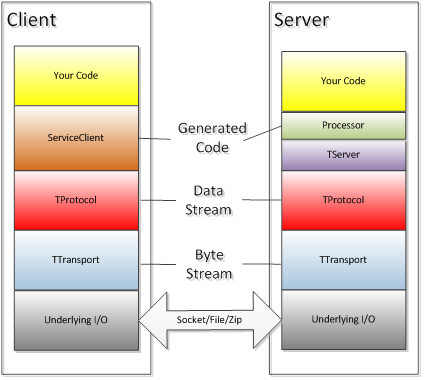
底层I/O模块:负责实际的数据传输,可以是Socket、文件、压缩数据流等;
TTransport:定义了消息怎样在Client和Server之间进行通信的,负责以字节流的方式发送和接收消息。TTransport不同的子类负责Thrift字节流(Byte Stream)数据在不同的IO模块上的传输,如:TSocket负责Socket传输,TFileTransport负责文件传输;
TProtocol:定义了消息时怎样进行序列化的,即负责结构化数据(如对象、结构体等)与字节流消息的转换,对Client侧是将结构化数据组装成字节流消息,对Server端则是从字节流消息中提取结构化数据。TProtocol不同的子类对应不同的消息格式转换,如TBinaryProtocol对应字节流。
TServer:负责接收客户端请求,并将请求转发给Processor。TServer各个子类实现机制不同,性能也差距很大。
Processor:负责处理客户端请求并返回响应,包括RPC请求转发、参数解析、调用用户定义的代码等。Processor的代码时Thrift根据IDL文件自动生成的,用户只需根据自动生成的接口进行业务逻辑的实现就可以,Processor是Thrift框架转入用户逻辑的关键。
ServiceClient:负责客户端发送RPC请求,和Processor一样,该部分的代码也是由Thrift根据IDL文件自动生成的。
Thrift核心类库实现原理
TServer
主要负责接收并转发Client的请求。TServer的类结构图如下:
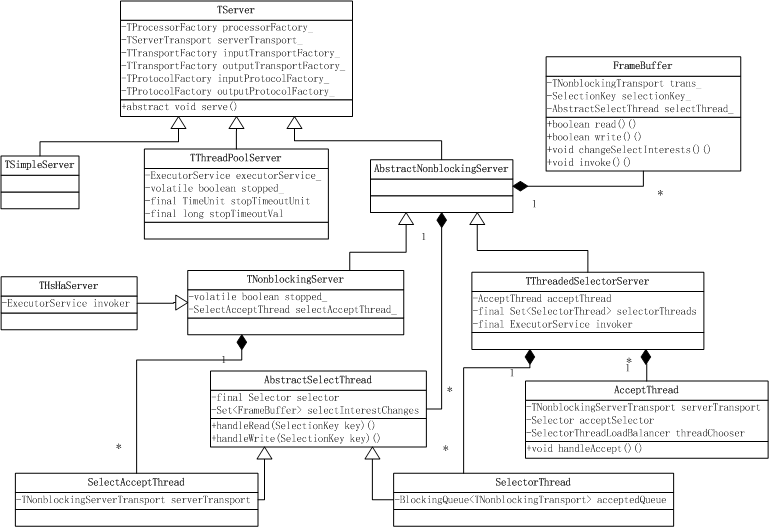
Thrift提供了多种TServer的实现,不同的TServer使用了不同的模型,适用的情况也有所不同。
TSimpleServer:阻塞I/O单线程Server,主要用于测试;
TThreadPoolServer:阻塞I/O多线程Server,多线程使用Java并发包中的线程池ThreadPoolExecutor。
AbstractNonblockingServer:抽象类,为非阻塞I/O Server类提供共同的方法和类。
TNonblockingServer:多路复用I/O单线程Server,依赖于TFramedTransport;
THsHaServer:半同步/半异步Server,多线程处理业务逻辑调用,同样依赖于TFramedTransport;
TThreadedSelectorServer:半同步/半异步Server,依赖于TFramedTransport。
下面详细分析一下各个TServer的实现原理
TSimpleServer
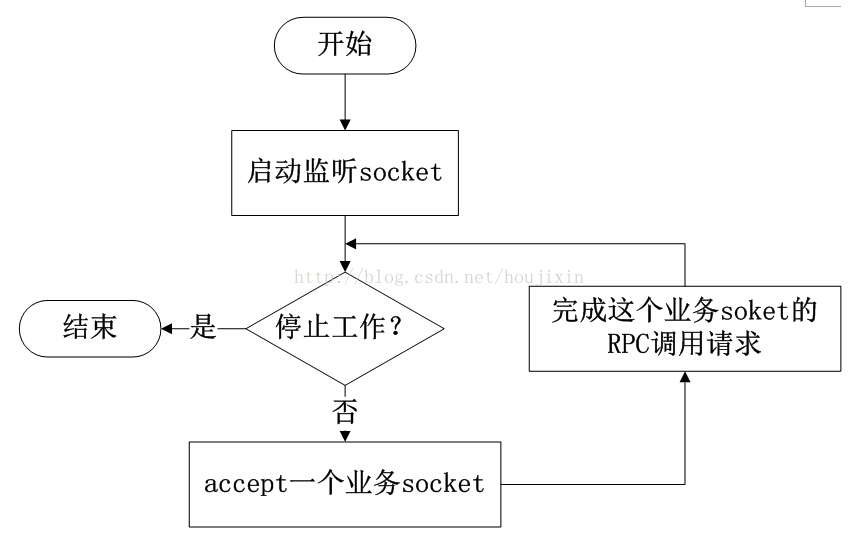
TSimpleServer每次只能处理一个连接,直到客户端关闭了连接,它才回去接受一个新的连接,正因为它只在一个单独的线程中以阻塞I/O的方式完成这些工作,所以它只能服务一个客户端连接,其他所有客户端在被服务器端接受之前都只能等待。TSimpleServer的效率很低,不能用在生产环境。通过源码具体分析实现机制。
public void serve() {

  stopped_ = false;

  try {

    //启动监听Socket

    serverTransport_.listen();

  } catch (TTransportException ttx) {

    LOGGER.error("Error occurred during listening.", ttx);

    return;

  }

  setServing(true);    //置状态为正在服务

  //一次只能处理一个Socket连接

  while (!stopped_) {

    TTransport client = null;

    TProcessor processor = null;

    TTransport inputTransport = null;

    TTransport outputTransport = null;

    TProtocol inputProtocol = null;

    TProtocol outputProtocol = null;

    try {

      client = serverTransport_.accept(); //接收连接请求,若没有则一直阻塞

      if (client != null) {

        processor = processorFactory_.getProcessor(client);

        inputTransport = inputTransportFactory_.getTransport(client);

        outputTransport = outputTransportFactory_.getTransport(client);

        inputProtocol = inputProtocolFactory_.getProtocol(inputTransport);

        outputProtocol = outputProtocolFactory_.getProtocol(outputTransport);

        //处理该请求直到成功

        while (processor.process(inputProtocol, outputProtocol)) {}

      }

    } catch (TTransportException ttx) {

      // Client died, just move on

    } catch (TException tx) {

      if (!stopped_) {

        LOGGER.error("Thrift error occurred during processing of message.", tx);

      }

    } catch (Exception x) {

      if (!stopped_) {

        LOGGER.error("Error occurred during processing of message.", x);

      }

    }

    if (inputTransport != null) {

      inputTransport.close();

    }

    if (outputTransport != null) {

      outputTransport.close();

    }

  }

  setServing(false);

}
由源代码可以分析出,TSimpleServer的处理流程如下:
TThreadPoolServer
TThreadPoolServer也是基于阻塞I/O模型,与TSimpleServer不同的是,它使用线程池来提高效率。
TThreadPoolServer的构造函数如下,使用了JDK并发包提供的线程池ThreadPoolExecutor,可配置最大线程数(默认为Integer.Max)和最小线程数(默认5),线程池的阻塞队列使用的是SynchronousQueue,每个put操作必须等待一个take操作,如果不满足条件,put操作和take操作将会被阻塞。
  // Executor service for handling client connections

  private ExecutorService executorService_;

  //关闭Server时的最长等待时间

  private final TimeUnit stopTimeoutUnit;

  private final long stopTimeoutVal;

  public TThreadPoolServer(Args args) {

    super(args);

    //同步阻塞队列,每个put操作必须等待一个take操作,没有容量,常用于线程间交换单一元素

    SynchronousQueue<Runnable> executorQueue =

      new SynchronousQueue<Runnable>();

    stopTimeoutUnit = args.stopTimeoutUnit;

    stopTimeoutVal = args.stopTimeoutVal;

    //初始化线程池

    executorService_ = new ThreadPoolExecutor(args.minWorkerThreads,

                                              args.maxWorkerThreads,

                                              60,

                                              TimeUnit.SECONDS,

                                              executorQueue);

  }
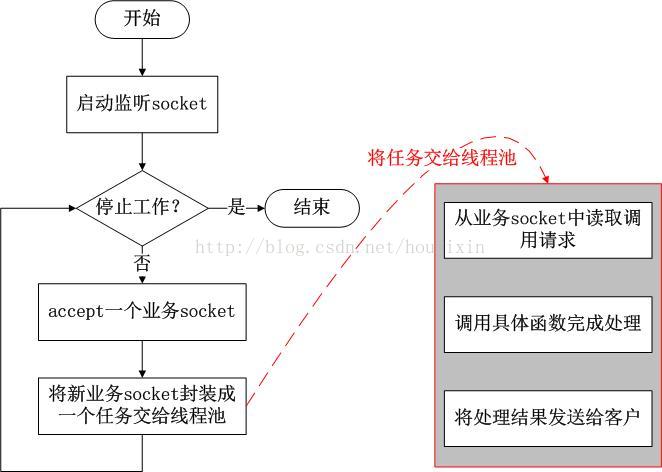
再看一下TThreadPoolServer的serve()方法,主线程专门用来接受连接,一旦接收了一个连接,该Client连接会被放入ThreadPoolExecutor中的一个worker线程里处理,主线程继续接收下一个Client连接请求。由于线程池的阻塞队列使用的是SynchronousQueue,所以TThreadPoolServer能够支撑的最大Client连接数为线程池的线程数,也就是说每个Client连接都会占用一个线程。需要注意的是,当并发的Client连接数很大时,Server端的线程数会很大,可能会引发Server端的性能问题。
  public void serve() {

    try {

      //启动监听Socket

      serverTransport_.listen();

    } catch (TTransportException ttx) {

      LOGGER.error("Error occurred during listening.", ttx);

      return;

    }

    stopped_ = false;

    setServing(true);

    //如果Server没有被停止,就一直循环

    while (!stopped_) {

      int failureCount = 0;

      try {

        //阻塞方式接收Client连接请求,每收到一个Client连接请求就新建一个Worker,放入线程池处理该连接的业务

        TTransport client = serverTransport_.accept();

        WorkerProcess wp = new WorkerProcess(client);

        executorService_.execute(wp);

      } catch (TTransportException ttx) {

        if (!stopped_) {

          ++failureCount;

          LOGGER.warn("Transport error occurred during acceptance of message.", ttx);

        }

      }

    }

    //Server停止,关闭线程池

    executorService_.shutdown();

    // Loop until awaitTermination finally does return without a interrupted

    // exception. If we don't do this, then we'll shut down prematurely. We want

    // to let the executorService clear it's task queue, closing client sockets

    // appropriately.

    //在timeoutMS时间内,循环直到完成调用awaitTermination方法。防止过早的关闭线程池,关闭遗留的client sockets。

    long timeoutMS = stopTimeoutUnit.toMillis(stopTimeoutVal);

    long now = System.currentTimeMillis();

    while (timeoutMS >= 0) {

      try {

        //awaitTermination方法调用会被阻塞,直到所有任务执行完毕并且shutdown请求被调用,或者参数中定义的timeout时间到达或者当前线程被中断

        executorService_.awaitTermination(timeoutMS, TimeUnit.MILLISECONDS);

        break;

      } catch (InterruptedException ix) {

        //如果发生中断异常,继续循环

        long newnow = System.currentTimeMillis();

        timeoutMS -= (newnow - now);

        now = newnow;

      }

    }

    setServing(false);

  }
最后看一下WorkerProcess类。WorkerProcess是TThreadPoolServer的内部类。每个WorkerProcess线程被绑定到特定的客户端连接上,处理该连接上的请求,直到它关闭,一旦连接关闭,该worker线程就又回到了线程池中。
  private class WorkerProcess implements Runnable {

    private TTransport client_;

    private WorkerProcess(TTransport client) {

      client_ = client;

    }

    public void run() {

      TProcessor processor = null;

      TTransport inputTransport = null;

      TTransport outputTransport = null;

      TProtocol inputProtocol = null;

      TProtocol outputProtocol = null;

      try {

        processor = processorFactory_.getProcessor(client_);

        inputTransport = inputTransportFactory_.getTransport(client_);

        outputTransport = outputTransportFactory_.getTransport(client_);

        inputProtocol = inputProtocolFactory_.getProtocol(inputTransport);

        outputProtocol = outputProtocolFactory_.getProtocol(outputTransport);

        // we check stopped_ first to make sure we're not supposed to be shutting

        // down. this is necessary for graceful shutdown.

        //循环处理该Client连接的请求,除非Server关闭或连接异常否则一直循环

        while (!stopped_ && processor.process(inputProtocol, outputProtocol)) {}

      } catch (TTransportException ttx) {

        // Assume the client died and continue silently

      } catch (TException tx) {

        LOGGER.error("Thrift error occurred during processing of message.", tx);

      } catch (Exception x) {

        LOGGER.error("Error occurred during processing of message.", x);

      }

      //关闭inputTransport和outputTransport

      if (inputTransport != null) {

        inputTransport.close();

      }

      if (outputTransport != null) {

        outputTransport.close();

      }

    }

  }
用流程图表示TThreadPoolServer的处理流程如下:
AbstractNonblockingServer
AbstractNonblockingServer类是非阻塞I/O TServer的父类,提供了公用的方法和类。先通过源码了解它的实现机制。启动服务的大致流程为 startThreads() -> startListening() -> setServing(true) -> waitForShutdown(),具体内容依赖于AbstractNonblockingServer子类的具体实现。基于Java NIO(多路复用I/O模型)实现。
public abstract class AbstractNonblockingServer extends TServer {

  protected final Logger LOGGER = LoggerFactory.getLogger(getClass().getName());

  public static abstract class AbstractNonblockingServerArgs<T extends AbstractNonblockingServerArgs<T>> extends AbstractServerArgs<T> {

    //读缓冲区的最大字节数

    public long maxReadBufferBytes = Long.MAX_VALUE;

    //设置父类inputTransportFactory_、outputTransportFactory_对象

    public AbstractNonblockingServerArgs(TNonblockingServerTransport transport) {

      super(transport);

      transportFactory(new TFramedTransport.Factory());

    }

  }

  private final long MAX_READ_BUFFER_BYTES;

  //已分配读缓存字节数

  private final AtomicLong readBufferBytesAllocated = new AtomicLong(0);

  public AbstractNonblockingServer(AbstractNonblockingServerArgs args) {

    super(args);

    MAX_READ_BUFFER_BYTES = args.maxReadBufferBytes;

  }

  /**

   * Begin accepting connections and processing invocations.

   */

  public void serve() {

    // start any IO threads  启动IO线程

    if (!startThreads()) {

      return;

    }

    // start listening, or exit    开启监听端口,接收Client请求

    if (!startListening()) {

      return;

    }

    setServing(true);    //置状态为服务中

    // this will block while we serve

    waitForShutdown();    //启动服务后的阻塞方法,Server停止后会解除阻塞

    setServing(false);    //置状态为服务结束

    // do a little cleanup

    stopListening();    //停止监听端口

  }

  /**

   * Starts any threads required for serving.

   *

   * @return true if everything went ok, false if threads could not be started.

   */

  protected abstract boolean startThreads();//启动IO线程,由子类实现

  /**

   * A method that will block until when threads handling the serving have been

   * shut down.

   */

  protected abstract void waitForShutdown();//启动服务后的阻塞方法,Server停止后会解除阻塞,由子类实现

  //开启监听端口

  protected boolean startListening() {

    try {

      serverTransport_.listen();

      return true;

    } catch (TTransportException ttx) {

      LOGGER.error("Failed to start listening on server socket!", ttx);

      return false;

    }

  }

  //停止监听端口

  protected void stopListening() {

    serverTransport_.close();

  }

  /**

   * Perform an invocation. This method could behave several different ways -

   * invoke immediately inline, queue for separate execution, etc.

   *

   * @return true if invocation was successfully requested, which is not a

   *         guarantee that invocation has completed. False if the request

   *         failed.

   */

  protected abstract boolean requestInvoke(FrameBuffer frameBuffer);//对frameBuffer执行业务逻辑,由子类实现

}
AbstractNonblockingServer的内部类 FrameBuffer是非阻塞I/O TServer实现读写数据的核心类。FrameBuffer类存在多种状态,不同的状态表现出不同的行为,先看一下FrameBufferState枚举类。
  private enum FrameBufferState {

    // in the midst of reading the frame size off the wire 读取FrameSize的状态

    READING_FRAME_SIZE,

    // reading the actual frame data now, but not all the way done yet 读取真实数据的状态

    READING_FRAME,

    // completely read the frame, so an invocation can now happen 完成读取数据,调用业务处理方法

    READ_FRAME_COMPLETE,

    // waiting to get switched to listening for write events 完成业务调用,等待被转换为监听写事件

    AWAITING_REGISTER_WRITE,

    // started writing response data, not fully complete yet 写response数据状态

    WRITING,

    // another thread wants this framebuffer to go back to reading

    //完成写response数据,等待另一个线程注册为读事件,注册成功后变为READING_FRAME_SIZE状态

    AWAITING_REGISTER_READ,

    // we want our transport and selection key invalidated in the selector

    // thread 上面任一种状态执行异常时处于该状态,selector轮询时会关闭该连接

    AWAITING_CLOSE

  }
如果Client需要返回结果,FrameBuffer状态转换过程为: READING_FRAME_SIZE -> READING_FRAME -> READ_FRAME_COMPLETE -> AWAITING_REGISTER_WRITE -> WRITING -> AWAITING_REGISTER_READ -> READING_FRAME_SIZE ;
如果Client不需要返回结果,FrameBuffer状态转换过程为: READING_FRAME_SIZE -> READING_FRAME -> READ_FRAME_COMPLETE -> AWAITING_REGISTER_READ -> READING_FRAME_SIZE ;
如果以上任何状态执行时出现异常,FrameBuffer状态将转换为 AWAITING_CLOSE。
FrameBuffer类的源码分析如下,FrameBuffer与SelectionKey绑定,它实现了从客户端读取数据、调用业务逻辑、向客户端返回数据,并管理阈值绑定的SelectionKey的注册事件的改变。
  protected class FrameBuffer {

    // the actual transport hooked up to the client.

    private final TNonblockingTransport trans_;//与客户端建立的连接,具体的实现是TNonblockingSocket

    // the SelectionKey that corresponds to our transport

    private final SelectionKey selectionKey_;//该FrameBuffer对象关联的SelectionKey对象

    // the SelectThread that owns the registration of our transport

    private final AbstractSelectThread selectThread_;//该FrameBuffer对象所属的selectThread_线程

    // where in the process of reading/writing are we?

    private FrameBufferState state_ = FrameBufferState.READING_FRAME_SIZE;//该FrameBuffer对象的状态

    // the ByteBuffer we'll be using to write and read, depending on the state

    private ByteBuffer buffer_;//读写数据时使用的buffer,Java NIO

    private TByteArrayOutputStream response_;//执行完业务逻辑后,保存在本地的结果

    public FrameBuffer(final TNonblockingTransport trans,

        final SelectionKey selectionKey,

        final AbstractSelectThread selectThread) {

      trans_ = trans;

      selectionKey_ = selectionKey;

      selectThread_ = selectThread;

      buffer_ = ByteBuffer.allocate(4);//因为TFramedTransport的frameSize为4-byte,所以分配4字节

    }

    /**

     * Give this FrameBuffer a chance to read. The selector loop should have

     * received a read event for this FrameBuffer.

     *

     * @return true if the connection should live on, false if it should be

     *         closed

     */

    //读取一次数据,如果状态为READING_FRAME_SIZE,则读取FrameSize;如果状态为READING_FRAME,则读数据

    public boolean read() {

      if (state_ == FrameBufferState.READING_FRAME_SIZE) {

        // try to read the frame size completely

        //从trans_读取数据到buffer_中,数据大小小于等于Framesize

        if (!internalRead()) {

          return false;

        }

        // if the frame size has been read completely, then prepare to read the

        // actual frame.

        //remaining()返回buffer_剩余的可用长度,返回0代表buffer_的4字节缓存已经被占满,即读完了FrameSize

        if (buffer_.remaining() == 0) {

          // pull out the frame size as an integer.

          int frameSize = buffer_.getInt(0);//转化为Int型frameSize

          //对frameSize进行校验

          if (frameSize <= 0) {

            LOGGER.error("Read an invalid frame size of " + frameSize

                + ". Are you using TFramedTransport on the client side?");

            return false;

          }

          // if this frame will always be too large for this server, log the

          // error and close the connection.

          if (frameSize > MAX_READ_BUFFER_BYTES) {

            LOGGER.error("Read a frame size of " + frameSize

                + ", which is bigger than the maximum allowable buffer size for ALL connections.");

            return false;

          }

          // if this frame will push us over the memory limit, then return.

          // with luck, more memory will free up the next time around.

          // 超出已分配读缓存字节数,返回true,等待下次读取

          if (readBufferBytesAllocated.get() + frameSize > MAX_READ_BUFFER_BYTES) {

            return true;

          }

          // increment the amount of memory allocated to read buffers已分配读缓存字节数增加frameSize

          readBufferBytesAllocated.addAndGet(frameSize);

          // reallocate the readbuffer as a frame-sized buffer

          //frameSize通过校验后,重新为buffer_分配frameSize大小的缓存空间,读取真实数据时使用

          buffer_ = ByteBuffer.allocate(frameSize);

          //frameSize通过校验后,将状态改为READING_FRAME,接着读真实数据

          state_ = FrameBufferState.READING_FRAME;

        } else {

          // this skips the check of READING_FRAME state below, since we can't

          // possibly go on to that state if there's data left to be read at

          // this one.

          //buffer_还有剩余空间,即还没有读完FrameSize,返回true,下次继续读

          return true;

        }

      }

      // it is possible to fall through from the READING_FRAME_SIZE section

      // to READING_FRAME if there's already some frame data available once

      // READING_FRAME_SIZE is complete.

      if (state_ == FrameBufferState.READING_FRAME) {

        if (!internalRead()) {

          return false;

        }

        // since we're already in the select loop here for sure, we can just

        // modify our selection key directly.

        //此时的buffer_大小为frameSize,当==0时,说明数据读取完成

        if (buffer_.remaining() == 0) {

          // get rid of the read select interests

          //注销掉当前FrameBuffer关联的selectionKey_的read事件

          selectionKey_.interestOps(0);

          //修改状态为READ_FRAME_COMPLETE

          state_ = FrameBufferState.READ_FRAME_COMPLETE;

        }

        //数据读取没有完成,返回true下次继续读取

        return true;

      }

      // if we fall through to this point, then the state must be invalid.

      LOGGER.error("Read was called but state is invalid (" + state_ + ")");

      return false;

    }

    /**

     * Give this FrameBuffer a chance to write its output to the final client.写数据

     */

    public boolean write() {

      if (state_ == FrameBufferState.WRITING) {

        try {

          //将buffer_中的数据写入客户端trans_

          if (trans_.write(buffer_) < 0) {

            return false;

          }

        } catch (IOException e) {

          LOGGER.warn("Got an IOException during write!", e);

          return false;

        }

        // we're done writing. now we need to switch back to reading.

        if (buffer_.remaining() == 0) {

          prepareRead();//已经write完成,准备切换为读模式

        }

        return true;

      }

      LOGGER.error("Write was called, but state is invalid (" + state_ + ")");

      return false;

    }

    /**

     * Give this FrameBuffer a chance to set its interest to write, once data

     * has come in. 修改selectionKey_的事件,当状态为AWAITING_状态时调用,

     */

    public void changeSelectInterests() {

      if (state_ == FrameBufferState.AWAITING_REGISTER_WRITE) {

        // set the OP_WRITE interest

        selectionKey_.interestOps(SelectionKey.OP_WRITE);

        state_ = FrameBufferState.WRITING;

      } else if (state_ == FrameBufferState.AWAITING_REGISTER_READ) {

        prepareRead();

      } else if (state_ == FrameBufferState.AWAITING_CLOSE) {

        close();

        selectionKey_.cancel();

      } else {

        LOGGER.error("changeSelectInterest was called, but state is invalid (" + state_ + ")");

      }

    }

    /**

     * Shut the connection down. 关闭当前FrameBuffer

     */

    public void close() {

      // if we're being closed due to an error, we might have allocated a

      // buffer that we need to subtract for our memory accounting.

      if (state_ == FrameBufferState.READING_FRAME || state_ == FrameBufferState.READ_FRAME_COMPLETE) {

        readBufferBytesAllocated.addAndGet(-buffer_.array().length);

      }

      trans_.close();

    }

    /**

     * Check if this FrameBuffer has a full frame read.

     */

    public boolean isFrameFullyRead() {

      return state_ == FrameBufferState.READ_FRAME_COMPLETE;

    }

    /**

     * After the processor has processed the invocation, whatever thread is

     * managing invocations should call this method on this FrameBuffer so we

     * know it's time to start trying to write again. Also, if it turns out that

     * there actually isn't any data in the response buffer, we'll skip trying

     * to write and instead go back to reading.

     */

    //准备返回结果

    public void responseReady() {

      // the read buffer is definitely no longer in use, so we will decrement

      // our read buffer count. we do this here as well as in close because

      // we'd like to free this read memory up as quickly as possible for other

      // clients.

      // 此时已完成调用,释放读缓存

      readBufferBytesAllocated.addAndGet(-buffer_.array().length);

      if (response_.len() == 0) {

        // go straight to reading again. this was probably an oneway method

        // 不需要返回结果,直接将状态置为AWAITING_REGISTER_READ,准备进行下次读取操作

        state_ = FrameBufferState.AWAITING_REGISTER_READ;

        buffer_ = null;

      } else {

        //将返回数据写入buffer_

        buffer_ = ByteBuffer.wrap(response_.get(), 0, response_.len());

        // set state that we're waiting to be switched to write. we do this

        // asynchronously through requestSelectInterestChange() because there is

        // a possibility that we're not in the main thread, and thus currently

        // blocked in select(). (this functionality is in place for the sake of

        // the HsHa server.)

        //状态置为AWAITING_REGISTER_WRITE,准备写回数据

        state_ = FrameBufferState.AWAITING_REGISTER_WRITE;

      }

      //请求注册selector事件变化

      requestSelectInterestChange();

    }

    /**

     * Actually invoke the method signified by this FrameBuffer.

     * 调用业务逻辑的方法

     */

    public void invoke() {

      TTransport inTrans = getInputTransport();

      TProtocol inProt = inputProtocolFactory_.getProtocol(inTrans);

      TProtocol outProt = outputProtocolFactory_.getProtocol(getOutputTransport());

      try {

        //执行业务逻辑

        processorFactory_.getProcessor(inTrans).process(inProt, outProt);

        //准被返回数据

        responseReady();

        return;

      } catch (TException te) {

        LOGGER.warn("Exception while invoking!", te);

      } catch (Throwable t) {

        LOGGER.error("Unexpected throwable while invoking!", t);

      }

      // This will only be reached when there is a throwable.

      state_ = FrameBufferState.AWAITING_CLOSE;

      requestSelectInterestChange();

    }

    /**

     * Wrap the read buffer in a memory-based transport so a processor can read

     * the data it needs to handle an invocation.

     */

    private TTransport getInputTransport() {

      return new TMemoryInputTransport(buffer_.array());

    }

    /**

     * Get the transport that should be used by the invoker for responding.

     */

    private TTransport getOutputTransport() {

      response_ = new TByteArrayOutputStream();

      return outputTransportFactory_.getTransport(new TIOStreamTransport(response_));

    }

    /**

     * Perform a read into buffer.

     * 从trans_读取数据到buffer_中

     * @return true if the read succeeded, false if there was an error or the

     *         connection closed.

     */

    private boolean internalRead() {

      try {

        if (trans_.read(buffer_) < 0) {

          return false;

        }

        return true;

      } catch (IOException e) {

        LOGGER.warn("Got an IOException in internalRead!", e);

        return false;

      }

    }

    /**

     * We're done writing, so reset our interest ops and change state

     * accordingly.

     */

    private void prepareRead() {

      // we can set our interest directly without using the queue because

      // we're in the select thread. 注册读事件

      selectionKey_.interestOps(SelectionKey.OP_READ);

      // get ready for another go-around

      buffer_ = ByteBuffer.allocate(4);//分配4字节缓存

      state_ = FrameBufferState.READING_FRAME_SIZE;//状态置为READING_FRAME_SIZE

    }

    /**

     * When this FrameBuffer needs to change its select interests and execution

     * might not be in its select thread, then this method will make sure the

     * interest change gets done when the select thread wakes back up. When the

     * current thread is this FrameBuffer's select thread, then it just does the

     * interest change immediately.

     */

    private void requestSelectInterestChange() {

      if (Thread.currentThread() == this.selectThread_) {

        changeSelectInterests();

      } else {

        this.selectThread_.requestSelectInterestChange(this);

      }

    }

  }
AbstractSelectThread类是Selector非阻塞I/O读写的线程,源码分析如下:
  protected abstract class AbstractSelectThread extends Thread {

    protected final Selector selector;

    // List of FrameBuffers that want to change their selection interests.

    // 当FrameBuffer需要修改已注册到selector的事件时,要把该FrameBuffer加入这个集合

    protected final Set<FrameBuffer> selectInterestChanges = new HashSet<FrameBuffer>();

    public AbstractSelectThread() throws IOException {

      this.selector = SelectorProvider.provider().openSelector();

    }

    /**

     * If the selector is blocked, wake it up. 唤醒selector

     */

    public void wakeupSelector() {

      selector.wakeup();

    }

    /**

     * Add FrameBuffer to the list of select interest changes and wake up the

     * selector if it's blocked. When the select() call exits, it'll give the

     * FrameBuffer a chance to change its interests.

     * 将frameBuffer加入selectInterestChanges集合

     */

    public void requestSelectInterestChange(FrameBuffer frameBuffer) {

      synchronized (selectInterestChanges) {

        selectInterestChanges.add(frameBuffer);

      }

      // wakeup the selector, if it's currently blocked.

      selector.wakeup();

    }

    /**

     * Check to see if there are any FrameBuffers that have switched their

     * interest type from read to write or vice versa.

     * 检查是否有需要改变注册事件的FrameBuffer

     */

    protected void processInterestChanges() {

      synchronized (selectInterestChanges) {

        for (FrameBuffer fb : selectInterestChanges) {

          fb.changeSelectInterests();

        }

        selectInterestChanges.clear();

      }

    }

    /**

     * Do the work required to read from a readable client. If the frame is

     * fully read, then invoke the method call.

     * 读取Client数据,如果已经读取完成则调用业务逻辑

     */

    protected void handleRead(SelectionKey key) {

      FrameBuffer buffer = (FrameBuffer) key.attachment();

      if (!buffer.read()) {

        //读取失败则清除连接

        cleanupSelectionKey(key);

        return;

      }

      // if the buffer's frame read is complete, invoke the method.

      if (buffer.isFrameFullyRead()) {

        if (!requestInvoke(buffer)) {

          //调用失败则清除连接

          cleanupSelectionKey(key);

        }

      }

    }

    /**

     * Let a writable client get written, if there's data to be written.

     * 向Client返回数据

     */

    protected void handleWrite(SelectionKey key) {

      FrameBuffer buffer = (FrameBuffer) key.attachment();

      if (!buffer.write()) {

        //写入失败则清除连接

        cleanupSelectionKey(key);

      }

    }

    /**

     * Do connection-close cleanup on a given SelectionKey.

     * 关闭连接

     */

    protected void cleanupSelectionKey(SelectionKey key) {

      // remove the records from the two maps

      FrameBuffer buffer = (FrameBuffer) key.attachment();

      if (buffer != null) {

        // close the buffer

        buffer.close();

      }

      // cancel the selection key

      key.cancel();

    }

  }
总结:AbstractNonblockingServer、FrameBuffer、AbstractSelectThread三个类是实现非阻塞I/O TServer的关键,三种的关系如下图所示。
其中AbstractSelectThread中handleRead(SelectionKey key),processInterestChanges(),handleWrite(SelectionKey key)是子类调用的方法入口,我们按照 一次请求的流程来介绍整个过程。

1.1.子类调用handRead(SelectionKey key)方法时,会对传入的SelectionKey绑定的FrameBuffer调用read()方法,这里read()可能一次不会读完,有可能多次handRead方法调用才会读完数据,最终读完数据状态转为READ_FRAME_COMPLETE,从而isFrameFullyRead()才会通过。

1.2.读完数据后,会调用用子类的requestInvoke(buffer)方法,内部最终回调FrameBuffer.invoke()方法,进行业务逻辑处理。

1.3.业务调用结束后,调整FrameBuffer进入AWAITING_REGISTER_WRITE或AWAITING_REGISTER_READ状态,然后将变更Selector事件类型,这里的requestSelectInterestChange()方法会有判断当前线程是否为所属Select线程,是因为非阻塞服务模型中有单线程、多线程,一般来说,多线程由于业务逻辑的执行是线程池在调用,所以肯定是调用AbstractSelectThread.requestSelectInterestChange(FrameBuffer frameBuffer)将事件变更注册到AbstractSelectThread的事件集合中。

2.processInterestChanges()由子类调用后,会对事件集合中的FrameBuffer进行已注册的事件转换。

3.handleWrite(SelectionKey key)由子类调用后,会对传入的SelectionKey绑定的FrameBuffer调用write()方法,同read()一样,可能需要多次才能写完,写完后又回到READING_FRAME_SIZE状态。

注意:handleRead,handleWrite调用时,如果读写操作出错,则调用cleanupSelectionKey(SelectionKey key)清理key和释放FrameBuffer相关资源。
图片和解释摘自http://blog.csdn.net/chen7253886/article/details/53024848

TNonblockingServer
TNonblockingServer是非阻塞AbstractNonblockingServer的一种实现,采用单线程处理I/O事件。将所有的Socket注册到Selector中,在一个线程中循环检查并处理Selector的就绪事件。TNonblockingServer与TSimpleServer都是使用单线程,但与阻塞TSimpleServer不同的是,TNonblockingServer可以实现同时接入多个客户端连接。下面看一下源码。
public class TNonblockingServer extends AbstractNonblockingServer {

  private SelectAcceptThread selectAcceptThread_;

  //开启selectAcceptThread_处理Client连接和请求

  @Override

  protected boolean startThreads() {

    try {

      //单线程SelectAcceptThread处理I/O

      selectAcceptThread_ = new SelectAcceptThread((TNonblockingServerTransport)serverTransport_);

      stopped_ = false;

      selectAcceptThread_.start();

      return true;

    } catch (IOException e) {

      LOGGER.error("Failed to start selector thread!", e);

      return false;

    }

  }

  @Override

  protected void waitForShutdown() {

    joinSelector();

  }

  //阻塞直到selectAcceptThread_退出

  protected void joinSelector() {

    try {

      selectAcceptThread_.join();

    } catch (InterruptedException e) {

      // for now, just silently ignore. technically this means we'll have less of

      // a graceful shutdown as a result.

    }

  }

  //关闭Server

  @Override

  public void stop() {

    stopped_ = true;

    if (selectAcceptThread_ != null) {

      selectAcceptThread_.wakeupSelector();

    }

  }

  /**

   * Perform an invocation. This method could behave several different ways

   * - invoke immediately inline, queue for separate execution, etc.

   * 调用业务逻辑,在handleRead方法中读取数据完成后会调用该方法

   */

  @Override

  protected boolean requestInvoke(FrameBuffer frameBuffer) {

    frameBuffer.invoke();

    return true;

  }

}
其中SelectAcceptThread线程类是处理I/O的核心方法,SelectAcceptThread继承了抽象类AbstractSelectThread。
  /**

   * The thread that will be doing all the selecting, managing new connections

   * and those that still need to be read.

   * 处理I/O事件的线程,继承了抽象类AbstractSelectThread

   */

  protected class SelectAcceptThread extends AbstractSelectThread {

    // The server transport on which new client transports will be accepted

    private final TNonblockingServerTransport serverTransport;

    /**

     * Set up the thread that will handle the non-blocking accepts, reads, and

     * writes.

     */

    public SelectAcceptThread(final TNonblockingServerTransport serverTransport)

    throws IOException {

      this.serverTransport = serverTransport;

      //注册serverSocketChannel到selector,SelectionKey.OP_ACCEPT

      serverTransport.registerSelector(selector);

    }

    public boolean isStopped() {

      return stopped_;

    }

    /**

     * The work loop. Handles both selecting (all IO operations) and managing

     * the selection preferences of all existing connections.

     */

    public void run() {

      //循环检查selector是否有就绪的事件

      try {

        while (!stopped_) {

          //检查并处理IO事件

          select();

          //检查是否有FrameBuffer需要修改他们的interest

          processInterestChanges();

        }

        //服务关闭,清除所有的SelectionKey

        for (SelectionKey selectionKey : selector.keys()) {

          cleanupSelectionKey(selectionKey);

        }

      } catch (Throwable t) {

        LOGGER.error("run() exiting due to uncaught error", t);

      } finally {

        stopped_ = true;

      }

    }

    /**

     * Select and process IO events appropriately:

     * If there are connections to be accepted, accept them.

     * If there are existing connections with data waiting to be read, read it,

     * buffering until a whole frame has been read.

     * If there are any pending responses, buffer them until their target client

     * is available, and then send the data.

     * 检查并处理I/O事件

     */

    private void select() {

      try {

        // wait for io events. 检查是否有就绪的I/O操作,如果没有则一直阻塞

        selector.select();

        // process the io events we received

        Iterator<SelectionKey> selectedKeys = selector.selectedKeys().iterator();

        while (!stopped_ && selectedKeys.hasNext()) {

          SelectionKey key = selectedKeys.next();

          selectedKeys.remove();

          // skip if not valid

          if (!key.isValid()) {

            //清除无效的SelectionKey

            cleanupSelectionKey(key);

            continue;

          }

          // if the key is marked Accept, then it has to be the server

          // transport. 对不同的事件做不同的处理

          if (key.isAcceptable()) {

            handleAccept();

          } else if (key.isReadable()) {

            // deal with reads 处理读数据,调用AbstractSelectThread的handleRead方法。

            handleRead(key);

          } else if (key.isWritable()) {

            // deal with writes 处理写数据,调用AbstractSelectThread的handleWrite方法。

            handleWrite(key);

          } else {

            LOGGER.warn("Unexpected state in select! " + key.interestOps());

          }

        }

      } catch (IOException e) {

        LOGGER.warn("Got an IOException while selecting!", e);

      }

    }

    /**

     * Accept a new connection. Client建立连接

     */

    private void handleAccept() throws IOException {

      SelectionKey clientKey = null;

      TNonblockingTransport client = null;

      try {

        // accept the connection 建立与客户端的连接,并将该连接注册到selector的OP_READ事件

        //在Java NIO中SelectionKey是跟踪被注册事件的句柄

        client = (TNonblockingTransport)serverTransport.accept();

        clientKey = client.registerSelector(selector, SelectionKey.OP_READ);

        // add this key to the map 每个与客户端的连接都对应一个FrameBuffer

        //

        FrameBuffer frameBuffer = new FrameBuffer(client, clientKey,

          SelectAcceptThread.this);

        //将frameBuffer附着到SelectionKey上,这样就能方便的识别某个给定的通道

        clientKey.attach(frameBuffer);

      } catch (TTransportException tte) {

        // something went wrong accepting.

        LOGGER.warn("Exception trying to accept!", tte);

        tte.printStackTrace();

        if (clientKey != null) cleanupSelectionKey(clientKey);

        if (client != null) client.close();

      }

    }

  }
由源码可以看出,TNonblockingServer的处理流程如下
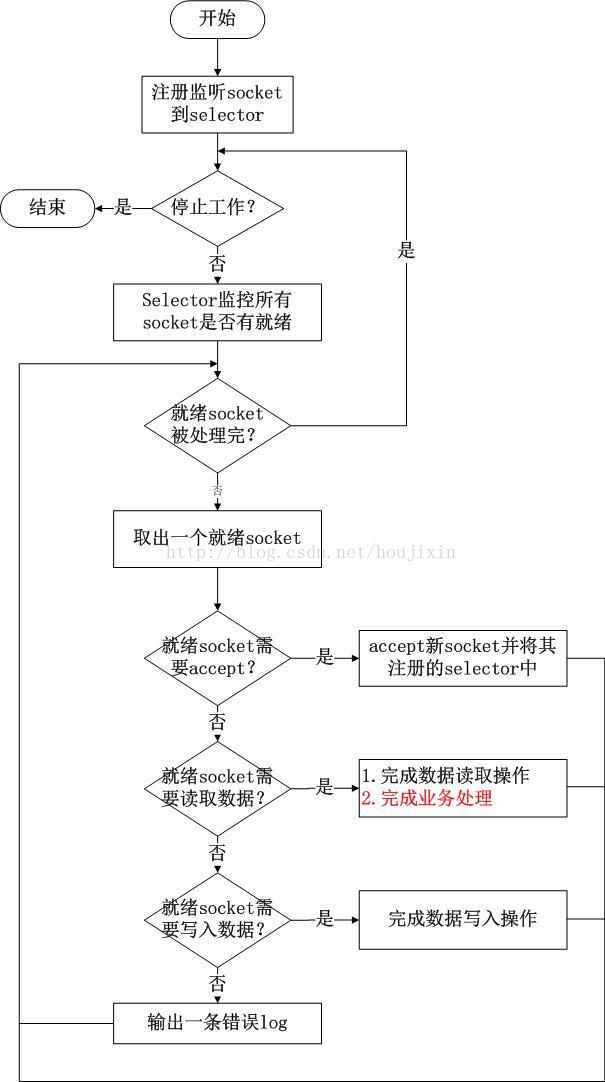
THsHaServer
THsHaServer是TNonblockingServer的子类,它重写了 requestInvoke() 方法,与TNonblockingServer使用单线程处理selector和业务逻辑调用不同的是,THsHaServer采用线程池异步处理业务逻辑调用,因此THsHaServer也被称为半同步/半异步Server。它的源码就很简单了。
public class THsHaServer extends TNonblockingServer {

  private final ExecutorService invoker;//处理业务逻辑调用的线程池

  private final Args args;

  public THsHaServer(Args args) {

    super(args);

    //如果参数中没有线程池则创建线程池

    invoker = args.executorService == null ? createInvokerPool(args) : args.executorService;

    this.args = args;

  }

  @Override

  protected void waitForShutdown() {

    joinSelector();//Server关闭前一直阻塞

    gracefullyShutdownInvokerPool();

  }

  //创建线程池方法

  protected static ExecutorService createInvokerPool(Args options) {

    int workerThreads = options.workerThreads;

    int stopTimeoutVal = options.stopTimeoutVal;

    TimeUnit stopTimeoutUnit = options.stopTimeoutUnit;

    LinkedBlockingQueue<Runnable> queue = new LinkedBlockingQueue<Runnable>();

    ExecutorService invoker = new ThreadPoolExecutor(workerThreads,

      workerThreads, stopTimeoutVal, stopTimeoutUnit, queue);

    return invoker;

  }

  //友好的关闭线程池

  protected void gracefullyShutdownInvokerPool() {

    invoker.shutdown();

    // Loop until awaitTermination finally does return without a interrupted

    // exception. If we don't do this, then we'll shut down prematurely. We want

    // to let the executorService clear it's task queue, closing client sockets

    // appropriately.

    long timeoutMS = args.stopTimeoutUnit.toMillis(args.stopTimeoutVal);

    long now = System.currentTimeMillis();

    while (timeoutMS >= 0) {

      try {

        invoker.awaitTermination(timeoutMS, TimeUnit.MILLISECONDS);

        break;

      } catch (InterruptedException ix) {

        long newnow = System.currentTimeMillis();

        timeoutMS -= (newnow - now);

        now = newnow;

      }

    }

  }

  //重写的业务逻辑调用的方法,使用线程池异步完成

  @Override

  protected boolean requestInvoke(FrameBuffer frameBuffer) {

    try {

      Runnable invocation = getRunnable(frameBuffer);

      invoker.execute(invocation);

      return true;

    } catch (RejectedExecutionException rx) {

      LOGGER.warn("ExecutorService rejected execution!", rx);

      return false;

    }

  }

  protected Runnable getRunnable(FrameBuffer frameBuffer){

    return new Invocation(frameBuffer);

  }

}
THsHaServer处理流程如下
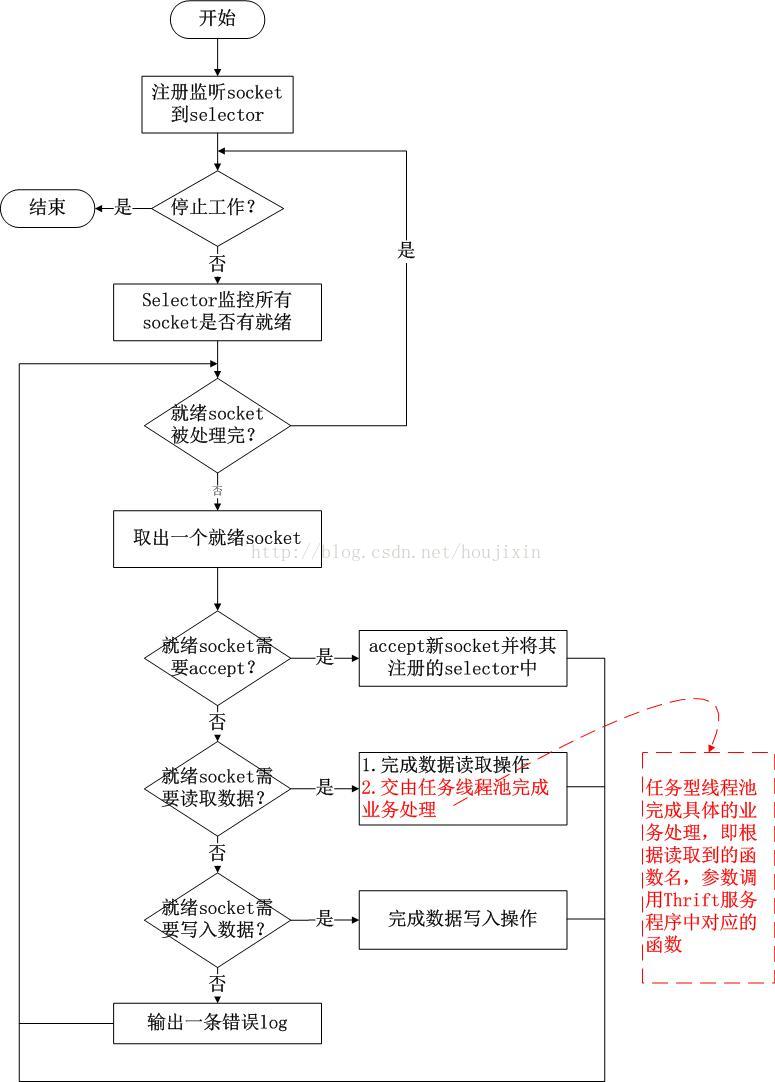
TThreadedSelectorServer
TThreadedSelectorServer是非阻塞服务AbstractNonblockingServer的另一种实现,也是TServer的最高级形式。虽然THsHaServer对业务逻辑调用采用了线程池的方式,但是所有的数据读取和写入操作还都在单线程中完成,当需要在Client和Server之间传输大量数据时,THsHaServer就会面临性能问题。TThreadedSelectorServer将数据读取和写入操作也进行了多线程化,先通过模型图了解实现原理。
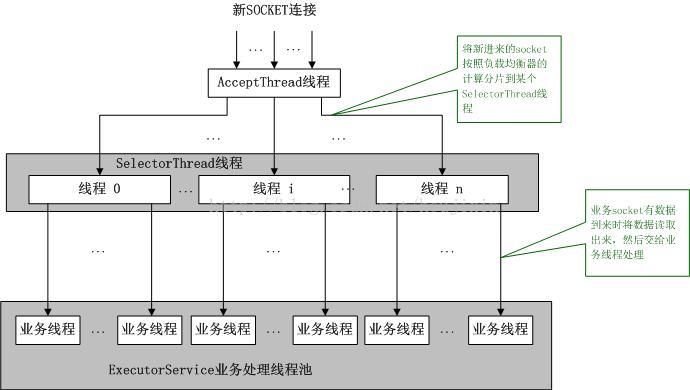
由上图可以看到:
1)单个AcceptThread线程负责处理Client的新建连接;
2)多个SelectorThread线程负责处理数据读取和写入操作;
3)单个负载均衡器SelectorThreadLoadBalancer负责将AcceptThread线程建立的新连接分配给哪个SelectorThread线程处理;
4)ExecutorService线程池负责业务逻辑的异步调用。
源码分析,先看一下TThreadedSelectorServer的参数类Args增加了那些参数。
  public static class Args extends AbstractNonblockingServerArgs<Args> {

    public int selectorThreads = 2;    //SelectorThread线程数量

    //业务逻辑调用线程池大小,为0时相当于在SelectorThread线程中直接调用业务逻辑

    private int workerThreads = 5;

    private int stopTimeoutVal = 60;

    private TimeUnit stopTimeoutUnit = TimeUnit.SECONDS;

    private ExecutorService executorService = null; //业务逻辑调用线程池

    private int acceptQueueSizePerThread = 4; //SelectorThread线程接收请求的队列大小

    //处理Client新连接请求的策略

    public static enum AcceptPolicy {

      //已接收的连接请求需要注册到线程池中,如果线程池已满,将立即关闭连接,由于调度将会稍微增加延迟

      FAIR_ACCEPT,

      //快速接收,不关心线程池的状态

      FAST_ACCEPT

    }

    //默认使用快速接收

    private AcceptPolicy acceptPolicy = AcceptPolicy.FAST_ACCEPT;

  }
再看一下TThreadedSelectorServer类的成员变量和对父类AbstractNonblockingServer抽象方法的具体实现。
public class TThreadedSelectorServer extends AbstractNonblockingServer {

  private volatile boolean stopped_ = true;

  private AcceptThread acceptThread; //处理Client新连接线程

  private final Set<SelectorThread> selectorThreads = new HashSet<SelectorThread>(); //处理读写数据的线程集合

  private final ExecutorService invoker; //线程池

  private final Args args;

  //构造函数,初始化Server

  public TThreadedSelectorServer(Args args) {

    super(args);

    args.validate();

    invoker = args.executorService == null ? createDefaultExecutor(args) : args.executorService;

    this.args = args;

  }

  //启动acceptThread和若干个selectorThreads

  @Override

  protected boolean startThreads() {

    try {

      for (int i = 0; i < args.selectorThreads; ++i) {

        selectorThreads.add(new SelectorThread(args.acceptQueueSizePerThread));

      }

      acceptThread = new AcceptThread((TNonblockingServerTransport) serverTransport_,

        createSelectorThreadLoadBalancer(selectorThreads));

      stopped_ = false;

      for (SelectorThread thread : selectorThreads) {

        thread.start();

      }

      acceptThread.start();

      return true;

    } catch (IOException e) {

      LOGGER.error("Failed to start threads!", e);

      return false;

    }

  }

  //等待关闭Server

  @Override

  protected void waitForShutdown() {

    try {

      joinThreads(); //等待accept and selector threads都停止运行

    } catch (InterruptedException e) {

      LOGGER.error("Interrupted while joining threads!", e);

    }

    //关闭回调业务逻辑的线程池

    gracefullyShutdownInvokerPool();

  }

  protected void joinThreads() throws InterruptedException {

    //accept and selector threads都停止运行前一直阻塞

    acceptThread.join();

    for (SelectorThread thread : selectorThreads) {

      thread.join();

    }

  }

  //停止Server

  @Override

  public void stop() {

    stopped_ = true;

    stopListening(); //停止接收新请求

    if (acceptThread != null) {

      //可能acceptThread处于阻塞中,唤醒acceptThread

      acceptThread.wakeupSelector();

    }

    if (selectorThreads != null) {

      //可能selectorThreads处于阻塞中,唤醒selectorThreads

      for (SelectorThread thread : selectorThreads) {

        if (thread != null)

          thread.wakeupSelector();

      }

    }

  }

  protected void gracefullyShutdownInvokerPool() {

    invoker.shutdown();

    // Loop until awaitTermination finally does return without a interrupted

    // exception. If we don't do this, then we'll shut down prematurely. We want

    // to let the executorService clear it's task queue, closing client sockets

    // appropriately.

    long timeoutMS = args.stopTimeoutUnit.toMillis(args.stopTimeoutVal);

    long now = System.currentTimeMillis();

    while (timeoutMS >= 0) {

      try {

        invoker.awaitTermination(timeoutMS, TimeUnit.MILLISECONDS);

        break;

      } catch (InterruptedException ix) {

        long newnow = System.currentTimeMillis();

        timeoutMS -= (newnow - now);

        now = newnow;

      }

    }

  }

  //业务逻辑调用,在handleRead方法读取数据完成后调用

  @Override

  protected boolean requestInvoke(FrameBuffer frameBuffer) {

    Runnable invocation = getRunnable(frameBuffer);

    if (invoker != null) {

      //放进线程池执行

      try {

        invoker.execute(invocation);

        return true;

      } catch (RejectedExecutionException rx) {

        LOGGER.warn("ExecutorService rejected execution!", rx);

        return false;

      }

    } else {

      // 线程池为null,在调用requestInvoke的线程(I/O线程)中执行

      invocation.run();

      return true;

    }

  }

  protected Runnable getRunnable(FrameBuffer frameBuffer) {

    return new Invocation(frameBuffer);

  }

  protected static ExecutorService createDefaultExecutor(Args options) {

    return (options.workerThreads > 0) ? Executors.newFixedThreadPool(options.workerThreads) : null;

  }

  private static BlockingQueue<TNonblockingTransport> createDefaultAcceptQueue(int queueSize) {

    if (queueSize == 0) {

      return new LinkedBlockingQueue<TNonblockingTransport>();//无界队列

    }

    return new ArrayBlockingQueue<TNonblockingTransport>(queueSize);

  }

}
最后看一下最核心的两个类AcceptThread与SelectorThread的源码。
AcceptThread负责接收CLient的新连接请求。
  protected class AcceptThread extends Thread {

    private final TNonblockingServerTransport serverTransport;//监听端口的ServerSocket

    private final Selector acceptSelector;

    private final SelectorThreadLoadBalancer threadChooser;//负责负载均衡

    public AcceptThread(TNonblockingServerTransport serverTransport,

        SelectorThreadLoadBalancer threadChooser) throws IOException {

      this.serverTransport = serverTransport;

      this.threadChooser = threadChooser;

      //acceptSelector是AcceptThread专属的,专门用于接收新连接使用,不要与处理I/O时的selector混淆

      this.acceptSelector = SelectorProvider.provider().openSelector();

      //将serverTransport注册到Selector上接收OP_ACCEPT连接事件

      this.serverTransport.registerSelector(acceptSelector);

    }

    public void run() {

      try {

        //不断循环select()

        while (!stopped_) {

          select();

        }

      } catch (Throwable t) {

        LOGGER.error("run() exiting due to uncaught error", t);

      } finally {

        TThreadedSelectorServer.this.stop();//调用Stop方法,唤醒SelectorThreads中的线程

      }

    }

    //唤醒acceptSelector

    public void wakeupSelector() {

      acceptSelector.wakeup();

    }

    private void select() {

      try {

        // wait for connect events.

        acceptSelector.select();

        // process the io events we received

        Iterator<SelectionKey> selectedKeys = acceptSelector.selectedKeys().iterator();

        while (!stopped_ && selectedKeys.hasNext()) {

          SelectionKey key = selectedKeys.next();

          selectedKeys.remove();

          // skip if not valid

          if (!key.isValid()) {

            continue;

          }

          //处理连接请求

          if (key.isAcceptable()) {

            handleAccept();

          } else {

            LOGGER.warn("Unexpected state in select! " + key.interestOps());

          }

        }

      } catch (IOException e) {

        LOGGER.warn("Got an IOException while selecting!", e);

      }

    }

    //处理连接请求

    private void handleAccept() {

      final TNonblockingTransport client = doAccept();//新建连接

      if (client != null) {

        //取出一个selector thread

        final SelectorThread targetThread = threadChooser.nextThread();

        //当接收策略为FAST_ACCEPT或invoker为空时,直接将client扔给SelectorThread

        if (args.acceptPolicy == Args.AcceptPolicy.FAST_ACCEPT || invoker == null) {

          doAddAccept(targetThread, client);

        } else {

          //当接收策略为FAIR_ACCEPT时,将doAddAccept任务扔到线程池处理

          try {

            invoker.submit(new Runnable() {

              public void run() {

                doAddAccept(targetThread, client);

              }

            });

          } catch (RejectedExecutionException rx) {

            LOGGER.warn("ExecutorService rejected accept registration!", rx);

            // 如果线程池invoker队列满,关闭该Client连接

            client.close();

          }

        }

      }

    }

    //接收新连接

    private TNonblockingTransport doAccept() {

      try {

        return (TNonblockingTransport) serverTransport.accept();

      } catch (TTransportException tte) {

        LOGGER.warn("Exception trying to accept!", tte);

        return null;

      }

    }

    //将新连接添加到SelectorThread的队列中

    private void doAddAccept(SelectorThread thread, TNonblockingTransport client) {

      if (!thread.addAcceptedConnection(client)) {

        client.close();//如果添加失败,关闭client

      }

    }

  }
SelectorThread线程负责读写数据:
  protected class SelectorThread extends AbstractSelectThread {

    private final BlockingQueue<TNonblockingTransport> acceptedQueue;//存放Client连接的阻塞队列

    public SelectorThread() throws IOException {

      this(new LinkedBlockingQueue<TNonblockingTransport>());//默认为无界队列

    }

    public SelectorThread(int maxPendingAccepts) throws IOException {

      this(createDefaultAcceptQueue(maxPendingAccepts));//指定大小有界队列

    }

    public SelectorThread(BlockingQueue<TNonblockingTransport> acceptedQueue) throws IOException {

      this.acceptedQueue = acceptedQueue;//指定队列

    }

    //将连接添加到acceptedQueue,如果队列满将阻塞

    public boolean addAcceptedConnection(TNonblockingTransport accepted) {

      try {

        acceptedQueue.put(accepted);

      } catch (InterruptedException e) {

        LOGGER.warn("Interrupted while adding accepted connection!", e);

        return false;

      }

      //某个线程调用select()方法后阻塞了,即使没有通道就绪,wakeup()办法也能让其从select()方法返回

      //唤醒selector,很重要,因为首次添加accepted时select()方法肯定会一直阻塞,只有唤醒后才能执行processAcceptedConnections方法,将新连接注册到注册到selector,下次调用select()方法时就可以检测到该连接就绪的事件

      selector.wakeup();

      return true;

    }

    public void run() {

      try {

        while (!stopped_) {

          select();//如果没有通道就绪,将阻塞

          processAcceptedConnections();//处理新连接,注册到selector

          processInterestChanges();//处理现有连接,注册事件修改请求

        }

        //Server关闭时的清理工作

        for (SelectionKey selectionKey : selector.keys()) {

          cleanupSelectionKey(selectionKey);

        }

      } catch (Throwable t) {

        LOGGER.error("run() exiting due to uncaught error", t);

      } finally {

        // This will wake up the accept thread and the other selector threads

        TThreadedSelectorServer.this.stop();

      }

    }

    /**

     * Select and process IO events appropriately: If there are existing

     * connections with data waiting to be read, read it, buffering until a

     * whole frame has been read. If there are any pending responses, buffer

     * them until their target client is available, and then send the data.

     */

    private void select() {

      try {

        // wait for io events.

        selector.select();//每个SelectorThread线程都有自己的selector

        // process the io events we received

        Iterator<SelectionKey> selectedKeys = selector.selectedKeys().iterator();

        while (!stopped_ && selectedKeys.hasNext()) {

          SelectionKey key = selectedKeys.next();

          selectedKeys.remove();

          // skip if not valid

          if (!key.isValid()) {

            cleanupSelectionKey(key);

            continue;

          }

          if (key.isReadable()) {

            // deal with reads

            handleRead(key);

          } else if (key.isWritable()) {

            // deal with writes

            handleWrite(key);

          } else {

            LOGGER.warn("Unexpected state in select! " + key.interestOps());

          }

        }

      } catch (IOException e) {

        LOGGER.warn("Got an IOException while selecting!", e);

      }

    }

    private void processAcceptedConnections() {

      // Register accepted connections

      while (!stopped_) {

        TNonblockingTransport accepted = acceptedQueue.poll();

        if (accepted == null) {

          break;

        }

        registerAccepted(accepted);

      }

    }

    //将accepted注册到selector监听OP_READ事件,并组装FrameBuffer附着在SelectionKey上

    private void registerAccepted(TNonblockingTransport accepted) {

      SelectionKey clientKey = null;

      try {

        clientKey = accepted.registerSelector(selector, SelectionKey.OP_READ);

        FrameBuffer frameBuffer = new FrameBuffer(accepted, clientKey, SelectorThread.this);

        clientKey.attach(frameBuffer);

      } catch (IOException e) {

        LOGGER.warn("Failed to register accepted connection to selector!", e);

        if (clientKey != null) {

          cleanupSelectionKey(clientKey);

        }

        accepted.close();

      }

    }

  }
总结:几种TServer的对比
| 是否阻塞I/O | 接收连接处理 | I/O处理 | 业务逻辑调用 | 特点 | 适用情况 | |
| TSimpleServer | 阻塞 | 单线程 | 单线程处理所有操作,同一时间只能处理一个客户端连接,当前客户端断开连接后才能接收下一个连接 | 测试使用,不能在生产环境使用 | ||
| TThreadPoolServer | 阻塞 | 单线程 | 线程池 |
有一个专用的线程用来接受连接,一旦接受了一个连接,它就会被放入ThreadPoolExecutor中的一个worker线程里处理, worker线程被绑定到特定的客户端连接上,直到它关闭。一旦连接关闭,该worker线程就又回到了线程池中。 如果客户端数量超过了线程池中的最大线程数,在有一个worker线程可用之前,请求将被一直阻塞在那里。 |
性能较高,适合并发Client连接数不是太高的情况 | |
| TNonblockingServer | 非阻塞 | 单线程 | 采用非阻塞的I/O可以单线程监控多个连接,所有处理是被调用select()方法的同一个线程顺序处理的 | 适用于业务处理简单,客户端连接较少的情况,不适合高并发场景,单线程效率低 | ||
| THsHaServer | 非阻塞 | 单线程 | 线程池 |
半同步半异步,使用一个单独的线程来处理接收连接和网络I/O,一个独立的worker线程池来处理消息。 只要有空闲的worker线程,消息就会被立即处理,因此多条消息能被并行处理。 |
适用于网络I/O不是太繁忙、对业务逻辑调用要求较高的场景 | |
| TThreadedSelectorServer | 非阻塞 | 单线程 | 多线程 | 线程池 |
半同步半异步Server。用多个线程来处理网络I/O,用线程池来进行业务逻辑调用的处理。 当网络I/O是瓶颈的时候,TThreadedSelectorServer比THsHaServer的表现要好。 |
适用于网络I/O繁忙、对业务逻辑调用要求较高的、高并发场景 |
一般情况下,生产环境中使用会在TThreadPoolServer和TThreadedSelectorServer中选一个。TThreadPoolServer优势是处理速度快、响应时间短,缺点是在高并发情况下占用系统资源较高;TThreadedSelectorServer优势是支持高并发,劣势是处理速度没有TThreadPoolServer高,但在大多数情况下能也满足业务需要。
本篇文章主要介绍了Thrtft RPC的简单实用、整体协议栈介绍,TServer几种实现类的原理和源码解析。下一篇将介绍Thrift的其他重要组成部分TProtocol、TTransport等
参考资料
架构设计:系统间通信(12)——RPC实例Apache Thrift 中篇
[原创](翻译)Java版的各种Thrift server实现的比较
多线程awaitTermination和shutdown的使用问题
由浅入深了解Thrift(三)——Thrift server端的几种工作模式分析
Thrift源码系列----5.AbstractNonblockingServer源码
RPC-Thrift(一)的更多相关文章
- Thrift的TJsonProtocol协议分析
Thrift协议实现目前有二进制协议(TBinaryProtocol),紧凑型二进制协议(TCompactProtocol)和Json协议(TJsonProtocol). 前面的两篇文字从编码和协议原 ...
- Thrift的TCompactProtocol紧凑型二进制协议分析
Thrift的紧凑型传输协议分析: 用一张图说明一下Thrift的TCompactProtocol中各个数据类型是怎么表示的. 报文格式编码: bool类型: 一个字节. 如果bool型的字段是结构体 ...
- Thrift初用小结
thrift --gen csharp search.thrift thrift --gen java search.thrift Thrift是facebook的一个技术核心框架,07年四月开放 ...
- 分享一个基于thrift的java-rpc框架
简单介绍 这是一个简单小巧的Java RPC框架,适用于Java平台内.为系统之间的交互提供了.高性能.低延迟的方案.适合在集群数量偏少的情况下使用(50台以下集群环境).当然.它也可以在大型集群环境 ...
- Thrift 原理与使用实例
一.Thrift 框架介绍 1.前言 Thrift是一个跨语言的服务部署框架,最初由Facebook于2007年开发,2008年进入Apache开源项目.Thrift通过一个中间语言(IDL, 接口定 ...
- go thrift demo
接口:https://gowalker.org/github.com/apache/thrift/lib/go/thrift 参考文件:https://cong.im/2018/05/14/other ...
- [Java面经]干货整理, Java面试题(覆盖Java基础,Java高级,JavaEE,数据库,设计模式等)
如若转载请注明出处: http://www.cnblogs.com/wang-meng/p/5898837.html 谢谢.上一篇发了一个找工作的面经, 找工作不宜, 希望这一篇的内容能够帮助到大 ...
- haproxy 新手上路
apache.nginx之类的反向代理(转发)功能,通常只能用于http协议,其它协议就不好使了(注:nginx据说商业版的,支持tcp协议了). haproxy可以弥补这方面的不足,haproxy支 ...
- 一个Java项目的学习
1. java命令行的启动 首先是gradle build 其次是:java -Dabc.appid=1234 -classpath "a.jar:b.jar" com.ctri ...
- hive-jdbc获取查询日志慢的问题发现与解决
1.问题描述: 数据平台的临时查询一直有一个问题,就是日志获取太慢了,每次都是和结果一块出来的,这就非常影响用户的体验,半天都没任何输出.另一个是Beeline客户端不一致,beeline客户端每次都 ...
随机推荐
- cloudera manager服务迁移(scm数据库在postgresql上,其他amon,rman,oozie,metastore等在mysql上)
公司线上大数据集群,之前用的是公有云主机,现在换成了自己idc机房机器,需要服务迁移,已下为测试: 1.备份原postgresql数据库: pg_dump -U scm scm > scm.sq ...
- sqoop 的使用 -20160410
1 导入导出数据库 1)列出mysql数据库中的所有数据库命令 # sqoop list-databases --connect jdbc:mysql://localhost:3306/ - ...
- 实用脚本 2 -- Linux下定时执行脚本
今天学习Linux下定时执行脚本,看到一篇讲解比较好的文章,特此拿来分享. 原文链接:http://www.blogjava.net/decode360/archive/2009/09/18/2877 ...
- 【数据库】 SQLite 语法
[数据库] SQLite 语法 一 . 创建数据库 1. 只需创建数据库,只需创建文件,操作时将连接字符串指向该文件即可 2. 连接字符串 : data source = FilePath; 不能加密 ...
- win10 java环境变量配置
首先,你应该已经安装了 Java 的 JDK 了(如果没有安装JDK,请跳转到此网址:http://www.oracle.com/technetwork/java/javase/downloads/i ...
- 九度OJ--Q1168
import java.util.Scanner; public class q1168 { public static void main(String[] args) { Scanner scan ...
- python基础训练营03——字典、集合、判断、循环
一.字典dict: 相比列表list而言,列表list像一本书,如果要查书中的某一个内容,需要把书从前往后翻一遍,直到找到想要获取的东西:而字典dict,就像现实中的字典一样,通过查找特定的字或者词( ...
- TensorFlow 调用预训练好的模型—— Python 实现
1. 准备预训练好的模型 TensorFlow 预训练好的模型被保存为以下四个文件 data 文件是训练好的参数值,meta 文件是定义的神经网络图,checkpoint 文件是所有模型的保存路径,如 ...
- web四则运算
目录 1.coding.net地址 2.PSP 3.Information Hiding, Interface Design, Loose Coupling 4.计算模块接口的设计与实现过程 5.计算 ...
- 【python】time 和datetime类型转换,字符串型变量转成日期型变量
s1='20120125'; 6 s2='20120216'; 7 a=time.strptime(s1,'%Y%m%d'); 8 b=time.strptime( ...