
[WPF]绑定到界面的数组不支持调度线程以外对其更改的办法
[原]WPF编程经常遇到一个问题:
某个数组己绑定到主界面某控件中,然后在后台程序中需要对数组增(减)数据,然后程序就会报错,
程序提示:该类型的CollectionView 不支持从调度程序线程以外的线程对其SourceCollection进行的更改。
如下图所示:

既然不能这样操作,就得想一个办法来解决,现在先把把出现错误的程序全部列出来,然后再来根据解决办法进行修改,
本测试程序先建一个学生类:
using System;

using System.Collections.Generic;

using System.Linq;

using System.Text;

using System.ComponentModel;

namespace WPF_test

{

    public class student : INotifyPropertyChanged

    {

        //定义数据更改事件通知和更改的方法

        public event PropertyChangedEventHandler PropertyChanged;

        public void up(string s)

        {

            if (this.PropertyChanged != null)

            {

                PropertyChanged(this, new PropertyChangedEventArgs(s));

            }

        }

        //姓名

        string _name;

        public string name

        {

            get { return _name; }

            set { _name = value; up("name"); }

        }

        //学号

        string _id;

        public string id

        {

            get { return _id; }

            set { _id = value; up("name"); }

        }

        public student(string _id, string _name)

        {

            id = _id;

            name = _name;

        }

        public student()

        { }

    }

}
学生类代码
主窗口xaml代码(将students数组绑定到主界面中):
<Window x:Class="WPF_test.MainWindow"

        xmlns="http://schemas.microsoft.com/winfx/2006/xaml/presentation"

        xmlns:x="http://schemas.microsoft.com/winfx/2006/xaml"

         xmlns:zz="clr-namespace:WPF_test"

        Title="MainWindow" Height="" Width="" Loaded="Window_Loaded" >

    <Window.Resources >

        <zz:VisibilityConverter x:Key="VisibilityConverter"/>

    </Window.Resources>

    <DockPanel >

        <StackPanel Orientation="Horizontal" DockPanel.Dock="Bottom" HorizontalAlignment="Center" Margin="0 10 ">

            <Button Content="出错测试" Margin="20 0" Click="Button_Click" />

            <Button Content="正确测试"  Margin="20 0" Click="Button_Click_1" />

        </StackPanel>

        <Grid>

            <!-- 顶层等待动画-->

            <Grid Name="g1" Panel.ZIndex=""  Visibility="{Binding isWorking, Converter={StaticResource VisibilityConverter}}">

                <Border Background="Black"  Height="" BorderBrush="Gold" Opacity="0.7" BorderThickness="">

                    <StackPanel >

                        <TextBlock Text="请稍等" HorizontalAlignment="Center" Foreground="White"  Margin="0 10 0 0"></TextBlock>

                        <ProgressBar IsIndeterminate="True" Height="" Margin=""></ProgressBar>

                    </StackPanel>

                </Border>

            </Grid>

            <!-- 底层数据显示-->

            <ListView  Name="listview1">

                <ListView.View>

                    <GridView >

                        <GridViewColumn Header="学号" Width="" DisplayMemberBinding="{Binding id}"/>

                        <GridViewColumn Header="姓名" Width="" DisplayMemberBinding="{Binding name}"/>

                    </GridView>

                </ListView.View>

            </ListView>

        </Grid>

    </DockPanel>

</Window>
主窗口xmal代码:
等待动画类代码:
using System;

using System.Collections.Generic;

using System.Linq;

using System.Text;

using System.ComponentModel;

namespace WPF_test

{

    class witeMe:INotifyPropertyChanged

    {

        public event PropertyChangedEventHandler PropertyChanged;

        public void up(string s)

        {

            if (this.PropertyChanged != null)

            {

                PropertyChanged(this, new PropertyChangedEventArgs(s));

            }

        }

        //工作提示状态

        private bool _isWorking = false;

        public bool isWorking

        {

            get { return _isWorking; }

            set { _isWorking = value; up("isWorking"); }

        }

    }

}
等待动画代码:
主窗口核心代码:
using System;

using System.Collections.Generic;

using System.Linq;

using System.Text;

using System.Windows;

using System.Windows.Controls;

using System.Windows.Data;

using System.Windows.Shapes;

using System.Collections.ObjectModel;

using System.Threading;

using System.Threading.Tasks;

namespace WPF_test

{

    /// <summary>

    /// MainWindow.xaml 的交互逻辑

    /// </summary>

    public partial class MainWindow : Window

    {

        public MainWindow()

        {

            InitializeComponent();

        }

        ObservableCollection<student> students = new ObservableCollection<student>();

        witeMe wm = new witeMe();

        private void Window_Loaded(object sender, RoutedEventArgs e)

        {

            students.Add(new student("1号","张三"));

            students.Add(new student("2号", "李四"));

            listview1.ItemsSource  = students;

            g1.DataContext = wm;

        }

        //出错测试

        private void Button_Click(object sender, RoutedEventArgs e)

        {

            students.Clear();

            Task tk = new Task(() =>

            {

                Action<student, bool> ac1 = (x, y) => students.Add(x);

                createStudents(ac1);

            });

            tk.Start();

            tk.ContinueWith((t) => MessageBox.Show("结束"));

        }

        //正确测试

        private void Button_Click_1(object sender, RoutedEventArgs e)

        {

            students.Clear();

            wm.isWorking = true;

            Task tk = new Task(() =>

            {

                Action<student, bool> ac2 = (x, y) => addData(x, y);

                createStudents(ac2);

            });

            tk.Start();

       }

        private void addData(student s, bool k)

        {

            ThreadPool.QueueUserWorkItem(delegate

            {

                this.Dispatcher.Invoke(new Action(() =>

                {

                    students.Add(s);

                    if (k == true)

                        wm.isWorking = false;

                    // students.Insert(0, s);//这样也会很卡

                    //listview1.ScrollIntoView(s);//这个不行,大数据时真会卡死了

                }), null);

            });

        }

        //创建学生数组

        private void createStudents(Action<student, bool> _ac)

        {

            for (int i = ; i < ; i++)

            {

                student s = new student();

                s.id = (i + ).ToString();

                s.name = "小颗豆" + (i + ).ToString();

                if (i < )

                    _ac(s, false);

                else

                    _ac(s, true);

            }

        }

    }

}
主窗口核心代码:
程序运行时:点击"错误测试"就会出现文章前边的错误图示,点击"正确测试"出现下图,一切正常:
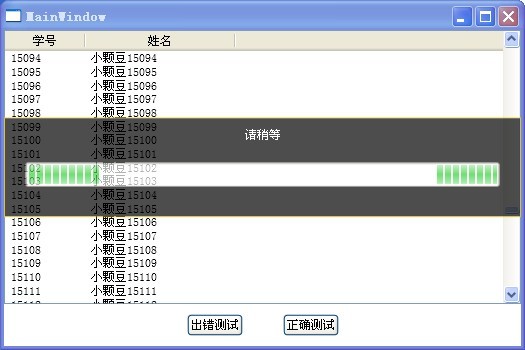
正确测试时绑定的数组边修改,画面边显示,而且主窗口也没有卡死,鼠标也能拖动窗口,基本能达到目的了,下面分析一下代码是如何解决的:
//创建学生数组
private void createStudents(Action<student, bool> _ac)
{
for (int i = 0; i < 100000; i++)
{
student s = new student();
s.id = (i + 1).ToString();
s.name = "小颗豆" + (i + 1).ToString();
if (i < 99999)
_ac(s, false);
else
_ac(s, true);
}
}
在以上代码中每增加一个学生成员到数组中都是通过_ac(s,bool)委托进行的,
委托的定义是在异步线程中定义好的.即是ac2
Task tk = new Task(() =>
{
Action<student, bool> ac2 = (x, y) => addData(x, y);
createStudents(ac2);
});
tk.Start();
异步Task里,先定义了委托,每增加一个数组成员时委托addData方法在主界面调用者线程中由线程池去操作即可解决外线程不能更改数组的问题:
private void addData(student s, bool k)
{
ThreadPool.QueueUserWorkItem(delegate
{
this.Dispatcher.Invoke(new Action(() =>
{
students.Add(s);
if (k == true)
wm.isWorking = false;
// students.Insert(0, s);//这样会很卡,如果数据量小时则会显得很流畅
//listview1.ScrollIntoView(s);//这个不行,小数据无所谓,大数据时真会卡死界面了
}), null);
});
}
上边的代码中,
this.Dispatcher.Invoke(new Action(() =>
{
students.Add(s);
}),null);这里是关键的解决办法,主窗体是主线程创建的,每个线程都有一个唯一的调度员,我们的工作就是命令调度员去做相应的工作,这里我们就相当于命令主窗体的线程调度员去增加数组成员,这样做线程是安全的,不会再有错误提示。
以上是本人测试的例子,不足之处请批评指正,高手请飘过。
~~~~~~~~~ 给昨天写的内容还是再补充一下:~~~~~~~~~~~~~~~~~~
补充:
以上例程为了简化没有写成MVVM,如果写在MVVM的方式略有点不同,

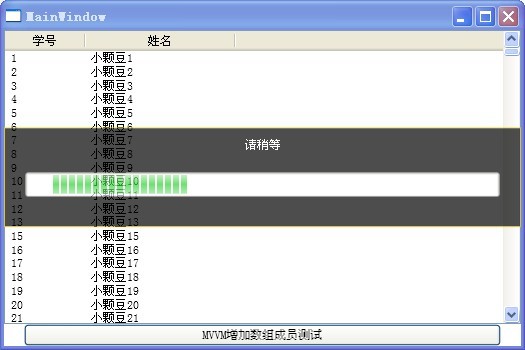
代码如下:
//主界面代码

<Window x:Class="WPF_test.MainWindow"

        xmlns="http://schemas.microsoft.com/winfx/2006/xaml/presentation"

        xmlns:x="http://schemas.microsoft.com/winfx/2006/xaml"

         xmlns:zz="clr-namespace:WPF_test"

        Title="MainWindow" Height="" Width=""  >

    <Window.Resources >

        <zz:VisibilityConverter x:Key="VisibilityConverter"/>

    </Window.Resources>

    <DockPanel >

            <Button DockPanel.Dock="Bottom"  Content="MVVM增加数组成员测试"  Margin="20 0" Command="{Binding AddStudents}" />

        <Grid>

            <!-- 顶层等待动画-->

            <Grid Name="g1" Panel.ZIndex=""  Visibility="{Binding myModel.StudentMaster.isWorking, Converter={StaticResource VisibilityConverter}}">

                <Border Background="Black"  Height="" BorderBrush="Gold" Opacity="0.7" BorderThickness="">

                    <StackPanel >

                        <TextBlock Text="请稍等" HorizontalAlignment="Center" Foreground="White"  Margin="0 10 0 0"></TextBlock>

                        <ProgressBar IsIndeterminate="True" Height="" Margin=""></ProgressBar>

                    </StackPanel>

                </Border>

            </Grid>

            <!-- 底层数据显示-->

            <ListView  Name="listview1" ItemsSource="{Binding myModel.StudentMaster.students}">

                <ListView.View>

                    <GridView >

                        <GridViewColumn Header="学号" Width="" DisplayMemberBinding="{Binding id}"/>

                        <GridViewColumn Header="姓名" Width="" DisplayMemberBinding="{Binding name}"/>

                    </GridView>

                </ListView.View>

            </ListView>

        </Grid>

    </DockPanel>

</Window>

//主界面后台代码:

namespace WPF_test

{

    /// <summary>

    /// MainWindow.xaml 的交互逻辑

    /// </summary>

    public partial class MainWindow : Window

    {

        viewModel vm = new viewModel();

        public MainWindow()

        {

            this.DataContext = vm;

            InitializeComponent();

        }

    }

}

//NotifyUp.cs

namespace WPF_test

{

    public class NotifyUp : INotifyPropertyChanged

    {

        //定义数据更改事件通知和更改的方法

        public event PropertyChangedEventHandler PropertyChanged;

        public void up(string s)

        {

            if (this.PropertyChanged != null)

            {

                PropertyChanged(this, new PropertyChangedEventArgs(s));

            }

        }

    }

}

//Model代码model.cs:

namespace WPF_test

{

    public class model : NotifyUp

    {

        //学生管理类

        studentMaster _studentMaster = new studentMaster();

        public studentMaster StudentMaster

        {

            get { return _studentMaster; }

            set { _studentMaster = value; }

        }

    }

}

//student.cs学生类代码:

namespace WPF_test

{

    public class student : NotifyUp

    {

        //姓名

        string _name;

        public string name

        {

            get { return _name; }

            set { _name = value; up("name"); }

        }

        //学号

        string _id;

        public string id

        {

            get { return _id; }

            set { _id = value; up("id"); }

        }

        public student(string _id, string _name)

        {

            id = _id;

            name = _name;

        }

        public student()

        { }

    }

}

//studentMaster.cs学生管理类代码:

namespace WPF_test

{

    public class studentMaster : NotifyUp

    {

        ObservableCollection<student> _students = new ObservableCollection<student>();

        public ObservableCollection<student> students

        {

            get { return _students; }

            set { _students = value; up("students"); }

        }

        //工作提示状态

        private bool _isWorking = false;

        public bool isWorking

        {

            get { return _isWorking; }

            set { _isWorking = value; up("isWorking"); }

        }

        public studentMaster()

        {

            load();

        }

        private void load()

        {

            students.Add(new student("1号", "张三"));

            students.Add(new student("2号", "李四"));

        }

        //异步线程增加学生成员

       public void addStudent()

        {

            students.Clear();

            isWorking = true;

            Task tk = new Task(() =>

            {

                Action<student, bool> ac2 = (x, y) => addData(x, y);

                createStudents(ac2);

            });

            tk.Start();

        }

        /// <summary>

        //主窗口调度线程增加数组成员

        /// </summary>

        /// <param name="s">学生成员</param>

       /// <param name="isend">是否结束</param>

        private void addData(student s, bool isend)

        {

                ThreadPool.QueueUserWorkItem(delegate

                {

                    System.Threading.SynchronizationContext.SetSynchronizationContext(new

                        System.Windows.Threading.DispatcherSynchronizationContext(System.Windows.Application.Current.Dispatcher));

                    System.Threading.SynchronizationContext.Current.Send(pl =>

                    {

                        students.Add(s);//students.Insert (0,s);//从数组前边加进成员,界面还是比较卡

                        if (isend) isWorking = false;

                    }, null);

                });

        }

        //创建学生数组

        private void createStudents(Action<student, bool> _ac)

        {

            for (int i = ; i < ; i++)

            {

                student s = new student();

                s.id = (i + ).ToString();

                s.name = "小颗豆" + (i + ).ToString();

                if (i < )

                    _ac(s, false);

                else

                    _ac(s, true);

            }

        }

    }

}
MVVM模式
以上代码通过测试.
[WPF]绑定到界面的数组不支持调度线程以外对其更改的办法的更多相关文章
- WPF中,多key值绑定问题,一个key绑定一个界面上的对象
问题说明: 当用到dictionary<key,value>来储存数据的时候,有时候需要在界面上绑定一个key来显示value,这时候有两种思路: 一种是写一个自定义的扩展类,类似Bind ...
- WPF快速入门系列(4)——深入解析WPF绑定
一.引言 WPF绑定使得原本需要多行代码实现的功能,现在只需要简单的XAML代码就可以完成之前多行后台代码实现的功能.WPF绑定可以理解为一种关系,该关系告诉WPF从一个源对象提取一些信息,并将这些信 ...
- 【转】【WPF】WPF绑定用法
一.简介 为了后面行文顺利,在进入正文之前,我们首先对本文所涉及到的绑定知识进行简单地介绍.该节包含绑定的基本组成以及构建方式. WPF中的绑定完成了绑定源和绑定目标的联动.一个绑定常常由四部分组成: ...
- Wix 安装部署教程(九) --用WPF做安装界面
经常安装PC端的应用,特别是重装系统之后,大致分为两类.一类像QQ,搜狗输入法这样的.分三步走的:第一个页面可以自定义安装路径和软件许可.第二个页面显示安装进度条,第三个页面推荐其他应用.先不管人家怎 ...
- WPF绑定之索引器值变化通知
背景 在某些应用中,需要在界面上绑定到索引器,并在值发生变化时实时更新. 解决方案 只要将包含索引器的类实现INotifyPropertyChanged接口,并在索引值更改时引发PropertyCha ...
- 【转】WPF绑定模式
源地址:http://www.cnblogs.com/zjz008/archive/2010/05/26/1744802.html http://blog.csdn.net/haylhf/articl ...
- wpf绑定全局静态变量(mvvm)
原文 wpf绑定全局静态变量(mvvm) 在实际的开发中,有一些集合或者属性可能是全局的,比如当你做一个oa的时候,可能需要展示所有的人员,这时这个所有的人员列表显然可以作为全局参数,比如这里有一个全 ...
- WPF绑定功能常用属性介绍
1.Mode 绑定中数据流的方向(enum BindingMode) 目标属性指的是控件的属性 (1)TwoWay 更改源属性或目标属性时,会自动更新另一方.适用于可编辑窗体 例:TextBox (2 ...
- WPF绑定各种数据源之xml数据源
一.WPF绑定各种数据源索引 WPF 绑定各种数据源之Datatable WPF绑定各种数据源之object数据源 WPF绑定各种数据源之xml数据源 WPF绑定各种数据源之元素控件属性 Bindin ...
随机推荐
- oracle 包和包实现
包: create or replace package sp_pexam_clear as --定义结构体 /*type re_stu is record( rname student.name%t ...
- linux编译动态库 fPIC作用
在生成动态库时,常常习惯性的加上fPIC选项,fPIC有什么作用和意义,加不加有什么区别,这里做下小结: fPIC的全称是 Position Independent Code, 用于生成位置无关代码. ...
- bzoj 1083 最小生成树
裸的最小生成树. /************************************************************** Problem: User: BLADEVIL Lan ...
- CocoaPods详解之----使用篇
http://blog.csdn.net/meegomeego/article/details/24005567 作者:wangzz 原文地址:http://blog.csdn.net/wzzvict ...
- POJ3264(线段树求区间最大最小值)
Balanced Lineup Time Limit: 5000MS Memory Limit: 65536K Total Submissions: 41162 Accepted: 19327 ...
- Linux2.6.32内核笔记(5)在应用程序中移植使用内核链表【转】
转自:http://blog.csdn.net/Deep_l_zh/article/details/48392935 版权声明:本文为博主原创文章,未经博主允许不得转载. 摘要:将内核链表移植到应用程 ...
- hammer.js触摸,手指缩放等许多手势操作
使用方法: 插件描述:Hammer.js是一个开源的,轻量级的javascript库,它可以在不需要依赖其他东西的情况下识别触摸,鼠标事件. <script src="http://e ...
- ros pcl sensor::pointcloud2 转换成pcl::pointcloud
#include <pcl_conversions/pcl_conversions.h> #include <pcl/point_types.h> #include <p ...
- React Native - 1 Windows下的环境配置(Windows+Android)
参考:https://facebook.github.io/react-native/docs/getting-started.html(要FQ) 网站上建议使用Chocolatey去配环境, ...
- docker 与 yarn
有时我们的项目是使用yarn去发布的,当需要使用docker发布这个项目时,安装yarn是必须的,但是平时使用的npm install -g yarn此时却不可用 从网站上找到解决的方法 地址:htt ...