
Qt Qwdget 汽车仪表知识点拆解3 进度条编写
先贴上效果图,注意,没有写逻辑,都是乱动的
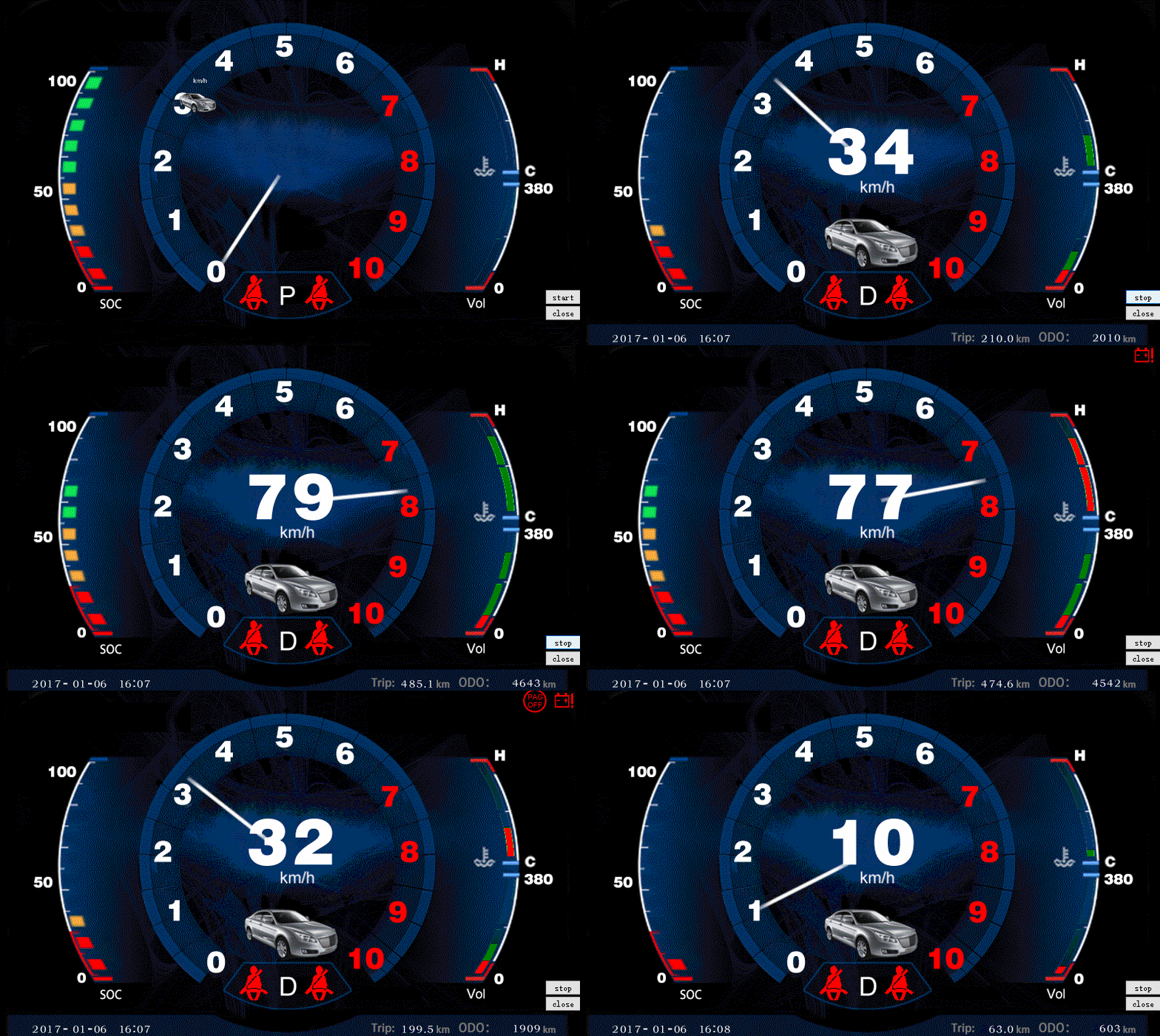
这篇我来说说左侧的这个进度条的实现原理,其实更简单,哈哈哈
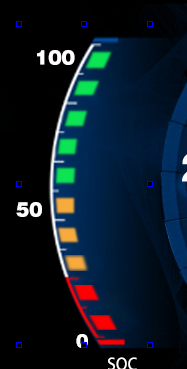
有一个大的widget,根据素材,我放了10个label
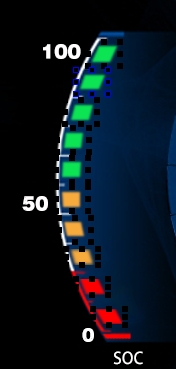
剩下的就是写一个函数,根据数据的不同,实时控制这10个label的显示,
实现代码
void Widget::show_Lline(int num)

{

    switch (num) {

    case 0:

    {

        ui->label_lline_1->hide();

        ui->label_lline_2->hide();

        ui->label_lline_3->hide();

        ui->label_lline_4->hide();

        ui->label_lline_5->hide();

        ui->label_lline_6->hide();

        ui->label_lline_7->hide();

        ui->label_lline_8->hide();

        ui->label_lline_9->hide();

        ui->label_lline_10->hide();

        break;

    }

    case 1:

    {

        ui->label_lline_1->show();

        ui->label_lline_2->hide();

        ui->label_lline_3->hide();

        ui->label_lline_4->hide();

        ui->label_lline_5->hide();

        ui->label_lline_6->hide();

        ui->label_lline_7->hide();

        ui->label_lline_8->hide();

        ui->label_lline_9->hide();

        ui->label_lline_10->hide();

        break;

    }

    case 2:

    {

        ui->label_lline_1->show();

        ui->label_lline_2->show();

        ui->label_lline_3->hide();

        ui->label_lline_4->hide();

        ui->label_lline_5->hide();

        ui->label_lline_6->hide();

        ui->label_lline_7->hide();

        ui->label_lline_8->hide();

        ui->label_lline_9->hide();

        ui->label_lline_10->hide();

        break;

    }

    case 3:

    {

        ui->label_lline_1->show();

        ui->label_lline_2->show();

        ui->label_lline_3->show();

        ui->label_lline_4->hide();

        ui->label_lline_5->hide();

        ui->label_lline_6->hide();

        ui->label_lline_7->hide();

        ui->label_lline_8->hide();

        ui->label_lline_9->hide();

        ui->label_lline_10->hide();

        break;

    }

    case 4:

    {

        ui->label_lline_1->show();

        ui->label_lline_2->show();

        ui->label_lline_3->show();

        ui->label_lline_4->show();

        ui->label_lline_5->hide();

        ui->label_lline_6->hide();

        ui->label_lline_7->hide();

        ui->label_lline_8->hide();

        ui->label_lline_9->hide();

        ui->label_lline_10->hide();

        break;

    }

    case 5:

    {

        ui->label_lline_1->show();

        ui->label_lline_2->show();

        ui->label_lline_3->show();

        ui->label_lline_4->show();

        ui->label_lline_5->show();

        ui->label_lline_6->hide();

        ui->label_lline_7->hide();

        ui->label_lline_8->hide();

        ui->label_lline_9->hide();

        ui->label_lline_10->hide();

        break;

    }

    case 6:

    {

        ui->label_lline_1->show();

        ui->label_lline_2->show();

        ui->label_lline_3->show();

        ui->label_lline_4->show();

        ui->label_lline_5->show();

        ui->label_lline_6->show();

        ui->label_lline_7->hide();

        ui->label_lline_8->hide();

        ui->label_lline_9->hide();

        ui->label_lline_10->hide();

        break;

    }

    case 7:

    {

        ui->label_lline_1->show();

        ui->label_lline_2->show();

        ui->label_lline_3->show();

        ui->label_lline_4->show();

        ui->label_lline_5->show();

        ui->label_lline_6->show();

        ui->label_lline_7->show();

        ui->label_lline_8->hide();

        ui->label_lline_9->hide();

        ui->label_lline_10->hide();

        break;

    }

    case 8:

    {

        ui->label_lline_1->show();

        ui->label_lline_2->show();

        ui->label_lline_3->show();

        ui->label_lline_4->show();

        ui->label_lline_5->show();

        ui->label_lline_6->show();

        ui->label_lline_7->show();

        ui->label_lline_8->show();

        ui->label_lline_9->hide();

        ui->label_lline_10->hide();

        break;

    }

    case 9:

    {

        ui->label_lline_1->show();

        ui->label_lline_2->show();

        ui->label_lline_3->show();

        ui->label_lline_4->show();

        ui->label_lline_5->show();

        ui->label_lline_6->show();

        ui->label_lline_7->show();

        ui->label_lline_8->show();

        ui->label_lline_9->show();

        ui->label_lline_10->hide();

        break;

    }

    case 10:

    {

        ui->label_lline_1->show();

        ui->label_lline_2->show();

        ui->label_lline_3->show();

        ui->label_lline_4->show();

        ui->label_lline_5->show();

        ui->label_lline_6->show();

        ui->label_lline_7->show();

        ui->label_lline_8->show();

        ui->label_lline_9->show();

        ui->label_lline_10->show();

        break;

    }

    default:

        break;

    }

}
这样,就可以了

Qt Qwdget 汽车仪表知识点拆解3 进度条编写的更多相关文章
- Qt Qwdget 汽车仪表知识点拆解4 另类进度条实现
先贴上效果图,注意,没有写逻辑,都是乱动的 注意看一下,右面的这两个进度条,有瑕疵,就是我没有把图片处理干净,这里犹豫我不知道这个具体的弧度,也没法绘制,就偷懒了 现在上面放一个UI,把两个进度条抠空 ...
- Qt Qwdget 汽车仪表知识点拆解6 自定义控件
先贴上效果图,注意,没有写逻辑,都是乱动的 这里说一下控件自定义 图中标出的部分都是自定义的控件 这里如果我们有批量类似的功能,就可以使用自定义控件的方式,这里我已下面的自定义控件说一下,上面的在上一 ...
- Qt Qwdget 汽车仪表知识点拆解2 图像放大
先贴上效果图,注意,没有写逻辑,都是乱动的 这里讲下 这个小汽车的进入过程,其实这个说白了就没有技术含量了,本来应该趁着这个机会学习一下Qt的动画机制,不过随机一想,这个自己写也累不到那里去 下面说下 ...
- Qt Qwdget 汽车仪表知识点拆解8 淡入效果
先贴上效果图,注意,没有写逻辑,都是乱动的 看下面的开始,开始的时候有一个带入的效果,这里有一个坑, 网上大部分都是调用下面这个函数 setWindowOpacity(); 但是,你会发现,在你的子窗 ...
- Qt Qwdget 汽车仪表知识点拆解7 图像绘制,旋转
先贴上效果图,注意,没有写逻辑,都是乱动的 看下最中心的指针旋转,这里使用的QPainter的绘制函数 要显示复杂的效果,需要分层 void Widget::draw_number_pointer() ...
- Qt Qwdget 汽车仪表知识点拆解5 标题栏图标闪烁
先贴上效果图,注意,没有写逻辑,都是乱动的 看下最上面的部分,有一些仪表图标在闪烁,如果一个一个写,也是可以实现的,不过感觉要累死的节奏 这里我写了一个我自己的Label,完了把把这些QLabel提升 ...
- Qt Qwdget 汽车仪表知识点拆解1 速度表示
先贴上效果图,注意,没有写逻辑,所以这些都是乱动的 这里线主要说一下中间显示速度的显示制作的方式,在这里,自己专门写了一个数字的仪表 考虑的一般的汽车是没有办法把瞬时速度提升到四位数的,所以我这里就放 ...
- MFC控件编程进度条编写
MFC控件编程进度条编写 一丶进度条编程需要用到的方法 进度条MFC已经帮我们封装好类了. 叫做 CProgressCtrl 进度条编程也很简单. 封装的方法也就那个那几个. GetPos() 获 ...
- Qt之模型/视图(自定义进度条)
简述 在之前的章节中分享过关于QHeaderView表头排序.添加复选框等内容,相信大家模型/视图.自定义风格有了一定的了解,下面我们来分享一个更常用的内容-自定义进度条. 实现方式: 从QAbstr ...
随机推荐
- HDU 1754 I Hate It 【线段树单点修改 维护区间最大值】
题目传送门:http://acm.hdu.edu.cn/showproblem.php?pid=1754 I Hate It Time Limit: 9000/3000 MS (Java/Others ...
- thinkphp 实现移动端和PC端显示不同的模板
1.首先在项目模块下的Common文件夹内建立function.php文件,这样就可以首先执行这里的函数了.所以在这里判断是否是移动端访问的,判断方法如下: function ismobile() { ...
- EntityFrameWork简单操作 EF数据上下文对象操作数据增删改差及批处理
/// <summary> /// EF针对 留言数据库 的 数据上下文对象!!!! /// </summary> static LeaveWordBoradEntities ...
- Mvc5 表单和HTML辅助方法
①表单的使用 在WebFrom里面你创建一个页面,页面上就会出<from></from>. 1,action和method属性 action表示目的,method表示表单传值方 ...
- 如何关闭Eclipse智障的变量命名自动补全功能
找到了最最完美的解决方案,无需下载源码. 详见:https://zhidao.baidu.com/question/1451659429285222820.html
- 菜鸟笔记 -- Chapter 6.2.6 内部类
6.2.6 内部类 在权限修饰符中,我们已经见过内部类了,但我们看到的只是冰山一角,这节我们详细介绍一下内部类,内部类可以分为成员内部类,局部内部类,匿名内部类,静态内部类.下面我们来讲解一下,在讲 ...
- HDU 6330--Visual Cube(构造,计算)
Visual Cube 将这个立方体分块,分成上中下三个部分,利用长宽高计算行列,最后输出即可. 每个部分都分成奇偶行来输出,总共有\(2*(b+c)+1\)行,共\(2*(a+b)+1\)列.设当前 ...
- 如何安全地跨窗体调用Timer控件 从一个窗体调用控制另外一个窗体的控件
具体的情况是Form1中有一个Timer2时钟,Timer2时钟事件弹出Warning窗体,点击Warning窗体上面的按钮,重新激活一下Form1中的Timer2.从而实现了从一个窗体调用另外一个窗 ...
- dos命令操作数据库(上)
1.cd到mysql安装目录bin目录: 2.输入id.用户名和密码: 3.查看数据库实例: 4.创建一个实例: 5.删除一个实例: 6.创建一个表: 7.删除一个表: 8.表结构: 9.修改表: 你 ...
- Static关键字,遇到的问题_1
一.问题 父类代码: ...