
Zabbix JMX之tomcat监控
工作原理:
1、JAVA-GATEWAY
Zabbix本身不支持直接监控Java,在zabbix 1.8以前,只能使用Zapcat来做代理监控,而且要修改源代码,非常麻烦。所有后来为了解决这个监控问题,Zabbix和Java双方应运生成了各自的代理监控程序:zabbix 2.0 以后添加了服务进程zabbix-java-gateway,用以在服务端接收JMX的监控数据;Java有了JMX(全称是Java Management Extensions,即Java管理扩展),用以在客户端收集客户端的监控数据并转发到zabbix-java-gateway
2、示意图
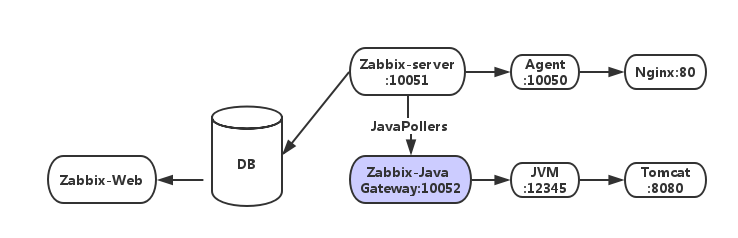
比如:当Zabbix-Server需要知道java应用程序的某项性能的时候,会启动自身的一个Zabbix-JavaPollers进程去连接Zabbix-Java-Gateway请求数据,而Zabbix-Java-gateway收到请求后会使用“JMX-management-API”去tomcat服务器开启JMX,而前提是tomcat服务器端在开启时需要“-Dcom.sun.management.jmxremote”参数来开启JMX远程查询。Java程序会启动自身的一个简单的小程序端口12345向Zabbix-JavaGateway提供请求数据。
Zabbix监控端部署:
1.安装zabbix server
编译安装zabbix server需要加上--enable-java以支持jmx监控,如果之前的zabbix server没加,那么请重新编译安装
./configure --prefix=/application/zabbix-3.0.3 --enable-server --enable-agent --enable-java --enable-ipv6 --with-mysql=/application/mysql-5.5.49/bin/mysql_config --with-net-snmp --with-libcurl --with-libxml2 --with-openipmi --with-unixodbc --with-openssl
并且监控端也需要安装java环境
2.安装zabbix_java_gateway
wget http://mirrors.aliyun.com/zabbix/zabbix/3.4/rhel/6/x86_64/zabbix-java-gateway-3.4.1-1.el6.x86_64.rpm
rpm -ivh zabbix-java-gateway-3.4.1-1.el6.x86_64.rpm(zabbix-java-gateway用老版本可能会出错)
#zabbix_java_gateway配置文件zabbix_java_gateway.conf里有默认端口等设置,这里我们保持默认即可
service zabbix-java-gateway start
此时,默认的端口10052应该打开,ss -nat | grep 10052查看
在zabbix_server.conf 中配置监控端访问zabbix_java_gateway
JavaGateway=172.16.2.150 #zabbix_java_gateway地址
StartJavaPollers=6 #预启动进程轮询个数,且这个值要比zabbix_java_gateway.conf中Start_poller值要大,不然会无法通信
重启zabbix-server
zabbix客户端安装:
1.安装JMX
1. 下载 JMX Remote jar 二进制包。放在 tomcat/lib 下面
wget http://archive.apache.org/dist/tomcat/tomcat-7/v7.0.56/bin/extras/catalina-jmx-remote.jar
2. 修改 tomcat conf/server.xml 配置文件,添加以下内容:
|
<Listener className="org.apache.catalina.mbeans.JmxRemoteLifecycleListener" rmiRegistryPortPlatform="12345" rmiServerPortPlatform="12346" /> |
3. 修改 tomcat/bin 目录下 catalina.sh ,添加以下内容:
|
CATALINA_OPTS="-Dcom.sun.management.jmxremote -Dcom.sun.management.jmxremote.authenticate=false -Dcom.sun.management.jmxremote.ssl=false -Djava.rmi.server.hostname=10.32.18.1" |
注意:Djava.rmi.server.hostname这里写上被监控端 hostname 是由于 hostname 默认值为 localhost,如果你的 tomcat 未监听在 localhost,那么不写具体 ip 会引发问题。并且这段配置应该写在catalina.sh的前面,不然端口打不开。
4. 确保 zabbix server 或者 proxy 和 配置文件中的端口通讯畅通,重启tomcat,lsof -i:12345端口打开
验证是否能获取数据
在监控端下载JMX cmd.jar文件
wget http://nchc.dl.sourceforge.net/project/jmxcmd/jmxcmd.jar
测试有数据则表示成功
命令格式:
# java -jar jmxcmd.jar - 192.168.3.18:12345 java.lang:type=Memory NonHeapMemoryUsage
导入模板,添加监控
<?xml version="1.0" encoding="UTF-8"?>

-<zabbix_export>

<version>2.0</version>

<date>2013-05-30T03:17:01Z</date>

-<groups>

-<group>

<name>Templates</name>

</group>

</groups>

-<templates>

-<template>

<template>CustomTomcat</template>

<name>CustomTomcat</name>

-<groups>

-<group>

<name>Templates</name>

</group>

</groups>

-<applications>

-<application>

<name>class</name>

</application>

-<application>

<name>HeapStatistics</name>

</application>

-<application>

<name>Sessions</name>

</application>

-<application>

<name>ThreadStatistics</name>

</application>

-<application>

<name>Tomcat</name>

</application>

</applications>

-<items>

-<item>

<name>http-8080 gzip compression</name>

<type>16</type>

<snmp_community/>

<multiplier>0</multiplier>

<snmp_oid/>

<key>jmx["Catalina:type=ProtocolHandler,port=8080",compression]</key>

<delay>30</delay>

<history>90</history>

<trends>365</trends>

<status>0</status>

<value_type>1</value_type>

<allowed_hosts/>

<units/>

<delta>0</delta>

<snmpv3_securityname/>

<snmpv3_securitylevel>0</snmpv3_securitylevel>

<snmpv3_authpassphrase/>

<snmpv3_privpassphrase/>

<formula>1</formula>

<delay_flex/>

<params/>

<ipmi_sensor/>

<data_type>0</data_type>

<authtype>0</authtype>

<username/>

<password/>

<publickey/>

<privatekey/>

<port/>

<description/>

<inventory_link>0</inventory_link>

<applications/>

<valuemap/>

</item>

-<item>

<name>http-8080活动线程</name>

<type>16</type>

<snmp_community/>

<multiplier>0</multiplier>

<snmp_oid/>

<key>jmx["java.lang:type=Threading","ThreadCount"]</key>

<delay>30</delay>

<history>90</history>

<trends>365</trends>

<status>0</status>

<value_type>3</value_type>

<allowed_hosts/>

<units/>

<delta>0</delta>

<snmpv3_securityname/>

<snmpv3_securitylevel>0</snmpv3_securitylevel>

<snmpv3_authpassphrase/>

<snmpv3_privpassphrase/>

<formula>1</formula>

<delay_flex/>

<params/>

<ipmi_sensor/>

<data_type>0</data_type>

<authtype>0</authtype>

<username/>

<password/>

<publickey/>

<privatekey/>

<port/>

<description/>

<inventory_link>0</inventory_link>

-<applications>

-<application>

<name>ThreadStatistics</name>

</application>

</applications>

<valuemap/>

</item>

-<item>

<name>http-8080线程峰值</name>

<type>16</type>

<snmp_community/>

<multiplier>0</multiplier>

<snmp_oid/>

<key>jmx["java.lang:type=Threading","PeakThreadCount"]</key>

<delay>30</delay>

<history>90</history>

<trends>365</trends>

<status>0</status>

<value_type>3</value_type>

<allowed_hosts/>

<units/>

<delta>0</delta>

<snmpv3_securityname/>

<snmpv3_securitylevel>0</snmpv3_securitylevel>

<snmpv3_authpassphrase/>

<snmpv3_privpassphrase/>

<formula>1</formula>

<delay_flex/>

<params/>

<ipmi_sensor/>

<data_type>0</data_type>

<authtype>0</authtype>

<username/>

<password/>

<publickey/>

<privatekey/>

<port/>

<description/>

<inventory_link>0</inventory_link>

-<applications>

-<application>

<name>ThreadStatistics</name>

</application>

</applications>

<valuemap/>

</item>

-<item>

<name>http-8080线程总计</name>

<type>16</type>

<snmp_community/>

<multiplier>0</multiplier>

<snmp_oid/>

<key>jmx["java.lang:type=Threading","TotalStartedThreadCount"]</key>

<delay>30</delay>

<history>90</history>

<trends>365</trends>

<status>0</status>

<value_type>3</value_type>

<allowed_hosts/>

<units/>

<delta>0</delta>

<snmpv3_securityname/>

<snmpv3_securitylevel>0</snmpv3_securitylevel>

<snmpv3_authpassphrase/>

<snmpv3_privpassphrase/>

<formula>1</formula>

<delay_flex/>

<params/>

<ipmi_sensor/>

<data_type>0</data_type>

<authtype>0</authtype>

<username/>

<password/>

<publickey/>

<privatekey/>

<port/>

<description/>

<inventory_link>0</inventory_link>

-<applications>

-<application>

<name>ThreadStatistics</name>

</application>

</applications>

<valuemap/>

</item>

-<item>

<name>Sessions-Number of sessions we rejected due to maxActive beeing reached</name>

<type>16</type>

<snmp_community/>

<multiplier>0</multiplier>

<snmp_oid/>

<key>jmx["Catalina:type=Manager,context=/,host=localhost",rejectedSessions]</key>

<delay>30</delay>

<history>90</history>

<trends>365</trends>

<status>0</status>

<value_type>3</value_type>

<allowed_hosts/>

<units/>

<delta>0</delta>

<snmpv3_securityname/>

<snmpv3_securitylevel>0</snmpv3_securitylevel>

<snmpv3_authpassphrase/>

<snmpv3_privpassphrase/>

<formula>1</formula>

<delay_flex/>

<params/>

<ipmi_sensor/>

<data_type>0</data_type>

<authtype>0</authtype>

<username/>

<password/>

<publickey/>

<privatekey/>

<port/>

<description/>

<inventory_link>0</inventory_link>

-<applications>

-<application>

<name>Sessions</name>

</application>

</applications>

<valuemap/>

</item>

-<item>

<name>Sessions-The maximum number of active Sessions allowed, or -1 for no limit</name>

<type>16</type>

<snmp_community/>

<multiplier>0</multiplier>

<snmp_oid/>

<key>jmx["Catalina:type=Manager,context=/,host=localhost",maxActiveSessions]</key>

<delay>30</delay>

<history>90</history>

<trends>365</trends>

<status>0</status>

<value_type>0</value_type>

<allowed_hosts/>

<units/>

<delta>0</delta>

<snmpv3_securityname/>

<snmpv3_securitylevel>0</snmpv3_securitylevel>

<snmpv3_authpassphrase/>

<snmpv3_privpassphrase/>

<formula>1</formula>

<delay_flex/>

<params/>

<ipmi_sensor/>

<data_type>0</data_type>

<authtype>0</authtype>

<username/>

<password/>

<publickey/>

<privatekey/>

<port/>

<description/>

<inventory_link>0</inventory_link>

-<applications>

-<application>

<name>Sessions</name>

</application>

</applications>

<valuemap/>

</item>

-<item>

<name>Sessions-会话数</name>

<type>16</type>

<snmp_community/>

<multiplier>0</multiplier>

<snmp_oid/>

<key>jmx["Catalina:type=Manager,context=/,host=localhost",sessionCounter]</key>

<delay>30</delay>

<history>90</history>

<trends>365</trends>

<status>0</status>

<value_type>3</value_type>

<allowed_hosts/>

<units/>

<delta>0</delta>

<snmpv3_securityname/>

<snmpv3_securitylevel>0</snmpv3_securitylevel>

<snmpv3_authpassphrase/>

<snmpv3_privpassphrase/>

<formula>1</formula>

<delay_flex/>

<params/>

<ipmi_sensor/>

<data_type>0</data_type>

<authtype>0</authtype>

<username/>

<password/>

<publickey/>

<privatekey/>

<port/>

<description/>

<inventory_link>0</inventory_link>

-<applications>

-<application>

<name>Sessions</name>

</application>

</applications>

<valuemap/>

</item>

-<item>

<name>Sessions-当前活动会话数</name>

<type>16</type>

<snmp_community/>

<multiplier>0</multiplier>

<snmp_oid/>

<key>jmx["Catalina:type=Manager,context=/,host=localhost",activeSessions]</key>

<delay>30</delay>

<history>90</history>

<trends>365</trends>

<status>0</status>

<value_type>3</value_type>

<allowed_hosts/>

<units/>

<delta>0</delta>

<snmpv3_securityname/>

<snmpv3_securitylevel>0</snmpv3_securitylevel>

<snmpv3_authpassphrase/>

<snmpv3_privpassphrase/>

<formula>1</formula>

<delay_flex/>

<params/>

<ipmi_sensor/>

<data_type>0</data_type>

<authtype>0</authtype>

<username/>

<password/>

<publickey/>

<privatekey/>

<port/>

<description/>

<inventory_link>0</inventory_link>

-<applications>

-<application>

<name>Sessions</name>

</application>

</applications>

<valuemap/>

</item>

-<item>

<name>Sessions-最大活动会话数</name>

<type>16</type>

<snmp_community/>

<multiplier>0</multiplier>

<snmp_oid/>

<key>jmx["Catalina:type=Manager,context=/,host=localhost",maxActive]</key>

<delay>30</delay>

<history>90</history>

<trends>365</trends>

<status>0</status>

<value_type>3</value_type>

<allowed_hosts/>

<units/>

<delta>0</delta>

<snmpv3_securityname/>

<snmpv3_securitylevel>0</snmpv3_securitylevel>

<snmpv3_authpassphrase/>

<snmpv3_privpassphrase/>

<formula>1</formula>

<delay_flex/>

<params/>

<ipmi_sensor/>

<data_type>0</data_type>

<authtype>0</authtype>

<username/>

<password/>

<publickey/>

<privatekey/>

<port/>

<description/>

<inventory_link>0</inventory_link>

-<applications>

-<application>

<name>Sessions</name>

</application>

</applications>

<valuemap/>

</item>

-<item>

<name>Tomcat version</name>

<type>16</type>

<snmp_community/>

<multiplier>0</multiplier>

<snmp_oid/>

<key>jmx["Catalina:type=Server",serverInfo]</key>

<delay>30</delay>

<history>90</history>

<trends>365</trends>

<status>0</status>

<value_type>1</value_type>

<allowed_hosts/>

<units/>

<delta>0</delta>

<snmpv3_securityname/>

<snmpv3_securitylevel>0</snmpv3_securitylevel>

<snmpv3_authpassphrase/>

<snmpv3_privpassphrase/>

<formula>1</formula>

<delay_flex/>

<params/>

<ipmi_sensor/>

<data_type>0</data_type>

<authtype>0</authtype>

<username/>

<password/>

<publickey/>

<privatekey/>

<port/>

<description/>

<inventory_link>0</inventory_link>

-<applications>

-<application>

<name>Tomcat</name>

</application>

</applications>

<valuemap/>

</item>

-<item>

<name>堆内存已使用</name>

<type>16</type>

<snmp_community/>

<multiplier>0</multiplier>

<snmp_oid/>

<key>jmx["java.lang:type=Memory","HeapMemoryUsage.used"]</key>

<delay>30</delay>

<history>90</history>

<trends>365</trends>

<status>0</status>

<value_type>3</value_type>

<allowed_hosts/>

<units/>

<delta>0</delta>

<snmpv3_securityname/>

<snmpv3_securitylevel>0</snmpv3_securitylevel>

<snmpv3_authpassphrase/>

<snmpv3_privpassphrase/>

<formula>1</formula>

<delay_flex/>

<params/>

<ipmi_sensor/>

<data_type>0</data_type>

<authtype>0</authtype>

<username/>

<password/>

<publickey/>

<privatekey/>

<port/>

<description/>

<inventory_link>0</inventory_link>

-<applications>

-<application>

<name>HeapStatistics</name>

</application>

</applications>

<valuemap/>

</item>

-<item>

<name>堆内存已提交</name>

<type>16</type>

<snmp_community/>

<multiplier>0</multiplier>

<snmp_oid/>

<key>jmx["java.lang:type=Memory","HeapMemoryUsage.committed"]</key>

<delay>30</delay>

<history>90</history>

<trends>365</trends>

<status>0</status>

<value_type>3</value_type>

<allowed_hosts/>

<units/>

<delta>0</delta>

<snmpv3_securityname/>

<snmpv3_securitylevel>0</snmpv3_securitylevel>

<snmpv3_authpassphrase/>

<snmpv3_privpassphrase/>

<formula>1</formula>

<delay_flex/>

<params/>

<ipmi_sensor/>

<data_type>0</data_type>

<authtype>0</authtype>

<username/>

<password/>

<publickey/>

<privatekey/>

<port/>

<description/>

<inventory_link>0</inventory_link>

-<applications>

-<application>

<name>HeapStatistics</name>

</application>

</applications>

<valuemap/>

</item>

-<item>

<name>堆内存最大</name>

<type>16</type>

<snmp_community/>

<multiplier>0</multiplier>

<snmp_oid/>

<key>jmx["java.lang:type=Memory","HeapMemoryUsage.max"]</key>

<delay>30</delay>

<history>90</history>

<trends>365</trends>

<status>0</status>

<value_type>3</value_type>

<allowed_hosts/>

<units/>

<delta>0</delta>

<snmpv3_securityname/>

<snmpv3_securitylevel>0</snmpv3_securitylevel>

<snmpv3_authpassphrase/>

<snmpv3_privpassphrase/>

<formula>1</formula>

<delay_flex/>

<params/>

<ipmi_sensor/>

<data_type>0</data_type>

<authtype>0</authtype>

<username/>

<password/>

<publickey/>

<privatekey/>

<port/>

<description/>

<inventory_link>0</inventory_link>

-<applications>

-<application>

<name>HeapStatistics</name>

</application>

</applications>

<valuemap/>

</item>

-<item>

<name>类-已加载</name>

<type>16</type>

<snmp_community/>

<multiplier>0</multiplier>

<snmp_oid/>

<key>jmx["java.lang:type=ClassLoading","LoadedClassCount"]</key>

<delay>30</delay>

<history>90</history>

<trends>365</trends>

<status>0</status>

<value_type>3</value_type>

<allowed_hosts/>

<units/>

<delta>0</delta>

<snmpv3_securityname/>

<snmpv3_securitylevel>0</snmpv3_securitylevel>

<snmpv3_authpassphrase/>

<snmpv3_privpassphrase/>

<formula>1</formula>

<delay_flex/>

<params/>

<ipmi_sensor/>

<data_type>0</data_type>

<authtype>0</authtype>

<username/>

<password/>

<publickey/>

<privatekey/>

<port/>

<description/>

<inventory_link>0</inventory_link>

-<applications>

-<application>

<name>class</name>

</application>

</applications>

<valuemap/>

</item>

-<item>

<name>类-已卸载</name>

<type>16</type>

<snmp_community/>

<multiplier>0</multiplier>

<snmp_oid/>

<key>jmx["java.lang:type=ClassLoading","UnloadedClassCount"]</key>

<delay>30</delay>

<history>90</history>

<trends>365</trends>

<status>0</status>

<value_type>3</value_type>

<allowed_hosts/>

<units/>

<delta>0</delta>

<snmpv3_securityname/>

<snmpv3_securitylevel>0</snmpv3_securitylevel>

<snmpv3_authpassphrase/>

<snmpv3_privpassphrase/>

<formula>1</formula>

<delay_flex/>

<params/>

<ipmi_sensor/>

<data_type>0</data_type>

<authtype>0</authtype>

<username/>

<password/>

<publickey/>

<privatekey/>

<port/>

<description/>

<inventory_link>0</inventory_link>

-<applications>

-<application>

<name>class</name>

</application>

</applications>

<valuemap/>

</item>

-<item>

<name>类-总计</name>

<type>16</type>

<snmp_community/>

<multiplier>0</multiplier>

<snmp_oid/>

<key>jmx["java.lang:type=ClassLoading","TotalLoadedClassCount"]</key>

<delay>30</delay>

<history>90</history>

<trends>365</trends>

<status>0</status>

<value_type>3</value_type>

<allowed_hosts/>

<units/>

<delta>0</delta>

<snmpv3_securityname/>

<snmpv3_securitylevel>0</snmpv3_securitylevel>

<snmpv3_authpassphrase/>

<snmpv3_privpassphrase/>

<formula>1</formula>

<delay_flex/>

<params/>

<ipmi_sensor/>

<data_type>0</data_type>

<authtype>0</authtype>

<username/>

<password/>

<publickey/>

<privatekey/>

<port/>

<description/>

<inventory_link>0</inventory_link>

-<applications>

-<application>

<name>class</name>

</application>

</applications>

<valuemap/>

</item>

</items>

<discovery_rules/>

<macros/>

<templates/>

<screens/>

</template>

</templates>

-<graphs>

-<graph>

<name>会话状态</name>

<width>900</width>

<height>200</height>

<yaxismin>0.0000</yaxismin>

<yaxismax>100.0000</yaxismax>

<show_work_period>1</show_work_period>

<show_triggers>1</show_triggers>

<type>0</type>

<show_legend>1</show_legend>

<show_3d>0</show_3d>

<percent_left>0.0000</percent_left>

<percent_right>0.0000</percent_right>

<ymin_type_1>0</ymin_type_1>

<ymax_type_1>0</ymax_type_1>

<ymin_item_1>0</ymin_item_1>

<ymax_item_1>0</ymax_item_1>

-<graph_items>

-<graph_item>

<sortorder>0</sortorder>

<drawtype>0</drawtype>

<color>C80000</color>

<yaxisside>0</yaxisside>

<calc_fnc>2</calc_fnc>

<type>0</type>

-<item>

<host>CustomTomcat</host>

<key>jmx["Catalina:type=Manager,context=/,host=localhost",maxActive]</key>

</item>

</graph_item>

-<graph_item>

<sortorder>1</sortorder>

<drawtype>0</drawtype>

<color>00C800</color>

<yaxisside>0</yaxisside>

<calc_fnc>2</calc_fnc>

<type>0</type>

-<item>

<host>CustomTomcat</host>

<key>jmx["Catalina:type=Manager,context=/,host=localhost",activeSessions]</key>

</item>

</graph_item>

-<graph_item>

<sortorder>2</sortorder>

<drawtype>0</drawtype>

<color>0000C8</color>

<yaxisside>0</yaxisside>

<calc_fnc>2</calc_fnc>

<type>0</type>

-<item>

<host>CustomTomcat</host>

<key>jmx["Catalina:type=Manager,context=/,host=localhost",sessionCounter]</key>

</item>

</graph_item>

-<graph_item>

<sortorder>3</sortorder>

<drawtype>0</drawtype>

<color>C800C8</color>

<yaxisside>0</yaxisside>

<calc_fnc>2</calc_fnc>

<type>0</type>

-<item>

<host>CustomTomcat</host>

<key>jmx["Catalina:type=Manager,context=/,host=localhost",rejectedSessions]</key>

</item>

</graph_item>

-<graph_item>

<sortorder>4</sortorder>

<drawtype>0</drawtype>

<color>00C8C8</color>

<yaxisside>0</yaxisside>

<calc_fnc>2</calc_fnc>

<type>0</type>

-<item>

<host>CustomTomcat</host>

<key>jmx["Catalina:type=Manager,context=/,host=localhost",maxActiveSessions]</key>

</item>

</graph_item>

</graph_items>

</graph>

-<graph>

<name>堆内存状态</name>

<width>900</width>

<height>200</height>

<yaxismin>0.0000</yaxismin>

<yaxismax>100.0000</yaxismax>

<show_work_period>1</show_work_period>

<show_triggers>1</show_triggers>

<type>0</type>

<show_legend>1</show_legend>

<show_3d>0</show_3d>

<percent_left>0.0000</percent_left>

<percent_right>0.0000</percent_right>

<ymin_type_1>0</ymin_type_1>

<ymax_type_1>0</ymax_type_1>

<ymin_item_1>0</ymin_item_1>

<ymax_item_1>0</ymax_item_1>

-<graph_items>

-<graph_item>

<sortorder>0</sortorder>

<drawtype>0</drawtype>

<color>C80000</color>

<yaxisside>0</yaxisside>

<calc_fnc>2</calc_fnc>

<type>0</type>

-<item>

<host>CustomTomcat</host>

<key>jmx["java.lang:type=Memory","HeapMemoryUsage.used"]</key>

</item>

</graph_item>

-<graph_item>

<sortorder>1</sortorder>

<drawtype>0</drawtype>

<color>00C800</color>

<yaxisside>0</yaxisside>

<calc_fnc>2</calc_fnc>

<type>0</type>

-<item>

<host>CustomTomcat</host>

<key>jmx["java.lang:type=Memory","HeapMemoryUsage.committed"]</key>

</item>

</graph_item>

-<graph_item>

<sortorder>2</sortorder>

<drawtype>0</drawtype>

<color>0000C8</color>

<yaxisside>0</yaxisside>

<calc_fnc>2</calc_fnc>

<type>0</type>

-<item>

<host>CustomTomcat</host>

<key>jmx["java.lang:type=Memory","HeapMemoryUsage.max"]</key>

</item>

</graph_item>

</graph_items>

</graph>

-<graph>

<name>类状态</name>

<width>900</width>

<height>200</height>

<yaxismin>0.0000</yaxismin>

<yaxismax>100.0000</yaxismax>

<show_work_period>1</show_work_period>

<show_triggers>1</show_triggers>

<type>0</type>

<show_legend>1</show_legend>

<show_3d>0</show_3d>

<percent_left>0.0000</percent_left>

<percent_right>0.0000</percent_right>

<ymin_type_1>0</ymin_type_1>

<ymax_type_1>0</ymax_type_1>

<ymin_item_1>0</ymin_item_1>

<ymax_item_1>0</ymax_item_1>

-<graph_items>

-<graph_item>

<sortorder>0</sortorder>

<drawtype>0</drawtype>

<color>C80000</color>

<yaxisside>0</yaxisside>

<calc_fnc>2</calc_fnc>

<type>0</type>

-<item>

<host>CustomTomcat</host>

<key>jmx["java.lang:type=ClassLoading","LoadedClassCount"]</key>

</item>

</graph_item>

-<graph_item>

<sortorder>1</sortorder>

<drawtype>0</drawtype>

<color>00C800</color>

<yaxisside>0</yaxisside>

<calc_fnc>2</calc_fnc>

<type>0</type>

-<item>

<host>CustomTomcat</host>

<key>jmx["java.lang:type=ClassLoading","UnloadedClassCount"]</key>

</item>

</graph_item>

-<graph_item>

<sortorder>2</sortorder>

<drawtype>0</drawtype>

<color>0000C8</color>

<yaxisside>0</yaxisside>

<calc_fnc>2</calc_fnc>

<type>0</type>

-<item>

<host>CustomTomcat</host>

<key>jmx["java.lang:type=ClassLoading","TotalLoadedClassCount"]</key>

</item>

</graph_item>

</graph_items>

</graph>

-<graph>

<name>线程状态</name>

<width>900</width>

<height>200</height>

<yaxismin>0.0000</yaxismin>

<yaxismax>100.0000</yaxismax>

<show_work_period>1</show_work_period>

<show_triggers>1</show_triggers>

<type>0</type>

<show_legend>1</show_legend>

<show_3d>0</show_3d>

<percent_left>0.0000</percent_left>

<percent_right>0.0000</percent_right>

<ymin_type_1>0</ymin_type_1>

<ymax_type_1>0</ymax_type_1>

<ymin_item_1>0</ymin_item_1>

<ymax_item_1>0</ymax_item_1>

-<graph_items>

-<graph_item>

<sortorder>0</sortorder>

<drawtype>0</drawtype>

<color>C80000</color>

<yaxisside>0</yaxisside>

<calc_fnc>2</calc_fnc>

<type>0</type>

-<item>

<host>CustomTomcat</host>

<key>jmx["java.lang:type=Threading","ThreadCount"]</key>

</item>

</graph_item>

-<graph_item>

<sortorder>1</sortorder>

<drawtype>0</drawtype>

<color>00C800</color>

<yaxisside>0</yaxisside>

<calc_fnc>2</calc_fnc>

<type>0</type>

-<item>

<host>CustomTomcat</host>

<key>jmx["java.lang:type=Threading","PeakThreadCount"]</key>

</item>

</graph_item>

-<graph_item>

<sortorder>2</sortorder>

<drawtype>0</drawtype>

<color>0000C8</color>

<yaxisside>0</yaxisside>

<calc_fnc>2</calc_fnc>

<type>0</type>

-<item>

<host>CustomTomcat</host>

<key>jmx["java.lang:type=Threading","TotalStartedThreadCount"]</key>

</item>

</graph_item>

</graph_items>

</graph>

</graphs>

</zabbix_export>
附录

Zabbix JMX之tomcat监控的更多相关文章
- zabbix 基于JMX的Tomcat监控
zabbix 基于JMX的Tomcat监控 一.环境 ubuntu14.04 LTS Java 1.7.0 zabbix 2.4.5 二.安装配置 1.安装JavaGateway 在ubuntu14. ...
- zabbix实现对tomcat的监控
zabbix实现对tomcat的监控 工作原理 比如:当Zabbix-Server需要知道java应用程序的某项性能的时候,会启动自身的一个Zabbix-JavaPollers进程去连接Zabbix- ...
- zabbix添加Tomcat监控
参靠了网上一些关于zabbix添加Tomcat的监控配置,自己整理了下: 一.服务器端配置1.找到zabbix源码存放路径 # find / -name zabbix_java #/usr/local ...
- 【 Zabbix 】— Tomcat监控及故障重启服务
一.监控tomcat原理 zabbix_server开启java poller,zabbix_java开启JavaGateway, 端口为:10052,tomcat JMX开启12345提供性能数据. ...
- 使用JMX工具远程监控tomcat配置
使用JMX工具远程监控tomcat,在tomcat启动时添加配置参数: -Dcom.sun.management.jmxremote -Dcom.sun.management.jmxremote.po ...
- 8、zabbix监控方式及分布式监控(04)
zabbix支持的监控方式 zabbix所能够显示的且可指定为监控接口类型的监控方式: Agent passive active SNMP:Simple Network Management Prot ...
- Zabbix的集中式监控
相对于传统的ZABBIX硬件系统级监控(CPU,内存,硬盘,网卡),应用级的监控就显得有些复杂了. 如果对不同的应该来不同的应用,配置会很多的. 如果我们能在一个指定的AGENT上监控所有的APACH ...
- 开源框架是如何通过JMX来做监控的(一) - JMX简介和Standard MBean
相关文章目录: 开源框架是如何通过JMX来做监控的(一) - JMX简介和Standard MBean 开源框架是如何通过JMX来做监控的(二) - Druid连接池的监控 相信很多做Java开发的同 ...
- Centos Tomcat监控
1.Window环境下jdk的bin目录中提供jvisualvm.exe工具,但是linux环境中的jdk未提供. 用window下的jvisualvm远程监控linux环境下的tomcat 两种连接 ...
随机推荐
- LINUX下的U盘挂载
linux下如果没有图形界面的情况下就要我们自己熟悉命令来挂载U盘,下面给大家详细描述下U盘的挂载过程. 1. 插入U盘 2. #sudo fdisk –l 查看所挂载盘符名称如下图,假设盘符名称为s ...
- Docker Centos6 下建立 Docker 桥接网络
cd /etc/sysconfig/network-scripts/; cp ifcfg-eth0 ifcfg-br0 vi ifcfg-eth0 //增加BRIDGE=br0,删除IPADDR,N ...
- 【南京邮电】maze 迷宫解法
[南京邮电]maze 迷宫解法 题目来源:南京邮电大学网络攻防训练平台. 题目下载地址:https://pan.baidu.com/s/1i5gLzIt (密码rijss) 0x0 初步分析 题目中给 ...
- Selenium+Python进行web自动化测试(Demo+API)
Selenium官方网站 http://selenium-python.readthedocs.io/ 配置使用环境 下载相应的浏览器驱动, Firefox 是默认的 本文以 chrome 为主 ,放 ...
- Sping Boot入门到实战之入门篇(三):Spring Boot属性配置
该篇为Sping Boot入门到实战系列入门篇的第三篇.介绍Spring Boot的属性配置. 传统的Spring Web应用自定义属性一般是通过添加一个demo.properties配置文件(文 ...
- PHP判断是手机端还是PC端
function check_wap() { if (isset($_SERVER['HTTP_VIA'])) return true; if (isset($_SERVER['HTTP_X_NOKI ...
- 原创:实现ehcache动态创建cache,以及超期判断的具体逻辑
当前最常用的三个缓存组件:ehcache.redis.memcached 其中,ehcache与应用共同运行于JVM中,属于嵌入式组件,运行效率最高,因此常被用于实现一级缓存. 在更复杂的一些系统中, ...
- hihoCoder1330 数组重排
题意 小Hi想知道,如果他每次都按照一种固定的顺序重排数组,那么最少经过几次重排之后数组会恢复初始的顺序? 具体来讲,给定一个1 - N 的排列 P,小Hi每次重排都是把第 i 个元素放到第 Pi个位 ...
- UVALive - 3027 Corporative Network (并查集)
这题比较简单,注意路径压缩即可. AC代码 //#define LOCAL #include <stdio.h> #include <algorithm> using name ...
- nyoj137 取石子(三) 楼教主男人八题之一
思路:一堆时,N态.两堆时,当两堆数量相同,P态,不同为N态.三堆时,先手可以变成两堆一样的,必胜N态. 此时可以总结规律:堆数为偶数可能且石子数都是两两相同的,为P态.分析四堆时,当四堆中两两数量一 ...