
smallcorgi/Faster-RCNN_TF训练自己的数据
熟悉了github项目提供的训练测试后,可以来训练自己的数据了。本文只介绍改动最少的方法,只训练2个类,
即自己添加的类(如person)和 background,使用的数据格式为pascal_voc。
1.训练数据的准备
先来看看data下的目录:
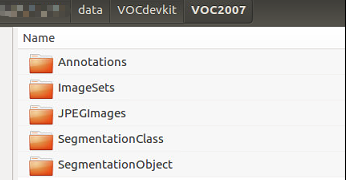
(1)Annotations 存放所有训练数据的xml文件,是图片的标注数据,
可以使用labelImg工具生成。github地址:https://github.com/tzutalin/labelImg.git
(2)ImageSets 底下有个main文件夹,里面放的是4个txt文件,
分别为 test.txt,train.txt,trainval.txt,val.txt。
每个文件存放的都是相应的图片数据名称,不含后缀。
trainval是train和val的合集,两者的比例可以为1:1。
生成txt文件的方法可以参考本人的另一篇blog:http://www.cnblogs.com/danpe/p/7859635.html
(3)JPEGImages 是存放所有训练图片的目录。
注:修改为训练数据后,需要删除data/cache 下的pkl文件,不然不会去获取修改的数据,而是使用该缓存。
2.修改项目部分代码文件
由于我们只训练了2个类,所以需要对代码中有关类的数目的地方进行修改。
(1)lib/datasets/pascal_voc.py
   class pascal_voc(imdb):

        def __init__(self, image_set, year, devkit_path=None):

            imdb.__init__(self, 'voc_' + year + '_' + image_set)

            self._year = year

            self._image_set = image_set

            self._devkit_path = self._get_default_path() if devkit_path is None \

                                else devkit_path

            self._data_path = os.path.join(self._devkit_path, 'VOC' + self._year)
    #   modified

    #        self._classes = ('__background__', # always index 0

    #                         'aeroplane', 'bicycle', 'bird', 'boat',

    #                         'bottle', 'bus', 'car', 'cat', 'chair',

    #                         'cow', 'diningtable', 'dog', 'horse',

    #                         'motorbike', 'person', 'pottedplant',

    #                         'sheep', 'sofa', 'train', 'tvmonitor')

            self._classes = ('__background__', # always index 0

                             'person')
(2)lib/datasets/pascal_voc2.py,与pascal_voc.py文件类似。
(3)lib/networks/VGGnet_train.py
    import tensorflow as tf

    from networks.network import Network

    #define


    #  modified

    #n_classes = 21

    n_classes = 2

    _feat_stride = [16,]

    anchor_scales = [8, 16, 32]
(4)lib/networks/VGGnet_test.py,与VGGnet_train.py文件类似。
(5)tools/demo.py
 import os, sys, cv2

    import argparse

    from networks.factory import get_network


    #  modified

    #CLASSES = ('__background__',

    #           'aeroplane', 'bicycle', 'bird', 'boat',

    #           'bottle', 'bus', 'car', 'cat', 'chair',

    #           'cow', 'diningtable', 'dog', 'horse',

    #           'motorbike', 'person', 'pottedplant',

    #           'sheep', 'sofa', 'train', 'tvmonitor')

    CLASSES = ('__background__',

               'person')
注:如果修改的.py文件有对应的.pyc文件,需要对pyc文件重新编译,方法为
  import py_compile

  py_compile.compile(dir/filename)
3.执行训练的脚本
./experiments/scripts/faster_rcnn_end2end.sh $DEVICE $DEVICE_ID VGG16 pascal_voc
smallcorgi/Faster-RCNN_TF训练自己的数据的更多相关文章
- caffe学习三:使用Faster RCNN训练自己的数据
本文假设你已经完成了安装,并可以运行demo.py 不会安装且用PASCAL VOC数据集的请看另来两篇博客. caffe学习一:ubuntu16.04下跑Faster R-CNN demo (基于c ...
- caffe 用faster rcnn 训练自己的数据 遇到的问题
1 . 怎么处理那些pyx和.c .h文件 在lib下有一些文件为.pyx文件,遇到不能import可以cython 那个文件,然后把lib文件夹重新make一下. 遇到.c 和 .h一样的操作. 2 ...
- python3 + Tensorflow + Faster R-CNN训练自己的数据
之前实现过faster rcnn, 但是因为各种原因,有需要实现一次,而且发现许多博客都不全面.现在发现了一个比较全面的博客.自己根据这篇博客实现的也比较顺利.在此记录一下(照搬). 原博客:http ...
- py-faster-rcnn 训练自己的数据
转载:http://blog.csdn.net/sinat_30071459/article/details/51332084 Faster-RCNN+ZF用自己的数据集训练模型(Python版本) ...
- ubuntu14.04上实现faster rcnn_TF的demo程序及训练过程
安装环境:Ubuntu14.04.显卡Tesla K40C+GeForce GT 705.tensorflow1.0.0.pycharm5.0 说明:原文见博客园,有问题原文下留言,不定期回复.本文作 ...
- faster r-cnn 在CPU配置下训练自己的数据
因为没有GPU,所以在CPU下训练自己的数据,中间遇到了各种各样的坑,还好没有放弃,特以此文记录此过程. 1.在CPU下配置faster r-cnn,参考博客:http://blog.csdn.net ...
- faster rcnn训练详解
http://blog.csdn.net/zy1034092330/article/details/62044941 py-faster-rcnn训练自己的数据:流程很详细并附代码 https://h ...
- YOLO2解读,训练自己的数据及相关转载以供学习
https://pjreddie.com/darknet/yolo/ 具体安装及使用可以参考官方文档https://github.com/pjreddie/darknet https://blog.c ...
- 如何才能将Faster R-CNN训练起来?
如何才能将Faster R-CNN训练起来? 首先进入 Faster RCNN 的官网啦,即:https://github.com/rbgirshick/py-faster-rcnn#installa ...
随机推荐
- Spring MVC 学习总结(一)——MVC概要与环境配置 转载自【张果】博客
Spring MVC 学习总结(一)--MVC概要与环境配置 目录 一.MVC概要 二.Spring MVC介绍 三.第一个Spring MVC 项目:Hello World 3.1.通过Mave ...
- dedecms 图集标签{dede:productimagelist} {dede:field name='imgurls'}&nbs
1.{dede:productimagelist}{/dede:productimagelist} 2.{dede:field name='imgurls'}{/dede:field} 这两个图集标签 ...
- vi命令加行号查找替换等命令
一.加行号 : set nu二.vi查找: 当你用vi打开一个文件后,因为文件太长,如何才能找到你所要查找的关键字呢?在vi里可没有菜单-〉查找, ...
- Hive总结(七)Hive四种数据导入方式
- word:Can't find the word document templant:WordToRqm.doc
问题:打开word文件时弹出提示 Cannot find the Word template:WordToRqm.dot 原因:安装了power designer. 解决:运行regedit.exe ...
- 监控服务器ssh登录,并发送报警邮件
最近想监控下云主机的ssh登录情况,所以开始写ssh登录报警监控.实现方式并不难. 一:邮箱申请开启SMTP 在邮箱中选择“设置”----->“账户” 在如下图处开启POP3/SMTP服务,并生 ...
- linux_http协议
什么是http协议? 超文本传输协议 最流行www服务,是http协议的实现 ssh,nfs,rsync客户端(Client)和服务端(Server),C/S架构,局域网内部用,胖客户端 http协议 ...
- _3_form_标签
什么是input标签? 处理输入信息 input有哪些类型? 选择: <input type="checkbox"> 多选框,选择爱好等 <input type= ...
- MYSQL 5.7 修改密码、登录问题
mysql5.7 关于密码问题 报错: ERROR 1862 (HY000): Your password has expired. To log in you must change it usin ...
- EL表达式和JSTL核心标签库
1 EL表达式 1.1 EL的概述 EL,全名为Expression Language. 主要作用: ①EL表达式主要用于替换jsp页面中的脚本表达式,以便于从各种类型的web域中检索java对象(某 ...