
Net core 关于缓存的实现
在很多项目中, 需要用到缓存,借鉴网上前辈们的一些经验,自己再进行总结简化了一些, 做出如下的缓存操作,其中包含内存缓存(IMemoryCache) 和 Redis 缓存;
一.前提内容, 导入两个包: Microsoft.Extensions.Caching.Memory 和 Microsoft.Extensions.Caching.Redis ,并在使用的类中using 一下它们. 我这里是用2.1.0版本的;
二. 创建 ICacheService 公共接口 ,我这里写的比较简单, 如若业务需要可自行增加 异步和批量的接口方法.
 /// <summary>

     /// 缓存接口

     /// 分别内存缓存和Redis缓存(2.1.0版本)

     /// </summary>

     public interface ICacheService

     {

         /// <summary>

         ///  新增

         /// </summary>

         /// <param name="key"></param>

         /// <param name="value"></param>

         /// <param name="ExpirtionTime"></param>

         /// <returns></returns>

         bool Add(string key, object value, int ExpirtionTime = );

         /// <summary>

         /// 获取

         /// </summary>

         /// <param name="key"></param>

         /// <returns></returns>

         string GetValue(string key);

         /// <summary>

         /// 验证缓存项是否存在

         /// </summary>

         /// <param name="key">缓存Key</param>

         /// <returns></returns>

         bool Exists(string key);

         /// <summary>

         /// 移除

         /// </summary>

         /// <param name="key"></param>

         /// <returns></returns>

         bool Remove(string key);

     }
三. 再分别创建 MemoryCacheService 和RedisCacheService 类, 并继承 ICacheService 接口.
a. MemoryCacheService 类 , 记得using 一下 Microsoft.Extensions.Caching.Memory
 /// <summary>

    /// 缓存接口实现

    /// </summary>

    public class MemoryCacheService : ICacheService

    {

        protected IMemoryCache _cache;

        public MemoryCacheService(IMemoryCache cache)

        {

            _cache = cache;

        }

        public bool Add(string key, object value, int ExpirtionTime = )

        {

            if (!string.IsNullOrEmpty(key))

            {

                _cache.Set(key, value , DateTimeOffset.Now.AddMinutes(ExpirtionTime));

            }

            return true;

        }

        public bool Remove(string key)

        {

            if (string.IsNullOrEmpty(key))

            {

                return false;

            }

            if (Exists(key))

            {

                _cache.Remove(key);

                return true;

            }

            return false;

        }

        public string GetValue(string key)

        {

            if (string.IsNullOrEmpty(key))

            {

                return null;

            }

            if (Exists(key))

            {

                return _cache.Get(key).ToString();

            }

            return null;

        }

        public bool Exists(string key)

        {

            if (string.IsNullOrEmpty(key))

            {

                return false;

            }

            object cache;

            return _cache.TryGetValue(key, out cache);

        }

    }
b. RedisCacheService 类 , 记得using 一下 Microsoft.Extensions.Caching.Redis
public  class RedisCacheService:ICacheService

    {

        protected RedisCache _redisCache = null;

        public RedisCacheService(RedisCacheOptions options)

        {

            _redisCache = new RedisCache(options);

        }

        public bool Add(string key, object value,int ExpirtionTime=)

        {

            if (!string.IsNullOrEmpty(key))

            {

                _redisCache.Set(key, Encoding.UTF8.GetBytes(value.ToString()), new DistributedCacheEntryOptions()

                {

                    AbsoluteExpiration = DateTimeOffset.Now.AddMinutes(ExpirtionTime)

                });

            }

            return true;

        }

        public bool Remove(string key)

        {

            if (string.IsNullOrEmpty(key))

            {

                return false;

            }

            if (Exists(key))

            {

                _redisCache.Remove(key);

                return true;

            }

            return false;

        }

        public string GetValue(string key)

        {

            if (string.IsNullOrEmpty(key))

            {

                return null;

            }

            if (Exists(key))

            {

                return _redisCache.GetString(key);

            }

            return null;

        }

        public bool Exists(string key)

        {

            if (string.IsNullOrEmpty(key))

            {

                return false;

            }

          return  !string.IsNullOrEmpty(_redisCache.GetString(key)) ? true :false;

        }

    }
四. 在 Startup.cs 文件中注入 Redis 和Memory. 这里啰嗦多几句, 因为同一个接口注入了多个实现, 那到调用的时候, 容器是怎么知道调用哪个类呢? 我这里是参考了
ASP.NET Core默认注入方式下如何注入多个实现(多种方式) ,
            services.AddTransient<MemoryCacheService>(); //内存缓存认证注入

            //注入Redis

            services.AddSingleton(new RedisCacheService(new RedisCacheOptions()

            {

                InstanceName = Configuration.GetSection("Redis:InstanceName").Value,

                Configuration= Configuration.GetSection("Redis:Connection").Value

            }));
并在appsettings.json配置redis ,
 "Redis": {

    "Connection": "127.0.0.1:6379",

    "InstanceName": "Redis:"

  }
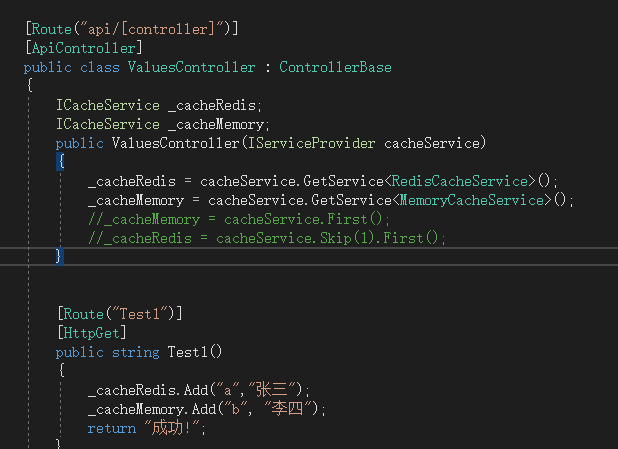
服务调用我使用了IServiceProvider .
调用如下:
五.总结
总算是写了一篇让自己看得懂一些的文章了. 行吧...算是一个小进步吧!
Net core 关于缓存的实现的更多相关文章
- Asp.Net Core 2.0 项目实战(8)Core下缓存操作、序列化操作、JSON操作等Helper集合类
本文目录 1. 前沿 2.CacheHelper基于Microsoft.Extensions.Caching.Memory封装 3.XmlHelper快速操作xml文档 4.Serializatio ...
- 讨论过后而引发对EF 6.x和EF Core查询缓存的思考
前言 最近将RabbitMQ正式封装引入到.NET Core 2.0项目当中,之前从未接触过是个高大上的东东跟着老大学习中,其中收获不少,本打算再看看RabbitMQ有时间写写,回来后和何镇汐大哥探讨 ...
- ASP.NET Core 开发-缓存(Caching)
ASP.NET Core 缓存Caching,.NET Core 中为我们提供了Caching 的组件. 目前Caching 组件提供了三种存储方式. Memory Redis SqlServer 学 ...
- .NET Core 的缓存篇之MemoryCache
前言 对于缓存我们都已经很熟悉了,缓存分为很多种,浏览器缓存.试图缓存.服务器缓存.数据库缓存等等一些,那今天我们先介绍一下视图缓存和MemoryCache内存缓存的概念和用法: 视图缓存 在老的版本 ...
- Asp.Net Core 轻松学-在.Net Core 使用缓存和配置依赖策略
前言 几乎在所有的应用程序中,缓存都是一个永恒的话题,恰当的使用缓存可以有效提高应用程序的性能:在某些业务场景下,使用缓存依赖会有很好的体验:在 Asp.Net Core 中,支持了多种缓存组 ...
- .NET Core MemoryCache缓存获取全部缓存键
在Core中不能使用原HttpRuntime.Cache缓存,改为MemoryCache(Microsoft.Extensions.Caching.Memory). 现MemoryCache新版为2. ...
- .net core响应缓存
按照官网资料操作无效,这里使用https://github.com/speige/AspNetCore.ResponseCaching.Extensions的扩展包 安装AspNetCore.Resp ...
- net core WebApi——缓存神器Redis
目录 前言 Redis 使用 RedisUtil 测试 小结 @ 前言 中秋过完不知不觉都已经快两周没动这个工程了,最近业务需要总算开始搞后台云服务了,果断直接net core搞起,在做的中间遇到了不 ...
- CacheManager Net Core Redis 缓存
using CacheManager.Core; using System; using System.Collections.Generic; using System.Text; namespac ...
随机推荐
- 深入理解Java虚拟机-第1章-走进Java-读书笔记
第 1 章 走近 Java 前言 Java 的技术体系主要是由支撑 Java 程序运行的虚拟机.为各开发领域提供接口支持的 Java API.Java 编程语言及许许多多的第三方 Java 框架(如 ...
- 发布 ASP.NET Core 2.x 应用到 Ubuntu
简单绍一下如何将ASP.NET Core 应用发布到Linux (Ubuntu)服务器上,都是文档的东西. 服务器结构 ASP.NET Core 2.x 有两种server: HTTP.sys 只支持 ...
- JS ES6的变量的结构赋值
变量的结构赋值用户很多 1.交换变量的值 let x = 1; let y = 2; [x,y] = [y,x] 上面的代码交换变量x和变量y的值,这样的写法不仅简洁,易读,语义非常清晰 2.从函数返 ...
- Java集合详解1:ArrayList,Vector与Stack
今天我们来探索一下LinkedList和Queue,以及Stack的源码. 具体代码在我的GitHub中可以找到 https://github.com/h2pl/MyTech 喜欢的话麻烦star一下 ...
- SpringBoot + Spring Security 学习笔记(三)实现图片验证码认证
整体实现逻辑 前端在登录页面时,自动从后台获取最新的验证码图片 服务器接收获取生成验证码请求,生成验证码和对应的图片,图片响应回前端,验证码保存一份到服务器的 session 中 前端用户登录时携带当 ...
- 如何使用git和ssh部署本地代码到服务器
一.首先设置好自己本地的Git用户名和密码: git config --global user.name "your name" git config --global user. ...
- C#复制文件全代码--供参考
private void button1_Click(object sender, EventArgs e) { //创建文件对象 FileInfo fi = null; //实例化打开文件对话框 O ...
- [MySQL] mysql的逻辑分层
mysql逻辑分层:1.client ==>连接层 ==>服务层==>引擎层==>存储层 server2.连接层: 提供与客户端连接的服务3.服务层: 1.提供各种用户使用的接 ...
- vue click事件 v-on:click
v-on:click <!DOCTYPE html> <html lang="en"> <head> <meta charset=&quo ...
- 介绍Dynamics 365的OrgDBOrgSettings工具
摘要: 微软动态CRM专家罗勇 ,回复320或者20190320可方便获取本文,同时可以在第一间得到我发布的最新博文信息,follow me!我的网站是 www.luoyong.me . 有时候会需要 ...