
spring-boo hello world程序
作为一个程序猿,使用了spring好多年,现在有了spring-boot,也想尝尝鲜。
初听spring-boot,觉得很神秘,实际上就是集合了很多组件,再加上一些boot开发的启动和粘合程序。 个人见解,不一定对。
构建过程
使用 Spring Initializr ,我使用idea构建的,在新项目里面有一个Spring Initializr 选项,如图:

设置项目属性,如图:

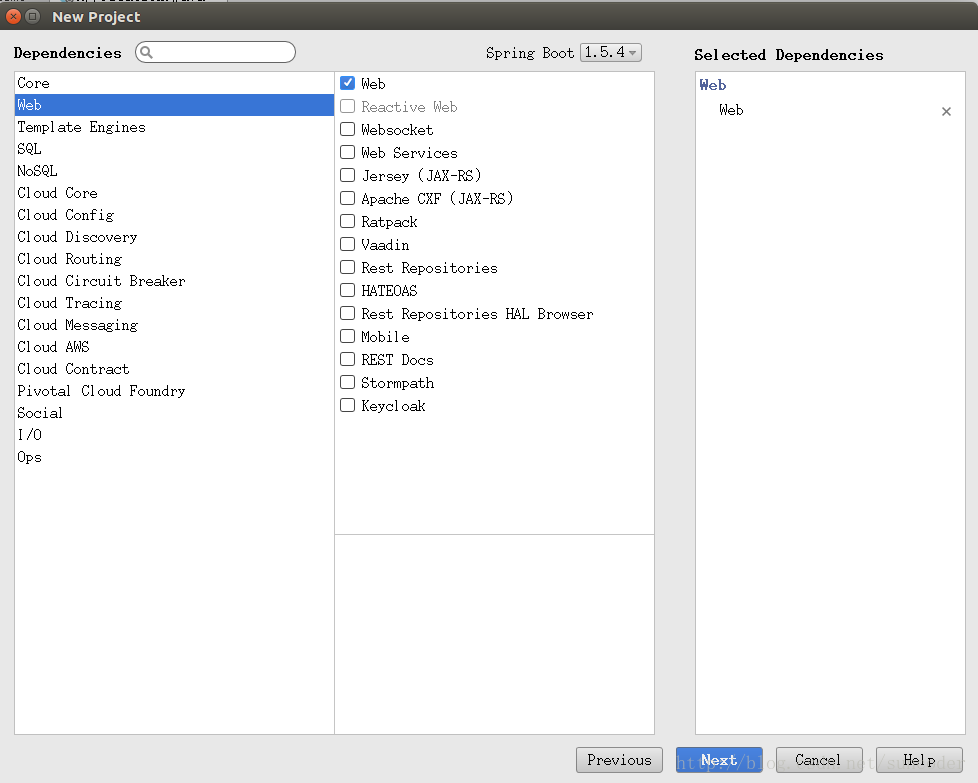
选择spring-boot组件:
设置项目名:

完成就可以了
第一个程序
新建Java程序
package com.sun.boot;

import org.springframework.boot.SpringApplication;

import org.springframework.boot.autoconfigure.EnableAutoConfiguration;

import org.springframework.web.bind.annotation.*;

@RestController

@EnableAutoConfiguration

public class Application {

    @RequestMapping("/helloworld")

    public String home() {

        return "Hello World!";

    }

    public static void main(String[] args) {

        SpringApplication.run(Application.class, args);

    }

}
查看build.gradle文件
buildscript {

    ext {

        springBootVersion = '1.5.4.RELEASE'

    }

    repositories {

        mavenCentral()

    }

    dependencies {

        classpath("org.springframework.boot:spring-boot-gradle-plugin:${springBootVersion}")

    }

}

apply plugin: 'java'

apply plugin: 'eclipse'

apply plugin: 'org.springframework.boot'

version = '0.0.1-SNAPSHOT'

sourceCompatibility = 1.8

repositories {

    mavenCentral()

}

dependencies {

    compile('org.springframework.boot:spring-boot-starter-web')

    runtime('mysql:mysql-connector-java')

    testCompile('org.springframework.boot:spring-boot-starter-test')

}
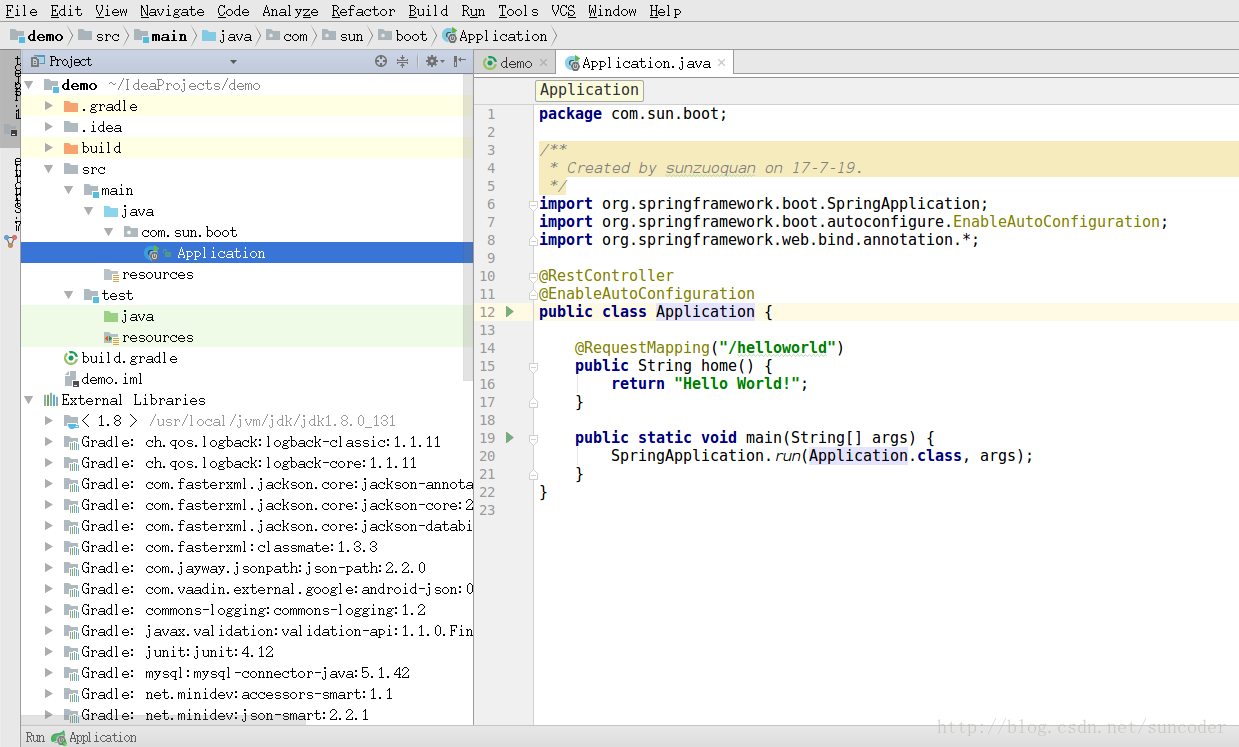
程序结构如下:
运行
运行Application,输出如下:
  .   ____          _            __ _ _

 /\\ / ___'_ __ _ _(_)_ __  __ _ \ \ \ \

( ( )\___ | '_ | '_| | '_ \/ _` | \ \ \ \

 \\/  ___)| |_)| | | | | || (_| |  ) ) ) )

  '  |____| .__|_| |_|_| |_\__, | / / / /

 =========|_|==============|___/=/_/_/_/

 :: Spring Boot ::        (v1.5.4.RELEASE)

2017-07-19 08:22:36.552  INFO 8372 --- [           main] com.sun.boot.Application                 : Starting Application on sunzuoquan-Inspiron-7466 with PID 8372 (/home/sunzuoquan/IdeaProjects/demo/build/classes/java/main started by sunzuoquan in /home/sunzuoquan/IdeaProjects/demo)

2017-07-19 08:22:36.583  INFO 8372 --- [           main] com.sun.boot.Application                 : No active profile set, falling back to default profiles: default

2017-07-19 08:22:37.041  INFO 8372 --- [           main] ationConfigEmbeddedWebApplicationContext : Refreshing org.springframework.boot.context.embedded.AnnotationConfigEmbeddedWebApplicationContext@43bd930a: startup date [Wed Jul 19 08:22:36 CST 2017]; root of context hierarchy

2017-07-19 08:22:42.185  INFO 8372 --- [           main] s.b.c.e.t.TomcatEmbeddedServletContainer : Tomcat initialized with port(s): 8080 (http)

2017-07-19 08:22:42.210  INFO 8372 --- [           main] o.apache.catalina.core.StandardService   : Starting service [Tomcat]

2017-07-19 08:22:42.211  INFO 8372 --- [           main] org.apache.catalina.core.StandardEngine  : Starting Servlet Engine: Apache Tomcat/8.5.15

2017-07-19 08:22:42.747  INFO 8372 --- [ost-startStop-1] o.a.c.c.C.[Tomcat].[localhost].[/]       : Initializing Spring embedded WebApplicationContext

2017-07-19 08:22:42.748  INFO 8372 --- [ost-startStop-1] o.s.web.context.ContextLoader            : Root WebApplicationContext: initialization completed in 5760 ms

2017-07-19 08:22:42.877  INFO 8372 --- [ost-startStop-1] o.s.b.w.servlet.ServletRegistrationBean  : Mapping servlet: 'dispatcherServlet' to [/]

2017-07-19 08:22:42.880  INFO 8372 --- [ost-startStop-1] o.s.b.w.servlet.FilterRegistrationBean   : Mapping filter: 'characterEncodingFilter' to: [/*]

2017-07-19 08:22:42.880  INFO 8372 --- [ost-startStop-1] o.s.b.w.servlet.FilterRegistrationBean   : Mapping filter: 'hiddenHttpMethodFilter' to: [/*]

2017-07-19 08:22:42.880  INFO 8372 --- [ost-startStop-1] o.s.b.w.servlet.FilterRegistrationBean   : Mapping filter: 'httpPutFormContentFilter' to: [/*]

2017-07-19 08:22:42.881  INFO 8372 --- [ost-startStop-1] o.s.b.w.servlet.FilterRegistrationBean   : Mapping filter: 'requestContextFilter' to: [/*]

2017-07-19 08:22:43.338  INFO 8372 --- [           main] s.w.s.m.m.a.RequestMappingHandlerAdapter : Looking for @ControllerAdvice: org.springframework.boot.context.embedded.AnnotationConfigEmbeddedWebApplicationContext@43bd930a: startup date [Wed Jul 19 08:22:36 CST 2017]; root of context hierarchy

2017-07-19 08:22:43.401  INFO 8372 --- [           main] s.w.s.m.m.a.RequestMappingHandlerMapping : Mapped "{[/helloworld]}" onto public java.lang.String com.sun.boot.Application.home()

2017-07-19 08:22:43.405  INFO 8372 --- [           main] s.w.s.m.m.a.RequestMappingHandlerMapping : Mapped "{[/error],produces=[text/html]}" onto public org.springframework.web.servlet.ModelAndView org.springframework.boot.autoconfigure.web.BasicErrorController.errorHtml(javax.servlet.http.HttpServletRequest,javax.servlet.http.HttpServletResponse)

2017-07-19 08:22:43.405  INFO 8372 --- [           main] s.w.s.m.m.a.RequestMappingHandlerMapping : Mapped "{[/error]}" onto public org.springframework.http.ResponseEntity<java.util.Map<java.lang.String, java.lang.Object>> org.springframework.boot.autoconfigure.web.BasicErrorController.error(javax.servlet.http.HttpServletRequest)

2017-07-19 08:22:43.421  INFO 8372 --- [           main] o.s.w.s.handler.SimpleUrlHandlerMapping  : Mapped URL path [/webjars/**] onto handler of type [class org.springframework.web.servlet.resource.ResourceHttpRequestHandler]

2017-07-19 08:22:43.421  INFO 8372 --- [           main] o.s.w.s.handler.SimpleUrlHandlerMapping  : Mapped URL path [/**] onto handler of type [class org.springframework.web.servlet.resource.ResourceHttpRequestHandler]

2017-07-19 08:22:43.440  INFO 8372 --- [           main] o.s.w.s.handler.SimpleUrlHandlerMapping  : Mapped URL path [/**/favicon.ico] onto handler of type [class org.springframework.web.servlet.resource.ResourceHttpRequestHandler]

2017-07-19 08:22:43.634  INFO 8372 --- [           main] o.s.j.e.a.AnnotationMBeanExporter        : Registering beans for JMX exposure on startup

2017-07-19 08:22:44.043  INFO 8372 --- [           main] s.b.c.e.t.TomcatEmbeddedServletContainer : Tomcat started on port(s): 8080 (http)

2017-07-19 08:22:44.065  INFO 8372 --- [           main] com.sun.boot.Application                 : Started Application in 9.217 seconds (JVM running for 15.872)
从日志可以看出,Tomcat started on port(s): 8080,spring-boot内部启动了tomcat,监听8080端口。
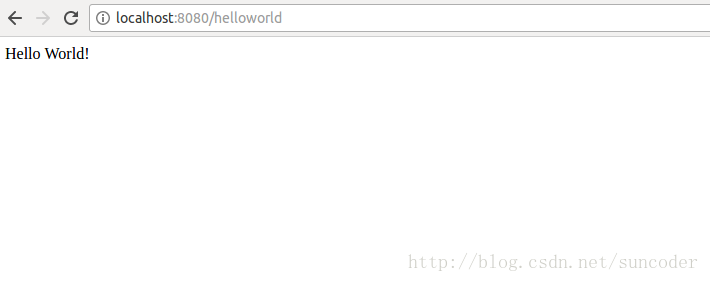
打开浏览器,访问:http://localhost:8080/helloworld
浏览器输出如下:
spring-boo hello world程序的更多相关文章
- 借助Maven入手Spring Boot第一个程序
目前网上有不少Spring Boot的入门文章,都很有帮助,本人最近在深入学习Spring Cloud,在搭建第一个Hello World程序时,感觉对于新手而言,介绍文章怎么详细都不为过,因为其中坑 ...
- .NET CORE与Spring Boot编写控制台程序应有的优雅姿势
本文分别说明.NET CORE与Spring Boot 编写控制台程序应有的“正确”方法,以便.NET程序员.JAVA程序员可以相互学习与加深了解,注意本文只介绍用法,不会刻意强调哪种语言或哪种框架写 ...
- 04 Spring:01.Spring框架简介&&02.程序间耦合&&03.Spring的 IOC 和 DI&&08.面向切面编程 AOP&&10.Spring中事务控制
spring共四天 第一天:spring框架的概述以及spring中基于XML的IOC配置 第二天:spring中基于注解的IOC和ioc的案例 第三天:spring中的aop和基于XML以及注解的A ...
- Spring的第一个程序
目录 一.Spring概述 1. Spring是什么? 2. IOC控制反转 二.Spring的第一个程序 1. 创建Maven项目 2. 加入maven依赖pom.xml 3. 定义接口和实体类 4 ...
- Spring的入门的程序
1 下载Spring的开发包: spring-framework-3.2.0.RELEASE-dist.zip ---Spring开发包 docs :spring框架api和规范 libs :spri ...
- spring+ibatis问题1—— 程序报错:java.sql.SQLException: Io 异常: Connection reset by peer, socket write error; ”或“java.sql.SQLException 关闭的连接”异常
转自:http://blog.sina.com.cn/s/blog_1549fb0710102whz2.html spring+ibatis程序测试时报错:java.sql.SQLException: ...
- Spring Cloud的应用程序—上下文服务
Spring Boot对于如何使用Spring构建应用程序有一个看法:例如它具有常规配置文件的常规位置,以及用于常见管理和监视任务的端点.Spring Cloud建立在此之上,并添加了一些可能系统中所 ...
- Spring框架第一篇之Spring的第一个程序
一.下载Spring的jar包 通过http://repo.spring.io/release/org/springframework/spring/地址下载最新的Spring的zip包,当然,如果你 ...
- Spring---基于Spring IOC的小程序
实现的功能以及各文件间的关系 IHelloMessage:一个接口,用于定义输出问候信息. HelloWorld.HelloChina:接口的实现类.在这里表示人在不同的地方 Person:一个人物类 ...
- Spring Security认证提供程序
1.简介 本教程将介绍如何在Spring Security中设置身份验证提供程序,与使用简单UserDetailsService的标准方案相比,提供了额外的灵活性. 2. The Authentica ...
随机推荐
- php连接memcahed出现Cannot assign requested address (99)的解决方法
今天在将服务器合并后,发现php偶尔会报出 Server *.*.*.* (tcp *****) failed with: Cannot assign requested address (99) 的 ...
- PID算法
所谓PID就是比例-积分-微分的英文缩写,但并不是必须同时具备这三种算法,也可以是 PD, PI,甚至只有 P算法控制,下面分别介绍每个参数的含义:首先需要明确一个事实就是,要实现PID算法,必须在硬 ...
- centos7创建新用户
创建新用户 创建一个叫xiaoming的用户: [root@192 ~]# adduser xiaoming 为这个用户初始化密码,linux会判断密码复杂度,不过可以强行忽略: [root@192 ...
- java里程碑之泛型--泛型基本语法
1,java7提供的泛型菱形语法 在java7之前,如果使用带泛型的接口和类定义变量初始化对象的时候,构造器后面也必须带上泛型,这有点恶心的.以前我在公司一直使用的java6,所以我也已经习惯了这种写 ...
- shell参数传递
应用实例: #!/bin/bash #运行:bash para_tran.bash text1.txt text2.txt #"set $1"设置存储传入的第一参数 #" ...
- 渗透测试,form对象类型转换,简单demo
最近公司的项目在进行国家某行业的安全检测,涉及到项目安全渗透等方面的问题: 参与项目的渗透等改造,是一个机遇与挑战,今后对与项目安全等方面会思考更多: 下面说说form表单对象提交,为了防止抓包,后台 ...
- div仿td标签属性
链接:https://pan.baidu.com/s/1kW1At9d 密码:g0he 这里说的div是指固定大小的,动态往里面填充文字的时候,文字一直水平垂直居中(换行也是).就和td标签一样.当然 ...
- Cypher查询语言--Neo4j之聚合函数(五)
目录 聚合Aggregation 计数 计算节点数 分组计算关系类型 计算实体数 计算非空可以值数 求和sum 平均值avg 最大值max 最小值min 聚类COLLECT 相异DISTINCT 聚合 ...
- ASP.NET MVC 播放远程服务器上的MP3文件
问题: 做需求遇到需要播放远程服务器上的MP3音频,使用FTP去获取文件.但是一般都是在页面 <audio> 的src 中直接写文件地址来播放音频.实在不想做临时文件,折腾了半天终于可以通 ...
- 700名黑客无法攻破Trillium安全防护软件 欲以网络安全险获利
盖世汽车讯 据外媒报道,在2017 DEF CON黑客大会上,黑客们受邀入侵Car Hacking Village会场内的各类自动驾驶车辆.物联网网络安全公司--Trillium Incorporat ...