
ssm框架之将数据库的数据导入导出为excel文件
在这里首先我要将自己遇到的各种问题,以及需求记录下来,做一个备忘,便于以后查看:
需求:主要实现两个功能,将oracle数据库里的数据导出为excel,同时需要将excel表格的数据导入到数据库
环境:springmvc + spring + mybatis + jdk1.7 + poi3.8 + easyui + oracle
在开始的时候,我就各种找jar包搭建环境,搭建环境时候所有的jar包都没有,只能去各种找,去下载,话不多说,直接上jar包,
然后就是各种配置文件,将配置文件现在直接贴出来:
《 applicationContext-dao.xml 》:
<?xml version="1.0" encoding="UTF-8"?>
<beans xmlns="http://www.springframework.org/schema/beans"
xmlns:context="http://www.springframework.org/schema/context" xmlns:p="http://www.springframework.org/schema/p"
xmlns:aop="http://www.springframework.org/schema/aop" xmlns:tx="http://www.springframework.org/schema/tx"
xmlns:xsi="http://www.w3.org/2001/XMLSchema-instance"
xsi:schemaLocation="http://www.springframework.org/schema/beans http://www.springframework.org/schema/beans/spring-beans-4.2.xsd
http://www.springframework.org/schema/context http://www.springframework.org/schema/context/spring-context-4.2.xsd
http://www.springframework.org/schema/aop http://www.springframework.org/schema/aop/spring-aop-4.2.xsd http://www.springframework.org/schema/tx http://www.springframework.org/schema/tx/spring-tx-4.2.xsd
http://www.springframework.org/schema/util http://www.springframework.org/schema/util/spring-util-4.2.xsd">
<!-- 加载配置文件 -->
<context:property-placeholder location="classpath:db.properties" />
<!-- 数据库连接池 -->
<bean id="dataSource" class="com.alibaba.druid.pool.DruidDataSource">
<!-- 驱动 -->
<property name="driverClassName" value="${jdbc.driver}" />
<!-- url -->
<property name="url" value="${jdbc.url}" />
<!-- 用户名 -->
<property name="username" value="${jdbc.username}" />
<!-- 密码 -->
<property name="password" value="${jdbc.password}" />
</bean>
<!-- mapper配置 -->
<!-- 让spring管理sqlsessionfactory 使用mybatis和spring整合包中的 -->
<bean id="sqlSessionFactory" class="org.mybatis.spring.SqlSessionFactoryBean">
<!-- 数据库连接池 -->
<property name="dataSource" ref="dataSource" />
<property name="typeAliasesPackage" value="com.sword.dataprocess.pojo"></property>
</bean>
<!-- 配置Mapper扫描器 -->
<bean class="org.mybatis.spring.mapper.MapperScannerConfigurer">
<property name="basePackage" value="com.sword.dataprocess.mapper"/>
</bean>
</beans>
《 applicationContext-service.xml 》:
<?xml version="1.0" encoding="UTF-8"?>
<beans xmlns="http://www.springframework.org/schema/beans"
xmlns:context="http://www.springframework.org/schema/context" xmlns:p="http://www.springframework.org/schema/p"
xmlns:aop="http://www.springframework.org/schema/aop" xmlns:tx="http://www.springframework.org/schema/tx"
xmlns:xsi="http://www.w3.org/2001/XMLSchema-instance"
xsi:schemaLocation="http://www.springframework.org/schema/beans http://www.springframework.org/schema/beans/spring-beans-4.2.xsd
http://www.springframework.org/schema/context http://www.springframework.org/schema/context/spring-context-4.2.xsd
http://www.springframework.org/schema/aop http://www.springframework.org/schema/aop/spring-aop-4.2.xsd http://www.springframework.org/schema/tx http://www.springframework.org/schema/tx/spring-tx-4.2.xsd
http://www.springframework.org/schema/util http://www.springframework.org/schema/util/spring-util-4.2.xsd">
<context:component-scan base-package="com.sword.dataprocess.service"/>
<!-- 事务管理器 -->
<bean id="transactionManager"
class="org.springframework.jdbc.datasource.DataSourceTransactionManager">
<!-- 数据源 -->
<property name="dataSource" ref="dataSource" />
</bean>
<!-- 通知 -->
<tx:advice id="txAdvice" transaction-manager="transactionManager">
<tx:attributes>
<!-- 传播行为 -->
<tx:method name="save*" propagation="REQUIRED" />
<tx:method name="insert*" propagation="REQUIRED" />
<tx:method name="delete*" propagation="REQUIRED" />
<tx:method name="update*" propagation="REQUIRED" />
<tx:method name="find*" propagation="SUPPORTS" read-only="true" />
<tx:method name="get*" propagation="SUPPORTS" read-only="true" />
</tx:attributes>
</tx:advice>
<!-- 切面 -->
<aop:config>
<aop:advisor advice-ref="txAdvice"
pointcut="execution(* com.sword.dataprocess.service*.*.*(..))" />
</aop:config>
</beans>
数据库的连接信息:
《 db.properties 》:
jdbc.dbType=oracle
jdbc.driver=oracle.jdbc.driver.OracleDriver
jdbc.url=jdbc:oracle:thin:@远程的连接ip:orcl
jdbc.username=xxx
jdbc.password=xxx
日志文件:
《log4j.properties 》: 这里不再贴出
springmvc的xml
《springmvc.xml》:
<beans xmlns="http://www.springframework.org/schema/beans"
xmlns:xsi="http://www.w3.org/2001/XMLSchema-instance" xmlns:mvc="http://www.springframework.org/schema/mvc"
xmlns:context="http://www.springframework.org/schema/context"
xmlns:aop="http://www.springframework.org/schema/aop" xmlns:tx="http://www.springframework.org/schema/tx"
xmlns:task="http://www.springframework.org/schema/task"
xsi:schemaLocation="http://www.springframework.org/schema/beans
http://www.springframework.org/schema/beans/spring-beans-4.2.xsd
http://www.springframework.org/schema/mvc
http://www.springframework.org/schema/mvc/spring-mvc-4.2.xsd
http://www.springframework.org/schema/context
http://www.springframework.org/schema/context/spring-context-4.2.xsd
http://www.springframework.org/schema/aop
http://www.springframework.org/schema/aop/spring-aop-4.2.xsd
http://www.springframework.org/schema/tx
http://www.springframework.org/schema/tx/spring-tx-4.2.xsd
http://www.springframework.org/schema/task
http://www.springframework.org/schema/task/spring-task-4.2.xsd">
<!-- 加载属性文件 -->
<!-- <context:property-placeholder location="classpath:resource.properties"/> -->
<!-- 配置扫描 器 -->
<context:component-scan base-package="com.sword.dataprocess.controller" />
<!-- 配置处理器映射器 适配器 -->
<mvc:annotation-driven />
<!-- 配置不拦截静态文件 -->
<mvc:resources location="/css/" mapping="/css/**" />
<mvc:resources location="/js/" mapping="/js/**" />
<mvc:resources location="/plugins/" mapping="/plugins/**" />
<!-- 配置视图解释器 jsp -->
<bean id="jspViewResolver"
class="org.springframework.web.servlet.view.InternalResourceViewResolver">
<property name="prefix" value="/WEB-INF/jsp/" />
<property name="suffix" value=".jsp" />
</bean>
<!-- 配置文件解析器 上传文件 -->
<bean id="multipartResolver"
class="org.springframework.web.multipart.commons.CommonsMultipartResolver">
<property name="defaultEncoding" value="UTF-8"/>
<!-- 设置上传文件的最大尺寸为5MB -->
<property name="maxUploadSize">
<value>5242880</value>
</property>
</bean>
</beans>
最后最重要的就是web.xml :
《web.xml 》:
<?xml version="1.0" encoding="UTF-8"?>
<web-app xmlns:xsi="http://www.w3.org/2001/XMLSchema-instance" xmlns="http://java.sun.com/xml/ns/javaee" xsi:schemaLocation="http://java.sun.com/xml/ns/javaee http://java.sun.com/xml/ns/javaee/web-app_2_5.xsd" id="WebApp_ID" version="2.5">
<display-name>DataProcess</display-name>
<welcome-file-list>
<welcome-file>index.html</welcome-file>
<welcome-file>index.htm</welcome-file>
<welcome-file>index.jsp</welcome-file>
<welcome-file>default.html</welcome-file>
<welcome-file>default.htm</welcome-file>
<welcome-file>default.jsp</welcome-file>
</welcome-file-list>
<!-- 配置监听器 -->
<listener>
<listener-class>org.springframework.web.context.ContextLoaderListener</listener-class>
</listener>
<context-param>
<param-name>contextConfigLocation</param-name>
<param-value>classpath:applicationContext-*.xml</param-value>
</context-param>
<!-- 配置servlet -->
<servlet>
<servlet-name>springmvc</servlet-name>
<servlet-class>org.springframework.web.servlet.DispatcherServlet</servlet-class>
<init-param>
<param-name>contextConfigLocation</param-name>
<param-value>classpath:springmvc.xml</param-value>
</init-param>
</servlet>
<servlet-mapping>
<servlet-name>springmvc</servlet-name>
<url-pattern>/</url-pattern>
</servlet-mapping>
</web-app>
前端主要使用的是easyui里面的datagried :大致页面如下:
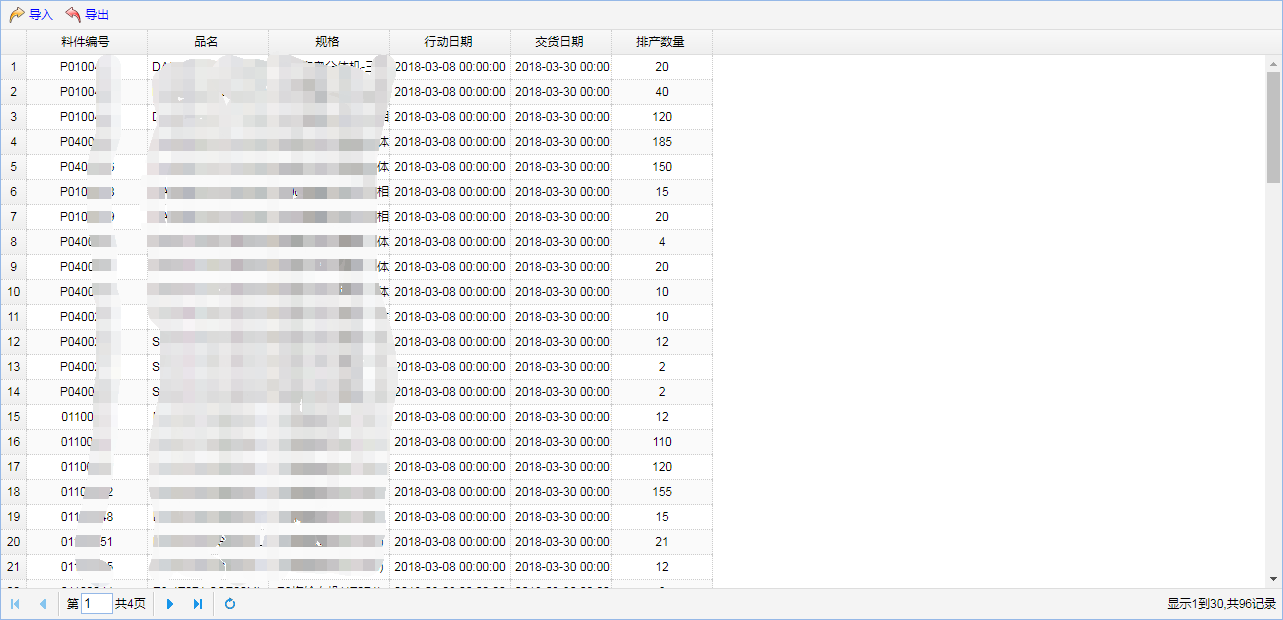
然后就是把jsp页面的代码贴出来:
《index.jsp》:
<%@ page language="java" contentType="text/html; charset=UTF-8"
pageEncoding="UTF-8"%>
<!DOCTYPE html PUBLIC "-//W3C//DTD HTML 4.01 Transitional//EN" "http://www.w3.org/TR/html4/loose.dtd">
<html>
<head>
<meta http-equiv="Content-Type" content="text/html; charset=UTF-8">
<title>MRP导入导出</title>
<!-- 导入jquery核心类库 -->
<script type="text/javascript" src="${pageContext.request.contextPath}/js/jquery-1.8.3.js"></script>
<!-- 导入easyui类库 -->
<link rel="stylesheet" type="text/css" href="${pageContext.request.contextPath}/js/easyui/themes/default/easyui.css">
<link rel="stylesheet" type="text/css" href="${pageContext.request.contextPath}/js/easyui/themes/icon.css">
<link rel="stylesheet" type="text/css" href="${pageContext.request.contextPath}/js/easyui/ext/portal.css">
<link rel="stylesheet" type="text/css" href="${pageContext.request.contextPath}/css/default.css">
<script type="text/javascript" src="${pageContext.request.contextPath}/js/easyui/jquery.easyui.min.js"></script>
<script type="text/javascript" src="${pageContext.request.contextPath}/js/easyui/ext/jquery.portal.js"></script>
<script type="text/javascript" src="${pageContext.request.contextPath}/js/easyui/ext/jquery.cookie.js"></script>
<script src="${pageContext.request.contextPath}/js/easyui/locale/easyui-lang-zh_CN.js" type="text/javascript"></script>
<script src="${pageContext.request.contextPath}/js/jquery.serializejson.min.js" type="text/javascript"></script>
<script src="${pageContext.request.contextPath}/js/jquery.ocupload-1.1.2.js" type="text/javascript"></script>
<script type="text/javascript">
function doExport() {
location.href="${pageContext.request.contextPath}/export";
}
function doImport() {
$("#button-import").upload({
name:'myFile',
action:'${pageContext.request.contextPath}/import"',
onComplete:function(data){
alert(data);
if(data == "success"){
$.messager.alert('友情提示','恭喜你,导入成功');
}
if(data == "error"){
$.messager.alert('友情提示','导入失败,请按正确的模板数据导入!');
}
$('#grid').datagrid('load');
}
});
}
//工具栏
var toolbar = [{
id : 'button-import',
text : '导入',
iconCls : 'icon-redo',
handler : doImport
}, {
id : 'button-export',
text : '导出',
iconCls : 'icon-undo',
handler : doExport
} ];
// 定义列
var columns = [ [ {
field : 'p_id',
title : '料件编号',
width : 120,
align : 'center',
}, {
field : 'p_name',
title : '品名',
width : 120,
align : 'center',
}, {
field : 'p_guige',
title : '规格',
width : 120,
align : 'center',
}, {
field : 'p_xdata',
title : '行动日期',
width : 120,
align : 'center'
}, {
field : 'p_jdate',
title : '交货日期',
width : 100,
align : 'center'
}, {
field : 'p_descCount',
title : '排产数量',
width : 100,
align : 'center'
} ] ];
$(function() {
/* daoru fenqu */
// 先将body隐藏,再显示,不会出现页面刷新效果
$("body").css({
visibility : "visible"
});
// 管理数据表格
$('#grid').datagrid({
iconCls : 'icon-forward',
fit : true,
border : true,
rownumbers : true,
striped : true,
pageList : [ 30, 50, 100 ],
pagination : true,
toolbar : toolbar,
url : "${pageContext.request.contextPath}/show",
idField : 'p_id',
columns : columns,
});
var pager = $('#grid').datagrid('getPager'); // get the pager of datagrid
pager.pagination({
showPageList:false,
});
});
</script>
</head>
<body class="easyui-layout" style="visibility: hidden;">
<div region="center" border="false">
<table id="grid"></table>
</div>
</body>
</html>
接下来就是代码的实现:
《controller层》:
import java.io.File;
import java.io.FileInputStream;
import java.util.List;
import java.util.Map;
import javax.servlet.ServletOutputStream;
import javax.servlet.http.HttpServletRequest;
import javax.servlet.http.HttpServletResponse;
import org.apache.commons.fileupload.disk.DiskFileItem;
import org.springframework.beans.factory.annotation.Autowired;
import org.springframework.stereotype.Controller;
import org.springframework.ui.Model;
import org.springframework.web.bind.annotation.RequestMapping;
import org.springframework.web.bind.annotation.ResponseBody;
import org.springframework.web.context.request.RequestContextHolder;
import org.springframework.web.context.request.ServletRequestAttributes;
import org.springframework.web.multipart.MultipartFile;
import org.springframework.web.multipart.MultipartHttpServletRequest;
import org.springframework.web.multipart.commons.CommonsMultipartFile;
import com.sword.dataprocess.pojo.DataProcess;
import com.sword.dataprocess.service.DataService;
import com.sword.dataprocess.utils.FileUtils;
@Controller
public class DataController {
@Autowired
private DataService dataService;
@RequestMapping(value={"/index","/index.html","/index.htm"})
public String index(){
return "index";
}
@RequestMapping("/show")
@ResponseBody
public List<DataProcess> show(Model model){
List<DataProcess> list = dataService.findAll();
model.addAttribute("list", list);
return list;
}
// 文件导出
@RequestMapping("/export")
public void exportXls(HttpServletRequest request,HttpServletResponse response) throws Exception{
// 一个流
// 两个头
// 下载文件的mime类型
response.setContentType("application/vnd.ms-excel"); // 常见的文件 可以省略
// 文件的打开方式 inline在线打开 attachment
String agent = request.getHeader("User-Agent");
String filename = FileUtils.encodeDownloadFilename("data.xlsx", agent);
response.setHeader("content-disposition", "attachment;fileName="+filename);
ServletOutputStream outputStream = response.getOutputStream();
// 获取模板 在当前项目
ServletRequestAttributes attributes = (ServletRequestAttributes) RequestContextHolder.currentRequestAttributes();
String templatePath = request.getServletContext().getRealPath(File.separator)+"temp"+File.separator+"data.xlsx";
System.out.println(templatePath);
FileInputStream fileInputStream = new FileInputStream(templatePath);
dataService.exportAls(fileInputStream, outputStream);
}
// 文件导入
//接收页面传来的文件
@RequestMapping("/import")
@ResponseBody
public String importXlsx(HttpServletRequest request){
System.out.println(111);
MultipartHttpServletRequest multipartRequest = (MultipartHttpServletRequest) request;
MultipartFile myFile = multipartRequest.getFile("myFile"); // 通过参数名获取指定文件 文件本身 变量名和文件上传时的名称保持一致
String myFileFileName = myFile.getOriginalFilename();//文件的名字
String myFileContentType = myFile.getContentType(); //文件的mime类型
CommonsMultipartFile cf= (CommonsMultipartFile)myFile;
DiskFileItem fi = (DiskFileItem)cf.getFileItem();
File f = fi.getStoreLocation();
String msg = null;
Boolean flag = dataService.importXls(f,myFileContentType);
if(flag){
msg = "success";
}else{
msg = "error";
}
return msg;
}
}
《service层》:
import java.io.File;
import java.io.FileInputStream;
import java.io.IOException;
import java.text.SimpleDateFormat;
import java.util.Date;
import java.util.List;
import javax.servlet.ServletOutputStream;
import org.apache.commons.lang3.StringUtils;
import org.apache.poi.hssf.usermodel.HSSFRow;
import org.apache.poi.hssf.usermodel.HSSFSheet;
import org.apache.poi.hssf.usermodel.HSSFWorkbook;
import org.apache.poi.xssf.usermodel.XSSFCell;
import org.apache.poi.xssf.usermodel.XSSFRow;
import org.apache.poi.xssf.usermodel.XSSFSheet;
import org.apache.poi.xssf.usermodel.XSSFWorkbook;
import org.springframework.beans.factory.annotation.Autowired;
import org.springframework.stereotype.Service;
import com.sword.dataprocess.mapper.DataMapper;
import com.sword.dataprocess.pojo.DataProcess;
import com.sword.dataprocess.service.DataService;
@Service
public class DataServiceImpl implements DataService{
@Autowired
private DataMapper dataMapper;
@Override
public int dataCount() {
return dataMapper.dataCount();
}
@Override
public void exportAls(FileInputStream fileInputStream, ServletOutputStream outputStream) {
// Workbook工作簿
XSSFWorkbook book = null;
try {
book = new XSSFWorkbook(fileInputStream);
} catch (IOException e) {
e.printStackTrace();
}
// 工作表 sheet
XSSFSheet sheet = book.getSheetAt(0);
// 获取第二个sheet中的第一行第一列的样式 及边框
// XSSFCellStyle cellStyle = book.getSheetAt(1).getRow(0).getCell(0).getCellStyle();
List<DataProcess> list = dataMapper.findAll();
System.out.println(list.size());
int rowIndex = 1; // 让表格从第二行开始导入
XSSFCell cell = null;
for (DataProcess dataProcess : list) {
// 新建一行
XSSFRow row = sheet.createRow(rowIndex);
cell = row.createCell(0); // 第一个单元格
// 设定已经准备好单元格的样式
// cell.setCellStyle(cellStyle);
String id = dataProcess.getP_id();
if(id != null){
cell.setCellValue(id);
}
cell = row.createCell(1); // 第一个单元格
String name = dataProcess.getP_name();
if(name != null){
cell.setCellValue(name);
}
cell = row.createCell(2); // 第二个单元格
String guige = dataProcess.getP_guige();
if(guige != null){
cell.setCellValue(guige);
}
cell = row.createCell(3); // 第三个单元格
String xdata = dataProcess.getP_xdata();
if(xdata != null){
cell.setCellValue(xdata);
}
cell = row.createCell(4); // 第四个单元格
String jdate = dataProcess.getP_jdate();
if(jdate != null){
cell.setCellValue(jdate);
}
/*cell = row.createCell(5); // 第五个单元格
Integer sourceCount = dataProcess.getP_sourceCount();
if(sourceCount != null){
cell.setCellValue(sourceCount);
}*/
cell = row.createCell(6); // 第六个单元格
Integer descCount = dataProcess.getP_descCount();
if (descCount != null) {
cell.setCellValue(descCount);
}
rowIndex++;
}
// 把工作簿放在输出流中
try {
book.write(outputStream);
} catch (IOException e) {
e.printStackTrace();
}
}
// 导入数据
@Override
public Boolean importXls(File myFile, String myFileContentType) {
if ("application/vnd.ms-excel".equals(myFileContentType)) {
System.out.println(123);
try {
// 获取workbook工作簿
HSSFWorkbook hssfWorkbook = new HSSFWorkbook(new FileInputStream(myFile));
// 获取sheet 工作表
HSSFSheet sheet = hssfWorkbook.getSheetAt(0);
// 获取工作表的最后一行索引
int lastRowNum = sheet.getLastRowNum();
for (int i = 1; i <= lastRowNum; i++) {
DataProcess dataProcess = new DataProcess();
HSSFRow row = sheet.getRow(i);
// 料件编号 特征码(8个0)行动日期 交货日期 排产数量 版本号(一次导入只用设置一个相同的值就行) 已执行步骤为0
// 料件编号
String p_id = row.getCell(0).getStringCellValue();
dataProcess.setP_id(p_id);
// 行动日期
String p_xdata = row.getCell(3).getStringCellValue();
dataProcess.setP_xdata(p_xdata);;
// 交货日期
String p_jdate = row.getCell(4).getStringCellValue();
dataProcess.setP_jdate(p_jdate);
/*// 需求数量
Integer p_sourceCount = (int) row.getCell(5).getNumericCellValue();
dataProcess.setP_sourceCount(p_sourceCount);*/
// 排产数量
Integer p_descCount = (int) row.getCell(5).getNumericCellValue();
dataProcess.setP_descCount(p_descCount);
// 版本号(一次导入只用设置一个相同的值就行)
SimpleDateFormat tempDate = new SimpleDateFormat("yyyy-MM-dd");
String datetime = tempDate.format(new Date());
String p_version = "MRPVERNO"+datetime;
dataProcess.setP_version(p_version);
// 向tc_aau_file表插入数据
dataMapper.insertdata(dataProcess);
// 向tc_aat_file表插入数据
if(i==lastRowNum){
dataMapper.insertToAAT(p_version);
}
}
} catch (Exception e) {
e.printStackTrace();
return false;
}
} else if ("application/vnd.openxmlformats-officedocument.spreadsheetml.sheet".equals(myFileContentType)) {
try {
// 获取workbook工作簿
XSSFWorkbook xssfWorkbook = new XSSFWorkbook(new FileInputStream(myFile));
// 获取sheet 工作表
XSSFSheet sheet = xssfWorkbook.getSheetAt(0);
// 获取工作表的最后一行索引
int lastRowNum = sheet.getLastRowNum();
for (int i = 1; i <= lastRowNum; i++) {
DataProcess dataProcess = new DataProcess();
XSSFRow row = sheet.getRow(i);
// 料件编号 特征码(8个0)行动日期 交货日期 排产数量 版本号(一次导入只用设置一个相同的值就行) 已执行步骤为0
// 料件编号
String p_id = row.getCell(0).getStringCellValue();
dataProcess.setP_id(p_id);
// 行动日期
String p_xdata = row.getCell(3).getStringCellValue();
dataProcess.setP_xdata(p_xdata);
// 交货日期
String p_jdate = row.getCell(4).getStringCellValue();
dataProcess.setP_jdate(p_jdate);
/*// 需求数量
Integer p_sourceCount = (int) row.getCell(5).getNumericCellValue();
dataProcess.setP_sourceCount(p_sourceCount);*/
// 排产数量
Integer p_descCount = (int) row.getCell(5).getNumericCellValue();
dataProcess.setP_descCount(p_descCount);
// 版本号(一次导入只用设置一个相同的值就行)
SimpleDateFormat tempDate = new SimpleDateFormat("yyyy-MM-dd");
String datetime = tempDate.format(new Date());
String p_version = "MRPVERNO"+datetime;
dataProcess.setP_version(p_version);
// 向tc_aau_file表插入数据
dataMapper.insertdata(dataProcess);
// 向tc_aat_file表插入数据
if(i==lastRowNum){
dataMapper.insertToAAT(p_version);
}
}
}catch (Exception e) {
e.printStackTrace();
return false;
}
} // elseif 结束
return true;
}
// 查询所有数据
@Override
public List<DataProcess> findAll() {
List<DataProcess> result = dataMapper.findAll();
return result;
}
}
《mapper 层》:
import java.util.List;
import org.apache.ibatis.annotations.Param;
import com.sword.dataprocess.pojo.DataProcess;
public interface DataMapper {
public int dataCount();
public List<DataProcess> findAll();
public void insertdata(@Param("dataProcess")DataProcess dataProcess);
public void insertToAAT(@Param("p_version")String p_version);
}
《对应的xml:》:
<?xml version="1.0" encoding="UTF-8" ?>
<!DOCTYPE mapper PUBLIC "-//mybatis.org//DTD Mapper 3.0//EN" "http://mybatis.org/dtd/mybatis-3-mapper.dtd" >
<mapper namespace="com.sword.dataprocess.mapper.DataMapper" >
<select id="dataCount" resultType="int">
select count(1) from tc_aau_file
</select>
<resultMap type="dataProcess" id="datdProcessMap">
<id column="tc_aau01" property="p_id"/>
<result column="IMA02" property="p_guige"/>
<result column="ima021" property="p_name"/>
<result column="TC_AAU06" property="p_xdata"/>
<result column="TC_AAU07" property="p_jdate"/>
<result column="TC_AAU09" property="p_descCount"/>
</resultMap>
<select id="findAll" resultMap="datdProcessMap">
select t.TC_AAU01 ,
i.IMA02 ,
i.ima021 ,
t.TC_AAU06 ,
t.TC_AAU07 ,
t.TC_AAU09
from SWORD.IMA_FILE i, SWORD.TC_AAU_FILE t where i.ima01 = t.tc_aau01
</select>
<insert id="insertdata" parameterType="dataProcess">
INSERT INTO SWORD.TC_AAU_FILE ("TC_AAU01", "TC_AAU03", "TC_AAU06", "TC_AAU07", "TC_AAU09", "TC_AAU13", "TC_AAU14") VALUES (#{dataProcess.p_id}, '00000000', TO_DATE(#{dataProcess.p_xdata}, 'SYYYY-MM-DD HH24:MI:SS'), TO_DATE(#{dataProcess.p_jdate}, 'SYYYY-MM-DD HH24:MI:SS'),#{dataProcess.p_descCount}, #{dataProcess.p_version}, '0')
</insert>
<insert id="insertToAAT" parameterType="string">
INSERT INTO SWORD.TC_AAT_FILE ("TC_AAT01") VALUES (#{p_version})
</insert>
</mapper>
用到了一个工具类(fileutils):
package com.sword.dataprocess.utils;
import java.io.IOException;
import java.net.URLEncoder;
import sun.misc.BASE64Encoder;
public class FileUtils {
/**
* 下载文件时,针对不同浏览器,进行附件名的编码
*
* @param filename
* 下载文件名
* @param agent
* 客户端浏览器
* @return 编码后的下载附件名
* @throws IOException
*/
public static String encodeDownloadFilename(String filename, String agent)
throws IOException {
if (agent.contains("Firefox")) { // 火狐浏览器
filename = "=?UTF-8?B?"
+ new BASE64Encoder().encode(filename.getBytes("utf-8"))
+ "?=";
filename = filename.replaceAll("\r\n", "");
} else { // IE及其他浏览器
filename = URLEncoder.encode(filename, "utf-8");
filename = filename.replace("+"," ");
}
return filename;
}
}后续会继续补充,未经允许不得转载,欢迎大家多多指正!
ssm框架之将数据库的数据导入导出为excel文件的更多相关文章
- 【SqlServer】在SqlServer中把数据导入导出为Excel文件
这里笔者介绍利用SqlServer数据库操作EXECEL文件. 1.将Excel表中的数据导入为SqlServer数据库 把Excel表中的数据导入为SqlServer数据库中的数据. 新建一个Exc ...
- JAVA实现数据库数据导入/导出到Excel(POI)
准备工作: 1.导入POI包:POI下载地址http://mirrors.tuna.tsinghua.edu.cn/apache/poi/release/src/(重要) 如下 2.导入Java界面美 ...
- 使用pentaho工具将数据库数据导入导出为Excel
写在前面:本篇博客讲述的是如何使用pentaho工具快速的将数据库数据导出为Excel文件,以及如何将Excel文件数据导入数据库. 补充:使用此工具并不需要任何一句代码并能快速便捷解决实际问题,此工 ...
- sqoop工具介绍(hdfs与关系型数据库进行数据导入导出)
数据表 第一类:数据库中的数据导入到HDFS上 #数据库驱动jar包用mysql-connector-java--bin,否则有可能报错! ./sqoop import --connect jdbc: ...
- Oracle数据库的数据导入导出
--备份数据库--数据库系统用户账号system/adminuser --查看oracle数据库的用户select * from all_users;--查看oracle数据库的版本号select * ...
- SQL Server 之 在数据库之间进行数据导入导出
1.同一服务器上数据库之间进行数据导入导出 (1).使用 SELECT INTO 导出数据 在SQL Server中使用最广泛的就是通过SELECT INTO语句导出数据,SELECT INTO语句同 ...
- 将数据库的数据导入solr索引库中
在solr与tomcat整合文章中,我用的索引库是mycore,现在就以这个为例. 首先要准备jar包:solr-dataimporthandler-4.8.1.jar.solr-dataimport ...
- oracle数据库数据导入导出步骤(入门)
oracle数据库数据导入导出步骤(入门) 说明: 1.数据库数据导入导出方法有多种,可以通过exp/imp命令导入导出,也可以用第三方工具导出,如:PLSQL 2.如果熟悉命令,建议用exp/imp ...
- 数据库数据导入/导出报错:无法在只读列“Id”中插入数据。
本文仅供小白参考,大佬请随意...... 本例是:从vs 2017自带的localDB数据库的数据---导出到---->Sql Server 2008中的相应数据库中 1. 导出数据库: 2. ...
随机推荐
- pandas读取各类sql数据源
大数据分析中,我们经常需要使用pandas工具读取各类数据源并将结果保存到数据库中. 本文总结了一些读取和写入常用数据库数据的一些方法,包括mysql,oracle,impala等. 其中读取数据库数 ...
- 编译预处理命令define
#include 包含指令 将一个源文件嵌入到当前源文件中该点处. #include<文件名> 按标准方式搜索,文件位于C++系统目录的include子目录下 #include" ...
- grep 同时满足多个关键字、满足任意关键字和排除关键字
1. 同时满足多个关键字 grep "word1" file_name | grep "word2" | grep "word3" 2. 满 ...
- [bzoj4552][Tjoi2016&Heoi2016]排序-二分+线段树
Brief Description DZY有一个数列a[1..n],它是1∼n这n个正整数的一个排列. 现在他想支持两种操作: 0, l, r: 将a[l..r]原地升序排序. 1, l, r: 将a ...
- Halcon一日一练:图像拼接技术2:步骤与例程
上一篇主要介绍了图像拼接的一些原理和方法,这一篇将主要介绍步骤和例程: 接上一篇: 基于特征的接拼方法,分为四个步骤 1.特征检测:从图像中检测出显著且独特的图像特征,诸如:闭合区域,直线段,边缘,轮 ...
- git使用步骤
1报名出处: git config --global user.name lhp 用户名 git config --global user.email a@.qq.com 邮箱 2.建立项目文件夹: ...
- 通过实例介绍Android App自动化测试框架--Unittest
1.为什么需要使用框架实现自动化测试 作为测试工程师,可能在代码能力上相比开发工程师要弱一点,所以我们在写脚本的时候就会相对容易的碰到更多的问题,如果有一个成熟的框架供给我们使用的话,可以帮助我们避免 ...
- SpringMvc文件资源防止被外链链接
/** * 文件下载防止文件被别的网站引用 * 直接访问会访问不了 * @Description: * @param type * 文件后缀名 * @param fileName * 文件名 * @p ...
- Yii的HTML助手
Html 帮助类 基础 表单 样式表和脚本 超链接 图片 列表 任何一个 web 应用程序会生成很多 HTMl 超文本标记.如果超文本标记是静态的, 那么将 PHP 和 HTML 混合在一个文件里 这 ...
- postman 中调试接口的小记录
1.form-data: 就是http请求中的multipart/form-data,它会将表单的数据处理为一条消息,以标签为单元,用分隔符分开.既可以上传键值对,也可以上传文件.当上传的字段是文件 ...