
Azure Functions + Azure Batch实现MP3音频转码方案
客户需求
客户的环境是一个网络音乐播放系统,根据网络情况提供给手机用户收听各种码率的MP3歌曲,在客户没购买歌曲的情况下提供一个三十秒内的试听版本。这样一个系统非常明确地一个需求就是会定期需要将一批从音乐版商手中获取到的高比特率音乐文件转换成各种低码率的MP3文件和试听文件,由于收到版商的文件数量和时间都不确定,所以长期部署大量的转码服务器为系统提供转码服务显然非常浪费资源,但是如果不准备好足够的转码服务器的话,当大批量文件需要转码时又没法能够快速完成任务,在现在这个时间比金钱更加重要的互联网时代显然是不可接受的。这时候选择公有云这样高弹性、按需计费的计算平台就显得非常合适了。
技术选型
使用Azure Fuctions+Azure Batch+Azure Blob Storage方案,全部都是基于PaaS平台,无需对服务器进行管理,省去服务器在日常维护中各种补丁安全管理要求。
方案架构图:
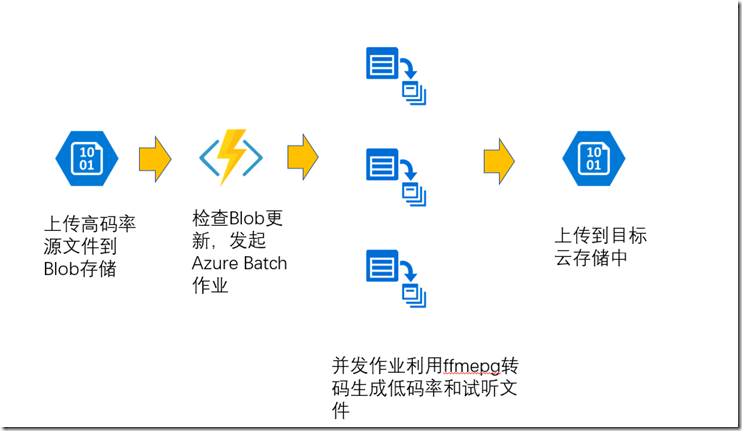
方案实现:
利用Azure Function监控Blob文件变化,Azure Functions的一大优点就是提供了不同类型的触发器(http Trigger,Blob Trigger,Timer Trigger,Queue Trigger…),这里我们正好利用上Blob Trigger用来监控Blob文件的变化。
首先是创建一个Azure Functions的Project
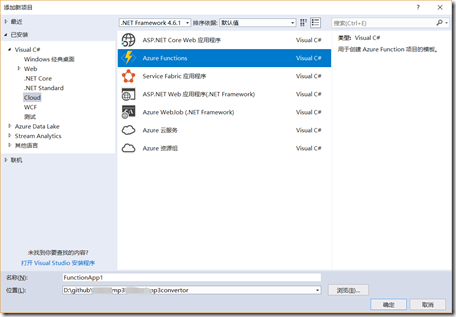
然后指定Function是用Blob Trigger的。
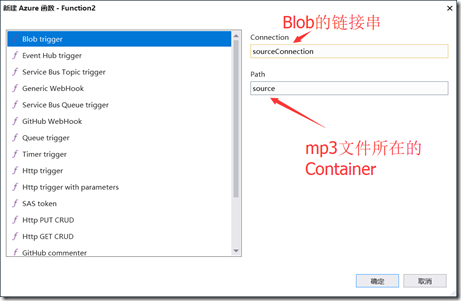
创建ListeningBlob函数,
using System;

using System.Collections.Generic;

using System.Diagnostics;

using System.IO;

using Microsoft.Azure.WebJobs;

using Microsoft.Azure.WebJobs.Host;

using Microsoft.Extensions.Logging;

using Microsoft.WindowsAzure.Storage;

using Microsoft.WindowsAzure.Storage.Blob;

using Microsoft.WindowsAzure.Storage.Queue;

namespace MS.CSU.mp3encoder

{

    public static class ListeningBlob

    {

        static string key_Convert = Environment.GetEnvironmentVariable("KeyConvert") ?? "-i \"{0}\" -codec:a libmp3lame -b:a {1} \"{2}\" -y";

        static string work_Dir = Path.GetTempPath();

        static string targetStorageConnection = Environment.GetEnvironmentVariable("targetStorageConnection");

        static string sourceStorageConnection = Environment.GetEnvironmentVariable("sourceStorageConnection");

        static string bitRates = Environment.GetEnvironmentVariable("bitRates") ?? "192k;128k;64k";

        static string keyPreview = Environment.GetEnvironmentVariable("keyPreview") ?? "-ss 0 -t 29 -i \"{0}\" \"{1}\"";

        static CloudBlobClient blobOutputClient;

        static string blobOutputContainerName = Environment.GetEnvironmentVariable("outputContainer") ?? "output";

        static CloudBlobContainer blobOutputContainer;

        static CloudBlobClient blobInputClient;

        static CloudBlobContainer blobInputContainer;

        [FunctionName("ListeningBlob")]

        [return: Queue("jobs")]

        public static void Run([BlobTrigger("source/{name}", Connection = "sourceStorageConnection")]Stream myBlob, string name, Uri uri,

            TraceWriter log)

        {

            AzureBatch batch = new AzureBatch(sourceStorageConnection);

            //保证每个音频文件都有自己的处理文件夹,避免冲突

            Guid jobId = Guid.NewGuid();

            log.Info($"Job:{jobId},C# Blob trigger function Processed blob\n Name:{name} \n Size: {myBlob.Length} Bytes,Path:{uri.ToString()}");

            //将源Blob剪切到TargetBlob,将源文件移出监控Blob容器,避免误触发

            try

            {

                initBlobClient();

                CloudBlockBlob sourceBlob = blobInputContainer.GetBlockBlobReference($"{name}");

                name = Path.GetFileNameWithoutExtension(name);

                CloudBlockBlob targetBlob = blobOutputContainer.GetBlockBlobReference($"{name}_{jobId}/{name}.mp3");

                targetBlob.StartCopy(sourceBlob);

                sourceBlob.Delete();

                uri = targetBlob.Uri;

            }

            catch (Exception err)

            {

                log.Error($"删除源Blob错误!Err:{err}");

                return ;

            }

            List<EncodeJob> jobs = new List<EncodeJob>();

            string url = Uri.EscapeUriString(uri.ToString());

            log.Info($"需要转换的码率:{bitRates}");

            string[] bitsRateNames = bitRates.Split(';');

            Dictionary<string, bool> status = new Dictionary<string, bool>();

            foreach (var s in bitsRateNames)

            {

                if (string.IsNullOrWhiteSpace(s))

                    continue;

                var job = new EncodeJob()

                {

                    OutputName = $"{name}{s}.mp3",

                    Name = name,

                    Command = string.Format(key_Convert, name, s, $"{name}{s}.mp3"),

                    id = jobId,

                    InputUri = uri

                };

                batch.QueueTask(job);

            }

            var previewJob = new EncodeJob()

            {

                Name = name,

                OutputName = $"{name}preview.mp3",

                Command = string.Format(keyPreview, name, $"{name}preview.mp3"),

                InputUri = uri,

                id = jobId,

            };

            batch.QueueTask(previewJob);

            //Directory.Delete($"{work_Dir}\\{jobId}",true);

        }

        static void initBlobClient()

        {

            CloudStorageAccount storageOutputAccount = CloudStorageAccount.Parse(targetStorageConnection);

            // Create a blob client for interacting with the blob service.

            blobOutputClient = storageOutputAccount.CreateCloudBlobClient();

            blobOutputContainer = blobOutputClient.GetContainerReference(blobOutputContainerName);

            blobOutputContainer.CreateIfNotExists();

            //初始化输入的Storage容器

            CloudStorageAccount storageInputAccount = CloudStorageAccount.Parse(sourceStorageConnection);

            // Create a blob client for interacting with the blob service.

            blobInputClient = storageInputAccount.CreateCloudBlobClient();

            blobInputContainer = blobInputClient.GetContainerReference("source");

        }

    }

}
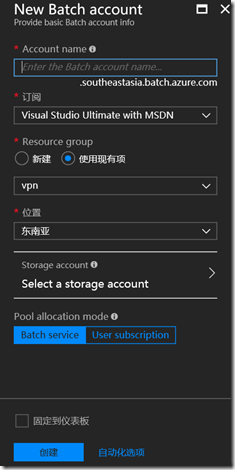
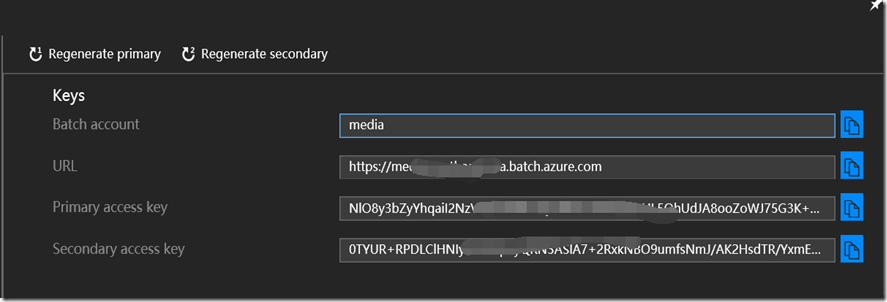
创建Batch服务账号,并且获取Batch Account的相关信息。
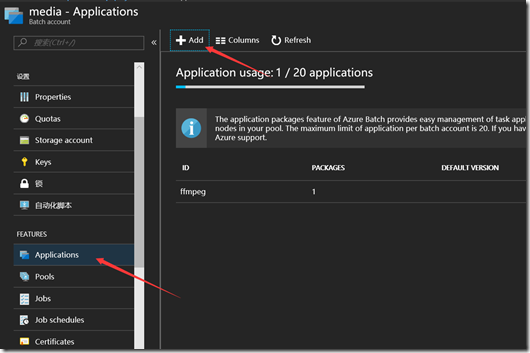
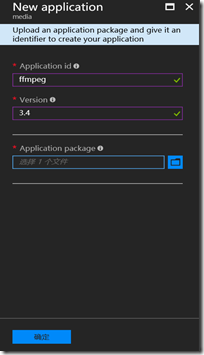
到https://ffmpeg.zeranoe.com/下载最新的ffmpeg程序,安装后将ffmpeg.exe单独压缩成zip文件,然后上传到Batch中,为程序调用做准备,
构建Azure Batch类用于调用Azure Batch进行ffmpeg进行转换
using Microsoft.Azure.Batch;

using Microsoft.Azure.Batch.Auth;

using Microsoft.Azure.Batch.Common;

using Microsoft.WindowsAzure.Storage;

using Microsoft.WindowsAzure.Storage.Blob;

using System;

using System.Collections.Generic;

using System.IO;

using System.Linq;

using System.Text;

using System.Threading.Tasks;

namespace MS.CSU.mp3encoder

{

    public class AzureBatch

    {

        //ffmpeg相关信息;

        string env_appPackageInfo = Environment.GetEnvironmentVariable("ffmpegversion")??"ffmpeg 3.4";

        string appPackageId = "ffmpeg";

        string appPackageVersion = "3.4";

        // Pool and Job constants

        private const string PoolId = "WinFFmpegPool";

        private const int DedicatedNodeCount = 0;

        private const int LowPriorityNodeCount = 5;

        //指定执行转码任务的VM机型

        private const string PoolVMSize = "Standard_F2";

        private const string JobName = "WinFFmpegJob";

        string outputStorageConnection;

        string outputContainerName = "output";

        string batchAccount = Environment.GetEnvironmentVariable("batchAccount");

        string batchKey = Environment.GetEnvironmentVariable("batchKey");

        string batchAccountUrl = Environment.GetEnvironmentVariable("batchAccountUrl");

        string strMaxTaskPerNode = Environment.GetEnvironmentVariable("MaxTaskPerNode") ?? "4";

       //设置每个计算节点能同时处理的任务数量,可根据选择的VM类型和任务类型适当调整

        int maxTaskPerNode=4;

        public AzureBatch(string storageConnection)

        {

            outputStorageConnection = storageConnection;

        }

        //用于单元测试时创建Batch对象

        public AzureBatch(string storageConnection, string _batchAccount, string _batchAccountUrl, string _batchKey)

        {

            outputStorageConnection = storageConnection;

            batchAccount = _batchAccount;

            batchAccountUrl = _batchAccountUrl;

            batchKey = _batchKey;

            maxTaskPerNode = int.TryParse(strMaxTaskPerNode, out maxTaskPerNode) ? maxTaskPerNode : 4;

            appPackageId = env_appPackageInfo.Split(' ')[0] ?? "ffmpeg";

            appPackageVersion = env_appPackageInfo.Split(' ')[1] ?? "3.4";

        }

        /// <summary>

        /// Returns a shared access signature (SAS) URL providing the specified

        ///  permissions to the specified container. The SAS URL provided is valid for 2 hours from

        ///  the time this method is called. The container must already exist in Azure Storage.

        /// </summary>

        /// <param name="blobClient">A <see cref="CloudBlobClient"/>.</param>

        /// <param name="containerName">The name of the container for which a SAS URL will be obtained.</param>

        /// <param name="permissions">The permissions granted by the SAS URL.</param>

        /// <returns>A SAS URL providing the specified access to the container.</returns>

        private string GetContainerSasUrl(CloudBlobClient blobClient, string containerName, SharedAccessBlobPermissions permissions)

        {

            // Set the expiry time and permissions for the container access signature. In this case, no start time is specified,

            // so the shared access signature becomes valid immediately. Expiration is in 2 hours.

            SharedAccessBlobPolicy sasConstraints = new SharedAccessBlobPolicy

            {

                SharedAccessExpiryTime = DateTime.UtcNow.AddHours(2),

                Permissions = permissions

            };

            // Generate the shared access signature on the container, setting the constraints directly on the signature

            CloudBlobContainer container = blobClient.GetContainerReference(containerName);

            string sasContainerToken = container.GetSharedAccessSignature(sasConstraints);

            // Return the URL string for the container, including the SAS token

            return String.Format("{0}{1}", container.Uri, sasContainerToken);

        }

        // BATCH CLIENT OPERATIONS - FUNCTION IMPLEMENTATIONS

        /// <summary>

        /// Creates the Batch pool.

        /// </summary>

        /// <param name="batchClient">A BatchClient object</param>

        /// <param name="poolId">ID of the CloudPool object to create.</param>

        private void CreatePoolIfNotExist(BatchClient batchClient, string poolId)

       {

        //    if (batchClient.PoolOperations.GetPool(poolId) != null)

        //    {

        //        return;

        //    }

            CloudPool pool = null;

            try

            {

                ImageReference imageReference = new ImageReference(

                        publisher: "MicrosoftWindowsServer",

                        offer: "WindowsServer",

                        sku: "2012-R2-Datacenter-smalldisk",

                        version: "latest");

                //ImageReference imageReference = new ImageReference(

                //        publisher: "MicrosoftWindowsServer",

                //        offer: "WindowsServer",

                //        sku: "2016-Datacenter-samlldisk",

                //        version: "latest");

                VirtualMachineConfiguration virtualMachineConfiguration =

                new VirtualMachineConfiguration(

                    imageReference: imageReference,

                    nodeAgentSkuId: "batch.node.windows amd64");

                // Create an unbound pool. No pool is actually created in the Batch service until we call

                // CloudPool.Commit(). This CloudPool instance is therefore considered "unbound," and we can

                // modify its properties.

                pool = batchClient.PoolOperations.CreatePool(

                    poolId: poolId,

                    targetDedicatedComputeNodes: DedicatedNodeCount,

                    targetLowPriorityComputeNodes: LowPriorityNodeCount,

                    virtualMachineSize: PoolVMSize,

                    virtualMachineConfiguration: virtualMachineConfiguration);

                pool.MaxTasksPerComputeNode = maxTaskPerNode;

                // Specify the application and version to install on the compute nodes

                // This assumes that a Windows 64-bit zipfile of ffmpeg has been added to Batch account

                // with Application Id of "ffmpeg" and Version of "3.4".

                // Download the zipfile https://ffmpeg.zeranoe.com/builds/win64/static/ffmpeg-3.4-win64-static.zip

                // to upload as application package

                pool.ApplicationPackageReferences = new List<ApplicationPackageReference>

                {

                    new ApplicationPackageReference

                    {

                    ApplicationId = appPackageId,

                    Version = appPackageVersion

                    }

                };

                pool.Commit();

            }

            catch (BatchException be)

            {

                // Accept the specific error code PoolExists as that is expected if the pool already exists

                if (be.RequestInformation?.BatchError?.Code == BatchErrorCodeStrings.PoolExists)

                {

             //       Console.WriteLine("The pool {0} already existed when we tried to create it", poolId);

                }

                else

                {

                    throw; // Any other exception is unexpected

                }

            }

        }

        /// <summary>

        /// Creates a job in the specified pool.

        /// </summary>

        /// <param name="batchClient">A BatchClient object.</param>

        /// <param name="jobId">ID of the job to create.</param>

        /// <param name="poolId">ID of the CloudPool object in which to create the job.</param>

        private void CreateJobIfNotExist(BatchClient batchClient, string jobId, string poolId)

        {

            //if (batchClient.JobOperations.GetJob(jobId) != null)

            //    return;

            try

            {

                Console.WriteLine("Creating job [{0}]...", jobId);

                CloudJob job = batchClient.JobOperations.CreateJob();

                job.Id = $"{JobName}";

                job.PoolInformation = new PoolInformation { PoolId = poolId };

                job.Commit();

            }

            catch (BatchException be)

            {

                // Accept the specific error code JobExists as that is expected if the job already exists

                if (be.RequestInformation?.BatchError?.Code == BatchErrorCodeStrings.JobExists)

                {

                    Console.WriteLine("The job {0} already existed when we tried to create it", jobId);

                }

                else

                {

                    throw; // Any other exception is unexpected

                }

            }

        }

        /// <summary>

        ///

        /// </summary>Creates tasks to process each of the specified input files, and submits them

        ///  to the specified job for execution.

        /// <param name="batchClient">A BatchClient object.</param>

        /// <param name="jobId">ID of the job to which the tasks are added.</param>

        /// <param name="inputFiles">A collection of ResourceFile objects representing the input file

        /// to be processed by the tasks executed on the compute nodes.</param>

        /// <param name="outputContainerSasUrl">The shared access signature URL for the Azure

        /// Storagecontainer that will hold the output files that the tasks create.</param>

        /// <returns>A collection of the submitted cloud tasks.</returns>

        private List<CloudTask> AddTasks(BatchClient batchClient,EncodeJob job, string outputContainerSasUrl)

        {

            // Create a collection to hold the tasks added to the job:

            List<CloudTask> tasks = new List<CloudTask>();

            // Assign a task ID for each iteration

            var taskId = String.Format("Task{0}", Guid.NewGuid());

            // Define task command line to convert the video format from MP4 to MP3 using ffmpeg.

            // Note that ffmpeg syntax specifies the format as the file extension of the input file

            // and the output file respectively. In this case inputs are MP4.

            string appPath = String.Format("%AZ_BATCH_APP_PACKAGE_{0}#{1}%", appPackageId, appPackageVersion);

            string inputMediaFile = job.Name;

            string outputMediaFile = job.OutputName;

            string taskCommandLine = String.Format("cmd /c {0}\\ffmpeg.exe {1}", appPath, job.Command);

            // Create a cloud task (with the task ID and command line) and add it to the task list

            CloudTask task = new CloudTask(taskId, taskCommandLine);

            task.ApplicationPackageReferences = new List<ApplicationPackageReference>

                {

                    new ApplicationPackageReference

                    {

                    ApplicationId = appPackageId,

                    Version = appPackageVersion

                    }

                };

            task.ResourceFiles = new List<ResourceFile>();

            task.ResourceFiles.Add(new ResourceFile(Uri.EscapeUriString(job.InputUri.ToString()), inputMediaFile));

            // Task output file will be uploaded to the output container in Storage.

            List<OutputFile> outputFileList = new List<OutputFile>();

            OutputFileBlobContainerDestination outputContainer = new OutputFileBlobContainerDestination(outputContainerSasUrl,$"{job.Name}_{job.id}/{job.OutputName}");

            OutputFile outputFile = new OutputFile(outputMediaFile,

                                                   new OutputFileDestination(outputContainer),

                                                   new OutputFileUploadOptions(OutputFileUploadCondition.TaskSuccess));

            outputFileList.Add(outputFile);

            task.OutputFiles = outputFileList;

            tasks.Add(task);

            // Call BatchClient.JobOperations.AddTask() to add the tasks as a collection rather than making a

            // separate call for each. Bulk task submission helps to ensure efficient underlying API

            // calls to the Batch service.

            batchClient.JobOperations.AddTask($"{JobName}", tasks);

            return tasks;

        }

        private CloudBlobClient initBlobClient()

        {

            CloudStorageAccount storageOutputAccount = CloudStorageAccount.Parse(outputStorageConnection);

            // Create a blob client for interacting with the blob service.

            var blobOutputClient = storageOutputAccount.CreateCloudBlobClient();

            return blobOutputClient;

            //blobOutputContainer = blobOutputClient.GetContainerReference(blobOutputContainerName);

            //blobOutputContainer.CreateIfNotExists();

        }

        public void QueueTask(EncodeJob job)

        {

            BatchSharedKeyCredentials sharedKeyCredentials = new BatchSharedKeyCredentials(batchAccountUrl, batchAccount, batchKey);

            var blobClient = initBlobClient();

            var outputContainerSasUrl = GetContainerSasUrl(blobClient, outputContainerName, SharedAccessBlobPermissions.Write);

            using (BatchClient batchClient = BatchClient.Open(sharedKeyCredentials))

            {

                // Create the Batch pool, which contains the compute nodes that execute the tasks.

                CreatePoolIfNotExist(batchClient, PoolId);

                // Create the job that runs the tasks.

                CreateJobIfNotExist(batchClient, $"{JobName}", PoolId);

                // Create a collection of tasks and add them to the Batch job.

                // Provide a shared access signature for the tasks so that they can upload their output

                // to the Storage container.

                AddTasks(batchClient,job,outputContainerSasUrl);

            }

        }

        public async Task<Tuple<string,int>>  GetStatus()

        {

            BatchSharedKeyCredentials sharedKeyCredentials = new BatchSharedKeyCredentials(batchAccountUrl, batchAccount, batchKey);

            string result = "正在获取任务信息...";

            int total = 0;

            using (BatchClient batchClient = BatchClient.Open(sharedKeyCredentials))

            {

                var counts =await batchClient.JobOperations.GetJobTaskCountsAsync(JobName);

                total = counts.Active + counts.Running + counts.Completed;

                result = $"总任务:{total},等待的任务:{counts.Active},运行中的任务:{counts.Running},成功的任务:{counts.Succeeded},失败的任务:{counts.Failed}";

            }

            return new Tuple<string,int>(result,total);

        }

    }

}
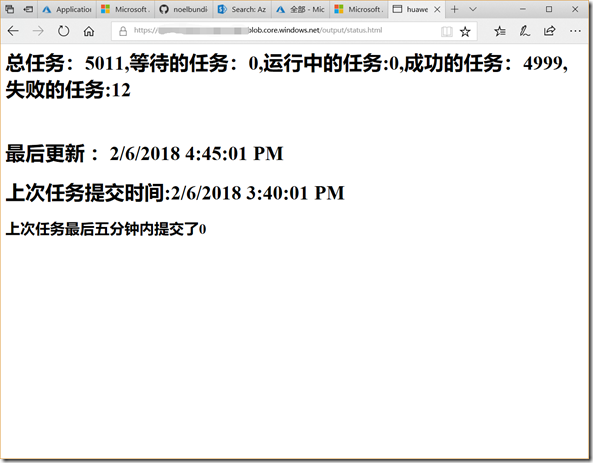
由于Azure Functions的最大Timeout时间为10分钟,当执行一些大型的文件转换时如果是同步执行往往会导致超时错误,所以我们需要在调用完Batch的任务后即可返回,让Batch Task后台执行。为了监控这些Task的完成状况,我们需要构建一个定时的Functions来检查任务状态。然后将获取到的状态信息写到output Blob Container的status.html中就好了
using System;

using System.Threading.Tasks;

using Microsoft.Azure.WebJobs;

using Microsoft.Azure.WebJobs.Host;

using Microsoft.WindowsAzure.Storage;

using Microsoft.WindowsAzure.Storage.Blob;

namespace MS.CSU.mp3encoder

{

    /// <summary>

    /// 用于更新任务处理状态

    /// </summary>

    public static class StatusUpdate

    {

        static int lastTotal=0;

        static DateTime lastSubmitTime;

        static string targetStorageConnection = Environment.GetEnvironmentVariable("targetStorageConnection");

        static CloudBlobClient blobOutputClient;

        static string blobOutputContainerName = Environment.GetEnvironmentVariable("outputContainer") ?? "output";

        static CloudBlobContainer blobOutputContainer;

        [FunctionName("StatusUpdate")]

        public async static Task Run([TimerTrigger("0 */5 * * * *")]TimerInfo myTimer, TraceWriter log)

        {

            string strStatus = "";

            int jobCount = 0;

            try

            {

                AzureBatch batch = new AzureBatch(targetStorageConnection);

              var result=await batch.GetStatus();

                strStatus = result.Item1;

                jobCount = result.Item2 - lastTotal;

                if (lastTotal != result.Item2)

                {

                    lastTotal = result.Item2;

                    lastSubmitTime = DateTime.Now;

                }

            }

            catch (Exception err)

            {

                strStatus = Uri.EscapeDataString(err.ToString());

            };

            initBlobContainer();

            var statusBlob = blobOutputContainer.GetBlockBlobReference("status.html");

            string htmlStatus =$@"<html>

                                    <head>

                                        <meta http-equiv=""refresh"" content=""5"">

                                        < meta charset=""utf-8"">

                                    </head>

                                    <body>

                                    <h1>{strStatus}</h1><br/>

                                    <h1>最后更新 :{DateTime.Now.AddHours(8)}</h1>

                                    <h1>上次任务提交时间:{lastSubmitTime.AddHours(8)}<h1>

                                    <h2>上次任务最后五分钟内提交了{jobCount}<h2>

                                    </body>

                                </html>";

            await statusBlob.UploadTextAsync(htmlStatus);

        }

        private static void initBlobContainer()

        {

            CloudStorageAccount storageOutputAccount = CloudStorageAccount.Parse(targetStorageConnection);

            // Create a blob client for interacting with the blob service.

            blobOutputClient = storageOutputAccount.CreateCloudBlobClient();

            blobOutputContainer = blobOutputClient.GetContainerReference(blobOutputContainerName);

            blobOutputContainer.CreateIfNotExists();

        }

    }

}
最终效果:
引用资料:
Azure Blob storage bindings for Azure Functions
Timer trigger for Azure Functions
Azure Batch .NET File Processing with ffmpeg
Azure Functions + Azure Batch实现MP3音频转码方案的更多相关文章
- 技术博客:Azure Functions + Azure Storage 开发
Azure GitHub wiki 同步发布 传送门 Azure Functions 通过 Functions(一个事件驱动型无服务器计算平台,还可以解决复杂的业务流程问题)更加高效地进行开发.在本地 ...
- 使用 Visual Studio 开发、测试和部署 Azure Functions(一)开发
1,什么是Azure functions Azure Functions 是 Microsoft Azure 提供的完全托管的 PaaS 服务,用于实现无服务器体系结构. Azure Function ...
- 使用VS code 创建 Azure Functions,从blob触发,解析,发送至Service Bus
更多内容,关注公众号:来学云计算 场景: 某设备定时于每天23:00左右将一天的运行日志.devicelogtxt上传到Azure Blob,期待Blob文件上传后, 自动通过Azure Functi ...
- 设备数据通过Azure Functions 推送到 Power BI 数据大屏进行展示(2.Azure Functions实战)
本案例适用于开发者入门理解Azure Functions/ IoT Hub / Service Bus / Power BI等几款产品. 主要实战的内容为: 将设备遥测数据上传到物联网中心, 将遥测数 ...
- 设备数据通过Azure Functions 推送到 Power BI 数据大屏进行展示(1.准备工作)
本案例适用于开发者入门理解Azure Functions/ IoT Hub / Service Bus / Power BI等几款产品. 主要实战的内容为: 将设备遥测数据上传到物联网中心, 将遥测数 ...
- 通过流量管理器和 Azure Functions(作为代理)为全球用户提供最靠近的认知服务(或自定义API)
本实战是一个中等复杂度的综合性实战,涉及到的内容有TrafficManager,AzureFunctions,域名/域名解析等几个内容. 本案例基础介绍: https://www.bilibili.c ...
- 使用 Visual Studio 开发、测试和部署 Azure Functions(二)测试,部署
1,引言 上一篇介绍了使用使用 Visual Studio 开发 "Azure Functions" 函数,此篇介绍 “Azure Functions” 的测试以及直接从 Vist ...
- 使用Azure Functions 在web 应用中启用自动更新(一)分析基于轮询的 Web 应用的限制
1,引言 上一篇介绍了使用使用 Visual Studio 开发 "Azure Functions" 函数,此篇介绍 “Azure Functions” 的测试以及直接从 Vist ...
- 利用Azure Functions和k8s构建Serverless计算平台
题记:昨晚在一个技术社区直播分享了"利用Azure Functions和k8s构建Serverless计算平台"这一话题.整个分享分为4个部分:Serverless概念的介绍.Az ...
随机推荐
- Wing ide 6.0 注册 ,python 3.6环境
直接切入主题,套路如下: 1.选择手动输入license license number输入:CN123-12345-12345-12345 2.在下一步中,选择第二项,拷贝的request code ...
- H5中的web worker示例demo分析
web worker 是运行在后台的 JavaScript,不会影响页面的性能. 什么是 Web Worker? 当在 HTML 页面中执行脚本时,页面的状态是不可响应的,直到脚本已完成. web w ...
- Codeforces 777C Alyona and Spreadsheet
C. Alyona and Spreadsheet time limit per test:1 second memory limit per test:256 megabytes input:sta ...
- COGS 1299. bplusa【听说比a+b还要水的大水题???】
1299. bplusa ☆ 输入文件:bplusa.in 输出文件:bplusa.out 评测插件 时间限制:1 s 内存限制:128 MB [题目描述] 输入一个整数n,将其拆为两 ...
- CF 615D Multipliers
题目:http://codeforces.com/contest/615/problem/D 求n的约数乘积. 设d(x)为x的约数个数,x=p1^a1+p2^a2+……+pn^an,f(x)为x的约 ...
- C语言缓冲区(缓存)详解
缓冲区又称为缓存,它是内存空间的一部分.也就是说,在内存空间中预留了一定的存储空间,这些存储空间用来缓冲输入或输出的数据,这部分预留的空间就叫做缓冲区.缓冲区根据其对应的是输入设备还是输出设备,分为输 ...
- Responder Pro new version could analyze Win10 memory dump
My friend John acquired a memory dump from Windows 10, but he could analyze this memory dump with an ...
- phpstudy php5.4以上版本伪静态设置 thinkphp
http://www.thinkphp.cn/topic/35958.html <IfModule mod_rewrite.c> Options +FollowSymlinks -Mult ...
- HTML5 Audio/Video 标签,属性,方法,事件汇总 (转)
标签属性:src:音乐的URLpreload:预加载autoplay:自动播放loop:循环播放controls:浏览器自带的控制条 1 http://www.abc.com/test.mp3&quo ...
- VUE之ECMAScript6(es6)
es6:es:EMCAScript 6 (es2015)Emca:国际标准组织 1.常量和变量 const a = "hello" let:定义一个块级作用域的变量 需要先定义再使 ...