
Selenium Grid和IE /Firefox各种填坑
使用selenium grid的步骤
1、确保hub和node都安装并且配置好了java jdk.
2、在hub上运行以下命令。
java -jar C:\Software\selenium\selenium-server-standalone-2.40.0.jar -role hub -port 4444
其中,-port 4444是可选的,不指定的话,默认是4444端口
3、在用作Node的电脑上运行以下命令
java -Dwebdriver.chrome.driver="C:\webdrivers\chromedriver.exe" -Dwebdriver.ie.driver="C:\webdrivers\IEDriverServer.exe" -Dwebdriver.gecko.driver="C:\webdrivers\geckodriver.exe" -jar C:\selenium-server\selenium-server-standalone-3.141.59.jar -role node -hub http://192.168.60.66:4444/grid/register -host 192.168.60.61 -port 5566
一口气把各种webdriver的地址都加进去了
问题就来了。
因为我的node电脑有两个物理网卡和两个虚拟网卡,HUB也有两个网卡,一个连外网,一个连内网。
两个物理网卡当中的一张通过网线与Hub相连,并且确定是互联互通的,但是另外一张物理网卡是WIFI,虽然WIFI与HUB在同一路由下,但WIFI与HUB的有线网卡并不是同一个局域网网段。这就导致后来执行测试脚本时各种报错。
后来我重新运行Java -jar命令,并指定了Node的IP地址和端口,如上是完整命令,下面是重点选项。
-host 192.168.60.61 -port 5566
经过这些坑,两台电脑的selenium是能够联通了。
但是有遇到了IE保护模式和ZOOM LEVEL这个破事儿,这个问题,需要改java代码。
改好的java代码在下面。
package com.qa.data;

import java.net.MalformedURLException;

import java.net.URL;

import org.openqa.selenium.By;

import org.openqa.selenium.Platform;

import org.openqa.selenium.WebDriver;

import org.openqa.selenium.ie.InternetExplorerDriver;

import org.openqa.selenium.remote.DesiredCapabilities;

import org.openqa.selenium.remote.RemoteWebDriver;

import org.testng.annotations.Test;

public class ExcelData {

    @SuppressWarnings("deprecation")

    @Test

    public void openBrowser() throws MalformedURLException, InterruptedException {

        DesiredCapabilities cap=DesiredCapabilities.internetExplorer();

        cap.setBrowserName("internet explorer");

        //以下三句,很多网上的文章都没加,我KAO,不加这三句它们的IE是怎么跑起来的?

        cap.setCapability(InternetExplorerDriver.IE_ENSURE_CLEAN_SESSION, true);

        cap.setCapability(InternetExplorerDriver.INTRODUCE_FLAKINESS_BY_IGNORING_SECURITY_DOMAINS, true);

        cap.setCapability("ignoreZoomSetting", true);//忽略IE浏览器的ZOOM LEVEL,不加这句会报错。每次selenium打开ie都是他妈的150%放大倍数,狗日的IE+SELENIUM

        cap.setPlatform(Platform.WINDOWS);

        URL url=new URL("http://192.168.60.61:5566/wd/hub");

        WebDriver driver=new RemoteWebDriver (url,cap);

        driver.get("http://www.baidu.com");

        driver.manage().window().maximize();

        String t=driver.getTitle();

        System.out.println(t);

        Thread.sleep(3000);

        driver.findElement(By.id("kw")).sendKeys("天气");

        Thread.sleep(1000);

        driver.findElement(By.id("su")).click();

        Thread.sleep(3000);

        driver.quit();

    }

}
关于填坑的截图,坑爹啊。
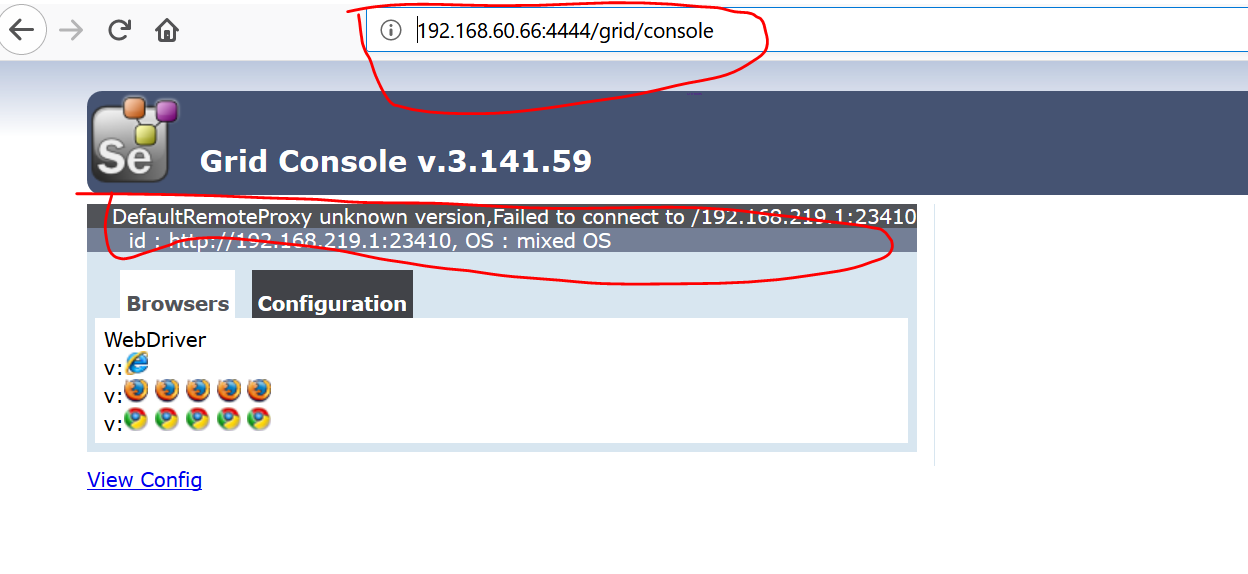
第二张图

Firefox在remote web driver打开的正确方式。
这也是一个坑,以前WebDriver driver=new FirefoxDriver()不管用了,
要使用下面的方法。
不能使用DesiredCapabilities cap=DesiredCapabilities.firefox();
package com.qa.data;

import java.net.MalformedURLException;

import java.net.URL;

import org.openqa.selenium.By;

import org.openqa.selenium.Platform;

import org.openqa.selenium.WebDriver;

import org.openqa.selenium.firefox.FirefoxDriver;

import org.openqa.selenium.firefox.FirefoxOptions;

import org.openqa.selenium.remote.DesiredCapabilities;

import org.openqa.selenium.remote.RemoteWebDriver;

import org.testng.annotations.Test;

public class FirefoxTest {

    @Test

    public void openFirefox() throws MalformedURLException, InterruptedException {

        /*这段不需要

        System.setProperty("webdriver.gecko.driver",

                "C:\\webdrivers\\geckodriver.exe");

        */

        FirefoxOptions option=new FirefoxOptions();

        String binaryPath="C:\\Program Files\\Mozilla Firefox\\firefox.exe";

        //注意,是firefox.exe在远程Node电脑的路径,不是gecko.driver

        option.setBinary(binaryPath);

        URL url=new URL("http://192.168.60.61:5566/wd/hub");

        WebDriver driver=new RemoteWebDriver (url,option);

        driver.get("http://www.baidu.com");

        driver.manage().window().maximize();

        String t=driver.getTitle();

        System.out.println(t);

        Thread.sleep(3000);

        driver.findElement(By.id("kw")).sendKeys("天气");

        Thread.sleep(1000);

        driver.findElement(By.id("su")).click();

        Thread.sleep(3000);

        driver.quit();

    }

}
Selenium Grid和IE /Firefox各种填坑的更多相关文章
- 学习selenium grid记录
1.找两台Windows系统,一个是A,作为Hub:一个是B,作为Node: 2.在A.B两台电脑分别下载selenium-server-standalone-2.48.0.jar,并放到指定目录 3 ...
- F2eTest和uirecorder自动化测试环境部署填坑记录
坑1:尝试部署的时候只在opennode.bat里面填写了两个浏览器,测试通过后再增加其他浏览器,页面上一直不显示. 填坑:需要清空数据库里的`wd_browsers`和`wd_nodes`表,然后重 ...
- css 填坑常用代码分享
以下是常用的代码收集,没有任何技术含量,只是填坑的积累.转载请注明出处,谢谢. 因为提交比较麻烦,后来转置github:https://github.com/jsfront/src/blob/mast ...
- 搭建selenium grid简单配置
1.使用selenium提供的服务端独立jar包 :服务端.客户端都是运行于java7环境. 2.启动hub: hub配置文件如下: Java -jar selenium-server-standal ...
- Robot Framework + Selenium2Library环境下,结合Selenium Grid实施分布式自动化测试
最近一段时间,公司在推行自动化测试流程,本人有幸参与了自定义通用控件的关键字封装和脚本辅助编写.数据驱动管理.测试用例执行管理等一系列工具软件的研发工作,积累了一些经验,在此与大家做一下分享,也算是做 ...
- Selenium Grid Configuration
Start Hub and Node with Json config 1. Start Hub with json config file title HubWebDriver java -jar ...
- Selenium Grid 运行报错 Exception thrown in Navigator.Start first time ->Error forwarding the new session Empty pool of VM for setup Capabilities
Selenium Grid 运行报错 : Exception thrown in Navigator.Start first time ->Error forwarding the new se ...
- selenium Grid(一)
selenium grid Quick Start selenium-grid是用于设计帮助我们进行分布式测试的工具,其整个结构是由一个hub节点和若干个代理节点组成.hub用来管理各个代理节点的注册 ...
- selenium Grid
Selenium Grid 的机制是启动一个 hub,然后启动多个 Selenium RC 注册到 hub 上, 当测试请求到 hub 时,hub 会将测试分发给 Selenium RC, Selen ...
随机推荐
- Azure CosmosDB (8) 性能指标Request Unit-RU
<Windows Azure Platform 系列文章目录> 本次将介绍Cosmos DB的性能指标RU (Request Unit). 总的来说,我们设置的Azure CosmosDB ...
- c# 简单方便的连接oracle方式
通过nuget安装ManagedDataAccess (自动生成的config里面的配置都可以删掉) winform程序,拖出一个datagridview和button using Oracle.Ma ...
- tomcat9配置https
首先去阿里云申请一个pfx证书,可以免费获得. 其次,在tomcat的server.xml增加如下connector <Connector port="443" protoc ...
- jvisualvm远程连接
1. 今天用jvisualvm远程连接linux上的jdk,jxm方式没有连接成功,后来发现是tomcat安装目录bin下的catalina.sh文件下的JAVA_OPTS中内容格式不对,要有空格,修 ...
- no module named selenium
I am having the same problem. I have downgraded selenium for now. pip uninstall selenium pip install ...
- Linux中VIM的使用
转自:http://www.lupaworld.com/?uid-296380-action-viewspace-itemid-118973 vi/vim 基本使用方法本文介绍了vi (vim)的基本 ...
- springboot学习一:快速搭建springboot项目
1.idea创建springboot工程 JDK选择1.8以上的版本 选择springboot的版本和添加配置项 新建一个HelloController,测试 访问 http://localhost: ...
- centos7 lnmp环境部署
搭建版本 版本组合 php5.6+apache/2.4.6(centos7)+mysql5.7.24 因为新系统不能确认哪些指令已经搭建 所以安装前需要确认下是否拥有 检测是否已经安装过Vim rp ...
- qt button clicked(bool) always false
今天用 qt 中的按键的时候,希望按键有两种状态,通过 clicked(bool) 发送信号给槽,结果一直发的是 false,不能为 true,后来终于找到问题了,有两种解决方法. 在 button ...
- html5自带表单验证
起因:今天无意中发现chrome的input框自带表单验证!于是就去试试firefox,惊奇的发现也有自带的验证提示,只不过两者的样式不一样 chrome中的样子: firefox中的样子: 发散:具 ...