
PhoenixFD插件流体模拟——UI布局【Preview】详解
Liquid Preview
流体预览
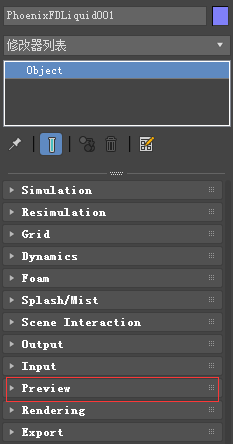
主要内容
- Overview 综述
- Parameters 参数
- Voxel Preview 体素预览
- Particles 粒子
- Draw Just a Slice 切片预览
综述
The parameters in this rollout control the representation of the fluids in the viewport.此折叠栏中的参数控制视图中流体的表示形式。
All enabled values are drawn if the content is within the specified range. 如果内容在指定范围内,则绘制所有启用的值。
UI Path: ||Select Liquid Simulator | LiquidSim object|| > Modify panel > Preview rollout
参数

Read Cache for Preview | prv_read_cache – Allows to completely disable reading of cache files in order to speed up the viewport and the simulation.允许完全禁用高速缓存文件的读取,以加快viewport和仿真。
When cache files are not read, neither voxels and particles, nor the grid bounding box or the Cache File Content under the Simulation rollout will be shown.
当缓存文件未被读取时,将不会显示体素和粒子,也不会显示模拟折叠栏下的网格包围框或缓存文件内容。
This way scrolling the timeline would be quick as there will be no access to hard disk or the network.这样滚动时间轴将很快,因为将没有访问硬盘或网络。
If you still need to see the grid bounding box and the Cache File Content info, you could leave this option to Always, and instead disable all voxel preview options, the Mesh Preview, GPU Preview and all particle previews. The intended use for this parameter is as a last step performance optimization - once you're done tweaking your setup and you're ready to commit to a high-resolution, overnight simulation, disable the preview of cache files.
Always – Cache files are always read by the preview.缓存文件总是由预览读取。
Disable During Sim – Cache files are read only when the simulation is stopped.只有当模拟停止时才读取缓存文件。
This would speed up the simulation and is good for overnight simulations where you don't need to watch the simulation constantly.
Don't Preview Caches – Cache files are never read for the preview.缓存文件从不为预览而读取。
They will only be read during rendering, or in case any of the Phoenix tools requires them - e.g. the Particle Shader, the Grid Texture, etc.
Detail Reduction | gpudown – Decreases the grid and particle detail in the preview. 减少预览中的网格和粒子细节。
A value of 0 means no reduction.值为0表示没有减少。
Increase this value if the interface starts to lag due to the simulation being very large.如果由于模拟非常大,接口开始滞后,则增加此值。
This parameter controls both the viewport preview and the GPU preview.
Auto Reduction – Enables automatic adjustment of the Detail Reduction parameter.启用自动调整详细信息约简参数。
The preview detail will be reduced up to a point where the preview will display fast without blocking the interface. Note that the detail will only decrease automatically, but will not increase.
Show Mesh | show mesh – When enabled, shows the implicit surface as a mesh.启用时,将隐式表面显示为网格。
This mode overrides the Voxel Preview mode.此模式覆盖体素预览模式。
Note that if Render Mode is set to Ocean Mesh, the ocean will have lower detail in the preview than in the render in order to speed up the viewport display.
注意,如果渲染模式设置为Ocean Mesh,为了加速viewport的显示,Ocean在预览时的细节比渲染时要低。
Voxel Preview 体素预览
! Phoenix FD can only preview the channels present in the cache file for the current frame. To see the list of available channels and their ranges, go to the Cache File Content section of the Simulation roll-out.

Only if selected | show_only_sel – When enabled, the viewport preview is only drawn if the simulator is selected.
Active view only | prv_avonly – When enabled, only the selected viewport shows the content of the simulator.
Show box | showgrid – Shows the bounding box of the simulator. The green outline is drawn based on the settings in the Grid roll-out while the red outline displays the bounds of the currently loaded cache file, if it exists.
Graph cells | gridcells – Shows a lattice with the cell sizes on the sides of the simulator's box when there is a loaded cache file.
Only the overlap of | prv_and – When enabled, shows only the cells where the following selected channels overlap.
Liquid | prv_temperature, prv_t_threshold, prv_t_threshold2, prv_t_color, prv_t_color2 – Enables the representation of the liquid channel.
Velocity | prv_velocity, prv_v_threshold, prv_v_threshold2, prv_v_color, prv_v_color2 – Enables the representation of the velocity channel.
Viscosity | prv_viscosity, prv_visc_color1, prv_visc_color2, prv_visc_threshold1, prv_visc_threshold2 - Enables the representation of the viscosity channel.
Special | prv_smoke, prv_smoke_threshold, prv_smoke_threshold2, prv_smoke_color, prv_smoke_color2 – Enables the representation of special channels.
Forces | prv_forces, prv_f_threshold, prv_f_threshold2, prv_f_color, prv_f_color2, prv_force_list – Enables preview of how Phoenix forces or standard 3ds Max forces will affect the simulation.
RGB | prv_uvw, prv_uvw_threshold, prv_uvw_threshold2 – Enables the representation of the RGB channel.
Auto Range | prv_autorange – When enabled, automatically adjusts the preview ranges of visible channels for the current frame so that important data is always visible and the preview is always quick.
Using the Add or Remove buttons will allow you to select which forces will be previewed. Note that the force preview is exclusive with all other voxel channel previews and will override other voxel channels. Unlike other voxel preview channels which use the size of the loaded cache, the Forces preview can also work without a loaded cache and will use the grid size of the Simulator.
Additionally, some Phoenix FD and standard 3ds Max forces require the previous velocity at their acting position in the grid. This is not yet supported by the Forces preview. As a result, forces such as the Drag force are shown as if their velocity is always 0 and will not be visible. In addition, forces that act differently depending on the quantity of content in the grid (e.g. amount of liquid, smoke, or no content) are not yet supported by the preview.
Particles

Particle Preview | prv_particles – Enables the preview of particles. The controls below affect the visualization of the currently selected particle group.
Show | show_prt_face – Enable the preview of the currently selected particle group in the viewport.
Particle color | prv_prt_color_face – Specifies the color of the particles when standing. The moving particles are displayed with modified color. The faster the particles, the whiter they appear. Note that if the particle system has a RGB channel exported, it will be used instead of the Particle color. (The preview will still be affected by the White speed if the particle system has a Velocity channel.)
Auto White Speed | prv_prt_awspeed_face – When enabled, automatically calculates the preview White Speed based on the particle velocity.
White Speed | prv_prt_wspeed_face – When Auto White Speed is disabled, allows the user to specify the speed at which the particle preview color becomes pure white.
Draw Just a Slice

Draw Just a Slice | prv_sect – When enabled, only a voxel-thick cross-section of the grid is visible. This allows for a better view of occluded details and can help when previewing very rich data such as velocity fields.
Along Axis | prv_sect_axis – Specifies the axis along which the grid will be sliced.
Slice Level | prv_sect_lvl – Specifies the offset of the slice from the bottom center of the grid in voxels.
PhoenixFD插件流体模拟——UI布局【Preview】详解的更多相关文章
- PhoenixFD插件流体模拟——UI布局【Output】详解
Liquid Output 流体输出 本文主要讲解Output折叠栏中的内容.原文地址:https://docs.chaosgroup.com/display/PHX3MAX/Liquid+Outp ...
- PhoenixFD插件流体模拟——UI布局【Simulation】详解
前言 之前使用RealFlow做流体模拟,但是总得和3ds导来导去,略显麻烦,特意学习PhoenixFD插件,直接在3ds中进行流体模拟.若读者有更好的流体模拟方法,欢迎在评论区交流. 原文地址:ht ...
- PhoenixFD插件流体模拟——UI布局【Rendering】详解
Liquid Rendering 流体渲染 本文主要讲解Rendering折叠栏中的内容.原文地址:https://docs.chaosgroup.com/display/PHX3MAX/Liqui ...
- PhoenixFD插件流体模拟——UI布局【Export】详解
Liquid Export 流体导出 本文主要讲解Export折叠栏中的内容.原文地址:https://docs.chaosgroup.com/display/PHX3MAX/Liquid+Expor ...
- PhoenixFD插件流体模拟——UI布局【Input】详解
Liquid Input 流体输入 本文主要讲解Input折叠栏中的内容.原文地址:https://docs.chaosgroup.com/display/PHX3MAX/Liquid+Input 主 ...
- PhoenixFD插件流体模拟——UI布局【Splash | Mist】详解
液体飞溅 | 水雾 本文主要讲解Splash | Mist折叠栏中的内容.原文地址:https://docs.chaosgroup.com/display/PHX3MAX/Liquid+Splash+ ...
- PhoenixFD插件流体模拟——UI布局【Foam】详解
流体泡沫 本文主要讲解Foam折叠栏中的内容.原文地址:https://docs.chaosgroup.com/display/PHX3MAX/Liquid+Foam 主要内容 Overview 综述 ...
- PhoenixFD插件流体模拟——UI布局【Dynamics】详解
流体动力学 本文主要讲解Dynamics折叠栏中的内容.原文地址:https://docs.chaosgroup.com/display/PHX3MAX/Liquid+Dynamics 主要内容 Ov ...
- PhoenixFD插件流体模拟——UI布局【Gird】详解
流体网格 本文主要讲解Grid折叠栏中的内容 主要内容 Overview 综述 Parameters 参数 General 普通参数 Example: Scene Scale Example: Gri ...
随机推荐
- Java8-Optional与null
对null进行处理 程序中经常需要对null情况进行处理,比如Course类中有一个List stuList属性,Student有一个name属性. 现在想要查看某个student的name属性的长度 ...
- LeetCode——295. Find Median from Data Stream
一.题目链接: https://leetcode.com/problems/find-median-from-data-stream 二.题目大意: 给定一段数据流,要求求出数据流中的中位数,其中数据 ...
- C# 6.0:Expression – Bodied Methods
Expression-bodied 方法是C# 6.0 中另一个能简化代码的特性.我们已经对lambda表达式将funciton和delegation关联起来的这种用法很熟悉了.Expression- ...
- DES加密算法—实现(C语言)
http://www.iteye.com/topic/478024 DES(Data Encrypt Standard数据库加密标准)是迄今为止使用最广泛的加密体制. 初学信息安全的新生,一般都会被老 ...
- Linux下的快捷键
1:tab 键 命令补全 路径补全 2:Ctrl+C 命令的中止 3:Ctrl+D 退出当前的会话 exit logout 4:Ctrl+l clear 清屏 5 ...
- (整理) .NET IIS性能优化
本文收集了部分性能优化的方式,缓存.压缩.线程池调整等等,仅供参考. 1 .NET 程序中的调整 程序Sqlhelper中使用缓存 使用JSON序列化器(Jil)取代Json.NET 2 .NET 程 ...
- 关于js-xlsx的简单使用
关于js-xlsx的简单使用 最近要做一个东西用到对excel的操作,就是在前端将excel加载进来,操作后再生成excel,在网上找了很多种办法,能够实现的demo是下面这个: 纯前端利用 js-x ...
- koa-passport实现本地验证
安装 yarn add koa-passport passport-local 先看下passport.js登录策略,判断用户和密码 const passport = require('koa-pas ...
- Python数据类型的内置函数之tuple(元组),dict(字典),set(集合)
Python数据类型内置函数 - str(字符串) - list(列表) - tuple(元组) - dict(字典) - set(收集) tuple(元组)的操作 - (count)统计元组中元素出 ...
- Python PEP8 编码规范
代码编排 缩进.缩进4个空格,不能混合使用Tab和空格. 每行最大长度79,文档字符串和注释行最大长度为72,换行可以使用反斜杠,最好使用圆括号. 类和顶层函数定义之间空两行:类中的方法定义以单行分隔 ...