
基于WebGL架构的3D可视化平台—新风系统演示
新风系统是根据在密闭的室内一侧用专用设备向室内送新风,再从另一侧由专用设备向室外排出,在室内会形成“新风流动场”,从而满足室内新风换气的需要。实施方案是:采用高风压、大流量风机、依靠机械强力由一侧向室内送风,由另一侧用专门设计的排风风机向室外排出的方式强迫在系统内形成新风流动场。在送风的同时对进入室内的空气进过滤、消毒、杀菌、增氧、预热(冬天)。
接下来就用ThingJs平台来搭建一个新风系统
第一步,利用CampusBuilder搭建模拟场景。CampusBuilder的模型库有各种各样的模型,使我们搭建出的场景更逼真。
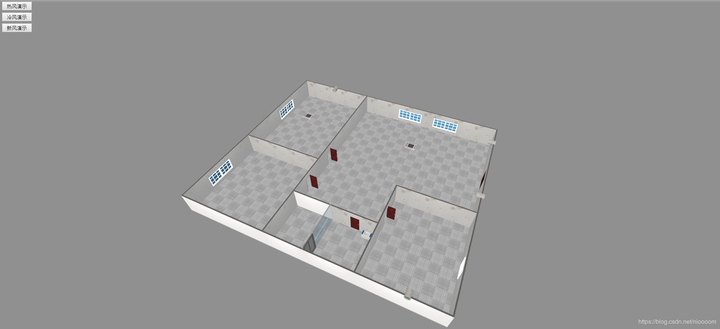
//加载场景代码
var app = new THING.App({
    // 场景地址
    "url": "http://www.thingjs.com/./uploads/wechat/oLX7p05lsWJZUIxnIWsNXAzJ40X8/scene/新风演示2",

});
第二步,创建三个数组来保存每个风的模型。、
var hotWindGroup = [];
var coolWindGroup = [];
var newWindGroup = [];
var wind = null;
第三步,构造一个创建风的函数,为了方便创建风及其位置,我们选取排风设备为风的父物体,将创建出来的风的visiable属性设置为false(这里这个坐标问题可以看一下官网的教程中控制物体中的坐标转换)。
function createWind(parent, x, y, angle, localPosition, color, group) {
    rs = app.query(parent)[0];
    wind = app.create({
        type: 'Thing',
        name: 'hotWind',
        url: 'http://model.3dmomoda.cn/models/4da706d8a37047298c0318a5b9546abd/0/gltf/',
        localPosition: localPosition,
        scale: [1, 2, 1],
        angle: angle,
        parent: rs,
    });
    wind.style.color = color;
    wind.visible = false;
    wind.rotateX(x);
    wind.rotateY(y);
    group.push(wind);
}
第四步,开始创建风模型,并调整一下摄像机的角度及位置。
app.on('load', function () {
    //摄像机角度
    app.camera.position = [-22.91452445633646, 30.46296743148116, -23.83548169673341];
    app.camera.target = [-13.532807014407252, 5.6565539015865856, -3.3431546399681276];
    //hotWind
    createWind('空调1', 0, 0, 0, [0, -2, 0], '#FF0000', hotWindGroup);
    createWind('空调1', 0, 0, 0, [0, -2, 0.5], '#FF0000', hotWindGroup);
    createWind('空调1', 0, 0, 0, [0, -2, 1], '#FF0000', hotWindGroup);
    createWind('空调2', 0, 0, 0, [0, -2, 0], '#FF0000', hotWindGroup);
    createWind('空调2', 0, 0, 0, [0, -2, 0.5], '#FF0000', hotWindGroup);
    createWind('空调2', 0, 0, 0, [0, -2, 1], '#FF0000', hotWindGroup);
    //coolWind
    createWind('空调1', 0, 0, 0, [0, -2, 0], '#0000FF', coolWindGroup);
    createWind('空调1', 0, 0, 0, [0, -2, 0.5], '#0000FF', coolWindGroup);
    createWind('空调1', 0, 0, 0, [0, -2, 1], '#0000FF', coolWindGroup);
    createWind('空调2', 0, 0, 0, [0, -2, 0], '#0000FF', coolWindGroup);
    createWind('空调2', 0, 0, 0, [0, -2, 0.5], '#0000FF', coolWindGroup);
    createWind('空调2', 0, 0, 0, [0, -2, 1], '#0000FF', coolWindGroup);
    //newWind
    createWind('排风1', -50, 0, 0, [0, -0.5, 2], '#00FF00', newWindGroup);
    createWind('排风1', -50, 0, 0, [0, -0.5, 4], '#00FF00', newWindGroup);
    createWind('排风1', -50, 0, 0, [0, -0.5, 6], '#00FF00', newWindGroup);
    createWind('排风1', -50, 50, 50, [2, -0.5, 7], '#00FF00', newWindGroup);
    createWind('排风1', -50, 50, 50, [4, -0.5, 8], '#00FF00', newWindGroup);
    createWind('排风1', -50, 50, 50, [6, -0.5, 9], '#00FF00', newWindGroup);
    createWind('排风1', -50, 50, 50, [8, -0.5, 12], '#00FF00', newWindGroup);
    createWind('排风1', -50, 50, 50, [10, -0.5, 15], '#00FF00', newWindGroup);
    createWind('排风1', -50, 50, 50, [12, -0.5, 18], '#00FF00', newWindGroup);
    createWind('排风1', -50, 50, 50, [10, -0.5, 9], '#00FF00', newWindGroup);
    createWind('排风1', -50, 50, 50, [14, -0.5, 9], '#00FF00', newWindGroup);
    createWind('排风1', -50, 50, 50, [18, -0.5, 9], '#00FF00', newWindGroup);
    createWind('排风1', -50, 50, 50, [22, -0.5, 9], '#00FF00', newWindGroup);
    createWind('排风1', -50, 50, 50, [26, -0.5, 9], '#00FF00', newWindGroup);
    createWind('排风2', -50, 0, 0, [0, -0.5, 2], '#00FF00', newWindGroup);
    createWind('排风3', -50, 0, 0, [0, -0.5, 2], '#00FF00', newWindGroup);
    createWind('排风4', -50, 0, 0, [0, -0.5, 2], '#00FF00', newWindGroup);
    createWind('排风4', -50, 0, 0, [0, -0.5, 4], '#00FF00', newWindGroup);
    createWind('排风4', -50, 0, 0, [0, -0.5, 6], '#00FF00', newWindGroup);
    createWind('排风4', -50, 0, 0, [0, -0.5, 8], '#00FF00', newWindGroup);
    createWind('排风4', -50, 0, 0, [0, -0.5, 10], '#00FF00', newWindGroup);
    createWind('排风4', -50, 0, 0, [0, -0.5, 12], '#00FF00', newWindGroup);
    createWind('排风4', -90, 50, 50, [2, -0.6, 12], '#00FF00', newWindGroup);
    createWind('排风4', -90, 50, 50, [4, -0.7, 12], '#00FF00', newWindGroup);
    createWind('排风4', -90, 50, 50, [6, -0.8, 13], '#00FF00', newWindGroup);
    createWind('排风4', -90, 50, 90, [8, -0.8, 11], '#00FF00', newWindGroup);
    createWind('排风4', -90, 50, 90, [12, -0.8, 9], '#00FF00', newWindGroup);
    createWind('排风4', -90, 50, 90, [16, -0.8, 7], '#00FF00', newWindGroup);
    createWind('排风4', -90, 50, 90, [20, -0.8, 5], '#00FF00', newWindGroup);
    createWind('排风4', -90, 50, 90, [24, -0.8, 3], '#00FF00', newWindGroup);
    createWind('排风4', -90, 0, 90, [8, -0.8, 13], '#00FF00', newWindGroup);
    createWind('排风4', -90, 0, 90, [12, -0.8, 13], '#00FF00', newWindGroup);
    createWind('排风4', -90, 0, 90, [16, -0.7, 13], '#00FF00', newWindGroup);
    createWind('排风4', -90, 0, 90, [20, -0.6, 13], '#00FF00', newWindGroup);
    //createWind('排风4', -90, 0, 90, [24, -0.5, 13], '#00FF00', newWindGroup);

    //热风演示
    new THING.widget.Button('热风演示', function () {
        for (let i of coolWindGroup) {
            i.visible = false;
        };
        for (let i of hotWindGroup) {
            i.visible = true;
        };

    });

    //冷风演示
    new THING.widget.Button('冷风演示', function () {
        for (let i of coolWindGroup) {
            i.visible = true;
        };
        for (let i of hotWindGroup) {
            i.visible = false;
        };
    });

    //新风演示
    new THING.widget.Button('新风演示', function () {
        playNewWind();
    });

    function playNewWind() {
        for (var i = 0; i < newWindGroup.length; i++) {
            if(i==newWindGroup.length-1)
            return;
            newWindGroup[i].visible = true;
            newWindGroup[i].moveTo({
                "time": 4000,
                "position": newWindGroup[i+1].position,
            });
        }
});
第五步,运行项目。演示地址
思考与总结:
首先就是空间坐标系下转父物体坐标真是弄晕了,看了官网的教程多少理解了一点。刚开始的时候我一直认为我的子物体以父物体坐标下放置的时候,子物体坐标轴的问题指向的问题。看了教程发现自己的担心多余了,就好像是人戴鸭舌帽帽子不管戴在谁的头上都一样。
其次就是让风动起来,最初是想让一个模型在空间中运动,发现效果不好用。最后就创建了多个模型他们对应着有各自的点,让每一个模型向他下一个模型的位置移动实现运动。
完整代码
/加载场景代码
var app = new THING.App({
    // 场景地址
    "url": "http://www.thingjs.com/./uploads/wechat/oLX7p05lsWJZUIxnIWsNXAzJ40X8/scene/新风演示2",

});

var hotWindGroup = [];
var coolWindGroup = [];
var newWindGroup = [];
var wind = null;

function createWind(parent, x, y, angle, localPosition, color, group) {
    rs = app.query(parent)[0];
    wind = app.create({
        type: 'Thing',
        name: 'hotWind',
        url: 'http://model.3dmomoda.cn/models/4da706d8a37047298c0318a5b9546abd/0/gltf/',
        localPosition: localPosition,
        scale: [1, 2, 1],
        angle: angle,
        parent: rs,
    });
    wind.style.color = color;
    wind.visible = false;
    wind.rotateX(x);
    wind.rotateY(y);
    group.push(wind);
}

app.on('load', function () {
    //摄像机角度
    app.camera.position = [-22.91452445633646, 30.46296743148116, -23.83548169673341];
    app.camera.target = [-13.532807014407252, 5.6565539015865856, -3.3431546399681276];
    //hotWind
    createWind('空调1', 0, 0, 0, [0, -2, 0], '#FF0000', hotWindGroup);
    createWind('空调1', 0, 0, 0, [0, -2, 0.5], '#FF0000', hotWindGroup);
    createWind('空调1', 0, 0, 0, [0, -2, 1], '#FF0000', hotWindGroup);
    createWind('空调2', 0, 0, 0, [0, -2, 0], '#FF0000', hotWindGroup);
    createWind('空调2', 0, 0, 0, [0, -2, 0.5], '#FF0000', hotWindGroup);
    createWind('空调2', 0, 0, 0, [0, -2, 1], '#FF0000', hotWindGroup);
    //coolWind
    createWind('空调1', 0, 0, 0, [0, -2, 0], '#0000FF', coolWindGroup);
    createWind('空调1', 0, 0, 0, [0, -2, 0.5], '#0000FF', coolWindGroup);
    createWind('空调1', 0, 0, 0, [0, -2, 1], '#0000FF', coolWindGroup);
    createWind('空调2', 0, 0, 0, [0, -2, 0], '#0000FF', coolWindGroup);
    createWind('空调2', 0, 0, 0, [0, -2, 0.5], '#0000FF', coolWindGroup);
    createWind('空调2', 0, 0, 0, [0, -2, 1], '#0000FF', coolWindGroup);

    //newWind
    createWind('排风1', -50, 0, 0, [0, -0.5, 2], '#00FF00', newWindGroup);
    createWind('排风1', -50, 0, 0, [0, -0.5, 4], '#00FF00', newWindGroup);
    createWind('排风1', -50, 0, 0, [0, -0.5, 6], '#00FF00', newWindGroup);
    createWind('排风1', -50, 50, 50, [2, -0.5, 7], '#00FF00', newWindGroup);
    createWind('排风1', -50, 50, 50, [4, -0.5, 8], '#00FF00', newWindGroup);
    createWind('排风1', -50, 50, 50, [6, -0.5, 9], '#00FF00', newWindGroup);
    createWind('排风1', -50, 50, 50, [8, -0.5, 12], '#00FF00', newWindGroup);
    createWind('排风1', -50, 50, 50, [10, -0.5, 15], '#00FF00', newWindGroup);
    createWind('排风1', -50, 50, 50, [12, -0.5, 18], '#00FF00', newWindGroup);
    createWind('排风1', -50, 50, 50, [10, -0.5, 9], '#00FF00', newWindGroup);
    createWind('排风1', -50, 50, 50, [14, -0.5, 9], '#00FF00', newWindGroup);
    createWind('排风1', -50, 50, 50, [18, -0.5, 9], '#00FF00', newWindGroup);
    createWind('排风1', -50, 50, 50, [22, -0.5, 9], '#00FF00', newWindGroup);
    createWind('排风1', -50, 50, 50, [26, -0.5, 9], '#00FF00', newWindGroup);
    createWind('排风2', -50, 0, 0, [0, -0.5, 2], '#00FF00', newWindGroup);
    createWind('排风3', -50, 0, 0, [0, -0.5, 2], '#00FF00', newWindGroup);
    createWind('排风4', -50, 0, 0, [0, -0.5, 2], '#00FF00', newWindGroup);
    createWind('排风4', -50, 0, 0, [0, -0.5, 4], '#00FF00', newWindGroup);
    createWind('排风4', -50, 0, 0, [0, -0.5, 6], '#00FF00', newWindGroup);
    createWind('排风4', -50, 0, 0, [0, -0.5, 8], '#00FF00', newWindGroup);
    createWind('排风4', -50, 0, 0, [0, -0.5, 10], '#00FF00', newWindGroup);
    createWind('排风4', -50, 0, 0, [0, -0.5, 12], '#00FF00', newWindGroup);
    createWind('排风4', -90, 50, 50, [2, -0.6, 12], '#00FF00', newWindGroup);
    createWind('排风4', -90, 50, 50, [4, -0.7, 12], '#00FF00', newWindGroup);
    createWind('排风4', -90, 50, 50, [6, -0.8, 13], '#00FF00', newWindGroup);
    createWind('排风4', -90, 50, 90, [8, -0.8, 11], '#00FF00', newWindGroup);
    createWind('排风4', -90, 50, 90, [12, -0.8, 9], '#00FF00', newWindGroup);
    createWind('排风4', -90, 50, 90, [16, -0.8, 7], '#00FF00', newWindGroup);
    createWind('排风4', -90, 50, 90, [20, -0.8, 5], '#00FF00', newWindGroup);
    createWind('排风4', -90, 50, 90, [24, -0.8, 3], '#00FF00', newWindGroup);
    createWind('排风4', -90, 0, 90, [8, -0.8, 13], '#00FF00', newWindGroup);
    createWind('排风4', -90, 0, 90, [12, -0.8, 13], '#00FF00', newWindGroup);
    createWind('排风4', -90, 0, 90, [16, -0.7, 13], '#00FF00', newWindGroup);
    createWind('排风4', -90, 0, 90, [20, -0.6, 13], '#00FF00', newWindGroup);
    //createWind('排风4', -90, 0, 90, [24, -0.5, 13], '#00FF00', newWindGroup);

    //热风演示
    new THING.widget.Button('热风演示', function () {
        for (let i of coolWindGroup) {
            i.visible = false;
        };
        for (let i of hotWindGroup) {
            i.visible = true;
            //playWind(i,[0,-0.6499999999999999,0],[0,-0.7234152255572697,0.46352549156242107],[0,-1.2683221215612903,1.2135254915624212],[0,-2.15,1.5])
        };

    });

    //冷风演示
    new THING.widget.Button('冷风演示', function () {
        for (let i of coolWindGroup) {
            i.visible = true;
        };
        for (let i of hotWindGroup) {
            i.visible = false;
        };
    });

    //新风演示
    new THING.widget.Button('新风演示', function () {
        playNewWind();
    });

    function playNewWind() {
        for (var i = 0; i < newWindGroup.length; i++) {
            if(i==newWindGroup.length-1)
            return;
            newWindGroup[i].visible = true;
            newWindGroup[i].moveTo({
                "time": 4000,
                "position": newWindGroup[i+1].position,
            });
        }
    }

});
作者:extends Thread
基于WebGL架构的3D可视化平台—新风系统演示的更多相关文章
- 基于WebGL架构的3D可视化平台ThingJS-搭建设备管理系统
国内高层建筑不断兴建,它的特点是高度高.层数多.体量大.面积可达几万平方米到几十万平方米.这些建筑都是一个个庞然大物,高高的耸立在地面上,这是它的外观,而随之带来的内部的建筑设备也是大量的.为了提高设 ...
- 基于WebGL架构的3D可视化平台—设备管理
---恢复内容开始--- 国内高层建筑不断兴建,它的特点是高度高.层数多.体量大.面积可达几万平方米到几十万平方米.这些建筑都是一个个庞然大物,高高的耸立在地面上,这是它的外观,而随之带来的内部的建筑 ...
- 基于WebGL架构的3D可视化平台—实现小车行走路线演示
小车行走路线演示New VS Old 刚接触ThingJS的时候,写的一个小车开进小区的演示,今天又看了教程中有movePath这个方法就重新写了一遍,其中也遇到了一些问题,尤其突出的问题就是小车过弯 ...
- 基于 HTML5 WebGL 的发动机 3D 可视化系统
前言 工业机械产品大多体积庞大.运输成本高,在参加行业展会或向海外客户销售时,如果没有实物展示,仅凭静态.简单的图片说明书介绍,无法让客户全面了解产品,不仅工作人员制作麻烦,客户看得也费力.如 ...
- 基于 HTML5 WebGL 的地铁站 3D 可视化系统
前言 工业互联网,物联网,可视化等名词在我们现在信息化的大背景下已经是耳熟能详,日常生活的交通,出行,吃穿等可能都可以用信息化的方式来为我们表达,在传统的可视化监控领域,一般都是基于 Web SCAD ...
- 基于 HTML5 的 WebGL 楼宇自控 3D 可视化监控
前言 智慧楼宇和人们的生活息息相关,楼宇智能化程度的提高,会极大程度的改善人们的生活品质,在当前工业互联网大背景下受到很大关注.目前智慧楼宇可视化监控的主要优点包括: 智慧化 -- 智慧楼宇是一个生态 ...
- 基于 HTML5 WebGL 的挖掘机 3D 可视化应用
前言 在工业互联网以及物联网的影响下,人们对于机械的管理,机械的可视化,机械的操作可视化提出了更高的要求.如何在一个系统中完整的显示机械的运行情况,机械的运行轨迹,或者机械的机械动作显得尤为的重要,因 ...
- 基于 HTML5 WebGL 的加油站 3D 可视化监控
前言 随着数字化,工业互联网,物联网的发展,我国加油站正向有人值守,无人操作,远程控制的方向发展,传统的人工巡查方式逐渐转变为以自动化控制为主的在线监控方式,即采用数据采集与监控系统 SCADA.SC ...
- 基于 HTML5 和 WebGL 的地铁站 3D 可视化系统
前言 工业互联网,物联网,可视化等名词在我们现在信息化的大背景下已经是耳熟能详,日常生活的交通,出行,吃穿等可能都可以用信息化的方式来为我们表达,在传统的可视化监控领域,一般都是基于 Web SCAD ...
随机推荐
- 【转】Syncthing – 数据同步利器---自己的网盘,详细安装配置指南,内网使用,发现服务器配置
Syncthing – 数据同步利器---自己的网盘,详细安装配置指南,内网使用,发现服务器配置 原贴:https://www.cnblogs.com/jackadam/p/8568833.html ...
- 安装lnmp1.5,搬迁Laravel项目到服务器笔记
近期有个Laravel开发项目,需要搬到CentOS服务器做测试. 先说下项目的配置: Laravel版本5.5 --确定了php7.0以上: CentOS 7.0或以上. lnmp 1.5版 以下是 ...
- python3-基础8
模块与包 什么是模块 模块就是一个包含了python定义和声明的文件,文件名就是模块名字加上.py的后缀. #在python中,模块的使用方式都是一样的,但其实细说的话,模块可以分为四个通用类别: 1 ...
- Mvc 提交表单的4种方法
一,MVC HtmlHelper方法 1. Html.BeginForm(actionName,controllerName,method,htmlAttributes){} 2. ...
- Oracle数据库ORA-01109 数据库未打开
引致 https://blog.csdn.net/colinmok/article/details/39504879?locationNum=11&fps=1 感谢! 在plsql创建了2表 ...
- 01_新建WebApi后端服务项目
1.打开微软官网: https://www.asp.net/learn 2.查看文章: https://docs.microsoft.com/en-us/aspnet/web-api/overview ...
- 通过google cloud API 使用 WaveNet
Cloud Text-to-Speech 中使用了WaveNet,用于TTS,页面上有Demo.目前是BETA版 使用方法 注册及认证参考:Quickstart: Text-to-Speech 安装g ...
- jenkins部署web项目(不包含前后端分离)
本次部署的是非常非常传统的web项目, jsp页面那种, 一 首先给tomact设置管理员用户和管理员密码,这类的教程网上有很多,在<tomcat-users><tomcat-use ...
- 问题-python3.6找不到tkinter
问题:import tkinter失败 然后直接pip安装也不ok python3.6安装过程中会提示是否选择安装tkinter,如此只有打开原来的安装程序 勾选箭头所示
- .net core下载文件
上传的文件是在wwwroot下 通过保存的路径跟文件名称完成下载 public IActionResult DownloadFile() { var filePath = "/Upload ...