
基于WebGL架构的3D可视化平台—新风系统演示
新风系统是根据在密闭的室内一侧用专用设备向室内送新风,再从另一侧由专用设备向室外排出,在室内会形成“新风流动场”,从而满足室内新风换气的需要。实施方案是:采用高风压、大流量风机、依靠机械强力由一侧向室内送风,由另一侧用专门设计的排风风机向室外排出的方式强迫在系统内形成新风流动场。在送风的同时对进入室内的空气进过滤、消毒、杀菌、增氧、预热(冬天)。
接下来就用ThingJs平台来搭建一个新风系统
第一步,利用CampusBuilder搭建模拟场景。CampusBuilder的模型库有各种各样的模型,使我们搭建出的场景更逼真。
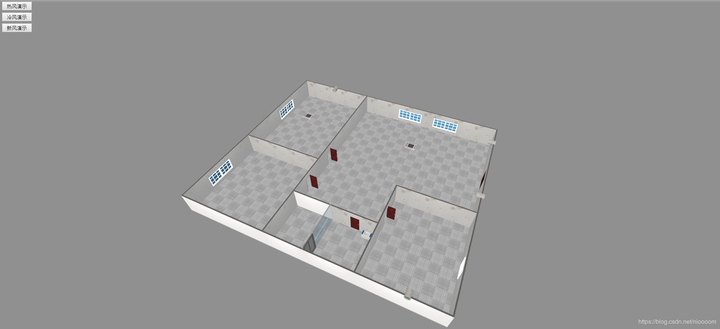
//加载场景代码
var app = new THING.App({
    // 场景地址
    "url": "http://www.thingjs.com/./uploads/wechat/oLX7p05lsWJZUIxnIWsNXAzJ40X8/scene/新风演示2",

});
第二步,创建三个数组来保存每个风的模型。、
var hotWindGroup = [];
var coolWindGroup = [];
var newWindGroup = [];
var wind = null;
第三步,构造一个创建风的函数,为了方便创建风及其位置,我们选取排风设备为风的父物体,将创建出来的风的visiable属性设置为false(这里这个坐标问题可以看一下官网的教程中控制物体中的坐标转换)。
function createWind(parent, x, y, angle, localPosition, color, group) {
    rs = app.query(parent)[0];
    wind = app.create({
        type: 'Thing',
        name: 'hotWind',
        url: 'http://model.3dmomoda.cn/models/4da706d8a37047298c0318a5b9546abd/0/gltf/',
        localPosition: localPosition,
        scale: [1, 2, 1],
        angle: angle,
        parent: rs,
    });
    wind.style.color = color;
    wind.visible = false;
    wind.rotateX(x);
    wind.rotateY(y);
    group.push(wind);
}
第四步,开始创建风模型,并调整一下摄像机的角度及位置。
app.on('load', function () {
    //摄像机角度
    app.camera.position = [-22.91452445633646, 30.46296743148116, -23.83548169673341];
    app.camera.target = [-13.532807014407252, 5.6565539015865856, -3.3431546399681276];
    //hotWind
    createWind('空调1', 0, 0, 0, [0, -2, 0], '#FF0000', hotWindGroup);
    createWind('空调1', 0, 0, 0, [0, -2, 0.5], '#FF0000', hotWindGroup);
    createWind('空调1', 0, 0, 0, [0, -2, 1], '#FF0000', hotWindGroup);
    createWind('空调2', 0, 0, 0, [0, -2, 0], '#FF0000', hotWindGroup);
    createWind('空调2', 0, 0, 0, [0, -2, 0.5], '#FF0000', hotWindGroup);
    createWind('空调2', 0, 0, 0, [0, -2, 1], '#FF0000', hotWindGroup);
    //coolWind
    createWind('空调1', 0, 0, 0, [0, -2, 0], '#0000FF', coolWindGroup);
    createWind('空调1', 0, 0, 0, [0, -2, 0.5], '#0000FF', coolWindGroup);
    createWind('空调1', 0, 0, 0, [0, -2, 1], '#0000FF', coolWindGroup);
    createWind('空调2', 0, 0, 0, [0, -2, 0], '#0000FF', coolWindGroup);
    createWind('空调2', 0, 0, 0, [0, -2, 0.5], '#0000FF', coolWindGroup);
    createWind('空调2', 0, 0, 0, [0, -2, 1], '#0000FF', coolWindGroup);
    //newWind
    createWind('排风1', -50, 0, 0, [0, -0.5, 2], '#00FF00', newWindGroup);
    createWind('排风1', -50, 0, 0, [0, -0.5, 4], '#00FF00', newWindGroup);
    createWind('排风1', -50, 0, 0, [0, -0.5, 6], '#00FF00', newWindGroup);
    createWind('排风1', -50, 50, 50, [2, -0.5, 7], '#00FF00', newWindGroup);
    createWind('排风1', -50, 50, 50, [4, -0.5, 8], '#00FF00', newWindGroup);
    createWind('排风1', -50, 50, 50, [6, -0.5, 9], '#00FF00', newWindGroup);
    createWind('排风1', -50, 50, 50, [8, -0.5, 12], '#00FF00', newWindGroup);
    createWind('排风1', -50, 50, 50, [10, -0.5, 15], '#00FF00', newWindGroup);
    createWind('排风1', -50, 50, 50, [12, -0.5, 18], '#00FF00', newWindGroup);
    createWind('排风1', -50, 50, 50, [10, -0.5, 9], '#00FF00', newWindGroup);
    createWind('排风1', -50, 50, 50, [14, -0.5, 9], '#00FF00', newWindGroup);
    createWind('排风1', -50, 50, 50, [18, -0.5, 9], '#00FF00', newWindGroup);
    createWind('排风1', -50, 50, 50, [22, -0.5, 9], '#00FF00', newWindGroup);
    createWind('排风1', -50, 50, 50, [26, -0.5, 9], '#00FF00', newWindGroup);
    createWind('排风2', -50, 0, 0, [0, -0.5, 2], '#00FF00', newWindGroup);
    createWind('排风3', -50, 0, 0, [0, -0.5, 2], '#00FF00', newWindGroup);
    createWind('排风4', -50, 0, 0, [0, -0.5, 2], '#00FF00', newWindGroup);
    createWind('排风4', -50, 0, 0, [0, -0.5, 4], '#00FF00', newWindGroup);
    createWind('排风4', -50, 0, 0, [0, -0.5, 6], '#00FF00', newWindGroup);
    createWind('排风4', -50, 0, 0, [0, -0.5, 8], '#00FF00', newWindGroup);
    createWind('排风4', -50, 0, 0, [0, -0.5, 10], '#00FF00', newWindGroup);
    createWind('排风4', -50, 0, 0, [0, -0.5, 12], '#00FF00', newWindGroup);
    createWind('排风4', -90, 50, 50, [2, -0.6, 12], '#00FF00', newWindGroup);
    createWind('排风4', -90, 50, 50, [4, -0.7, 12], '#00FF00', newWindGroup);
    createWind('排风4', -90, 50, 50, [6, -0.8, 13], '#00FF00', newWindGroup);
    createWind('排风4', -90, 50, 90, [8, -0.8, 11], '#00FF00', newWindGroup);
    createWind('排风4', -90, 50, 90, [12, -0.8, 9], '#00FF00', newWindGroup);
    createWind('排风4', -90, 50, 90, [16, -0.8, 7], '#00FF00', newWindGroup);
    createWind('排风4', -90, 50, 90, [20, -0.8, 5], '#00FF00', newWindGroup);
    createWind('排风4', -90, 50, 90, [24, -0.8, 3], '#00FF00', newWindGroup);
    createWind('排风4', -90, 0, 90, [8, -0.8, 13], '#00FF00', newWindGroup);
    createWind('排风4', -90, 0, 90, [12, -0.8, 13], '#00FF00', newWindGroup);
    createWind('排风4', -90, 0, 90, [16, -0.7, 13], '#00FF00', newWindGroup);
    createWind('排风4', -90, 0, 90, [20, -0.6, 13], '#00FF00', newWindGroup);
    //createWind('排风4', -90, 0, 90, [24, -0.5, 13], '#00FF00', newWindGroup);

    //热风演示
    new THING.widget.Button('热风演示', function () {
        for (let i of coolWindGroup) {
            i.visible = false;
        };
        for (let i of hotWindGroup) {
            i.visible = true;
        };

    });

    //冷风演示
    new THING.widget.Button('冷风演示', function () {
        for (let i of coolWindGroup) {
            i.visible = true;
        };
        for (let i of hotWindGroup) {
            i.visible = false;
        };
    });

    //新风演示
    new THING.widget.Button('新风演示', function () {
        playNewWind();
    });

    function playNewWind() {
        for (var i = 0; i < newWindGroup.length; i++) {
            if(i==newWindGroup.length-1)
            return;
            newWindGroup[i].visible = true;
            newWindGroup[i].moveTo({
                "time": 4000,
                "position": newWindGroup[i+1].position,
            });
        }
});
第五步,运行项目。演示地址
思考与总结:
首先就是空间坐标系下转父物体坐标真是弄晕了,看了官网的教程多少理解了一点。刚开始的时候我一直认为我的子物体以父物体坐标下放置的时候,子物体坐标轴的问题指向的问题。看了教程发现自己的担心多余了,就好像是人戴鸭舌帽帽子不管戴在谁的头上都一样。
其次就是让风动起来,最初是想让一个模型在空间中运动,发现效果不好用。最后就创建了多个模型他们对应着有各自的点,让每一个模型向他下一个模型的位置移动实现运动。
完整代码
/加载场景代码
var app = new THING.App({
    // 场景地址
    "url": "http://www.thingjs.com/./uploads/wechat/oLX7p05lsWJZUIxnIWsNXAzJ40X8/scene/新风演示2",

});

var hotWindGroup = [];
var coolWindGroup = [];
var newWindGroup = [];
var wind = null;

function createWind(parent, x, y, angle, localPosition, color, group) {
    rs = app.query(parent)[0];
    wind = app.create({
        type: 'Thing',
        name: 'hotWind',
        url: 'http://model.3dmomoda.cn/models/4da706d8a37047298c0318a5b9546abd/0/gltf/',
        localPosition: localPosition,
        scale: [1, 2, 1],
        angle: angle,
        parent: rs,
    });
    wind.style.color = color;
    wind.visible = false;
    wind.rotateX(x);
    wind.rotateY(y);
    group.push(wind);
}

app.on('load', function () {
    //摄像机角度
    app.camera.position = [-22.91452445633646, 30.46296743148116, -23.83548169673341];
    app.camera.target = [-13.532807014407252, 5.6565539015865856, -3.3431546399681276];
    //hotWind
    createWind('空调1', 0, 0, 0, [0, -2, 0], '#FF0000', hotWindGroup);
    createWind('空调1', 0, 0, 0, [0, -2, 0.5], '#FF0000', hotWindGroup);
    createWind('空调1', 0, 0, 0, [0, -2, 1], '#FF0000', hotWindGroup);
    createWind('空调2', 0, 0, 0, [0, -2, 0], '#FF0000', hotWindGroup);
    createWind('空调2', 0, 0, 0, [0, -2, 0.5], '#FF0000', hotWindGroup);
    createWind('空调2', 0, 0, 0, [0, -2, 1], '#FF0000', hotWindGroup);
    //coolWind
    createWind('空调1', 0, 0, 0, [0, -2, 0], '#0000FF', coolWindGroup);
    createWind('空调1', 0, 0, 0, [0, -2, 0.5], '#0000FF', coolWindGroup);
    createWind('空调1', 0, 0, 0, [0, -2, 1], '#0000FF', coolWindGroup);
    createWind('空调2', 0, 0, 0, [0, -2, 0], '#0000FF', coolWindGroup);
    createWind('空调2', 0, 0, 0, [0, -2, 0.5], '#0000FF', coolWindGroup);
    createWind('空调2', 0, 0, 0, [0, -2, 1], '#0000FF', coolWindGroup);

    //newWind
    createWind('排风1', -50, 0, 0, [0, -0.5, 2], '#00FF00', newWindGroup);
    createWind('排风1', -50, 0, 0, [0, -0.5, 4], '#00FF00', newWindGroup);
    createWind('排风1', -50, 0, 0, [0, -0.5, 6], '#00FF00', newWindGroup);
    createWind('排风1', -50, 50, 50, [2, -0.5, 7], '#00FF00', newWindGroup);
    createWind('排风1', -50, 50, 50, [4, -0.5, 8], '#00FF00', newWindGroup);
    createWind('排风1', -50, 50, 50, [6, -0.5, 9], '#00FF00', newWindGroup);
    createWind('排风1', -50, 50, 50, [8, -0.5, 12], '#00FF00', newWindGroup);
    createWind('排风1', -50, 50, 50, [10, -0.5, 15], '#00FF00', newWindGroup);
    createWind('排风1', -50, 50, 50, [12, -0.5, 18], '#00FF00', newWindGroup);
    createWind('排风1', -50, 50, 50, [10, -0.5, 9], '#00FF00', newWindGroup);
    createWind('排风1', -50, 50, 50, [14, -0.5, 9], '#00FF00', newWindGroup);
    createWind('排风1', -50, 50, 50, [18, -0.5, 9], '#00FF00', newWindGroup);
    createWind('排风1', -50, 50, 50, [22, -0.5, 9], '#00FF00', newWindGroup);
    createWind('排风1', -50, 50, 50, [26, -0.5, 9], '#00FF00', newWindGroup);
    createWind('排风2', -50, 0, 0, [0, -0.5, 2], '#00FF00', newWindGroup);
    createWind('排风3', -50, 0, 0, [0, -0.5, 2], '#00FF00', newWindGroup);
    createWind('排风4', -50, 0, 0, [0, -0.5, 2], '#00FF00', newWindGroup);
    createWind('排风4', -50, 0, 0, [0, -0.5, 4], '#00FF00', newWindGroup);
    createWind('排风4', -50, 0, 0, [0, -0.5, 6], '#00FF00', newWindGroup);
    createWind('排风4', -50, 0, 0, [0, -0.5, 8], '#00FF00', newWindGroup);
    createWind('排风4', -50, 0, 0, [0, -0.5, 10], '#00FF00', newWindGroup);
    createWind('排风4', -50, 0, 0, [0, -0.5, 12], '#00FF00', newWindGroup);
    createWind('排风4', -90, 50, 50, [2, -0.6, 12], '#00FF00', newWindGroup);
    createWind('排风4', -90, 50, 50, [4, -0.7, 12], '#00FF00', newWindGroup);
    createWind('排风4', -90, 50, 50, [6, -0.8, 13], '#00FF00', newWindGroup);
    createWind('排风4', -90, 50, 90, [8, -0.8, 11], '#00FF00', newWindGroup);
    createWind('排风4', -90, 50, 90, [12, -0.8, 9], '#00FF00', newWindGroup);
    createWind('排风4', -90, 50, 90, [16, -0.8, 7], '#00FF00', newWindGroup);
    createWind('排风4', -90, 50, 90, [20, -0.8, 5], '#00FF00', newWindGroup);
    createWind('排风4', -90, 50, 90, [24, -0.8, 3], '#00FF00', newWindGroup);
    createWind('排风4', -90, 0, 90, [8, -0.8, 13], '#00FF00', newWindGroup);
    createWind('排风4', -90, 0, 90, [12, -0.8, 13], '#00FF00', newWindGroup);
    createWind('排风4', -90, 0, 90, [16, -0.7, 13], '#00FF00', newWindGroup);
    createWind('排风4', -90, 0, 90, [20, -0.6, 13], '#00FF00', newWindGroup);
    //createWind('排风4', -90, 0, 90, [24, -0.5, 13], '#00FF00', newWindGroup);

    //热风演示
    new THING.widget.Button('热风演示', function () {
        for (let i of coolWindGroup) {
            i.visible = false;
        };
        for (let i of hotWindGroup) {
            i.visible = true;
            //playWind(i,[0,-0.6499999999999999,0],[0,-0.7234152255572697,0.46352549156242107],[0,-1.2683221215612903,1.2135254915624212],[0,-2.15,1.5])
        };

    });

    //冷风演示
    new THING.widget.Button('冷风演示', function () {
        for (let i of coolWindGroup) {
            i.visible = true;
        };
        for (let i of hotWindGroup) {
            i.visible = false;
        };
    });

    //新风演示
    new THING.widget.Button('新风演示', function () {
        playNewWind();
    });

    function playNewWind() {
        for (var i = 0; i < newWindGroup.length; i++) {
            if(i==newWindGroup.length-1)
            return;
            newWindGroup[i].visible = true;
            newWindGroup[i].moveTo({
                "time": 4000,
                "position": newWindGroup[i+1].position,
            });
        }
    }

});
作者:extends Thread
基于WebGL架构的3D可视化平台—新风系统演示的更多相关文章
- 基于WebGL架构的3D可视化平台ThingJS-搭建设备管理系统
国内高层建筑不断兴建,它的特点是高度高.层数多.体量大.面积可达几万平方米到几十万平方米.这些建筑都是一个个庞然大物,高高的耸立在地面上,这是它的外观,而随之带来的内部的建筑设备也是大量的.为了提高设 ...
- 基于WebGL架构的3D可视化平台—设备管理
---恢复内容开始--- 国内高层建筑不断兴建,它的特点是高度高.层数多.体量大.面积可达几万平方米到几十万平方米.这些建筑都是一个个庞然大物,高高的耸立在地面上,这是它的外观,而随之带来的内部的建筑 ...
- 基于WebGL架构的3D可视化平台—实现小车行走路线演示
小车行走路线演示New VS Old 刚接触ThingJS的时候,写的一个小车开进小区的演示,今天又看了教程中有movePath这个方法就重新写了一遍,其中也遇到了一些问题,尤其突出的问题就是小车过弯 ...
- 基于 HTML5 WebGL 的发动机 3D 可视化系统
前言 工业机械产品大多体积庞大.运输成本高,在参加行业展会或向海外客户销售时,如果没有实物展示,仅凭静态.简单的图片说明书介绍,无法让客户全面了解产品,不仅工作人员制作麻烦,客户看得也费力.如 ...
- 基于 HTML5 WebGL 的地铁站 3D 可视化系统
前言 工业互联网,物联网,可视化等名词在我们现在信息化的大背景下已经是耳熟能详,日常生活的交通,出行,吃穿等可能都可以用信息化的方式来为我们表达,在传统的可视化监控领域,一般都是基于 Web SCAD ...
- 基于 HTML5 的 WebGL 楼宇自控 3D 可视化监控
前言 智慧楼宇和人们的生活息息相关,楼宇智能化程度的提高,会极大程度的改善人们的生活品质,在当前工业互联网大背景下受到很大关注.目前智慧楼宇可视化监控的主要优点包括: 智慧化 -- 智慧楼宇是一个生态 ...
- 基于 HTML5 WebGL 的挖掘机 3D 可视化应用
前言 在工业互联网以及物联网的影响下,人们对于机械的管理,机械的可视化,机械的操作可视化提出了更高的要求.如何在一个系统中完整的显示机械的运行情况,机械的运行轨迹,或者机械的机械动作显得尤为的重要,因 ...
- 基于 HTML5 WebGL 的加油站 3D 可视化监控
前言 随着数字化,工业互联网,物联网的发展,我国加油站正向有人值守,无人操作,远程控制的方向发展,传统的人工巡查方式逐渐转变为以自动化控制为主的在线监控方式,即采用数据采集与监控系统 SCADA.SC ...
- 基于 HTML5 和 WebGL 的地铁站 3D 可视化系统
前言 工业互联网,物联网,可视化等名词在我们现在信息化的大背景下已经是耳熟能详,日常生活的交通,出行,吃穿等可能都可以用信息化的方式来为我们表达,在传统的可视化监控领域,一般都是基于 Web SCAD ...
随机推荐
- 针对不同.NET版本的条件编译
原理:查找项目目录下的 csproj 文件,解析它,找到节点TargetFrameworkVersion,判断.net版本
- python3-基础1
eval() --- 返回表达式计算结果 实际上就是把括号中的命令提取出来执行一遍. eval("print('ok')") ok 可变类型: 在ID不变的情况下,value可变 ...
- [转]SQL中的case when then else end用法
Case具有两种格式.简单Case函数和Case搜索函数. --简单Case函数 CASE sex WHEN '1' THEN '男' WHEN '2' THEN '女' ELSE '其他' EN ...
- S/Kademlia2007 翻译
S/Kademlia:实现安全Key路由的可行方法 摘要 安全性是完全分散式P2P系统中的常见问题. 尽管关于如何创建一个安全的基于Key的路由协议存在几点建议,但一个可行的方法仍然无人参与. 在本文 ...
- 如何限制指定textFiled第三方输入法切换
在有些项目中需要用到输入纯数字的键盘,并且还不能切换到第三方输入法! textFiled.secureTextEntry = YES; [textFiled addTarget:self action ...
- [UE4]插值interp
插值 在两个数之间补充一些数,让过渡变得更自然. UE4引擎提供的插值 一.CInterp To:颜色(Color)插值.C:Color,颜色. 二.FInterp To.FInterp To Con ...
- Apartment 2019
Apartment 2019 最近在学习3D建模,Apartment 2019是我的个人项目. 初步的想法是,先在网上找公寓建筑的平面图以及室内效果照片,根据这些参考图像来练习建模与渲染. 建模顺序与 ...
- vue-cli 发布部署IIS
有些时候我们的服务器不用的是node,也许是IIS,这样就需要把工程构建出来,与IIS集成. 构建的命令如下 cnpm run build 将其中的dist文件夹拷贝出来,放到IIS的发布目录,在浏览 ...
- vue 组件自定义v-model
参考资料:vue官网在vue 中使用v-model双向绑定 <input v-model="something"> 其实是语法糖 <input :value=&q ...
- 从零开始学习python:demo2.5
for 循环语句 1.单个for循环: s1 = 'Python'for s2 in s1: print(s2) ------------------------- Python ------- ...