
|ERROR|ERROR: missing data for column "createtime" (seg3 slice1 192.168.66.23:40001 pid=33370)之mysql换行符或者空格引起的问题
1、最近的kettle的数据交换配置,启动kettle引起的错误,如下所示:
|ERROR|ERROR: missing data for column "createtime" (seg3 slice1 192.168.66.23: pid=)
引发这个错误,并不是这个字段引起的错误,一般是这个字段临近的字段存在空格或者换行符引发的错误。
2、引发这个错误,并不是这个字段引起的错误,一般是这个字段临近的字段存在空格或者换行符引发的错误。为了问题重现,我新建一个数据库和数据表:
3、准备插入的正常数据,可以执行多条插入数据:
 insert into user(name,age,birthday,sex) VALUES("张三",,"2018-08-20","男");

 insert into user(name,age,birthday,sex) VALUES("李四",,"2018-8-20","男");

 insert into user(name,age,birthday,sex) VALUES("王五",,"2018-8-20","男");

 insert into user(name,age,birthday,sex) VALUES("赵六",,"2018-8-20","男");

 insert into user(name,age,birthday,sex) VALUES("李白",,"2018-8-20","男");

 insert into user(name,age,birthday,sex) VALUES("安琪拉",,"2018-8-20","女");

 insert into user(name,age,birthday,sex) VALUES("亚瑟",,"2018-8-20","男");

 insert into user(name,age,birthday,sex) VALUES("鲁班",,"2018-8-20","男");
然后执行查询结果是没有查询结果的:
CONCAT(str1,str2,…) 返回结果为连接参数产生的字符串。

4、然后插入一条换行的数据:
换行的数据可以如下所示造几条,这里造一条。
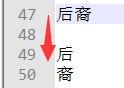
然后执行
insert into user(name,age,birthday,sex) VALUES("后
裔",14,"2018-8-20","男");
5、然后可以看到已经查询出来了这条换行的数据。
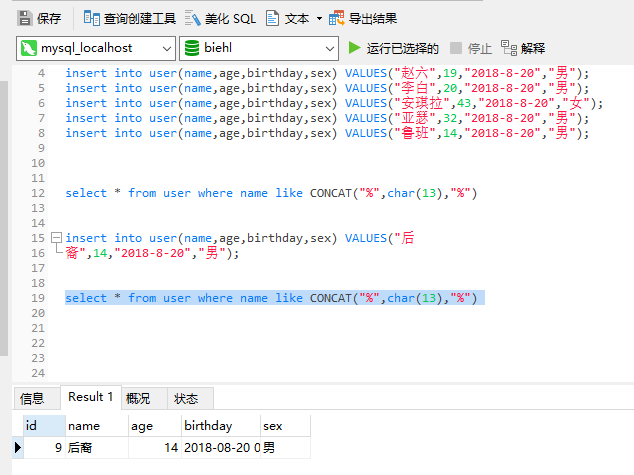
6、mysql函数。replace(string_expression , string_pattern , string_replacement),第一个参数:要查找的字段。第二个参数:要查找的字符。第三个参数:要替换成的字符。char(10)换行键。char(13)回车键。你会发现字段名称like 的concat里面是char(10)和char(13)都可以进行查询出结果的。

7、我要的结果就是将带有换行和回车的字符处理掉,然后执行交换。其他使用情况以后用到再贴。
8、最后说一下,这里是name的字段,本不该出现回车和换行符的,如果是其他长文本字段,可以使用如下命令:
 -- 将char()换行键,char()回车键换成@#r;和@#n;

 select REPLACE(REPLACE(name, char(), '@#r;'), char(), '@#n;') as name from user where name like CONCAT("%",char(),"%")

 -- 将@#r;和@#换成nchar()换行键,char()回车键;

 select REPLACE(REPLACE(name, '@#r;', char()), '@#n;', char()) as name from user where name like CONCAT("%",char(),"%")
待续......
|ERROR|ERROR: missing data for column "createtime" (seg3 slice1 192.168.66.23:40001 pid=33370)之mysql换行符或者空格引起的问题的更多相关文章
- loadrunner:Action.c(4): Error -27796: Failed to connect to server "192.168.66.3:8080": [10060] Connection timed out
Action.c(4): Error -27796: Failed to connect to server "192.168.66.3:8080": [10060] Connec ...
- MySQL Error 1170 (42000): BLOB/TEXT Column Used in Key Specification Without a Key Length【转】
今天有开发反应他的建表语句错误,我看了下,提示: MySQL Error 1170 (42000): BLOB/TEXT Column Used in Key Specification Withou ...
- 插入中文错误ERROR 1406 (22001): Data too long for column 'name' at row 1
1.在导入数据前执行以下命令即可:set SESSION sql_mode=''; 通过设置sql_mode变量更改模式.linux下安装完mysql后,默认的sql-mode值是空,在这种情形下my ...
- MySQL插入中文时出现ERROR 1406 (22001): Data too long for column 'name' at row 1 (转)
使用命令行方式登陆到MySQL服务器, 建立一个数据库,数据库编码设为UTF-8.此时,如果直接在命令行窗口使用insert语句插入中文,就遇到类似 ERROR 1406 (22001): Data ...
- error items-9022:missing required icon file.the bundle does not contain an app icon for iPhone/iPad Touch of exactly '120x120' pixels,in.pen format for ios versions >= 7.0
error items-9022:missing required icon file.the bundle does not contain an app icon for iPhone/iPad ...
- SQL logic error or missing database no such table: xxx
原文:SQL logic error or missing database no such table: xxx System.Data.SQLite.SQLiteException (0x8000 ...
- 如何解决:ERROR: the user data image is used by another emulator. aborting 的问题
问题概述: 在启动Android模拟器时出现以下错误,导致启动失败. ERROR: the user data image is used by another emulator. aborting. ...
- imagecreatefromjpeg(): gd-jpeg, libjpeg: recoverable error: Corrupt JPEG data: 1 extraneous bytes be
imagecreatefromjpeg(): gd-jpeg, libjpeg: recoverable error: Corrupt JPEG data: 1 extraneous bytes be ...
- error on line 1 at column 6: XML declaration allowed only at the start of the document
This page contains the following errors: error on line 1 at column 6: XML declaration allowed only a ...
随机推荐
- Python3学习笔记30-datetime模块
datetime是Python处理日期和时间的标准库 获取当前的日期和时间 from datetime import datetime now = datetime.now() print(now) ...
- URLConnection和HttpURLConnection
URLConnection和HttpURLConnection使用的都是java.net中的类,属于标准的java接口. HttpURLConnection继承自URLConnection,差别在与H ...
- boost.Asio lib
Documentation for Boost.Asio http://www.boost.org/doc/libs/1_62_0/doc/html/boost_asio.html https://w ...
- HBase Snapshot简介
一.简介 HBase 从0.95开始引入了Snapshot,可以对table进行Snapshot,也可以Restore到Snapshot.Snapshot可以在线做,也可以离线做.Snapshot的实 ...
- ProtocolError: <ProtocolError for 127.0.0.1/RPC2: 401 Unauthor.
安装cloudera-manager-agent报错 查看/var/log/cloudera-scm-agent.log 报错 Traceback (most recent call last): F ...
- Connection reset by [server_ip] port 22 (hexo d 部署博客出错)
问题 在使用 hexo d 部署博客和使用 Git/Github 进行 git push -u origin master 时遇到了以下问题: git -c diff.mnemonicprefix=f ...
- Confluence 6 Oracle 驱动输入你的数据库细节
Confluence 的安装向导将会指导你一步一步的在 Confluence 中配置安装 Oracle 数据库. 使用 JDBC 连接(默认) JDBC 是推荐的连接你的 Confluence 到数据 ...
- numpy:dot与multiply
http://blog.csdn.net/iamzhangzhuping/article/details/52370241
- Spark SQL访问PostgreSQL
随着Spark SQL的正式发布,以及它对DataFrame的支持,它可能会取代HIVE成为越来越重要的针对结构型数据进行分析的平台.在博客文章What’s new for Spark SQL in ...
- Django Admin的相关知识
一.面向对象复习 1.类的继承 class Base(object): def __init__(self,val): self.val = val def func(self): self.test ...