
SpringBoot笔记十六:ElasticSearch
ElasticSearch官方文档
推荐去看官网的文档,有中文的,我这里仅仅是简单的入门一下,做一下个人笔记 ElasticSearch官方文档
ElasticSearch安装
我使用Docker进行安装,使用了中国加速
docker pull registry.docker-cn.com/library/elasticsearch
然后,开启镜像,生成容器,这里需要注意的是,ElasticSearch默认运行内存占用2个G,我虚拟机整个才给了2G内存,所以我要限制ElasticSearch的内存为最小256M,最大256M,端口号是9200,在分布式的情况下,互通的端口号是9300
docker run -e ES_JAVA_OPTS="-Xms256m -Xmx256m" -d -p 9200:9200 -p 9300:9300 --name myElasticSearch 5acf0e8da90b
在浏览器输入你的Linux服务器IP+9200,当你看到下图时就安装成功了

ElasticSearch简介
ElasticSearch就是一个搜索的东西,维基百科,Github用的都是这个。简单介绍一下,他的原理是这样的,有索引,索引下有类型,类型下有文档,文档有属性

可以这么理解,把ElasticSearch看作Mysql,索引就是数据库,类型就是表,文档就是数据,属性就是数据的属性类型
ElasticSearch操作数据,RESTful风格
存储
put 我们来往ElasticSearch里面存3条数据,ElasticSearch使用json存储的,格式是
PUT /索引/类型/特定标识
我这里提供几个json给你们使用
{

	"first_name":"Vae",

	"age":32,

	"about":"许嵩是音乐家",

	"interests":["music","Photograph"]

}

{

	"first_name":"JJ",

	"age":32,

	"about":"林俊杰是音乐家",

	"interests":["music","Dota2"]

}

{

	"first_name":"shuyunquan",

	"age":23,

	"about":"蜀云泉是程序员",

	"interests":["music","Photograph"]

}
打开postman这个软件,输入http://193.112.28.104:9200/meizu/employee/1
我索引写成魅族公司,注意必须小写,类型写成员工,标识先写1
选择PUT模式,Body,raw,send一下会有返回消息,如图

我们依次把2和3都存储进ElasticSearch
检查是否存在
把postman从PUT模式改成HEAD模式,就可以查有没有数据了,例如我们查3就显示 status:200ok 这就表明有数据,我们查4就显示status:404 NotFound


删除
把PUT改为Delete就是删除,我这里不演示
查询
Get就是查询,不演示
更新
更新也是PUT,PUT第一次就是插入,后面全是更新
查询所有
把id换成_search就可以,例如:

条件查询
比如我想查询,about是和音乐相关的,我可以这样写
http://193.112.28.104:9200/meizu/employee/_search?q=about:音乐
加了一个 ?q= 后面是属性名:查询关键字
看看结果:

查询表达式查询,全文搜索
上面的条件查询加的是?q=,这里使用条件表达式也是一样的效果。
使用POST方式,http://193.112.28.104:9200/meizu/employee/_search
然后使用Body里的raw,改为json数据,结果也是一样的。这个也是全文搜索,只要有这个关键字的其中一个,就会出现
{

    "query":{

        "match":{

            "about":"音乐"

        }

    }

}

绝对搜索
这个不是模糊的了,必须是和关键字一模一样才能查出来
{

    "query":{

        "match_phrase":{

            "about":"音乐"

        }

    }

}
高亮搜索
{

    "query":{

        "match_phrase":{

            "about":"音乐"

        }

    },

    "highlight":{

        "fields":{

            "about":{}

        }

    }

}
ElasticSearch整合进SpringBoot
添加引用
SpringBoot与ElasticSearch的交互有两种方式的,我把两种方式的Maven依赖都写出来,我们两种方式都测试一下。
ElasticSearch的Jest版Maven引用
<dependency>

    <groupId>io.searchbox</groupId>

    <artifactId>jest</artifactId>

    <version>5.3.4</version>

</dependency>
ElasticSearch的SpringBoot版Maven引用,不是ElasticSearch,在Maven仓库里面需要搜索
spring-boot-starter-data-elasticsearch
出现的第一个就是,这个是SpringBoot版的ElasticSearch,如下
<dependency>

    <groupId>org.springframework.boot</groupId>

    <artifactId>spring-boot-starter-data-elasticsearch</artifactId>

    <version>2.1.3.RELEASE</version>

</dependency>
SpringBoot和ElasticSearch交互的两种方式
我们看看org.springframework.boot.autoconfigure这个包,发现下面有两个ElasticSearch,一个是data.elasticsearch,一个是elasticsearch.jest,如图:
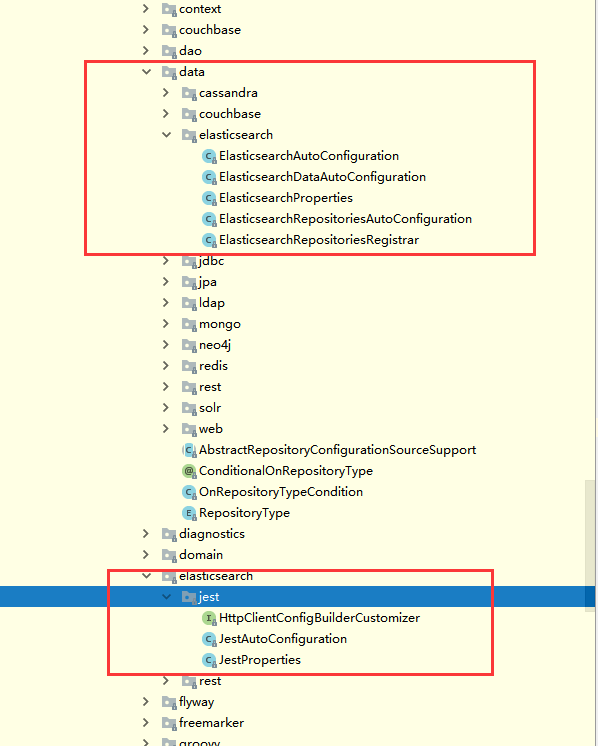
这两种方式都是可以的,Jest是通过Http的方式,data.ElasticSearch是SpringBoot data整合的,总结一下
SpringBoot和ElasticSearch交互的两种方式:
jest:默认不生效,需要导入一个io.searchbox.client.JestClient的包
SpringBoot Data:默认生效
Jest方式
把Jest的Maven依赖引入进项目
在application配置文件写上我们的ElasticSearch部署服务器的ip
spring:

  elasticsearch:

    jest:

      uris: http://193.112.28.104:9200
Jest存入ElasticSearch
@Autowired

    JestClient jestClient;

    @Test

    public  void jest(){

        //第一步,先新建文档

        Message message=new Message();

        message.setId("1");

        message.setCommand("音乐");

        message.setDescription("音乐风格");

        message.setContent("许嵩的音乐风格非常独特");

        //第二步,新建一个索引

        Index index=new Index.Builder(message).index("Vae").type("Music").build();

        //第三步,执行

        try {

            jestClient.execute(index);

        } catch (IOException e) {

            e.printStackTrace();

        }

    }
我们这里存储一个Message对象,注意,Message对象的Id需要加一个注解
public class Message {

    @JestId

    private String id;

    ....
执行一下,成功后在浏览器或者PostMan输入
照理说应该会出现我们的Message对象的json数据,但是不知道为什么我的没有出现....我的报了这个错误
{

    "error": {

        "root_cause": [

            {

                "type": "index_not_found_exception",

                "reason": "no such index",

                "resource.type": "index_expression",

                "resource.id": "Vae",

                "index_uuid": "_na_",

                "index": "Vae"

            }

        ],

        "type": "index_not_found_exception",

        "reason": "no such index",

        "resource.type": "index_expression",

        "resource.id": "Vae",

        "index_uuid": "_na_",

        "index": "Vae"

    },

    "status": 404

}
我不知道为什么,也搜不出来答案
Jest读取ElasticSearch
   @Test

    public void jestsearch(){

        String json="{\n" +

                "    \"query\":{\n" +

                "        \"match\":{\n" +

                "            \"about\":\"音乐\"\n" +

                "        }\n" +

                "    }\n" +

                "}";

        //构建搜索功能

        Search search = new Search.Builder(json).addIndex("meizu").addType("employee").build();

        //执行

        try {

            SearchResult result=jestClient.execute(search);

            System.out.println(result.getJsonString());

        } catch (IOException e) {

            e.printStackTrace();

        }

    }
这个倒是成功了,我查找之前存储的employee数据
SpringBoot data方式
我们先引入SpringBoot data ElasticSearch的Maven依赖
配置文件
spring:

  data:

    elasticsearch:

      cluster-name: elasticsearch

      cluster-nodes: 193.112.28.104:9300
新建一个Java Bean的类吧
package com.example.bean;

import io.searchbox.annotations.JestId;

public class Article {

    @JestId

    private Integer id;

    private String title;

    private String auter;

    private String content;

    public Article() {

    }

    public Article(Integer id, String title, String auter, String content) {

        this.id = id;

        this.title = title;

        this.auter = auter;

        this.content = content;

    }

    @Override

    public String toString() {

        return "Article{" +

                "id=" + id +

                ", title='" + title + '\'' +

                ", auter='" + auter + '\'' +

                ", content='" + content + '\'' +

                '}';

    }

    public Integer getId() {

        return id;

    }

    public void setId(Integer id) {

        this.id = id;

    }

    public String getTitle() {

        return title;

    }

    public void setTitle(String title) {

        this.title = title;

    }

    public String getAuter() {

        return auter;

    }

    public void setAuter(String auter) {

        this.auter = auter;

    }

    public String getContent() {

        return content;

    }

    public void setContent(String content) {

        this.content = content;

    }

}
再新建一个实现了ElasticsearchRepository接口的接口
package com.example.repository;

import com.example.bean.Article;

import org.springframework.data.elasticsearch.repository.ElasticsearchRepository;

import java.util.List;

public interface ArticleRepository extends ElasticsearchRepository<Article,Integer> {

    public List<Article> findArticleContentLike(String Content);

}
我自己写了一个自定义方法,模糊查询Content字段
    @Test

    public void data1(){

        Article article=new Article();

        article.setId(1);

        article.setTitle("音乐");

        article.setAuter("许嵩");

        article.setContent("许嵩的音乐风格很独特");

        articleRepository.index(article);

    }

    @Test

    public void data2(){

        for (Article article : articleRepository.findArticleContentLike("许嵩")) {

            System.out.println(article);

        }

    }
一个是存储,一个是模糊查询,但是!!我还是执行保存......我的好像也不是版本问题.....先搁置吧,忙着找工作,没时间解决这个报错
SpringBoot笔记十六:ElasticSearch的更多相关文章
- python3.4学习笔记(十六) windows下面安装easy_install和pip教程
python3.4学习笔记(十六) windows下面安装easy_install和pip教程 easy_install和pip都是用来下载安装Python一个公共资源库PyPI的相关资源包的 首先安 ...
- SpringBoot | 第二十六章:邮件发送
前言 讲解了日志相关的知识点后.今天来点相对简单的,一般上,我们在开发一些注册功能.发送验证码或者订单服务时,都会通过短信或者邮件的方式通知消费者,注册或者订单的相关信息.而且基本上邮件的内容都是模版 ...
- (C/C++学习笔记) 十六. 预处理
十六. 预处理 ● 关键字typeof 作用: 为一个已有的数据类型起一个或多个别名(alias), 从而增加了代码的可读性. typedef known_type_name new_type_nam ...
- SpringBoot笔记十四:消息队列
目录 什么是消息队列 消息队列的作用 异步通信 应用解耦 流量削峰 RabbitMQ RabbitMQ流程简介 RabbitMQ的三种模式 安装RabbitMQ RabbitMQ交换器路由和队列的创建 ...
- SpringBoot(十六)-- 使用外部容器运行springBoot项目
spring-boot项目需要部署在外部容器中的时候,spring-boot导出的war包无法再外部容器(tomcat)中运行或运行报错. 为了解决这个问题,需要移除springBoot自带的tomc ...
- SpringBoot | 第十六章:web应用开发
前言 前面讲了这么多直接,都没有涉及到前端web和后端交互的部分.因为作者所在公司是采用前后端分离方式进行web项目开发了.所以都是后端提供api接口,前端根据api文档或者服务自行调用的.后台也有读 ...
- SpringBoot第十六篇:自定义starter
作者:追梦1819 原文:https://www.cnblogs.com/yanfei1819/p/11058502.html 版权声明:本文为博主原创文章,转载请附上博文链接! 前言 这一段时间 ...
- JavaScript权威设计--CSS(简要学习笔记十六)
1.Document的一些特殊属性 document.lastModified document.URL document.title document.referrer document.domai ...
- MySQL学习笔记十六:锁机制
1.数据库锁就是为了保证数据库数据的一致性在一个共享资源被并发访问时使得数据访问顺序化的机制.MySQL数据库的锁机制比较独特,支持不同的存储引擎使用不同的锁机制. 2.MySQL使用了三种类型的锁机 ...
随机推荐
- zabbix自动注册
实现方法是: 第一: 选择动作-->事件源-->自动注册-->创建动作 第二: 动作-->触发条件-->主机元数据-->contains-->Linux 第四 ...
- Java 属性映射(DozerBeanMapper)
package com.kps.common.utils; import java.util.ArrayList; import java.util.Collection; import java.u ...
- 【BZOJ1999】【NOIP2007】树网的核 单调队列优化DP
题目描述 题目很长,大家自己去看吧. bzoj vijos 原题\(n\leq 300\) 加强版\(n\leq 500000\) 题解 这种东西当然要猜结论的啦,否则会比较麻烦. 结论1:如果有很多 ...
- 洛谷P4689 [Ynoi2016]这是我自己的发明(莫队,树的dfn序,map,容斥原理)
洛谷题目传送门 具体思路看别的题解吧.这里只提两个可能对常数和代码长度有优化的处理方法. I 把一个询问拆成\(9\)个甚至\(16\)个莫队询问实在是有点珂怕. 发现询问的一边要么是一个区间,要么是 ...
- Nowcoder | [题解-N165]牛客网NOIP赛前集训营-普及组(第二场)
啊...表示一大早还没睡醒就开始打比赛(开始前一分钟的我还在桌子上趴着休眠)...表示题目思路清奇(尤其C题)...但是我还是太蒻了...\(D\)题暴力都没打...题解正式开始之前先\(\%\)一下 ...
- Scout YYF I POJ - 3744(概率dp)
Description YYF is a couragous scout. Now he is on a dangerous mission which is to penetrate into th ...
- [NOI2012]美食节(费用流)
题目描述 CZ市为了欢迎全国各地的同学,特地举办了一场盛大的美食节.作为一个喜欢尝鲜的美食客,小M自然不愿意错过这场盛宴.他很快就尝遍了美食节所有的美食.然而,尝鲜的欲望是难以满足的.尽管所有的菜品都 ...
- 20165223《Java程序设计》第八周Java学习总结
教材学习内容总结 第12章-JAVA多线程机制 要点 Java中的线程 Thread类与线程的创建 线程的常用方法 线程同步 协调同步的线程 线程联合 GUI线程 计时器线程 教材学习中的问题和解决过 ...
- Python基础之文件和目录操作
1 .文件操作 1.1 文件打开和关闭 在python, 使用 open 函数, 可以打开一个已经存在的文件, 或者创建一个新文件. # 打开文件 f = open('test.txt', 'w') ...
- kafaka quickstart
http://kafka.apache.org/ http://kafka.apache.org/downloads cd /root/kafuka/kafka_2.12-0.11.0.0 nohup ...