
使用IP欺骗Loadrunner并发测试小结


 Action()

 {

     int status;

     int HttpRetCode;

     char *ip;

     ip = lr_get_vuser_ip();

 //检查Loadrunner Controller有没有Enable IP Spoofing

     if(ip)

         lr_output_message("The IP address is %s", ip);

     else

         lr_output_message("IP spoofing disabled");

 //设置集合点,让50个vuser一起发起第一个请求

     lr_rendezvous("letusgo");

 //开始第一个事务(请求)

     lr_start_transaction("1stReq");

     web_url("RCS_Initial_HTTP_Req",

 //这里有一个参数化,我要每一次传递给该参数一个唯一的msisdn号码,并且只执行一次。

 //我在参数属性对话框里设置:Select next row -> Unique

 //                                          Update value on -> Once

         "URL= http://xxx.yyy.com/self?x-forwarding-msisdn={NewParam}",

         "TargetFrame=Main",

         "Resource=0",

         "RecContentType=text/html",

         "Mode=http",

         LAST );

 //打印第一个请求的返回码

     HttpRetCode = web_get_int_property(HTTP_INFO_RETURN_CODE);

     lr_output_message("Response code:%d",HttpRetCode);

 //检查返回码是否是200

       if(HttpRetCode == ){

         lr_end_transaction("1stReq", LR_PASS);

         sleep();

 //开始第二个事务(请求)

         lr_start_transaction("2ndReq");

         web_url("RCS_Initial_HTTP_Req",

         "URL= https://xxx.yyy.com/self?vers=1&IMSI=1&rcs_version=1&rcs_profile=1&client_vendor=1&client_version=1&terminal_vendor=1&terminal_model=1&terminal_sw_version=1&IMEI=1&mock_scheme=HTTPS",

         "TargetFrame=Main",

         "Resource=0",

         "RecContentType=text/html",

         "Mode=http",

         LAST );

 //打印第二个请求的返回码

          HttpRetCode = web_get_int_property(HTTP_INFO_RETURN_CODE);

          lr_output_message("Response code:%d",HttpRetCode);

 //检查返回码是否是200

 //结束第二个事务(请求)

         if(HttpRetCode == ){

             lr_end_transaction("2ndReq", LR_PASS);

          }else{

              lr_end_transaction("2ndReq", LR_FAIL);

         }

      return ;  }else{

 //结束第一个事务(请求)

      lr_end_transaction("1stReq", LR_FAIL);

      return ;

      }

 }
场景设置:
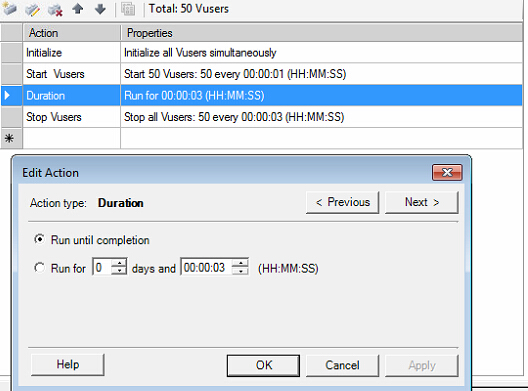


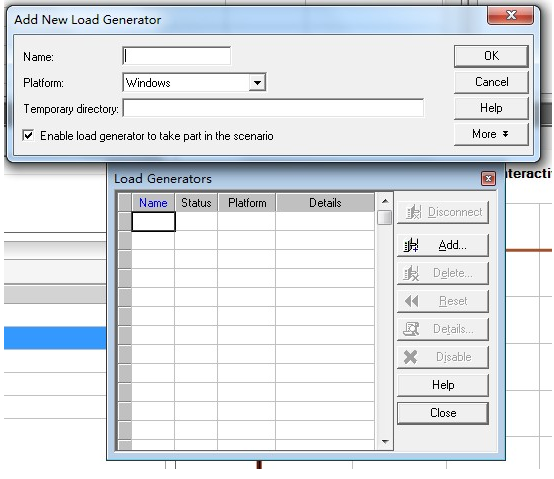
一定要注意每一个Vuser的IP是否是唯一的。双击下图Scenario Groups里面的Group Name行可以打开每一个Vuser对应的Generator,查看其IP。


[root@~]# service rstatd status
rpc.rstatd (pid 2650) is running...
[root@~]#
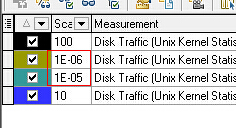

| UNIX counter | Windows Counter | Description |
| Average Load* | N/A | The sum of the number of processes waiting in the run queue plus the number currently executing. |
| Collision rate | N/A | The total number of network collisions/sec |
| Context switch rate | System – Context Switches/sec | The rate at which processors switch from executing one thread to another. High switch rates can indicate performance problems as servers juggle multiple running applications. |
| CPU utilisation | %Processor Time | The percentage of elapsed time that the process spends executing non-idle threads. |
| Disk traffic | %Disk time | The percentage of elapsed time that the disk(s) are busy servicing read or write requests. |
| Incoming packets error rate | Packets received errors | The number of packets received containing errors that precvent them from being delivered to a higher OSI layer protocol. |
| Incoming packets rate | Packets received/sec | The number of packets received on the network interface |
| Interrupt rate | Interrupts/sec | Average rate at which the processor receives and services hardware interrupts. Processes generate an interrupt when they finish a task and need to report that fact to the CPU. |
| Outgoing packets error rate | Packets outbound errors | The number of packets that can’t be transmitted due to errors |
| Outgoing packets rate | Packets sent / sec | The rate at which packets are sent on the network interface |
| Page-in rate | Pages Input/sec | The rate at which pages are read from disk to resolve hard page faults. Hard page faults occur when a process refers to a page in virtual memory which is not in it’s working set or available elsewhere in physical memory and has to be read from disk. |
| Page-out rate | Pages Output/sec | The rate at which memory pages are written to disk to free up space in physical memory. |
| Paging rate | Paging rate | The rate at which pages are read from disk or written to disk. This is the sum of Pages Input/sec and Pages Output/sec. |
| Swap-in rate | N/A | The number of pages read into memory per second |
| Swap-out rate | N/A | The number of pages written out of memory per second |
| System mode CPU utilization | Processor – %Priviledged time | The percentage of elapsed time that the processor spends executing user threads (i.e. running applications) |
| User mode CPU utilization | Processor – %User time | The percentage or elapsed time that the processor spends executing priviledged or system mode threads. |
使用IP欺骗Loadrunner并发测试小结的更多相关文章
- jmeter使用IP欺骗进行压力测试
loadrunner的IP欺骗功能很强大,耐心研究jmeter官方文档,发现在jmeter2.5以上的版本有此功能的实现~ 准备工作: 1.window7一台,安装jdk1.6环境. 2.下载最新 ...
- 转 LoadRunner 技巧之 IP欺骗 (推荐)
IP欺骗也是也loadrunner自带的一个非常有用的功能. 需要使用ip欺骗的原因: 1.当某个IP的访问过于频繁,或者访问量过大是,服务器会拒绝访问请求,这时候通过IP欺骗可以增加访问频率和访问量 ...
- LoadRunner 技巧之 IP欺骗 (推荐)
IP欺骗也是也loadrunner自带的一个非常有用的功能. 需要使用ip欺骗的原因:1.当某个IP的访问过于频繁,或者访问量过大是,服务器会拒绝访问请求,这时候通过IP欺骗可以增加访问频率和访问量, ...
- LoadRunner 技巧之 IP欺骗
IP欺骗也是也loadrunner自带的一个非常有用的功能. 需要使用ip欺骗的原因:1.当某个IP的访问过于频繁,或者访问量过大是,服务器会拒绝访问请求,这时候通过IP欺骗可以增加访问频率和访问量, ...
- jmeter使用IP欺骗压力测试
最近在使用jmeter进行压力测试时需要使用类似于loadrunner的IP欺骗功能,经问津度娘无果后决定再次耐心研究jmeter官方文 档,终于发现在jmeter2.5以上的版本有此功能的实现,由于 ...
- 转 jmeter使用IP欺骗压力测试
jmeterIP 欺骗多IP 最近在使用jmeter进行压力测试时需要使用类似于loadrunner的IP欺骗功能,经问津度娘无果后决定再次耐心研究jmeter官方文 档,终于发现在jmeter2.5 ...
- 【Loadrunner】初学Loadrunner——IP欺骗
因为在默认情况下,同一个用户用同一个IP访问运行是不符合实际情况的,而且很多网站会自动屏蔽同个IP多次重复访问.那么就想到了Loadrunner的虚拟IP技术,也就是常说的IP欺骗.在用Loadrun ...
- LoadRunner学习知多少--IP欺骗使用
使用IP欺骗功能时,需要将系统防火墙,杀毒软件关闭(如果有影响的话) 一.为什么要设置IP欺骗 1. 当某个IP的访问过于频繁,或者访问量过大时,服务器会拒绝访问请求,这时候通过IP欺骗可以增加访问频 ...
- Loadrunner如何进行有效的IP欺骗
柠檬班的清风同学某天紧急求助如何搞IP欺骗,端午节后,抽时间把这个事情搞定啦!跟大家详细的讲讲IP欺骗的运用和理解. 一.什么是IP欺骗 给你客户端的IP地址加个马甲,让服务器端识别不到是同一个IP地 ...
随机推荐
- Android 监测手机联网状态 wifi、移动数据流量、无联网状态
手机当完成联网时会发送一个广播,我们只要创建一个广播接收者即可,代码如下: package com.example.NetworkChangeReceiver2; import android.con ...
- hdu 1180 诡异的楼梯
诡异的楼梯 Time Limit: 2000/1000 MS (Java/Others) Memory Limit: 131072/65536 K (Java/Others)Total Subm ...
- floodlight make the VMs can not getDHCP IP address
https://answers.launchpad.net/neutron/+question/242170 这个问题我也遇到了,但是没人回答. floodlight make the VMs can ...
- 将集成spring的项目从tomcat上移植到weblogic下存在的问题
当在weblogic下部署时, 1.需要jersey-servlet-xx.jar,jersey-core-xx.jar,jersey-server-xx.jar: 2.在web.xml中全局参数co ...
- QT5删除隐藏目录+隐藏文件(使用Process::start函数调用系统命令,且等待到结束)
1.功能需求 删除一个目录(包括目录本身),同时删除该目录中所有文件及目录(含隐藏的) 2.遇到的问题 qt5中已经有了递归删除目录的函数--->bool QDir::removeRecursi ...
- Android:调试之DDMS
DDMS 的全称是Dalvik Debug Monitor Service,是 Android 开发环境中的Dalvik虚拟机调试监控服务. 在Eclipse,项目启动了虚拟器后,右上角选择Open ...
- 59. Spiral Matrix II
题目: Given an integer n, generate a square matrix filled with elements from 1 to n2 in spiral order. ...
- rhel-server-7.2-x86_64无法联网(VMware环境)
vim /etc/sysconfig/network-script vim ifcfg-eno16777736 (编辑网卡名) 将ONBOOT=NO更改为YES (启动network服务时是否启用该网 ...
- Java API —— 多线程(2)
1.JDK5中Lock锁的使用 虽然我们可以理解同步代码块和同步方法的锁对象问题,但是我们并没有直接看到在哪里加上了锁,在哪里释放了锁,为了更清晰的表达如何加锁和释放锁,JDK5以后提供了一个新的锁对 ...
- Struts2的简单案例
第一步:首先下载struts2的架包(链接地址:http://download.csdn.net/detail/ahy1024/4626028) 第二步:新建web project项目 DemoStr ...