
How to install JDK (Java Development Kit) on Linux
This tutorial will guide you on how to install JDK (Java Development Kit) on Linux. Since I use Centos 5.4 x86_64 in everyday life, this guide is showing you how to install JDK in Centos 5.4 64bit. It must work in any other Linux distro such as Slackware, Fedora, Ubuntu et cetera.
If you install a Linux OS, the developers usually already included a JVM to the system to run some programs that need Java. Mostly they included OpenJDK for the JVM.
But I don’t like to use OpenJDK because some Java platform like JavaFX will not run using OpenJDK.
UPDATE! Java SE 6 (JDK 1.6) Update 24 (file name: jdk-6u24-linux-i586.bin) is now available. You can download the file from Java SE Downloads page. Java SE 7 (JDK 1.7) Binary Snapshot build b132 also has been released. If you want to download and install the Java SE 7, you can get the file fromJava SE 7 download page with the file name jdk-7-ea-bin-b132-linux-i586-03_mar_2011.bin. This tutorial should be applicable for those version.
1. Download the JDK
The JDK can be downloaded from its official website. At the time this tutorial was written, the JDK version is JDK 6 Update 17. Click the Download button then you will be forwarded to Java SE Download page. You can select the Java platform to suit your system.
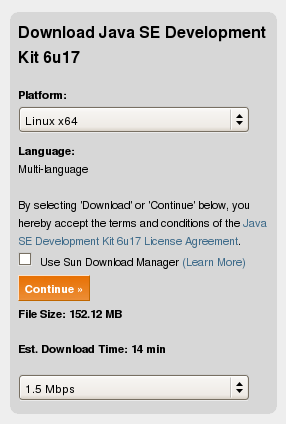
Since I use x86_64 of Linux, I choose ‘Linux x64′ for the platform. Then click ‘Continue’ button. You can skip for the ‘Log in for Downloads’ optional window. Then select from the available files.
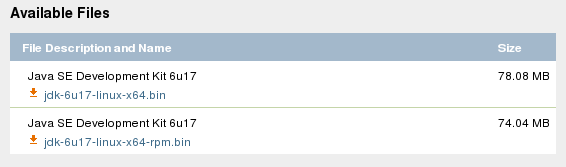
Choose not the ‘rpm’ file because we will install the JDK in a folder as we want to.
2. After the download is complete, unpack the file by executing it.
First you have to make it executable.
[fuad@centos Downloads]$ chmod +x jdk-6u17-linux-x64.bin

[fuad@centos Downloads]$ ./jdk-6u17-linux-x64.bin

  inflating: jdk1.6.0_17/README.html

   creating: jdk1.6.0_17/include/

  inflating: jdk1.6.0_17/include/jni.h

   creating: jdk1.6.0_17/include/linux/

  inflating: jdk1.6.0_17/include/linux/jawt_md.h

  inflating: jdk1.6.0_17/include/linux/jni_md.h

  inflating: jdk1.6.0_17/include/jvmti.h

  inflating: jdk1.6.0_17/include/jawt.h

  inflating: jdk1.6.0_17/include/jdwpTransport.h

  inflating: jdk1.6.0_17/include/classfile_constants.h

  inflating: jdk1.6.0_17/COPYRIGHT

Creating jdk1.6.0_17/jre/lib/rt.jar

Creating jdk1.6.0_17/jre/lib/jsse.jar

Creating jdk1.6.0_17/jre/lib/charsets.jar

Creating jdk1.6.0_17/lib/tools.jar

Creating jdk1.6.0_17/jre/lib/ext/localedata.jar

Creating jdk1.6.0_17/jre/lib/plugin.jar

Creating jdk1.6.0_17/jre/lib/javaws.jar

Creating jdk1.6.0_17/jre/lib/deploy.jar

Java(TM) SE Development Kit 6 successfully installed.

Product Registration is FREE and includes many benefits:

* Notification of new versions, patches, and updates

* Special offers on Sun products, services and training

* Access to early releases and documentation

Product and system data will be collected. If your configuration

supports a browser, the Sun Product Registration form for

the JDK will be presented. If you do not register, none of

this information will be saved. You may also register your

JDK later by opening the register.html file (located in

the JDK installation directory) in a browser.

For more information on what data Registration collects and

how it is managed and used, see:

http://java.sun.com/javase/registration/JDKRegistrationPrivacy.html

Press Enter to continue.....

Done.
A folder ‘jdk1.6.0_17′ will be created.
3. Move the ‘jdk1.6.0_17′ folder to a safe place
We will move this folder to a place as you want to. You can move it to /opt folder, leave it in this directory or to anywhere in the system. I prefer to move this folder to /usr/local. So move it there.
[fuad@centos Downloads]$ sudo mv jdk1.6.0_17 /usr/local/
Here in the /usr/local/ directory, we will create a symbolic link to jdk1.6.0_17 named as ‘java’
[fuad@centos Downloads]$ cd /usr/local/

[fuad@centos local]$ sudo ln -s jdk1.6.0_17 java
Now the JDK is installed in /usr/local/jdk1.6.0_17 and linked to /usr/local/java.
We need to add /usr/local/java/bin folder to the system PATH. If it is only for your account, add it in .bash_profile file in you home directory. In Slackware, it should be in .profile file. To make it system wide environment, add it in the /etc/profile.
Edit a line in .bash_profile to be similar like below:
PATH=$PATH:$HOME/bin:/usr/local/java/bin
This way the PATH will be automatically set at boot time.
You can also set the PATH immediately by using a command below:
$ export PATH=$PATH:/usr/local/java/bin
Now you can call java directly in your shell:
$ java -version

java version "1.6.0_17"

Java(TM) SE Runtime Environment (build 1.6.0_17-b04)

Java HotSpot(TM) 64-Bit Server VM (build 14.3-b01, mixed mode)
4. Upgrade to the latest version
If there is a new JDK version released by Sun/Oracle and you want to upgrade to the latest version, you can simply follow the steps above. Except for the third step, after moving the new JDK version to /usr/local/ folder, you need to remove the existing ‘java’ folder in the /usr/local/ directory and re-create the symbolic link again.
For example, today on May 18th, 2010, I checked to the java.sun.com website that the current latest version of the JDK is JDK 6 Update 20. So after following step 1 and 2, we remove the ‘java’ folder and re-create the symbolic link again to the ‘java’ folder.
$ sudo rm -rf java

$ sudo ln -s jdk1.6.0_20 java
To make sure it has been successfully upgraded, you can check the current java version.
$ java -version

java version "1.6.0_20"

Java(TM) SE Runtime Environment (build 1.6.0_20-b02)

Java HotSpot(TM) Server VM (build 16.3-b01, mixed mode)
How to install JDK (Java Development Kit) on Linux的更多相关文章
- jdk (Java Development Kit)
JDK是 Java 语言的软件开发工具包,主要用于移动设备.嵌入式设备上的java应用程序.JDK是整个java开发的核心,它包含了JAVA的运行环境(JVM+Java系统类库)和JAVA工具. JD ...
- eclipse解压后启动弹出A Java Runtime Evironment(JRE) or Java Development Kit(JDK)....
系统环境:win7 64bit JDK:jdk-7u79-windows-x64 Eclipse:eclipse-jee-helios-win32 启动eclipse:弹出A Java Runtime ...
- ubuntu myeclipse 启动时提示 A Java Runtime Environment (JRE) or Java Development Kit (JDK) must be avail ....
jdk已经安装过但是启动eclipse时提示“A Java Runtime Environment (JRE) or Java Development Kit (JDK) must be avail ...
- Linux 下报错:A Java RunTime Environment (JRE) or Java Development Kit (JDK) must解决方案
一.报错环境:在Linux mint下,前几天还用得很好的的eclipse,今天开机不知为什么这样. Linux 下报错:A Java RunTime Environment (JRE) or Jav ...
- A Java Runtime Environment (JRE) or Java Development Kit (JDK) must be available in order to run Eclipse. No Java virtual machine was found after searching the following locations: /usr/local/eclipse/
linux系统下jdk是已经安装好的情况之下软件出现 A Java Runtime Environment (JRE) or Java Development Kit (JDK) must be av ...
- ubuntu 打开eclipse出现A Java Runtime Environment (JRE) or Java Development Kit (JDK) must be ... 解决方法(转载)
原创作者:http://www.cnblogs.com/jerome-rong/archive/2013/02/19/2916608.html Java RunTime Environment (JR ...
- eclipse 启动问题Eclipse启动时报错:A Java RunTime Environment (JRE) or Java Development Kit (JDK) must be available in order to run Eclipse. No java virtual machine was found after searching the following locat
从其他人直接复制的环境导致的问题. 正常双击出现当前异常,以管理员权限启动可以正常启动. ---------------------------Eclipse--------------------- ...
- Eclipse启动错误:A Java Runtime Environment(JRE) or Java Development Kit(JDK) must be available……
确保Jdk,Jre都安装完成并且环境变量配置无误的情况下,自动Ecplise报错如下: A Java Runtime Environment (JRE) or Java Development Kit ...
- JDK(Java Development Kit)内置常用自带工具一览(转)
注意:可能随着JDK的版本升级,工具也会随着增多. JDK(Java Development Kit)是Java程序员最核心的开发工具,没有之一. JDK是一个功能强大的Java开发套装,它不仅仅为我 ...
随机推荐
- 微软职位内部推荐-Senior Dev Lead
微软近期Open的职位: Bing Index Serve team is hiring! We are one of the core teams in Bing serving more than ...
- office365 development
Introduction to Office 365 Development http://www.microsoftvirtualacademy.com/training-courses/intro ...
- iOS性能调优之Analyze静态分析
之前遇到一个同事写的 陈年老工程,需要尽快的时间修改里面的东西,急用,让我帮忙.那就帮着看看. 而Analyze这个工具 真是好用. 工程存在严重的内存泄漏. 如果不解决 很容易就会出现崩溃等现象 ...
- .NET4安装总进度一直不动的解决办法
在安装.NET4时遇到上面的进度在动,而安装进度一直停在0,解决办法: 禁止并关闭Window Update服务,重新运行安装程序. 关闭服务:控制面板->管理工具->服务->Win ...
- oracle 字符集
---- 在国内外大中型数据库管理系统中,把ORACLE作为数据库管理平台的用户比较多.ORACLE 不论是数据库管理能力还是安全性都是无可非议的,但是,它在汉字信息的显示方面着实给中国用户带来不少麻 ...
- Javascript的9张思维导图学习
思维导图小tips:思维导图又叫心智图,是表达发射性思维的有效的图形思维工具 ,它简单却又极其有效,是一种革命性的思维工具.思维导图运用图文并重的技巧,把各级主题的关系用相互隶属与相关的层级图表现出来 ...
- hdu 1063 Exponentiation
求实数的幂,这个用C++写的话有点长,但是用Java写就非常方便了…… ); System.out.println(an); } }}
- 关于Python的super用法
Python中对象方法的定义很怪异,第一个参数一般都命名为self(相当于其它语言的this),用于传递对象本身,而在调用的时候则不必显式传递,系统会自动传递. 举一个很常见的例子: >> ...
- Play Framework 2.2.6 安装
网络上很多安装方法都是互相复制黏贴的, 都没有人考虑到启动application 还有依赖很多jar 包,而其中typesafe 官网提供的只是一个mini的 启动器来安装,很慢,所以以下下载完整包. ...
- lintcode: 爬楼梯
题目: 爬楼梯 假设你正在爬楼梯,需要n步你才能到达顶部.但每次你只能爬一步或者两步,你能有多少种不同的方法爬到楼顶部? 样例 比如n=3,中不同的方法 返回 3 解题: 动态规划题目,同时还是有顺序 ...