
How To: Perl TCP / UDP Socket Programming using IO::Socket::INET
http://www.thegeekstuff.com/2010/07/perl-tcp-udp-socket-programming/
In this article, let us discuss how to write Perl socket programming using the inbuilt socket modules in Perl.
Perl socket modules provides an object interface that makes it easier to create and use TCP / UPD sockets.
This article covers the following topics:
- Perl example code for TCP client and server
- Perl example code for UDP client and server
- Read and write descriptor list using Select(IO::Select)
CPAN module IO::Socket::INET is used to perform socket operations such as — creating, binding, connecting, listening and closing the socket.
IO::Select module is used for obtaining the descriptors that are ready for read/write operations.
Perl TCP Client and Server
TCP is a connection oriented networking protocol. In this example, let us review the Perl code-snippet that will explaining us the simple client and server communication.
Perl TCP Server Operation
The socket operation such as socket creation, binding and listening to the socket is performed by the IO::Socket::INET module.
The Perl code given below does the following:
- Create the Socket
- Bind the socket to an address and port
- Listen to the socket at the port address
- Accept the client connections
- Perform read/write operation on the socket.
#!c:\perl\bin\perl.exe

#tcpserver.pl

use IO::Socket::INET;

# flush after every write

$| = ;

my ($socket,$client_socket);

my ($peeraddress,$peerport);

# creating object interface of IO::Socket::INET modules which internally does

# socket creation, binding and listening at the specified port address.

$socket = new IO::Socket::INET (

  LocalHost => '61.52.222.111',

  LocalPort => '8888',

  Proto => 'tcp',

  Listen => ,

  Reuse =>

) or die"ERROR in Socket Creation : $!\n";

print "SERVER Waiting for client connection on port 8888";

while()

{

  # waiting for new client connection.

  $client_socket = $socket->accept();

  # get the host and port number of newly connected client.

  $peer_address = $client_socket->peerhost();

  $peer_port = $client_socket->peerport();

  print "Accepted New Client Connection From : $peeraddress:$peerport\n";

  # write operation on the newly accepted client.

  $data = "DATA from Server";

  print $client_socket "$data\n";

  # we can also send the data through IO::Socket::INET module,

  # $client_socket->send($data);

  # read operation on the newly accepted client

  $data = <$client_socket>;

  # we can also read from socket through recv()  in IO::Socket::INET

  # $client_socket->recv($data,1024);

  print "Received from Client : $data\n";

}

$socket->close();
Perl TCP Client Operation
The Perl code given below does the following:
- Create the socket.
- Connect to the remote machine at a specific port.
- Perform read/write operation on the socket.
#!c:\perl\bin\perl.exe

#tcpclient.pl

use IO::Socket::INET;

# flush after every write

$| = ;

my ($socket,$client_socket);

# creating object interface of IO::Socket::INET modules which internally creates

# socket, binds and connects to the TCP server running on the specific port.

$socket = new IO::Socket::INET (

  PeerHost => '61.52.222.111',

  PeerPort => '8888',

  Proto => 'tcp',

) or die "ERROR in Socket Creation : $!\n”;

print "TCP Connection Success.\n”;

# read the socket data sent by server.

$data = <$socket>;

# we can also read from socket through recv()  in IO::Socket::INET

# $socket->recv($data,1024);

print "Received from Server : $data\n”;

# write on the socket to server.

$data = "DATA from Client”;

print $socket "$data\n”;

# we can also send the data through IO::Socket::INET module,

# $socket->send($data);

sleep (10);

$socket->close();
Perl UDP Server
The Perl code given below does the following:
- Create the socket.
- Bind the socket to the specific port.
#!c:\perl\bin\perl.exe

#udpserver.pl

use IO::Socket::INET;

# flush after every write

$| = ;

my ($socket,$received_data);

my ($peeraddress,$peerport);

#  we call IO::Socket::INET->new() to create the UDP Socket and bound

# to specific port number mentioned in LocalPort and there is no need to provide

# LocalAddr explicitly as in TCPServer.

$socket = new IO::Socket::INET (

LocalPort => '8888',

Proto => 'udp',

) or die "ERROR in Socket Creation : $!\n";

while()

{

  # read operation on the socket

  $socket->recv($recieved_data,);

  #get the peerhost and peerport at which the recent data received.

  $peer_address = $socket->peerhost();

  $peer_port = $socket->peerport();

  print "\n($peer_address , $peer_port) said : $recieved_data";

  #send the data to the client at which the read/write operations done recently.

  $data = "data from server\n";

  print $socket "$data";

}

$socket->close();
Perl UDP Client
The Perl code given below does the following:
- Create the UDP client.
- Connect to the specific UDP server.
- Perform write and read operation on the socket.
#!c:\perl\bin\perl.exe

#udpclient.pl

use IO::Socket::INET;

# flush after every write

$| = ;

my ($socket,$data);

#  We call IO::Socket::INET->new() to create the UDP Socket

# and bind with the PeerAddr.

$socket = new IO::Socket::INET (

PeerAddr   => '61.52.222.111:8888',

Proto        => 'udp'

) or die "ERROR in Socket Creation : $!\n";

#send operation

$data = "data from client";

$socket->send($data);

#read operation

$data = <$socket>;

print "Data received from socket : $data\n ";

sleep();

$socket->close();
http://www.tutorialspoint.com/perl/perl_socket_programming.htm
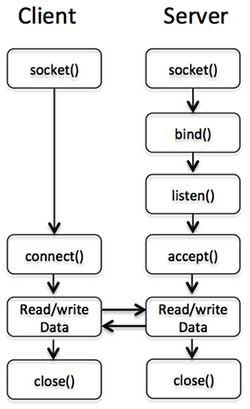
To explain above mentioned socket concept we will take an example of Client - Server Programming using Perl.
To complete a client server architecture we would have to go through the following steps:
To create a server
Create a socket using socket call.
Bind the socket to a port address using bind call.
Listen to the socket at the port address using listen call.
Accept client connections using accept call.
To create a client
Create a socket with socket call.
Connect (the socket) to the server using connect call.
Following diagram shows complete sequence of the calls used by Client and Server to communicate with each other:
How To: Perl TCP / UDP Socket Programming using IO::Socket::INET的更多相关文章
- JAVA之旅(三十二)——JAVA网络请求,IP地址,TCP/UDP通讯协议概述,Socket,UDP传输,多线程UDP聊天应用
JAVA之旅(三十二)--JAVA网络请求,IP地址,TCP/UDP通讯协议概述,Socket,UDP传输,多线程UDP聊天应用 GUI写到一半电脑系统挂了,也就算了,最多GUI还有一个提示框和实例, ...
- c++ 网络编程(一)TCP/UDP windows/linux 下入门级socket通信 客户端与服务端交互代码
原文作者:aircraft 原文地址:https://www.cnblogs.com/DOMLX/p/9601511.html c++ 网络编程(一)TCP/UDP 入门级客户端与服务端交互代码 网 ...
- TCP/UDP套接字 java socket编程实例
网络协议七层结构: 什么是Socket? socket(套接字)是两个程序之间通过双向信道进行数据交换的端,可以理解为接口.使用socket编程也称为网络编程,socket只是接口并不是网络通信协议. ...
- tcp / udp 协议及其实现的socket
一.tcp协议 1.1 基本知识 特点: 可靠,慢,全双工通信 建立连接时:三次握手 断开连接时:四次挥手 在建立起连接之后 发送的每一条信息都有回执 为了保证数据的完整性,还有重传机制 长连接:会一 ...
- 【Java TCP/IP Socket】Java NIO Socket VS 标准IO Socket
简介 Java NIO从JDK1.4引入,它提供了与标准IO完全不同的工作方式. NIO包(java.nio.*)引入了四个关键的抽象数据类型,它们共同解决传统的I/O类中的一些问题. 1. ...
- TCP/UDP 协议,和 HTTP、FTP、SMTP,区别及应用场景
一.OSI 模型 OSI 模型主要作为一个通用模型来做理论分析,而TCP/IP 协议模型是互联网的实际通讯协议,两者一般做映射分析,以下不做严格区分和声明(好吧,比较懒): OSI 整个模型层次大致可 ...
- TCP/UDP的网络底层实现
1.1Socket的使用背景 当我们在使用微信.玩游戏.收发邮件,以及用web浏览器上网时,底层的实现是TCP/UDP的协议,封装socket实现网络通信功能. 了解了网络通信的底层实现原理,在出现s ...
- TCP Socket Programming in Node.js
TCP Socket Programming in Node.js Posted on October 26th, 2011 under Node.jsTags: Client, node.js, S ...
- .net学习笔记---tcp/udp/http/socket
什么是TCP和UDP,以及二者区别是什么? TCP的全称为传输控制协议.这种协议可以提供面向连接的.可靠的.点到点的通信. UDP全称为用户数据报协议,它可以提供非连接的不可靠的点到多点的通信. 使用 ...
随机推荐
- 基于CentOS与VmwareStation10搭建Oracle11G RAC 64集群环境:4.安装Oracle RAC FAQ-4.3.Oracle 集群节点间连通失败
1.检查节点连通性的错误 [grid@linuxrac1 grid]$ ./runcluvfy.sh stage -post hwos -n linuxrac1,linuxrac2 -verbose ...
- 有关loading share object file libjvm.so: xxxxx 的那些问题
今天在跑一个有关postgresql产品的测试,要测试postgresql的有关Mirroring Controller的功能. 在执行mc_ctl命令的时候,报错:error while loadi ...
- ANT 发布项目中 build.xml 文件的详细配置
xml 代码 <?xml version="1.0" encoding="UTF-8"?> <!-- name:对应工程名字 default: ...
- smtp邮件营销吧
SPF 设置说明: 首先你必须有自己的域名.没有的话是不可能设置 SPF 的. SPF 是域名的一条 TXT 记录. 如果你的邮箱服务器是企业邮箱服务商的,可以在自己的 SPF 中直接包含服务商 SP ...
- Drupal如何处理系统变量?
Drupal的系统变量都保存在数据库variable表中: 然后,开发人员可以通过下面的API函数操作这些系统变量: function variable_get($name, $default = N ...
- cocos2d-x CocoStudio中场景触发器(Trigger)的使用和扩展
场景编辑器中的触发器是一种通过事件触发机制,在特定的事件被触发的时候自动执行自己预先定义的动作或者功能. 编辑器中带有一些默认的事件.条件和动作,当然也可以扩展自定义的事件.条件和动作. 触发器可以创 ...
- C++ 容器一些细节
今天学习是看到了讲解C++容器的一些细节用法,故记之!参考:http://www.cnblogs.com/answeryi/archive/2011/12/16/2289811.html: 目录 == ...
- Emmet使用手册
语法: 1.后代:> 缩写:nav>ul>li < nav> < ul> < li></ li > ...
- int型长度
Ø 基本数据类型 C语言中只有4中基本数据类型——整型.浮点型.指针和聚合类型(如数组和结构等):所有其他类型都是从这4种基本类型的某种变化或组合派生而来. 一.整型家族 整型家族包括char.sh ...
- 14个超赞的响应式HTML5模板免费下载
现在HTML5已经势不可挡.很多朋友开始学习HTML5,当你已经学习过一些HTML5的教程之后,是不是想立即开始实战了呢?对,现在就开始吧,不过 找一些优秀的HTML5模板案例练习是相当不错的注意.当 ...