
OpenCms Application dev-ref
OpenCms Application Overview
Before undertaking development, it will be helpful to understand the basic design of OpenCms. OpenCms is structured as a typical J2EE web application conforming to a 3-tier web application architecture:
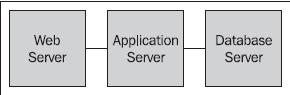
A web server on the front-end tier services incoming requests. The requests are passed through to an application server in the middle tier, where the OpenCms application runs. The OpenCms application utilizes the database on the third tier to read and store its content.
For production, using an array of web servers will typically distribute load to the application server tier. A common choice is to use the Apache web server, utilizing the mod_jk plug-in to distribute load. For development purposes, using a web server is optional, and instead the application server container may be accessed directly. Open Cms supports a wide variety of application servers, including commercial servers such as IBM Websphere and BEA WebLogic. It also supports open source servers such as Tomcat and JBoss. A popular choice among developers is the Apache Tomcat server. We will be using the Apache server for our development environment.
On th e back end, OpenCms supports a variety of databases, including Oracle, Postgreas, and the popular open source database, MySQL. The OpenCms installation setup procedure provides a wizard interface guiding the user through the creation of the database schema. Optionally, it allows for manual creation of the database schema through provided scripts.
This wide variety of choices makes it easy to install and run OpenCms in many mixed environments. It also allows for easy integration with other technologies, such as portals, CRM systems, and document management systems. Next, let's take a look at the file structure of an installed environment.
OpenCms Architecture
OpenCms has a modular architecture centered on a VFS. The file system is considered virtual as it resides inside a database and not on a hard disk. The VFS is similar to a real file system that supports folders, file types, and permissions. Access permission masks on the fi les and folders, and controls access that users and groups have to the files. The OpenCms VFS also provides a feature very similar to symbolic links in a Unix file system. A link is a directory entry that contains meta-information which is kept separate from the file contents.
The core also provides support for basic features such as publishing, access control, and revisions. Layered above this are application level features such as confi guration, the user interface, and module support. Module support is a key feature of OpenCms, providing the ability to extend and modify it. Module support is layered on top of OpenCms. A logical view looks like this:
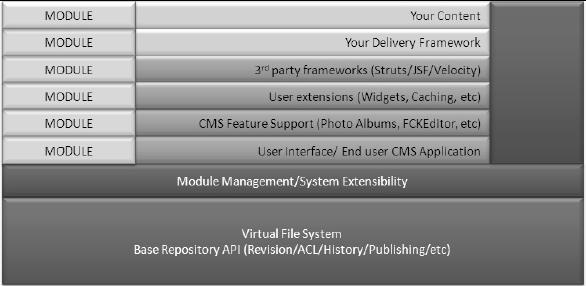
It is interesting to note that although OpenCms is a web application, it comes with a shell application that provides an interpretive interface to the API from a Java command line interface! Furthermore, it is possible to script this interface to install content into the VFS.
Extensibility through Modules
M odules are a key aspect of the OpenCms design. They provide a way to package together necessary components that may be easily plugged into OpenCms. Modules are the way that new content types, templates, or web capabilities are added to OpenCms. Later in this book, we will go into the details of creating an administration module for OpenCms.
The OpenCms Web Request Process
It would be useful to understand how a request made to OpenCms results in the display of content. The structure of a typical OpenCms URL looks like:
http://[server]:[port]/[context]/[servlet]/[parameters]
For example:
http://mydevserver:8080/opencms/opencms/system/logon/index.html
Server: mydevserver
Port: 8080
Context: opencms
Servlet: opencms
Parameters: /system/logon/index.html
The request will invoke the opencms servlet with the parameter /system/logon/ index.html. When the servlet runs, it goes through the following sequence:
1. Uses the passed in parameter to locate the item in the virtual fi le system
2. Determines its access permissions, and see if it can be accessed by the requestor
3. Determines its file type
4. Based on its fi le type, locates a resource loader for that type
5. Invokes the resource loader to load the file
There is a bit more going on; but for our discussion we will consider only the previous steps. It can be seen that after permission has been established, a resource loader is utilized to load the file. Resource loaders are responsible for encapsulating the knowledge required to load and execute items requested from the VFS. There are several types of resource loaders provided by OpenCms, and there is a one-to-one mapping between an OpenCms fi le type and a resource loader.
Most site content is structured XML, and the assigned loader for this type is the CmsXmlContentLoader. W hen this resource loader is invoked, it examines the properties assigned to the resource, specifi cally looking for the template-elements property. This property must contain the full path to a template used to render the XML content. The resource loader passes control to the template. When the template runs, it takes the responsibility of parsing the original XML resource, and displaying it. Most templates will be JSP fi les, but they are not restricted to this type. In fact, when a template is invoked, it follows the same loading process, resulting in its corresponding resource loader being invoked. This allows for new template languages to be plugged into OpenCms, by writing and adding new resource loaders.
As resource loaders act on file types, the extension of a fi le in the VFS is not signifi cant. This means that a fi le with an HTML extension in the VFS may, in fact, be run as a JSP fi le, or vice versa. A useful way to leverage this, is to create a fi le with a .CSS extension that is in fact a JSP file. The JSP could then dynamically generate the CSS based on browser type.
ref from:
http://careerride.com/OpenCms-Application-Overview.aspx
http://careerride.com/OpenCms-Architecture.aspx
OpenCms Application dev-ref的更多相关文章
- asterisk channel driver dev ref
入口函数load_module load_config ast_channel_register console_tech ast_cli_register_multiple ...
- Django
一.Django 简介 Django 是一个由 Python 写成的开放源代码的 Web 应用框架.它最初是被开发来用于管理劳伦斯出版集团旗下的一些以新闻内容为主的网站的,即是 CMS(内容管理系统) ...
- Python之路Day20-Django一对一(多)以及Ajax
上节内容回顾 问题一:Django请求生命周期 -> URL对应关系(匹配) -> 视图函数 -> 返回用户字符串-> URL对应关系(匹配) -> 视图函数 -> ...
- python Django教程 之 模型(数据库)、自定义Field、数据表更改、QuerySet API
python Django教程 之 模型(数据库).自定义Field.数据表更改.QuerySet API 一.Django 模型(数据库) Django 模型是与数据库相关的,与数据库相关的代码 ...
- Django:之Sitemap站点地图、通用视图和上下文渲染器
Django中自带了sitemap框架,用来生成xml文件 Django sitemap演示: sitemap很重要,可以用来通知搜索引擎页面的地址,页面的重要性,帮助站点得到比较好的收录. 开启si ...
- Django之路:模型(数据库)和自定义Field以及数据表的更改
一.Django 模型(数据库) Django模型是与数据库相关的,与数据库相关的代码一般写在models.py中,Django支持sqlite3,MySQL,PostgreSQL等数据库,只需要在s ...
- Django框架全面讲解
Python的WEB框架有Django.Tornado.Flask 等多种,Django相较与其他WEB框架其优势为:大而全,框架本身集成了ORM.模型绑定.模板引擎.缓存.Session等诸多功能. ...
- CentOS7.2非HA分布式部署Openstack Pike版 (实验)
部署环境 一.组网拓扑 二.设备配置 笔记本:联想L440处理器:i3-4000M 2.40GHz内存:12G虚拟机软件:VMware® Workstation 12 Pro(12.5.2 build ...
- [转]django-registration quickstart
Basic configuration and use--------------------------- Once installed, you can add django-registrati ...
随机推荐
- 学习Erlang--1、入门
1.正式起航 从前,一名程序员偶然读到了一本古怪的语言图书,相等其实不是相等,变量其实是不能改变的,语法是那么陌生,它甚至不是面向对象,这些程序实在是太过另类…… 另类的不仅仅是程序,编程的教学步骤也 ...
- Vim常用配置(~/.vimrc)(转载)
原文地址:http://www.2cto.com/os/201309/246271.html " This must be first, beacuse it changes other o ...
- NopCommerce架构分析之三---数据库初试化及数据操作
系统启动时执行任务:IStartupTask,启动时执行的任务主要是数据库的初始化和加载. IStartupTask调用IEfDataProvider进行数据库的初始化. IEfDataProvide ...
- Hackers' Crackdown( UVA UVA 11825状压dp)
题意:N台电脑,现在有N种服务,现在你可以在每台电脑终止一项服务,他和他相邻的电脑都会被关闭,如果一项服务在所有电脑都没运行,该项服务成功被破坏,问最多能破坏几种服务. 分析:把n个集合分成尽量多组, ...
- codeforces 676D Theseus and labyrinth BFS搜索
分析:一个n*m的矩阵,每个格子有12个状态,每次按一次,每个格子转90度,所以整个矩阵只有4种状态,然后爆搜就好了 #include <cstdio> #include <iost ...
- Linux批量修改指定目录下的文件或文件夹权限
在Puppet下很头大,尤其是文件拷贝,使用file的mode会导致文件或文件夹都一个权限. 暂时使用命令代替: 最近忙着明年的N多计划,待有空后继续研究.
- C#给文件重命名
使用的主要方法是: File.Move(oldFileDir,newFileDir);//这个是移动文件的方法 Directory.GetFiles(dir);//获取dir路径下的所有文件的全路径 ...
- <转>DNS SOA记录
http://www.sigma.me/2011/01/01/about_dns_soa.html 今天登入google webmaster,发现有好多crawl错误,一看,都是Domain name ...
- 解决JSP页面无法使用EasyUI里面class="easyui-dialog"的问题
当使用MyEclipse新建一个JSP页面的时候,MyEclipse会自动添加一些标记,这些标记也许不一定会在工程中使用到.比如<base href="<%=basePath%& ...
- 8.1.C++ AMP简介
C++ AMP是专为设计支持C++的异构并行模型. 全程是: Accelerator Massive Parallelism 下面是一个Vector C++ AMP的代码,通过这段代码来解释C++ A ...