
Android Device Orientation
最近在处理相机拍照的方向问题,在Android Device的Orientation问题上有了些疑问,就顺便写个Demo了解下Android Device Orientation究竟是怎么个判断。
Android Device Orientation的使用场景其实最常见的就是视频播放软件了,它会随着你摆弄手机的方向,来调整一个最适合的画面旋转让用户观看。官方API文档里对Android Device Orientation有这么一句话:
public abstract void onOrientationChanged (int orientation)
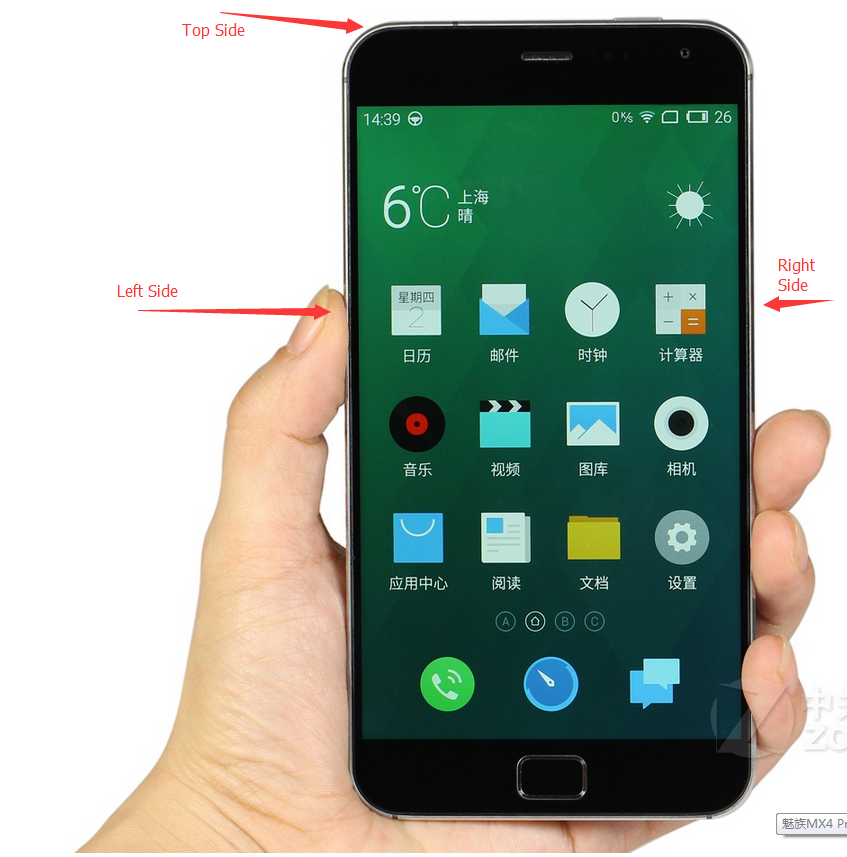
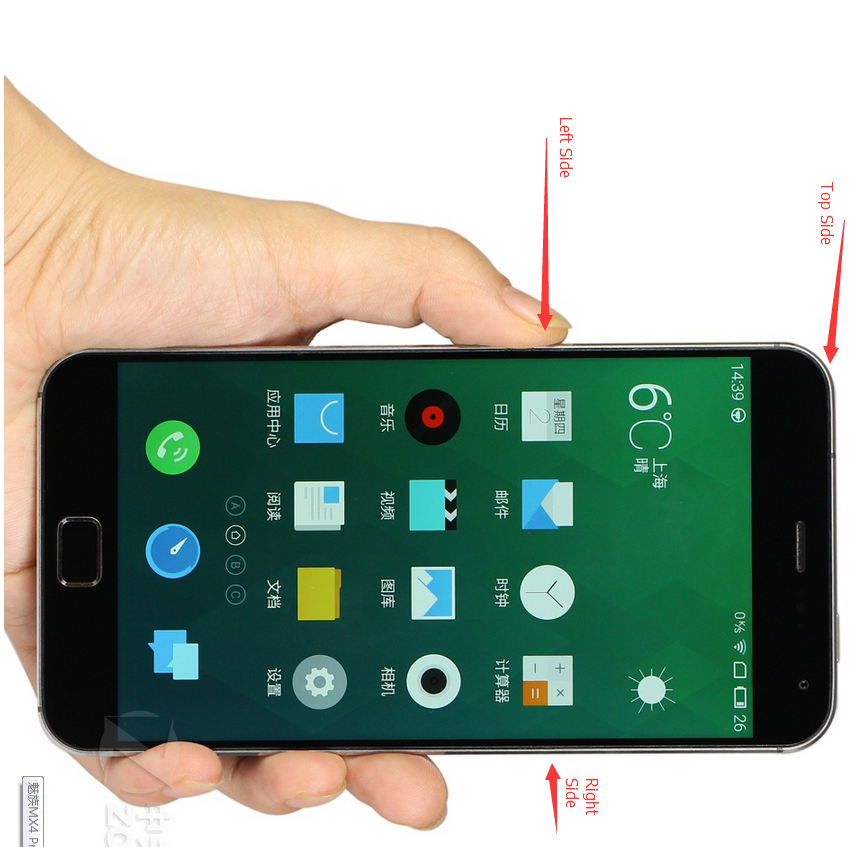
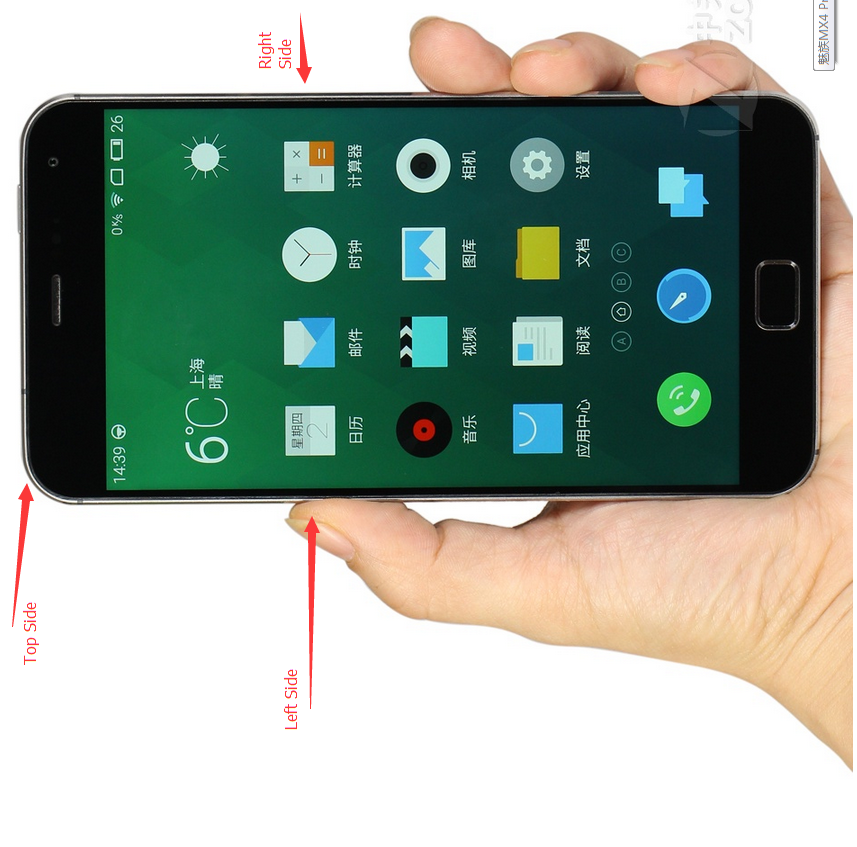
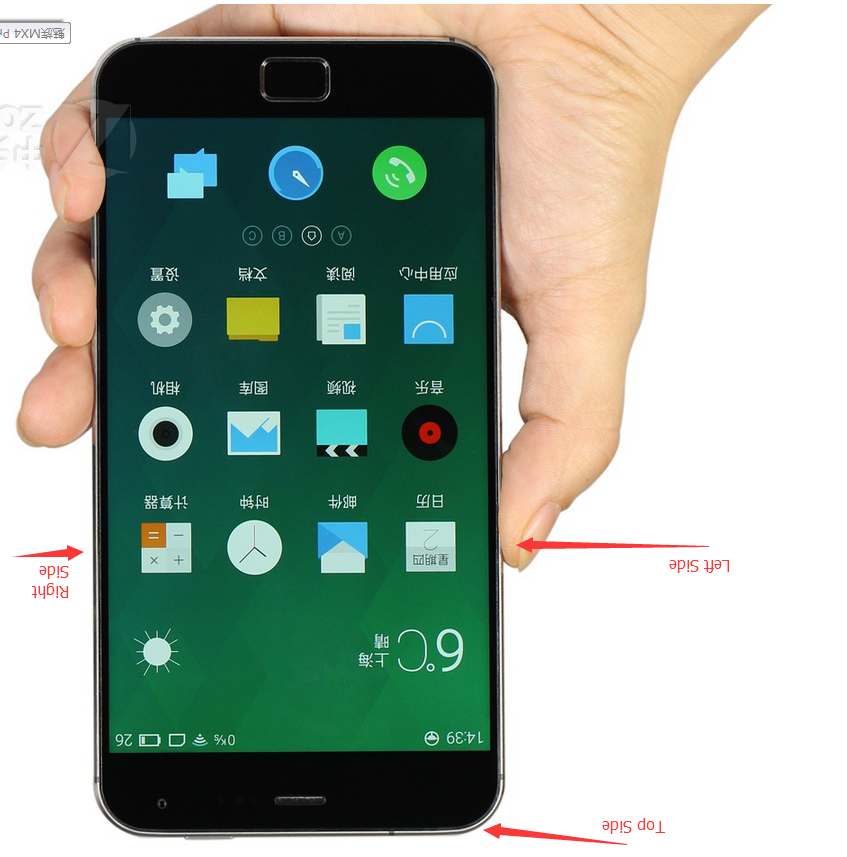
Called when the orientation of the device has changed. orientation parameter is in degrees, ranging from 0 to 359. orientation is 0 degrees when the device is oriented in its natural position, 90 degrees when its left side is at the top, 180 degrees when it is upside down, and 270 degrees when its right side is to the top. ORIENTATION_UNKNOWN is returned when the device is close to flat and the orientation cannot be determined.
对于这句话,有一点不理解的就是natural position到底是一个什么个position,其实就是我们正常用手机的摆放方向,如下图:Orientation为0
Left Side Top, Orientation为90:
Right Side Top, Orientation为270:
Top Side Down,Orientation为180
好了,差不多就是这样了。再放上一次我测试时用的代码:
 public class MainActivity extends ActionBarActivity {

     private TextView textView = null;

     private MyOrientationListener myOrientationListener = null;

     @Override

     protected void onCreate(Bundle savedInstanceState) {

         super.onCreate(savedInstanceState);

         setContentView(R.layout.activity_main);

         textView = (TextView)findViewById(R.id.textview);

         myOrientationListener = new MyOrientationListener(this, SensorManager.SENSOR_DELAY_NORMAL);

         if( myOrientationListener.canDetectOrientation()){

             myOrientationListener.enable();

         }

         else{

             Toast.makeText(this, "Can't Detect Orientation", Toast.LENGTH_LONG).show();

         }

     }

     @Override

     public boolean onCreateOptionsMenu(Menu menu) {

         // Inflate the menu; this adds items to the action bar if it is present.

         getMenuInflater().inflate(R.menu.main, menu);

         return true;

     }

     @Override

     protected void onDestroy(){

         super.onDestroy();

         myOrientationListener.disable();

     }

     @Override

     protected void onResume(){

         super.onResume();

         if( myOrientationListener.canDetectOrientation()){

             myOrientationListener.enable();

         }

         else{

             Toast.makeText(this, "Can't Detect Orientation", Toast.LENGTH_LONG).show();

         }

     }

     @Override

     public boolean onOptionsItemSelected(MenuItem item) {

         // Handle action bar item clicks here. The action bar will

         // automatically handle clicks on the Home/Up button, so long

         // as you specify a parent activity in AndroidManifest.xml.

         int id = item.getItemId();

         if (id == R.id.action_settings) {

             return true;

         }

         return super.onOptionsItemSelected(item);

     }

     private class MyOrientationListener extends OrientationEventListener{

         public MyOrientationListener(Context context, int rate) {

             super(context, rate);

             // TODO Auto-generated constructor stub

         }

         @Override

         public void onOrientationChanged(int orientation) {

             // TODO Auto-generated method stub

             textView.setText("" + orientation);

         }

     }

 }
Android Device Orientation的更多相关文章
- LED notification in Android device
Code can control the LED notification in Android device, using android.app.Notification: 1 2 3 4 5 6 ...
- android4.0 禁止横竖屏切换使用 android:configChanges="orientation|keyboardHidden"无效的解决方法
Android横竖屏幕切换时注意4.0以上配置configChanges要加上screenSize,要不还会调用onCreate(). <activity android:name=" ...
- android4.0 禁止横竖屏切换使用 android:configChanges="orientation|keyboardHidden"无效
android4.0 禁止横竖屏切换使用 android:configChanges="orientation|keyboardHidden"无效 在之前的版本中都是在Man ...
- 解决Android Device Chooser 找不到设备问题
第一种情况: 已经启动了官方的模拟器也进入了Android手机界面,可是在Android Device Chooser 看不到设备,怎么办? 例如以下图所看到的,使用Reset adb 或者在adb所 ...
- Android Device Chooser中显示Target unknown解决方法
手机插在电脑上准备调试程序来着,通过eclipse运行时,弹出的Android Device Chooser中显示设备名是?????,Target未知,无法继续运行. 可以通过以下步骤解决(Ubunt ...
- 6.5、Android Studio的Android Device Monitor
Android Device Monitor是一个独立的工具,可以对Android应用进行调试和分析.Android Device Monitor无需安装整合在一个IDE中,比如像Android St ...
- Android Device Administration 设备管理器——实现一键锁屏
Android Device Administration 设备管理器--实现一键锁屏 最近研究了一下安全这一块的内容,当然,我是比较水的,所以也拿不出什么好知识点,但是有一些冷门的东西我还是可以聊聊 ...
- Android device debug (adb) by Charge Only mode
Android device debug by Charge Only mode Method 1 Connect devices to computer and execute lsusb Find ...
- 解决 Android Device Monitor 常见问题
Ø 简介 什么是 Android Device Monitor,中文意思就是安卓设备监视器,用于管理安装设备(手机.模拟器)用的.下面列出 Android Device Monitor 常见的一些问 ...
随机推荐
- Display:Block
根据CSS规范的规定,每一个网页元素都有一个display属性,用于确定该元素的类型,每一个元素都有默认的display属性值,比如div元素,它的默认display属性值为“block”,成为“块级 ...
- 利用AssetsManager实现在线更新脚本文件lua、js、图片等资源(免去平台审核周期)
转自:http://www.himigame.com/iphone-cocos2dx/1354.html 首先说明一个问题: 为什么要在线更新资源和脚本文件!? 对于此问题,那要说的太多了,简单概括, ...
- 【转】Android 实现ListView的滑动删除效果
http://www.cnblogs.com/weixiao870428/p/3524055.html http://download.csdn.net/download/love_javc_you/ ...
- Android Study ING
http://bbs.csdn.net/topics/370249613 android的tools和adb命令 http://www.u148.net/article/102147.html htt ...
- PHP+MySQL多语句执行<转自wooyun>
发起这个帖子,估计就很多人看到题目就表示不屑了.一直以来PHP+MySQL环境下,无论是写程序或者是注入攻击,是无法多语句执行的,这么广为人知的常识,没理由会有人不知道.可权威就是用来被挑战的,常识也 ...
- 判断sqlserver临时表等临时资源是否存在
if exists(select * from tempdb..sysobjects where id=object_id('tempdb..#TEMP')) drop table #TEMP
- HttpRequest
#ifndef __HTTP_REQUEST_H__ #define __HTTP_REQUEST_H__ #include "cocos2d.h" #include " ...
- 解决用Eclipse开发Android程序时不能生成R.java的问题
今天我照着Mars老师的视频教程开始学习Android程序开发. 但是,我的Eclipse死活不能生成R.java文件,新建的工程也不行. 然后我百度,百度出来的结果一般是说这样解决: 1.clean ...
- Codeforces Round #277 (Div. 2) A. Calculating Function 水题
A. Calculating Function Time Limit: 20 Sec Memory Limit: 256 MB 题目连接 http://codeforces.com/contest/4 ...
- Sharepoint 2010 根据用户权限隐藏Ribbon菜单(利用css)
本文介绍的是根据用户权限隐藏整个Ribbon菜单项. 操作环境:Windows Server 2008 r2+ SharePoint 2010 1.关于SharePoint 权限详细请参考:http ...