
Android Device Orientation
最近在处理相机拍照的方向问题,在Android Device的Orientation问题上有了些疑问,就顺便写个Demo了解下Android Device Orientation究竟是怎么个判断。
Android Device Orientation的使用场景其实最常见的就是视频播放软件了,它会随着你摆弄手机的方向,来调整一个最适合的画面旋转让用户观看。官方API文档里对Android Device Orientation有这么一句话:
public abstract void onOrientationChanged (int orientation)
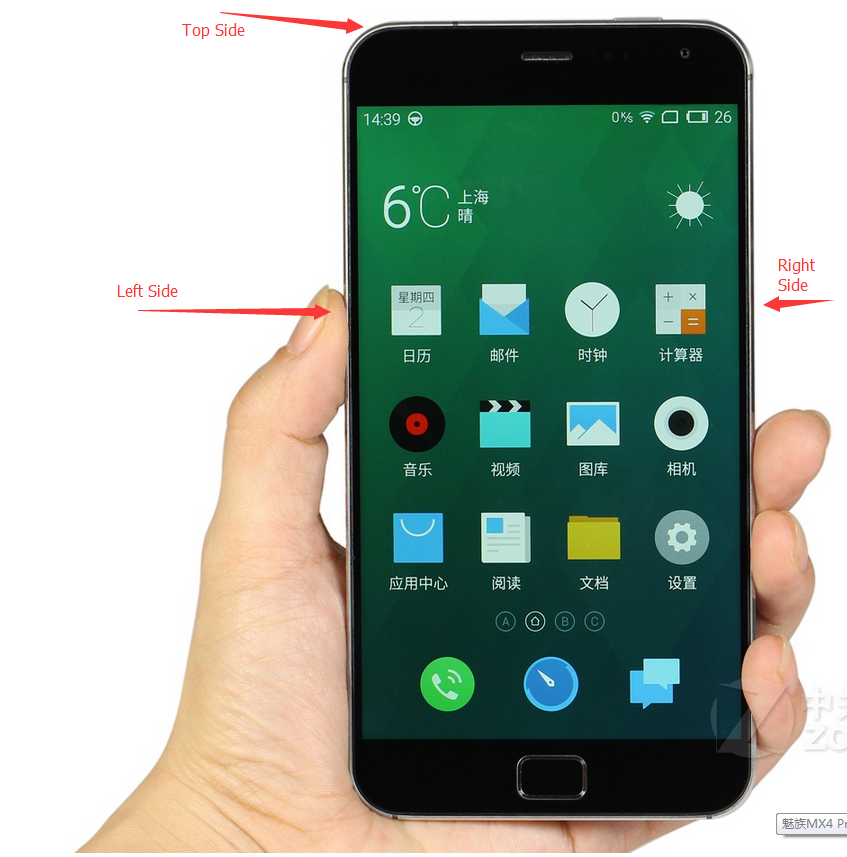
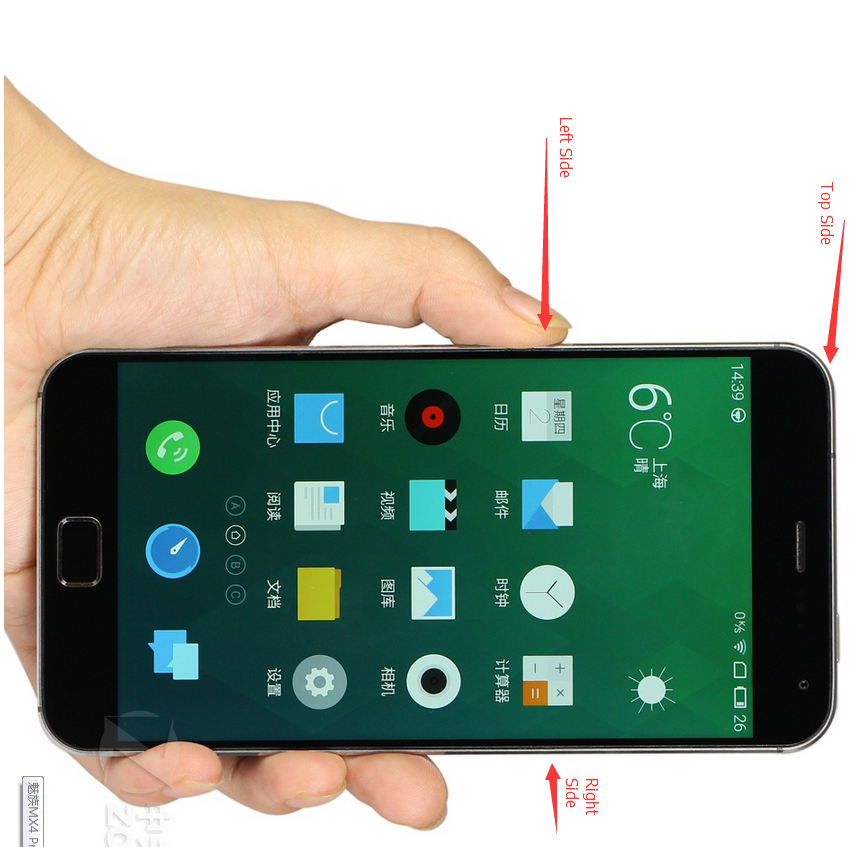
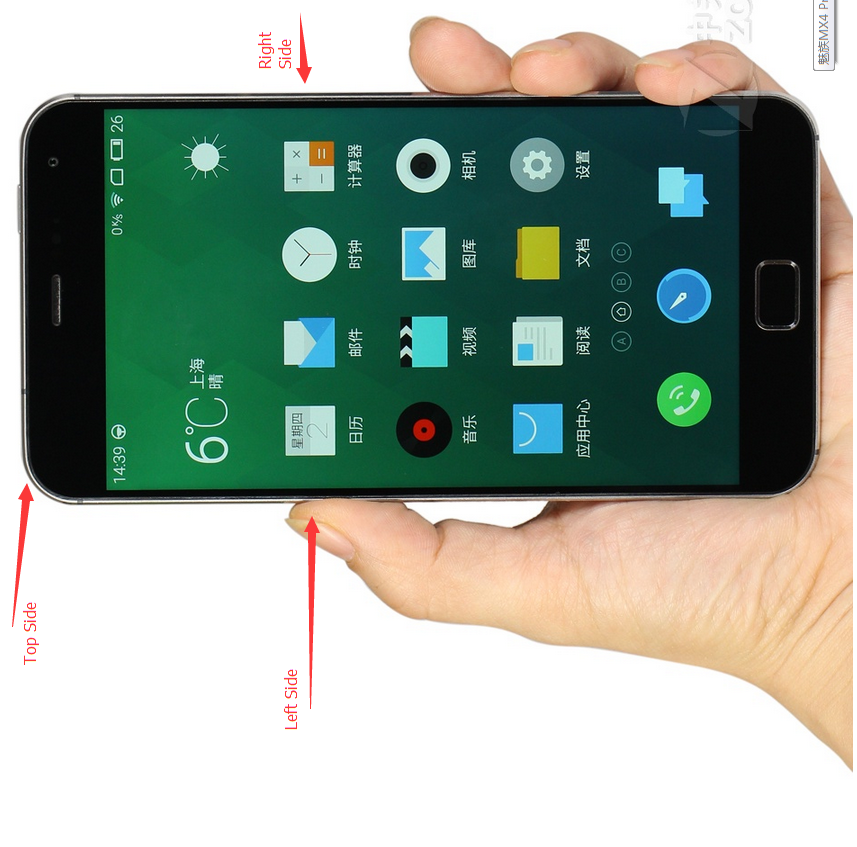
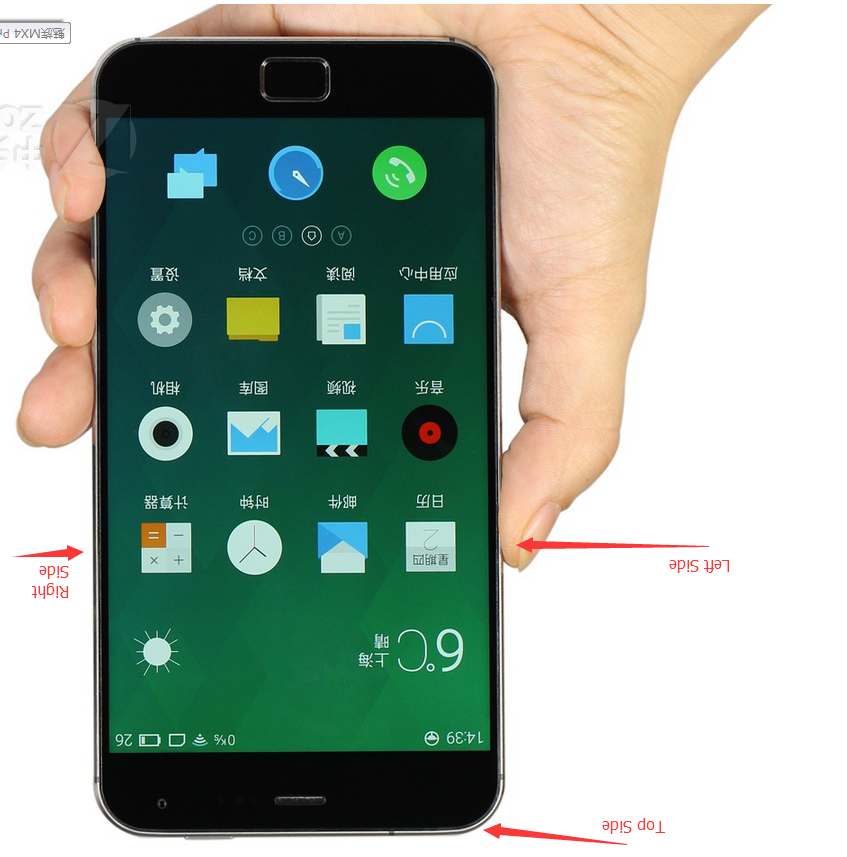
Called when the orientation of the device has changed. orientation parameter is in degrees, ranging from 0 to 359. orientation is 0 degrees when the device is oriented in its natural position, 90 degrees when its left side is at the top, 180 degrees when it is upside down, and 270 degrees when its right side is to the top. ORIENTATION_UNKNOWN is returned when the device is close to flat and the orientation cannot be determined.
对于这句话,有一点不理解的就是natural position到底是一个什么个position,其实就是我们正常用手机的摆放方向,如下图:Orientation为0
Left Side Top, Orientation为90:
Right Side Top, Orientation为270:
Top Side Down,Orientation为180
好了,差不多就是这样了。再放上一次我测试时用的代码:
 public class MainActivity extends ActionBarActivity {

     private TextView textView = null;

     private MyOrientationListener myOrientationListener = null;

     @Override

     protected void onCreate(Bundle savedInstanceState) {

         super.onCreate(savedInstanceState);

         setContentView(R.layout.activity_main);

         textView = (TextView)findViewById(R.id.textview);

         myOrientationListener = new MyOrientationListener(this, SensorManager.SENSOR_DELAY_NORMAL);

         if( myOrientationListener.canDetectOrientation()){

             myOrientationListener.enable();

         }

         else{

             Toast.makeText(this, "Can't Detect Orientation", Toast.LENGTH_LONG).show();

         }

     }

     @Override

     public boolean onCreateOptionsMenu(Menu menu) {

         // Inflate the menu; this adds items to the action bar if it is present.

         getMenuInflater().inflate(R.menu.main, menu);

         return true;

     }

     @Override

     protected void onDestroy(){

         super.onDestroy();

         myOrientationListener.disable();

     }

     @Override

     protected void onResume(){

         super.onResume();

         if( myOrientationListener.canDetectOrientation()){

             myOrientationListener.enable();

         }

         else{

             Toast.makeText(this, "Can't Detect Orientation", Toast.LENGTH_LONG).show();

         }

     }

     @Override

     public boolean onOptionsItemSelected(MenuItem item) {

         // Handle action bar item clicks here. The action bar will

         // automatically handle clicks on the Home/Up button, so long

         // as you specify a parent activity in AndroidManifest.xml.

         int id = item.getItemId();

         if (id == R.id.action_settings) {

             return true;

         }

         return super.onOptionsItemSelected(item);

     }

     private class MyOrientationListener extends OrientationEventListener{

         public MyOrientationListener(Context context, int rate) {

             super(context, rate);

             // TODO Auto-generated constructor stub

         }

         @Override

         public void onOrientationChanged(int orientation) {

             // TODO Auto-generated method stub

             textView.setText("" + orientation);

         }

     }

 }
Android Device Orientation的更多相关文章
- LED notification in Android device
Code can control the LED notification in Android device, using android.app.Notification: 1 2 3 4 5 6 ...
- android4.0 禁止横竖屏切换使用 android:configChanges="orientation|keyboardHidden"无效的解决方法
Android横竖屏幕切换时注意4.0以上配置configChanges要加上screenSize,要不还会调用onCreate(). <activity android:name=" ...
- android4.0 禁止横竖屏切换使用 android:configChanges="orientation|keyboardHidden"无效
android4.0 禁止横竖屏切换使用 android:configChanges="orientation|keyboardHidden"无效 在之前的版本中都是在Man ...
- 解决Android Device Chooser 找不到设备问题
第一种情况: 已经启动了官方的模拟器也进入了Android手机界面,可是在Android Device Chooser 看不到设备,怎么办? 例如以下图所看到的,使用Reset adb 或者在adb所 ...
- Android Device Chooser中显示Target unknown解决方法
手机插在电脑上准备调试程序来着,通过eclipse运行时,弹出的Android Device Chooser中显示设备名是?????,Target未知,无法继续运行. 可以通过以下步骤解决(Ubunt ...
- 6.5、Android Studio的Android Device Monitor
Android Device Monitor是一个独立的工具,可以对Android应用进行调试和分析.Android Device Monitor无需安装整合在一个IDE中,比如像Android St ...
- Android Device Administration 设备管理器——实现一键锁屏
Android Device Administration 设备管理器--实现一键锁屏 最近研究了一下安全这一块的内容,当然,我是比较水的,所以也拿不出什么好知识点,但是有一些冷门的东西我还是可以聊聊 ...
- Android device debug (adb) by Charge Only mode
Android device debug by Charge Only mode Method 1 Connect devices to computer and execute lsusb Find ...
- 解决 Android Device Monitor 常见问题
Ø 简介 什么是 Android Device Monitor,中文意思就是安卓设备监视器,用于管理安装设备(手机.模拟器)用的.下面列出 Android Device Monitor 常见的一些问 ...
随机推荐
- setuptools的使用
1.什么是setuptools setuptoolssetuptools是 Python Enterprise Application Kit(PEAK)的一个副项目,是Python distutil ...
- delphi TreeView修改选中的节点的颜色和背景
TreeView修改选中的节点的颜色和背景 TCustomDrawTarget = (dtControl, dtItem, dtSubItem); TCustomDrawStage = ...
- android之多媒体篇(三)
录像 Android提供了2种方案去录像. 方案一: 最简单的方式就是使用Intents去启动App来帮助你完成.这个方案使你能够指定输出的位置和视频的质量.这方案通常是最好的方法,应该可以用在多种情 ...
- python selenium自动化(一)点击页面链接测试
需求:现在有一个网站的页面,我希望用python自动化的测试点击这个页面上所有的在本窗口跳转,并且是本站内的链接,前往到链接页面之后在通过后退返回到原始页面. 要完成这个需求就必须实现3点: 1. 找 ...
- Flex4之元数据标签使用
Flex 元数据标签 1.[ArrayElementType] 使用ArrayElementType元数据标签可以让你定义数组元素的数据类型. 程序代码: [ArrayElementType(&quo ...
- MYSQL SQL 审核工具 (inception安装步骤)
http://blog.csdn.net/wulantian/article/category/5825391
- UNIX基础知识之用户标识
一.用户ID 口令文件(/etc/passwd)登录项中的用户ID(user ID)是个数值,它向系统标识各个不同的用户.系统管理员在确定一个用户的登录名的同时,确定其用户ID.用户不能更改其用户ID ...
- SQL Server 数学函数 相关
1.计算绝对值ABS ABS函数对一个数值表达式结果计算绝对值(bit数据类型除外),返回整数. 语法结构: ABS(数值表达式) 返回值:与数值表达式类型一致的数据 示例: SELECT ABS ...
- 正确率、召回率和 F 值
原文:http://peghoty.blog.163.com/blog/static/49346409201302595935709/ 正确率.召回率和 F 值是在鱼龙混杂的环境中,选出目标的重要评价 ...
- 一元线性回归模型与最小二乘法及其C++实现
原文:http://blog.csdn.net/qll125596718/article/details/8248249 监督学习中,如果预测的变量是离散的,我们称其为分类(如决策树,支持向量机等), ...