
MySQL Group Replication
group replication是一种全新的高可用,高扩张的MySQL集群服务。
高一致性,基于原生复制及paxos协议的组复制技术,以插件方式提供一致数据安全保证;
高容错性,大多数服务正常就可继续工作,自动不同节点检测资源征用冲突,按顺序优先处理,内置自动防脑裂机制;
高扩展性,自动添加移除节点,并更新组信息;
高灵活性,单主模式和多主模式。单主模式自动选主,所有更新操作在主进行;多主模式,所有server同时更新。
0,修改hosts
vim /etc/hosts
localhost 127.0.0.1
1,实验环境
M1:127.0.0.1 3307
M2:127.0.0.1 3308
2,安装mysql
/usr/local/mysql57/bin/mysqld --initialize-insecure --user=dba --basedir=/usr/local/mysql57 --datadir=/data1/mysql3307
/usr/local/mysql57/bin/mysqld --initialize-insecure --user=dba --basedir=/usr/local/mysql57 --datadir=/data1/mysql3308
3,配置
M1:
[mysqld]
# GENERAL con#
user = dba
port = 3307
default_storage_engine = InnoDB
socket = /tmp/mysql3307.sock
pid_file = /data1/mysql3307/mysql.pid
# SAFETY #
max_allowed_packet = 64M
max_connect_errors = 1000000
# DATA STORAGE #binlog-format
datadir = /data1/mysql3307/
# BINARY LOGGING #
log_bin = /data1/mysql3307/3307-binlog
expire_logs_days = 10
#sync_binlog = 1
relay-log= /data1/mysql3307/3307-relaylog
#replicate-wild-do-table=hostility_url.%
#replicate-wild-do-table=guards.%
# CACHES AND LIMITS #
tmp_table_size = 32M
max_heap_table_size = 32M
query_cache_type = 1
query_cache_size = 0
max_connections = 5000
#max_user_connections = 200
thread_cache_size = 512
open_files_limit = 65535
table_definition_cache = 4096
table_open_cache = 4096
wait_timeout=7500
interactive_timeout=7500
binlog-format=row
character-set-server=utf8
skip-name-resolve
skip-character-set-client-handshake
back_log=1024
# INNODB #
#innodb_flush_method = O_DIRECT
innodb_data_home_dir = /data1/mysql3307/
#innodb_data_file_path = ibdata1:1G:autoextend
innodb_log_group_home_dir=/data1/mysql3307/
innodb_log_files_in_group = 3
innodb_log_file_size = 1G
innodb_flush_log_at_trx_commit = 2
innodb_file_per_table = 1
innodb_file_format=Barracuda
innodb_support_xa=0
innodb_io_capacity=500
innodb_max_dirty_pages_pct=90
innodb_read_io_threads=16
innodb_write_io_threads=8
innodb_buffer_pool_instances=4
innodb_thread_concurrency=0
#GTID
#gtid_mode = on
#enforce_gtid_consistency = on
# LOGGING #
log_error = /data1/mysql3307/error.log
#log_queries_not_using_indexes = 1
slow_query_log = 1
slow_query_log_file = /data1/mysql3307/mysql-slow.log
long_query_time=0.05
server_id=3307
innodb_buffer_pool_size = 1G
report-host=localhost #此处的localhost一定要存在与hosts文件里,即:localhost 127.0.0.1
report-port=3307
log_slave_updates = on
#group replication
gtid_mode = on
enforce_gtid_consistency = on
master_info_repository = table
relay_log_info_repository = table
binlog_checksum=NONE
log_slave_updates=ON
transaction_write_set_extraction=XXHASH64
loose-group_replication_group_name="aaaaaaaa-aaaa-aaaa-aaaa-aaaaaaaaaaaa"
loose-group_replication_start_on_boot=off
loose-group_replication_local_address= "localhost:24901"
#该参数可动态修改: set global group_replication_group_seeds="localhost:24901,localhost:24902,localhost:24093",后续写入配置文件
loose-group_replication_group_seeds= "localhost:24901,localhost:24902"
loose-group_replication_single_primary_mode = true
loose-group_replication_bootstrap_group= off
loose-group_replication_enforce_update_everywhere_checks = false
### mysql_version=mysql57
[mysql]
prompt = \u@\h:\p [\d]>
4,启动mysql
nohup /usr/local/mysql57/bin/mysqld_safe --defaults-file=/data1/mysql3307/my3307.cnf 2>/dev/null &
mysql -uroot -S /tmp/mysql3307.sock -p123456
set sql_log_bin=0;
create user rpl_user@'%';
grant replication slave on *.* to rpl_user@'%' identified by 'rpl_pass';
flush privileges;
set sql_log_bin=1;
change master to master_user='rpl_user',master_password='rpl_pass' for channel 'group_replication_recovery';
5,启动group replication
install plugin group_replication soname 'group_replication.so';
show plugins;
set global group_replication_bootstrap_group=on; //只需在一个实例上执行
start group_replication;
set global group_replication_bootstrap_group=off;
select * from performance_schema.replication_group_members;
6,测试(创建一个数据库,新建一个实例加入到group replication中后会自动同步到新实例)
create database test;
use test;
create table t(id int primary key auto_increment,name text);
insert into t values(1,'Lucas');
show binlog evnets;
7,添加一个新实例
M2:
[mysqld]
# GENERAL con#
user = dba
port = 3308
default_storage_engine = InnoDB
socket = /tmp/mysql3308.sock
pid_file = /data1/mysql3308/mysql.pid
# SAFETY #
max_allowed_packet = 64M
max_connect_errors = 1000000
# DATA STORAGE #binlog-format
datadir = /data1/mysql3308/
# BINARY LOGGING #
log_bin = /data1/mysql3308/3308-binlog
expire_logs_days = 10
#sync_binlog = 1
relay-log= /data1/mysql3308/3308relaylog
#replicate-wild-do-table=hostility_url.%
#replicate-wild-do-table=guards.%
# CACHES AND LIMITS #
tmp_table_size = 32M
max_heap_table_size = 32M
query_cache_type = 1
query_cache_size = 0
max_connections = 5000
#max_user_connections = 200
thread_cache_size = 512
open_files_limit = 65535
table_definition_cache = 4096
table_open_cache = 4096
wait_timeout=7500
interactive_timeout=7500
binlog-format=row
character-set-server=utf8
skip-name-resolve
skip-character-set-client-handshake
back_log=1024
# INNODB #
#innodb_flush_method = O_DIRECT
innodb_data_home_dir = /data1/mysql3308/
#innodb_data_file_path = ibdata1:1G:autoextend
innodb_log_group_home_dir=/data1/mysql3308/
innodb_log_files_in_group = 3
innodb_log_file_size = 1G
innodb_flush_log_at_trx_commit = 2
innodb_file_per_table = 1
innodb_file_format=Barracuda
innodb_support_xa=0
innodb_io_capacity=500
innodb_max_dirty_pages_pct=90
innodb_read_io_threads=16
innodb_write_io_threads=8
innodb_buffer_pool_instances=4
innodb_thread_concurrency=0
#GTID
#gtid_mode = on
#enforce_gtid_consistency = on
# LOGGING #
log_error = /data1/mysql3308/error.log
#log_queries_not_using_indexes = 1
slow_query_log = 1
slow_query_log_file = /data1/mysql3308/mysql-slow.log
long_query_time=0.05
server_id=3307
innodb_buffer_pool_size = 1G
report-host=localhost #此处的localhost一定要存在与hosts文件里,即:localhost 127.0.0.1
report-port=3307
log_slave_updates = on
#group replication
gtid_mode = on
enforce_gtid_consistency = on
master_info_repository = table
relay_log_info_repository = table
binlog_checksum=NONE
log_slave_updates=ON
transaction_write_set_extraction=XXHASH64
loose-group_replication_group_name="aaaaaaaa-aaaa-aaaa-aaaa-aaaaaaaaaaaa"
loose-group_replication_start_on_boot=off
loose-group_replication_local_address= "localhost:24901"
loose-group_replication_group_seeds= "localhost:24901,localhost:24902"
loose-group_replication_single_primary_mode = true
loose-group_replication_bootstrap_group= off
loose-group_replication_enforce_update_everywhere_checks = false
### mysql_version=mysql57
[mysql]
prompt = \u@\h:\p [\d]>
8,启动实例 & 配置group replication
nohup /usr/local/mysql57/bin/mysqld_safe --defaults-file=/data1/mysql3308/my3308.cnf 2>/dev/null &
mysql -uroot -S /tmp/mysql3308.sock -p123456
set sql_log_bin=0;
create user rpl_user@'%';
grant replication slave on *.* to rpl_user@'%' identified by 'rpl_pass';
flush privileges;
set sql_log_bin=1;
change master to master_user='rpl_user',master_password='rpl_pass' for channel 'group_replication_recovery';
9,启动group replication
install plugin group_replication soname 'group_replication.so';
show plugins;
set global group_replication_allow_local_disjoint_gtids_join=ON;
start group_replication;
select * from performance_schema.replication_group_members;

10,测试同步是否正常
/usr/local/mysql57/bin/mysql -uroot -p123456 -S /tmp/mysql3308.sock
show databases;
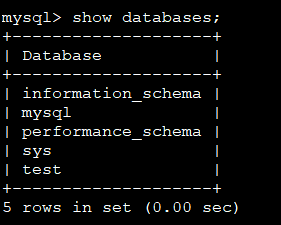
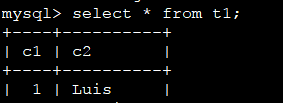
注意:之前在新加实例的过程中新实例一直报recovering,主要是mysql的配置中report-host未配置,或者是report-host配置的值不在系统hosts里面
默认情况下:只有最开始配置的那台instance会设置super_read_only=off,即可以写入数据,其他后加入的都会默认为super_read_only=on,即只能读。
group replication分single-primary和multi-primary两种模式。
multi-primary模式不支持SERIALIZABLE隔离级别和外键约束。
这些限制可以通过 group_replication_enforce_update_everywhere_checks 参数来开启或关闭,single-primary模式下,该参数必须为OFF。该参数只能在group replication停止的情况下修改
下面介绍这两种模式
1,single primary
该模式下,只能有一个实例可接受写操作,组内其他成员会自动被设置为只读模式(super_read_only=on),若组内原主offline,会自动提升组内一个成员为primary,并设置super_read_only=off,接受读写操作,后续offline的主再加入进来后,会被设置成只读模式。整个切换过程全自动,无需人工干预。
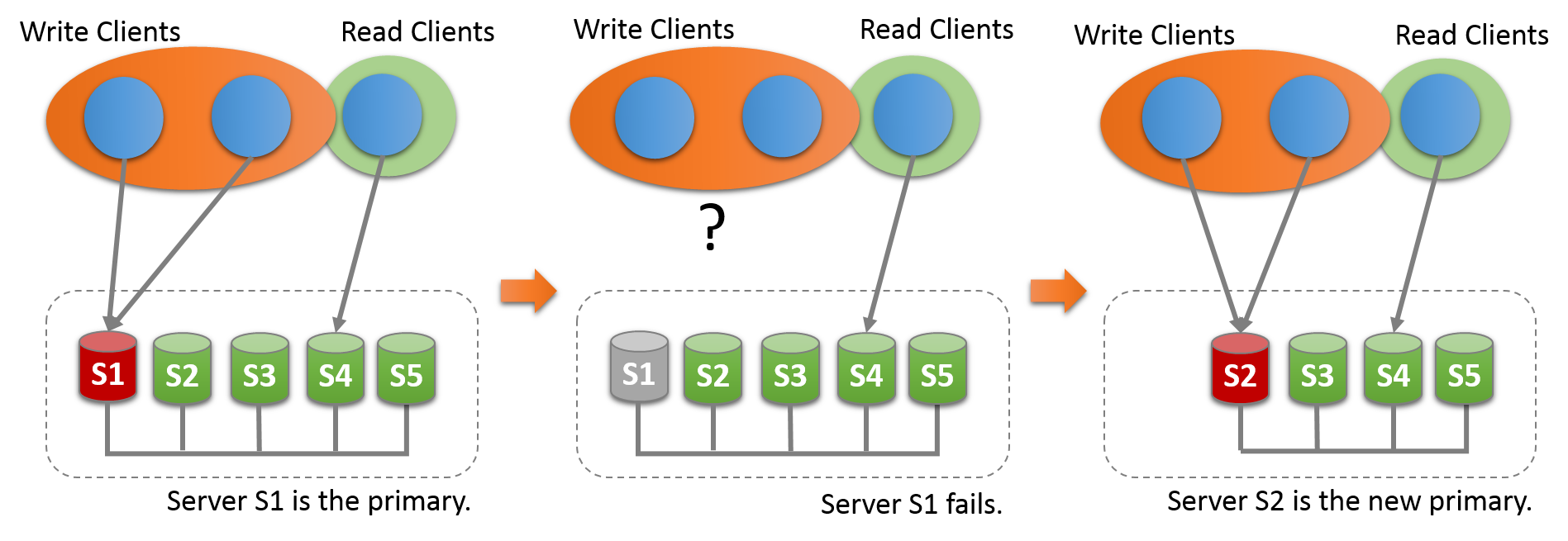
选主规则:根据group中UUID字典排序;当主挂掉后,根据UUID 字典排序,选第排在最前面的UUID做新主。
2,multi primary
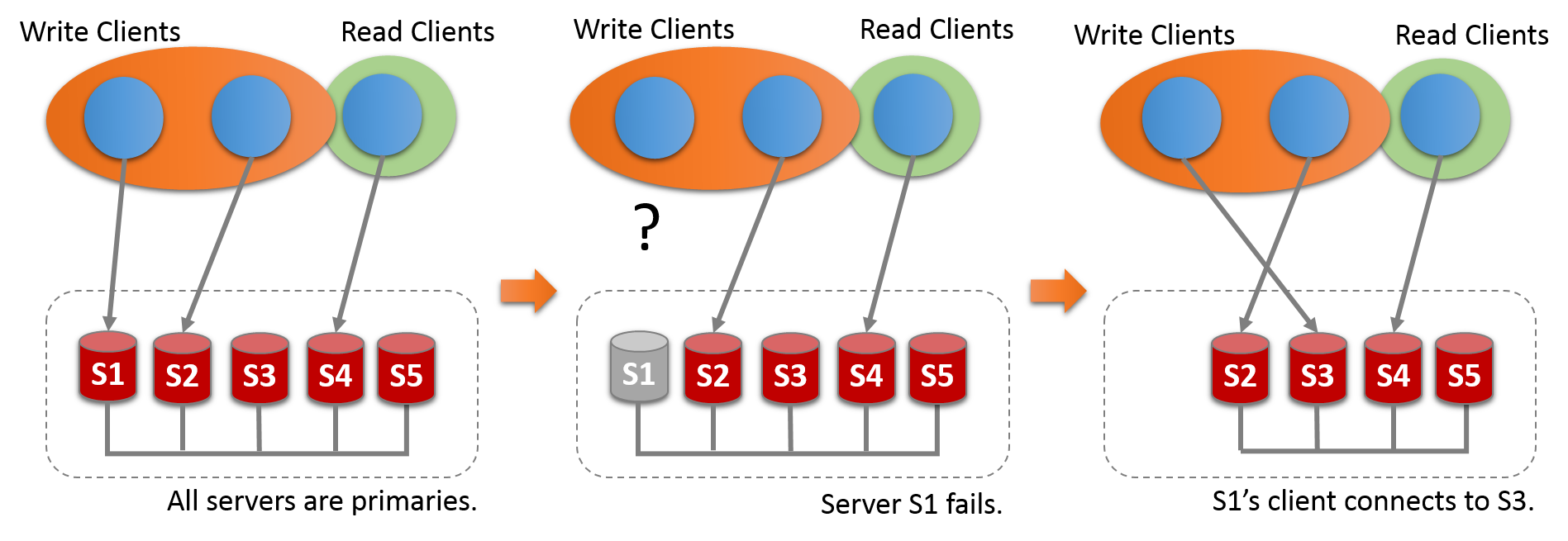
single primary 模式下,若原主挂掉,需要找出新主,如何确认primary?
SELECT VARIABLE_VALUE FROM performance_schema.global_status WHERE VARIABLE_NAME= 'group_replication_primary_member';
MySQL Group Replication的更多相关文章
- MySQL Group Replication 技术点
mysql group replication,组复制,提供了多写(multi-master update)的特性,增强了原有的mysql的高可用架构.mysql group replication基 ...
- MySQL Group Replication 动态添加成员节点
前提: MySQL GR 3节点(node1.node2.node3)部署成功,模式定为多主模式,单主模式也是一样的处理. 在线修改已有GR节点配置 分别登陆node1.node2.node3,执行以 ...
- Docker Images for MySQL Group Replication 5.7.14
In this post, I will point you to Docker images for MySQL Group Replication testing. There is a new ...
- Percona XtraDB Cluster vs Galera Cluster vs MySQL Group Replication
Percona XtraDB Cluster vs Galera Cluster vs MySQL Group Replication Overview Galera Cluster 由 Coders ...
- Mysql 5.7 基于组复制(MySQL Group Replication) - 运维小结
之前介绍了Mysq主从同步的异步复制(默认模式).半同步复制.基于GTID复制.基于组提交和并行复制 (解决同步延迟),下面简单说下Mysql基于组复制(MySQL Group Replication ...
- MySQL group replication介绍
“MySQL group replication” group replication是MySQL官方开发的一个开源插件,是实现MySQL高可用集群的一个工具.第一个GA版本正式发布于MySQL5.7 ...
- mysql group replication 主节点宕机恢复
一.mysql group replication 生来就要面对两个问题: 一.主节点宕机如何恢复. 二.多数节点离线的情况下.余下节点如何继续承载业务. 在这里我们只讨论第一个问题.也就是说当主结点 ...
- mysql group replication观点及实践
一:个人看法 Mysql Group Replication 随着5.7发布3年了.作为技术爱好者.mgr 是继 oracle database rac 之后. 又一个“真正” 的群集,怎么做到“ ...
- MySQL Group Replication配置
MySQL Group Replication简述 MySQL 组复制实现了基于复制协议的多主更新(单主模式). 复制组由多个 server成员构成,并且组中的每个 server 成员可以独立地执行事 ...
- Mysql Group Replication 简介及单主模式组复制配置【转】
一 Mysql Group Replication简介 Mysql Group Replication(MGR)是一个全新的高可用和高扩张的MySQL集群服务. 高一致性,基于原生复制及p ...
随机推荐
- thinkphp %s %d %f
%s -- 表示字段串%d -- 表示整形数字%f -- 表示浮点数 例子:$order_number = $m_ebay_order_numbers->where("ebay_ord ...
- ORACLE常见方法使用(转)
1.DBMS_LOB包的使用 2.如何释放DBMS_LOB.CREATETEMPORARY的空间 3.oracle数组
- @ConditionalOnProperty 详解
@Retention(RetentionPolicy.RUNTIME) @Target({ElementType.TYPE, ElementType.METHOD}) @Documented @Con ...
- IDEA秒退或者一直让填写激活码问题
IDEA秒退或者一直让填写激活码 1)复制 0.0.0.0 account.jetbrains.com 2)找到你本地的这个路径,我的电脑是windows,所以路径为: 3)点击hosts,添加刚刚 ...
- shiro学习笔记-Subject#login(token)实现过程
本博文所有的代码均为shiro官网(http://shiro.apache.org/)中shiro 1.3.2版本中的源码. 追踪Subject的login(AuthenticationToken t ...
- [转载]Java集成PageOffice在线打开编辑word文件 - Spring Boot
开发环境:JDK1.8.Eclipse.Sping Boot + Thymeleaf框架. 一. 构建Sping Boot + Thymeleaf框架的项目(不再详述): 1. 新建一个maven p ...
- Vysor安装
Vysor安装 Vysor安装
- cocos2d-x安装教程
cocos2d-x安装教程 cocos的安装方法有多种,今天讲的是其中一种,使用cocos的源代码直接进行编译. 下载cocos2d-x的源代码,提供两种方式给大家 -- 中文官网下载 -- 英文官网 ...
- linux定时任务:crontab命令
crontab命令被用来提交和管理用户的需要周期性执行的任务,与windows下的计划任务类似,当安装完成操作系统后,默认会安装此服务工具,并且会自动启动crond进程,crond进程每分钟会定期检查 ...
- Windows XP系统服役13年今正式退休
清明已过,服役13年的微软Windows XP系统也于今日正式“退休”.尽管这之后XP系统仍可以继续使用,但微软不再提供官方服务支持.对于中国数以亿计的XP用户来说,一方面是对已经使用了13年的操作系 ...