
.NET中使用Rabbit MQ
1、通过Nuget 获取Rabbit MQ NET client bindings from NuGet:
PM> Install-Package RabbitMQ.Client
2、发送者(生产者)代码:
 public class RabbitMqSender

    {

        private static string strHostName = "localhost";

        private static string strExchangeName = "test.exchange.1";

        private static string strQueueName = "test.queue.1";

        private static string strRouteKey = "test.exchange.key.1";

        public static void send()

        {

            var factory = new ConnectionFactory() {  HostName= strHostName };

            using (var connection=factory.CreateConnection())

            {

                using (var channel=connection.CreateModel())

                {

                    //channel.QueueDeclare

                    //    (queue: strQueueName,

                    //    durable: true,

                    //    exclusive: false,

                    //    autoDelete: false,

                    //    arguments: null

                    //    );

                    //channel.ExchangeDeclare(exchange: strQueueName,type:"direct", durable: true, autoDelete: false, arguments: null);

                    channel.ExchangeDeclare(strExchangeName, ExchangeType.Direct, true, false);

                    channel.QueueDeclare(strQueueName, true, false, false, null);

                    channel.QueueBind(strQueueName, strExchangeName, strRouteKey, null);

                    string message = string.Empty;

                    byte[] body = null;

                    for (int i = ; i < ; i++)

                    {

                        message = i+DateTime.Now.ToString() + " -----send rabbitmq message!";

                        body = Encoding.UTF8.GetBytes(message);

                        channel.BasicPublish(

                            exchange: strExchangeName,

                            routingKey: strRouteKey,

                            basicProperties: null,

                            body: body

                            );

                        Console.WriteLine("{0}", message);

                    }

                }

            }

        }

    }
3、接收者(消费者)代码
public class RabbitMqReceiver

    {

        private static string strHostName = "localhost";

        private static string strExchangeName = "test.exchange.1";

        private static string strQueueName = "test.queue.1";

        private static string strRouteKey = "test.exchange.key.1";

        public static void receive()

        {

            var factory = new ConnectionFactory() { HostName = strHostName };

            using (var connection = factory.CreateConnection())

            using (var channel = connection.CreateModel())

            {

                //channel.ExchangeDeclare(exchange: strQueueName, type: "direct", durable: true, autoDelete: false, arguments: null);

                channel.ExchangeDeclare(strExchangeName, ExchangeType.Direct, true, false);

                channel.QueueDeclare(strQueueName, true, false, false, null);

                channel.QueueBind(strQueueName, strExchangeName, strRouteKey, null);

                var consumer = new EventingBasicConsumer(channel);

                consumer.Received += (model, ea) =>

                {

                    var body = ea.Body;

                    var message = Encoding.UTF8.GetString(body);

                    Console.WriteLine("AAAAAAAAA--- [x] Received {0}", message);

                };

                channel.BasicConsume(queue: strQueueName,

                                     noAck: true,

                                     consumer: consumer);

                //BasicGetResult result = channel.BasicGet(queue: "test.queue", noAck: true);

                //while (result!= null)

                //{

                //    string strMessage = Encoding.UTF8.GetString(result.Body);

                //    Console.WriteLine(" [x] Received {0}", strMessage);

                //    result = channel.BasicGet(queue: "test.queue", noAck: true);

                //}

                Console.WriteLine(" Press [enter] to exit.");

                Console.ReadLine();

            }

        }

    }
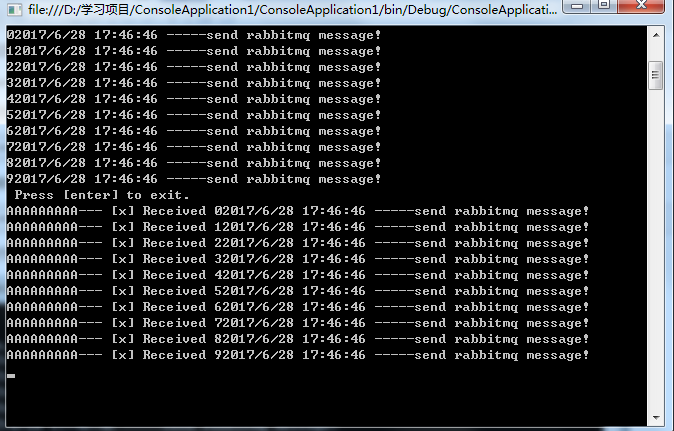
4、运行效果
.NET中使用Rabbit MQ的更多相关文章
- redis反向代理docker容器中的rabbit mq服务
最近做的项目中用到了docker,发现docker容器还真挺好用的,可以统一来管理各种资源,项目. 但是在实际使用中就碰到下面这个问题(下面所有的应用都是在docker中启动的): 通过nginx来反 ...
- spring boot 中 rabbit mq基础例子
1.先安装ELANG,再按照RabbitMQ 2.打开RabbitMQ控制台:rabbit command prompt 1.设置elang的路径:set ERLANG_HOME=D:\work_pr ...
- 在 Windows 上安装Rabbit MQ 指南
rabbitMQ是一个在AMQP协议标准基础上完整的,可服用的企业消息系统.他遵循Mozilla Public License开源协议.采用 Erlang 实现的工业级的消息队列(MQ)服务器. Ra ...
- windows下的php rabbit mq安装、配置
http://www.cnblogs.com/shanyou/p/4067250.html 这篇博文写的rabbit mq和erlang的安装以及rabbitmq可视化插件的一些操作 接下去开始安装P ...
- (转)在 Windows 上安装Rabbit MQ 指南
rabbitMQ是一个在AMQP协议标准基础上完整的,可服用的企业消息系统.他遵循Mozilla Public License开源协议.采用 Erlang 实现的工业级的消息队列(MQ)服务器. Ra ...
- celery rabbit mq 详解
Celery介绍和基本使用 Celery 是一个 基于python开发的分布式异步消息任务队列,通过它可以轻松的实现任务的异步处理, 如果你的业务场景中需要用到异步任务,就可以考虑使用celery, ...
- Rabbit MQ 消息确认和持久化机制
一:确认种类 RabbitMQ的消息确认有两种.一种是消息发送确认,用来确认生产者将消息发送给交换器,交换器传递给队列的过程中消息是否成功投递.发送确认分为两步,一是确认是否到达交换器,二是确认是否到 ...
- celery+Rabbit MQ实战记录
基于以前的一篇文章,celery+Rabbit MQ的安装和使用, 本文更加详细的介绍如何安装和使用celey, Rabbit MQ. 并记录在使用celery时遇到的一些问题. 1.安装 Rabbi ...
- Rabbit MQ 入门指南
rabbitMQ是一个在AMQP协议标准基础上完整的,可服用的企业消息系统.他遵循Mozilla Public License开源协议.采用 Erlang 实现的工业级的消息队列(MQ)服务器. Ra ...
随机推荐
- linux脚本-判断进程是否存在,从而可以做预警处理..
count=`ps -ef | grep Seeyon | grep -v "grep" | wc -l` echo $count if [ $count -gt 0 ]; the ...
- 数据仓库基础(八)Informatica 小例子
本文转载自:http://www.cnblogs.com/evencao/p/3147843.html 之前看了一段数据库的基础,感觉自己对数据库的基础挺薄弱的.以后再学习其他东西的时候也需要经常能学 ...
- linux常用命令:chkconfig 命令
chkconfig命令用来安装,查看或修改 services随系统启动的启动选项的设置.是Red Hat公司遵循GPL规则所开发的程序,它可查询操作系统在每一个执行等级中会执行哪些系统服务,其中包括各 ...
- Python之路----列表推导式和生成器的表达式
列表推导式 egg_list=['鸡蛋%s'%i for i in range(10)] print(egg_list) 列表推导式 推导过程 egg_list = [] for i in range ...
- 安装SQL2008时显示:RebootRequiredCheck 检查是否需要挂起计算机重新启动。
解决方法: a.在开始->运行中输入regeditb.删除HKEY_CURRENT_USER\Software\Microsoft\Microsoft SQL Serverc.删除HKEY_LO ...
- CentOS 7 安装OpenCV
CentOS 7 安装OpenCV步骤如下: 1.在CentOS 7命令行中直接在线安装: yum install numpy opencv* 2.安装完成后进行全盘搜索:find / -n ...
- SmartOS之以太网精简协议栈TinyIP
做物联网,没有以太网怎么能行!基于Enc28j60,我们团队独立实现了以太网精简协议栈TinyIP,目前支持ARP/ICMP/TCP/UDP/DHCP,还缺一个DNS就完整了.TinyIP内置一个数据 ...
- 2017.7.4 ACM校内赛 Round 2
这是一个向导 A - hdu 3652 B - bzoj 4152 C - bzoj 2429 D - bzoj 1087 E - bzoj 1566 F - bzoj 4043 G - bzoj 1 ...
- C++ 一串数字三位一节,用逗号隔开表示
#include <iostream> #include <string> #include <sstream> using namespace std; stri ...
- luogu P1880石子归并
石子归并 luogu1880 传送门 noi1995 在一个圆形操场的四周摆放N堆石子,现要将石子有次序地合并成一堆.规定每次只能选相邻的2堆合并成新的一堆,并将新的一堆的石子数,记为该次合并的得 ...