
UI设计文本框解决Placeholder的在IE10 以下 IE 9 IE8 IE 7 的兼容问题
创建JS文件 placeholderfriend.js
(function($) {

  /**

   * 牛叉的解决方案

   */

  var placeholderfriend = {

    focus: function(s) {

      s = $(s).hide().prev().show().focus();

      var idValue = s.attr("id");

      if (idValue) {

        s.attr("id", idValue.replace("placeholderfriend", ""));

      }

      var clsValue = s.attr("class");

      if (clsValue) {

        s.attr("class", clsValue.replace("placeholderfriend", ""));

      }

    }

  }

  //判断是否支持placeholder

  function isPlaceholer() {

    var input = document.createElement('input');

    return "placeholder" in input;

  }

  //不支持的代码

  if (!isPlaceholer()) {

    $(function() {

      var form = $(this);

      var elements = form.find("input[type='text'][placeholder]");

      elements.each(function() {

        var s = $(this);

        var pValue = s.attr("placeholder");

        var sValue = s.val();

        if (pValue) {

          if (sValue == '') {

            s.val(pValue);

          }

        }

      });

      elements.focus(function() {

        var s = $(this);

        var pValue = s.attr("placeholder");

        var sValue = s.val();

        if (sValue && pValue) {

          if (sValue == pValue) {

            s.val('');

          }

        }

      });

      elements.blur(function() {

        var s = $(this);

        var pValue = s.attr("placeholder");

        var sValue = s.val();

        if (!sValue) {

          s.val(pValue);

        }

      });

      var elementsPass = form.find("input[type='password'][placeholder]");

      elementsPass.each(function(i) {

        var s = $(this);

        var pValue = s.attr("placeholder");

        var sValue = s.val();

        if (pValue) {

          if (sValue == '') {

            var html = this.outerHTML || "";

            html = html.replace(/\s*type=(['"])?password\1/gi, " type=text placeholderfriend").replace(/\s*(?:value|on[a-z]+|name)(=(['"])?\S*\1)?/gi, " ").replace(/\s*placeholderfriend/, " placeholderfriend value='" + pValue + "' " + "onfocus='placeholderfriendfocus(this);' ");

            var idValue = s.attr("id");

            if (idValue) {

              s.attr("id", idValue + "placeholderfriend");

            }

            var clsValue = s.attr("class");

            if (clsValue) {

              s.attr("class", clsValue + "placeholderfriend");

            }

            s.hide();

            s.after(html);

          }

        }

      });

      elementsPass.blur(function() {

        var s = $(this);

        var sValue = s.val();

        if (sValue == '') {

          var idValue = s.attr("id");

          if (idValue) {

            s.attr("id", idValue + "placeholderfriend");

          }

          var clsValue = s.attr("class");

          if (clsValue) {

            s.attr("class", clsValue + "placeholderfriend");

          }

          s.hide().next().show();

        }

      });

    });

  }

  window.placeholderfriendfocus = placeholderfriend.focus;

})(jQuery);
2在html文件中直接引用该文件路径即可
<script src="Content/jquery/dist/placeholderfriend.js"></script>
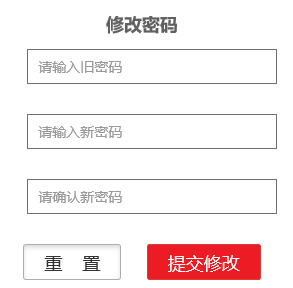
3 在IE10 以下实现效果
UI设计文本框解决Placeholder的在IE10 以下 IE 9 IE8 IE 7 的兼容问题的更多相关文章
- 文本框的placeholder属性
在文本框中添加placeholder属性,用于文本框处于未输入状态时,模糊显示输入提示,当用户进行输入时,不需要删除该提示文字. 如: <input type="text" ...
- .NET开源工作流RoadFlow-表单设计-文本框
点击表单设计器工具栏上的文本框按钮,会弹出文本框属性对话框: 绑定字段:该文本框与表单属性设置中选择的表的某个字段绑定(该文本框中的值将会保存到该字段中). 默认值:该文本框的初始化值. 宽度:文本框 ...
- 微信内置浏览器H5 弹出键盘 遮盖文本框解决办法 Fixed失效
if(/Android [4-6]/.test(navigator.appVersion)) { window.addEventListener("resize", functio ...
- 设置文本框的 placeholder 的颜色
使用方法: 选择器类型::-webkit-input-placeholder input::-webkit-input-placeholder{ color:rgba(144,147,153,1); ...
- (一)UI设计的一些常识
一.概述 新版本的Xcode似乎框架不明示. UIView:屏幕上看得见摸得着的东西.视图.控件.组件. UIView是一个容器,能容纳其他UIView. UIViewController用来控制UI ...
- jquery选中将select下拉框中一项后赋值给text文本框
jquery选中将select下拉框中一项后赋值给text文本框,出现无法将第一个下拉框的value赋值给文本框 因为select默认选中第一项..在选择第一项时,便导致无法激发onchange事件. ...
- 手机浏览器浏览WebApp弹出的键盘遮盖住文本框的解决办法
手机浏览器浏览WebApp弹出的键盘遮盖住文本框的解决办法 最近碰到Android微信内置浏览H5页面,因为其中的文本输入框(input)放置在靠近页面的中下方,点击文本框以后,则输入框会被弹出的手机 ...
- xmlplus 组件设计系列之三 - 文本框
文本框是页面中最常用的输入组件,它的默认使用方式如下: <input type='text'/> 当然,这里的 `type='text' 可以略去不写.大部分情况下,使用默认的文本框作为输 ...
- 小tip:FireFox下文本框/域百分比padding bug解决——张鑫旭
一.问题描述 我是流体布局控,经常会遇到文本框以及文本域宽度100%自适应显示的情况. 如下效果图: 在窄屏下,上面的文本框宽度也要跟着外部宽度变小. 难点对于文本框或者文本域,光标最好距离左侧边缘有 ...
随机推荐
- 转: Orz是一个基于Ogre思想的游戏开发架构
Orz是一个基于Ogre思想的游戏开发架构,好的结构可以带来更多的功能.Orz和其他的商业以及非商业游戏开发架构不同.Orz更专著于开发者的感受,简化开发者工作.Orz可以用于集成其他Ogre3D之外 ...
- Ubuntu下使用git提交代码至GitHub
一.Ubuntu下安装Git Ubuntu12.04 LTS默认是已经安装Git的,可以使用 git --version 测试是否安装. 如果没有安装,使用命令: sudo apt-get insta ...
- uitextview根据内容算高度
UITextView根据内容自动改变frame 分类: iOS2013-03-08 07:27 190人阅读 评论(0) 收藏 举报 注意点: 在textview中计算string占据的高度不能使用[ ...
- TCP KeepAlive的几个附加选项
TCP_KEEPALIVE选项只是一个开关,Linux中默认的Keepalive的选项如下: $sudo sysctl -a | grep keepalive net.ipv4.tcp_keepali ...
- Swift3 根据秒数获取视频时长(转换成00:00:00时间格式)以及将时长转换成秒
直接代码了: /// 秒转换成00:00:00格式 /// /// - Parameter secounds: <#secounds description#> /// - Returns ...
- python+stomp+activemq
python也可以连接MQ,以ActiveMQ为例,安装stomp.py: https://github.com/jasonrbriggs/stomp.py 下载后安装: python setup.p ...
- iOS页面性能优化
前言 在软件开发领域里经常能听到这样一句话,“过早的优化是万恶之源”,不要过早优化或者过度优化.我认为在编码过程中时刻注意性能影响是有必要的,但凡事都有个度,不能为了性能耽误了开发进度.在时间紧急的情 ...
- kafka负载均衡相关资料收集(三)
apache kafka系列之Producer处理逻辑 下文是转载的,原文链接地址:点这儿 [转] Kafka ProducerKafka Producer处理逻辑kafka生产者处理逻辑apache ...
- Jetty安装配置
1) 从官方网站下载绿色版的jetty 下载地址:http://download.eclipse.org/jetty/ 我下载的是 jetty-distribution-7.5.4.v20111024 ...
- webdriver之py,driver启动chrome时加载profile
import os from selenium import webdriver from selenium.webdriver.chrome.options import Options execu ...