
H5 password自动记录取消
最近完成一个项目时需要取消谷歌浏览器的密码自动填充功能,为了用户方便,大多浏览器都有保存某个网站的密码并在后面再打开这个网站且需要输入密码的时候自动填充。这个功能是方便,但是我们有时候不需要使用这个功能,怎么样通过前端代码的写法来实现禁用呢,这就是本文的重要内容。
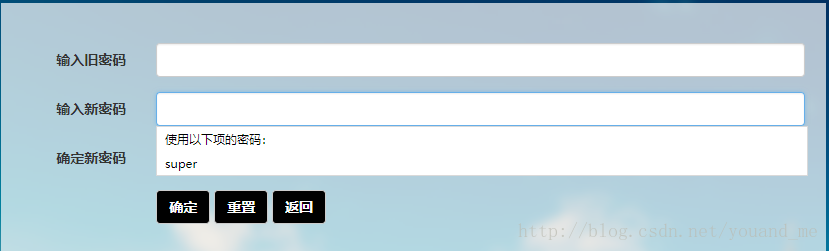
我在项目里遇到的就是这样一个情景,我打开项目网站的登录页面输入用户名密码登录成功,此时谷歌浏览器问是否保存密码,点击保存,然后在我项目里面有修改密码页面,其中包括了旧密码、新密码、重复新密码三个type为password的input标签,当我选中的时候它会有一个下拉选项把保存的密码填充进去(如下图),这显然不是我所需要的,将我用的方式记录下来,有用的话还请点个赞。
须知
登录页面可以是自动填充的,不需禁用,以下我只是用登录页面来举例,具体需要禁用的是类似修改密码页面。
- input标签
首先以下的都是在chorme浏览器上的运行结果,chorme在遇到type=’password’的时候才会有自动填充密码,一般只有单独的type=’text’的input标签是没有填充的。所以一旦我们包含type=’password’的input标签chorme就会把你在当前网站(注意不是网址,是你的整个项目)下保存的密码填充进去。
- autocomplete属性
网上大多数人都说只需要将input标签的autocomplete属性设置为off就行了,事实上呢在一些浏览器上是可以的,但是有些浏览器就不行了,比如chorme(其它浏览器没有试过),chorme老版本的浏览器。
还有人说将autocomplete属性设置为new-password,这时候发现是没有自动填充了,但是点击输入时会有下拉选项选择填充密码(如下图),这不还是没取消吗。
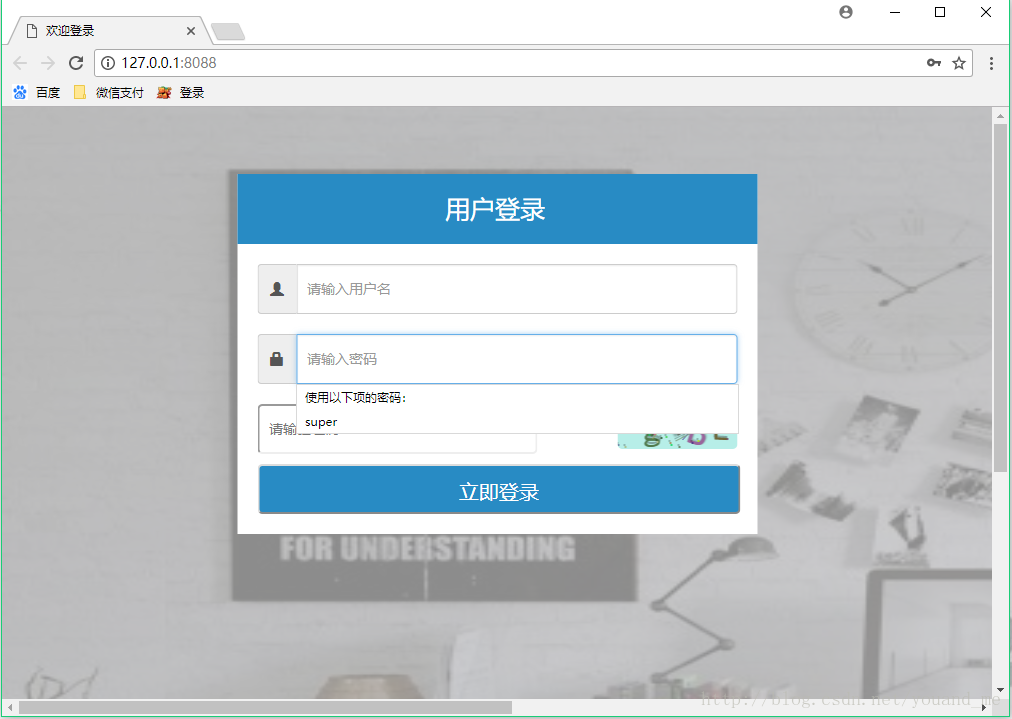
还有说在初始化页面的时候设置type=’text’,在获取到焦点的时候再修改为type=’password’,效果和上面一样。
还有就是添加两个隐藏的input标签(要对应写name属性)来欺骗浏览器,且不说方法很低级(这里我就不贴出来了),最后效果和上面一样。
我的方法
由于自动填充密码是浏览器后面完成的,所以去修改源码不太现实,这和自己造轮子没什么区别。我们只需要让浏览器找不到填充的位置就可以了。具体方式就是先告诉浏览器我的type=passowrd的input标签是一个新创建的密码,也就是设置autocomplete=”new-password”,然后不给这个input标签设置id和name属性,这样就无法填充了,核心代码如下:
 <div class="input-group inputStyle">

    <span class="glyphicon glyphicon-lock dropdown-toggle input-group-addon" style="top: 0px"></span>

    <input class="form-control inputTextStyle" type="password" autocomplete="new-password" placeholder="请输入密码">

</div>- 1
- 2
- 3
- 4
没有id和name属性我们要获取这个标签的值的话可以使用classs属性或者通过父元素来获取:
# 通过父元素获取密码值

pwd = $('.inputStyle input[type=password]').val();- 1
- 2
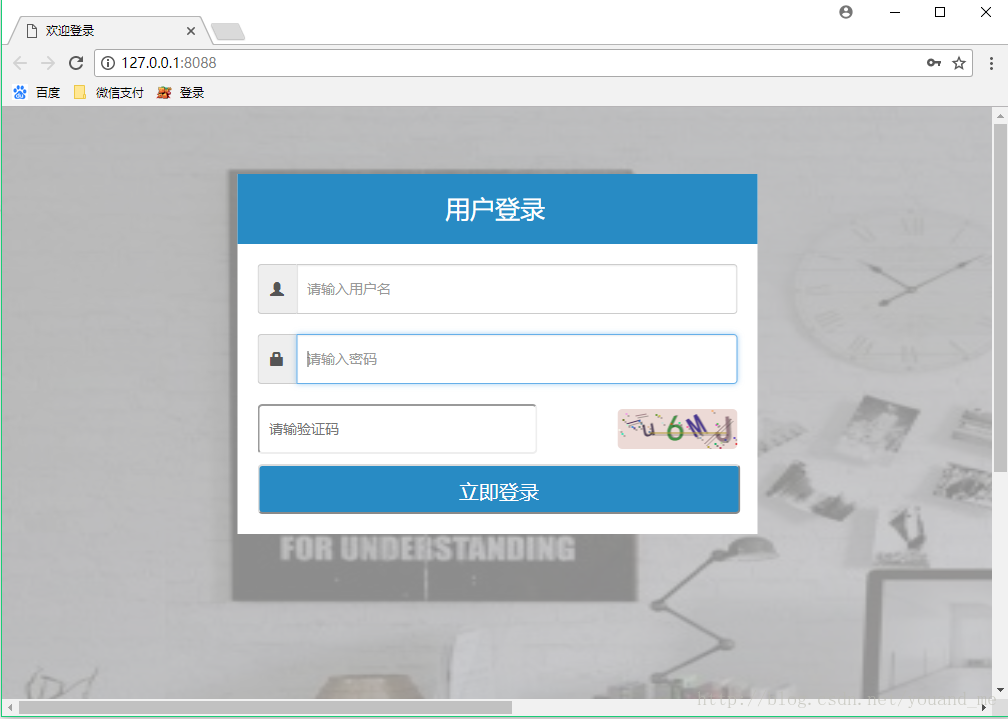
登录页面的完整代码和效果图如下:
<!DOCTYPE html>

<html lang="">

<head>

    <meta charset="utf-8">

    <meta http-equiv="X-UA-Compatible" content="IE=edge">

    <meta name="viewport" content="width=device-width, initial-scale=1">

    <title>欢迎登录</title>

    <!-- Bootstrap CSS -->

    <link href="/static/css/bootstrap.min.css" rel="stylesheet">

    <style type="text/css">

        @media (max-width: 768px) {

            body{

                margin: 0;

                padding: 0;

                background: #ddd;

            }

        }

        @media (min-width:768px) {

            body{

                margin: 0;

                padding: 0;

                background-size:1920px 949px;

                background-image: url('/static/img/桌面背景.jpg');

                width: 1920px;

                height: 949px;

            }

            #myLoginView{

                width: 665px;

                padding: 0 0px 20px 0px;

                position: absolute;

                z-index: 1;

                top: 40%;

                left: 50%;

                transform: translate(-50%, -50%);

            }

        }

        .code {

            font-family:Arial;

            font-style:italic;

            color:#ffffff;

            font-size:14px;

            border:0;

            cursor:pointer;

            width:120px;

            height:40px;

            line-height: 40px;

            text-align:center;

            vertical-align:center;

            display: inline-block;

            border-radius: 5px;

        }

        a {

            text-decoration:none;

            font-size:12px;

            color:#288bc4;

        }

        a:hover {

           text-decoration:underline;

        }

        .topTitle{

            position: relative;

            background: #288bc4;

            height: 70px;

            line-height: 70px;

            width: 100%;

            color: #ffffff;

            font-size: 25px;

        /*  text-align: center;*/

        }

        .inputStyle{

            margin-top: 10px;

            border-radius: 6px;

            margin: 20px 20px 0 20px;

        }

        .inputTextStyle

        {

            width: 400px;

            font-size: 14px;

            height: 50px;

            padding-left: 10px;

        }

        .inputCodeStyle{

            width: 280px;

            font-size: 14px;

            height: 50px;

            border-radius: 5px;

            padding-left: 10px;

        }

        .loginBtn{

            position: relative;

            color: #ffffff;

            background: #288bc4;;

            height: 50px;

            line-height: 50px;

            text-align: center;

            width: 93%;

            border-radius: 5px;

            font-size: 20px;

            margin: 10px 20px 0 20px;

        }

        input{

            outline:none;

        }

        .background{

           width: 100%;

           height: 100%;

           background: rgba(200,200,200,0.7);

      /*     background-image: url('/static/img/桌面背景.jpg') no-repeat;*/

           background-size:100% 100%;

        }

    </style>

    </head>

    <body>

        <div class="bg bg-blur"></div>

        <div class="background">

            <div class="col-md-4,col-sm-4,col-lg-4  center-block " id="myLoginView">

                <div style="background: #ffffff;width: 520px;padding-bottom: 20px;margin:40px 72.5px 0 72.5px;">

                    <div class="topTitle">

                        <div  style="display: inline-block;align-self: center;margin-left: 40%;">用户登录</div>

                    </div>

                    <div class="input-group inputStyle"><span class="glyphicon glyphicon-user dropdown-toggle input-group-addon" style="top: 0px"></span>

                        <input id="userId" class="inputTextStyle form-control" type="text" name="userId" placeholder="请输入用户名">

                    </div>

                    <div class="input-group inputStyle">

                        <span class="glyphicon glyphicon-lock dropdown-toggle input-group-addon" style="top: 0px"></span>

                        <input class="form-control inputTextStyle" type="password" autocomplete="new-password" placeholder="请输入密码">

                    </div>

                    <div class="input-group" style="display: flex;justify-content: space-between; align-items: center; margin: 20px 20px 0 20px;">

                        <input class="inputCodeStyle" type="text" name="controlId" placeholder="请输验证码" type="text" id="inputCode">

                        <div class="code" id="checkCode" onclick="createCode();">

                            <canvas id="verifyCanvas" width="120" height="40" style="cursor: pointer;border-radius: 5px;">您的浏览器版本不支持canvas</canvas>

                        </div>

                    </div>

                    <input class="loginBtn" id="Button1" onclick="validateCode();" type="button" value="立即登录"/>

                </div>

            </div>

        </div>

        <!-- jQuery -->

        <script src="/static/js/jquery-3.2.1.min.js"></script>

        <script>

            $.ajaxSetup({

                data: {csrfmiddlewaretoken: '{{ csrf_token }}' },

            });

        </script>

        <!-- jQuery -->

        <script src="/static/js/gVerify.js"></script>

        <!-- Bootstrap JavaScript -->

        <script src="/static/js/bootstrap.min.js"></script>

        <!-- code.js -->

        <script src="/static/js/loginCheck.js"></script>

    </body>

</html>- 1
- 2
- 3
- 4
- 5
- 6
- 7
- 8
- 9
- 10
- 11
- 12
- 13
- 14
- 15
- 16
- 17
- 18
- 19
- 20
- 21
- 22
- 23
- 24
- 25
- 26
- 27
- 28
- 29
- 30
- 31
- 32
- 33
- 34
- 35
- 36
- 37
- 38
- 39
- 40
- 41
- 42
- 43
- 44
- 45
- 46
- 47
- 48
- 49
- 50
- 51
- 52
- 53
- 54
- 55
- 56
- 57
- 58
- 59
- 60
- 61
- 62
- 63
- 64
- 65
- 66
- 67
- 68
- 69
- 70
- 71
- 72
- 73
- 74
- 75
- 76
- 77
- 78
- 79
- 80
- 81
- 82
- 83
- 84
- 85
- 86
- 87
- 88
- 89
- 90
- 91
- 92
- 93
- 94
- 95
- 96
- 97
- 98
- 99
- 100
- 101
- 102
- 103
- 104
- 105
- 106
- 107
- 108
- 109
- 110
- 111
- 112
- 113
- 114
- 115
- 116
- 117
- 118
- 119
- 120
- 121
- 122
- 123
- 124
- 125
- 126
- 127
- 128
- 129
- 130
- 131
- 132
- 133
- 134
- 135
- 136
- 137
- 138
- 139
- 140
- 141
- 142
- 143
- 144
- 145
- 146
- 147
- 148
- 149
- 150
- 151
- 152
- 153
- 154
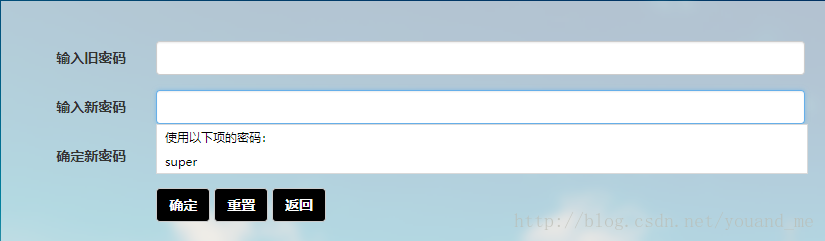
注意,上诉代码你拿去运行是不会自动填充的,你得在你的项目中登录并在浏览器弹出保存用户密码的时候保存密码再打开你的登录页面才会自动填充。其次当你的页面中只包含type=password的input标签的时候上诉方法就有问题了,比如在修改密码页面,首先我们不需要它自动填充密码,而且修改密码页面一般只有旧密码、新密码、重复新密码三个需要type=password的input标签,这时候没有type=text的input标签,此时用上面的方法就有问题了,解决办法是加一个隐藏type=text的input标签,不加的效果如下:
下面是修改页面的body部分代码:
<div class="col-lg-10 col-lg-offset-1 col-md-offset-1 centerDiv col-md-10 col-sm-12  col-xs-12">

    <div class="form-horizontal">

        <div class="form-group">

            <label class="col-sm-2 control-label">输入旧密码</label>

            <div class="col-sm-10" id="oldPwd">

                <!-- 这里添加了一个隐藏的type=text的input标签 -->

                <input type="text" style="display: none;">

                <input type="password" class="form-control"  placeholder=""  autocomplete="new-password">

            </div>

        </div>

        <div class="form-group">

            <label class="col-sm-2 control-label">输入新密码</label>

            <div class="col-sm-10" id="pwd">

                <input type="password" class="form-control"  placeholder="" autocomplete="new-password">

            </div>

        </div>

        <div class="form-group">

          <label class="col-sm-2 control-label">确定新密码</label>

          <div class="col-sm-10" id="pwdMore">

              <input placeholder="" class="form-control" type="password" autocomplete="new-password">

          </div>

        </div>

        <div class="form-group">

          <div class="col-sm-offset-2 col-sm-10">

            <button type="button" class="btn btn-default btnStyle" id="eidtPwd">确定</button>

            <button type="button" class="btn btn-default btnStyle" id="reset">重置</button>

             <button type="button" class="btn btn-default btnStyle" id="goback">返回</button>

          </div>

        </div>

  </div>

</div>- 1
- 2
- 3
- 4
- 5
- 6
- 7
- 8
- 9
- 10
- 11
- 12
- 13
- 14
- 15
- 16
- 17
- 18
- 19
- 20
- 21
- 22
- 23
- 24
- 25
- 26
- 27
- 28
- 29
- 30
- 31
不加的效果就是前面第一张图片。
H5 password自动记录取消的更多相关文章
- 恢复PasswordChar 默认值、取消密码框设置
//三种都是清空 this.textBox1.PasswordChar = new char(); this.textBox1.PasswordChar = '\0'; this.textBox1.P ...
- CI 学习笔记、记录
[ci框架]ci框架目录结构分析 分类: [CodeIgniter深入研究]2013-05-09 00:24 7420人阅读 评论(5) 收藏 举报 [php] view plaincopy mysh ...
- 部署rfc5766-turn-server--谷歌推荐的开源穿透服务器 [复制链接]
谷歌推荐的开源穿透服务器,包含trun和stun服务,主页:https://code.google.com/p/rfc5766-turn-server/(个人觉得可以利用这个来进一步搭建VPN,有兴趣 ...
- 马士兵SVN.
下载 服务端:VisualSVN Server 和客户端:TortoiseSVN cmd,并cd 到 VisualSVN Server安装目录下的bin目录. 新建库: svnadmin create ...
- user密码
一.修改密码 alter user hr identified by hr; password/passw hr: SYS@test>password hr Changing password ...
- Oracle User Management FAQ翻译及学习笔记
转载 最近了解到AME 的东西,很迫切,先转载一篇 [@more@] Oracle User Management FAQ翻译及学习笔记 写在前面 本文主要是翻译的英文版的Oracle User Ma ...
- 模型转换[yolov3模型在keras与darknet之间转换]
首先借助qqwweee/keras-yolo3中的convert.py和tensorrt例子yolov3_onnx,并重新编写了代码,实现将darknet格式的yolov3的yolov3.cfg和yo ...
- Vue 给axios做个靠谱的封装(报错,鉴权,跳转,拦截,提示)
需求及实现 统一捕获接口报错 弹窗提示 报错重定向 基础鉴权 表单序列化 用法及封装 用法 // 服务层 , import默认会找该目录下index.js的文件,这个可能有小伙伴不知道可以去了解npm ...
- linux mount
挂载 mount //10.65.200.168/linux_bj /home/linux_bj -t cifs -o username=niu,password=ruanxiaopang ...
随机推荐
- 笔记关闭fn功能
使用笔记本在vs开发中调试需要加fn+10进行调试,一点都不方便,使用fn+esc(fnLock)这个功能就可以关闭fn功能
- 【转】Castle Windsor之组件注册
[转]Castle Windsor之组件注册 注册方式较多,大体有这么几种,学习得比较粗浅,先记录: 1.逐个注册组件 即对每个接口通过代码指定其实现类,代码: container.Register( ...
- unity3d 获取游戏对象详解
原文地址:http://www.xuanyusong.com/archives/2768 我觉得Unity里面的Transform 和 GameObject就像两个双胞胎兄弟一样,这俩哥们很要好,我能 ...
- iOS : 用 InterfaceBuilder 开始一个项目
1.创建一个 xib 文件 : Main_iPhone.xib 更改 File's Owner 的 Class 为 UIApplication; 添加 1 个 Window .1 个 Object . ...
- UNIX环境编程学习笔记(20)——进程管理之exec 函数族
lienhua342014-10-07 在文档“进程控制三部曲”中,我们提到 fork 函数创建子进程之后,通常都会调用 exec 函数来执行一个新程序.调用 exec 函数之后,该进程就将执行的程序 ...
- Rx与Async Task的简单对比
有关Reactive Extensions的介绍可见https://rx.codeplex.com/,总的来说,你可以当它是又一个异步编程的框架,它以观察者模式实现了对数据流的的“订阅”.一个列表,一 ...
- UGUI表情系统解决方案
参考链接: https://blog.uwa4d.com/archives/Sparkle_UGUI.html http://tech.seasungame.com/blog/index.php/20 ...
- 理解linux 块, i节点
https://blog.csdn.net/zdf19/article/details/54424880 https://www.cnblogs.com/hnrainll/archive/2012/0 ...
- 自动构建工具Gulp
摘要: gulp与grunt一样,都是自动构建工具.和grunt相比它更突出一个流的概念,任务是一个接一个执行的.今天就分享如何用gulp做自动化. 安装: gulp也是基于node环境,所以安装g ...
- 使用monkey技术修改python requests模块
例如请求前和请求后各来一条日志,这样就不需要在自己的每个代码都去加日志了. 其实也可以直接记录'urllib3.connectionpool' logger name的日志. 修改了requests ...