
基于spring-cloud的微服务(2) eureka服务提供方的注册和消费方的消费
启动Eureka注册中心之后,服务提供方就可以注册到Eureka上去(作为一个Eureka的客户端)
我们使用IDEA提供的spring initializer来新建一个springcloud项目
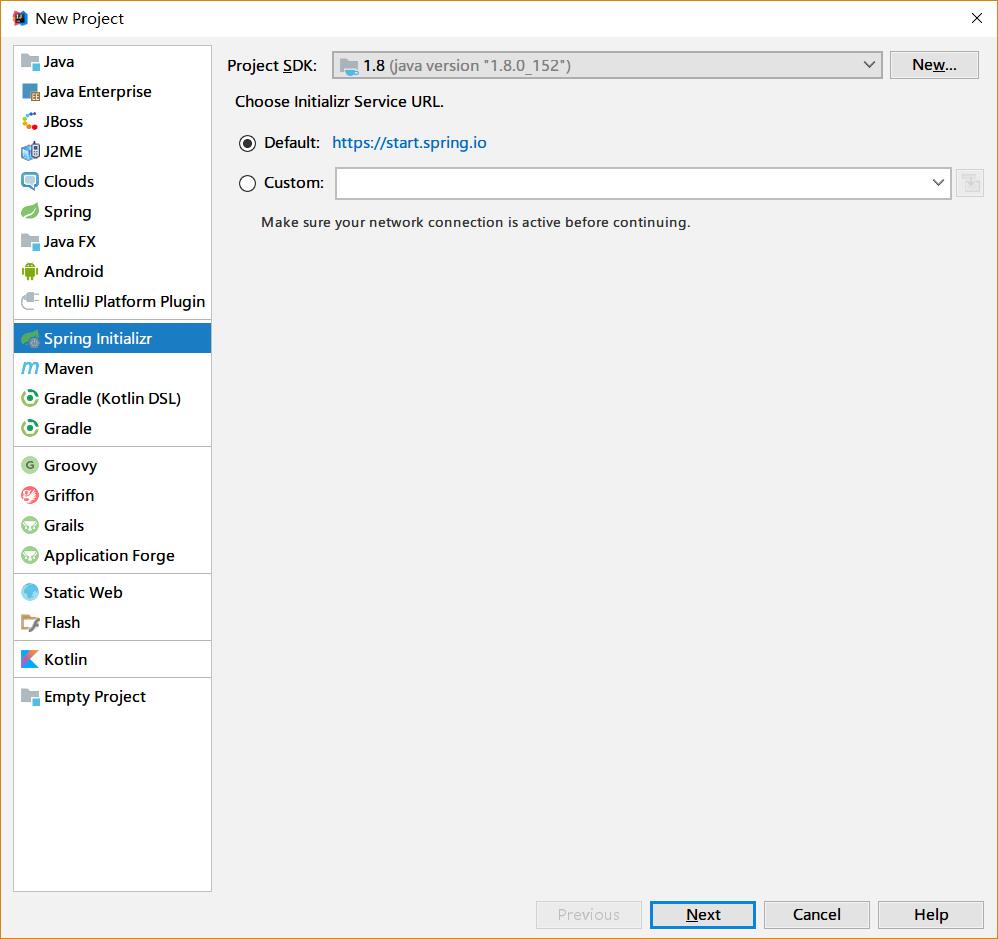
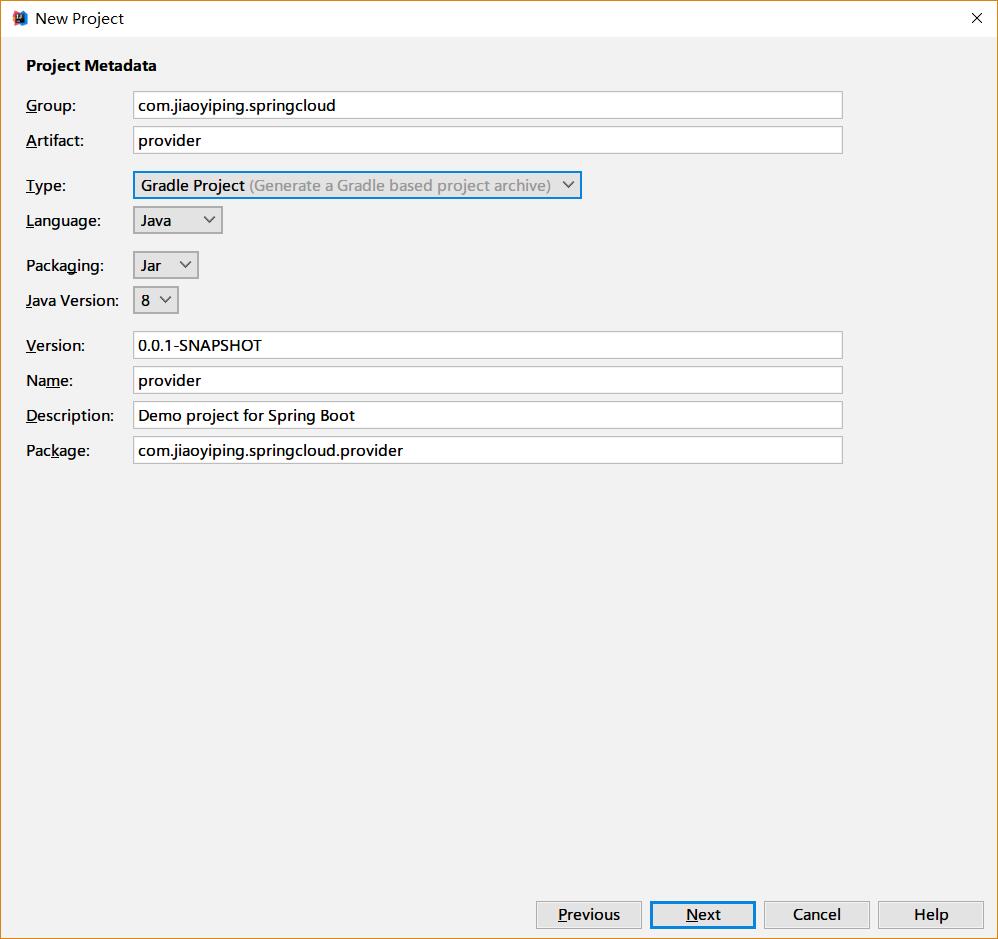
填写相关的包名等信息:
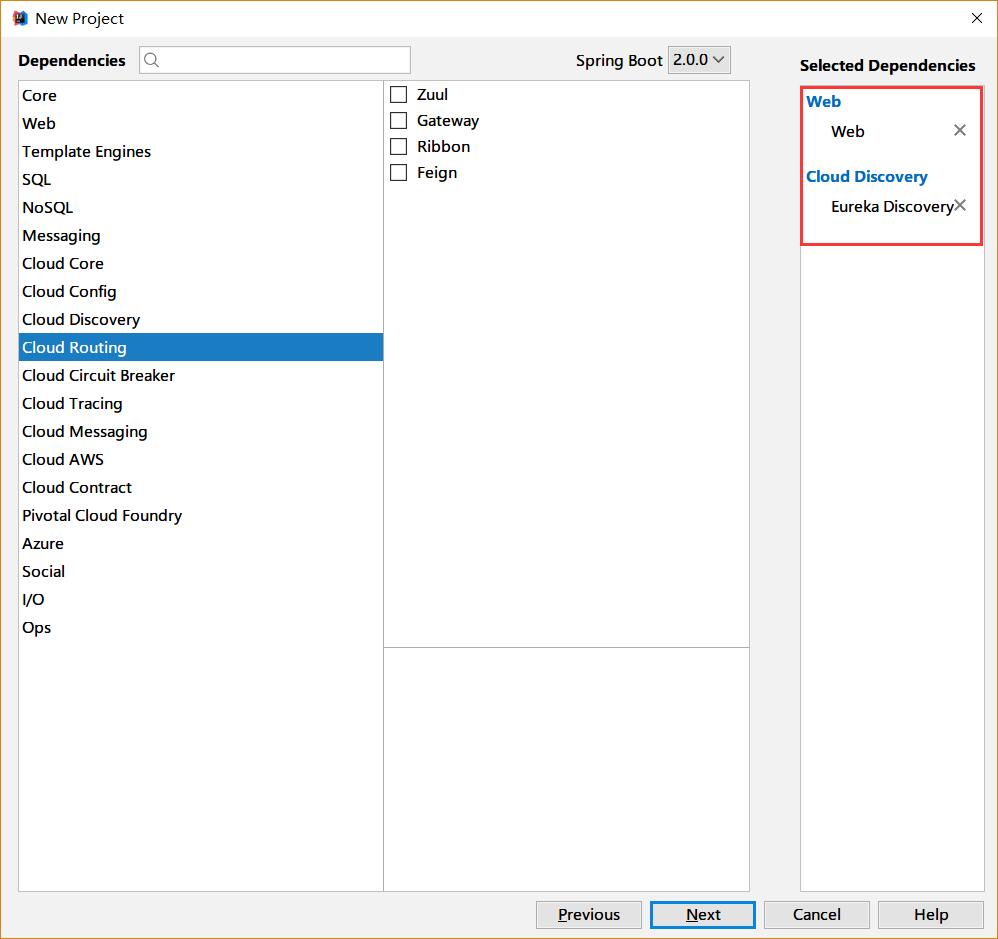
选择web和Erureka Discorvery
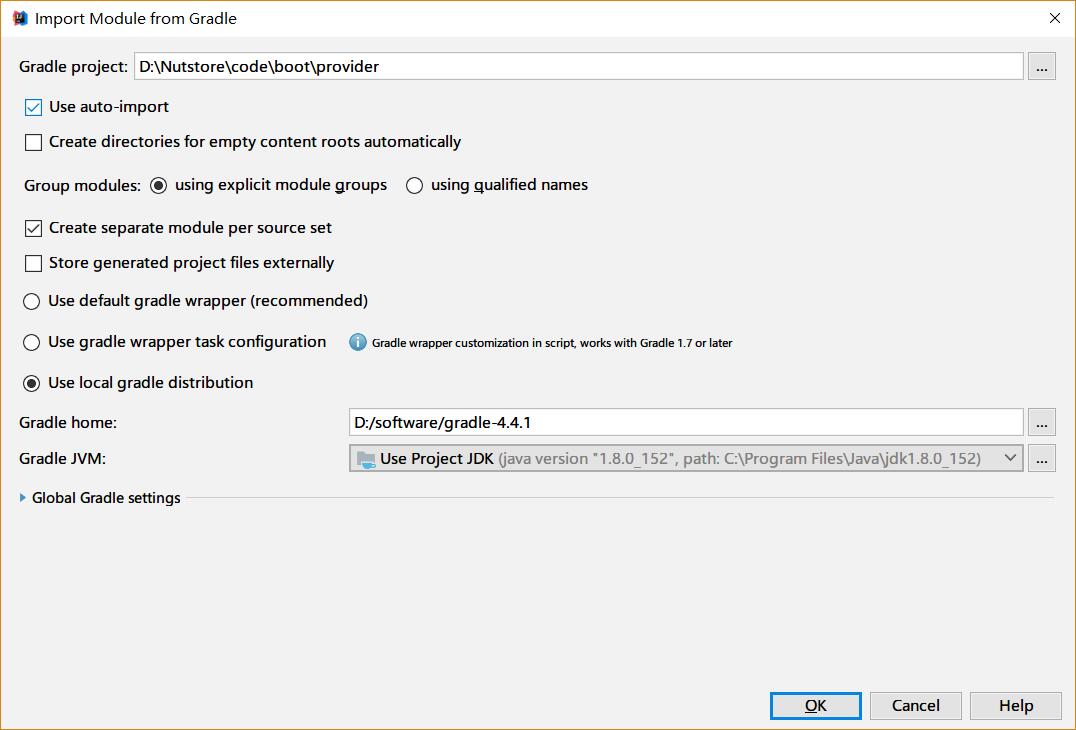
填写Gradle等相关信息完成创建
我们需要在启动类里边增加注解 @EnableDiscoveryClient 来标识这是一个Eureka客户端
启动类的代码如下:
package com.jiaoyiping.springcloud.provider;

import org.springframework.boot.SpringApplication;

import org.springframework.boot.autoconfigure.SpringBootApplication;

import org.springframework.cloud.client.discovery.EnableDiscoveryClient;

@SpringBootApplication

@EnableDiscoveryClient

public class ProviderApplication {

    public static void main(String[] args) {

	    SpringApplication.run(ProviderApplication.class, args);

    }

}
创建一个我们用来真正提供服务的Controller(在本例中,我们假设从路径中取到两个int值,将他们的和用字符形式返回,代码如下):
package com.jiaoyiping.springcloud.provider;

import org.springframework.web.bind.annotation.PathVariable;

import org.springframework.web.bind.annotation.RequestMapping;

import org.springframework.web.bind.annotation.RestController;

@RestController

public class ProductionController {

    //简单计算两个数字的和,转换为字符串返回

    @RequestMapping(value = "/add/{a}/{b}")

    public String add(@PathVariable("a") int a, @PathVariable("b") int b) {

        return (a + b) + "";

    }

}
修改应用的配置文件,指定服务的名称,网卡信息和eureka等相关信息:配置文件如下:
spring:

  application:

    name: provider

  cloud:

    inetutils:

      preferred-networks: 192.168.1.

server:

  port: 8082

eureka:

  client:

    service-url:

      defaultZone: http://127.0.0.1:8081/eureka

  instance:

    prefer-ip-address: true

    instance-id: 192.168.1.5:${server.port}
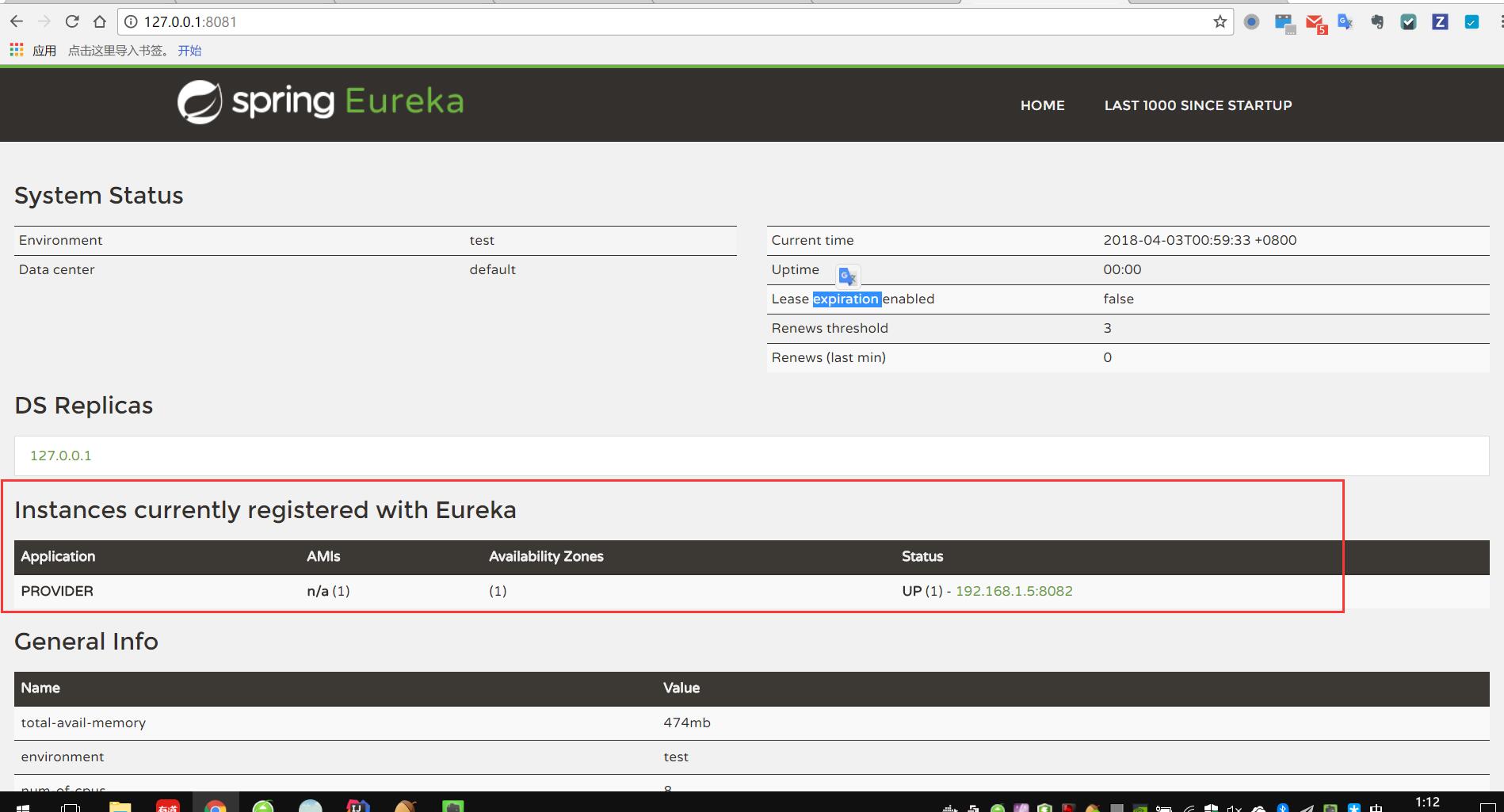
运行启动类,可以在eureka的页面上看到一个名为provider的服务已经注册上去了:
服务的消费方:
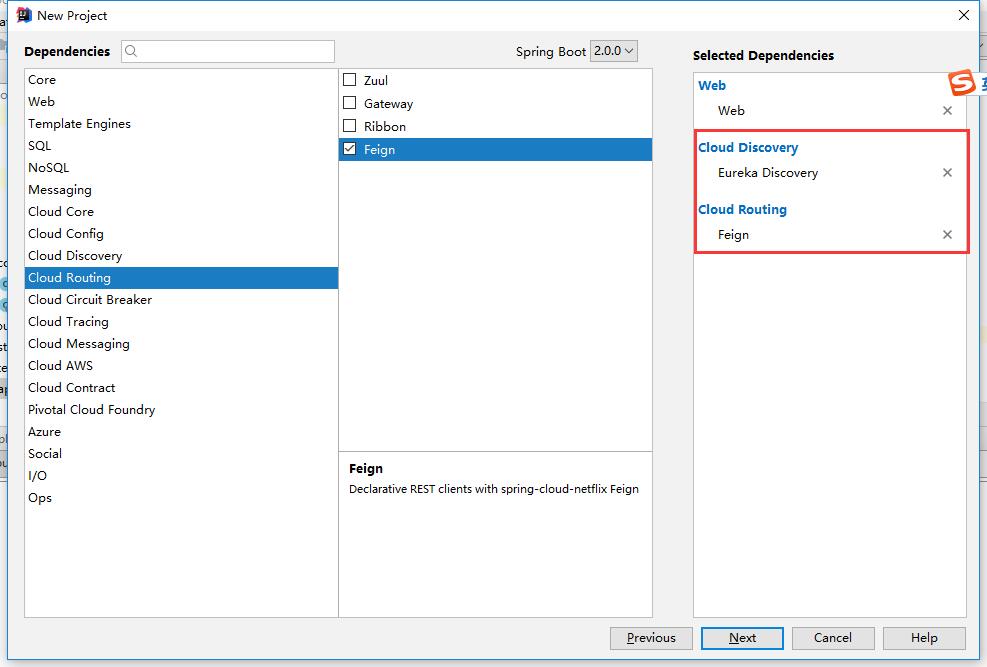
服务的消费方也是和服务提供方一样,也会到Eureka中去注册,按照上边的步骤,我们新建一个consumer项目,比前边的provider多加上Feign的依赖
在启动类上边,多加两个注解:
@EnableFeignClients

@EnableDiscoveryClient
启动类的代码如下:
package com.jiaoyiping.springcloud.consumer;

import org.springframework.boot.SpringApplication;

import org.springframework.boot.autoconfigure.SpringBootApplication;

import org.springframework.cloud.client.discovery.EnableDiscoveryClient;

import org.springframework.cloud.openfeign.EnableFeignClients;

@SpringBootApplication

@EnableFeignClients

@EnableDiscoveryClient

public class ConsumerApplication {

    public static void main(String[] args) {

        SpringApplication.run(ConsumerApplication.class, args);

    }

}
新建一个ProductControllerRemote接口,作为FeignClient,里边定义的方法和服务提供方的方法一致;
package com.jiaoyiping.springcloud.consumer;

import org.springframework.cloud.openfeign.FeignClient;

import org.springframework.web.bind.annotation.PathVariable;

import org.springframework.web.bind.annotation.RequestMapping;

@FeignClient(name = "provider")

public interface ProductControllerRemote {

    @RequestMapping(value = "/add/{a}/{b}")

    String add(@PathVariable("a") int a, @PathVariable("b") int b);

}
@FeignClient注解的name,指的是注册到eureka上的应用的名称(在服务提供方的spring的配置文件里配置) 接口的方法映射到服务提供方的相应的方法上,只需要定义,不需要实现,Feign会自动调用服务提供方的相应的方法
使用@FeignClient注解的这个类,可以作为一个spring的bean,注入到需要的地方去,直接调用相应的方法即可
作为例子,我们在消费方新定义一个Controller,来调用ProductControllerRemote:
package com.jiaoyiping.springcloud.consumer;

import org.springframework.beans.factory.annotation.Autowired;

import org.springframework.web.bind.annotation.PathVariable;

import org.springframework.web.bind.annotation.RequestMapping;

import org.springframework.web.bind.annotation.RestController;

@RestController

public class ConsumerController {

    @Autowired

    private ProductControllerRemote productControllerRemote;

    @RequestMapping("/getresult/{a}/{b}")

    public String getResult(@PathVariable("a") int a, @PathVariable("b") int b) {

        return productControllerRemote.add(a, b);

    }

}
然后是消费方的配置文件,需要配置Eureka的地址和服务的端口等信息:
spring:

  application:

    name: cunsumer

  cloud:

    inetutils:

      preferred-networks: 192.168.1.

server:

  port: 8083

eureka:

  client:

    service-url:

      defaultZone: http://127.0.0.1:8081/eureka/

  instance:

    prefer-ip-address: true

    instance-id: 192.168.1.5:${server.port}
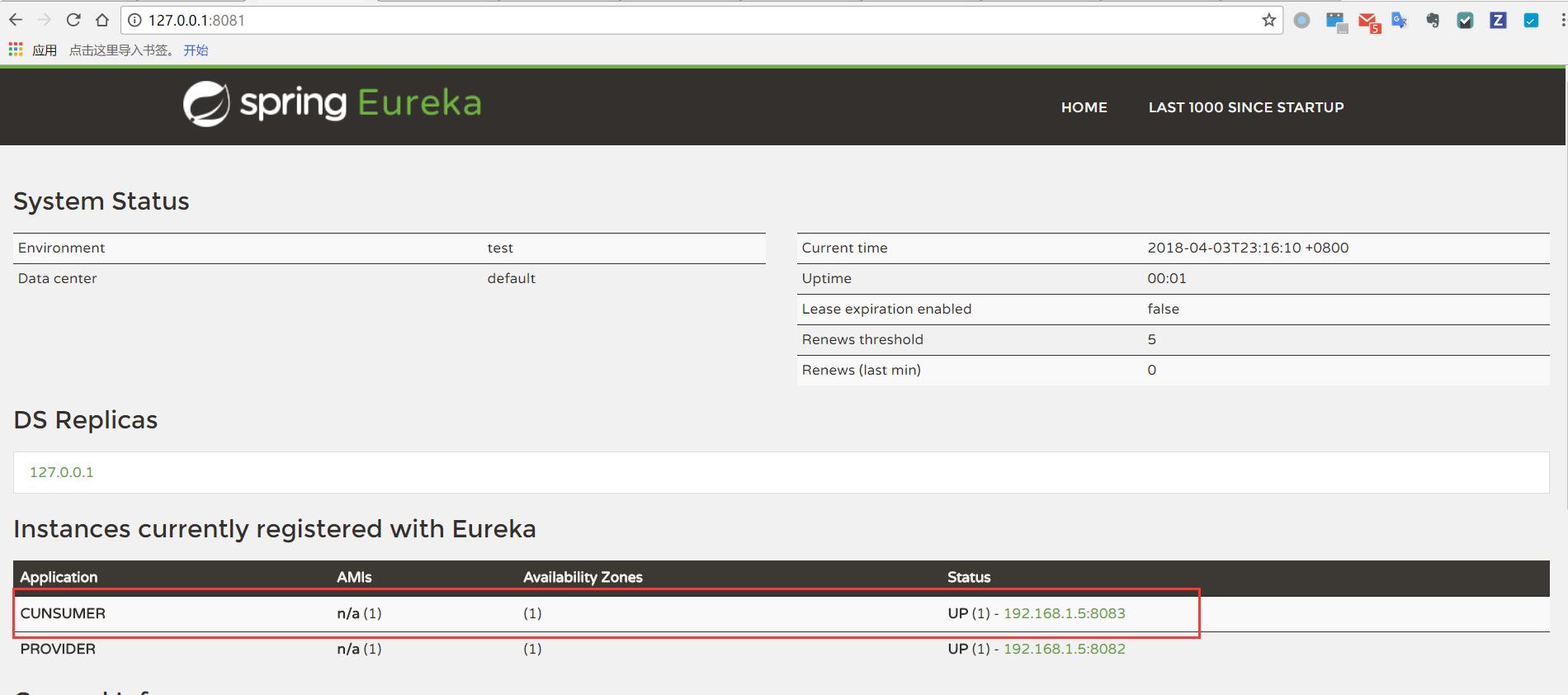
启动消费方的启动类,可以看到,消费方也被注册到Eureka中去了:
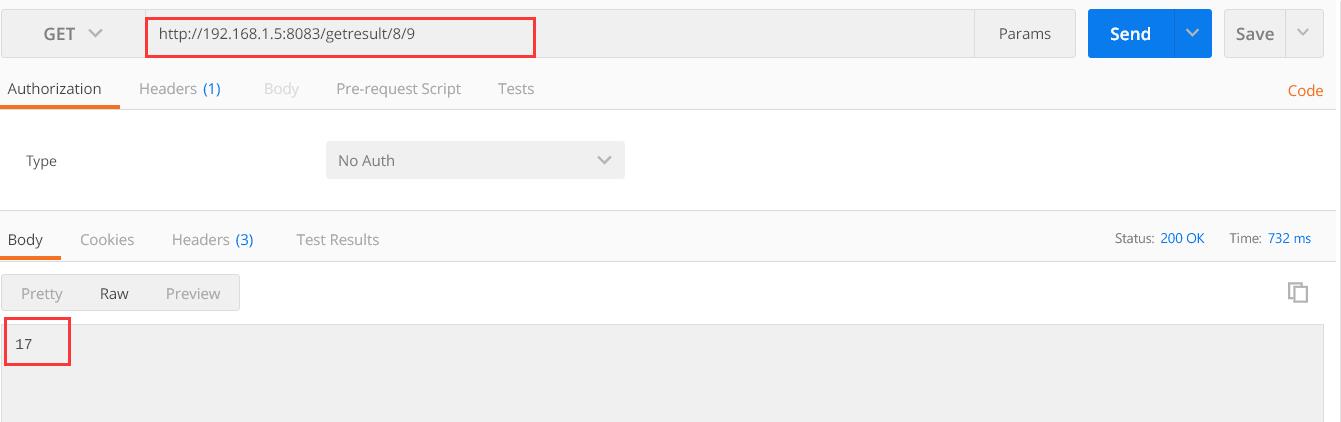
使用postman调用消费方对外提供的接口,我们可以看到,消费方调用了服务提供方提供的服务,正确的返回了结果:
基于spring-cloud的微服务(2) eureka服务提供方的注册和消费方的消费的更多相关文章
- 基于Spring Cloud的微服务入门教程
(本教程的原地址发布在本人的简书上:http://www.jianshu.com/p/947d57d042e7,若各位看官有什么问题或不同看法请在这里或简书留言,谢谢!) 本人也是前段时间才开始接触S ...
- 干货|基于 Spring Cloud 的微服务落地
转自 微服务架构模式的核心在于如何识别服务的边界,设计出合理的微服务.但如果要将微服务架构运用到生产项目上,并且能够发挥该架构模式的重要作用,则需要微服务框架的支持. 在Java生态圈,目前使用较多的 ...
- 基于Spring Cloud的微服务落地
微服务架构模式的核心在于如何识别服务的边界,设计出合理的微服务.但如果要将微服务架构运用到生产项目上,并且能够发挥该架构模式的重要作用,则需要微服务框架的支持. 在Java生态圈,目前使用较多的微服务 ...
- 基于 Spring Cloud 的微服务架构实践指南(下)
show me the code and talk to me,做的出来更要说的明白 本文源码,请点击learnSpringCloud 我是布尔bl,你的支持是我分享的动力! 一.引入 上回 基于 S ...
- Spring Cloud(二):Eureka 服务注册中心
前言 服务治理 随着业务的发展,微服务应用也随之增加,这些服务的管理和治理会越来越难,并且集群规模.服务位置.服务命名都会发生变化,手动维护的方式极易发生错误或是命名冲突等问题.而服务治理正是为了解决 ...
- 基于 Spring Cloud 的微服务架构实践指南(上)
show me the code and talk to me,做的出来更要说的明白 GitHub 项目learnSpringCloud同步收录 我是布尔bl,你的支持是我分享的动力! 一. 引入 上 ...
- Spring Cloud(二)服务提供者 Eureka + 服务消费者(rest + Ribbon)
Ribbon是什么? Ribbon是Netflix发布的开源项目,主要功能是提供客户端的软件负载均衡算法,将Netflix的中间层服务连接在一起.Ribbon客户端组件提供一系列完善的配置项如连接超时 ...
- spring cloud 系列第1篇 —— eureka 服务的注册与发现 (F版本)
源码仓库地址:https://github.com/heibaiying/spring-samples-for-all 一.eureka 简介 Spring Cloud Eureka使用Netflix ...
- Spring Cloud(四)服务提供者 Eureka + 服务消费者 Feign
上一篇文章,讲述了如何通过RestTemplate + Ribbon去消费服务,这篇文章主要讲述如何通过Feign去消费服务. Feign简介 Feign是一个声明式的伪Http客户端,它使得写Htt ...
- 画了一张基于Spring Cloud的微服务系统架构图
随机推荐
- 基于struts2的ajaxfileupload异步上传插件的使用
服务器端采用struts2来处理文件上传. 所需环境: jquery.js ajaxfileupload.js struts2所依赖的jar包 及struts2-json-plugin-2.1.8.1 ...
- gridview列超链接的几种设置方法
<asp:GridView ID="GridView1" runat="server" Width="100%" AutoGenera ...
- window.frames[]在Firefox下无法兼容的解决方式
html代码段: <iframe id="fr" src="ProjectTree.aspx?IsFree=true&f=yes&IsCheckPr ...
- koa2使用阿里云oss的nodejs sdk实现上传图片
nodejs实现上传图片到阿里云,自然是写成接口形式比较方便,前端监听input file的改变,把file对象传入到formData中传入后端,不能直接传入file对象,后端需要接受formData ...
- Alpine Linux:如何配置GUI的图形桌面环境:x Desktop Environment
alpine linux 真是不错.小巧.迅捷! 官方的各个版本的alpine镜像内没有带图形环境的.那我们如何构建自己的桌面图形环境呢? 其实:这个问题,在起官网的wiki内有指南,我们根据那些相关 ...
- 【12-06】A股主要指数的市盈率(PE)估值高度
全指材料(SH000987) - 2018-12-06日,当前值:12.043,平均值:30.37,中位数:26.0097,当前 接近历史新低.全指材料(SH000987)的历史市盈率PE详情 中证煤 ...
- git branch 命令
1.git init 该命令执行之后并没有创建branch 2.git add 添加文件,这时branch 也还没生成.git branch name也没用 3.git commit 提交到git r ...
- [原]unity3d GLSL无法pc上显示
pc编写GLSL: Shader "Custom/GLSL" { Properties { _MainTex ("Base (RGB)", ...
- [OpenCV] IplImage and Operation
IplImage 一.资源 In this chapter, APIs will make U crazy. Good luck! Next, Review Linear Algebra. Ref: ...
- C语言realloc,malloc,calloc的区别【转载】
转载自:http://www.cnblogs.com/BlueTzar/articles/1136549.html 三个函数的申明分别是: void* realloc(void* ptr, unsig ...