
MBProgressHUD 第三方库使用
关键操作:
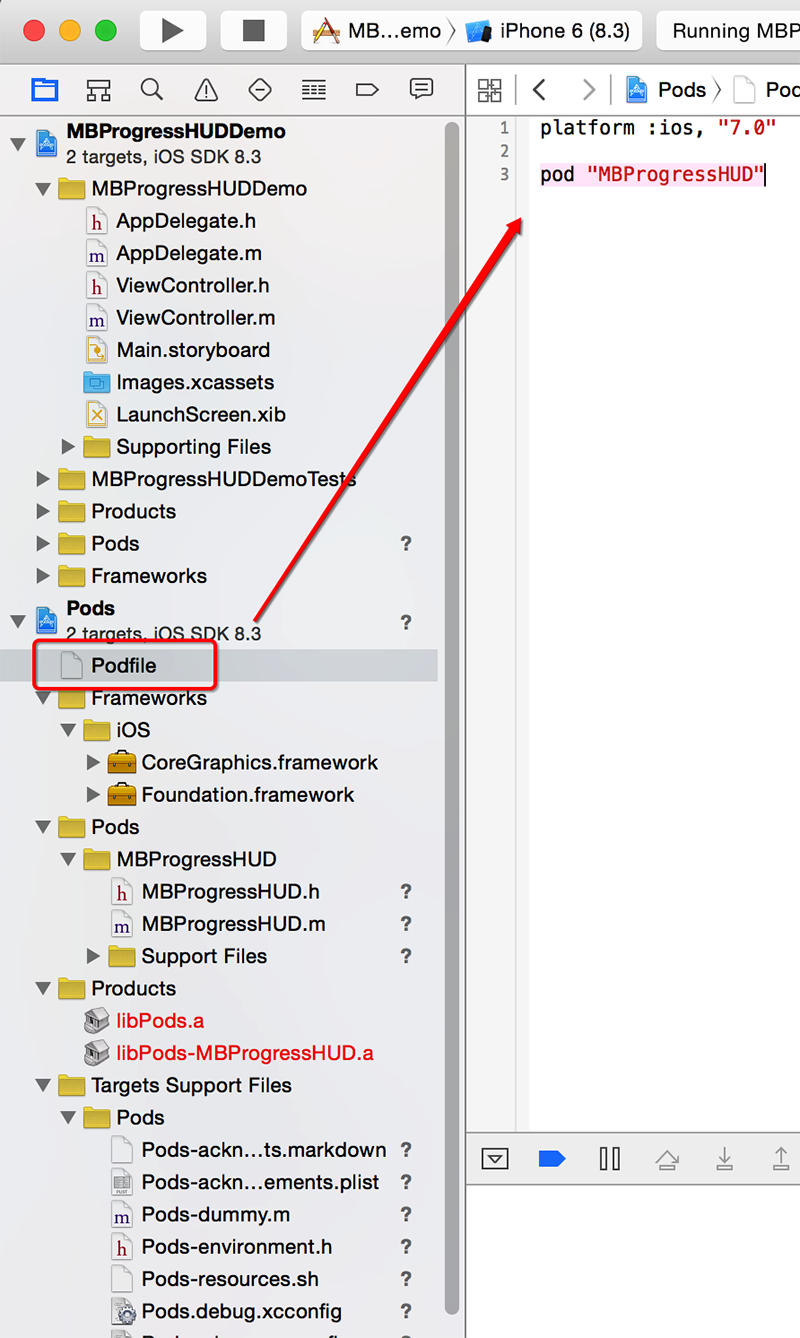
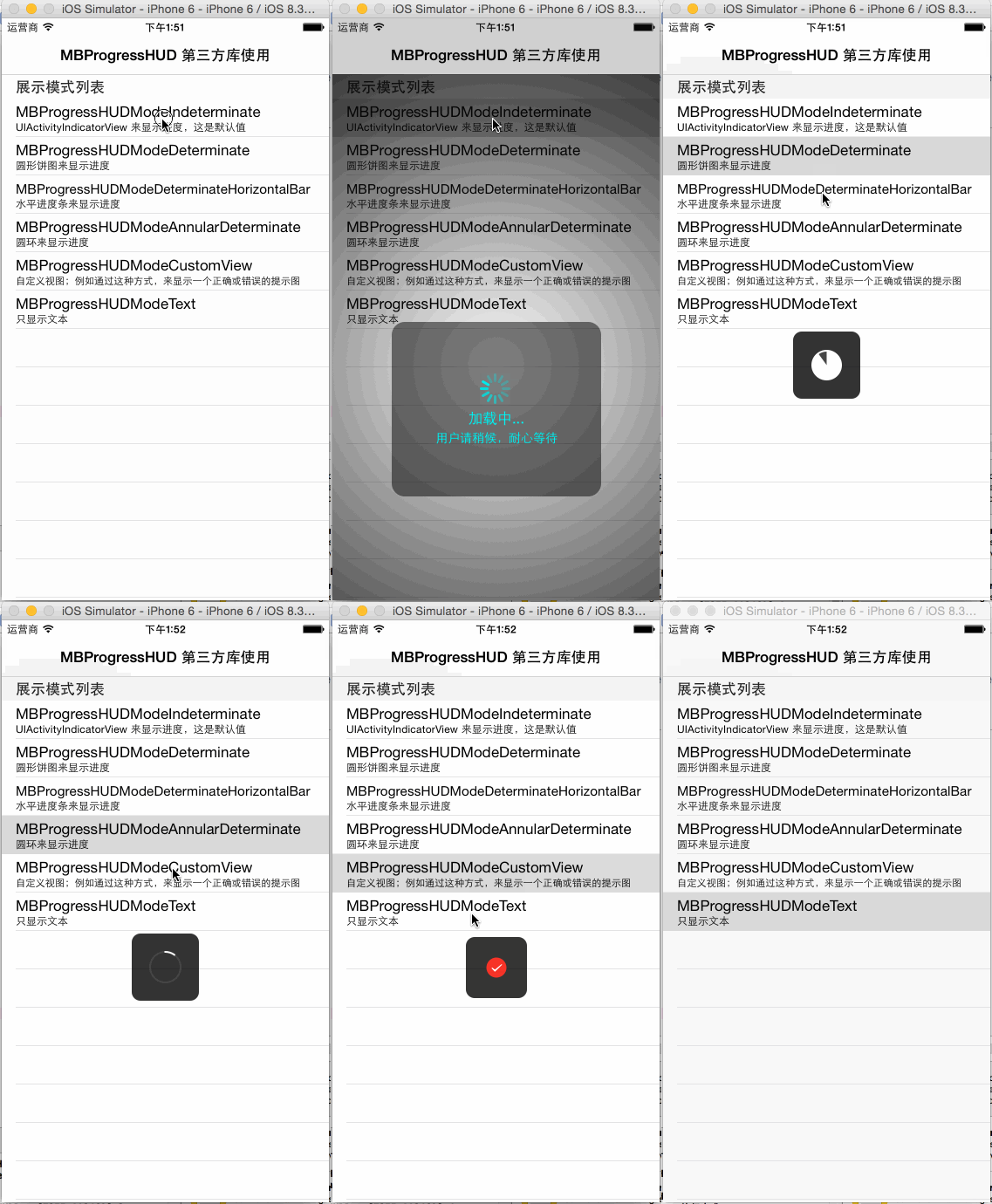
效果如下:
ViewController.h
 #import <UIKit/UIKit.h>

 #import "MBProgressHUD.h"

 @interface ViewController : UITableViewController<MBProgressHUDDelegate>

 @property (strong, nonatomic) MBProgressHUD *hud;

 @property (copy, nonatomic) NSArray *arrMode;

 @property (copy, nonatomic) NSArray *arrModeName;

 @end
ViewController.m
 #import "ViewController.h"

 @interface ViewController ()

 - (void)loadData;

 - (void)layoutUI;

 - (void)taskOfIndeterminate;

 - (void)taskOfDeterminate;

 - (void)taskOfDeterminateHorizontalBar;

 - (void)taskOfAnnularDeterminate;

 - (void)taskOfCustomView;

 - (void)taskOfText;

 - (void)showHUDByIndeterminate;

 - (void)showHUDByDeterminate;

 - (void)showHUDByDeterminateHorizontalBar;

 - (void)showHUDByAnnularDeterminate;

 - (void)showHUDByCustomView;

 - (void)showHUDByText;

 @end

 @implementation ViewController

 - (void)viewDidLoad {

     [super viewDidLoad];

     [self loadData];

     [self layoutUI];

 }

 - (void)didReceiveMemoryWarning {

     [super didReceiveMemoryWarning];

     // Dispose of any resources that can be recreated.

 }

 - (void)loadData {

     _arrMode = @[ @"MBProgressHUDModeIndeterminate",

                   @"MBProgressHUDModeDeterminate",

                   @"MBProgressHUDModeDeterminateHorizontalBar",

                   @"MBProgressHUDModeAnnularDeterminate",

                   @"MBProgressHUDModeCustomView",

                   @"MBProgressHUDModeText" ];

     _arrModeName = @[ @"UIActivityIndicatorView 来显示进度,这是默认值",

                       @"圆形饼图来显示进度",

                       @"水平进度条来显示进度",

                       @"圆环来显示进度",

                       @"自定义视图;例如通过这种方式,来显示一个正确或错误的提示图",

                       @"只显示文本" ];

 }

 - (void)layoutUI {

     self.navigationItem.title = @"MBProgressHUD 第三方库使用";

 }

 #pragma mark - MBProgressHUD Additional Task

 - (void)taskOfIndeterminate {

     sleep(); //进程挂起3秒,这里仅仅是模拟,相当于执行了一些操作耗时3秒;sleep 和 usleep 都是进程挂起操作方法,他们的精准度不同,所以按需使用;对于一般秒级别操作,就使用 sleep 方法

 }

 - (void)taskOfDeterminate {

     CGFloat progressVal = 0.0f;

     while (progressVal < 1.0) {

         progressVal += 0.1;

         _hud.progress = progressVal;

         usleep(); //千分之一毫秒,即百万分之一秒;这里设置进程挂起0.5秒

     }

 }

 - (void)taskOfDeterminateHorizontalBar {

     [self taskOfDeterminate];

 }

 - (void)taskOfAnnularDeterminate {

     [self taskOfDeterminate];

 }

 - (void)taskOfCustomView {

     [self taskOfIndeterminate];

 }

 - (void)taskOfText {

     [self taskOfIndeterminate];

 }

 #pragma mark - MBProgressHUD

 - (void)showHUDByIndeterminate {

     UIColor *color = [UIColor cyanColor];

     _hud = [[MBProgressHUD alloc] initWithView:self.view];

     _hud.activityIndicatorColor = color; //设置指示器颜色;默认为白色

     //label 和 detailsLabel 是公共部分,其他模式的展示效果一样可以用

     _hud.labelText = @"加载中...";

     _hud.labelFont = [UIFont systemFontOfSize:];

     _hud.labelColor = color; //设置文本颜色;默认为白色

     _hud.detailsLabelText = @"用户请稍候,耐心等待";

     _hud.detailsLabelFont = [UIFont systemFontOfSize:];

     _hud.detailsLabelColor = color; //设置详细文本颜色;默认为白色

     //一些额外不常用的设置

     _hud.minShowTime = 5.0f;

     _hud.opacity = 0.5f;

     _hud.animationType = MBProgressHUDAnimationZoomOut;

     _hud.cornerRadius = 15.0f;

     _hud.dimBackground = YES;

     _hud.xOffset = 0.0f;

     _hud.yOffset = 50.0f;

     _hud.margin = 30.0f;

     _hud.square = YES;

     _hud.minSize = CGSizeMake(240.0f, 200.0f); //设置了 minSize 后,square 就失效了

     //设置委托,以便调用hudWasHidden:方法

     _hud.delegate = self;

     [self.view addSubview:_hud];

     //操作方式一:

     //    [_hud showWhileExecuting:@selector(taskOfIndeterminate)

     //                    onTarget:self

     //                  withObject:nil

     //                    animated:YES];

     //操作方式二:

     [_hud showAnimated:YES

    whileExecutingBlock:^{

        [self taskOfIndeterminate];

    } completionBlock:^{

        NSLog(@"showHUDByIndeterminate 执行完成");

    }];

 }

 - (void)showHUDByDeterminate {

     _hud = [[MBProgressHUD alloc] initWithView:self.view];

     _hud.mode = MBProgressHUDModeDeterminate;

     [self.view addSubview:_hud];

     [_hud showAnimated:YES

    whileExecutingBlock:^{

        [self taskOfDeterminate];

    } completionBlock:^{

        NSLog(@"showHUDByDeterminate 执行完成");

    }];

 }

 - (void)showHUDByDeterminateHorizontalBar {

     _hud = [[MBProgressHUD alloc] initWithView:self.view];

     _hud.mode = MBProgressHUDModeDeterminateHorizontalBar;

     [self.view addSubview:_hud];

     [_hud showAnimated:YES

    whileExecutingBlock:^{

        [self taskOfDeterminateHorizontalBar];

    } completionBlock:^{

        NSLog(@"showHUDByDeterminateHorizontalBar 执行完成");

    }];

 }

 - (void)showHUDByAnnularDeterminate {

     _hud = [[MBProgressHUD alloc] initWithView:self.view];

     _hud.mode = MBProgressHUDModeAnnularDeterminate;

     [self.view addSubview:_hud];

     [_hud showAnimated:YES

    whileExecutingBlock:^{

        [self taskOfAnnularDeterminate];

    } completionBlock:^{

        NSLog(@"showHUDByAnnularDeterminate 执行完成");

    }];

 }

 - (void)showHUDByCustomView {

     _hud = [[MBProgressHUD alloc] initWithView:self.view];

     _hud.mode = MBProgressHUDModeCustomView;

     _hud.customView = [[UIImageView alloc] initWithImage:[UIImage imageNamed:@"AlbumCellRedSelected"]];

     [self.view addSubview:_hud];

     [_hud showAnimated:YES

    whileExecutingBlock:^{

        [self taskOfCustomView];

    } completionBlock:^{

        NSLog(@"showHUDByCustomView 执行完成");

    }];

 }

 - (void)showHUDByText {

     UIColor *color = [UIColor cyanColor];

     _hud = [[MBProgressHUD alloc] initWithView:self.view];

     _hud.mode = MBProgressHUDModeText;

     _hud.labelText = @"加载中...";

     _hud.labelFont = [UIFont systemFontOfSize:];

     _hud.labelColor = color; //设置文本颜色;默认为白色

     _hud.detailsLabelText = @"用户请稍候,耐心等待";

     _hud.detailsLabelFont = [UIFont systemFontOfSize:];

     _hud.detailsLabelColor = color; //设置详细文本颜色;默认为白色

     [self.view addSubview:_hud];

     [_hud showAnimated:YES

    whileExecutingBlock:^{

        [self taskOfText];

    } completionBlock:^{

        NSLog(@"showHUDByText 执行完成");

    }];

 }

 #pragma mark - MBProgressHUDDelegate

 - (void)hudWasHidden:(MBProgressHUD *)hud {

     NSLog(@"隐藏后做一些操作");

 }

 #pragma mark - TableView

 - (NSString *)tableView:(UITableView *)tableView titleForHeaderInSection:(NSInteger)section {

     return @"展示模式列表";

 }

 - (NSInteger)numberOfSectionsInTableView:(UITableView *)tableView {

     return ;

 }

 - (NSInteger)tableView:(UITableView *)tableView numberOfRowsInSection:(NSInteger)section {

     return _arrMode.count;

 }

 - (UITableViewCell *)tableView:(UITableView *)tableView cellForRowAtIndexPath:(NSIndexPath *)indexPath {

     static NSString *cellIdentifier = @"cellIdentifier";

     UITableViewCell *cell = [tableView dequeueReusableCellWithIdentifier:cellIdentifier];

     if (!cell) {

         cell = [[UITableViewCell alloc] initWithStyle:UITableViewCellStyleSubtitle reuseIdentifier:cellIdentifier];

     }

     NSInteger row = indexPath.row;

     cell.textLabel.text = _arrMode[row];

     cell.textLabel.adjustsFontSizeToFitWidth = YES;

     cell.detailTextLabel.text = _arrModeName[row];

     cell.detailTextLabel.adjustsFontSizeToFitWidth = YES;

     return cell;

 }

 - (void)tableView:(UITableView *)tableView didSelectRowAtIndexPath:(NSIndexPath *)indexPath {

     switch (indexPath.row) {

         case :

             [self showHUDByIndeterminate];

             break;

         case :

             [self showHUDByDeterminate];

             break;

         case :

             [self showHUDByDeterminateHorizontalBar];

             break;

         case :

             [self showHUDByAnnularDeterminate];

             break;

         case :

             [self showHUDByCustomView];

             break;

         case :

             [self showHUDByText];

             break;

     }

     NSLog(@"%ld", (long)indexPath.row);

 }

 @end
AppDelegate.h
 #import <UIKit/UIKit.h>

 @interface AppDelegate : UIResponder <UIApplicationDelegate>

 @property (strong, nonatomic) UIWindow *window;

 @property (strong, nonatomic) UINavigationController *navigationController;

 @end
AppDelegate.m
 #import "AppDelegate.h"

 #import "ViewController.h"

 @interface AppDelegate ()

 @end

 @implementation AppDelegate

 - (BOOL)application:(UIApplication *)application didFinishLaunchingWithOptions:(NSDictionary *)launchOptions {

     _window = [[UIWindow alloc] initWithFrame:[[UIScreen mainScreen] bounds]];

     ViewController *viewController = [[ViewController alloc] init];

     _navigationController = [[UINavigationController alloc] initWithRootViewController:viewController];

     _window.rootViewController = _navigationController;

     //[_window addSubview:_navigationController.view]; //当_window.rootViewController关联时,这一句可有可无

     [_window makeKeyAndVisible];

     return YES;

 }

 - (void)applicationWillResignActive:(UIApplication *)application {

 }

 - (void)applicationDidEnterBackground:(UIApplication *)application {

 }

 - (void)applicationWillEnterForeground:(UIApplication *)application {

 }

 - (void)applicationDidBecomeActive:(UIApplication *)application {

 }

 - (void)applicationWillTerminate:(UIApplication *)application {

 }

 @end
输出结果:
 -- ::30.788 MBProgressHUDDemo[:]

 -- ::36.090 MBProgressHUDDemo[:] showHUDByIndeterminate 执行完成

 -- ::36.091 MBProgressHUDDemo[:] 隐藏后做一些操作

 -- ::37.378 MBProgressHUDDemo[:]

 -- ::43.208 MBProgressHUDDemo[:] showHUDByDeterminate 执行完成

 -- ::44.435 MBProgressHUDDemo[:]

 -- ::50.278 MBProgressHUDDemo[:] showHUDByDeterminateHorizontalBar 执行完成

 -- ::51.692 MBProgressHUDDemo[:]

 -- ::57.529 MBProgressHUDDemo[:] showHUDByAnnularDeterminate 执行完成

 -- ::58.473 MBProgressHUDDemo[:]

 -- ::01.778 MBProgressHUDDemo[:] showHUDByCustomView 执行完成

 -- ::02.790 MBProgressHUDDemo[:]

 -- ::06.096 MBProgressHUDDemo[:] showHUDByText 执行完成
MBProgressHUD 第三方库使用的更多相关文章
- 【转】提示框第三方库之MBProgressHUD iOS toast效果 动态提示框效果
原文网址:http://www.zhimengzhe.com/IOSkaifa/37910.html MBProgressHUD是一个开源项目,实现了很多种样式的提示框,使用上简单.方便,并且可以对显 ...
- 常用iOS第三方库以及XCode插件介绍
第三方库 CocoaPod CocoaPod并不是iOS上的第三方库 而是大名鼎鼎的第三方库的管理工具 在CocoaPod没有出现之前 第三方库的管理是非常痛苦的 尤其是一些大型的库(比如nimbus ...
- iOS,第三方库使用
1.ASIHttpRequest网络请求库 2.MBProgressHUD指示层库 3.Toast+UIView提示库 4.SDWebImage图片缓存库 5.MGSwipeTableCell单元格侧 ...
- CocoaPods 添加第三方库报错
1.终端报错:The dependency MBProgressHUD (~> 0.9.2) is not used in any concrete target.2.原因:CocoaPods升 ...
- 个人常用iOS第三方库以及XCode插件介绍
第三方库 CocoaPod CocoaPod并不是iOS上的第三方库 而是大名鼎鼎的第三方库的管理工具 在CocoaPod没有出现之前 第三方库的管理是非常痛苦的 尤其是一些大型的库(比如nimbus ...
- 【转】个人常用iOS第三方库以及XCode插件介绍 -- 不错
原文网址:http://adad184.com/2015/07/08/my-favorite-libraries-and-plugins/ 第三方库是现在的程序员离不开的东西 不光是APP开发 基本上 ...
- CocoaPods一个Objective-C第三方库的管理利器
转:http://blog.csdn.net/totogo2010/article/details/8198694 介绍: 开发应用的时候第三方的库是不可缺少的,能提高开发的效率. 一些经常用到的库, ...
- Cocopods -第三方库的管理
前言 什么是CocoaPods? CocoaPods是OS X和iOS下的一个第三类库管理工具,通过CocoaPods工具我们可以为项目添加被称为“Pods”的依赖库(这些类库必须是CocoaPods ...
- ios开发必备第三方库
引言 作为iOS开发人员,在开发App的过程中怎么会不使用第三方库呢?相信没有App是不使用第三方库的! 网络库 网络库,这是开发必备,除非你的App玩单机.现在特别火也特别好用的网络库就数AFNet ...
随机推荐
- JavaScript高级 面向对象(11)--对象的动态特性-关联数组用法
说明(2017.4.2): 1. 对象的动态特性: (1)在js中,一个对象需要属性,就可以利用“对象名.属性 = 值”的方式为其添加,只要赋值成功,对象就新增这个属性. (2)对象属性的访问形式: ...
- Beef安装与简单使用
安装 Debian / Ubuntu 安装依赖 sudo apt-get update sudo apt-get install curl git curl -sSL https://raw.gith ...
- [转]oracle制定定时任务(dbms_jobs)
原文地址:http://www.cnblogs.com/siashan/p/4183868.html 本节摘要:本节介绍使用oracle自带的job来实现oracle定制定时执行任务. 1.引言 ...
- 腾讯云安装Hadoop遇到的问题
1.能正常访问bincoding.cn:50030,不能连接到9000端口 Call to bincoding.cn/123.206.212.115:9000 failed on connection ...
- zookeeper学习:知识点收集
其实学习zookeeper挺简单的,找一本书或者网上的资源,按照其中的例子做一遍就大致了解了.之前是自己学习的方法有问题. 1. 会启动单机版的服务器,并使用客户端连接,然后进行节点的各种操作 2. ...
- [serial]基于select/poll/epoll的串口操作
转自:http://www.cnblogs.com/darryo/p/selectpollepoll-on-serial-port.html In this article, I will use t ...
- PostgreSQL Table Partitioning<转>
原创文章,转载请务必将下面这段话置于文章开头处(保留超链接).本文转发自Jason’s Blog,原文链接 http://www.jasongj.com/2015/12/13/SQL3_partiti ...
- java static class 静态类
一般情况下是不可以用static修饰类的.如果一定要用static修饰类的话,通常static修饰的是匿名内部类. 在一个类中创建另外一个类,叫做成员内部类.这个成员内部类可以静态的(利用static ...
- Linux用户及用户组管理命令
一,组操作 1.创建组 groupadd test 增加一个test组 2.修改组 groupmod -n test2 test 将test组的名子改成test2 3.删除组 groupdel ...
- Extjs4.2 Grid搜索Ext.ux.grid.feature.Searching的使用
背景 Extjs4.2 默认提供的Search搜索,功能还是非常强大的,只是对于国内的用户来说,还是不习惯在每列里面单击好几下再筛选,于是相当当初2.2里面的搜索,更加的实用点,于是在4.2里面实现. ...