
关于UIAlertAction如何修改sheet上的字体颜色
相信很多程序员都会遇到需求是这样的:
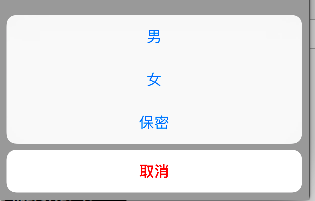
但是你发现无论怎么设置cancel和Destructive都无法让红色字体移动到下面取消按钮上:
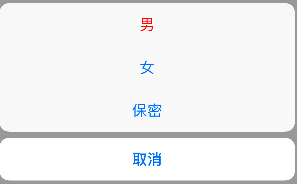
其实之前一直用错,用了ios9之前的UIActionSheet这个view来当控件,但是发现,UIAlertController这个控制器用来做这个更好,只需一行代码就可以搞定。以下是我自己通过利用kvc去对字体颜色做改变的做法,希望有其他见解的可以随时交流。
- (void)viewDidLoad {
[super viewDidLoad];
self.button = [[UIButton alloc]initWithFrame:CGRectMake(100, 200, 100, 50)];
_button.backgroundColor = [UIColor blueColor];
[_button setTitle:@"性别" forState:UIControlStateNormal];
[_button addTarget:self action:@selector(selectSheet) forControlEvents:UIControlEventTouchUpInside];
[self.view addSubview:_button];
}
- (void)selectSheet
{
UIAlertAction *alertAct = [UIAlertAction actionWithTitle:@"男" style:UIAlertActionStyleDefault handler:^(UIAlertAction * _Nonnull action) {
[_button setTitle:@"男" forState:UIControlStateNormal];
}];
UIAlertAction *alertAct1 = [UIAlertAction actionWithTitle:@"女" style:UIAlertActionStyleDefault handler:^(UIAlertAction * _Nonnull action) {
[_button setTitle:@"女" forState:UIControlStateNormal];
}];
UIAlertAction *alertAct2 = [UIAlertAction actionWithTitle:@"保密" style:UIAlertActionStyleDefault handler:^(UIAlertAction * _Nonnull action) {
[_button setTitle:@"保密" forState:UIControlStateNormal];
}];
UIAlertAction *alertAct3 = [UIAlertAction actionWithTitle:@"取消" style:UIAlertActionStyleCancel handler:^(UIAlertAction * _Nonnull action) {
}];
//******通过利用kvc对字体颜色进行修改 *******//
[alertAct3 setValue:[UIColor redColor] forKey:@"_titleTextColor"];
UIAlertController *alertControl = [UIAlertController alertControllerWithTitle:nil message:nil preferredStyle:UIAlertControllerStyleActionSheet];
[alertControl addAction:alertAct];
[alertControl addAction:alertAct1];
[alertControl addAction:alertAct2];
[alertControl addAction:alertAct3];
[self presentViewController:alertControl animated:YES completion:nil];
}
关于UIAlertAction如何修改sheet上的字体颜色的更多相关文章
- 修改TabBarViewController上标题字体颜色
UINavigationController *newNavVc = [[UINavigationController alloc]init]; newNavVc.title = title; new ...
- runtime查找 UIAlertAction 的key 及 UIActionSheet 设置字体颜色
修改不了颜色了 结果发现kvo 的key 不对 哎 直接上代码 设置正确的属性找到对应的key 还以为iOS 11改变了方法 unsigned int count; Ivar *ivars = c ...
- WPS修改批注部分的字体颜色?
今天遇到一个问题,就是复制文档的时候有几块红色字体想改成黑色,怎么也改不成功,通过修改字体颜色无效,通过百度找到了解决方法记录一下. 解决方法 审阅--显示标记--点击插入和删除(去掉前面的对钩即可) ...
- NPOI 修改指定单元格字体颜色
//创建一个字体颜色 IFont font = hssfworkbook.CreateFont(); //红色 font.Color = HSSFColor.Red.Index; //样式 ICell ...
- Android Them+SharedPreferences 修改程序所有view字体颜色、大小和页面背景
有这么一个需求,可以对页面的样式进行选择,然后根据选择改变程序所有字体颜色和页面背景.同时下一次启动程序,当前设置依然有效. 根据需求,我们需要一种快速,方便,有效的方式来实现需求,然后可以通过And ...
- 修改Vim内注释字体颜色
vim /etc/vimrc 然后按大写 G 到最后一行,插入 hi comment ctermfg=6 wq保存退出 PS:默认的注释颜色是4 然后有0,1,2,3,4,5 ...
- ECharts修改坐标轴,坐标轴字体,坐标轴网格样式以及控制坐标轴是否显示
转自:http://blog.csdn.net/kirinlau/article/details/72876689 首先要将一个图表显示在前端页面上: var myChart = echarts.in ...
- 修改UITextfield的Placeholder字体的颜色
- (void)viewDidLoad { [super viewDidLoad]; self.title=@"修改UITextField的placeholder字体颜色"; UI ...
- textFiled的placeHolder字体颜色
self.title=@"修改UITextField的placeholder字体颜色"; UITextField *textTF=[[UITextField alloc]initW ...
随机推荐
- saltstack命令执行过程
saltstack命令执行过程 具体步骤如下 Salt stack的Master与Minion之间通过ZeroMq进行消息传递,使用了ZeroMq的发布-订阅模式,连接方式包括tcp,ipc salt ...
- Kali 开机报错解决方案
问题一: piix4_smbus ::007.3: Host SMBus controller not enabled 解决:打开 /etc/modprobe.d/blacklist.conf 末尾加 ...
- MySQL索引背后的数据结构及算法原理【转】
本文来自:张洋的MySQL索引背后的数据结构及算法原理 摘要 本文以MySQL数据库为研究对象,讨论与数据库索引相关的一些话题.特别需要说明的是,MySQL支持诸多存储引擎,而各种存储引擎对索引的支持 ...
- Python: 利用Python进行数据分析 学习记录
-----15:18 2016/10/14----- 1. import numpy as np;import pandas as pd values = pd.Series(np.random.no ...
- java 简单使用redis
1.配置文件 <bean id="jedisPoolConfig" class="redis.clients.jedis.JedisPoolConfig" ...
- windows下的mysql忘记root密码的解决方法
1.首先,需要关闭MySQL Server服务.在"运行"窗口,输入"services.msc",进入"服务"窗口. 2. 在服务窗口,可以 ...
- seo优化urlrewrite伪静态技术
1.下载urlrewrite-3.2.0.jar 2.在WEB-INF下增加urlrewrite.xml <?xml version="1.0" encoding=" ...
- Xcode 常用快捷键
一.Xcode基本快捷键 1.1.新建项目 Shift + CMD + N 1.2.项目中新建文件 CMD + N 1.3.运行 CMD + R 1.4.编译 CMD + B 1.5.停止运行 CMD ...
- 静态代理&动态代理
原文地址:http://blog.csdn.net/partner4java/article/details/7048879 静态AOP和动态AOP. 静态代理: 代理对象与被代理对象必须实现同一个接 ...
- [转]DDD领域驱动设计基本理论知识总结
领域驱动设计之领域模型 加一个导航,关于如何设计聚合的详细思考,见这篇文章. 2004年Eric Evans 发表Domain-Driven Design –Tackling Complexity i ...