
r.js的build.js的详细配置解析
{
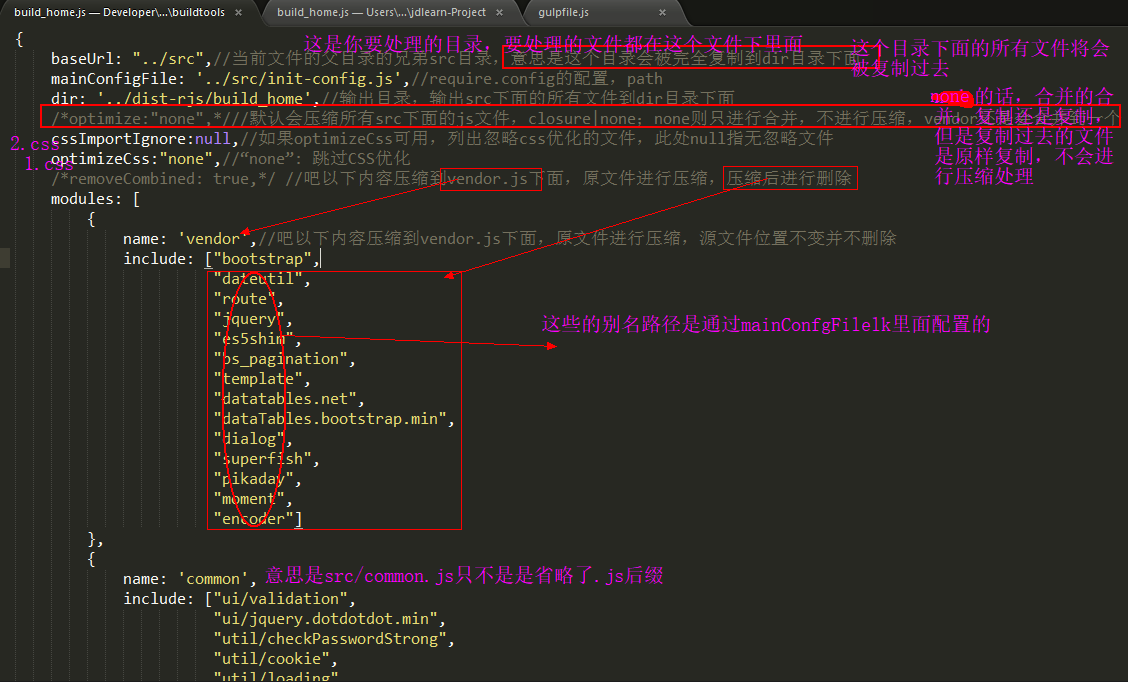
baseUrl: "../src",//当前文件的父目录的兄弟src目录,意思是这个目录会被完全复制到dir目录下面
mainConfigFile: '../src/init-config.js',//require.config的配置,path
dir: '../dist-rjs/build_home',//输出目录,输出src下面的所有文件到dir目录下面
/*optimize:"none",*///默认会压缩所有src下面的js文件,closure|none;none则只进行合并,不进行压缩,vendor还是会合并到一个
cssImportIgnore:null,//如果optimizeCss可用,列出忽略css优化的文件,此处null指无忽略文件
optimizeCss:"none",//“none”: 跳过CSS优化
/*removeCombined: true,*/ //吧以下内容压缩到vendor.js下面,原文件进行压缩,压缩后进行删除
modules: [
{
name: 'vendor',//吧以下内容压缩到vendor.js下面,原文件进行压缩,源文件位置不变并不删除
include: ["bootstrap",
"dateutil",
"route",
"jquery",
"es5shim",
"bs_pagination",
"template",
"datatables.net",
"dataTables.bootstrap.min",
"dialog",
"superfish",
"pikaday",
"moment",
"encoder"]
},
{
name: 'common',
include: ["ui/validation",
"ui/jquery.dotdotdot.min",
"util/checkPasswordStrong",
"util/cookie",
"util/loading",
"util/httpPrompt",
"util/humanNumber",
"util/md5",
"util/nuclear",
"util/pageHelp",
"util/storage",
"util/validators",
"util/vCode",
"service/service"],
exclude: ['vendor','appUrls']
},
//////////这两个模块在pop-shared-web-components中,这里仅做占位/////////////
{
name: 'navMenus'
},
{
name: 'appUrls'
},
////////////////////////////////////////////////////////////////////////////
{
name: 'init-config',
exclude: ['vendor', 'common','navMenus','appUrls']
},
{
name: 'modules/investor/investor/blacklist/index',
exclude: ['common','vendor','appUrls']
},
{
name: 'modules/investor/investor/change/index',
exclude: ['common','vendor','appUrls']
},
{
name: 'modules/investor/investor/ecode/index',
exclude: ['common','vendor','appUrls']
},
{
name: 'modules/investor/investor/frozen/index',
exclude: ['common','vendor','appUrls']
},
{
name: 'modules/investor/investor/holding/index',
exclude: ['common','vendor','appUrls']
},
{
name: 'modules/investor/investor/huStock/index',
exclude: ['common','vendor','appUrls']
},
{
name: 'modules/investor/investor/income/index',
exclude: ['common','vendor','appUrls']
},
{
name: 'modules/investor/investor/luckly/index',
exclude: ['common','vendor','appUrls']
},
{
name: 'modules/investor/investor/shenStock/index',
exclude: ['common','vendor','appUrls']
},
{
name: 'modules/error/forbiddenNotBind',
exclude: ['common','vendor','appUrls']
}
]
}
见图实例
r.js的build.js的详细配置解析的更多相关文章
- r.js 配置文件 build.js 不完整注释
-----------------------------------------------------------------------r.js 配置文件 example.build.js ...
- webpack详细配置解析
阅读本文之前,先看下面这个webpack的配置文件,如果每一项你都懂,那本文能带给你的收获也许就比较有限,你可以快速浏览或直接跳过:如果你和十天前的我一样,对很多选项存在着疑惑,那花一段时间慢慢阅读本 ...
- log4j详细配置解析
出自:http://www.blogjava.net/zJun/archive/2006/06/28/55511.html Log4J的配置文件(Configuration File)就是用来设置记录 ...
- webpack4打包报错ERROR in multi ./src/main.js dist/bundle.js
webpack打包测试: 上边将mode01.js模块及main.js主文件编写完成,下边使用webpack对这些js文件进行打包 1.进入程序目录,执行webpack main.js build.j ...
- r.js build.js配置
/* * This is an example build file that demonstrates how to use the build system for * require.js. * ...
- r.js合并实践 --项目中用到require.js做生产时模块开发 r.js build.js配置详解
本文所用源代码已上传,需要的朋友自行下载:点我下载 第一步: 全局安装 npm install -g requirejs 第二步: 1.以下例子主要实现功能, 1)引用jq库获取dom中元素文本, ...
- r.js 配置文件 example.build.js 不完整注释
/* * This is an example build file that demonstrates how to use the build system for * require.js. * ...
- 转: requirejs压缩打包r.js使用示例 2 (~~很详细的教程)
这一篇来认识下打包工具的paths参数,在入门一中 就介绍了require.config方法的paths参数.用来配置jquery模块的文件名(jQuery作为AMD模块时id为“jquery”, 但 ...
- vue-cli的webpack模版项目配置解析-build/dev-server.js
我们在使用vue-cli搭建vuejs项目(Vuejs实例-01使用vue-cli脚手架搭建Vue.js项目)的时候,会自动生成一系列文件,其中就包含webpack配置文件.我们现在来看下,这些配置到 ...
随机推荐
- tomcat修改默认端口
1.webserver: tomcat2.version: Apache Tomcat/7.0.293.operation: 修改默认端口 3.1 修改tomcat目录下的/conf/server ...
- JavaScript如何实现计时功能。
JavaScript如何实现计时功能. 解答:<script> window.setTimeout( “window.location = ‘http://www.csdn.net ‘; ...
- setAttribute()使用方法与IE兼容解决方法
我们经常需要在JavaScript中给Element动态添加各种属性,可以使用setAttribute()来实现,但涉及到了浏览器的兼容性问题.setAttribute(string name,str ...
- 【vijos】1790 拓扑编号(拓扑+贪心)
https://vijos.org/p/1790 好神的贪心题.. 一开始我也想到了贪心,但是是错的..sad 就是因为每一个节点的编号与逆图的子树有关,且编号一定是>=子树的儿子+1的.但是想 ...
- Android插件化开发之OpenAtlas生成插件信息列表
上一篇文章.[Android插件化开发之Atlas初体验]( http://blog.csdn.net/sbsujjbcy/article/details/47446733),简单的介绍了使用Atla ...
- 我的第一个reactnative
由于在做极光推送,前端使用的框架是reactnative,后台写好后为了测试一下,所以按照react官方的教程搭了遍react. 开发环境: 1.windows 7(建议各位如果开发react的最好还 ...
- SourceTree --转载 SourceTree大文件上传提示POST git-receive-pack (chunked)相关问题记录
前两天,更新了百度地图的SDK,更新完了通过SourceTree上传到Github 结果提示 :POST git-receive-pack (chunked), 在网上查询之后了解到这个提示的原因是因 ...
- AWS系列-申请MySQL
1.1 打开aws控制台,可以直接搜索MySQL 1.2 打开MySQL(rds)控制面板 点击启动数据库实例(这个只是启动创建的意思,不是启动下面创建好的node.我也不懂为啥翻译过来是这个意思.. ...
- Request的属性和防止图片被盗链
Request.AppRelativeCurrentExecutionFilePath,获取当前执行请求相对于应用根目录的虚拟路径,以~开头,比如"~/default.ashx" ...
- ModelShowDialog缓存上次浏览的URL
1. 一种解决方法设置每次清楚浏览的页面. In IE7, go to Tools | Internet Options. Click the Browsing History "Se ...