
SpringBoot中Mybaties PageHelper插件使用
首先引入pom.xml文件配置
    <!-- mybatis -->

    <dependency>

     <groupId>org.mybatis.spring.boot</groupId>

        <artifactId>mybatis-spring-boot-starter</artifactId>

        <version>1.3.</version>

    </dependency>

     <!--mybatis分页插件-->

        <dependency>

             <groupId>com.github.pagehelper</groupId>

             <artifactId>pagehelper-spring-boot-starter</artifactId>

             <version>1.1.</version>

        </dependency>
在application.properties中进行配置
#mybatis

mybatis.mapper-locations=classpath:mapper/*.xml

mybatis.type-aliases-package=com.CarManage.dao

#pagehelper

pagehelper.helperDialect=mysql

pagehelper.reasonable=true

pagehelper.support-methods-arguments=true

pagehelper.params=count=countSql
Controller中
@Controller

@RequestMapping(value="/admin")

public class MessageController {

    @Autowired

    private IMessages iMessages;

    @GetMapping(value="myMessage")

    public String messageList(@RequestParam(value = "currentPage", defaultValue = "") int currentPage,

            @RequestParam(value = "pageSize", defaultValue = "") int pageSize, HttpServletRequest request){

        PageInfo<CarMessage> messageList =     iMessages.findItemByPage(currentPage, pageSize);

        request.setAttribute("messageList", messageList);

        return "myMessage";

    }

}
传三个参数,currentPage 当前页码,pageSize每页显示多少数据,HttpServletRequest用来封装数据
使用@RequestParam进行参数设置,value和defaultValue意指当URL直接请求“/admin/myMessage”时,默认传值参数名称是currentPage,默认值是1;默认传值参数名称是pageSize,默认值是5。这次请求是在别的页面跳转此页面时发生。当进行分页请求时,就会真实传入这2个参数。可以发现request中封装进去了PageInfo对象。这是PageHelper中的东西。里面封装了
n多成员变量,在前台直接调用就可以。
public class PageInfo<T> implements Serializable {

    private static final long serialVersionUID = 1L;

    //当前页

    private int pageNum;

    //每页的数量

    private int pageSize;

    //当前页的数量

    private int size;

    //由于startRow和endRow不常用,这里说个具体的用法

    //可以在页面中"显示startRow到endRow 共size条数据"

    //当前页面第一个元素在数据库中的行号

    private int startRow;

    //当前页面最后一个元素在数据库中的行号

    private int endRow;

    //总记录数

    private long total;

    //总页数

    private int pages;

    //结果集

    private List<T> list;

    //前一页

    private int prePage;

    //下一页

    private int nextPage;

    //是否为第一页

    private boolean isFirstPage = false;

    //是否为最后一页

    private boolean isLastPage = false;

    //是否有前一页

    private boolean hasPreviousPage = false;

    //是否有下一页

    private boolean hasNextPage = false;

    //导航页码数

    private int navigatePages;

    //所有导航页号

    private int[] navigatepageNums;

    //导航条上的第一页

    private int navigateFirstPage;

    //导航条上的最后一页

    private int navigateLastPage;
等等东西。很方便使用。下面会介绍怎么使用。
然后再来看Service
@Service

@Transactional(rollbackFor = { RuntimeException.class, Exception.class })

public class MessagesServiceImpl implements IMessages{

        @Autowired

        private CarMessageMapper carMessageMapper;

        @Override

        public PageInfo<CarMessage> findItemByPage(int currentPage, int pageSize) {

            PageHelper.startPage(currentPage, pageSize);

            List<CarMessage> allMessages = carMessageMapper.findAll();

            PageInfo<CarMessage> pageInfo = new PageInfo<>(allMessages);

            return pageInfo;

        }

}
//设置分页信息保存到threadlocal中

PageHelper.startPage(currentPage, pageSize); //一定要放在查询之前

//紧跟着的第一个select方法会被分页,contryMapper会被PageInterceptor截拦,截拦器会从threadlocal中取出分页信息,把分页信息加到sql语句中,实现了分页查旬

 List<CarMessage> allMessages = carMessageMapper.findAll();
将list结果集进行pageInfo包裹,返回包裹对象到Controller中。
前天,我使用的是Thymeleaf模板引擎
 <table id="myMessageTable"  data-toggle="table" >

                <thead>

                            <tr>

                                <th>消息日期</th>

                                <th>消息内容</th>

                                <th>消息状态</th>

                                <th>操作</th>

                            </tr>

                         </thead>

                            <tbody>

                            <th:block th:each="messageList : ${messageList.list}">

                                <tr th:attr="id=${messageList.id}">

                                    <td  th:text="${#dates.format(messageList.createtime,'yyyy-MM-dd HH:mm:ss')}"  ></td>

                                    <td th:text="${messageList.content}"></td>

                                    <td>

                                       <th:block th:if="${messageList.status == 0}">

                                            <span>未读</span>

                                        </th:block>

                                        <th:block th:if="${messageList.status == 1}">

                                            <span>已读</span>

                                        </th:block>

                                    </td>

                                    <td>-</td>

                                </tr>

                            </th:block>

                            </tbody>

                </table>

<div th:replace="common/pagination :: pageNav(${messageList})"></div>
pageInfo中有一个成员变量list,封装了分页查询的结果集,所以在前台直接循环pageInfo中的list即可。
使用th:include或者th:replace引入th:fragment定义的分页按钮片段,一定要在循环外,因为传入的要是pageInfo整个对象,而不是list
<!DOCTYPE html>

<html lang="en" xmlns:th="http://www.thymeleaf.org">

<body>

<div th:fragment="pageNav(pageInfo)">

<div class="fixed-table-pagination" style="display: block;" >

    <div class="pull-left pagination-detail">

    <span class="pagination-info">显示第 <span th:text="${pageInfo.startRow}"></span> 到第 <span th:text="${pageInfo.endRow}"></span> 条记录,总共 <span th:text="${pageInfo.total}"></span>条记录</span>

        <span class="page-list">每页显示

        <span class="btn-group dropup">

            <button type="button" class="btn btn-default  dropdown-toggle" data-toggle="dropdown">

                <span class="page-size"  th:text="${pageInfo.pageSize}" ></span>

                 <span class="caret"></span>

             </button>

                <ul class="dropdown-menu" role="menu">

                <li  th:class="${pageInfo.pageSize== 5 }?'active':''"><a th:href="@{?pageSize=5}" ></a></li>

                <li  th:class="${pageInfo.pageSize== 8 }?'active':''"><a th:href="@{?pageSize=8}" ></a></li>

             </ul>

         </span>

         条记录

     </span>

     </div>

</div>

<div   class="dataTables_paginate paging_bootstrap pagination" >

        <ul >

            <li th:if="${pageInfo.hasPreviousPage}">

                <a th:href="@{'?currentPage='+${pageInfo.prePage}}" >

                    ← Previous

                </a>

            </li>

            <th:block th:each="nav : ${pageInfo.navigatepageNums}">

                <li th:class="${nav==pageInfo.pageNum}?'active':''"><a th:href="@{'?currentPage='+${nav}}" th:text="${nav}"></a>

                </li>

            </th:block>

            <th:block th:if="${pageInfo.hasNextPage}">

                <li>

                    <a th:href="@{'?currentPage='+${pageInfo.nextPage}}" >

                        Next →

                    </a>

                </li>

            </th:block>

        </ul>

    </div>

</div>

</body>

</html>
这个可以作为通用。在这里直接调用pageInfo所有你需要的成员变量即可。很方便。效果如图。
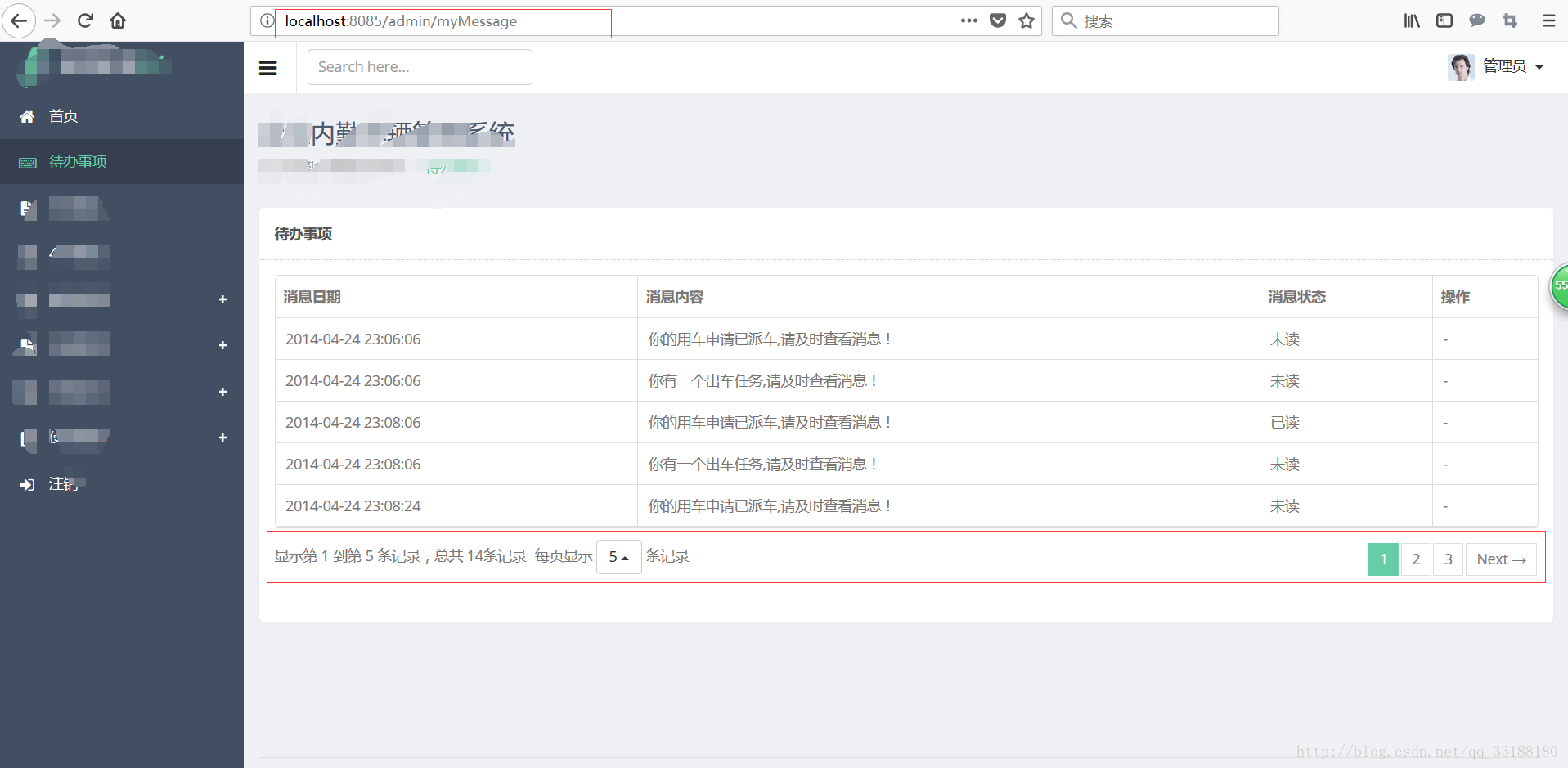
这是别的页面跳转进来的时候,URL访问路径,并无参数。所以以默认方式分页,默认定位在第一页,每页显示5条数据。
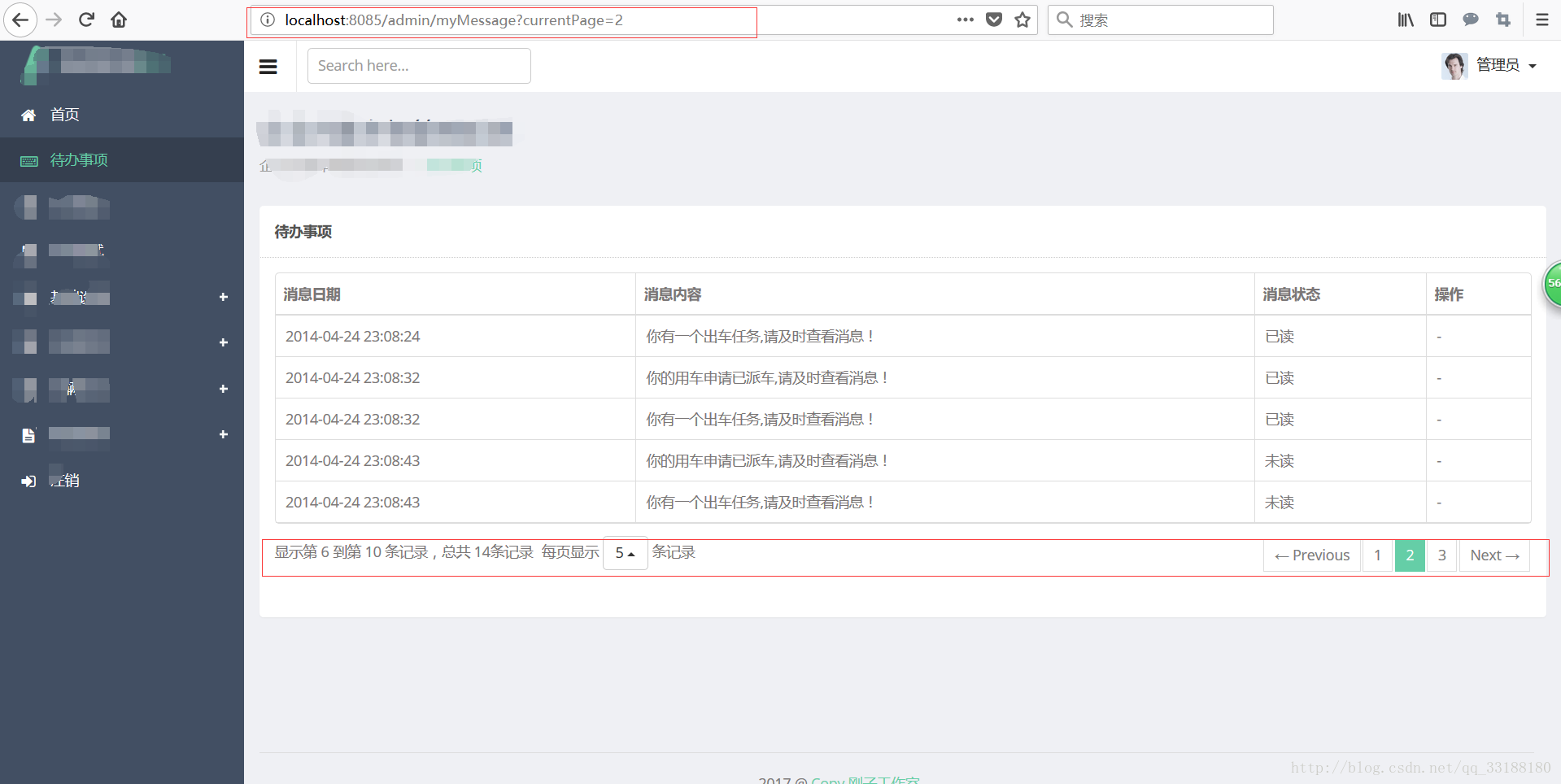
点击第二页的时候,观察URL有参数传入。以传入方式显示。
SpringBoot中Mybaties PageHelper插件使用的更多相关文章
- Mybatis中使用PageHelper插件进行分页
分页的场景比较常见,下面主要介绍一下使用PageHelper插件进行分页操作: 一.概述: PageHelper支持对mybatis进行分页操作,项目在github地址: https://github ...
- SpringBoot中使用Maven插件,上传docker镜像
开启docker远程端口 我上一篇里面写了,这里暴露的路径: 18.16.202.95:2375 简单构建 配置pom.xml文件 在properties中增加一行指定远程主机的位置 <prop ...
- 在项目中配置PageHelper插件时遇到类型转换异常
PageHelper是一种常用的分页工具,按照常规方法在mybatis的配置文件中整合它: <?xml version="1.0" encoding="UTF-8& ...
- 关于springboot整合配置pagehelper插件的方法
一,java代码配置法 这种方法个人感觉比较繁琐不是很推荐,而且也不怎么符合springboot的理念,但是胜在也能够用,所以就列起来,万一以后接手的代码是用这种方式的也方便自己维护. 首先引入jar ...
- SpringBoot 使用 MyBatis 分页插件 PageHelper 进行分页查询
前言:本文档使用的是 SpringBoot,如果是 Spring 还需要在 MyBatis 配置 xml 中配置拦截器,并且 PageHelper 是针对 MyBatis 的,MyBatis 的集成不 ...
- SpringBoot整合mybatis使用pageHelper插件进行分页操作
SpringBoot整合mybatis分页操作 SpringBoot整合Mybatis进行分页操作,这里需要使用Mybatis的分页插件:pageHelper, 关于pageHelper的介绍,请查看 ...
- SpringBoot+Mybatis配置Pagehelper分页插件实现自动分页
SpringBoot+Mybatis配置Pagehelper分页插件实现自动分页 **SpringBoot+Mybatis使用Pagehelper分页插件自动分页,非常好用,不用在自己去计算和组装了. ...
- springboot结合mybatis使用pageHelper插件进行分页查询
1.pom相关依赖引入 <dependencies> <dependency> <groupId>org.springframework.boot</grou ...
- springboot中的mybatis是如果使用pagehelper的
springboot中使用其他组件都是基于自动配置的AutoConfiguration配置累的,pagehelper插件也是一样的,通过PageHelperAutoConfiguration的,这个类 ...
随机推荐
- python的builtins模块
builtins模块详解 1.简介 builtins是python的内建模块,所谓内建模块就是你在使用时不需要import,在python启 动后,在没有执行程序员编写的任何代码前,python会加载 ...
- bundle 与 package
bundle是Apple提供的软件安装的便捷方法. bundle为用户和开发者提供了一个简单地接口. bundle 和 package package:看起来像一个文件的目录 bundle ...
- 关于z-index问题
关于z-inde,这个网址还是对我受益匪浅的,https://www.cnblogs.com/bigboyLin/p/4621335.html z-index 起作用得有一个前提: 就是和定位一起用, ...
- oracle12c之一 控制-PDB的磁盘I/O(IOPS,MBPS)资源管理
在以前的版本中,没有简单的方法来控制单个PDB使用的磁盘I / O量. 因此,某个PDB可能耗尽大量磁盘I / O,并影响同一实例中的其他PDB的性能. Oracle 12c R2可以控制PDB使用的 ...
- javascript 正则表达式校验方式写法
if(/[0-9]/.test(value)){return true; } if(/[a-z]/.test(value)){return true; } if(/[A-Z]/.test(value) ...
- mysql语句插入前判断数据是否重复
在mysql中插入数据有时需要判断数据插入是否重复 语句编写:insert into 表(相应字段) select 相应字段 from dual where not exists (select 相应 ...
- python3.5+ asyncio await异步详解
import asyncio,time from collections import defaultdict from pprint import pprint collect=defaultdic ...
- 014-CallbackServlet代码
package ${enclosing_package}; import java.io.IOException; import java.util.ResourceBundle; import ja ...
- a[i]==i[a]==*(i+a)==*(a+i)
在C语言中,如果我们要访问一个数组的某个下标对应的元素,通常的写法是a[i].但从汇编的角度看,写成i[a]一点问题都没有. 下面通过代码给出证明. o foo1.c int main(int arg ...
- Java入门系列-25-NIO(实现非阻塞网络通信)
还记得之前介绍NIO时对比传统IO的一大特点吗?就是NIO是非阻塞式的,这篇文章带大家来看一下非阻塞的网络操作. 补充:以数组的形式使用缓冲区 package testnio; import java ...