
记一次简单的UITableView卡顿优化
先说需求,要做一个类似这种的列表
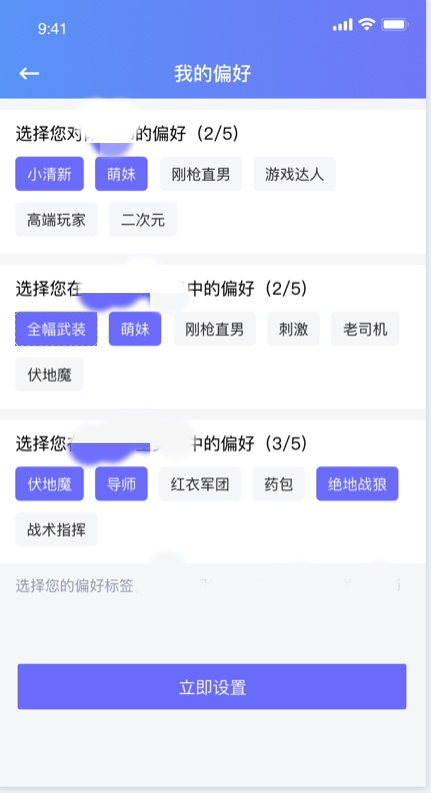
标签控件直接用的第三方
YZTagList
不知道的可以去搜一下,当这不重要。
重要的是这个控件加载数据的时候非常影响列表滑动效果,造成卡顿,尤其是列表行数如果更多的话,
这也不是要说的重点,自己写的控件也不一定就不耗性能,所以记一下我这次的处理方法。
先看一下cell代码:
 @interface PreferTableViewCell ()

 @property (nonatomic, weak) UILabel *titleLabel;

 @property (nonatomic, strong) YZTagList *tagList;

 @end

 @implementation PreferTableViewCell

 - (instancetype)initWithStyle:(UITableViewCellStyle)style reuseIdentifier:(NSString *)reuseIdentifier {

     if (self = [super initWithStyle:style reuseIdentifier:reuseIdentifier]) {

         [self setupUI];

     }

     return self;

 }

 - (void)setupUI {

     UIView *lineView = [[UIView alloc] init];

     lineView.backgroundColor = [UIColor colorWithRed:/255.0 green:/255.0 blue:/255.0 alpha:1.0];

     [self.contentView addSubview:lineView];

     [lineView makeConstraints:^(MASConstraintMaker *make) {

         make.left.equalTo(self);

         make.right.equalTo(self);

         make.height.equalTo();

         make.top.equalTo(self);

     }];

     UILabel *titleLabel = [[UILabel alloc] init];

     titleLabel.textColor = [UIColor blackColor];

     titleLabel.font = [UIFont systemFontOfSize:];

     [self.contentView addSubview:titleLabel];

     self.titleLabel = titleLabel;

     [titleLabel makeConstraints:^(MASConstraintMaker *make) {

         make.left.equalTo(self).offset();

         make.top.equalTo(lineView.bottom).offset();

     }];

     YZTagList *tagList = [[YZTagList alloc] init];

     tagList.isSort = NO;

     tagList.backgroundColor = [UIColor whiteColor];

     // 高度可以设置为0,会自动跟随标题计算

     tagList.frame = CGRectMake(, , SCREEN_WIDTH - , );

     // 设置标签背景色

     tagList.tagBackgroundColor = [UIColor colorWithRed:/255.0 green:/255.0 blue:/255.0 alpha:1.0];

     // 设置标签颜色

     tagList.tagColor = [UIColor colorWithHex:@"#303030"];

     tagList.tagFont = [UIFont systemFontOfSize:];

     tagList.tagCornerRadius = ;

     tagList.clickTagBlock = ^(UIButton *btn){

         btn.selected = !btn.isSelected;

         if (btn.isSelected) {

             [btn setTitleColor:[UIColor whiteColor] forState:UIControlStateNormal];

             [btn setBackgroundColor:[UIColor colorWithHex:@"#7676FD"]];

         } else {

             [btn setTitleColor:[UIColor colorWithHex:@"#303030"] forState:UIControlStateNormal];

             [btn setBackgroundColor:[UIColor colorWithRed:/255.0 green:/255.0 blue:/255.0 alpha:1.0]];

         }

     };

     [self.contentView addSubview:tagList];

     self.tagList = tagList;

 }

 - (void)setTitle:(NSString *)title {

     _title = title;

     self.titleLabel.text = title;

 }

 - (void)setTags:(NSArray *)tags {

     _tags = tags;

     if (self.tagList.tagArray.count > ) {

         return;

     }

     [self.tagList addTags:tags];

 }

 + (CGFloat)calcHeight:(NSArray *)tags {

     YZTagList *tagList = [[YZTagList alloc] init];

     tagList.frame = CGRectMake(, , SCREEN_WIDTH - , );

     tagList.tagFont = [UIFont systemFontOfSize:];

     tagList.tagCornerRadius = ;

     [tagList addTags:tags];

     return tagList.tagListH +  + ;

 }

 @end
然后是VC代码:
- (NSInteger)tableView:(UITableView *)tableView numberOfRowsInSection:(NSInteger)section {

    return self.tags.count;

}

- (UITableViewCell *)tableView:(UITableView *)tableView cellForRowAtIndexPath:(NSIndexPath *)indexPath {

    NSString *ID = [NSString stringWithFormat:@"%ld%ld",indexPath.section,indexPath.row];

    PreferTableViewCell *cell = [tableView dequeueReusableCellWithIdentifier:ID];

    if (!cell) {

        cell = [[PreferTableViewCell alloc] initWithStyle:UITableViewCellStyleDefault reuseIdentifier:ID];

        cell.selectionStyle = UITableViewCellSelectionStyleNone;

    }

    cell.title = @"";

    cell.tags = self.tags[indexPath.row];

    return cell;

}

- (CGFloat)tableView:(UITableView *)tableView heightForRowAtIndexPath:(NSIndexPath *)indexPath {

    CGFloat height = ;

    height = [[self.cellheightCache objectForKey:[NSString stringWithFormat:@"%ld%ld",indexPath.section,indexPath.row]] floatValue];

    if (height == ) {

        height = [PreferTableViewCell calcHeight:self.tags[indexPath.row]];

        [self.cellheightCache setObject:@(height) forKey:[NSString stringWithFormat:@"%ld%ld",indexPath.section,indexPath.row]];

    }

    return height;

}
前提:tags是一个二维数组。
1.首先没有使用cell重用机制,避免多次
[self.tagList addTags:tags];
影响滑动效果,反正标签占用内存微乎其微。
然后:
if (self.tagList.tagArray.count > 0) { return; }
一样的目的。到这里每个cell赋值只会发生一次。并且cell视图均缓存在内存中了。
2.然后是计算行高,计算行高需要用到一个类方法,代码写的很清楚了,直接用
YZTagList
算出来并返回。然后用一个可变字典将高度缓存起来,这样保证高度也只会计算一次。
3.当然了,我的标题顺序并不是代码运行顺序。
记一次简单的UITableView卡顿优化的更多相关文章
- Android性能优化----卡顿优化
前言 无论是启动,内存,布局等等这些优化,最终的目的就是为了应用不卡顿.应用的体验性好坏,最直观的表现就是应用的流畅程度,用户不知道什么启动优化,内存不足,等等,应用卡顿,那么这个应用就不行,被卸载的 ...
- android中app卡顿优化问题
所谓app卡顿原因就是在运行时出现了丢帧,还可能是UI线程被阻塞.首先来一下丢帧现象,android每16ms会对界面进行一次渲染,如果app的绘制.计算等超过了16ms那么只能等下一个16ms才能 ...
- GC 卡顿 优化 三色标记优势
小结: 1. 三色标记的一个明显好处是能够让用户程序和 mark 并发的进行 Go GC 卡顿由秒级降到毫秒级以下:到底做了哪些优化? https://mp.weixin.qq.com/s/2BMGG ...
- Android 卡顿优化 2 渲染优化
1.概述 2015年初google发布了Android性能优化典范,发了16个小视频供大家欣赏,当时我也将其下载,通过微信公众号给大家推送了百度云的下载地址(地址在文末,ps:欢迎大家订阅公众号),那 ...
- Android 卡顿优化 1 卡顿解析
1, 感知卡顿 用户对卡顿的感知, 主要来源于界面的刷新. 而界面的性能主要是依赖于设备的UI渲染性能. 如果我们的UI设计过于复杂, 或是实现不够好, 设备又不给力, 界面就会像卡住了一样, 给用户 ...
- 彻底解决 Intellij IDEA 卡顿 优化笔记,重要的快捷键
由于工作中经常出现分支各种切换,使用Eclipse便不再像以前那么舒服了,不停的修改工作空间,每次修改完工作空间又是一堆一堆的个性化设置,来回的切换,真的很累.我们做软件的,怎么能不去尝试新鲜的呢,毕 ...
- 彻底解决 intellij IDEA 卡顿 优化笔记
由于工作中经常出现分支各种切换,使用Eclipse便不再像以前那么舒服了,不停的修改工作空间,每次修改完工作空间又是一堆一堆的个性化设置,来回的切换,真的很累.我们做软件的,怎么能不去尝试新鲜的呢,毕 ...
- Android 布局渲染流程与卡顿优化
文章内容概要 一.手机界面UI渲染显示流程 二.16ms原则 三.造成卡顿的原因 四.过度绘制介绍.检测工具.如何避免造成过度绘制造成的卡顿 一.手机界面UI渲染显示流程 大家都知道CPU(中央处理器 ...
- WPF DataGrid OxyPlot 卡顿优化
不是优化,我是想用这个标题吸引遇到相同问题的同学过来看看. UI如下,左边DataGrid有7列,右边OxyPlot显示折线图 列表4000+数据,折线图4000+个点,页面卡的用不了. 体现就是列表 ...
随机推荐
- 001服务注册与发现Eureka
1.POM配置 和普通Spring Boot工程相比,仅仅添加了Eureka Server依赖和Spring Cloud依赖管理 <dependencies> <!--添加Eurek ...
- 【转】C# GDAL 配置
共生成9个dll,如下图: 1.在程序中添加*_csharp.dll四个文件的引用: 2.将剩余的五个文件复制到程序的Debug文件夹中:(如果不复制这五个文件就会出现类似“OSGeo.GDAL.Gd ...
- Ubuntu上如何搭建Android开发环境
1.以下是开始Android应用程序编程之前需要的软件列表: a.Java JDK5 及以后版本 b.Java运行环境 c.Android Studio 2.安装Android Studio: x64 ...
- 自学git心得-1
Github作为目前世界上最先进的分布式版本控制系统,是软工工作者管理工程代码的不二选择,笔者也是因时所需,自学了基本的git操作,在此回顾一下也作为分享. 推荐学习资源:https://www.li ...
- CCF201412-1 门禁系统
试题编号: 201412-1 试题名称: 门禁系统 时间限制: 1.0s 内存限制: 256.0MB 问题描述: 问题描述 涛涛最近要负责图书馆的管理工作,需要记录下每天读者的到访情况.每位读者有一个 ...
- 关于 Web 安全,99% 的网站都忽略了这些
Web安全是一个如何强调都不为过的事情,我们发现国内的众多网站都没有实现全站https,对于其他安全策略的实践更是很少,本文的目的并非讨论安全和攻击的细节,而是从策略的角度引发对安全的思考和重视. 1 ...
- Web API 2 入门——Web API 2(C#)入门(谷歌翻译)
ASP.NET Web API 2(C#)入门 在这篇文章中 本教程中使用的软件版本 创建一个Web API项目 添加模型 添加控制器 使用Javascript和jQuery调用Web API 运行应 ...
- [使用经验]cocostudio UI编辑器的裁剪
日志-2015/03/16 描述:在程序使用UI编辑器导出文件的时候,该panel中大于panel的部分都没有显示出来,例如人物,一些特效等 原因:UI编辑器panel都勾上了裁剪 解决:在编辑器中把 ...
- 抓取windows系统进程
最近在开发辅流分享界面,然后之前的windows编程的代码都忘记了,翻到了一个博客,具体的还是去msdn去查函数,这个是入门的链接如下: http://blog.csdn.net/zdragon200 ...
- LINUX中块设备文件和字符设备文件的本质区别
在LINUX系统文件类型分类的文章中我们提到了 块设备 和 字符设备文件,那么什么是块设备 字符设备文件呢?他们之间有什么本质上的区别呢? 设备文件分为 Block(块) Device Driver ...