
spring mvc如何优雅的使用fastjson
1. 在spring mvc中配置fastjson
<!-- 设置配置方案 -->

    <mvc:annotation-driven>

        <!-- 设置不使用默认的消息转换器 -->

        <mvc:message-converters register-defaults="false">

            <!-- 配置Spring的转换器, 字符编码 -->

            <bean class="org.springframework.http.converter.StringHttpMessageConverter">

                <constructor-arg value="UTF-8" index="0"/>

                <property name="supportedMediaTypes">

                    <list>

                        <value>text/plain;charset=UTF-8</value>

                    </list>

                </property>

            </bean>

            <bean class="org.springframework.http.converter.xml.XmlAwareFormHttpMessageConverter"/>

            <bean class="org.springframework.http.converter.ByteArrayHttpMessageConverter"/>

            <bean class="org.springframework.http.converter.BufferedImageHttpMessageConverter"/>

            <!--配置fastjson中实现HttpMessageConverter接口的转换器-->

            <bean id="fastJsonHttpMessageConverter"

                  class="com.alibaba.fastjson.support.spring.FastJsonHttpMessageConverter">

                <!-- 加入支持的媒体类型:返回contentType -->

                <property name="supportedMediaTypes">

                    <list>

                        <!-- 这里顺序不能反,一定先写text/html,不然ie下会出现下载提示 -->

                        <value>text/html;charset=UTF-8</value>

                        <value>application/json;charset=UTF-8</value>

                    </list>

                </property>

                <!--枚举类型,对于返回List集合中引用同一个对象,忽略引用检测【注意不要出现循环引用现象】-->

                <property name="features">

                    <list>

                        <value>DisableCircularReferenceDetect</value>

                    </list>

                </property>

            </bean>

        </mvc:message-converters>

    </mvc:annotation-driven>
2. 使用方法
    // 文章details

    @RequestMapping(value = "/detail", method = RequestMethod.GET)

    public String detail(Long id, Model model, HttpServletRequest request){

        Article article = articleService.getArticleById(id, request);

        Teacher teacher = (Teacher) request.getSession().getAttribute("teacher");

        if(teacher==null){

            return "login.jsp";

        }

        // role : 1-teacher

        ArticleZan zan = articleService.getZan(article.getArticle_id(), 1, teacher.getTe_id());

        model.addAttribute("article", article);

        model.addAttribute("zan",zan);

        return "article/detail.jsp";

    }
{"id":1} ->可以完成参数疯转
对于普通的参数,fastjson可以完成参数封装和类型转换。但是对于JSON数据中有数组就无能为力了:例如:
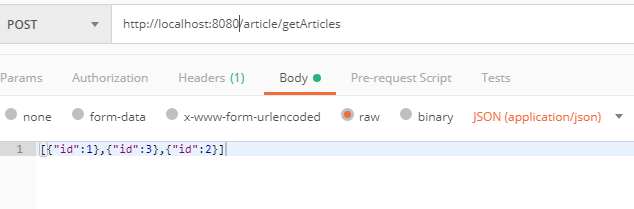
解决办法:
   @CrossOrigin(origins = "*", maxAge = 3600)

    @RequestMapping(value = "/getArticles")

    @ResponseBody

    public Object getArticles(Long[] id, @RequestBody JSONObject[] obj, HttpServletRequest request){

        Set<Long> ids = new HashSet<>();

        for (JSONObject o :

                obj) {

            ids.add(o.getLong("id"));

        }

        List<Article> articles = articleService.getArticles(ids, request);

        return articles;

    }
end
spring mvc如何优雅的使用fastjson的更多相关文章
- spring mvc + freemarker优雅的实现邮件定时发送
1. spring mvc工程中引入相关freemarker\mail的包 如:pom.xml中加入类似 <dependency> <groupId>javax.mail< ...
- Spring MVC整合fastjson、EasyUI乱码问题
一.框架版本 Spring MVC:spring-webmvc-4.0.0.RELEASE fastjson:fastjson-1.2.45 EasyUI:1.5 二.乱码现象 Controller调 ...
- 我是如何进行Spring MVC文档翻译项目的环境搭建、项目管理及自动化构建工作的
感兴趣的同学可以关注这个翻译项目 . 我的博客原文 和 我的Github 前段时间翻译的Spring MVC官方文档完成了第一稿,相关的文章和仓库可以点击以下链接.这篇文章,主要是总结一下这个翻译项目 ...
- Spring MVC中文文档翻译发布
前后经过九个月,我翻译的Spring MVC官方4.2.4版本中文文档可以发布第一个较为完整的版本了.译文上尽量做到准确并且符合中文习惯,让人能读懂,能理解.现全文发布如下,也希望它能够给出其价值,并 ...
- Spring MVC注解的一些案列
1. spring MVC-annotation(注解)的配置文件ApplicationContext.xml <?xml version="1.0" encoding=& ...
- Maven+Spring MVC Spring Mybatis配置
环境: Eclipse Neon JDK1.8.0 Tomcat8.0 先决条件: Eclipse先用maven向导创建web工程.参见本站之前随笔. 本机安装完成mysql5:新建用户xuxy03设 ...
- Spring MVC静态资源处理
优雅REST风格的资源URL不希望带 .html 或 .do 等后缀.由于早期的Spring MVC不能很好地处理静态资源,所以在web.xml中配置DispatcherServlet的请求映射,往往 ...
- 【WEB】初探Spring MVC框架
Spring MVC框架算是当下比较流行的Java开源框架.但实话实说,做了几年WEB项目,完全没有SpringMVC实战经验,乃至在某些交流场合下被同行严重鄙视“奥特曼”了.“心塞”的同时,只好默默 ...
- Java框架搭建-Maven、Mybatis、Spring MVC整合搭建
1. 下载eclipse 到网站下载 http://www.eclipse.org/downloads/packages/eclipse-ide-java-ee-developers/marsr 选择 ...
随机推荐
- linux命令之文件系统管理命令(下)
1.mount:挂载文件系统 该命令可以将指定的文件系统挂载到指定目录(挂载点),在linux中必须先挂载所有的设备,才能够访问,挂载的目录必须事先存在并且最好为空. 参数 说明 -t(常用) 指定挂 ...
- day04.2-迭代器
1. 迭代器协议: 对象必须提供一个next方法,执行该方法要么返回迭代中的下一项,要么就引起一个StopIteration异常,以终止迭代(只能往后走,不能往前退). 2. 可迭代对象:实现了迭代器 ...
- zabbix前端添加平台脚本监控
1.在前端创建脚本 2.添加监控配置 # 这里添加的监控为ping命令,用来探测网络的可用性. # 这里添加的监控为traceroute命令,用来探测网络的可用性. # 这里添加的监控为nmap命令, ...
- ArchLinux中证书错误解决方案
ca-certificates 更新 x509: failed to load system roots and no roots provided. curl error: Problem with ...
- 本机安装mysql服务
Windows 上安装 MySQL Windows 上安装 MySQL 相对来说会较为简单,你需要在 MySQL 下载中下载 Windows 版本的 MySQL 安装包. Download Link: ...
- openstack中安装包与组件
keystone openstack-keystone:验证服务,openstack 中的所有组件的验证以及用户验证,权限,目录等服务. python-openstackclient:命令行,安装以后 ...
- 对cors的理解
一.简介 CORS需要浏览器和服务器同时支持.目前,所有浏览器都支持该功能,IE浏览器不能低于IE10. 整个CORS通信过程,都是浏览器自动完成,不需要用户参与.对于开发者来说,CORS通信与同源的 ...
- lexical or preprocessor issue file not found in Xcode
The very last suggestion is all I needed to fix this issue. Close & re-open Xcode.
- java面向对象之封装性
面向对象的特征之一:封装和隐藏: 一.问题的引入: 当创建一个类的对象以后,可以通过“对象.属性”的方式,对对象的属性进行赋值.这里,赋值操作要受属性的数据类型和存储范围的制约.除此之外,没有其他制约 ...
- [转] Citrix XenDesktop桌面登录VM提示Citrix Web插件错误
[From] http://blog.51cto.com/xuhaili100love/1223707 [适用版本] 适用所有Citrix虚拟桌面版本 [现象描述] 使用SC登录虚拟机提示“无法访问您 ...