
Prometheus-4:服务自动发现Service Discovery
自动发现
- 基于文件的服务发现;
- 基于DNS的服务发现;
- 基于API的服务发现:Kubernetes、Consul、Azure......
Prometheus为什么需要自动发现?
Prometheus指标抓取的生命周期
- 在每个scrape_interval期间,Prometheus都会检查执行的作业(Job);
- 这些作业首先会根据Job上指定的发现配置生成target列表,此即服务发现过程;
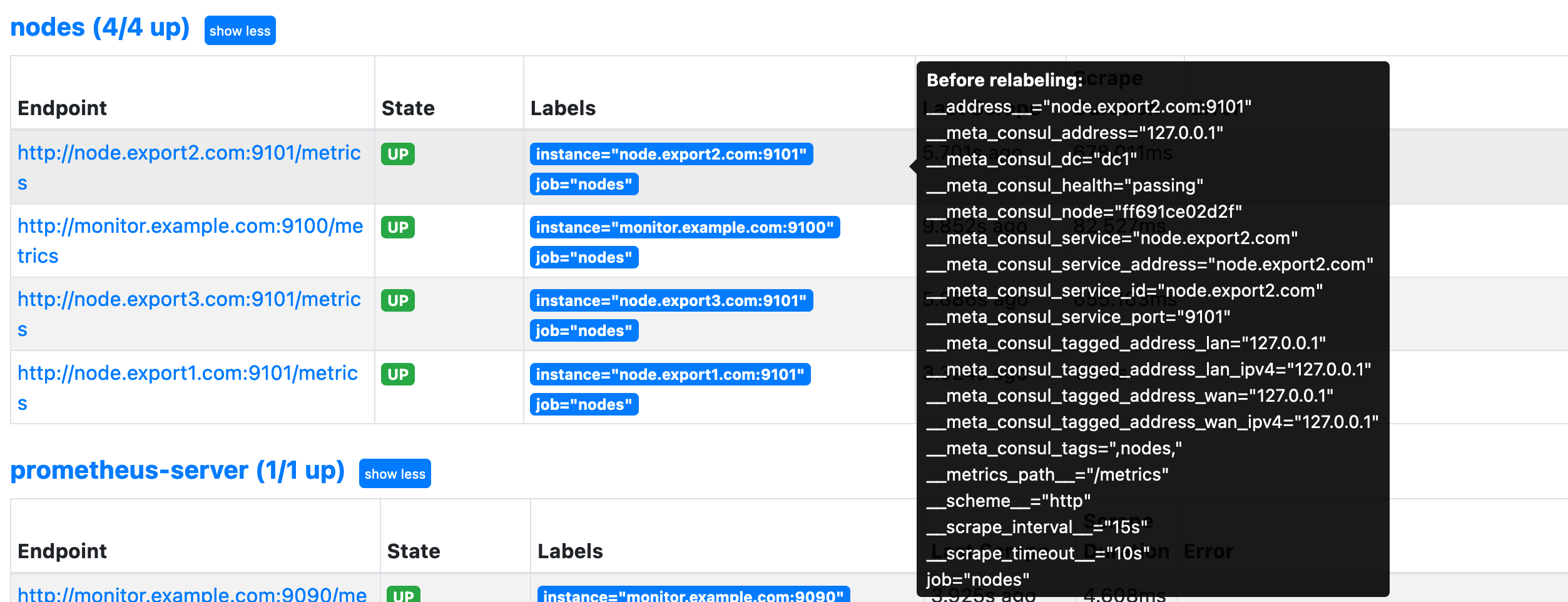
- 服务发现会返回一个Target列表,其中包含一组称为元数据的标签,这些标签都以“__meta_”为前缀;
- 服务发现还会根据目标配置来设置其它标签,这些标签带有“__”前缀和后缀,包括“__scheme__”、 “__address__”和“__metrics_path__”,分别保存有target支持使用协议(http或https,默认为http)、target的地址及指标的URI路径(默认为/metrics);
- 若URI路径中存在任何参数,则它们的前缀会设置为“__param_;
- 配置标签会在抓取的生命周期中被重复利用以生成其他标签,例如,指标上的instance标签的默认值就来自于__address__标签的值;
- 抓取而来的指标在保存之前,还允许用户对指标重新打标并过滤,在job段metric_relabel_configs配置,通常用来删除不需要的指标、删除敏感或不必要的标签和添加修改标签格式等。
自动发现的几种方式演示
基于文件的自动发现
# static config nodes

  - job_name: 'nodes'

    file_sd_configs:

    - files:

      - targets/nodes-*.yaml

      refresh_interval: 2m

scrape_interval: 15scat targets/nodes-linux.yaml
- targets:
- monitor.example.com:9100
- node.export1.com:9101
- node.export2.com:9101
- node.export3.com:9101
labels:
app: node-exporter
os: aliyunos3
cat targets/nodes-prometheus.yaml
- targets:
- monitor.example.com:9090
labels:
app: prometheus
job: prometheuscurl -XPOST monitor.example.com:9090/-/reload
基于consul注册中心自动发现
服务部署
version: '3.6'

volumes:

  consul_data: {}

networks:

  monitoring:

    driver: bridge

services:

  consul:

    image: consul:1.14

    volumes:

      - ./consul_configs:/consul/config

      - consul_data:/consul/data/

    networks:

      - monitoring

    ports:

      - 8500:8500

    command: ["consul","agent","-dev","-bootstrap","-config-dir","/consul/config","-data-dir","/consul/data","-ui","-log-level","INFO","-bind","127.0.0.1","-client","0.0.0.0"]

  consul-exporter:

    image: prom/consul-exporter:v0.8.0

    networks:

      - monitoring

    ports:

      - 9107:9107

    command:

      - "--consul.server=consul:8500"

    depends_on:

- consul# docker-compose up -d
# docker-compose ps
NAME IMAGE COMMAND SERVICE CREATED STATUS PORTS
consul-and-exporter-consul-1 consul:1.14 "docker-entrypoint.s…" consul 24 hours ago Up 24 hours 8300-8302/tcp, 8301-8302/udp, 8600/tcp, 8600/udp, 0.0.0.0:8500->8500/tcp, :::8500->8500/tcp
consul-and-exporter-consul-exporter-1 prom/consul-exporter:v0.8.0 "/bin/consul_exporte…" consul-exporter 24 hours ago Up 24 hours 0.0.0.0:9107->9107/tcp, :::9107->9107/tcp
编辑Prometheus.yml
  # consul_service_discovery

  - job_name: 'nodes'

    consul_sd_configs:

    - server: "monitor.example.com:8500"

      tags:

      - "nodes"    # 匹配在consul注册的服务中带有nodes标签的service

      refresh_interval: 2m

    scrape_interval: 15s

  - job_name: 'grafana'

    consul_sd_configs:

    - server: "monitor.example.com:8500"

      tags:

      - "grafana"    # 匹配在consul注册的服务中带有grafana标签的service

      refresh_interval: 2m

scrape_interval: 15scurl -XPOST monitor.example.com:9090/-/reload服务注册到consul
api方式注册演示
{

  "ID": "grafana",

  "Name": "grafana",

  "Tags": ["grafana", "v9"],    # 包含的标签

  "Address": "monitor.example.com",

  "Port": 3000,

  "Meta": {

    "grafana_version": "9"    # 元数据,可自定义

  },

  "EnableTagOverride": false,

  "Check": {    # 检查健康状态的方法

    "http": "http://monitor.example.com:3000/metrics",

    "interval": "5s",

    "Timeout": "5s"

  },

  "Weights": {

    "Passing": 1,

    "Warning": 1

  }

} "Check": {
"DeregisterCriticalServiceAfter": "90m",
"Args": ["/usr/local/bin/check_redis.py"],
"Interval": "10s",
"Timeout": "5s"
},curl -XPUT --data @grafana.json http://monitor.example.com:8500/v1/agent/service/register
# 查看当前所有注册的service

curl http://monitor.example.com:8500/v1/agent/services

# 查看tomcat service的健康状态

curl http://monitor.example.com:8500/v1/agent/health/service/name/tomcat

# 注册服务,需提前准备好json文件

curl -XPUT --data @grafana.json http://monitor.example.com:8500/v1/agent/service/register

# 注销服务

curl -XPUT http://monitor.example.com:8500/v1/agent/service/deregister/grafanaconsul命令方式注册演示
{

  "services": [

    {

      "id": "node.export1.com",

      "name": "node.export1.com",

      "address": "node.export1.com",

      "port": 9101,

      "tags": ["nodes"],

      "checks": [{

        "http": "http://node.export1.com:9101/metrics",

        "interval": "5s"

      }]

    },

    {

      "id": "node.export2.com",

      "name": "node.export2.com",

      "address": "node.export2.com",

      "port": 9101,

      "tags": ["nodes"],

      "checks": [{

        "http": "http://node.export2.com:9101/metrics",

        "interval": "5s"

      }]

    },

    {

      "id": "node.export3.com",

      "name": "node.export3.com",

      "address": "node.export3.com",

      "port": 9101,

      "tags": ["nodes"],

      "checks": [{

        "http": "http://node.export3.com:9101/metrics",

        "interval": "5s"

      }]

    },

    {

      "id": "monitor.example.com",

      "name": "monitor.example.com",

      "address": "monitor.example.com",

      "port": 9100,

      "tags": ["nodes"],

      "checks": [{

        "http": "http://monitor.example.com:9100/metrics",

        "interval": "5s"

      }]

    }

  ]

}/consul/config # pwd
/consul/config
/consul/config # ls
nodes.json# consul reload
Configuration reload triggered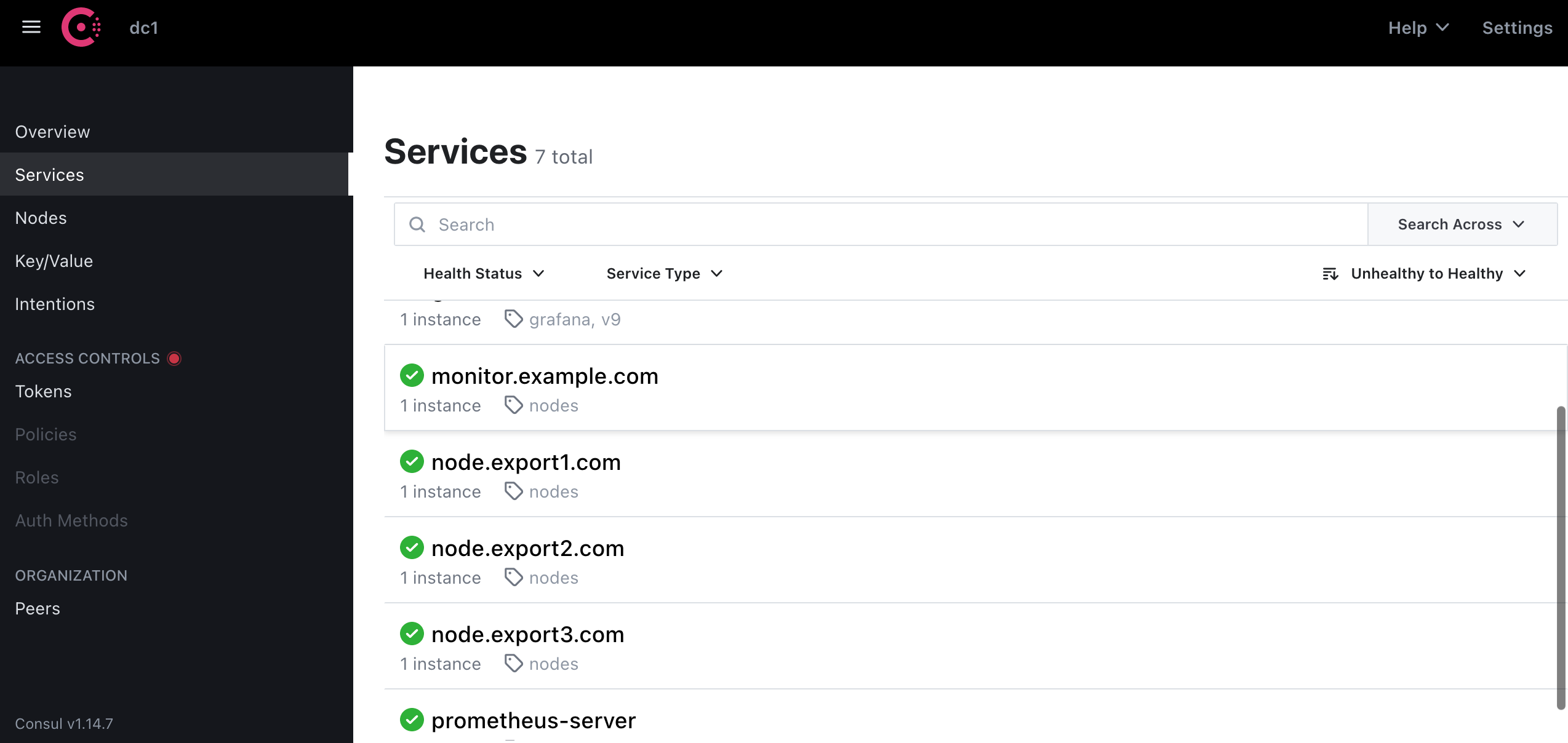
写到最后
Prometheus-4:服务自动发现Service Discovery的更多相关文章
- prometheus(5)之consul服务自动发现及pushgetway
pushgetway(push上传metric数据) Pushgateway简介 Pushgateway是prometheus的一个组件,prometheus server默认是通过exporter主 ...
- Prometheus基于consul自动发现监控对象 https://www.iloxp.com/archive/11/
Prometheus 监控目标为什么要自动发现 频繁对Prometheus配置文件进行修改,无疑给运维人员带来很大的负担,还有可能直接变成一个“配置小王子”,即使是配置小王子也会存在人为失误的情况 ...
- 1.利用consul实现k8s服务自动发现
标题 : 1.利用consul实现k8s服务自动发现 目录 : 微服务架构设计 序号 : 1 ] } } ] } } - consul自身支持ACL,但目前,Helm图表不支持其中一些功能,需要额 ...
- marathon的高可用服务自动发现和负载均衡
上一篇我们说谈了docker+zookeeper+mesos+marathon集群,本篇我们来谈谈marathon的集群和自动发现服务. marathon的服务自动发现和负载均衡有两种,1是mesos ...
- Kubernetes 服务自动发现CoreDNS
前言 Service服务,是一个概念,逻辑通过selector标签代理指定后端pod.众所周知,pod生命周期短,状态不稳定,pod错误异常后新生成的Pod IP会发生变化,之前Pod的访问方式均不可 ...
- dubbo与zk注册中心如何对接,如何做到服务自动发现
先看下consumer端发起调用时的链路流程: +---------------------------+ +---------------------------+ +--------------- ...
- zabbix3.0.4 探索主机Discovery自动发现agent主机和zabbix-agent自动注册详细图文教程
Zabbix 自动发现(Discovery)功能使用 随着监控主机不断增多,有的时候需要添加一批机器,特别是刚用zabbix的运维人员需要将公司的所有服务器添加到zabbix,如果使用传统办法去单个添 ...
- Spring Cloud 入门教程(四): 分布式环境下自动发现配置服务
前一章, 我们的Hello world应用服务,通过配置服务器Config Server获取到了我们配置的hello信息“hello world”. 但自己的配置文件中必须配置config serve ...
- zabbix系列(五)zabbix3.0.4 探索主机Discovery自动发现主机详细图文教程
Zabbix 自动发现(Discovery)功能使用 随着监控主机不断增多,有的时候需要添加一批机器,特别是刚用zabbix的运维人员需要将公司的所有服务器添加到zabbix,如果使用传统办法去单个添 ...
- 玩转Spring Cloud之服务注册发现(eureka)及负载均衡消费(ribbon、feign)
如果说用Spring Boot+Spring MVC是开发单体应用(或单体服务)的利器,那么Spring Boot+Spring MVC+Spring Cloud将是开发分布式应用(快速构建微服务)的 ...
随机推荐
- vue-element-admin 动态菜单改造
vue-element-admin 动态菜单改造 vue-element-admin 是一款优秀后台前端解决方案,它基于 vue 和 element-ui实现.开源后台管理系统解决方案项目 Boot- ...
- 【FAQ】统一扫码服务常见问题及解答
1.隐私政策是怎么样的?收集哪些信息? 关于Scan Kit的隐私政策及收集的信息,请查看SDK隐私安全说明. Android:SDK隐私安全说明 iOS:SDK隐私安全说明 2.如何使用多码识别?多 ...
- Spring配置数据库连接
<beans xmlns:context="http://www.springframework.org/schema/context" xmlns:mvc="ht ...
- Win Pycharm + Airtest + 夜神模拟器 实现APP自动化
前言: 前面已经讲过了Airtest的简单配置与使用了,相信大家已经对于操作Airtest没有什么问题了(#^.^#) 但是在Airtest IDE中编写代码是有局限性的,而且不能封装Airtest的 ...
- ABC294Ex K-Coloring
Statement 对一张简单无向图进行 \(k\) 染色,满足对于每条边的两个端点颜色不同,求方案数. \(n,m\leq 30\). Solution 无向图 \(k\) 染色问题,很经典的问题. ...
- 音视频八股文(11)-- ffmpeg avio 内存输入和内存输出。内存输出有完整代码,网上很少有的。
1.avio介绍 avio是FFmpeg中的一个模块,用于实现多种输入输出方式的封装. avio提供了一系列API,可以将数据从内存读取到缓冲区中,也可以将缓冲区中的数据写入到内存中.其实现依赖于IO ...
- golang在编程语言排行榜上排名第10,请不要说golang已死。
四月头条:编程语言 Zig 进入 TIOBE 指数前 50 名 最近,我们讨论了高性能编程语言的出现.由于需要处理的数据量越来越大,这些编程语言正在蓬勃发展.因此,C 和 C++ 在前十名中表现良好, ...
- Selenium - 快速上手之启动浏览器
Selenium - 浏览器启动/关闭 使用webdriver前,需要先导入包 from selenium import webdriver,每次打开浏览器时; 执行完毕要记得关闭浏览器,使用 dri ...
- IDEA output 输出中文乱码解决方案
1. 事发场景 最近在用idea 运行 spring 的项目发现运行之后 tomcat 的 output 输出 中文是乱码样子 2. 解决方法 点击右上角tomcat旁边的小三角 下拉框 点击Edit ...
- 《MS17-010(永恒之蓝)—漏洞复现及防范》
作者: susususuao 免责声明:本文仅供学习研究,严禁从事非法活动,任何后果由使用者本人负责. 一. 什么是永恒之蓝? - 永恒之蓝 永恒之蓝(Eternal Blue)是一种利用Window ...