
使用python获取知乎**话题下的所有回答,并统计后发布。
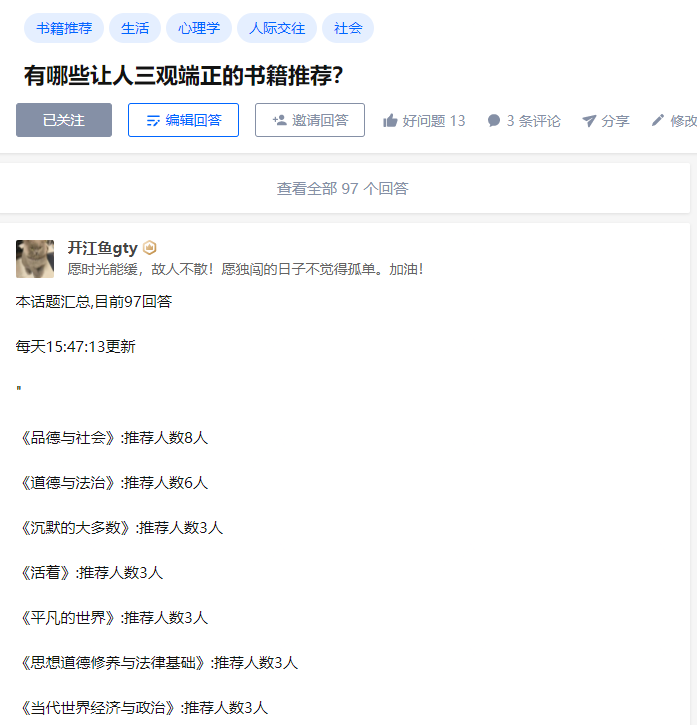
第一步:获取话题需要的url需要,并向上取整
 for idx in range(0,math.ceil(totals/5)):

        url = f"https://www.zhihu.com/api/v4/questions/29114634/answers?include=data%5B%2A%5D.is_normal%2Cadmin_closed_comment%2Creward_info%2Cis_collapsed%2Cannotation_action%2Cannotation_detail%2Ccollapse_reason%2Cis_sticky%2Ccollapsed_by%2Csuggest_edit%2Ccomment_count%2Ccan_comment%2Ccontent%2Ceditable_content%2Cattachment%2Cvoteup_count%2Creshipment_settings%2Ccomment_permission%2Ccreated_time%2Cupdated_time%2Creview_info%2Crelevant_info%2Cquestion%2Cexcerpt%2Cis_labeled%2Cpaid_info%2Cpaid_info_content%2Crelationship.is_authorized%2Cis_author%2Cvoting%2Cis_thanked%2Cis_nothelp%2Cis_recognized%3Bdata%5B%2A%5D.mark_infos%5B%2A%5D.url%3Bdata%5B%2A%5D.author.follower_count%2Cvip_info%2Cbadge%5B%2A%5D.topics%3Bdata%5B%2A%5D.settings.table_of_content.enabled&limit=5&offset={idx*5}&platform=desktop&sort_by=default"

        url_list.append(url)e
第二步:使用多线程,批量请求所有话题内容,获取到【“书籍”】列表
#创建十个个线程作为生产者,请求

    for x in range(10):

        product = threading.Thread(target=get_pic_url)

        product.start()
#生产者:请求url,获取所有书籍list

def get_pic_url():

    while True:

        glock.acquire()

        if len(url_list) == 0:

            glock.release()

            break

        else:

            page_url = url_list.pop()

            glock.release()

            res = urllib.request.Request(page_url,headers=headers)#请求

            res2 = urllib.request.urlopen(res).read().decode("utf-8")#获取html

            objContent = json.loads(res2)['data']#获取数据data

            ddd = re.compile(r'《.*?.》')#正则《》包裹的书籍

            glock.acquire()

            for rel in objContent:

                result = ddd.findall(str(rel['content']))

                for gtygty in result:

                    if len(gtygty)<30: #《》如果小于30个字符,就是正常书籍

                        contentList.append(gtygty)

                    else:

                        zz = re.compile(r'>.*?.<')#带有超链接的,则在处理一遍

                        hrefcontent = zz.findall(gtygty)

                        data = str(hrefcontent).replace(">","《",1).replace("<","》",1)

                        contentList.append(data[2:-2])

            glock.release()
第三:获取到图书后,统计每本书出现的次数
# 统计书籍出现的频率

def download_picture():

    ifStop=0

    submit = []

    while True:

        glock.acquire()

        if len(contentList) ==0:

            glock.release()

            ifStop +=1

            if ifStop == 2:

                y2 = {k: v for k, v in sorted(tongjicishu.items(), key=lambda item: item[1], reverse=True)}

                for key in y2.keys():

                    submit.append("<p>"+ key+ ":推荐人数"+str(y2[key])+"人</p>")

                return ''.join(submit)

                break

            else:

                continue

        else:

            url = contentList.pop()

            glock.release()

            #修改文件名

            if tongjicishu.__contains__(url) :

                tongjicishu[url]=tongjicishu[url]+1

            else :

                tongjicishu[url]=1
第四步:调用download_picture函数,获取到可发布的带标签的content,并发布
putcontent = download_picture()

submitPut("<p>本话题汇总,目前"+str(totals)+"回答</p>"+"<p>每天"+time.strftime('%H:%M:%S')+"更新</p>"+json.dumps(putcontent,ensure_ascii=False))
def submitPut(putcontent):

    putUrl = "https://www.zhihu.com/api/v4/answers/2342429808?include=is_visible%2Cpaid_info%2Cpaid_info_content%2Cadmin_closed_comment%2Creward_info%2Cannotation_action%2Cannotation_detail%2Ccollapse_reason%2Cis_normal%2Cis_sticky%2Ccollapsed_by%2Csuggest_edit%2Ccomment_count%2Ccan_comment%2Ccontent%2Ceditable_content%2Cvoteup_count%2Creshipment_settings%2Ccomment_permission%2Ccreated_time%2Cupdated_time%2Creview_info%2Crelevant_info%2Cquestion%2Cexcerpt%2Cattachment%2Crelationship.is_authorized%2Cvoting%2Cis_thanked%2Cis_author%2Cis_nothelp%2Cis_recognized%2Cis_labeled%3Bmark_infos%5B*%5D.url%3Bauthor.vip_info%2Cbadge%5B*%5D.topics%3Bsettings.table_of_content.enabled"

    data = {

           "content":putcontent,

           "reshipment_settings":"disallowed",

           "comment_permission":"all",

           "reward_setting":{"can_reward":False,"tagline":""},

           "disclaimer_status":"close",

           "disclaimer_type":"none",

           "commercial_report_info":{"is_report":False},

           "is_report":False,

           "push_activity":True,

           "table_of_contents_enabled":False,

           "thank_inviter_status":"close"

           }

    datascontent=json.dumps(data).encode('utf8')

    # data = urllib.parse.urlencode(formData).encode("utf-8")

    putres = urllib.request.Request(putUrl,data=datascontent,headers=headers,method='PUT')#请求

    putres2 = urllib.request.urlopen(putres).read().decode("utf-8")#获取html
使用python获取知乎**话题下的所有回答,并统计后发布。的更多相关文章
- Python获取指定文件夹下的文件名
本文采用os.walk()和os.listdir()两种方法,获取指定文件夹下的文件名. 一.os.walk() 模块os中的walk()函数可以遍历文件夹下所有的文件. os.walk(top, t ...
- python获取知乎日报另存为txt文件
前言 拿来练手的,比较简单(且有bug),欢迎交流~ 功能介绍 抓取当日的知乎日报的内容,并将每篇博文另存为一个txt文件,集中放在一个文件夹下,文件夹名字为当日时间. 使用的库 re,Beautif ...
- python 获取当前文件夹下所有文件名
os 模块下有两个函数: os.walk() os.listdir() 1 # -*- coding: utf-8 -*- 2 3 import os 4 5 def file_name(file_d ...
- python获取当前文件夹下所有文件名【转】
os 模块下有两个函数: os.walk() os.listdir() 1 # -*- coding: utf-8 -*- 2 3 import os 4 5 def file_name(file_d ...
- python获取指定文件夹下的文件路径
#!/usr/bin/python# -*- coding: UTF-8 -*-# @date: 2018/1/6 23:08# @name: tmp2# @author:vickey-wu impo ...
- python获取指定文件夹下的文件和文件夹
import os filepaths = []; dirpaths = []; pathName = r'C:\anfei\json\20191128' for root, dirs, files ...
- Python获取路径下所有文件名
python 获取当前文件夹下所有文件名 os 模块下有两个函数: os.walk() os.listdir() 1 # -*- coding: utf-8 -*- 2 3 import os 4 ...
- python获取指定目录下特定格式的文件名
之前一直用windows下的bat脚本获取一个目录下的指定格式的文件名,如下所示: dir *.jpg /b/s > train.set pause 十分简单,将这个bat文件放到你想要获取文件 ...
- python获取指定目录下所有文件名os.walk和os.listdir
python获取指定目录下所有文件名os.walk和os.listdir 觉得有用的话,欢迎一起讨论相互学习~Follow Me os.walk 返回指定路径下所有文件和子文件夹中所有文件列表 其中文 ...
- Python+selenium之获取文本值和下拉框选择数据
Python+selenium之获取文本值和下拉框选择数据 一.结合实例进行描述 1. 实例如下所示: #新增标签操作 def func_labels(self): self.driver.find_ ...
随机推荐
- H3C-IP路由器
定义 路由器负责将数据报文在IP网段之间进行转发 路由器负责将数据报文在IP网段之间进行转发 路由是指导路由器如何进行数据转发的路径信息 作用 路由器负责将数据报文在逻辑网段间进行转发 路由器是指导路 ...
- k8s资源管理中request和limit的区别
在 Kubernetes(K8s)中,request和limit是两个重要的概念,用于控制和管理容器的资源使用. Request(请求): request定义了容器启动时需要保证的最小资源量.这表示K ...
- 基于python源码的啸叫抑制算法解析
一 原理解析 从下图一中可以看出,该算法的原理也是先检测出来啸叫,然后通过陷波器来进行啸叫抑制的,和笔者以前分析的所用方法基本耦合. 二 源码分析 函数PAPR:计算峰值功率和平均功率的比 ...
- C#事件(event)的理解
一.多播委托的应用--观察者模式 遇到一个开发的问题? 面试者:以面向对象的思想实现一下的场景: 猫:Miao一声,紧接着引发了一系列的行为~ Miao:引发了一系列的动作: 从代码层面来说:代码这样 ...
- CloudXR技术如何运用于农业?
随着科技的不断发展和应用的深入,农业领域也在逐渐引入新技术来优化生产效率和成本.改进管理和监控等.云化XR(CloudXR)作为一种融合了云计算.虚拟现实(VR)和增强现实(AR)等技术的解决方案,也 ...
- 记录--JavaScript原型和原型链复习笔记
这里给大家分享我在网上总结出来的一些知识,希望对大家有所帮助 原型和原型链 1. 原型 每个JS对象一定对应一个原型对象,并从原型对象继承属性和方法 1.1 __proto__ 对象的__proto_ ...
- C# 优雅的处理TCP数据(心跳,超时,粘包断包,SSL加密 ,数据处理等)
Tcp是一个面向连接的流数据传输协议,用人话说就是传输是一个已经建立好连接的管道,数据都在管道里像流水一样流淌到对端.那么数据必然存在几个问题,比如数据如何持续的读取,数据包的边界等. Nagle's ...
- 使用Go语言开发一个短链接服务:四、生成code算法
章节 使用Go语言开发一个短链接服务:一.基本原理 使用Go语言开发一个短链接服务:二.架构设计 使用Go语言开发一个短链接服务:三.项目目录结构设计 使用Go语言开发一个短链接服务:四.生成 ...
- verilog之锁存器和触发器
verilog锁存器和触发器 1.基本概念 锁存,就是输入信号变化时,输出不发生变化时,就是触发器或者锁存器.触发器的敏感信号是clk,即触发器是知道被延时了多少.对于锁存器来说,延时是不确定的.一般 ...
- KingbaseES V8R6 逻辑恢复到新的 schema
前言 本文介绍一下KingbaseES V8R6版本中逻辑恢复时,将原有的对象恢复到新的schema. sys_restore命令中如果只加入了-g(原schema) -G(新schema)参数 那么 ...