
使用python获取知乎**话题下的所有回答,并统计后发布。
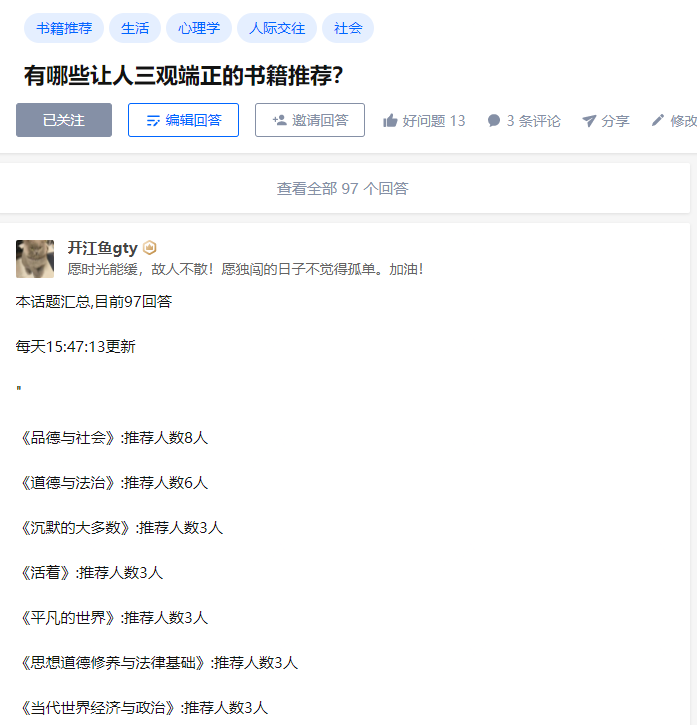
第一步:获取话题需要的url需要,并向上取整
 for idx in range(0,math.ceil(totals/5)):

        url = f"https://www.zhihu.com/api/v4/questions/29114634/answers?include=data%5B%2A%5D.is_normal%2Cadmin_closed_comment%2Creward_info%2Cis_collapsed%2Cannotation_action%2Cannotation_detail%2Ccollapse_reason%2Cis_sticky%2Ccollapsed_by%2Csuggest_edit%2Ccomment_count%2Ccan_comment%2Ccontent%2Ceditable_content%2Cattachment%2Cvoteup_count%2Creshipment_settings%2Ccomment_permission%2Ccreated_time%2Cupdated_time%2Creview_info%2Crelevant_info%2Cquestion%2Cexcerpt%2Cis_labeled%2Cpaid_info%2Cpaid_info_content%2Crelationship.is_authorized%2Cis_author%2Cvoting%2Cis_thanked%2Cis_nothelp%2Cis_recognized%3Bdata%5B%2A%5D.mark_infos%5B%2A%5D.url%3Bdata%5B%2A%5D.author.follower_count%2Cvip_info%2Cbadge%5B%2A%5D.topics%3Bdata%5B%2A%5D.settings.table_of_content.enabled&limit=5&offset={idx*5}&platform=desktop&sort_by=default"

        url_list.append(url)e
第二步:使用多线程,批量请求所有话题内容,获取到【“书籍”】列表
#创建十个个线程作为生产者,请求

    for x in range(10):

        product = threading.Thread(target=get_pic_url)

        product.start()
#生产者:请求url,获取所有书籍list

def get_pic_url():

    while True:

        glock.acquire()

        if len(url_list) == 0:

            glock.release()

            break

        else:

            page_url = url_list.pop()

            glock.release()

            res = urllib.request.Request(page_url,headers=headers)#请求

            res2 = urllib.request.urlopen(res).read().decode("utf-8")#获取html

            objContent = json.loads(res2)['data']#获取数据data

            ddd = re.compile(r'《.*?.》')#正则《》包裹的书籍

            glock.acquire()

            for rel in objContent:

                result = ddd.findall(str(rel['content']))

                for gtygty in result:

                    if len(gtygty)<30: #《》如果小于30个字符,就是正常书籍

                        contentList.append(gtygty)

                    else:

                        zz = re.compile(r'>.*?.<')#带有超链接的,则在处理一遍

                        hrefcontent = zz.findall(gtygty)

                        data = str(hrefcontent).replace(">","《",1).replace("<","》",1)

                        contentList.append(data[2:-2])

            glock.release()
第三:获取到图书后,统计每本书出现的次数
# 统计书籍出现的频率

def download_picture():

    ifStop=0

    submit = []

    while True:

        glock.acquire()

        if len(contentList) ==0:

            glock.release()

            ifStop +=1

            if ifStop == 2:

                y2 = {k: v for k, v in sorted(tongjicishu.items(), key=lambda item: item[1], reverse=True)}

                for key in y2.keys():

                    submit.append("<p>"+ key+ ":推荐人数"+str(y2[key])+"人</p>")

                return ''.join(submit)

                break

            else:

                continue

        else:

            url = contentList.pop()

            glock.release()

            #修改文件名

            if tongjicishu.__contains__(url) :

                tongjicishu[url]=tongjicishu[url]+1

            else :

                tongjicishu[url]=1
第四步:调用download_picture函数,获取到可发布的带标签的content,并发布
putcontent = download_picture()

submitPut("<p>本话题汇总,目前"+str(totals)+"回答</p>"+"<p>每天"+time.strftime('%H:%M:%S')+"更新</p>"+json.dumps(putcontent,ensure_ascii=False))
def submitPut(putcontent):

    putUrl = "https://www.zhihu.com/api/v4/answers/2342429808?include=is_visible%2Cpaid_info%2Cpaid_info_content%2Cadmin_closed_comment%2Creward_info%2Cannotation_action%2Cannotation_detail%2Ccollapse_reason%2Cis_normal%2Cis_sticky%2Ccollapsed_by%2Csuggest_edit%2Ccomment_count%2Ccan_comment%2Ccontent%2Ceditable_content%2Cvoteup_count%2Creshipment_settings%2Ccomment_permission%2Ccreated_time%2Cupdated_time%2Creview_info%2Crelevant_info%2Cquestion%2Cexcerpt%2Cattachment%2Crelationship.is_authorized%2Cvoting%2Cis_thanked%2Cis_author%2Cis_nothelp%2Cis_recognized%2Cis_labeled%3Bmark_infos%5B*%5D.url%3Bauthor.vip_info%2Cbadge%5B*%5D.topics%3Bsettings.table_of_content.enabled"

    data = {

           "content":putcontent,

           "reshipment_settings":"disallowed",

           "comment_permission":"all",

           "reward_setting":{"can_reward":False,"tagline":""},

           "disclaimer_status":"close",

           "disclaimer_type":"none",

           "commercial_report_info":{"is_report":False},

           "is_report":False,

           "push_activity":True,

           "table_of_contents_enabled":False,

           "thank_inviter_status":"close"

           }

    datascontent=json.dumps(data).encode('utf8')

    # data = urllib.parse.urlencode(formData).encode("utf-8")

    putres = urllib.request.Request(putUrl,data=datascontent,headers=headers,method='PUT')#请求

    putres2 = urllib.request.urlopen(putres).read().decode("utf-8")#获取html
使用python获取知乎**话题下的所有回答,并统计后发布。的更多相关文章
- Python获取指定文件夹下的文件名
本文采用os.walk()和os.listdir()两种方法,获取指定文件夹下的文件名. 一.os.walk() 模块os中的walk()函数可以遍历文件夹下所有的文件. os.walk(top, t ...
- python获取知乎日报另存为txt文件
前言 拿来练手的,比较简单(且有bug),欢迎交流~ 功能介绍 抓取当日的知乎日报的内容,并将每篇博文另存为一个txt文件,集中放在一个文件夹下,文件夹名字为当日时间. 使用的库 re,Beautif ...
- python 获取当前文件夹下所有文件名
os 模块下有两个函数: os.walk() os.listdir() 1 # -*- coding: utf-8 -*- 2 3 import os 4 5 def file_name(file_d ...
- python获取当前文件夹下所有文件名【转】
os 模块下有两个函数: os.walk() os.listdir() 1 # -*- coding: utf-8 -*- 2 3 import os 4 5 def file_name(file_d ...
- python获取指定文件夹下的文件路径
#!/usr/bin/python# -*- coding: UTF-8 -*-# @date: 2018/1/6 23:08# @name: tmp2# @author:vickey-wu impo ...
- python获取指定文件夹下的文件和文件夹
import os filepaths = []; dirpaths = []; pathName = r'C:\anfei\json\20191128' for root, dirs, files ...
- Python获取路径下所有文件名
python 获取当前文件夹下所有文件名 os 模块下有两个函数: os.walk() os.listdir() 1 # -*- coding: utf-8 -*- 2 3 import os 4 ...
- python获取指定目录下特定格式的文件名
之前一直用windows下的bat脚本获取一个目录下的指定格式的文件名,如下所示: dir *.jpg /b/s > train.set pause 十分简单,将这个bat文件放到你想要获取文件 ...
- python获取指定目录下所有文件名os.walk和os.listdir
python获取指定目录下所有文件名os.walk和os.listdir 觉得有用的话,欢迎一起讨论相互学习~Follow Me os.walk 返回指定路径下所有文件和子文件夹中所有文件列表 其中文 ...
- Python+selenium之获取文本值和下拉框选择数据
Python+selenium之获取文本值和下拉框选择数据 一.结合实例进行描述 1. 实例如下所示: #新增标签操作 def func_labels(self): self.driver.find_ ...
随机推荐
- 用json画图的画图软件 推荐 Balsamiq
看这个库的时候发现的的这个软件 https://github.com/ironman1987/chinese-developer-roadmap 下载:https://www.zdfans.com/h ...
- Redis持久化之RDB(Redis DataBase) 和 AOF(Append Only File)
Redis提供了两种持久化方式:RDB(Redis DataBase)和AOF(Append Only File). 1. RDB持久化: RDB持久化是指在指定的时间间隔内将内存中的数据集快照写入磁 ...
- 8、Linux CentOS 安装.Net Core 3.1
1.添加密钥 将 Microsoft 包签名密钥添加到受信任密钥列表,并添加 Microsoft 包存储库. 打开终端并运行以下命令: sudo rpm -Uvh https://packages.m ...
- drf(初始drf,restfull规范 ,CBV、APIView、Request源码)
一 web开发模式 # 前后端混合开发(前后端不分离):通过模版语法,在服务器上处理好html的内容(组合字符串),返回给浏览器一堆字符串(字符串封装到respons对象里),浏览器在渲染 # 前后端 ...
- 计算机网络(http协议)
一 软件开发架构 CS 客户端 服务端BS 浏览器 服务端ps: BS本质也是CS 二 浏览器窗口输入网址回车发生了几件事 1.浏览器朝服务端发送请求2.服务端接受请求3.服务端返回相应的响应4. ...
- python基础六(函数基础及参数使用)
一. 函数定义 1.什么是函数 函数就相当于具备某一功能的工具 函数的使用必须遵循一个原则: 先定义 后调用2.为何要用函数 代码冗余,程序的组织结构不清晰,可读性差 可维护性.扩展性差3.如何用函数 ...
- 如何打造一个花里胡哨的Github个人主页?
1.介绍 2.使用 2.1.创建一个同名仓库 2.2.引用模板 2.3.为内容添加有趣模块 2.3.1.徽章badge 2.3.2.waka 时间展示 2.3.3.展示 GitHub stars 等信 ...
- mybatis in 参数动态拼接
// 接口 List<SysUser> findByIdList(List<Integer> idList); //xml <select id="findBy ...
- KingbaseES 原生XML系列一 -- XML构造函数
KingbaseES 原生XML系列一--XML构造函数(XML,XMLPARSE,XMLSERIALIZE,IS-DOCUMENT,XML_IS_WELL_FORMED,XML_IS_WELL_FO ...
- archlinux修改btrfs文件系统大小出现ERROR: unable to retrieve fs info
提权sudo就可以了 例: sudo btrfs filesystem resize max /