
【Spring-Security】Re09 CSFR处理
一、CSRF:
CSRF 全称 Cross Site Request Forgery 跨站请求伪造
又称为OneClick Attack & SessionRiding
是非法请求访问,通过伪造用户请求访问受信任网站
什么是跨域?
只要 协议 - IP地址 - 端口号 三者中的任何一个不相同进行的访问,就是跨域请求
相关资料:
https://blog.csdn.net/xiaoxinshuaiga/article/details/80766369
二、Security的CSRF设置:
Security4版本开始默认开启CSRF攻击拦截,验证的方法是要求凭证提供键为 _csrf 的ID
该Token在服务端生成,登录时会用户携带此ID一并给Security。
演示案例:
首先取消CSRF关闭:
package cn.zeal4j.configuration;

import cn.zeal4j.handler.CustomAccessDeniedHandler;

import cn.zeal4j.handler.FarsAuthenticationFailureHandler;

import cn.zeal4j.handler.FarsAuthenticationSuccessHandler;

import org.springframework.beans.factory.annotation.Autowired;

import org.springframework.beans.factory.annotation.Qualifier;

import org.springframework.context.annotation.Bean;

import org.springframework.context.annotation.Configuration;

import org.springframework.http.HttpMethod;

import org.springframework.security.config.annotation.web.builders.HttpSecurity;

import org.springframework.security.config.annotation.web.configuration.WebSecurityConfigurerAdapter;

import org.springframework.security.core.parameters.P;

import org.springframework.security.core.userdetails.UserDetails;

import org.springframework.security.core.userdetails.UserDetailsService;

import org.springframework.security.crypto.bcrypt.BCryptPasswordEncoder;

import org.springframework.security.crypto.password.PasswordEncoder;

import org.springframework.security.web.access.AccessDeniedHandler;

import org.springframework.security.web.authentication.rememberme.JdbcTokenRepositoryImpl;

import org.springframework.security.web.authentication.rememberme.PersistentTokenRepository;

import javax.sql.DataSource;

/**

 * @author Administrator

 * @file IntelliJ IDEA Spring-Security-Tutorial

 * @create 2020 09 27 21:55

 */

@Configuration

public class SecurityConfiguration extends WebSecurityConfigurerAdapter {

    @Autowired

    private AccessDeniedHandler accessDeniedHandler;

    @Qualifier("userDetailsServiceImpl")

    @Autowired

    private UserDetailsService userDetailsService;

    @Autowired

    private DataSource dataSource;

    @Autowired

    private PersistentTokenRepository persistentTokenRepository;

    @Bean

    public PersistentTokenRepository getPersistentTokenRepository() {

        JdbcTokenRepositoryImpl jdbcTokenRepository = new JdbcTokenRepositoryImpl();

        jdbcTokenRepository.setDataSource(dataSource); // 数据源注入

        jdbcTokenRepository.setCreateTableOnStartup(false); // 由Security完成Token表的创建,如果有了就设置false关闭

        return jdbcTokenRepository;

    }

    @Bean

    public PasswordEncoder getPasswordEncoder() {

        return new BCryptPasswordEncoder();

    }

    @Override

    protected void configure(HttpSecurity httpSecurity) throws Exception {

        httpSecurity.formLogin(). // 设置登陆行为方式为表单登陆

                // 登陆请求参数设置

                usernameParameter("username").

                passwordParameter("password").

                loginPage("/login.html"). // 设置登陆页面URL路径

                loginProcessingUrl("/login.action"). // 设置表单提交URL路径

                successForwardUrl("/main.page"). // 设置认证成功跳转URL路径 POST请求

                failureForwardUrl("/error.page");  // 设置认证失败跳转URL路径 POST请求

                //  successHandler(new FarsAuthenticationSuccessHandler("https://www.acfun.cn/")). // 使用自定义的重定向登陆

                //  failureHandler(new FarsAuthenticationFailureHandler("/error.html")).; // 跨域处理,不需要跳转了

        httpSecurity.authorizeRequests().

                regexMatchers(HttpMethod.POST, "正则表达式").permitAll(). // 还可以对符合正则表达式的请求方式进行要求,这个属性使用来制定请求的方式

                antMatchers("/**/*.js", "/**/*.css", "/**/images/*.*").permitAll(). // 静态资源放行

                antMatchers("/login.html").permitAll(). // 登陆页面允许任意访问

                antMatchers("/error.html").permitAll(). // 失败跳转后重定向的页面也需要被允许访问

                antMatchers("/admin.page").hasAnyAuthority("admin").

                /*antMatchers("/vip-01.page").hasAnyAuthority("vip-01").*/

                antMatchers("/vip-01.page").hasRole("vip-01").

                antMatchers("/ip.page").hasIpAddress("192.168.43.180").

                // mvcMatchers("/main.page").servletPath("/xxx").permitAll(). // mvcMatchers资源放行匹配

                // antMatchers("/xxx/main.page").permitAll(). // 或者多写MSP的前缀

                anyRequest().authenticated(); // 其他请求均需要被授权访问

                // anyRequest().access("@customServiceImpl.hasPermission(request, authentication)"); // 自定义Access配置

        // CSRF攻击拦截关闭

        // httpSecurity.csrf().disable();

        httpSecurity.exceptionHandling().accessDeniedHandler(accessDeniedHandler);

        // 记住我

        httpSecurity.rememberMe().

                tokenValiditySeconds(60). // 设置Token有效时间, 以秒为单位取值

                userDetailsService(userDetailsService).

                tokenRepository(persistentTokenRepository);

        // 退出登录处理

        httpSecurity.

                logout().

                // logoutUrl("/xxx/xxx/logout").

                logoutSuccessUrl("/login.html");

    }

}
注意CSRF的Token需要Thymeleaf模板获取,也就是登录页面要放在模板目录里面,这里就重新编写一个登陆页面【csrf-login.html】
在登陆页面设置CSRF的Token处理:
<!DOCTYPE html>

<html lang="en" xmlns:th="http://www.thymeleaf.org" >

<head>

    <meta charset="UTF-8">

    <title>Title</title>

    <style type="text/css">

        h3,p {

            text-align: center;

        }

    </style>

</head>

<body>

    <h3>custom login page</h3>

    <form method="post"th:action="@{/login.action}" >

        <input type="hidden" th:value="${_csrf.token}" name="_csrf" th:if="${_csrf}" >

        <p>username: <input type="text" name="username"></p>

        <p>password: <input type="password" name="password"></p>

        <p>rememberMe: <input type="checkbox" name="remember-me" value="true"></p>

        <p><input type="submit" value="login"></p>

    </form>

</body>

</html>
编写控制器
package cn.zeal4j.controller;

import org.springframework.security.access.annotation.Secured;

import org.springframework.stereotype.Controller;

import org.springframework.web.bind.annotation.PostMapping;

import org.springframework.web.bind.annotation.RequestMapping;

/**

 * @author Administrator

 * @file IntelliJ IDEA Spring-Security-Tutorial

 * @create 2020 09 27 22:35

 */

@Secured("ROLE_vip-01")

@Controller

public class LoginController {

    @PostMapping("csrf-login.page")

    public String toCsrfLoginPage() {

        return "csrf-login";

    }

    @RequestMapping("main.page")

    public String toMainPage() {

        return "main"; // 模版内的页面不允许重定向,忘了忘了

    }

    @PostMapping("error.page") // 控制器不支持POST请求跳转解析, 需要控制器跳转 Resolved [org.springframework.web.HttpRequestMethodNotSupportedException: Request method 'POST' not supported]

    public String redirectToErrorPage() {

        return "redirect:/error.html"; // 重定向要写/标识 区分模版解析

    }

}
配置再更改为这个控制接口:
package cn.zeal4j.configuration;

import cn.zeal4j.handler.CustomAccessDeniedHandler;

import cn.zeal4j.handler.FarsAuthenticationFailureHandler;

import cn.zeal4j.handler.FarsAuthenticationSuccessHandler;

import org.springframework.beans.factory.annotation.Autowired;

import org.springframework.beans.factory.annotation.Qualifier;

import org.springframework.context.annotation.Bean;

import org.springframework.context.annotation.Configuration;

import org.springframework.http.HttpMethod;

import org.springframework.security.config.annotation.web.builders.HttpSecurity;

import org.springframework.security.config.annotation.web.configuration.WebSecurityConfigurerAdapter;

import org.springframework.security.core.parameters.P;

import org.springframework.security.core.userdetails.UserDetails;

import org.springframework.security.core.userdetails.UserDetailsService;

import org.springframework.security.crypto.bcrypt.BCryptPasswordEncoder;

import org.springframework.security.crypto.password.PasswordEncoder;

import org.springframework.security.web.access.AccessDeniedHandler;

import org.springframework.security.web.authentication.rememberme.JdbcTokenRepositoryImpl;

import org.springframework.security.web.authentication.rememberme.PersistentTokenRepository;

import javax.sql.DataSource;

/**

 * @author Administrator

 * @file IntelliJ IDEA Spring-Security-Tutorial

 * @create 2020 09 27 21:55

 */

@Configuration

public class SecurityConfiguration extends WebSecurityConfigurerAdapter {

    @Autowired

    private AccessDeniedHandler accessDeniedHandler;

    @Qualifier("userDetailsServiceImpl")

    @Autowired

    private UserDetailsService userDetailsService;

    @Autowired

    private DataSource dataSource;

    @Autowired

    private PersistentTokenRepository persistentTokenRepository;

    @Bean

    public PersistentTokenRepository getPersistentTokenRepository() {

        JdbcTokenRepositoryImpl jdbcTokenRepository = new JdbcTokenRepositoryImpl();

        jdbcTokenRepository.setDataSource(dataSource); // 数据源注入

        jdbcTokenRepository.setCreateTableOnStartup(false); // 由Security完成Token表的创建,如果有了就设置false关闭

        return jdbcTokenRepository;

    }

    @Bean

    public PasswordEncoder getPasswordEncoder() {

        return new BCryptPasswordEncoder();

    }

    @Override

    protected void configure(HttpSecurity httpSecurity) throws Exception {

        httpSecurity.formLogin(). // 设置登陆行为方式为表单登陆

                // 登陆请求参数设置

                usernameParameter("username").

                passwordParameter("password").

                // loginPage("/login.html"). // 设置登陆页面URL路径

                loginPage("/csrf-login.page").

                loginProcessingUrl("/login.action"). // 设置表单提交URL路径

                successForwardUrl("/main.page"). // 设置认证成功跳转URL路径 POST请求

                failureForwardUrl("/error.page");  // 设置认证失败跳转URL路径 POST请求

                //  successHandler(new FarsAuthenticationSuccessHandler("https://www.acfun.cn/")). // 使用自定义的重定向登陆

                //  failureHandler(new FarsAuthenticationFailureHandler("/error.html")).; // 跨域处理,不需要跳转了

        httpSecurity.authorizeRequests().

                regexMatchers(HttpMethod.POST, "正则表达式").permitAll(). // 还可以对符合正则表达式的请求方式进行要求,这个属性使用来制定请求的方式

                antMatchers("/**/*.js", "/**/*.css", "/**/images/*.*").permitAll(). // 静态资源放行


                antMatchers("/csrf-login.page").permitAll().

                antMatchers("/login.html").permitAll(). // 登陆页面允许任意访问

                antMatchers("/error.html").permitAll(). // 失败跳转后重定向的页面也需要被允许访问

                antMatchers("/admin.page").hasAnyAuthority("admin").

                /*antMatchers("/vip-01.page").hasAnyAuthority("vip-01").*/

                antMatchers("/vip-01.page").hasRole("vip-01").

                antMatchers("/ip.page").hasIpAddress("192.168.43.180").

                // mvcMatchers("/main.page").servletPath("/xxx").permitAll(). // mvcMatchers资源放行匹配

                // antMatchers("/xxx/main.page").permitAll(). // 或者多写MSP的前缀

                anyRequest().authenticated(); // 其他请求均需要被授权访问

                // anyRequest().access("@customServiceImpl.hasPermission(request, authentication)"); // 自定义Access配置

        // CSRF攻击拦截关闭

        // httpSecurity.csrf().disable();

        httpSecurity.exceptionHandling().accessDeniedHandler(accessDeniedHandler);

        // 记住我

        httpSecurity.rememberMe().

                tokenValiditySeconds(60). // 设置Token有效时间, 以秒为单位取值

                userDetailsService(userDetailsService).

                tokenRepository(persistentTokenRepository);

        // 退出登录处理

        httpSecurity.

                logout().

                // logoutUrl("/xxx/xxx/logout").

                logoutSuccessUrl("/login.html");

    }

}
使用csrf登录: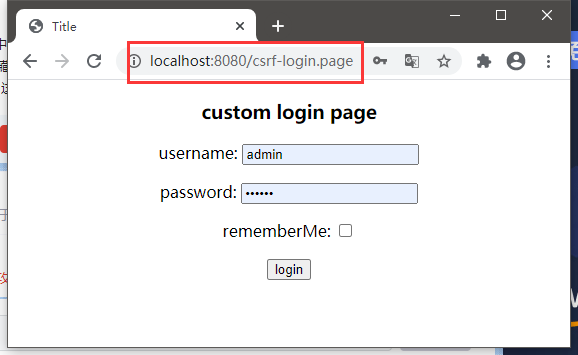
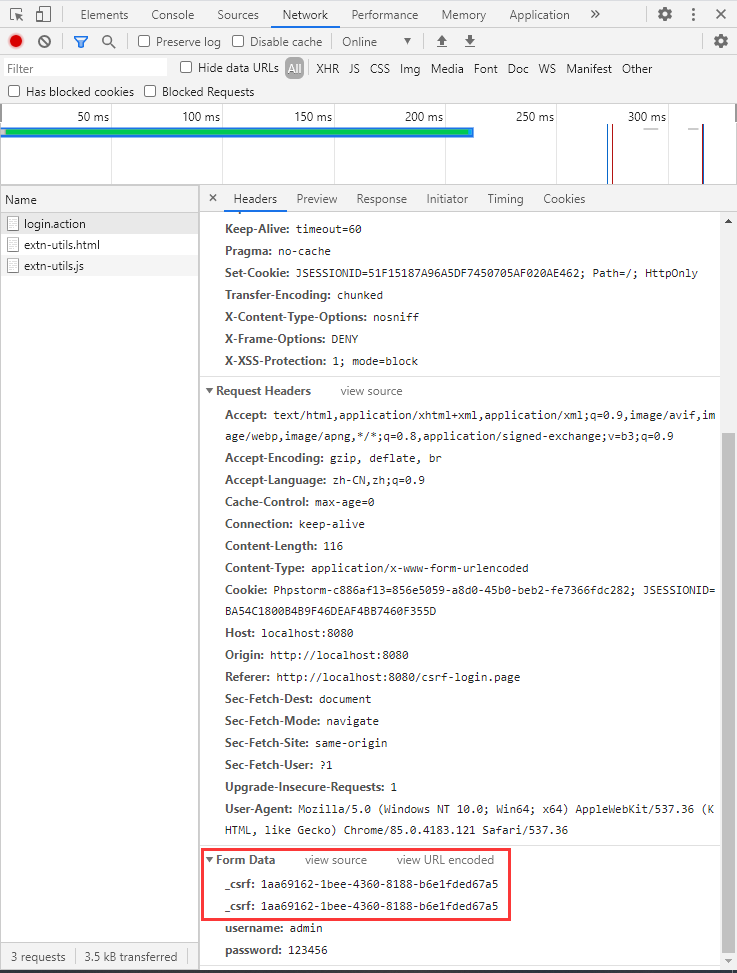
CSRF的显示在这里:
【Spring-Security】Re09 CSFR处理的更多相关文章
- Spring Security OAuth2 开发指南
官方原文:http://projects.spring.io/spring-security-oauth/docs/oauth2.html 翻译及修改补充:Alex Liao. 转载请注明来源:htt ...
- spring mvc 和spring security配置 web.xml设置
<?xml version="1.0" encoding="UTF-8"?> <web-app xmlns="http://xmln ...
- SPRING SECURITY JAVA配置:Web Security
在前一篇,我已经介绍了Spring Security Java配置,也概括的介绍了一下这个项目方方面面.在这篇文章中,我们来看一看一个简单的基于web security配置的例子.之后我们再来作更多的 ...
- 【OAuth2.0】Spring Security OAuth2.0篇之初识
不吐不快 因为项目需求开始接触OAuth2.0授权协议.断断续续接触了有两周左右的时间.不得不吐槽的,依然是自己的学习习惯问题,总是着急想了解一切,习惯性地钻牛角尖去理解小的细节,而不是从宏观上去掌握 ...
- spring security oauth2.0 实现
oauth应该属于security的一部分.关于oauth的的相关知识可以查看阮一峰的文章:http://www.ruanyifeng.com/blog/2014/05/oauth_2_0.html ...
- Spring Security(08)——intercept-url配置
http://elim.iteye.com/blog/2161056 Spring Security(08)--intercept-url配置 博客分类: spring Security Spring ...
- Spring Security控制权限
Spring Security控制权限 1,配置过滤器 为了在项目中使用Spring Security控制权限,首先要在web.xml中配置过滤器,这样我们就可以控制对这个项目的每个请求了. < ...
- Spring Security笔记:Hello World
本文演示了Spring Security的最最基本用法,二个页面(或理解成二个url),一个需要登录认证后才能访问(比如:../admin/),一个可匿名访问(比如:../welcome) 注:以下内 ...
- Spring Security笔记:自定义Login/Logout Filter、AuthenticationProvider、AuthenticationToken
在前面的学习中,配置文件中的<http>...</http>都是采用的auto-config="true"这种自动配置模式,根据Spring Securit ...
- spring session 和 spring security整合
背景: 我要做的系统前面放置zuul. 使用自己公司提供的单点登录服务.后面的业务应用也是spring boot支撑的rest服务. 目标: 使用spring security管理权限包括权限.用户请 ...
随机推荐
- FRDM-MCXN947开发板之i2c应用
介绍 MCXN947 NXP FRDM-MCXN947开发板是一款基于MCXN947 MCU的低成本评估板,MCU集成了双核Arm Cortex-M33微控制器和一个神经处理单元(NPU).开发板由一 ...
- INFINI Labs 产品更新 | 发布 Easysearch Java 客户端,Console 支持 SQL 查询等功能
近年来,日志管理平台越来越流行.使用日志管理平台可以实时地.统一地.方便地管理和查看日志,挖掘日志数据价值,驱动运维.运营,提升服务管理效率. 方案架构 Beats 是轻量级采集器,包括 Filebe ...
- Vue学习:3.V标签综合3
接上一篇... V标签综合使用:记事本案例 功能: 在实现列表渲染和删除功能的基础上,增加了数据添加以及数据统计,同时要求底部统计和清空区域在事件数目为0时不显示. 思路: 整体架构分为三部分:头部使 ...
- vue动态页签
效果图 前端 1 <template> 2 <!-- 总体情况 - 总览echarts --> 3 4 <div v-loading="loading" ...
- OceanBase 金融项目优化案例
领导让我帮忙支持下其他项目的SQL优化工作,呦西,是收集案例的好时机. 下面SQL都是在不能远程的情况下,按照原SQL的逻辑等价改写完成否发给现场同事验证. 案例一 慢SQL,4.32秒: SELEC ...
- JSONObject应用Json字符串和Object对象之间的转换,Map封装数据思路
JSONObject应用Json字符串和Object对象之间的转换,Map封装数据思路 package com.example.core.mydemo.json5; import com.alibab ...
- StringUtils.join()方法使用
* StringUtils.join()方法使用 打印输出: * 使用 StringBuilder 进行拼接:张三,李四,王五 * 使用 StringUtils.join 进行拼接:张三,李四,王五 ...
- 高德地图查询结果返回INVALID_USER_IP错误解决
高德地图查询结果返回INVALID_USER_IP错误解决 方法是添加白名单.IP白名单出错,发送请求的服务器IP不在IP白名单内开发者在LBS官网控制台设置的IP白名单不正确.白名单中未添加对应服务 ...
- MATLAB神经网络工具箱使用介绍
本文介绍MATLAB软件中神经网络拟合(Neural Net Fitting)工具箱的具体使用方法. 在MATLAB人工神经网络ANN代码这篇文章中,我们介绍了MATLAB软件中神经网络(AN ...
- 微信小程序自动化分析_包含执行设备及对应的微信版本
背景介绍: 微信小程序是基于腾讯自研 X5 内核,不是谷歌原生 webview. 实现方式: 1.小程序自动化sdk,使用自动化sdk,需要有小程序的开发者权限,以及参考的资料较少,2.选择采用app ...