
Vue05-Vuex
01. 什么是状态管理
在开发中,我们的应用程序需要处理各种各样的数据,这些数据需要保存在我们应用程序的某一个位置,对于这些数据的管理我们就称之为 状态管理。
在Vue开发中,我们使用组件化的开发方式:
在组件中我们定义data或者在setup中返回使用的数据,这些数据我们称之为state(状态);
在模块template中我们可以使用这些数据,模块最终会被渲染成DOM,我们称之为View;
在模块中我们会产生一些行为事件,处理这些行为事件时,有可能会修改state,这些行为事件我们称之为actions;

JavaScript开发的应用程序,已经变得越来越复杂了,这意味着JavaScript需要管理的状态越来越多了,
这些状态包括服务器返回的数据、缓存数据、用户操作产生的数据;
也包括一些UI的状态,比如某些元素是否被选中,是否显示加载动效,当前分页等等;
与此同时,状态之间相互会存在依赖,一个状态的变化会引起另一个状态的变化,这些都在加大状态管理的难度。
对于一些简单的状态,我们可以通过props的传递或者Provide的方式来共享状态;
但是对于复杂的状态管理,显然单纯通过传递和共享的方式是不足以解决问题的,这时候就需要专门的状态管理库了。
状态管理的第三方库有vuex和Pinia。
02. Vuex简介
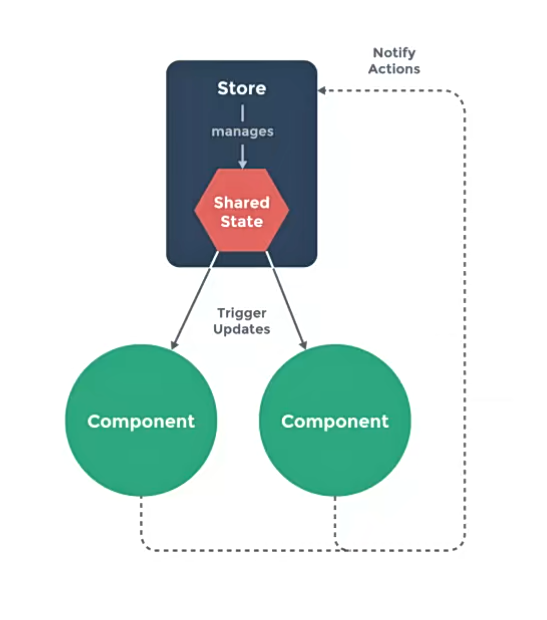
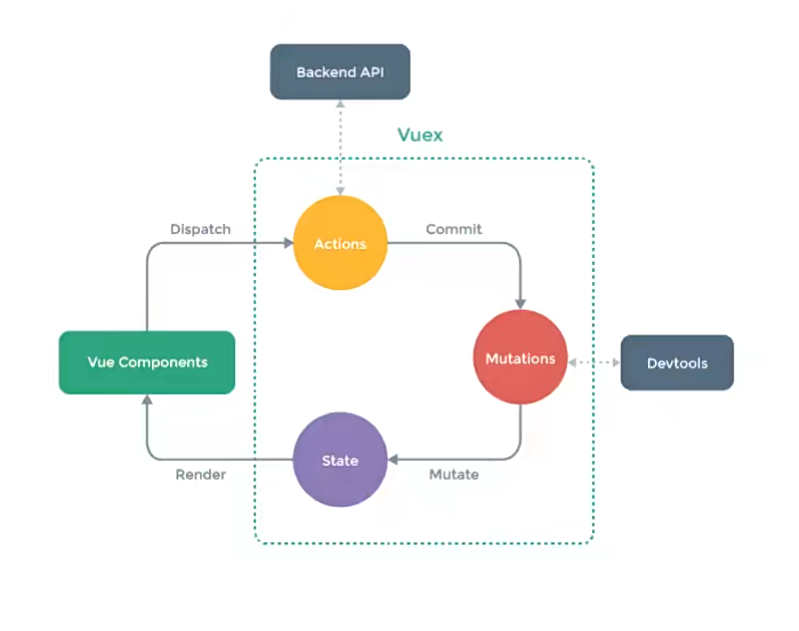
Vuex的状态管理图:
vuex将所有的state抽离存放于一个仓库Store,任何组件都可以去访问state。
- 组件读取state,进行渲染;组件不能直接修改state;
- 组件需要修改state时,需要派发(dispatch)一个行为(actions);
- 行为(actions)一般为访问服务器获取数据;
- 通过mutations修改state。
03. 安装vuex
npm install vuex
04. 从案例入手
我们从一个简单案例入手:在setup中定义了一个counter,在模板中显示这个counter。
常规写法
<template>

<div class="app">

    <!-- 以前写法 -->

    <h2>App当前计数: {{ counter }}</h2>

    </div>

</template>

<script setup>

    import {ref} from 'vue'

    const counter = ref(0)

</script>
运用vuex
每一个Vuex应用的核心就是store(仓库),store本质上是一个容器,它包含着应用中大部分的状态(state)。
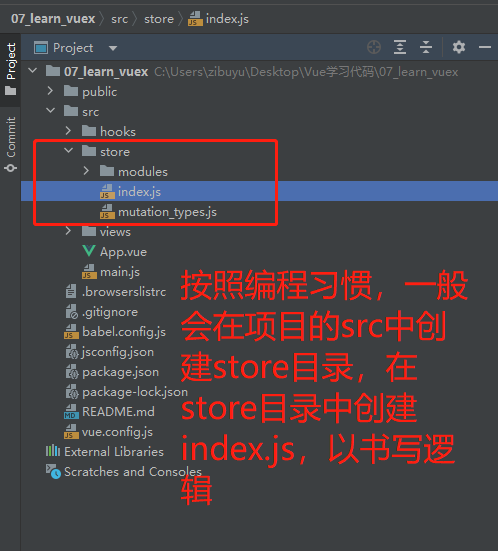
按照编程习惯,一般会在项目的src目录中,创建store目录,在store目录中创建index.js,在index.js中书写关于状态管理的逻辑。
Vuex和单纯的全局对象有什么区别呢?
第一:Vuex的状态存储是响应式的。当Vue组件从store中读取状态的时候,若store中的状态发生变化,那么相应的组件也会被更新;
第二:不能直接改变store中的状态。改变store中的状态的唯一途径就显示提交 (commit) mutation;
这样我们就可以方便跟踪每一个状态的变化,从而让我们能够通过一些工具帮助我们更好的管理应用的状态。
需要注意的是,一个项目只能创建一个store,这种官方的描述中被称为“单一状态树”。
单一状态树(SSOT,Single Source of Truth),也称为“单一数据源”。
这是vuex中的一个概念,指vuex用一个对象(一个store),就包含了全部的应用层级的状态。
App.vue:
<template>

    <div class="app">

        <!-- store中的counter:用 $store 访问-->

        <h2>App当前计数: {{ $store.state.counter }}</h2>

    </div>

</template>

<script setup>

    // 代码中需要先导入useStore

    import {useStore} from 'vuex'

    const store = useStore()

    function printCounter(){

        console.log(store.state.counter)

    }

</script>
index.js
import { createStore } from 'vuex'

const store = createStore({

    state: () => ({

        counter: 100,

    })

export default store
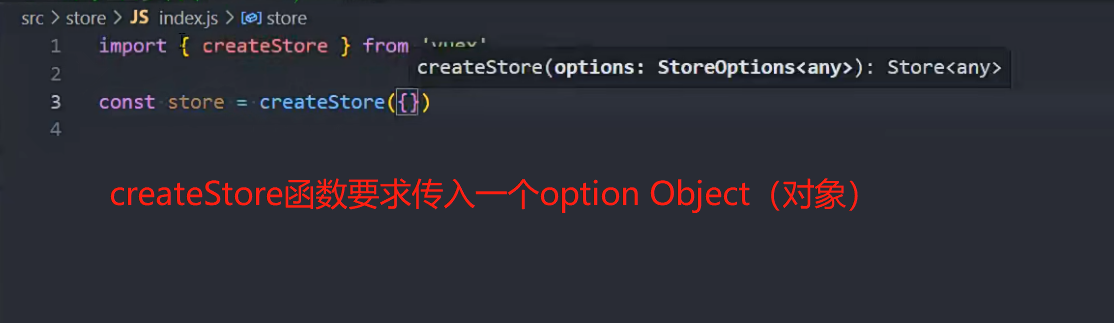
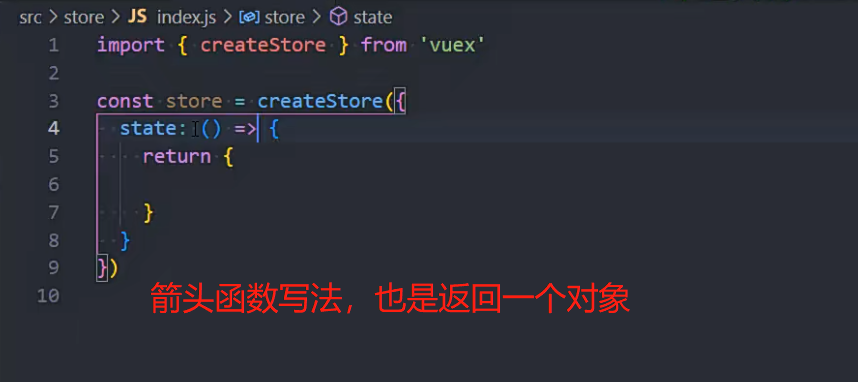
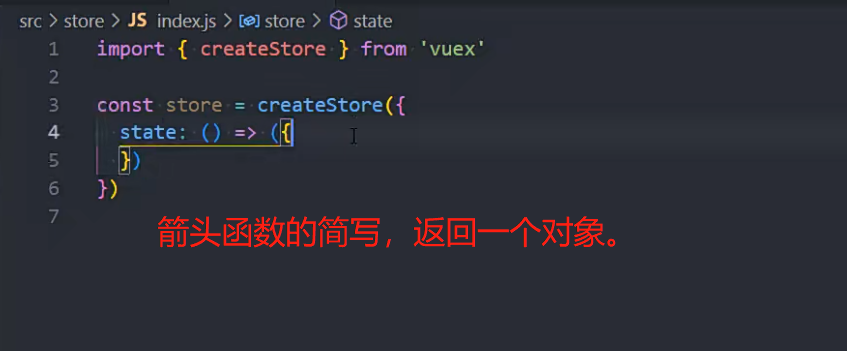
createStore函数的写法

05. mapState
在模板中访问state,一般的写法 $store.state.name,显得很冗长。
<template>

    <div class="app">

        <!-- 在模板中直接访问state -->

        <h2>name: {{ $store.state.name }}</h2>

        <h2>age: {{ $store.state.age }}</h2>

        <h2>avatar: {{ $store.state.avatarURL }}</h2>

    </div>

</template>
有没有更好的办法呢?你可能会想到computed。
<template>

    <div class="app">

        <!-- 通过computed访问state -->

        <h2>name: {{ name }}</h2>

        <h2>age: {{ age }}</h2>

        <h2>avatar: {{ avatar }}</h2>

    </div>

</template>

<script>

    export default {

        computed: {

            name(){

                return $store.state.name

            },

            age(){

                return $store.state.age

            },

            avatar(){

                return $store.state.avatarURL

            },

        }

    }

</script>
这种写法虽然简化了模板中的书写,但又需要在computed中定义函数,并没有优化多少。
vuex考虑到这种情况,提供了更简洁的写法,mapState函数。
mapState函数用于映射state到组件中,返回的是数组,内含一个个函数。
- 数组写法:需要保证state不与data中其他数据重名;
- 对象写法:可以给state取别名。
<template>

    <div class="app">

        <!-- mapState的数组写法 -->

        <h2>name: {{ name }}</h2>

        <h2>age: {{ age }}</h2>

        <h2>avatar: {{ avatarURL }}</h2>

        <!-- mapState的对象写法 -->

        <h2>name: {{ sName }}</h2>

        <h2>age: {{ sAge }}</h2>

    </div>

</template>

<script>

    import { mapState } from 'vuex'

    export default {

        computed: {

            // 舍弃这种繁琐的写法

            // name() {

            //   return this.$store.state.name

            // },

            // computed中可正常定义其他函数

            fullname() {

                return "xxx"

            },

            // 1. mapState的数组写法

            ...mapState(["name", "age", "avatarURL"]),

            // 2. mapState的对象写法:用于给变量取别名

            ...mapState({

                sName: state => state.name,

                sAge: state => state.age

            })

        }

    }

</script>
vuex适用于Vue2,或Vue3的optionAPI写法,
在setup中适用vuex,会略微繁琐。
官方推荐Vue3使用Pinia库作状态管理。
<template>

    <div class="app">

        <h2>name: {{ name }}</h2>

        <h2>age: {{ age }}</h2>

    </div>

</template>

<script setup>

    import { computed, toRefs } from 'vue'

    import { mapState, useStore } from 'vuex'

    import useState from "../hooks/useState"

    // 1.一步步完成

    // const { name, level } = mapState(["name", "level"])

    // 注意:name,level是函数,这个函数的执行需要传入store

    // setup中的computed函数要求传入一个函数,所以可以直接把上面的name和level传递进入,同时绑定所需要的store

    // const store = useStore()

    // const cName = computed(name.bind({ $store: store }))

    // const cLevel = computed(level.bind({ $store: store }))

    // 2.简洁写法:直接对store.state进行解构,同时赋予响应式。

    const store = useStore()

    const { name, age } = toRefs(store.state)

</script>
06. getters
如果我们在输出state之前,需要对数据进行逻辑处理,可以使用getters。
import {createStore} from 'vuex'

const store = createStore({

    state: () => ({

        name: "Mark",

        age: 18,

        height: 173,

        avatarURL: "http://xxxxxx",

        scores: [

            {id: 111, name: "语文", score: 89},

            {id: 112, name: "英语", score: 90},

            {id: 113, name: "数学", score: 96}

        ],

    }),

    getters: {

        // 1.基本使用:对身高进行格式化输出

        formatHeight(state) {

            return state.height / 100

        },

        // 1.复杂逻辑:计算总分

        totalScores(state) {

            return state.scores.reduce((preValue, item) => {

                return preValue + item.score

            }, 0)

        },

        // 3.在该getters属性中, 获取其他的getters

        message(state, getters) {

            return `name:${state.name} age:${state.age} height:${getters.height}`

        },

        // 4.getters也可以返回一个函数, 调用这个函数可以传入参数(了解)

        getScoreById(state) {

            return function (id) {

                 // 数组的find用法。

                const score = state.scores.find(item => item.id === id)

                return score

            }

        }

    },

})

export default store
07. mapGetters
为了方便对getters的使用,vuex也提供了mapGetters函数,使用方法于mapState类似。
<template>

  <div class="app">

    <h2>formatHeight: {{ formatHeight }}</h2>

    <h2>totalScores: {{ totalScores }}</h2>

    <h2>message: {{ message }}</h2>

    <!-- 根据id获取某一科目的成绩 -->

    <h2>id-111的科目分数: {{ getScoreById(111) }}</h2>

    <h2>id-112的科目分数: {{ getScoreById(112) }}</h2>

  </div>

</template>

<script>

    import { mapGetters } from 'vuex'

    export default {

        computed: {

            ...mapGetters(["formatHeight", "totalScores",'message']),

            ...mapGetters(["getScoreById"])

        }

    }

</script>
setup中使用:
<script setup>

    import { computed, toRefs } from 'vue';

    import { mapGetters, useStore } from 'vuex'

    const store = useStore()

    // 1.使用mapGetters

    // const { message: messageFn } = mapGetters(["message"])

    // const message = computed(messageFn.bind({ $store: store }))

    // 2.直接解构, 并且包裹成ref,提供响应式

    // const { message } = toRefs(store.getters)

    // 3.针对某一个getters属性使用computed,比mapGetters好用

    const message = computed(() => store.getters.message)

</script>
08. mutations
更改 Vuex 的 store 中的状态的唯一方法是提交 mutation。
在mutations中书写对应的函数,默认会传入一个参数state,用于获取所有的state
import {createStore} from 'vuex'

import {CHANGE_INFO} from './mutation_types'

import homeModule from './modules/home'

import counterModule from './modules/counter'

import {CHANGE_INFO} from "@/store/mutation_types"

const store = createStore({

    state: () => ({

        name: "Mark",

        age: 18,

        height: 173,

        avatarURL: "http://xxxxxx",

        scores: [

            {id: 111, name: "语文", score: 89},

            {id: 112, name: "英语", score: 90},

            {id: 113, name: "数学", score: 96}

        ],

    }),

    getters: {

        // 1.基本使用:对身高进行格式化输出

        formatHeight(state) {

            return state.height / 100

        },

        // 1.复杂逻辑:计算总分

        totalScores(state) {

            return state.scores.reduce((preValue, item) => {

                return preValue + item.score

            }, 0)

        },

        // 2.在该getters属性中, 获取其他的getters

        message(state, getters) {

            return `name:${state.name} age:${state.age} height:${getters.height}`

        },

        // 3.getters也可以返回一个函数, 调用这个函数可以传入参数(了解)

        getScoreById(state) {

            return function (id) {

                const score = state.scores.find(item => item.id === id)

                return score

            }

        }

    },

    mutations: {

        incrementAge(state) {

            state.age++

        },

        changeName(state, payload) {

            state.name = payload

        },

        changeInfo(state, newInfo) {

            state.age = newInfo.age

            state.name = newInfo.name

        },

        // 使用常量的写法:

        [CHANGE_INFO](state, newInfo) {

            state.age = newInfo.age

            state.name = newInfo.name

        },

    },

})

export default store
组件中应用:
<template>

<div class="app">

    <button @click="changeName">修改name</button>

    <button @click="incrementAge">递增age</button>

    <button @click="changeInfo">修改info</button>

    <h2>Store Name: {{ $store.state.name }}</h2>

    <h2>Store Level: {{ $store.state.level }}</h2>

    </div>

</template>

<script>

    import {CHANGE_INFO} from "@/store/mutation_types"

    export default {

        computed: {},

        methods: {

            changeName() {

                // 这种写法虽然可以修改值,但不推荐。

                // this.$store.state.name = "Tom"

                this.$store.commit("changeName", "Tom")  // 第一个参数为mutations中的名称,第二个参数为值

            },

            incrementAge() {

                this.$store.commit("incrementAge")

            },

            changeInfo() {

                this.$store.commit(changeInfo, {

                    name: "Tom",

                    age: 20

                })

            },

            // 使用常量的写法:

            changeInfo() {

                this.$store.commit(CHANGE_INFO, {

                    name: "Tom",

                    age: 20

                })

            }

        }

    }

</script>
store/mutation_types.js:
export const CHANGE_INFO = "changeInfo"
mutation是重要原则: mutation 必须是同步函数,不要执行异步操作。
这是因为devtool工具会记录mutation的日志;
每一条mutation被记录,devtools都需要捕捉到前一状态和后一状态的快照;
但是在mutation中执行异步操作,就无法追踪到数据的变化;
对于异步操作,vuex放在action中。
09. mapMutations
为了方便对Mutations的使用,vuex也提供了mapMutations函数,使用方法于mapState类似。
<template>

<div class="app">

    <button @click="changeName('王小波')">修改name</button>

    <button @click="incrementAge">递增Age</button>

    <button @click="changeInfo({ name: '王二', age: 22 })">修改info</button>

    <h2>Store Name: {{ $store.state.name }}</h2>

    <h2>Store Level: {{ $store.state.level }}</h2>

    </div>

</template>

<script>

    import { mapMutations } from 'vuex'

    import { CHANGE_INFO } from "@/store/mutation_types"

    export default {

        computed: {

        },

        methods: {

            btnClick() {

                console.log("btnClick")

            },

            // 注意这里通过CHANGE_INFO取出常量,但模板中使用的是changeInfo

            // ...mapMutations(["changeName", "incrementAge", CHANGE_INFO])

        }

    }

</script>

<script setup>

    import { mapMutations, useStore } from 'vuex'

    import { CHANGE_INFO } from "@/store/mutation_types"

    const store = useStore()

    // 手动的映射和绑定

    const mutations = mapMutations(["changeName", "incrementLevel", CHANGE_INFO])

    const newMutations = {}

    Object.keys(mutations).forEach(key => {

        newMutations[key] = mutations[key].bind({ $store: store })

    })

    const { changeName, incrementLevel, changeInfo } = newMutations

</script>
10. actions
Action类似于mutation,不同在于:
Action提交的是mutation,而不是直接变更状态;
Action可以包含任意异步操作;
在actions中书写函数,默认会传入一个参数context(上下文)。可以通过context访问到当前的state和getters。
context.commit(mutation名称) 用于提交mutation
import {createStore} from 'vuex'

const store = createStore({

    // ...

    actions: {

        incrementAction(context) {

            // console.log(context.commit) // 用于提交mutation

            // console.log(context.getters) // 访问getters

            // console.log(context.state) // 访问state

            context.commit("incrementAge")

        },

        changeNameAction(context, payload) {

            context.commit("changeName", payload)

        },

    },

    // ...

}
在组件中运用:通过 $store.dispatch
<template>

<div class="home">

    <h2>当前计数: {{ $store.state.counter }}</h2>

    <button @click="counterBtnClick">发起action修改counter</button>

    <h2>name: {{ $store.state.name }}</h2>

    <button @click="nameBtnClick">发起action修改name</button>

    </div>

</template>

<script>

    export default {

        methods: {

            counterBtnClick() {

                this.$store.dispatch("incrementAction")

            },

            nameBtnClick() {

                this.$store.dispatch("changeNameAction", "aaa")

            }

        }

    }

</script>
setup直接定义函数即可。
action中进行网络请求,继而处理请求得到的数据。
import {createStore} from 'vuex'

const store = createStore({

    actions: {

        incrementAction(context) {

            // console.log(context.commit) // 用于提交mutation

            // console.log(context.getters) // getters

            // console.log(context.state) // state

            context.commit("increment")

        },

        changeNameAction(context, payload) {

            context.commit("changeName", payload)

        },

        // 以下模拟网络请求

        // fetchHomeMultidataAction(context) {

        //   // 1.返回Promise, 给Promise设置then

        //   // fetch("http://123.207.32.32:8000/home/multidata").then(res => {

        //   //   res.json().then(data => {

        //   //     console.log(data)

        //   //   })

        //   // })

        //   // 2.Promise链式调用

        //   // fetch("http://123.207.32.32:8000/home/multidata").then(res => {

        //   //   return res.json()

        //   // }).then(data => {

        //   //   console.log(data)

        //   // })

        //   return new Promise(async (resolve, reject) => {

        //     // 3.await/async

        //     const res = await fetch("http://123.207.32.32:8000/home/multidata")

        //     const data = await res.json()

        //     // 修改state数据

        //     context.commit("changeBanners", data.data.banner.list)

        //     context.commit("changeRecommends", data.data.recommend.list)

        //     resolve("aaaaa")

        //   })

        // }

    },

})

export default store
11. mapActions
<template>

    <div class="home">

        <h2>当前计数: {{ $store.state.counter }}</h2>

        <button @click="incrementAgeBtn">发起action修改Age</button>

        <h2>name: {{ $store.state.name }}</h2>

        <button @click="changeNameBtn('bbbb')">发起action修改name</button>

    </div>

</template>

<script>

    import { mapActions } from 'vuex'

    export default {

        methods: {

            // incrementAgeBtn() {

            //   this.$store.dispatch("incrementAction")

            // },

            // changeNameBtn() {

            //   this.$store.dispatch("changeNameAction", "aaa")

            // }

            // 这种方法需要注意的调用名称需一致

            // ...mapActions(["incrementAction", "changeNameAction"])

        }

    }

</script>

<!-- ↓ setup写法 ↓ -->

<script setup>

    import { useStore, mapActions } from 'vuex'

    const store = useStore()

    // 1.在setup中使用mapActions辅助函数

    // const actions = mapActions(["incrementAction", "changeNameAction"])

    // const newActions = {}

    // Object.keys(actions).forEach(key => {

    //   newActions[key] = actions[key].bind({ $store: store })

    // })

    // const { incrementAction, changeNameAction } = newActions

    // 2.使用默认的做法

    function increment() {

        store.dispatch("incrementAction")

    }

</script>
12. module
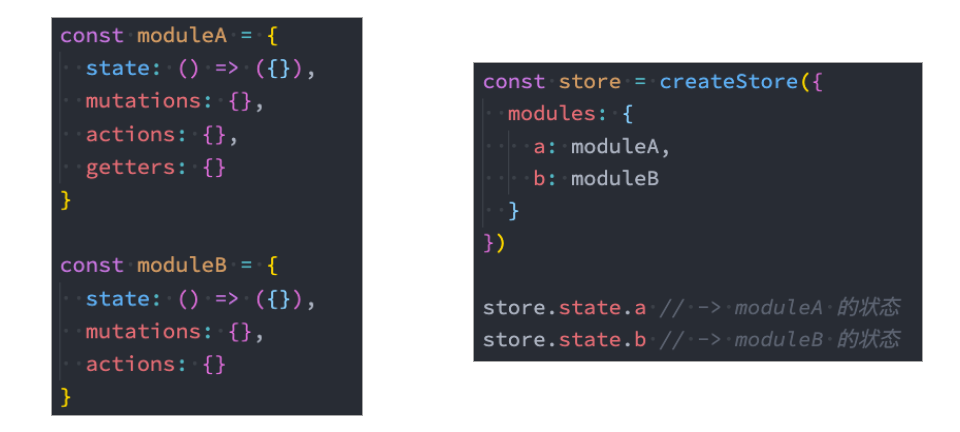
由于使用单一状态树,应用的所有状态会集中到一个比较大的对象,当应用变得非常复杂时,store 对象就有可能变得相当臃肿;
为了解决以上问题,Vuex 允许我们将 store 分割成模块(module);
每个模块拥有自己的 state、mutation、action、getter、甚至是嵌套子模块。
使用module时,mutation、action和getter会自动合并到一起,所以在模板中可以直接通过
$store.getters.xxxx去调用;而state是独立的,在模板中需要用
$store.state.module_name.state_name去访问。由于mutation、action和getter会自动合并到一起,一起放到全局,所以对于这些函数的命名需要特别小心,重名就会被覆盖;
为了避免重名问题,也可以设置namespace。
index.js:
import {createStore} from 'vuex'

import homeModule from './modules/home'

import counterModule from './modules/counter'

const store = createStore({

    state: () => ({

        name: "Mark",

        age: 18,

        height: 173,

        rootCounter: 100,

        avatarURL: "http://xxxxxx",

        scores: [

            {id: 111, name: "语文", score: 89},

            {id: 112, name: "英语", score: 90},

            {id: 113, name: "数学", score: 96}

        ],

    }),

    // ......

    modules: {

        home: homeModule,

        counter: counterModule

    }

})

export default store
home.js:
export default {

    state: () => ({

        // 服务器数据

        banners: [],

        recommends: []

    }),

    mutations: {

        changeBanners(state, banners) {

            state.banners = banners

        },

        changeRecommends(state, recommends) {

            state.recommends = recommends

        }

    },

    actions: {

        // 向服务器发起请求,获取home页面数据

        fetchHomeMultidataAction(context) {

            return new Promise(async (resolve, reject) => {

                // 3.await/async

                const res = await fetch("http://123.207.32.32:8000/home/multidata")

                const data = await res.json()

                // 修改state数据

                context.commit("changeBanners", data.data.banner.list)

                context.commit("changeRecommends", data.data.recommend.list)

                resolve("aaaaa")

            })

        }

    }

}
counter.js:
const counter = {

    namespaced: true,

    state: () => ({

        count: 99

    }),

    mutations: {

        incrementCount(state) {

            state.count++

        }

    },

    getters: {

        // 注意:module中,getters函数有第三个参数rootState

        doubleCount(state, getters, rootState) {

            return state.count + rootState.rootCounter

        }

    },

    actions: {

        incrementCountAction(context) {

            context.commit("incrementCount")

        }

    }

}

export default counter
对store的代码逻辑进行拆分后,在组件中如何访问数据呢?
<template>

    <div class="home">

        <h2>Home Page</h2>

        <ul>

            <!-- 获取数据: 需要从模块中获取 state.modulename.xxx -->

            <template v-for="item in $store.state.home.banners" :key="item.acm">

                <li>{{ item.title }}</li>

        	</template>

        </ul>

        <h2>Counter Page</h2>

        <!-- 使用state时, 是需要state.moduleName.xxx -->

        <h2>Counter模块的counter: {{ $store.state.counter.count }}</h2>

        <!-- 使用getters时, 默认可以直接getters.xxx -->

        <!--  <h2>Counter模块的doubleCounter: {{ $store.getters.doubleCount }}</h2>-->

        <!--  如果设置了namespace,则需要用下面的方式: -->

        <h2>Counter模块的doubleCounter: {{ $store.getters["counter/doubleCount"] }}</h2>

        <button @click="incrementCount">count模块+1</button>

    </div>

</template>

<script>

</script>

<script setup>

    import { useStore } from 'vuex'

    const store = useStore()

    // 默认:dispatch一个action的时候,直接调用即可

    store.dispatch("fetchHomeMultidataAction").then(res => {

        console.log("home中的then被回调:", res)

    })

    // 如果module中设置了 namespaced: true, 那么dispatch时就需要加上模块名

    function incrementCount() {

        store.dispatch("counter/incrementCountAction")

  	}

</script>
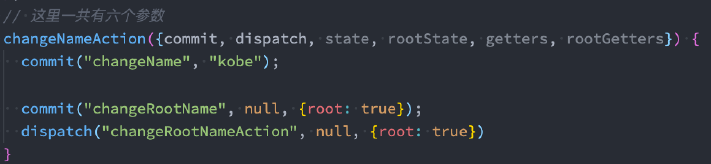
在module中,如果希望修改root中的state,有如下方式:
(完)
Vue05-Vuex的更多相关文章
- 关于Vue.js 2.0 的 Vuex 2.0,你需要更新的知识库
应用结构 实际上,Vuex 在怎么组织你的代码结构上面没有任何限制,相反,它强制规定了一系列高级的原则: 应用级的状态集中放在 store 中. 改变状态的唯一方式是提交mutations,这是个同步 ...
- vuex复习方案
这次复习vuex,发现官方vuex2.0的文档写得太简略了,有些看不懂了.然后看了看1.0的文档,感觉很不错.那以后需要复习的话,还是先看1.0的文档吧.
- vuex 初体验
vuex是vue的状态管理工具,vue进阶从es6和npm开始,es6推荐阮一峰大神的教程. vuex学习从官方文档和一个记忆小游戏开始.本着兴趣为先的原则,我先去试玩了一把-->. Vuex ...
- vuex(1.0版本写法)
Vuex 是一个专门为 Vue.js 应用所设计的集中式状态管理架构. 官方文档:http://vuex.vuejs.org/zh-cn/ 2.0和1.0都能在此找到 每一个 Vuex 应用的核心就 ...
- 关于Vue vuex vux 文档
01. vue 链接 http://vuejs.org.cn/guide/ 02. vuex ----->>状态管理模块儿<<------- https://vuex.vue ...
- vuex
英文:(Introduction)中文:https://github.com/vuejs/vuex/issues/176(贡献者努力中)
- Vue 2.0 + Vue Router + Vuex
用 Vue.js 2.x 与相配套的 Vue Router.Vuex 搭建了一个最基本的后台管理系统的骨架. 当然先要安装 node.js(包括了 npm).vue-cli 项目结构如图所示: ass ...
- Vue2.X的状态管理vuex记录
记住上述的顺序情况:想要改变state,只能通过Mutation,虽然action可以直接改变state,这样会使每个状态可以方便的跟踪和记录(用Devtools跟踪) vue Method -- ...
- 在vue1.0遇到vuex和v-model的坑
事情是这样的,在开发项目的过程中我使用了vuex并且在store中定义了一个保存用户信息的对象 userInfo : { 'nickName' : '', // 昵称 'password' :'', ...
- vuex 笔记
Vuex 笔记 一个简单的状态管理 单一数据源: const sourceOfTruth = {} const vmA = new Vue({ data: sourceOfTruth }) const ...
随机推荐
- hive grouping set
reference https://www.cnblogs.com/erlou96/p/13564191.html data-demo 2015-03,2015-03-10,cookie1 2015- ...
- Unity的IFilterBuildAssemblies:深入解析与实用案例
Unity IFilterBuildAssemblies Unity IFilterBuildAssemblies是Unity引擎中的一个非常有用的功能,它可以让开发者在构建项目时自定义哪些程序集需要 ...
- [golang]字符串拼接
前言 在go语言中,因为字符串只能被访问,不能被修改,所以进行字符串拼接的时候,golang都需要进行内存拷贝,造成一定的性能消耗. 方式1:操作符 + 特点:简单,可读性良好.每次拼接都会产生内存拷 ...
- 10、Spring之AOP概述
10.1.概念 AOP(Aspect Oriented Programming)是一种设计思想,是软件设计领域中的面向切面编程 AOP是面向对象编程(OOP)的一种补充和完善,OOP是纵向继承机制,A ...
- C语言下载minGW地址
https://sourceforge.net/projects/mingw-w64/files/ 下载红框内即可
- Python之os模块常用命令
OS模块介绍 os模块是Python标准库中的一个用于访问操作系统相关功能的模块,os模块提供了一种可移植的使用 操作系统功能的方法.使用os模块中提供的接口,可以实现跨平台访问.该模块包含了大量的操 ...
- 《CTFshow-Web入门》02. Web 11~20
@ 目录 web11 题解 原理 web12 题解 web13 题解 web14 题解 web15 题解 web16 题解 原理 web17 题解 web18 题解 原理 web19 题解 web20 ...
- 吃透单调栈(2)——解两道Hard题:接雨水、柱状图中最大的矩形问题
怎么想到要用单调栈的? 这类题目的数据通常是一维数组,要寻找任一个元素的右边或者左边第一个比自己大或者小的元素的位置(寻找边界),此时我们就要想到可以用单调栈了. 42. 接雨水 这道题就是要求解每一 ...
- 小白弄明白了 unix 时间戳的转换问题
小白对于将 unix 时间戳转换为日期时间和使用日期时间转换为 unix 时间戳,在项目中见到过很多,每次使用时不是用现有的方法转换就是网上搜索方法. 小白见过各种转换方式觉得moment库很是方便, ...
- Vue源码学习(七):合并生命周期(混入Vue.Mixin)
好家伙, 1.使用场景 现在来,来想一下,作为一个使用Vue的开发者,假设现在我们要使用created(),我们会如何使用 1.1. .vue文件中使用 <template> < ...