
vue+element-ui小笔记
1.图片加载失败,给默认图,两种解决方法:
方法一:
给img标签加 onerror指令,然后在data中给 errorGoodsImg 赋值,根据自己所需图片路径赋值
<img :src="imgSrc+scope.row.fileId" id="avatarImg" v-if="scope.row.fileId" :onerror="errorGoodsImg">
小颖的目录:
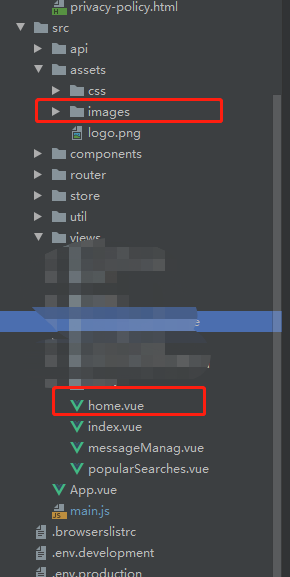
data中,errorGoodsImg的值如下:
errorGoodsImg: 'this.src="' + require('../assets/images/new.jpg') + '"',
方法二:
调用 element-ui 中的 <el-image> 标签,可通过slot = error可自定义加载失败内容
eg:
<el-image v-if="userInfo.credentialsFileId" style="width: 75px; height: 115px" :src="imgSrc+userInfo.credentialsFileId" :preview-src-list="srcList">

     <div slot="error" class="image-slot">

          <i class="el-icon-picture-outline"></i>

     </div>

</el-image>
2.form表单中,输入框加回车事件,页面刷新,如何解决?
解决方法就是在form中添加:@submit.native.prevent
示例:
html代码:
<template>

    <div class="ceshi-form-tem right-content-tem">

        <el-form ref="form" :model="userInfo" label-width="100px" class="userInfo-form" @submit.native.prevent>

            <el-row>

                <el-col :span="12">

                    <p class="form-title-tem">基本信息</p>

                </el-col>

                <el-col :span="12" class="txt-right">

                    <el-form-item>

                        <el-button type="primary" @click="onSubmit('form')" :loading="btnUserLoading">

                            保存

                        </el-button>

                    </el-form-item>

                </el-col>

            </el-row>

            <el-form-item label="头像">

                <el-upload

                        style="width: 30%"

                        action="https://jsonplaceholder.typicode.com/posts/"

                        accept=".jpg,.png"

                        :on-remove="handleRemoveAvatar"

                        :beforeUpload="beforeAvatarUpload"

                        :on-error="onError"

                        :on-success="onSuccess"

                        :limit="1">

                    <img v-if="userInfo.avatar" :src="userInfo.avatar" :onerror="errorGoodsImg"

                         class="userInfo-avatar">

                    <img v-else src="../assets/img/tu4.png" class="userInfo-avatar">

                </el-upload>

            </el-form-item>

            <el-form-item

                    label="昵称"

                    prop="nickname">

                <p v-if="!userInfoEdit.nickname">{{userInfo.nickname}}

                    <i class="el-icon-edit" @click="showInput('nickname')"></i>

                </p>

                <el-input ref="customerInput" v-else maxlength="6" placeholder="请输入昵称" v-model="userInfo.nickname"

                          @keyup.enter.native="handleInputConfirm('nickname')"

                          @blur="handleInputConfirm('nickname')"></el-input>

            </el-form-item>

            <el-form-item label="姓名">

                <p>{{userInfo.username}}</p>

            </el-form-item>

            <el-form-item label="性别">

                <el-radio-group v-model="userInfo.sex" @change="changeSex">

                    <el-radio :label="1">男</el-radio>

                    <el-radio :label="0">女</el-radio>

                </el-radio-group>

            </el-form-item>

            <!--普通用户-->

            <el-form-item label="所属机构">

                <p v-if="!userInfoEdit.organizationName">{{userInfo.organizationName}}<i class="el-icon-edit" @click="showInput('organizationName')"></i></p>

                <el-input ref="customerInput" v-if="userInfoEdit.organizationName" maxlength="6" placeholder="请输入所属机构"

                          v-model="userInfo.organizationName"

                          @keyup.enter.native="handleInputConfirm('organizationName')"

                          @blur="handleInputConfirm('organizationName')"></el-input>

            </el-form-item>

        </el-form>

    </div>

</template>
js代码:
<script>

    export default {

        name: "formCeshi",

        data(){

            return {

                btnUserLoading: false,

                errorGoodsImg: 'this.src="' + require('../assets/img/tu4.png') + '"',

                userInfo: {

                    avatar: '',

                    nickname: 'v',

                    username: '测试',

                    sex: 1,

                    organizationName: '杀杀杀'

                },

                userInfoEdit: {

                    nickname: false,

                    organizationName: false

                },

                haveChange: false

            }

        },

        mounted() {

            this.haveChange = false

        },

        methods: {

            onSubmit(formName) {

                const that = this

                if (!that.haveChange) {

                    that.$message({

                        message: '当前没有任何修改',

                        type: 'warning'

                    });

                    return

                }

                that.btnUserLoading = true

                that.$refs[formName].validate((valid) => {

                    if (valid) {

                        that.btnUserLoading = false

                    //    调接口

                    } else {

                        that.btnUserLoading = false

                        return false;

                    }

                });

            },

            showInput(key) {

                switch (key) {

                    case'nickname':

                        this.userInfoEdit.nickname = true;

                        break

                    case'organizationName':

                        this.userInfoEdit.organizationName = true;

                        break

                }

                this.$nextTick(function () {

                    this.$refs.customerInput.$el.querySelector('input').focus();

                });

            },

            handleInputConfirm(key) {

                this.haveChange = true

                switch (key) {

                    case'nickname':

                        this.userInfoEdit.nickname = false;

                        break

                    case'organizationName':

                        this.userInfoEdit.organizationName = false;

                        break

                }

            },

            handleRemoveAvatar(file, fileList) {

                this.userInfo.avatar = ''

            },

            beforeAvatarUpload(file) {

                let fileend = file.name.substring(file.name.lastIndexOf("."))

                //jpg、png、bmp

                const isZip = (fileend === '.jpg' || file.type === 'jpg') || (fileend === '.png' || file.type === 'png')

                if (!isZip) {

                    this.$message.error('您只能上传jpg、png格式的图片!')

                }

                const isLt2G = file.size / 1024 / 1024 < 1;

                if (!isLt2G) {

                    this.$message.error('上传的图片大小必须小于1MB!')

                }

                return isZip && isLt2G

            },

            onSuccess(file, res, fileList) {

                if (res.response.code != 200) {

                    this.$message.error('上传头像失败');

                } else {

                    this.haveChange = true

                    this.userInfo.avatar = URL.createObjectURL(file.raw);

                }

            },

            onError(err, file, fileList) {

                const errMsg = JSON.parse(err.message)

                this.$message.error(errMsg.msg ? errMsg.msg : '上传头像失败');

            },//修改性别

            changeSex() {

                this.haveChange = true

            }

        }

    }

</script>
css
<style scoped>

    form.userInfo-form {

        width: 400px;

        margin: 40px auto 0 auto;

    }

    img.userInfo-avatar {

        width: 48px;

        height: 48px;

        border-radius: 50%;

    }

</style>
3.使用在线主题生成工具,修改element自定义主题色
打开在线主题编辑器,在该页面中根据自己的需求,更改颜色,修改完后,下载主题包,然后在项目中引入就可以了。

持续更新.......................................
秀两张我家仔仔的盛世美颜:


vue+element-ui小笔记的更多相关文章
- vue + element ui 实现实现动态渲染表格
前言:之前需要做一个页面,能够通过表名动态渲染出不同的表格,这里记录一下.转载请注明出处:https://www.cnblogs.com/yuxiaole/p/9786326.html 网站地址:我的 ...
- vue + element ui 表格自定义表头,提供线上demo
前言:工作中用到 vue+element ui 的前端框架,需要使用自定义表头,需要使用 re.转载请注明出处:https://www.cnblogs.com/yuxiaole/p/9710826.h ...
- vue+element ui 的表格列使用组件
前言:工作中用到 vue+element ui 的前端框架,有这个场景:很多表格的列有许多一样的,所以考虑将列封装为组件.转载请注明出处:https://www.cnblogs.com/yuxiaol ...
- Vue+element ui table 导出到excel
需求: Vue+element UI table下的根据搜索条件导出当前所有数据 参考: https://blog.csdn.net/u010427666/article/details/792081 ...
- 基于vue(element ui) + ssm + shiro 的权限框架
zhcc 基于vue(element ui) + ssm + shiro 的权限框架 引言 心声 现在的Java世界,各种资源很丰富,不得不说,从分布式,服务化,orm,再到前端控制,权限等等玲琅满目 ...
- 分享一个自搭的框架,使用Spring boot+Vue+Element UI
废弃,新的:https://www.cnblogs.com/hackyo/p/10453243.html 特点:前后端分离,可遵循restful 框架:后端使用Spring boot,整合了aop.a ...
- Vue + Element UI 实现权限管理系统
Vue + Element UI 实现权限管理系统 前端篇(一):搭建开发环境 https://www.cnblogs.com/xifengxiaoma/p/9533018.html
- vue+element ui 的上传文件使用组件
前言:工作中用到 vue+element ui 的前端框架,使用到上传文件,则想着封装为组件,达到复用,可扩展.转载请注明出处:https://www.cnblogs.com/yuxiaole/p/9 ...
- vue+element ui 的tab 动态增减,切换时提示用户是否切换
前言:工作中用到 vue+element ui 的前端框架,动态添加 Tab,删除 Tab,切换 Tab 时提示用户是否切换等,发现 element ui 有一个 bug,这里记录一下如何实现.转载 ...
- 基于 vue+element ui 的cdn网站(多页面,都是各种demo)
前言:这个网站持续更新中...,有网上预览,github上也有源码,喜欢记得star哦,欢迎留言讨论. 网站地址:我的个人vue+element ui demo网站 github地址:yuleGH g ...
随机推荐
- c#如何使用WASM跨语言调用?
介绍Wasm(WebAssembly) WebAssembly(简称Wasm)是一种用于基于堆栈的虚拟机的二进制指令格式.Wasm被设计为编程语言的可移植编译目标,支持在web上部署客户端和服务器应用 ...
- 使用 Vue 实现页面访问拦截
目录 1 Vue 路由与导航守卫 1.1 Vue 路由简介 1.2 导航守卫概述 2 实现访问拦截的核心概念 2.1 路由守卫介绍 2.1.1 前置守卫(beforeEach) 2.1.2 后置钩子( ...
- ubuntu20.4操作指令合集
每个指令前面尽量加上sudo,避免麻烦的权限问题 下载软件:sudo apt install 包名 开启/关闭防火墙(开启/关闭所有端口):sudo ufw enable/disable 防火墙状态: ...
- python 面试题第一弹
1. 如何理解Python中的深浅拷贝 浅拷贝(Shallow Copy)创建一个新的对象,该对象的内容是原始对象的引用.这意味着新对象与原始对象共享相同的内存地址,因此对于可变对象来说,如果修改了其 ...
- 《最新出炉》系列入门篇-Python+Playwright自动化测试-15-playwright处理浏览器多窗口切换
1.简介 浏览器多窗口的切换问题相比大家不会陌生吧,之前宏哥在java+selenium系列文章中就有介绍过.大致步骤就是:使用selenium进行浏览器的多个窗口切换测试,如果我们打开了多个网页,进 ...
- 2023-09-03:用go编写。给你一个 n 个节点的无向无根树,节点编号从 0 到 n - 1 给你整数 n 和一个长度为 n - 1 的二维整数数组 edges , 其中 edges[i] =
2023-09-03:用go语言编写.给你一个 n 个节点的无向无根树,节点编号从 0 到 n - 1 给你整数 n 和一个长度为 n - 1 的二维整数数组 edges , 其中 edges[i] ...
- 性能调优 session 1 - 计算机体系结构 量化研究方法
近期本人参与的存储系统项目进入到性能调优阶段,当前系统的性能指标离项目预期目标还有较大差距.本人一直奉行"理论指导下的实践",尤其在调试初期,更要抓住主要矛盾,投入最少的资源来获取 ...
- 地表最帅缓存Caffeine
简介 缓存是程序员们绕不开的话题,像是常用的本地缓存Guava,分布式缓存Redis等,是提供高性能服务的基础.今天敬姐带大家一起认识一个更高效的本地缓存--Caffeine. Caffeine Ca ...
- RabbitMQ 如何实现延迟队列?
延迟队列是指当消息被发送以后,并不是立即执行,而是等待特定的时间后,消费者才会执行该消息. 延迟队列的使用场景有以下几种: 未按时支付的订单,30 分钟过期之后取消订单. 给活跃度比较低的用户间隔 N ...
- 钉钉旧版服务端SDK支持异步方法的升级改造
最近项目中需要对接钉钉,有些钉钉 API 的访问需要使用旧版服务端 SDK 才能搞定,但是这个 SDK 使用的还是 .NET Framework 2.0 框架,不能跨平台部署,也不支持 async\a ...