
安装华为软件昇腾mindspore-gpu-1.9.0失败记录
官网安装地址:
https://www.mindspore.cn/install
PS: 不得不说华为的软件是愈发的不好用了,这个mindspore老版本去年我是使用过的,安装也是比较方便的,搞不清这优化来优化去咋变的这么不好安装了呢。
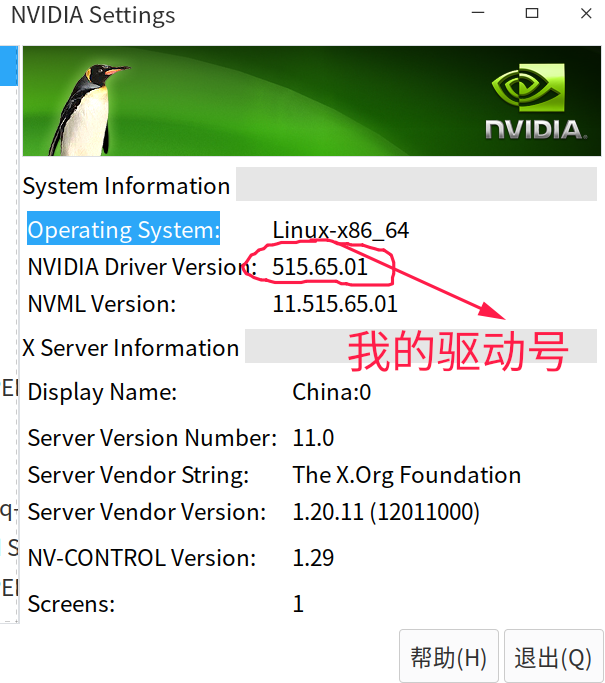
====================================
1. 首先选择使用conda方式安装:
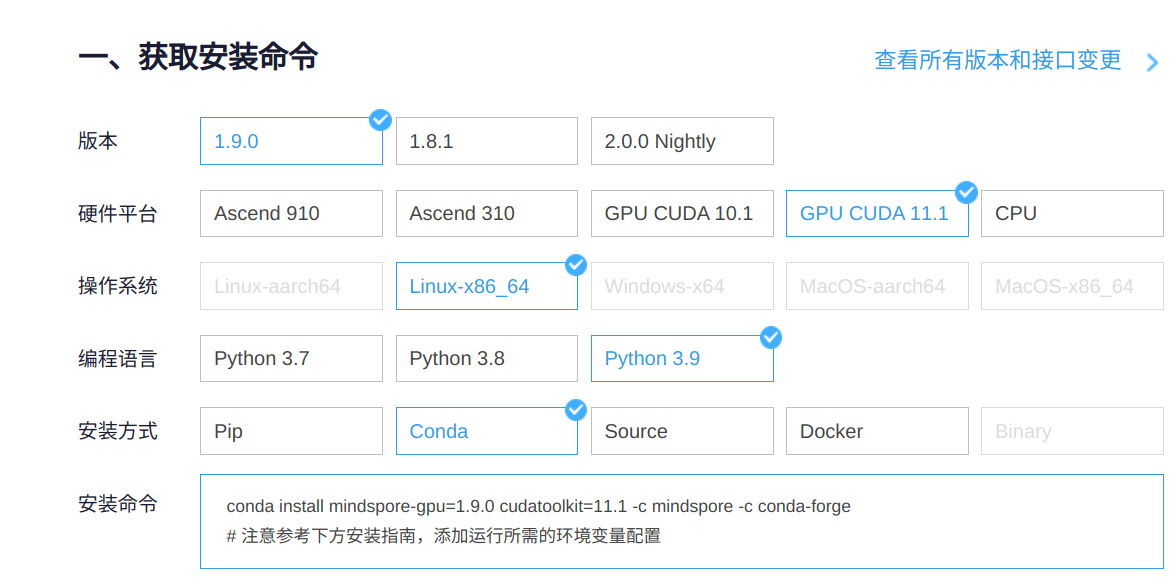
官网给出的安装命令:
conda install mindspore-gpu=1.9.0 cudatoolkit=11.1 -c mindspore -c conda-forge

运行测试代码:
python -c "import mindspore;mindspore.run_check()"
报错:
[ERROR] ME(74920:140607147143488,MainProcess):2022-12-10-11:48:19.825.553 [mindspore/run_check/_check_version.py:194] Cuda ['10.1', '11.1', '11.6'] version(libcu*.so need by mindspore-gpu) is not found, please confirm that the path of cuda is set to the env LD_LIBRARY_PATH, or check whether the CUDA version in wheel package and the CUDA runtime in current device matches, please refer to the installation guidelines: https://www.mindspore.cn/install

[ERROR] ME(74920:140607147143488,MainProcess):2022-12-10-11:48:19.825.657 [mindspore/run_check/_check_version.py:194] Cuda ['10.1', '11.1', '11.6'] version(libcu*.so need by mindspore-gpu) is not found, please confirm that the path of cuda is set to the env LD_LIBRARY_PATH, or check whether the CUDA version in wheel package and the CUDA runtime in current device matches, please refer to the installation guidelines: https://www.mindspore.cn/install

[ERROR] ME(74920:140607147143488,MainProcess):2022-12-10-11:48:19.830.949 [mindspore/run_check/_check_version.py:194] Cuda ['10.1', '11.1', '11.6'] version(libcudnn*.so need by mindspore-gpu) is not found, please confirm that the path of cuda is set to the env LD_LIBRARY_PATH, or check whether the CUDA version in wheel package and the CUDA runtime in current device matches, please refer to the installation guidelines: https://www.mindspore.cn/install

[ERROR] ME(74920:140607147143488,MainProcess):2022-12-10-11:48:19.831.029 [mindspore/run_check/_check_version.py:194] Cuda ['10.1', '11.1', '11.6'] version(libcudnn*.so need by mindspore-gpu) is not found, please confirm that the path of cuda is set to the env LD_LIBRARY_PATH, or check whether the CUDA version in wheel package and the CUDA runtime in current device matches, please refer to the installation guidelines: https://www.mindspore.cn/install

[ERROR] ME(74920,7fe1a70ef140,python):2022-12-10-11:48:19.881.793 [mindspore/ccsrc/runtime/hardware/device_context_manager.cc:46] LoadDynamicLib] Load dynamic library libmindspore_gpu failed, returns [libcudnn.so.8: cannot open shared object file: No such file or directory].

MindSpore version:  1.9.0

MindSpore running check failed.

Create device context failed, please make sure target device:GPU is available.

----------------------------------------------------

- C++ Call Stack: (For framework developers)

----------------------------------------------------

mindspore/ccsrc/runtime/hardware/device_context_manager.cc:208 GetOrCreateDeviceContext
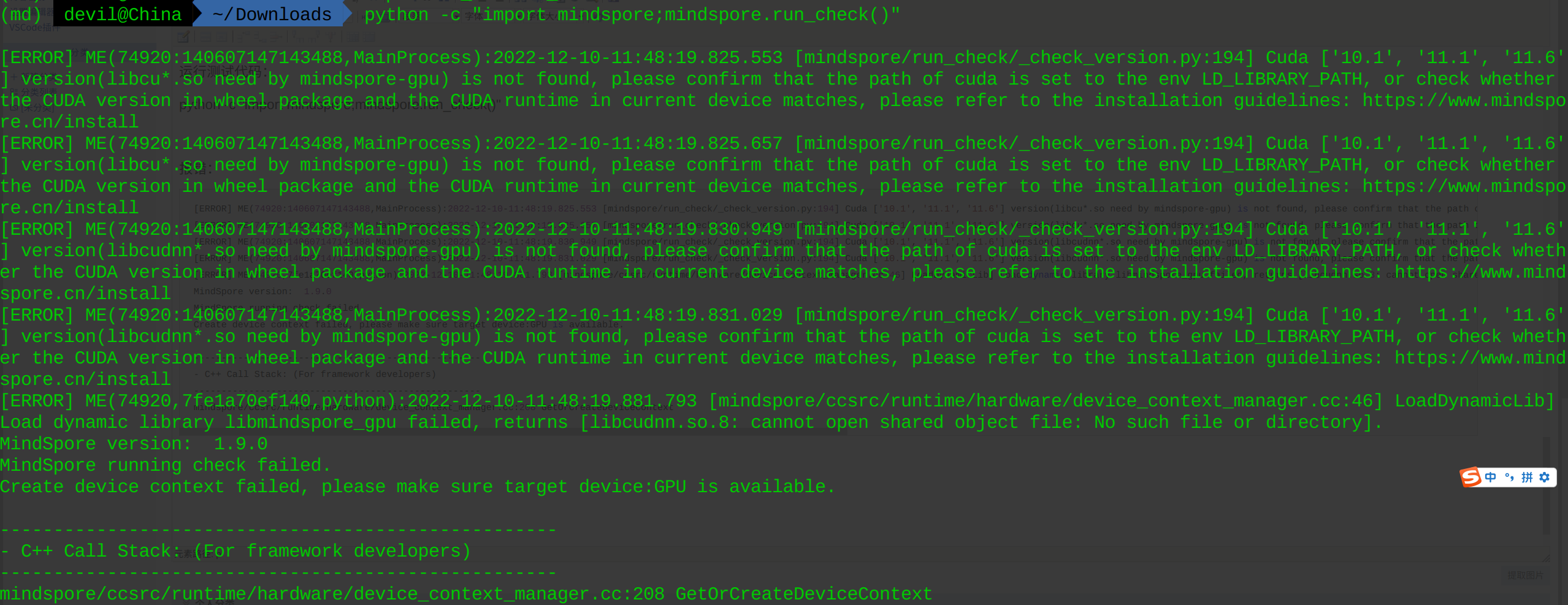
解释一下这个报错信息,说的就是mindspore-gpu识别不到环境中的cuda和cudnn。
这其实就是一个十分奇葩的报错,明明使用conda安装了,cuda和cudnn都应该是conda按照依赖关系安装的,如果使用conda安装不安装依赖的cuda和cudnn环境那么和pip安装方式又有什么区别呢。
看了下官方在conda方式下面给的具体说明:
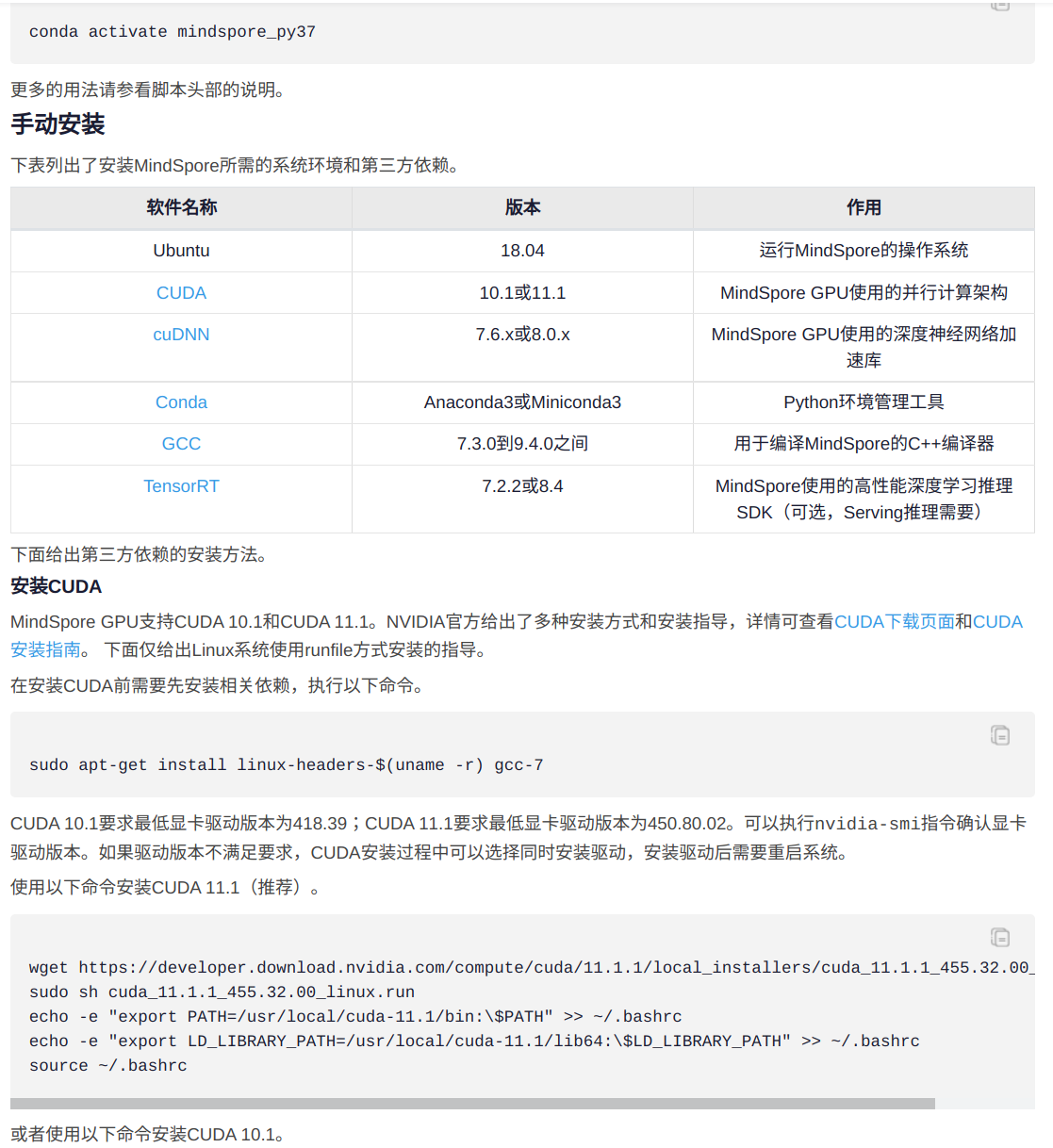
也就是说官方虽然提供了conda的安装方式,但是实际上和pip安装方式是一样的,只不过下载源的地址不同,这着实雷到我了。
同时官方还提供了自动安装cuda和cudnn的脚本:
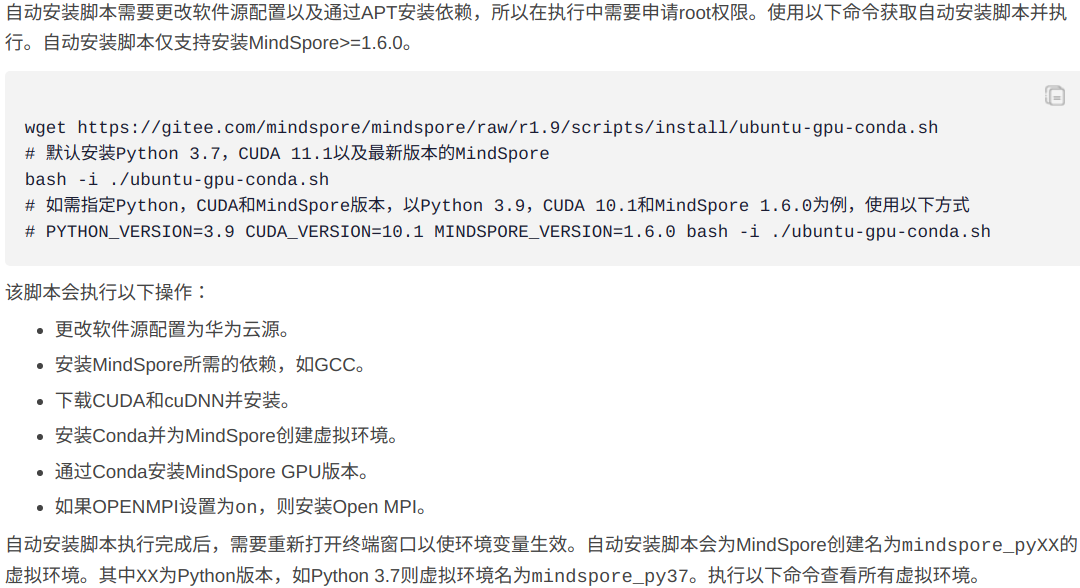
执行官方给出的自动安装cuda和cudnn脚本:
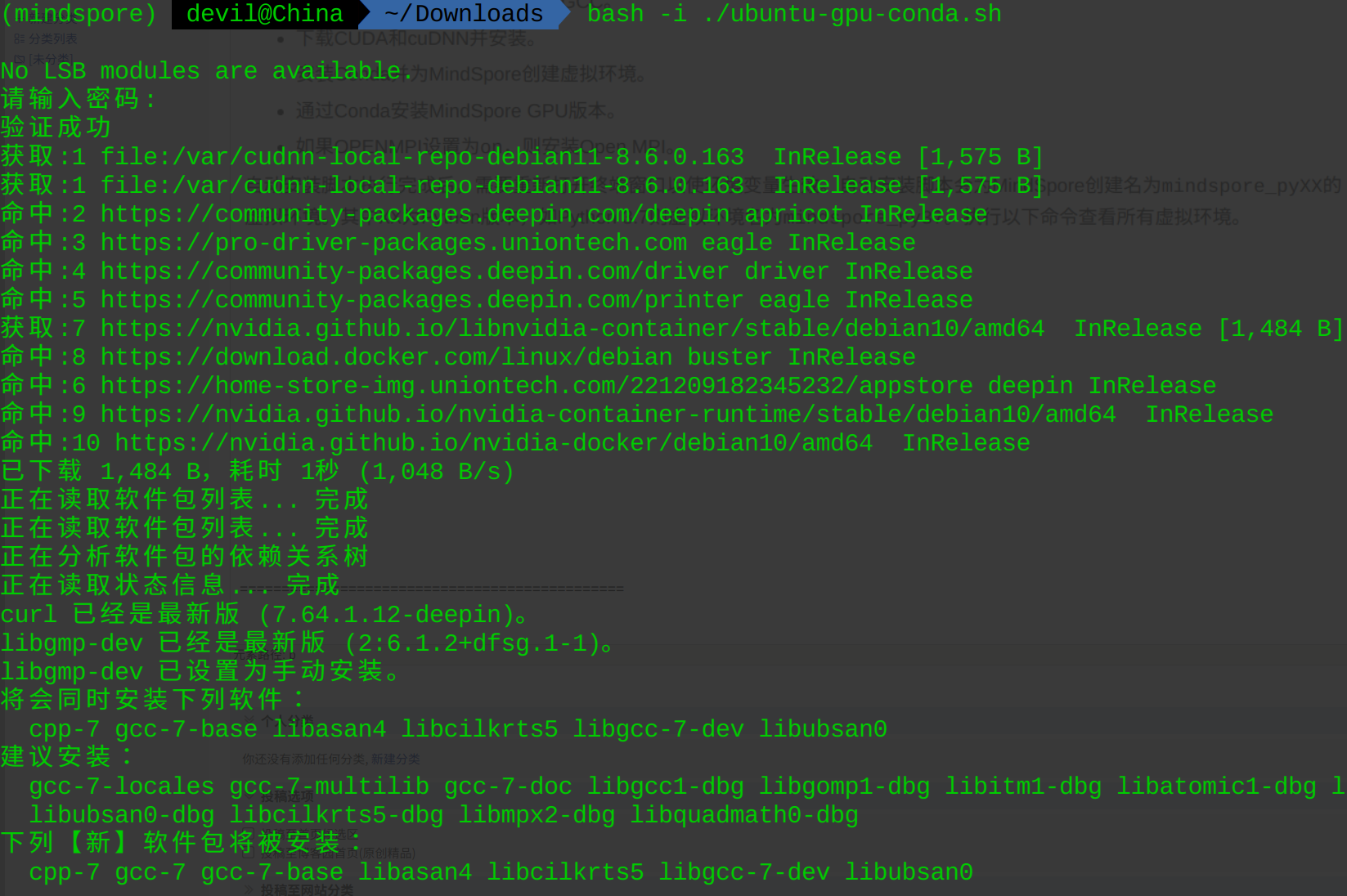
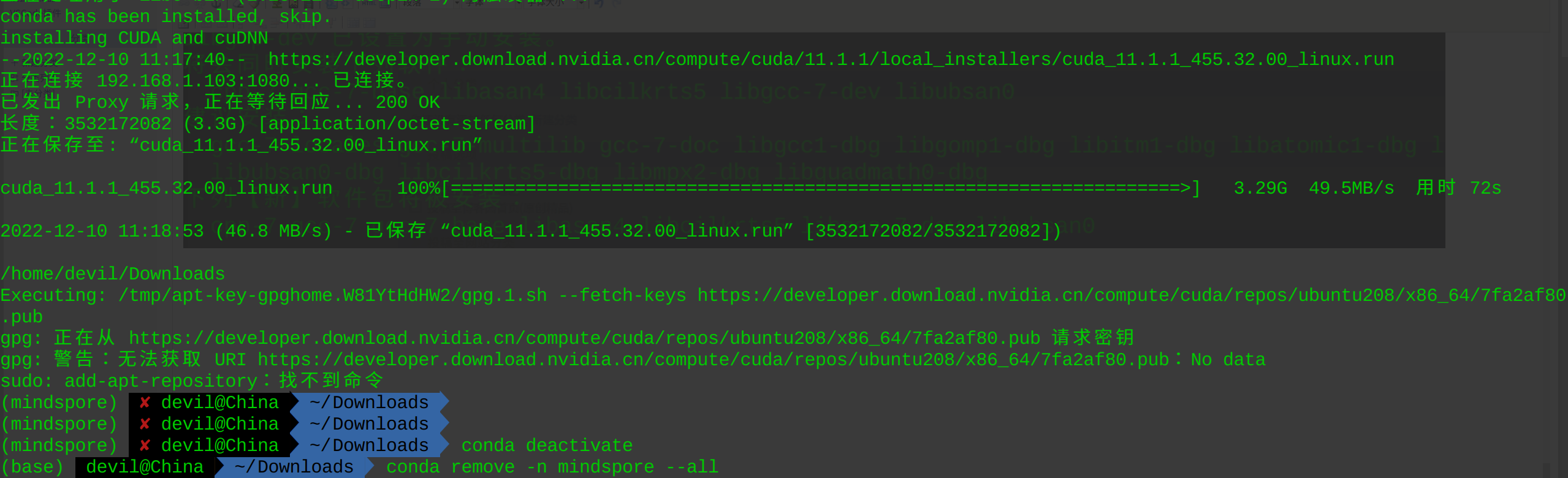
安装失败:(这个自动安装脚本失败或许是我的操作系统问题,因为这个系统是deepin系统)
==============================================
2. docker安装方式
既然pip和conda安装方式都需要自己额外安装cuda和cudnn,那么使用docker安装方式就应该可以避免这个问题了,于是使用docker安装:

运行镜像:

报错信息显示nvidia驱动版本不匹配。
============================================================
也就是说,在nvidia显卡驱动安装成功的前提下,如果不手动安装cuda和cudnn,那么使用pip,conda,docker方式都是无法成功安装mindspore的GPU版本的,这个结果确实要人不好接受。
============================================================

安装华为软件昇腾mindspore-gpu-1.9.0失败记录的更多相关文章
- 华为软件开发云对比Jenkins-JavaWeb项目持续部署方式
一.前言:Jenkins介绍 Jenkins是一个开源软件项目,是基于Java开发的一种持续集成工具,用于监控持续重复的工作,旨在提供一个开放易用的软件平台,使软件的持续集成和持续部署变成可能. 本文 ...
- Eclipse安装Git插件以及通过Git导入华为软件开发云项目
--内容提交-- 1. Eclipse安装Git插件 2. 在Eclipse中导入华为软件开发云项目, 以及常用Git操作 一. Eclipse安装Git插件 现在从eclipse官网下载 ...
- 昇思MindSpore全场景AI框架 1.6版本,更高的开发效率,更好地服务开发者
摘要:本文带大家快速浏览昇思MindSpore全场景AI框架1.6版本的关键特性. 全新的昇思MindSpore全场景AI框架1.6版本已发布,此版本中昇思MindSpore全场景AI框架易用性不断改 ...
- 如何使用华为软件开发云快速部署PHP网站
华为软件开发云这个工具,从去年推出我就一直在关注,毕竟是华为最新的一款软件开发工具,最近我一直在使用华为软件开发云进行开发项目管理,它有在线编译和构建.云端在线代码检查等功能,编译省去了很多物理机器的 ...
- GitHub转华为软件开发云详细教程
一.复制GitHub的代码库地址 首先,打开Github网页,找到要迁移的代码仓库地址,如下: 点击Clone or Download,出现以下界面 点击Copy toclipboard(复制到粘贴板 ...
- 华为软件开发云CloudIDE功能简测
华为软件开发云CloudIDE是面向软件开发者的云端开发环境,支持在线编写代码,智能提示,代码提交,代码片段智能搜索等功能. CloudIDE实现了大部分IDE的功能,同时克服了全能IDE的缺点. 一 ...
- 单机静默安装GI软件并创建ASM实例和ASM磁盘组
环境:RHEL 6.4 + Oracle 11.2.0.4 需求:单机静默安装GI软件并创建ASM实例和ASM磁盘组,为后续迁移数据库文件到ASM做准备 1. 安装配置GI软件 2. 创建ASM实例 ...
- Linux删除apt-get安装的软件
我们都知道安装软件最简单的方法是apt-get install,但是卸载就不常用了,如何卸载呢?1.sudo apt-get remove xxxxxsudo apt-get autoremove2. ...
- Linux 中如何卸载已安装的软件(转载)
Linux 中如何卸载已安装的软件. Linux软件的安装和卸载一直是困扰许多新用户的难题.在Windows中,我们可以使用软件自带的安装卸载程序或在控制面板中的“添加/删除程序”来实 ...
- 安装ubuntu和安装ubuntu后要安装的软件列表
安装ubuntu 老毛桃进入win pe修复启动项 在win pe下面制作ubuntu的安装盘,只用的软件是ultraISO 参考博客下面的分区的那篇文章 http://jingyan.baidu. ...
随机推荐
- 支付宝spi接口设计验签和返回结果加签注意点,支付宝使用JSONObject对象
支付宝spi接口设计验签和返回结果加签注意点,支付宝使用JSONObject对象 SPI 三方服务接入指南https://opendocs.alipay.com/isv/spiforisv 服务端实现 ...
- OOM异常的4种可能分析及常见的OOM异常演示
OOM异常的4种可能分析及常见的OOM异常演示 OOM异常: OutOfMemoryError 1.JAVA堆溢出JAVA堆用于存储对象实例,只要不断的创建对象,并且保证GC Roots到这些对象之间 ...
- 关于编译告警 C4819 的完整解决方案 - The file contains a character that cannot be represented in the current code page (number). Save the file in Unicode format to prevent data loss.
引言 今天迁移开发环境的时候遇到一个问题,同样的操作系统和 Visual Studio 版本,原始开发环境一切正常,但是迁移后 VS 出现了 C4819 告警,上网查了中文的一些博客,大部分涵盖几种解 ...
- git 删除远程分支文件
问题:多人协作开发同一分支的时候,有人误上传了一个不需要的文件,想删除远端仓库的该文件. 本地已经将此文件删除,推送至仓库时,仓库并未删除.此时拉取仓库更新本地时也不会将此文件拉取下来. 解决方案: ...
- ABC199E
考虑状压. 设计状态 \(dp_{i,j}\) 表示考虑 \(i\) 个数,每个数的使用情况的二进制压缩表示为 \(j\) 的情况下的方案数. 然后去正常转移. 唯一特殊的是将限制放在点上,假若这个点 ...
- java 提取证书指纹
正文 用到的依赖 <dependency> <groupId>org.bouncycastle</groupId> <artifactId>bcprov ...
- Mac Idea中获取application.properties的值,中文乱码
设置idea配置 将Properties Files (*.properties)下的Default encoding for properties files设置为UTF-8,将Transparen ...
- vue中的插槽详解
插槽(slot)插槽在vue中是一种很常见的写法,让父组件可以向子组件指定位置插入html结构,也是一种组件间通信的方式 一共有三种分类:默认插槽.具名插槽.作用域插槽,下面一一根据案例改造说明 1 ...
- 英特尔开源新等宽字体Intel One Mono,称可保护开发者视力
英特尔开源了一款面向开发者的新等宽字体 "Intel One Mono ",这是一种富有表现力的等宽字体系列,集清晰度.易读性和开发者视力保护于一体. Intel One Mono ...
- 解决方案 | 在 Tkinter 中导入 pywinauto/pyautogui 时窗口大小发生变化
上面问题也可以换一个说法,pywinauto/pyautogui 时改变了tkinter的原有的窗口大小.这个问题困扰了我好几天而且网上有这样的问题但是并没有答案,今天摸索出答案给大家分享下.解决方法 ...