
spring boot中配置网页语言国际化
项目地址:https://gitee.com/indexman/spring_boot_in_action
开发步骤
1.编写国际化配置文件
场景是给登录页面 login.html添加国际化支持。
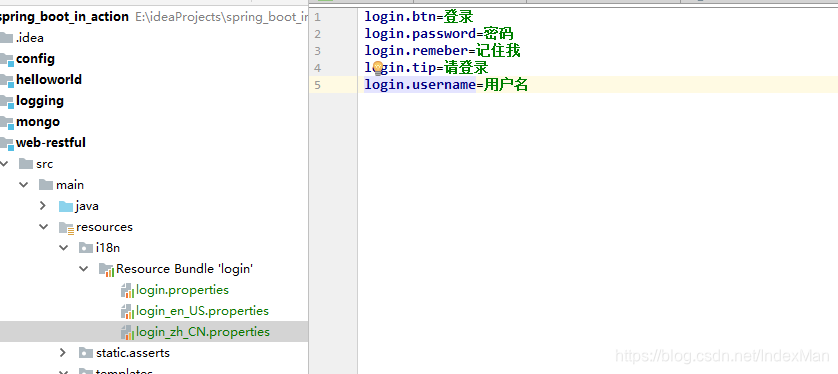
2.使用ResourceBundleMessageSource管理国际化资源文件
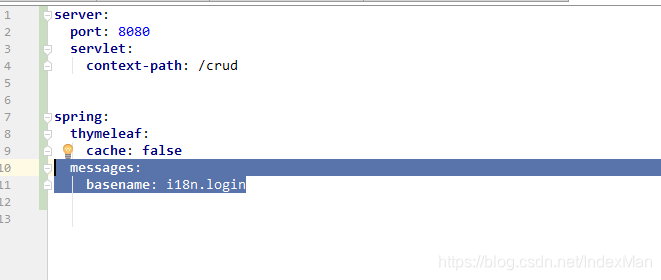
3.在页面使用取出国际化内容
此处用的是thymleaf模板
<!DOCTYPE html>

<html lang="en" xmlns:th="http://www.thymeleaf.org">

	<head>

		<meta http-equiv="Content-Type" content="text/html; charset=UTF-8">

		<meta name="viewport" content="width=device-width, initial-scale=1, shrink-to-fit=no">

		<meta name="description" content="">

		<meta name="author" content="">

		<title>Signin Template for Bootstrap</title>

		<!-- Bootstrap core CSS -->

		<link href="asserts/css/bootstrap.min.css" th:href="@{/webjars/bootstrap/4.0.0/css/bootstrap.css}" rel="stylesheet">

		<!-- Custom styles for this template -->

		<link href="asserts/css/signin.css" th:href="@{/asserts/css/signin.css}" rel="stylesheet">

	</head>

	<body class="text-center">

		<form class="form-signin" action="dashboard.html">

			<img class="mb-4" src="asserts/img/bootstrap-solid.svg" th:href="@{asserts/img/bootstrap-solid.svg}" alt="" width="72" height="72">

			<h1 class="h3 mb-3 font-weight-normal" th:text="#{login.tip}">Please sign in</h1>

			<label class="sr-only" th:text="#{login.username}">Username</label>

			<input type="text" class="form-control" placeholder="Username" th:placeholder="#{login.username}" required="" autofocus="">

			<label class="sr-only" th:text="#{login.username}">Password</label>

			<input type="password" class="form-control" placeholder="Password" th:placeholder="#{login.password}" required="">

			<div class="checkbox mb-3">

				<label>

          <input type="checkbox" value="remember-me" /> [[#{login.remeber}]]

        </label>

			</div>

			<button class="btn btn-lg btn-primary btn-block" type="submit" th:text="#{login.btn}">Sign in</button>

			<p class="mt-5 mb-3 text-muted"> 2017-2018</p>

			<a class="btn btn-sm">中文</a>

			<a class="btn btn-sm">English</a>

		</form>

	</body>

</html>
效果展示
效果:根据浏览器语言设置的信息切换了国际化;
英文页面:
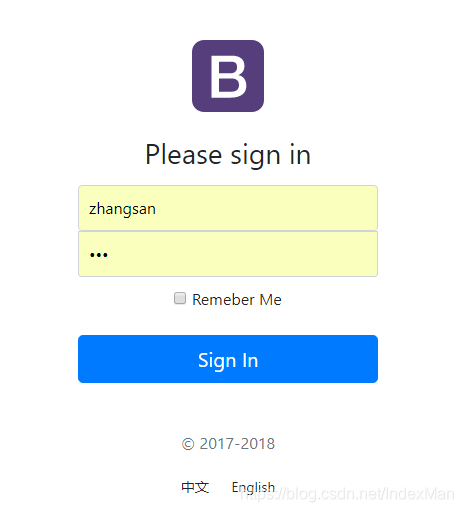
中文页面:

实现原理
SpringBoot自动配置好了管理国际化资源文件的组件
org.springframework.boot.autoconfigure.context.MessageSourceAutoConfiguration默认的就是根据请求头带来的区域信息获取Locale进行国际化
@Bean

@ConditionalOnMissingBean

@ConditionalOnProperty(prefix = "spring.mvc", name = "locale")

public LocaleResolver localeResolver() {

if (this.mvcProperties

.getLocaleResolver() == WebMvcProperties.LocaleResolver.FIXED) {

return new FixedLocaleResolver(this.mvcProperties.getLocale());

}

AcceptHeaderLocaleResolver localeResolver = new AcceptHeaderLocaleResolver();

localeResolver.setDefaultLocale(this.mvcProperties.getLocale());

return localeResolver;

}
spring boot中配置网页语言国际化的更多相关文章
- 在Spring Boot中配置web app
文章目录 添加依赖 配置端口 配置Context Path 配置错误页面 在程序中停止Spring Boot 配置日志级别 注册Servlet 切换嵌套服务器 在Spring Boot中配置web a ...
- Spring Boot2 系列教程(八)Spring Boot 中配置 Https
https 现在已经越来越普及了,特别是做一些小程序或者公众号开发的时候,https 基本上都是刚需了. 不过一个 https 证书还是挺费钱的,个人开发者可以在各个云服务提供商那里申请一个免费的证书 ...
- spring boot中配置日志log和热部署
Java的日志有很多 个人强烈不推荐log4j ,推荐log4j2和logback 在高并发,多线程的环境下log4j1 的性能和log4j2相比可以用junk来形容 对就是junk.log4j2的 ...
- spring、spring boot中配置多数据源
在项目开发的过程中,有时我们有这样的需求,需要去调用别的系统中的数据,那么这个时候系统中就存在多个数据源了,那么我们如何来解决程序在运行的过程中到底是使用的那个数据源呢? 假设我们系统中存在2个数据源 ...
- Spring boot中配置HikariCP连接池
# jdbc_config datasourcespring.datasource.driver-class-name=com.mysql.cj.jdbc.Driverspring.datasourc ...
- Spring Boot 中配置切换
步骤一:切换需求 有时候在本地测试是使用8080端口(默认端口),可是上线时使用的比如是9090端口(不常用的,以防被黑). 此时就可以通过多配置文件实现多配置支持与灵活切换. 步骤二:多配置文件 3 ...
- 记一次spring boot中MongoDB Prematurely reached end of stream的异常解决
在spring boot项目中使用了mongodb,当一段时间没有操作mongodb,下次操作mongodb时就会出现异常.异常如下: org.springframework.data.mongodb ...
- Spring Boot 属性配置&自定义属性配置
在使用spring boot过程中,可以发现项目中只需要极少的配置就能完成相应的功能,这归功于spring boot中的模块化配置,在pom.xml中依赖的每个Starter都有默认配置,而这些默认配 ...
- spring boot中的声明式事务管理及编程式事务管理
这几天在做一个功能,具体的情况是这样的: 项目中原有的几个功能模块中有数据上报的功能,现在需要在这几个功能模块的上报之后生成一条消息记录,然后入库,在写个接口供前台来拉取消息记录. 看到这个需求,首先 ...
- Spring Boot属性配置&自定义属性配置
一.修改默认配置 例1.spring boot 开发web应用的时候,默认tomcat的启动端口为8080,如果需要修改默认的端口,则需要在application.properties 添加以下记录: ...
随机推荐
- [转帖]Unix Domain Socket– IPC通信机制
什么是Unix Domain Socket 基于socket的框架上发展出一种IPC机制,就是UNIX Domain Socket.虽然网络socket也可用于同一台主机的进程间通讯(通过loopba ...
- [转帖]PD 配置文件描述
https://docs.pingcap.com/zh/tidb/stable/pd-configuration-file PD 配置文件比命令行参数支持更多的选项.你可以在 conf/config. ...
- [转帖]iptables规则链执行顺序
https://www.cnblogs.com/yum777/articles/8514636.html iptables 是采用规则堆栈的方式来进行过滤,当一个封包进入网卡,会先检查 Prerout ...
- 【转帖】【笔记】python连接神通数据库
https://www.cnblogs.com/wyongbo/p/17054924.html python连接国产神州通用数据库. 一.准备 下载whl及dll: 链接: https://pan.b ...
- Specjvm2008的简单学习
Specjvm2008的简单学习 摘要 前期整理过很多需要通过编译指定命令进行性能测试的工具 但是这种工具无法充分模式JAVA应用. 并且无法模拟不同jvm版本的性能情况. 早上去北京出差路上看到了 ...
- Docker 23.0.0 简单学习与使用
前言 Docker 从2013年火起来到现在才第十个年头. 现在已经被Google的K8S打的没有任何还手之力. 随着K8S放弃支持docker,仅支持containerd的方式. 直接导致docke ...
- 如何抓取http请求/拦截器用法
我们都知道postman是模拟接口向服务端发送请求的,在编写请求数据的时候非常 麻烦,那么如果我们可以先抓取该接口后直接使用,就方便的很多 抓取http请求 1.我们打开postman时就会看见右上角 ...
- Spring Boot Admin极简教程
一.简介 Spring Boot Admin是一个完整的应用程序,用于监控和管理Spring Boot应用.原理是通过调用Spring Boot Actuator提供的http接口来实现的监控和管理, ...
- vue render函数的简单使用(1)
1.render函数的介绍 在vue中我们经常使用HTML模板语法来组建页面. 除此之外,使用还可以使用render函数来创建页面. 因为vue是虚拟DOM,拿到template模板时也要转译成VNo ...
- 通过dotnet-dump分析生产环境docker容器部署的应用问题
首先找到对应的docker id并exec进去,然后执行命令并更新apt包+下载procps和wget用于等下拉取dotnet-dump和查看线程 sed -i -e "s@deb.debi ...