
spring boot中配置网页语言国际化
项目地址:https://gitee.com/indexman/spring_boot_in_action
开发步骤
1.编写国际化配置文件
场景是给登录页面 login.html添加国际化支持。
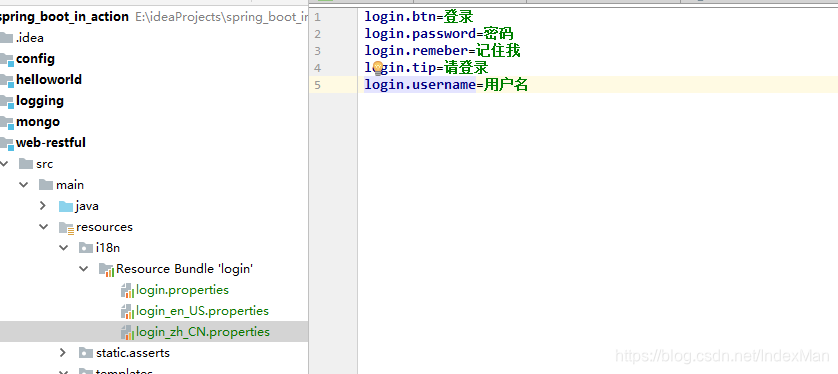
2.使用ResourceBundleMessageSource管理国际化资源文件
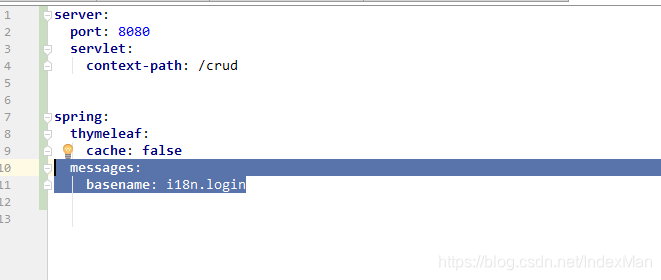
3.在页面使用取出国际化内容
此处用的是thymleaf模板
<!DOCTYPE html>

<html lang="en" xmlns:th="http://www.thymeleaf.org">

	<head>

		<meta http-equiv="Content-Type" content="text/html; charset=UTF-8">

		<meta name="viewport" content="width=device-width, initial-scale=1, shrink-to-fit=no">

		<meta name="description" content="">

		<meta name="author" content="">

		<title>Signin Template for Bootstrap</title>

		<!-- Bootstrap core CSS -->

		<link href="asserts/css/bootstrap.min.css" th:href="@{/webjars/bootstrap/4.0.0/css/bootstrap.css}" rel="stylesheet">

		<!-- Custom styles for this template -->

		<link href="asserts/css/signin.css" th:href="@{/asserts/css/signin.css}" rel="stylesheet">

	</head>

	<body class="text-center">

		<form class="form-signin" action="dashboard.html">

			<img class="mb-4" src="asserts/img/bootstrap-solid.svg" th:href="@{asserts/img/bootstrap-solid.svg}" alt="" width="72" height="72">

			<h1 class="h3 mb-3 font-weight-normal" th:text="#{login.tip}">Please sign in</h1>

			<label class="sr-only" th:text="#{login.username}">Username</label>

			<input type="text" class="form-control" placeholder="Username" th:placeholder="#{login.username}" required="" autofocus="">

			<label class="sr-only" th:text="#{login.username}">Password</label>

			<input type="password" class="form-control" placeholder="Password" th:placeholder="#{login.password}" required="">

			<div class="checkbox mb-3">

				<label>

          <input type="checkbox" value="remember-me" /> [[#{login.remeber}]]

        </label>

			</div>

			<button class="btn btn-lg btn-primary btn-block" type="submit" th:text="#{login.btn}">Sign in</button>

			<p class="mt-5 mb-3 text-muted"> 2017-2018</p>

			<a class="btn btn-sm">中文</a>

			<a class="btn btn-sm">English</a>

		</form>

	</body>

</html>
效果展示
效果:根据浏览器语言设置的信息切换了国际化;
英文页面:
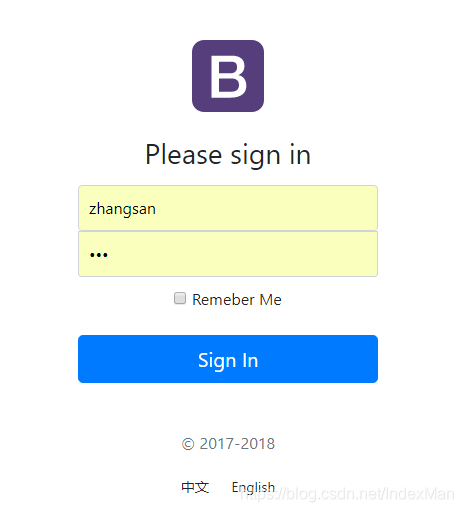
中文页面:

实现原理
SpringBoot自动配置好了管理国际化资源文件的组件
org.springframework.boot.autoconfigure.context.MessageSourceAutoConfiguration默认的就是根据请求头带来的区域信息获取Locale进行国际化
@Bean

@ConditionalOnMissingBean

@ConditionalOnProperty(prefix = "spring.mvc", name = "locale")

public LocaleResolver localeResolver() {

if (this.mvcProperties

.getLocaleResolver() == WebMvcProperties.LocaleResolver.FIXED) {

return new FixedLocaleResolver(this.mvcProperties.getLocale());

}

AcceptHeaderLocaleResolver localeResolver = new AcceptHeaderLocaleResolver();

localeResolver.setDefaultLocale(this.mvcProperties.getLocale());

return localeResolver;

}
spring boot中配置网页语言国际化的更多相关文章
- 在Spring Boot中配置web app
文章目录 添加依赖 配置端口 配置Context Path 配置错误页面 在程序中停止Spring Boot 配置日志级别 注册Servlet 切换嵌套服务器 在Spring Boot中配置web a ...
- Spring Boot2 系列教程(八)Spring Boot 中配置 Https
https 现在已经越来越普及了,特别是做一些小程序或者公众号开发的时候,https 基本上都是刚需了. 不过一个 https 证书还是挺费钱的,个人开发者可以在各个云服务提供商那里申请一个免费的证书 ...
- spring boot中配置日志log和热部署
Java的日志有很多 个人强烈不推荐log4j ,推荐log4j2和logback 在高并发,多线程的环境下log4j1 的性能和log4j2相比可以用junk来形容 对就是junk.log4j2的 ...
- spring、spring boot中配置多数据源
在项目开发的过程中,有时我们有这样的需求,需要去调用别的系统中的数据,那么这个时候系统中就存在多个数据源了,那么我们如何来解决程序在运行的过程中到底是使用的那个数据源呢? 假设我们系统中存在2个数据源 ...
- Spring boot中配置HikariCP连接池
# jdbc_config datasourcespring.datasource.driver-class-name=com.mysql.cj.jdbc.Driverspring.datasourc ...
- Spring Boot 中配置切换
步骤一:切换需求 有时候在本地测试是使用8080端口(默认端口),可是上线时使用的比如是9090端口(不常用的,以防被黑). 此时就可以通过多配置文件实现多配置支持与灵活切换. 步骤二:多配置文件 3 ...
- 记一次spring boot中MongoDB Prematurely reached end of stream的异常解决
在spring boot项目中使用了mongodb,当一段时间没有操作mongodb,下次操作mongodb时就会出现异常.异常如下: org.springframework.data.mongodb ...
- Spring Boot 属性配置&自定义属性配置
在使用spring boot过程中,可以发现项目中只需要极少的配置就能完成相应的功能,这归功于spring boot中的模块化配置,在pom.xml中依赖的每个Starter都有默认配置,而这些默认配 ...
- spring boot中的声明式事务管理及编程式事务管理
这几天在做一个功能,具体的情况是这样的: 项目中原有的几个功能模块中有数据上报的功能,现在需要在这几个功能模块的上报之后生成一条消息记录,然后入库,在写个接口供前台来拉取消息记录. 看到这个需求,首先 ...
- Spring Boot属性配置&自定义属性配置
一.修改默认配置 例1.spring boot 开发web应用的时候,默认tomcat的启动端口为8080,如果需要修改默认的端口,则需要在application.properties 添加以下记录: ...
随机推荐
- [转帖]Linux系统NVME盘分区和挂载
https://www.jianshu.com/p/04327f1b97cb 查看系统里面识别到的硬盘和分区的信息 $ sudo fdisk -l Disk /dev/nvme1n1: 1.8 TiB ...
- [转帖]iometer - 性能压力测试工具
<存储工具系列文章>主要介绍存储相关的测试和调试工具,包括不限于dd.fio.vdbench.iozone.iometer.cosbench等性能负载工具,及strace等调试工具. 1 ...
- ebpf的简单学习
ebpf的简单学习-万事开头难 前言 bpf 值得是巴克利包过滤器 他的核心思想是在内核态增加一个可编程的虚拟机. 可以在用户态定义很多规则, 然后直接在内核态进行过滤和使用. 他的效率极高. 因为避 ...
- [转帖]Unixbench服务器综合性能测试方法及工具下载
UnixBench是一款开源的测试 unix 系统基本性能的工具,是比较通用的测试VPS性能的工具. UnixBench会执行一系列的测试,包括2D和3D图形系统的性能衡量,测试的结果不仅仅只是CPU ...
- vue3.2如何将写hooks呢?
场景 有些时候,我们需要将一个页面拆分成各个模块. 这些模块包含增加,删除,修改,等 并且这些模块会处理非常复杂的业务逻辑问题 所以,我们最好是将他们分开. 如何将分离新增模块拆离出去 主页面 < ...
- js中计算一个时间点加上一个时间段后的时间
function aa(a,b){ console.log(111,a,b) var nd = new Date(Date.parse(a.replace(/-/g, "/"))) ...
- 从零开始配置 vim(3)—— 键盘映射进阶
严格意义上来说,快捷键的绑定应该是键盘映射,将某些键映射为另一些键. 在上篇我们介绍了基本的键盘映射操作,知道了如何 :map.:imap.:vmap.:nmap这些命令来映射键盘快捷键.它们很方便, ...
- vim 从嫌弃到依赖(10)——缓冲区列表
之前的一系列文章主要介绍了vim文本相关的操作,并且也介绍了vim的几种模式.通过前面的内容,相信各位小伙伴们已经对vim有了一个基本的了解,同时也能够使用vim快速编辑文本,从这篇开始,我们将要介绍 ...
- 微信小程序-页面生命周期方法
在经过上一篇文章的介绍之后,我们知道了大体的生命周期在什么时候执行,这次主要是以代码的形式来展示一下具体的阶段执行什么生命周期方法. 首先我们编写一个代码可以从首页跳转到日志页面: <!--in ...
- 小白学k8s(5)k8s中的service
k8s中的service service存在的意义 Pod与Service的关系 Port port targetPort nodePort IP Node IP Pod IP Cluster IP ...