
git clone时报错:Permission denied
一、问题简述:
执行git clone git@github.com:T-Better/Soft_test.git时报错:\302\226git@github.com: Permission denied (publickey).fatal: Could not read from remote repository.
Please make sure you have the correct access rights
and the repository exists.
二、问题复现:
删除了本地库或者对本地库移动了位置后重新git clone时发现报错:
\302\226git@github.com: Permission denied (publickey).fatal: Could not read from remote repository.
Please make sure you have the correct access rights
and the repository exists.
三、出错原因
1.ssh key有问题,具体原因忘了
四、解决办法
重新生成ssh-key并添加到github中:
解决步骤:
1. 生成新的SSH key
如果是客户端与服务端未生成ssh key,那么直接使用:ssh-keygen -t rsa -C "youremail@example.com" 生成新的rsa密钥即可。
如果是客户端与服务端的ssh key 不匹配,此时需要先将本地生成的 id_rsa以及id_rsa.pub这两个文件【一般在用户名下的.ssh文件夹下】删除掉,然后再使用上述指令生成新的rsa密钥。
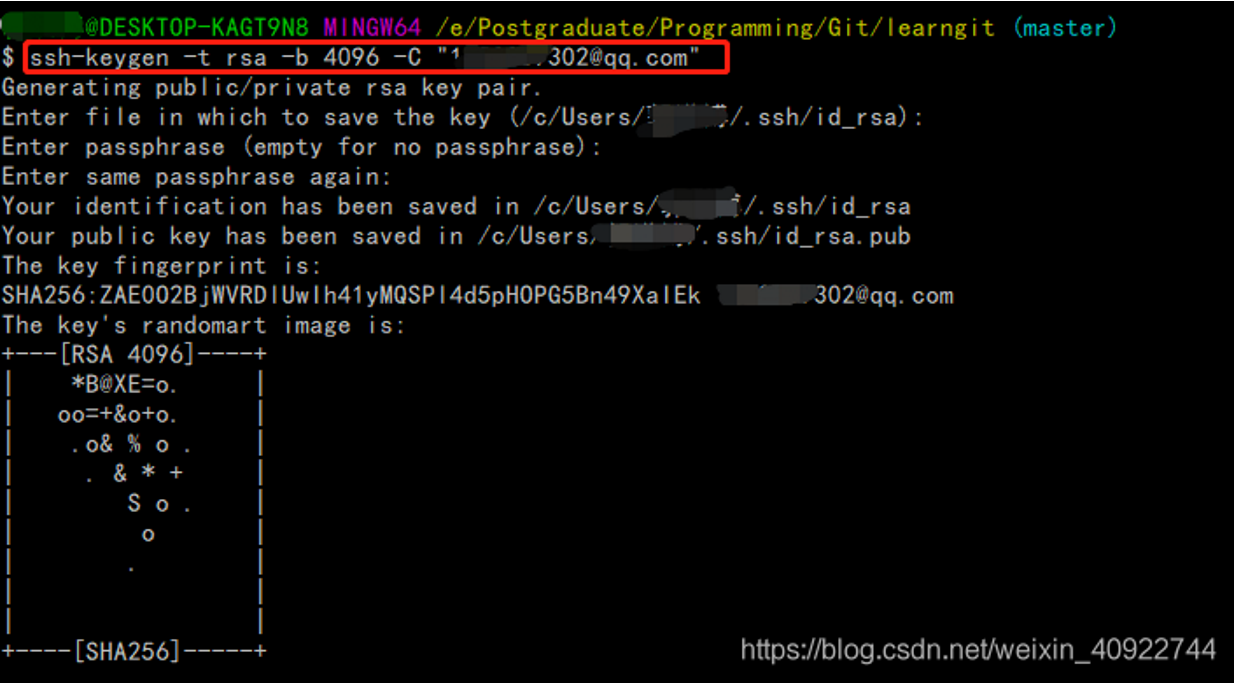
补充:ssh-keygen -t rsa -b 4096 -C "邮箱":这条命令的目的是为了让本地机器ssh登录远程机器上的GitHub账户无需输入密码。
ssh-keygen(基于密匙的安全验证):需要依靠密钥进行安全验证,必须为自己创建一对密钥,并把公用密钥放在需要访问的服务器上。
-t 即指定密钥的类型。密钥的类型有两种,一种是RSA,一种是DSA。
-b 指定密钥长度。对于RSA密钥,最小要求768位,默认是2048位。命令中的4096指的是RSA密钥长度为4096位。DSA密钥必须恰好是1024位(FIPS 186-2 标准的要求)。
-C 表示要提供一个新注释,用于识别这个密钥。“”里面不一定非要填邮箱,可以是任何内容,邮箱仅仅是识别用的key。
2. 将SSH key 添加到 ssh-agent
使用 ssh-add ~/.ssh/id_rsa 将产生的新ssh key添加到ssh-agent中:

补充: 如果出现“Could not open a connection to your authentication agent.”的错误可以使用以下两种方式解决:
eval "$(ssh-agent -s)"
或者:
eval `ssh-agent`
然后再次执行 ssh-add ~/.ssh/id_rsa 指令。
3. 将SSH key 添加到你的GitHub账户
在账户选项中选择 “Settings”–>“SSH and GPG keys”–>“New SSH key”,然后打开之前新生成的id_rsa.pub文件,将密钥复制后填写到账户中【注意填写时的格式要求】:

4. 验证key
使用 ssh -T git@github.com 对ssh key 进行验证:

当出现上述界面时说明配置成功,此时可以再次执行git push 操作将本地仓库推送到远程。
注: 以上操作命令均在 Git Bash 中完成。
“fatal: Could not read from remote repository.“报错也可用上法
解决办法转自:https://blog.csdn.net/weixin_40922744/article/details/107576748
声明:本文章是在以上地址博文基础上进行整理学习,如有侵权,请联系博主删除,感谢知识共享,一起进步,加油鸭
git clone时报错:Permission denied的更多相关文章
- git提交时报错 permission denied
git push 时报错:permission denied xxx 目前很多解决办法是生成公钥和秘钥,这种方法安全可靠,比较适用于一台电脑对应一个git账户,但是多个账户在同一台电脑上提交使用git ...
- Visual Studio Code 使用 Git插件报错 - Permission denied (publickey)
在使用GitHub的时候,为了避免每次输入用户名密码,都会使用SSH方式代替Https. 按网上教程,大多数使用SSH-KeyGen生成公私钥对,而后上传公钥至Github,并切换Repositori ...
- Git push提交时报错Permission denied(publickey)...Please make sure you have the correct access rights and the repository exists.
一.git push origin master 时出错 错误信息为: Permission denied(publickey). fatal: Could not read from remote ...
- 解决git clone时报错:The requested URL returned error: 401 Unauthorized while accessing
版本问题,最直接的解决办法就是重新编辑安装git吧: 1. 下载:# wget -O git.zip https://github.com/git/git/archive/master.zip 2. ...
- git clone时报错“Failed to connect to 127.0.0.1 port 2453: Connection refused”如何处理?
1. 查看git的配置 git config --global --list| grep -i proxy 如果有内容输出,那么unset配置项,如: git config --global --un ...
- IDEA中使用git报错Permission denied (publickey)
最近在使用idea开发时,使用git拉取远程仓库的代码时,报错Permission denied (publickey),原因是因为ssh的密钥失效,必须得重新设置下ssh的密钥即可. 命令很简单,在 ...
- [已解决]gitee初次使用git clone报错
本文描述的错误按实际出现先后顺序排列,并且附上一些其他可能会出现的问题 错误1: JZKJ@DESKTOP-I7Q9QJ4 MINGW64 ~ $ git clone https://gitee.co ...
- 解决方案 git@github.com出现Permission denied (publickey)
ubentu 13.10 git version 1.8.3.2 解决方案:ssh -T git@github.com出现Permission denied (publickey).的问题 今天的任 ...
- git push时报错refusing to merge unrelated histories
1. 删除本地项目中的.git目录,然后向远程仓库提交代码的时候,重新配置后再次提交.会有冲突. 解决方式: git remote add origin [//your giturl] git pul ...
- Git clone 报错 Unable to negotiate with xxx.xxx.xxx.xxx port 12345: no matching cipher found. Their offer: aes128-cbc,3des-cbc,blowfish-cbc
git clone 报错 Unable to negotiate with xxx.xxx.xxx.xxx. port 12345: no matching cipher found. Their o ...
随机推荐
- 《数据结构(C语言版)》严蔚敏代码实现———顺序表
一.前言 最近在重新学习数据结构啦,网上说这本书挺不错哒,于是我开始啃这本书咯...有一说一,严奶奶的书挺好的,就是有点大量使用指针...需要沉下心来,看一看画一画才能懂,我自己手敲了一遍书上代码,加 ...
- 最全的git操作命令(持续更新)
当前使用git进行版本管理越来越频繁,但是难免还是有些命令记不全,曾当前闲暇记录一下,免得需要时漫天找寻 目录 一. 配置用户信息 1.git config [配置git 用户信息] 2.git co ...
- jQuery实时显示日期、时间
jQuery实时显示日期.时间 html: <span id="time"></span> js: <script src="Js/jque ...
- Java并发(九)----线程join、interrupt
1.join 方法详解 1.1 为什么需要 join? 下面的代码执行,打印 r 是什么? static int r = 0; public static void main(String[] arg ...
- Kubernetes(k8s)使用ingress发布服务
目录 一.系统环境 二.前言 三.Kubernetes ingress简介 四.Ingress vs NodePort vs LoadBalancer 五.安装部署Nginx Ingress Cont ...
- 水果识别系统python
介绍 水果识别系统,使用Python作为主要开发语言,基于深度学习TensorFlow框架,搭建卷积神经网络算法.并通过对5种垃圾数据集进行训练,最后得到一个识别精度较高的模型.并基于Django框架 ...
- 记一次 .NET 某企业采购平台 崩溃分析
一:背景 1. 讲故事 前段时间有个朋友找到我,说他们的程序有偶发崩溃的情况,让我帮忙看下怎么回事,针对这种 crash 的程序,用 AEDebug 的方式抓取一个便知,有了 dump 之后接下来就可 ...
- python datetime.now() 的问题
python中,获取指定日期格式的时间可以用 datetime.datetime.now().strftime("%Y-%m-%d") 定义函数的时候,是可以设置参数的默认值的. ...
- 【SpringBoot】条件装配 @profile
profile 使用说明: @profile注解的作用是指定类或方法在特定的 Profile 环境生效,任何@Component或@Configuration注解的类都可以使用@Profile注解. ...
- GoFrame v2.5 版本发布,企业级 Golang 开发框架
大家好啊,GoFrame 框架今天发布了 v2.5.0 正式版本啦! 本次版本主要是对已有功能组件以及开发工具上的改进工作.其中,开发工具新增了 gf gen ctrl 命令,以规范化定义.开发 AP ...