
git clone时报错:Permission denied
一、问题简述:
执行git clone git@github.com:T-Better/Soft_test.git时报错:\302\226git@github.com: Permission denied (publickey).fatal: Could not read from remote repository.
Please make sure you have the correct access rights
and the repository exists.
二、问题复现:
删除了本地库或者对本地库移动了位置后重新git clone时发现报错:
\302\226git@github.com: Permission denied (publickey).fatal: Could not read from remote repository.
Please make sure you have the correct access rights
and the repository exists.
三、出错原因
1.ssh key有问题,具体原因忘了
四、解决办法
重新生成ssh-key并添加到github中:
解决步骤:
1. 生成新的SSH key
如果是客户端与服务端未生成ssh key,那么直接使用:ssh-keygen -t rsa -C "youremail@example.com" 生成新的rsa密钥即可。
如果是客户端与服务端的ssh key 不匹配,此时需要先将本地生成的 id_rsa以及id_rsa.pub这两个文件【一般在用户名下的.ssh文件夹下】删除掉,然后再使用上述指令生成新的rsa密钥。
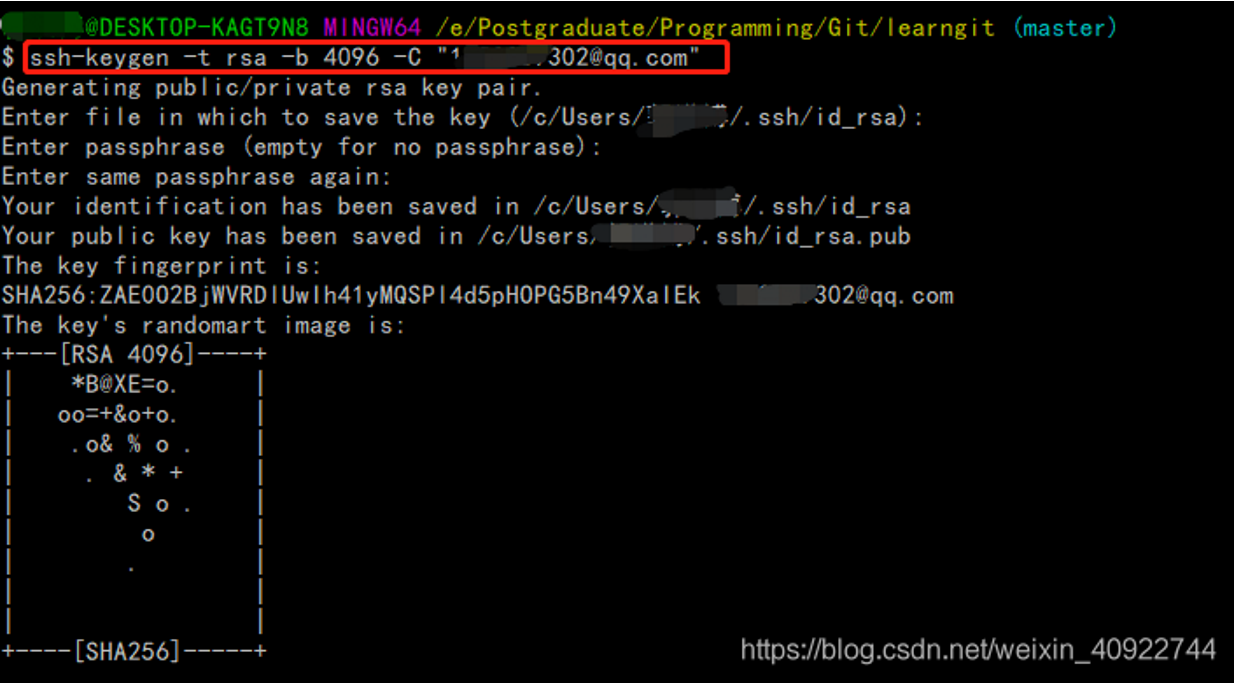
补充:ssh-keygen -t rsa -b 4096 -C "邮箱":这条命令的目的是为了让本地机器ssh登录远程机器上的GitHub账户无需输入密码。
ssh-keygen(基于密匙的安全验证):需要依靠密钥进行安全验证,必须为自己创建一对密钥,并把公用密钥放在需要访问的服务器上。
-t 即指定密钥的类型。密钥的类型有两种,一种是RSA,一种是DSA。
-b 指定密钥长度。对于RSA密钥,最小要求768位,默认是2048位。命令中的4096指的是RSA密钥长度为4096位。DSA密钥必须恰好是1024位(FIPS 186-2 标准的要求)。
-C 表示要提供一个新注释,用于识别这个密钥。“”里面不一定非要填邮箱,可以是任何内容,邮箱仅仅是识别用的key。
2. 将SSH key 添加到 ssh-agent
使用 ssh-add ~/.ssh/id_rsa 将产生的新ssh key添加到ssh-agent中:

补充: 如果出现“Could not open a connection to your authentication agent.”的错误可以使用以下两种方式解决:
eval "$(ssh-agent -s)"
或者:
eval `ssh-agent`
然后再次执行 ssh-add ~/.ssh/id_rsa 指令。
3. 将SSH key 添加到你的GitHub账户
在账户选项中选择 “Settings”–>“SSH and GPG keys”–>“New SSH key”,然后打开之前新生成的id_rsa.pub文件,将密钥复制后填写到账户中【注意填写时的格式要求】:

4. 验证key
使用 ssh -T git@github.com 对ssh key 进行验证:

当出现上述界面时说明配置成功,此时可以再次执行git push 操作将本地仓库推送到远程。
注: 以上操作命令均在 Git Bash 中完成。
“fatal: Could not read from remote repository.“报错也可用上法
解决办法转自:https://blog.csdn.net/weixin_40922744/article/details/107576748
声明:本文章是在以上地址博文基础上进行整理学习,如有侵权,请联系博主删除,感谢知识共享,一起进步,加油鸭
git clone时报错:Permission denied的更多相关文章
- git提交时报错 permission denied
git push 时报错:permission denied xxx 目前很多解决办法是生成公钥和秘钥,这种方法安全可靠,比较适用于一台电脑对应一个git账户,但是多个账户在同一台电脑上提交使用git ...
- Visual Studio Code 使用 Git插件报错 - Permission denied (publickey)
在使用GitHub的时候,为了避免每次输入用户名密码,都会使用SSH方式代替Https. 按网上教程,大多数使用SSH-KeyGen生成公私钥对,而后上传公钥至Github,并切换Repositori ...
- Git push提交时报错Permission denied(publickey)...Please make sure you have the correct access rights and the repository exists.
一.git push origin master 时出错 错误信息为: Permission denied(publickey). fatal: Could not read from remote ...
- 解决git clone时报错:The requested URL returned error: 401 Unauthorized while accessing
版本问题,最直接的解决办法就是重新编辑安装git吧: 1. 下载:# wget -O git.zip https://github.com/git/git/archive/master.zip 2. ...
- git clone时报错“Failed to connect to 127.0.0.1 port 2453: Connection refused”如何处理?
1. 查看git的配置 git config --global --list| grep -i proxy 如果有内容输出,那么unset配置项,如: git config --global --un ...
- IDEA中使用git报错Permission denied (publickey)
最近在使用idea开发时,使用git拉取远程仓库的代码时,报错Permission denied (publickey),原因是因为ssh的密钥失效,必须得重新设置下ssh的密钥即可. 命令很简单,在 ...
- [已解决]gitee初次使用git clone报错
本文描述的错误按实际出现先后顺序排列,并且附上一些其他可能会出现的问题 错误1: JZKJ@DESKTOP-I7Q9QJ4 MINGW64 ~ $ git clone https://gitee.co ...
- 解决方案 git@github.com出现Permission denied (publickey)
ubentu 13.10 git version 1.8.3.2 解决方案:ssh -T git@github.com出现Permission denied (publickey).的问题 今天的任 ...
- git push时报错refusing to merge unrelated histories
1. 删除本地项目中的.git目录,然后向远程仓库提交代码的时候,重新配置后再次提交.会有冲突. 解决方式: git remote add origin [//your giturl] git pul ...
- Git clone 报错 Unable to negotiate with xxx.xxx.xxx.xxx port 12345: no matching cipher found. Their offer: aes128-cbc,3des-cbc,blowfish-cbc
git clone 报错 Unable to negotiate with xxx.xxx.xxx.xxx. port 12345: no matching cipher found. Their o ...
随机推荐
- 计算机网络 vlan
目录 一.vlan的概念 二.vlan的优势 三.vlan的种类 四.静态vlan的配置 五.trunk的概念和配值 六.实验 一.vlan的概念 在传统的以太网中,所有的用户都是同一个广播域,当数据 ...
- SpringBoot配置文件加载
Spring Boot 配置文件加载是通过 Spring Boot 的自动配置机制实现的,它可以根据不同的环境加载不同的配置文件,包括 application.properties.applicati ...
- 【python基础】复杂数据类型-列表类型(排序/长度/遍历)
1.列表数据元素排序 在创建的列表中,数据元素的排列顺序常常是无法预测的.这虽然在大多数情况下都是不可避免的,但经常需要以特定的顺序呈现信息.有时候希望保留列表数据元素最初的排列顺序,而有时候又需要调 ...
- OSPF路由控制
实验拓扑 实验需求 公司A使用OSPF路由协议实现公司设备全网互通,后来公司A扩张兼并了公司B,要求将公司B采用的IS-IS路由协议与公司A的OSPF协议互相引入,使得相应部门可以实现互通. Rout ...
- idea设置退出软件提示
进入设置
- Windows服务启动exe无界面终极解决方案
1.前言 我这个方案(C#操作)是彻底解决[从Windows服务启动程序exe,程序无界面]问题的终极解决方案,终极方案,绝对的终极方案,本来打算收钱的,还是算了,你们也不容易,关注我一下就行.后 ...
- 微信小程序 - WXML 模板语法
[黑马程序员前端微信小程序开发教程,微信小程序从基础到发布全流程_企业级商城实战(含uni-app项目多端部署)] https://www.bilibili.com/video/BV1834y1676 ...
- Day05_Java_作业
A:看程序写结果(写出自己的分析理由),程序填空,改错,看程序写结果. 1.看程序写结果 class Demo { public static void main(String[] args) { i ...
- 巧用 bc 命令测试 Linux 主机的 CPU 性能
今天向公司申请了一台 Linux 主机,作为平时的开发环境.由于自己并不依赖远程开发(大多数情况下项目都可以本地开发.调试),于是只申请了 4C/8G 的低配机器. 突然好奇的是,这台机器的性能怎么样 ...
- Spring6 初始
Spring6 初始 @ 目录 Spring6 初始 每博一文案: 1. 初始 Spring6 1.1 OCP开闭原则 1.2 依赖倒置原则DIP 1.3 控制反转IoC 2. Spring 初始 2 ...