
Vue【原创】基于【日历组件Calendar】的【节假日管理】功能整合
基于日历组件(lilo-calendar)的节假日管理功能整合。
效果图:
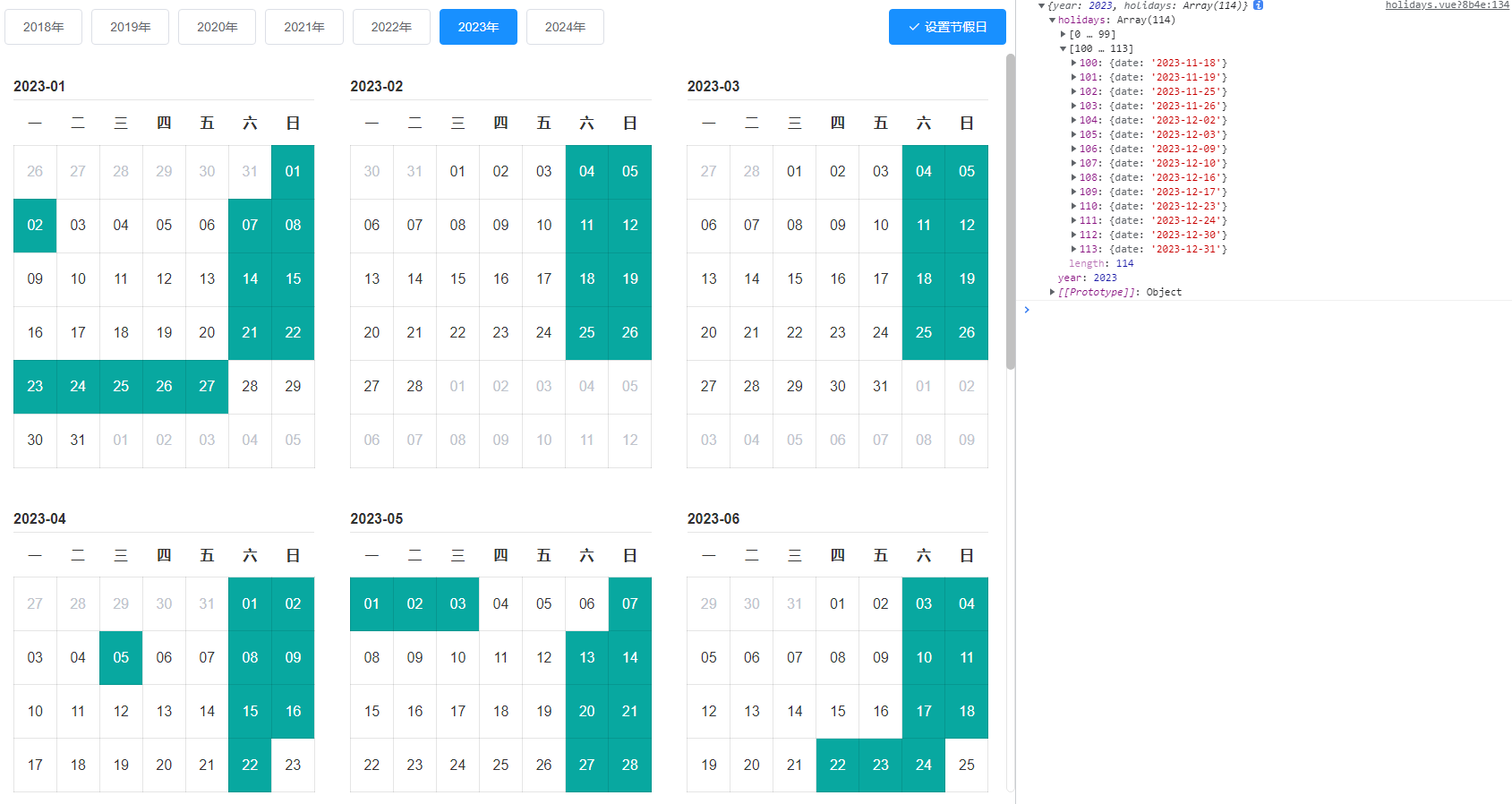
完整代码:
  1 <template>

  2     <div class="root-calendar">

  3         <div class="control-wrapper">

  4             <div class="year-wrapper">

  5                 <el-button v-for="(year, index) in years" :key="index" :type="year.isCurrent ? 'primary' : ''"

  6                     @click="changeYear(year)">

  7                     {{ year.value }}年

  8                 </el-button>

  9             </div>

 10             <div class="btn-wrapper">

 11                 <el-button type="primary" icon="el-icon-check" @click="submit">设置节假日</el-button>

 12             </div>

 13         </div>

 14         <div class="calendar-wrapper" :style="{ height: `${calendarHeight}px` }">

 15             <div class="calendar" v-for="(calendar, index) in calendars" :key="index">

 16                 <lilo-calendar :default-selected-dates="calendar.selectedDates" :current-date="calendar.date" can-select

 17                     @date-selected="dateSelected">

 18                 </lilo-calendar>

 19             </div>

 20         </div>

 21     </div>

 22 </template>

 23

 24 <script>

 25     import _ from 'lodash';

 26     // import {

 27     //     get1year, //业务接口,获取初始化的整年节假日

 28     //     set1year //业务接口,设置正年的节假日

 29     // } from '@/api/khxt/holidays/index.js';

 30

 31     export default {

 32         data() {

 33             return {

 34                 years: [],

 35                 currentYear: new Date().getFullYear(),

 36                 calendars: [],

 37                 calendarHeight: 0,

 38             }

 39         },

 40         created() {

 41             this.defaultSelectedDates = []

 42             this.selectedDates = []

 43             this.tempSelectedDates = []

 44

 45             this.years = this.createYears();

 46             this.calendars = this.createDates(new Date().getFullYear())

 47         },

 48         mounted() {

 49             this.calendarHeight = window.document.body.clientHeight - 150;

 50             window.addEventListener('resize', () => {

 51                 this.calendarHeight = window.document.body.clientHeight - 150;

 52             });

 53

 54             this.getHolidays();

 55         },

 56         computed: {},

 57         methods: {

 58             getHolidays() {

 59                 this.tempSelectedDates = []

 60                 // get1year({ year: this.currentYear }).then(res => {

 61                 //     const data = res.data

 62                 //     let result = []

 63                 //     data.forEach(d => {

 64                 //         const { date } = d

 65                 //         result.push(date)

 66                 //     })

 67                 //     this.defaultSelectedDates = result

 68                 // });

 69

 70                 //静态测试数据,应该从业务接口获取

 71                 this.defaultSelectedDates = [

 72                     "2023-01-01", "2023-01-02", "2023-01-07", "2023-01-08", "2023-01-14", "2023-01-15", "2023-01-21",

 73                     "2023-01-22", "2023-01-23", "2023-01-24", "2023-01-25", "2023-01-26", "2023-01-27", "2023-02-04",

 74                     "2023-02-05", "2023-02-11", "2023-02-12", "2023-02-18", "2023-02-19", "2023-02-25", "2023-02-26",

 75                     "2023-03-04", "2023-03-05", "2023-03-11", "2023-03-12", "2023-03-18", "2023-03-19", "2023-03-25",

 76                     "2023-03-26", "2023-04-01", "2023-04-02", "2023-04-05", "2023-04-08", "2023-04-09", "2023-04-15",

 77                     "2023-04-16", "2023-04-22", "2023-04-29", "2023-04-30", "2023-05-01", "2023-05-02", "2023-05-03",

 78                     "2023-05-07", "2023-05-13", "2023-05-14", "2023-05-20", "2023-05-21", "2023-05-27", "2023-05-28",

 79                     "2023-06-03", "2023-06-04", "2023-06-10", "2023-06-11", "2023-06-17", "2023-06-18", "2023-06-22",

 80                     "2023-06-23", "2023-06-24", "2023-07-01", "2023-07-02", "2023-07-08", "2023-07-09", "2023-07-15",

 81                     "2023-07-16", "2023-07-22", "2023-07-23", "2023-07-29", "2023-07-30", "2023-08-05", "2023-08-06",

 82                     "2023-08-12", "2023-08-13", "2023-08-19", "2023-08-20", "2023-08-26", "2023-08-27", "2023-09-02",

 83                     "2023-09-03", "2023-09-09", "2023-09-10", "2023-09-16", "2023-09-17", "2023-09-23", "2023-09-24",

 84                     "2023-09-29", "2023-09-30", "2023-10-01", "2023-10-02", "2023-10-03", "2023-10-04", "2023-10-05",

 85                     "2023-10-06", "2023-10-14", "2023-10-15", "2023-10-21", "2023-10-22", "2023-10-28", "2023-10-29",

 86                     "2023-11-04", "2023-11-05", "2023-11-11", "2023-11-12", "2023-11-18", "2023-11-19", "2023-11-25",

 87                     "2023-11-26", "2023-12-02", "2023-12-03", "2023-12-09", "2023-12-10", "2023-12-16", "2023-12-17",

 88                     "2023-12-23", "2023-12-24", "2023-12-30", "2023-12-31"

 89                 ]

 90                 //把整年的选中日期分配到每个月,这个数据结构的组装过程应该在服务端构建更好

 91                 this.calendars.forEach(calendar => {

 92                     calendar.selectedDates = []

 93                     this.defaultSelectedDates.forEach(dsd => {

 94                         if(dsd.indexOf(calendar.date) !== -1) {

 95                             calendar.selectedDates.push(dsd)

 96                         }

 97                     })

 98                 })

 99                 // console.log(this.calendars)

100             },

101             createYears() {

102                 let result = []

103                 const dt = new Date()

104                 const curYear = dt.getFullYear()

105                 for (let i = 5; i >= -1; i--) {

106                     result.push({

107                         value: curYear - i,

108                         isCurrent: i === 0

109                     })

110                 }

111                 return result

112             },

113             createDates(curYear) {

114                 let result = []

115                 for (let i = 1; i <= 12; i++) {

116                     result.push({

117                         date: curYear + '-' + (i < 10 ? `0${i}` : i)

118                     })

119                 }

120                 return result

121             },

122             changeYear(year) {

123                 this.years.forEach(y => {

124                     y.isCurrent = false;

125                 })

126                 year.isCurrent = true;

127

128                 this.currentYear = year.value;

129

130                 this.calendars = this.createDates(year.value)

131

132                 this.getHolidays();

133             },

134             dateSelected(val) {

135                 //我这边服务端需要全量返回,包括默认选中的内容,你也可以根据业务自己构建返回数据

136                 if (val.selectedDates) {

137                     this.tempSelectedDates = this.defaultSelectedDates.concat(this.tempSelectedDates).concat(val

138                         .selectedDates)

139                     this.tempSelectedDates = Array.from(new Set(this.tempSelectedDates));

140                 }

141                 if (val.removeDate) {

142                     this.tempSelectedDates.splice(this.tempSelectedDates.indexOf(val.removeDate), 1);

143                     const index = this.defaultSelectedDates.indexOf(val.removeDate);

144                     if (index !== -1) {

145                         this.defaultSelectedDates.splice(index, 1);

146                     }

147                 }

148                 let result = []

149                 this.tempSelectedDates.forEach(sd => {

150                     result.push({

151                         date: sd

152                     })

153                 })

154                 this.selectedDates = result

155             },

156             submit: _.debounce(function() {

157                 this.$confirm('是否确认提交', '提示', {

158                         confirmButtonText: '确定',

159                         cancelButtonText: '取消',

160                         type: 'warning'

161                     })

162                     .then(() => {

163                         const param = {

164                             year: this.currentYear,

165                             holidays: this.selectedDates

166                         }

167                         // set1year(param).then(res => {

168                         //     this.$notify.success({

169                         //         title: '通知',

170                         //         message: res.message

171                         //     });

172

173                         //     this.getHolidays();

174                         // })

175                         //打印最终提交结果数据

176                         console.log(param);

177                     })

178                     .catch(() => {

179                         this.loading = false;

180                         this.$message({

181                             type: 'info',

182                             message: '已取消'

183                         });

184                     });

185             }, 300),

186         }

187     };

188 </script>

189

190 <style lang="scss" scoped>

191     .root-calendar {

192         display: flex;

193         flex-direction: column;

194

195         .control-wrapper {

196             display: flex;

197             justify-content: center;

198             align-items: center;

199

200             .year-wrapper {

201                 flex: 1;

202                 padding: 10px;

203             }

204

205             .btn-wrapper {

206                 flex: 0 0 100px;

207                 padding: 10px;

208             }

209         }

210

211         .calendar-wrapper {

212             // height: calc(100vh - 150px);

213             overflow-y: auto;

214             // flex: 1;

215             display: flex;

216             flex-wrap: wrap;

217

218             .calendar {

219                 flex: 0 0 33.333%;

220                 padding: 10px;

221             }

222         }

223     }

224 </style>
查看lilo-calendar日历组件请移步我的另外一个帖子:https://www.cnblogs.com/loveFlex/p/17662243.html
Vue【原创】基于【日历组件Calendar】的【节假日管理】功能整合的更多相关文章
- 3- 功能2:基于forms组件和ajax实现注册功能
1.forms组件的注册页面 url from django.urls import path, re_path from blog import views from django.views.st ...
- Vue.js与 ASP.NET Core 服务端渲染功能整合
http://mgyongyosi.com/2016/Vuejs-server-side-rendering-with-aspnet-core/ 原作者:Mihály Gyöngyösi 译者:oop ...
- 基于Vue的简单日历组件
日历组件 由于移动端项目中需要用到日历组件,网上找了下,没看到几个合适的,就尝试着自己写一个.然后发现也不是很复杂,目前只做了最基本的功能,大家也可以拿去做做二次开发. 如何写一个日历组件 基础效果如 ...
- Vue文件封装日历组件
封装就是要具有灵活性,样式自适应,调用的时候传入props就可以变成自己想要的样式. 效果展示网址:https://1963331542.github.io/ 源代码: <template> ...
- 基于forms组件和Ajax实现注册功能
一.基于forms组件的注册页面设计 1.运用forms组件的校验字段功能实现用户注册 views.py: (在钩子中代码解耦,将form放在cnblog/blog/Myforms.py中) f ...
- 2.1博客系统 |基于form组件和Ajax实现注册登录
基于forms组件和Ajax实现注册功能 1 基于forms组件设计注册页面 --点击头像 === 点击input --头像预览: 修改用户选中的文件对象:获取文件对象的路径:修改img的src属性, ...
- BBS-基于forms组件和ajax实现注册功能
http://www.cnblogs.com/yuanchenqi/articles/7638956.html 1.设计注册页面 views.py from django import forms c ...
- vue-calendar 基于 vue 2.0 开发的轻量,高性能日历组件
vue-calendar-component 基于 vue 2.0 开发的轻量,高性能日历组件 占用内存小,性能好,样式好看,可扩展性强 原生 js 开发,没引入第三方库 Why Github 上很多 ...
- 一个vue的日历组件
说明: 1.基于element-ui开发的vue日历组件. 地址 更新: 1.增加value-format指定返回值的格式2.增加头部插槽自定义头部 <ele-calendar > < ...
- vue初学实践之路——vue简单日历组件(1)
---恢复内容开始--- 最近做的项目有一个需求,需要有一个日历组件供预定功能使用,之前的代码过于繁琐复杂,所以我采用vue重写了这个组件. npm.vue等等安装. 只是一个简单的日历组件,所以并不 ...
随机推荐
- 顶会ICSE-2023发布LIBRO技术,利用大模型技术进行缺陷重现,自动重现率达33%
摘要:本文围绕LIBRO技术的主要步骤进行介绍. 本文分享自华为云社区<[LLM for SE]顶会ICSE-2023发布LIBRO技术,利用大模型技术进行缺陷重现,自动重现率(33%)实现业界 ...
- 【论文笔记】Deeplab系列
[深度学习]总目录 DeepLab系列是谷歌团队提出的一系列语义分割算法.DeepLab v1于2014年推出,随后2017到2018年又相继推出了DeepLab v2,DeepLab v3以及Dee ...
- kafka生产者你不得不知的那些事儿
前言 kafka生产者作为消息发送中很重要的一环,这里面可是大有文章,你知道生产者消息发送的流程吗?知道消息是如何发往哪个分区的吗?如何保证生产者消息的可靠性吗?如何保证消息发送的顺序吗?如果对于这些 ...
- Springboot 开启异步任务Async,邮件发送任务,定时任务
异步任务 1.主启动类开启异步注解 2.service目录下开启异步任务注解 @Service public class AsyncService { @Async//异步任务注解的标志 public ...
- vscode 注释快捷键 一键注释和取消注释快捷键
// 注释:ctrl+/ /**/ 注释:alt+shift+a
- Hadoop的核心配置文件
1. core-site.xml:该配置文件包含了Hadoop通用配置,例如Hadoop的文件系统和I/O设置.Hadoop日志目录.Hadoop缓存设置等. 2. hdfs-site.xml:该配置 ...
- Galaxy Release 20.05 发布,新增多项可视化体验
Galaxy Project(https://galaxyproject.org/)是在云计算背景下诞生的一个生物信息学可视化分析开源项目. 该项目由美国国家科学基金会(NSF).美国国家人类基因组研 ...
- R画韦恩图之总结
本文分享自微信公众号 - 生信科技爱好者(bioitee).如有侵权,请联系 support@oschina.cn 删除.本文参与"OSC源创计划",欢迎正在阅读的你也加入,一起分 ...
- WPF中有中心点的slider滑动条
想要实现的效果 原生滑动条 需要认识一下滑动条的组成 在原生控件中生成"资源字典"对应的样式 然后在track所在的列进行添砖加瓦 由于track在row="1" ...
- MQ系列13:消息大量堆积如何为解决
MQ系列1:消息中间件执行原理 MQ系列2:消息中间件的技术选型 MQ系列3:RocketMQ 架构分析 MQ系列4:NameServer 原理解析 MQ系列5:RocketMQ消息的发送模式 MQ系 ...