
基于ModelArts进行流感患者密接排查
摘要:针对疫情期间存在的排查实时性差、排查效率低、无法追踪密接者等问题,可以使用基于YOLOv4的行人检测、行人距离估计、多目标跟踪的方案进行解决。
本文分享自华为云社区《基于ModelArts进行流感患者密接排查》,作者:HWCloudAI。
目前流感病毒患者密接难以排查,尤其是在人流量大的区域,进行排查需要消耗大量人力且需要等待。针对疫情期间存在的排查实时性差、排查效率低、无法追踪密接者等问题,可以使用基于YOLOv4的行人检测、行人距离估计、多目标跟踪的方案进行解决。
1)利用行人重识别技术实现流感病毒患者及密接者识别功能;
2)结合Stereo-vision以及YOLO算法实现患者的真实密切接触鉴别;
3)利用SORT多目标跟踪算法绘制出患者及密接者的行动轨迹;
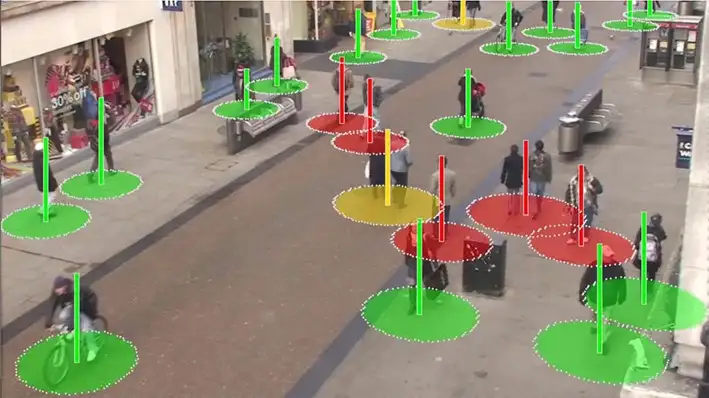
该系统可以有效提高防疫效率,减轻经济与防疫压力,提高安全性。
今天将带大家了解 通过华为云ModelArts的 DeepSocial-COVID-19社会距离监测案例实现AI排查新冠密接。
点击链接进入到AI Gallery的“DeepSocial-COVID-19社会距离监测”案例页面,点击Run in ModelArts,即可进入ModelArts Jupyter运行环境,此处需要选用GPU的规格。
注:以下步骤所涉及的代码都已经写好,直接点击代码前面的箭头,让其自动运行即可。
步骤一:从华为云对象存储服务(OBS)拷贝案例所需代码。
# 下载代码和数据

import moxing as mox

mox.file.copy_parallel('obs://obs-aigallery-zc/clf/code/DeepSocial','DeepSocial')

# 引入依赖

from IPython.display import display, Javascript, Image

from base64 import b64decode, b64encode

import os

import cv2

import numpy as np

import PIL

import io

import html

import time

import matplotlib.pyplot as plt

%matplotlib inline
步骤二:在本地编译YOLO。
需要根据运行环境修改Makefile 如是否有GPU等
如果编译报错:/bin/sh:nvcc not found
解决方式(参考):
1)查看nvcc可执行文件的路径
which nvcc
2)修改Makefile文件中的NVCC=nvcc,把nvcc替换为上面查询到的nvcc可执行文件的路径,如:/usr/local/cuda/bin/nvcc
NVCC=/usr/local/cuda/bin/nvcc
%cd DeepSocial

!make
步骤三:使用Darknet的python接口
# import darknet functions to perform object detections

from darknet2 import *

# load in our YOLOv4 architecture network

network, class_names, class_colors = load_network("cfg/yolov4.cfg", "cfg/coco.data", "DeepSocial.weights")

width = network_width(network)

height = network_height(network)

# darknet helper function to run detection on image

def darknet_helper(img, width, height):

 darknet_image = make_image(width, height, 3)

 img_rgb = cv2.cvtColor(img, cv2.COLOR_BGR2RGB)

 img_resized = cv2.resize(img_rgb, (width, height),

                              interpolation=cv2.INTER_LINEAR)

  # get image ratios to convert bounding boxes to proper size

 img_height, img_width, _ = img.shape

 width_ratio = img_width/width

 height_ratio = img_height/height

  # run model on darknet style image to get detections

 copy_image_from_bytes(darknet_image, img_resized.tobytes())

  detections = detect_image(network, class_names, darknet_image)

 free_image(darknet_image)

 return detections, width_ratio, height_ratio
步骤四:使用SORT来实时跟踪目标
!pip install filterpy

from sort import *

mot_tracker = Sort(max_age=25, min_hits=4, iou_threshold=0.3)
步骤五:输入设置
Input            = "OxfordTownCentreDataset.avi" # 需要检测的适配

ReductionFactor = 2   # 采样因子

calibration      = [[180,162],[618,0],[552,540],[682,464]] # 相机标定的参数
步骤六:DeepSocial参数设置和函数引入
from deepsocial import *

######################## Frame number

StartFrom = 0

EndAt = 500                       #-1 for the end of the video

######################## (0:OFF/ 1:ON) Outputs

CouplesDetection = 1                # Enable Couple Detection

DTC = 1                # Detection, Tracking and Couples

SocialDistance = 1

CrowdMap = 1

# MoveMap = 0

# ViolationMap = 0

# RiskMap = 0

######################## Units are Pixel

ViolationDistForIndivisuals = 28

ViolationDistForCouples = 31

####

CircleradiusForIndivsual = 14

CircleradiusForCouples = 17

########################

MembershipDistForCouples = (16 , 10) # (Forward, Behind) per Pixel

MembershipTimeForCouples = 35        # Time for considering as a couple (per Frame)

######################## (0:OFF/ 1:ON)

CorrectionShift = 1                    # Ignore people in the margins of the video

HumanHeightLimit = 200                  # Ignore people with unusual heights

########################

Transparency        = 0.7

######################## Output Video's path

Path_For_DTC = os.getcwd() + "/DeepSOCIAL DTC.mp4"

Path_For_SocialDistance = os.getcwd() + "/DeepSOCIAL Social Distancing.mp4"

Path_For_CrowdMap = os.getcwd() + "/DeepSOCIAL Crowd Map.mp4"

def extract_humans(detections):

 detetcted = []

 if len(detections) > 0: # At least 1 detection in the image and check detection presence in a frame

 idList = []

        id = 0

 for label, confidence, bbox in detections:

 if label == 'person':

 xmin, ymin, xmax, ymax = bbox2points(bbox)

                id +=1

 if id not in idList: idList.append(id)

 detetcted.append([int(xmin), int(ymin), int(xmax), int(ymax), idList[-1]])

 return np.array(detetcted)

def centroid(detections, image, calibration, _centroid_dict, CorrectionShift, HumanHeightLimit):

    e = birds_eye(image.copy(), calibration)

 centroid_dict = dict()

 now_present = list()

 if len(detections) > 0:

 for d in detections:

            p = int(d[4])

 now_present.append(p)

 xmin, ymin, xmax, ymax = d[0], d[1], d[2], d[3]

            w = xmax - xmin

            h = ymax - ymin

            x = xmin + w/2

            y = ymax - h/2

 if h < HumanHeightLimit:

 overley = e.image

 bird_x, bird_y = e.projection_on_bird((x, ymax))

 if CorrectionShift:

 if checkupArea(overley, 1, 0.25, (x, ymin)):

 continue

 e.setImage(overley)

 center_bird_x, center_bird_y = e.projection_on_bird((x, ymin))

 centroid_dict[p] = (

 int(bird_x), int(bird_y),

 int(x), int(ymax),

 int(xmin), int(ymin), int(xmax), int(ymax),

 int(center_bird_x), int(center_bird_y))

                _centroid_dict[p] = centroid_dict[p]

 return _centroid_dict, centroid_dict, e.image

def ColorGenerator(seed=1, size=10):

 np.random.seed = seed

    color=dict()

 for i in range(size):

        h = int(np.random.uniform() *255)

        color[i]= h

 return color

def VisualiseResult(_Map, e):

    Map = np.uint8(_Map)

 histMap = e.convrt2Image(Map)

 visualBird = cv2.applyColorMap(np.uint8(_Map), cv2.COLORMAP_JET)

 visualMap = e.convrt2Image(visualBird)

 visualShow = cv2.addWeighted(e.original, 0.7, visualMap, 1 - 0.7, 0)

 return visualShow, visualBird, histMap
步骤七:推理过程
cap = cv2.VideoCapture(Input)

frame_width = int(cap.get(3))

frame_height = int(cap.get(4))

height, width = frame_height // ReductionFactor, frame_width // ReductionFactor

print("Video Reolution: ",(width, height))

if DTC: DTCVid = cv2.VideoWriter(Path_For_DTC, cv2.VideoWriter_fourcc(*'X264'), 30.0, (width, height))

if SocialDistance: SDimageVid = cv2.VideoWriter(Path_For_SocialDistance, cv2.VideoWriter_fourcc(*'X264'), 30.0, (width, height))

if CrowdMap: CrowdVid = cv2.VideoWriter(Path_For_CrowdMap, cv2.VideoWriter_fourcc(*'X264'), 30.0, (width, height))

colorPool = ColorGenerator(size = 3000)

_centroid_dict = dict()

_numberOFpeople = list()

_greenZone = list()

_redZone = list()

_yellowZone = list()

_final_redZone = list()

_relation = dict()

_couples = dict()

_trackMap = np.zeros((height, width, 3), dtype=np.uint8)

_crowdMap = np.zeros((height, width), dtype=np.int)

_allPeople = 0

_counter = 1

frame = 0

while True:

 print('-- Frame : {}'.format(frame))

 prev_time = time.time()

    ret, frame_read = cap.read()

 if not ret: break

    frame += 1

 if frame <= StartFrom: continue

 if frame != -1:

 if frame > EndAt: break

 frame_resized = cv2.resize(frame_read,(width, height), interpolation=cv2.INTER_LINEAR)

    image = frame_resized

    e = birds_eye(image, calibration)

    detections, width_ratio, height_ratio = darknet_helper(image, width, height)

    humans = extract_humans(detections)

 track_bbs_ids = mot_tracker.update(humans) if len(humans) != 0 else humans

    _centroid_dict, centroid_dict, partImage = centroid(track_bbs_ids, image, calibration, _centroid_dict, CorrectionShift, HumanHeightLimit)

 redZone, greenZone = find_zone(centroid_dict, _greenZone, _redZone, criteria=ViolationDistForIndivisuals)

 if CouplesDetection:

        _relation, relation = find_relation(e, centroid_dict, MembershipDistForCouples, redZone, _couples, _relation)

        _couples, couples, coupleZone = find_couples(image, _centroid_dict, relation, MembershipTimeForCouples, _couples)

 yellowZone, final_redZone, redGroups = find_redGroups(image, centroid_dict, calibration, ViolationDistForCouples, redZone, coupleZone, couples , _yellowZone, _final_redZone)

 else:

        couples = []

 coupleZone = []

 yellowZone = []

 redGroups = redZone

 final_redZone = redZone

 if DTC:

 DTC_image = image.copy()

        _trackMap = Apply_trackmap(centroid_dict, _trackMap, colorPool, 3)

 DTC_image = cv2.add(e.convrt2Image(_trackMap), image)

 DTCShow = DTC_image

 for id, box in centroid_dict.items():

 center_bird = box[0], box[1]

 if not id in coupleZone:

                cv2.rectangle(DTCShow,(box[4], box[5]),(box[6], box[7]),(0,255,0),2)

                cv2.rectangle(DTCShow,(box[4], box[5]-13),(box[4]+len(str(id))*10, box[5]),(0,200,255),-1)

                cv2.putText(DTCShow,str(id),(box[4]+2, box[5]-2),cv2.FONT_HERSHEY_SIMPLEX,.4,(0,0,0),1,cv2.LINE_AA)

 for coupled in couples:

            p1 , p2 = coupled

 couplesID = couples[coupled]['id']

 couplesBox = couples[coupled]['box']

            cv2.rectangle(DTCShow, couplesBox[2:4], couplesBox[4:], (0,150,255), 4)

            loc = couplesBox[0] , couplesBox[3]

            offset = len(str(couplesID)*5)

 captionBox = (loc[0] - offset, loc[1]-13), (loc[0] + offset, loc[1])

            cv2.rectangle(DTCShow,captionBox[0],captionBox[1],(0,200,255),-1)

 wc = captionBox[1][0] - captionBox[0][0]

 hc = captionBox[1][1] - captionBox[0][1]

            cx = captionBox[0][0] + wc // 2

            cy = captionBox[0][1] + hc // 2

 textLoc = (cx - offset, cy + 4)

            cv2.putText(DTCShow, str(couplesID) ,(textLoc),cv2.FONT_HERSHEY_SIMPLEX,.4,(0,0,0),1,cv2.LINE_AA)

 DTCVid.write(DTCShow)

 if SocialDistance:

 SDimage, birdSDimage = Apply_ellipticBound(centroid_dict, image, calibration, redZone, greenZone, yellowZone, final_redZone, coupleZone, couples, CircleradiusForIndivsual, CircleradiusForCouples)

 SDimageVid.write(SDimage)

 if CrowdMap:

        _crowdMap, crowdMap = Apply_crowdMap(centroid_dict, image, _crowdMap)

        crowd = (crowdMap - crowdMap.min()) / (crowdMap.max() - crowdMap.min())*255

 crowd_visualShow, crowd_visualBird, crowd_histMap = VisualiseResult(crowd, e)

 CrowdVid.write(crowd_visualShow)

    cv2.waitKey(3)

print('::: Analysis Completed')

cap.release()

if DTC: DTCVid.release(); print("::: Video Write Completed : ", Path_For_DTC)

if SocialDistance: SDimageVid.release() ; print("::: Video Write Completed : ", Path_For_SocialDistance)

if CrowdMap: CrowdVid.release() ; print("::: Video Write Completed : ", Path_For_CrowdMap)
步骤八:展示结果
from IPython.display import HTML

outpath = "DeepSOCIAL DTC.mp4"

mp4 = open(outpath,'rb').read()

data_url = "data:video/mp4;base64," + b64encode(mp4).decode()

HTML("""

<video width=400 controls>

 <source src="%s" type="video/mp4">

</video>

""" % data_url)
<iframe src="https://obs-aigallery-zc.obs.cn-north-4.myhuaweicloud.com/clf/code/DeepSocial/DeepSOCIAL%20DTC.mp4" scrolling="no" border="0" frameborder="no" framespacing="0" allowfullscreen="true" height=450 width=800> </iframe> <iframe src="https://obs-aigallery-zc.obs.cn-north-4.myhuaweicloud.com/clf/code/DeepSocial/DeepSOCIAL%20Social%20Distancing.mp4" scrolling="no" border="0" frameborder="no" framespacing="0" allowfullscreen="true" height=450 width=800> </iframe>
如果想要更好的效果,如何进行优化呢?
1.使用精确度更高的检测算法YOLOv7,使用追踪效果更好的Deep SORT;
2.使用更多数据进行训练
本次介绍就到这里啦,大家快去Gallery实操一下吧!
基于ModelArts进行流感患者密接排查的更多相关文章
- 实践案例丨基于ModelArts AI市场算法MobileNet_v2实现花卉分类
概述 MobileNetsV2是基于一个流线型的架构,它使用深度可分离的卷积来构建轻量级的深层神经网,此模型基于 MobileNetV2: Inverted Residuals and Linear ...
- Hadoop完全分布式环境搭建(二)——基于Ubuntu16.04设置免密登录
在Windows里,使用虚拟机软件Vmware WorkStation搭建三台机器,操作系统Ubuntu16.04,下面是IP和机器名称. [实验目标]:在这三台机器之间实现免密登录 1.从主节点可以 ...
- SM2国密证书合法性验证
通常我们遇到过的X509证书都是基于RSA-SHA1算法的,目前国家在大力推行国密算法,未来银行发行的IC卡也都是基于PBOC3.0支持国密算法的,因此我们来学习一下如何验证SM2国密证书的合法性.至 ...
- Linux中SSH服务基于key认证实践
众所周知ssh是目前较可靠,专为远程登录会话和其他网络服务提供安全性的协议,它默认工作在tcp的22号端口,具体实现的软件有:openssh(centos默认安装的),dropbear.ssh协议目前 ...
- Modelarts与无感识别技术生态总结(浅出版)
[摘要] Modelarts技术及相关产业已成为未来AI与大数据重点发展行业模式之一,为了促进人工智能领域科学技术快速发展,modelarts现状及生态前景成为研究热点.笔者首先总结modelarts ...
- 华为云ModelArts 2.0全面升级,革新传统AI开发模式
[中国,上海,9月20日] 在HUAWEI CONNECT 2019期间,华为云EI服务产品部总经理贾永利宣布--华为云AI重装升级,并重磅发布一站式AI开发管理平台ModelArts 2.0. 现场 ...
- 自动驾驶轻松开发?华为云ModelArts赋能智慧出行
作为战略新兴产业,人工智能已经开始广泛应用于多个领域.近几年,科技公司.互联网公司等各领域的企业纷纷布局自动驾驶.那么,自动驾驶技术究竟发展得如何了?日前,华为云携手上海交通大学创新中心举办的华为云人 ...
- 本科阶段就挑战自动驾驶开发?华为云ModelArts帮你轻松实现!
欢迎添加华为云小助手微信(微信号:HWCloud002 或 HWCloud003),输入关键字"加群",加入华为云线上技术讨论群:输入关键字"最新活动",获取华 ...
- 快快使用ModelArts,零基础小白也能玩转AI!
摘要: 走过路过不要错过,看Copy攻城狮如何借力华为云ModelArts玩转AI. "自2018年10月发布以来,ModelArts累计服务了众多行业十几万开发者,通过基础平台的完备性和面 ...
- “体检医生”黑科技|让AI开发更精准,ModelArts更新模型诊断功能
摘要:华为云AI开发平台ModelArts黑科技加持AI研发,让模型开发更高效.更简单,降低AI在行业的落地门槛.全面的可视化评估以及智能诊断功能,使得开发者可以直观了解模型各方面性能,从而进行针对性 ...
随机推荐
- 我们又组织了一次欧洲最大开源社区活动,Hugging Face 博客欢迎社区成员发帖、Hugging Chat 功能更新!
每一周,我们的同事都会向社区的成员们发布一些关于 Hugging Face 相关的更新,包括我们的产品和平台更新.社区活动.学习资源和内容更新.开源库和模型更新等,我们将其称之为「Hugging Ne ...
- 一款简单漂亮的WPF UI - AduSkin
前言 经常会有同学会问,有没有好看简单的WPF UI库推荐的.今天就给大家推荐一款简单漂亮的WPF UI,融合多个开源框架组件:AduSkin. WPF是什么? WPF 是一个强大的桌面应用程序框架, ...
- splay + 垃圾回收 知识点与例题的简要讲解
splay 简要讲解 前置芝士:普通二叉树 splay tree是一个越处理越灵活的数据结构,通过splay(伸展)操作,使整棵树的单次查询时间复杂度接近于O(log n),整棵树的高度也接近于log ...
- Nodejs环境打包前端项目
Node.js 在Linux下安装和环境搭建/编译项目 安装nodejs:1.下载nodejs源码包 wget https://nodejs.org/dist/v14.16.0/node-v14.16 ...
- Wonder8.promotion营销规则引擎,轻松搞掂千变万化的营销玩法
超过10年没有更新过内容了,不知道现在园子的氛围这类文章还适不适合放首页 想着整点内容,也是支持园子! 旺德發.营销 引擎 概述 为了广泛支持营销活动的复杂与灵活,Wonder8.promotion( ...
- 一个java文件的JVM之旅
准备 我是小C同学编写得一个java文件,如何实现我的功能呢?需要去JVM(Java Virtual Machine)这个地方旅行. 变身 我高高兴兴的来到JVM,想要开始JVM之旅,它确说:&quo ...
- 聊聊 GPU 产品选型那些事
随着人工智能的飞速崛起,随之而来的是算力需求的指数级增加,CPU 已经不足以满足深度学习.大模型计算等场景的海量数据处理需求.GPU 作为一种强大的计算工具,无论是高性能计算.图形渲染还是机器学习领域 ...
- AtCoder Beginner Contest 329 (ABC329)
A. Spread 不说了,代码. B. Next 不说了,代码. C. Count xxx Description 给定一个长度为 \(N\) 的字符串 \(S\),求 \(S\) 中非空连续,并且 ...
- C++ 通过CryptoPP计算Hash值
Crypto++ (CryptoPP) 是一个用于密码学和加密的 C++ 库.它是一个开源项目,提供了大量的密码学算法和功能,包括对称加密.非对称加密.哈希函数.消息认证码 (MAC).数字签名等.C ...
- 解密Prompt系列20. LLM Agent之再谈RAG的召回多样性优化
几个月前我们就聊过RAG的经典方案解密Prompt系列14. LLM Agent之搜索应用设计.前几天刚看完openAI在DevDay闭门会议上介绍的RAG相关的经验,有些新的感悟,借此机会再梳理下R ...