
基于 SOA 架构,创建 ego-search-web 项目-solr集群-zookeeper集群
项目架构
Ego-search-web 服务的消费者,ego-rpc 服务提供者
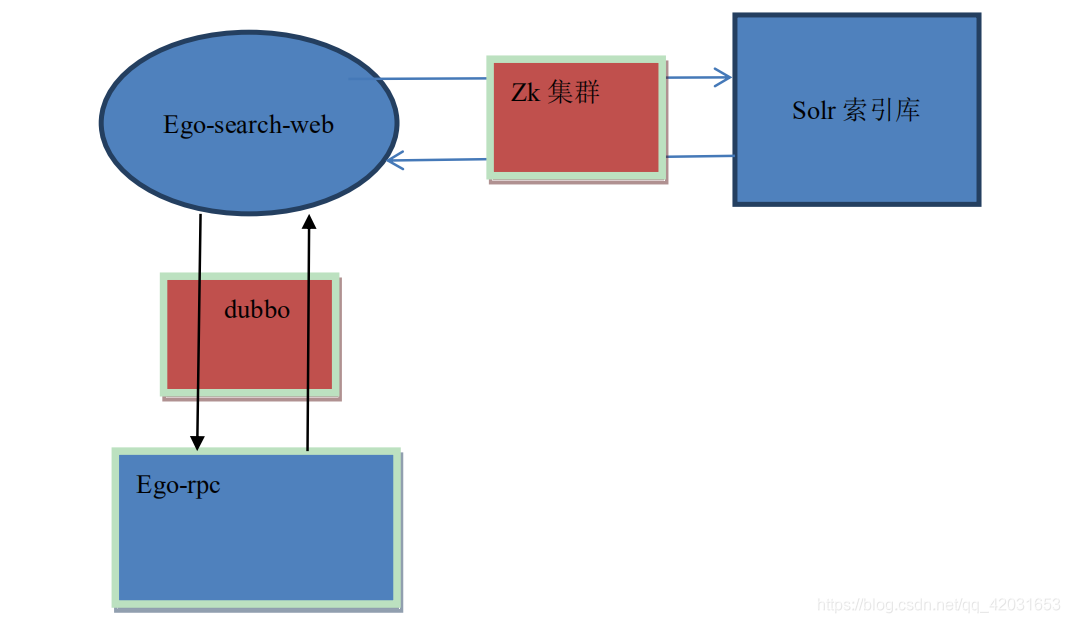
建立 ego-search-web 项目
继承:ego
依赖:ego-common ego-rpc-service
pom.xml:
<?xml version="1.0" encoding="UTF-8"?>

<project xmlns="http://maven.apache.org/POM/4.0.0"

         xmlns:xsi="http://www.w3.org/2001/XMLSchema-instance"

         xsi:schemaLocation="http://maven.apache.org/POM/4.0.0 http://maven.apache.org/xsd/maven-4.0.0.xsd">

    <parent>

        <artifactId>ego</artifactId>

        <groupId>com.bjsxt.ego</groupId>

        <version>1.0-SNAPSHOT</version>

    </parent>

    <modelVersion>4.0.0</modelVersion>

    <packaging>war</packaging>

    <artifactId>ego-search-web</artifactId>

    <dependencies>

        <dependency>

            <groupId>com.bjsxt.ego</groupId>

            <artifactId>ego-rpc-service</artifactId>

            <version>1.0-SNAPSHOT</version>

        </dependency>

        <dependency>

            <groupId>com.bjsxt.ego</groupId>

            <artifactId>ego-common</artifactId>

            <version>1.0-SNAPSHOT</version>

        </dependency>

        <!-- dubbo依赖 -->

        <dependency>

            <groupId>com.alibaba</groupId>

            <artifactId>dubbo</artifactId>

        </dependency>

        <!-- zookeeper客户端依赖 -->

        <dependency>

            <groupId>com.101tec</groupId>

            <artifactId>zkclient</artifactId>

        </dependency>

        <!-- spring依赖 -->

        <dependency>

            <groupId>org.springframework</groupId>

            <artifactId>spring-webmvc</artifactId>

        </dependency>

        <!-- JSP相关 -->

        <dependency>

            <groupId>jstl</groupId>

            <artifactId>jstl</artifactId>

        </dependency>

        <dependency>

            <groupId>javax.servlet</groupId>

            <artifactId>servlet-api</artifactId>

            <scope>provided</scope>

        </dependency>

        <dependency>

            <groupId>javax.servlet</groupId>

            <artifactId>jsp-api</artifactId>

            <scope>provided</scope>

        </dependency>

        <!-- json到java对象的序列化和反序列化 -->

        <dependency>

            <groupId>com.fasterxml.jackson.core</groupId>

            <artifactId>jackson-databind</artifactId>

        </dependency>

        <!-- Redis客户端 -->

        <dependency>

            <groupId>redis.clients</groupId>

            <artifactId>jedis</artifactId>

        </dependency>

        <!-- solr客户端 -->

        <dependency>

            <groupId>org.apache.solr</groupId>

            <artifactId>solr-solrj</artifactId>

        </dependency>

    </dependencies>

    <build>

    <plugins>

        <!-- 配置Tomcat插件 -->

        <plugin>

            <groupId>org.apache.tomcat.maven</groupId>

            <artifactId>tomcat7-maven-plugin</artifactId>

            <configuration>

                <!-- 不需要上下文  http://localhost:8080/xxx.jsp -->

                <path>/</path>

                <port>8082</port>

            </configuration>

        </plugin>

    </plugins>

</build>

</project>
进行 spring 相关配置
建立 applicationContext-dao.xml
<?xml version="1.0" encoding="UTF-8"?>

<beans xmlns="http://www.springframework.org/schema/beans"

   xmlns:context="http://www.springframework.org/schema/context"

   xmlns:xsi="http://www.w3.org/2001/XMLSchema-instance"

   xsi:schemaLocation="http://www.springframework.org/schema/beans

                  http://www.springframework.org/schema/beans/spring-beans.xsd

                  http://www.springframework.org/schema/context

                  http://www.springframework.org/schema/context/spring-context.xsd">

   <context:component-scan base-package="com.bjsxt.ego.search.dao.impl" />

   <!-- 实例化访问solr集群的api对象  -->

   <bean id="solrServer" class="org.apache.solr.client.solrj.impl.CloudSolrServer">

   		<constructor-arg name="zkHost" value="192.168.181.129:2181,192.168.181.129:2182,192.168.181.129:2183">

   		</constructor-arg>

       <property name="defaultCollection" value="bjsxt"/>

   </bean>

</beans>
建立 applicationContext-dubbo.xml
<?xml version="1.0" encoding="UTF-8"?>

<beans xmlns="http://www.springframework.org/schema/beans"

   xmlns:dubbo="http://code.alibabatech.com/schema/dubbo"

    xmlns:xsi="http://www.w3.org/2001/XMLSchema-instance"

    xsi:schemaLocation="http://www.springframework.org/schema/beans

        http://www.springframework.org/schema/beans/spring-beans.xsd

        http://code.alibabatech.com/schema/dubbo

        http://code.alibabatech.com/schema/dubbo/dubbo.xsd">

   <!-- 添加服务消费者的标志 -->

   <dubbo:application name="ego-search-web-consumer"/>

   <!-- 指定注册中心 -->

   <dubbo:registry address="192.168.181.129:2181,192.168.181.129:2182,192.168.181.129:2183" protocol="zookeeper" />

   <!-- spring容器中存在一个远程服务的代理对象 -->

    <dubbo:reference interface="com.bjsxt.ego.rpc.service.ItemService" id="itemServiceProxy"></dubbo:reference>

    <dubbo:reference interface="com.bjsxt.ego.rpc.service.ItemDescService" id="itemDescServiceProxy"></dubbo:reference>

    <dubbo:reference interface="com.bjsxt.ego.rpc.service.ParamItemService" id="paramItemServiceProxy"></dubbo:reference>

</beans>
建立 applicationContext-service.xml
<?xml version="1.0" encoding="UTF-8"?>

<beans xmlns="http://www.springframework.org/schema/beans"

   xmlns:context="http://www.springframework.org/schema/context"

   xmlns:xsi="http://www.w3.org/2001/XMLSchema-instance"

   xsi:schemaLocation="http://www.springframework.org/schema/beans

                  http://www.springframework.org/schema/beans/spring-beans.xsd

                  http://www.springframework.org/schema/context

                  http://www.springframework.org/schema/context/spring-context.xsd">

   <context:component-scan base-package="com.bjsxt.ego.search.service.impl" />

</beans>
建立 applicationContext-redis.xml
<?xml version="1.0" encoding="UTF-8"?>

<beans xmlns="http://www.springframework.org/schema/beans"

    xmlns:context="http://www.springframework.org/schema/context"

    xmlns:xsi="http://www.w3.org/2001/XMLSchema-instance"

    xsi:schemaLocation="http://www.springframework.org/schema/beans

        http://www.springframework.org/schema/beans/spring-beans.xsd

        http://www.springframework.org/schema/context

        http://www.springframework.org/schema/context/spring-context.xsd

        ">

    <!-- 加载cache.properties  -->

    <!-- 实例化JedisCluster -->

	<bean id="cluster" class="redis.clients.jedis.JedisCluster">

		<constructor-arg name="nodes">

			<set>

				<bean class="redis.clients.jedis.HostAndPort">

					<constructor-arg name="host" value="192.168.181.130"></constructor-arg>

					<constructor-arg name="port" value="6380"></constructor-arg>

				</bean>

				<bean class="redis.clients.jedis.HostAndPort">

					<constructor-arg name="host" value="192.168.181.130"></constructor-arg>

					<constructor-arg name="port" value="6381"></constructor-arg>

				</bean>

				<bean class="redis.clients.jedis.HostAndPort">

					<constructor-arg name="host" value="192.168.181.130"></constructor-arg>

					<constructor-arg name="port" value="6382"></constructor-arg>

				</bean>

				<bean class="redis.clients.jedis.HostAndPort">

					<constructor-arg name="host" value="192.168.181.130"></constructor-arg>

					<constructor-arg name="port" value="6383"></constructor-arg>

				</bean>

				<bean class="redis.clients.jedis.HostAndPort">

					<constructor-arg name="host" value="192.168.181.130"></constructor-arg>

					<constructor-arg name="port" value="6384"></constructor-arg>

				</bean>

				<bean class="redis.clients.jedis.HostAndPort">

					<constructor-arg name="host" value="192.168.181.130"></constructor-arg>

					<constructor-arg name="port" value="6385"></constructor-arg>

				</bean>

			</set>

		</constructor-arg>

	</bean>

</beans>
建立 springmvc.xml
<?xml version="1.0" encoding="UTF-8"?>

<beans xmlns="http://www.springframework.org/schema/beans"

   xmlns:context="http://www.springframework.org/schema/context"

   xmlns:mvc="http://www.springframework.org/schema/mvc"

   xmlns:xsi="http://www.w3.org/2001/XMLSchema-instance"

   xsi:schemaLocation="http://www.springframework.org/schema/beans

        http://www.springframework.org/schema/beans/spring-beans.xsd

        http://www.springframework.org/schema/context

        http://www.springframework.org/schema/context/spring-context.xsd

        http://www.springframework.org/schema/mvc

        http://www.springframework.org/schema/mvc/spring-mvc.xsd">

   <!-- 扫描controller -->

   <context:component-scan base-package="com.bjsxt.ego.search.controller" />

   <!-- mvc:annotation-driven -->

   <mvc:annotation-driven ></mvc:annotation-driven>

   <!-- 视图解析器 -->

   <bean id="viewResovler" class="org.springframework.web.servlet.view.InternalResourceViewResolver">

      <!-- 表示使用的视图技术是jsp -->

      <property name="viewClass" value="org.springframework.web.servlet.view.JstlView"></property>

      <!-- 前缀 -->

      <property name="prefix" value="/WEB-INF/jsp/"></property>

      <!-- 后缀 -->

      <property name="suffix" value=".jsp"></property>

   </bean>

</beans>
配置 web.xml
<?xml version="1.0" encoding="UTF-8"?>

<web-app xmlns="http://xmlns.jcp.org/xml/ns/javaee"

         xmlns:xsi="http://www.w3.org/2001/XMLSchema-instance"

         xsi:schemaLocation="http://xmlns.jcp.org/xml/ns/javaee http://xmlns.jcp.org/xml/ns/javaee/web-app_4_0.xsd"

         version="4.0">

    <display-name>ego-portal-web</display-name>

    <welcome-file-list>

        <welcome-file>index.html</welcome-file>

        <welcome-file>index.htm</welcome-file>

        <welcome-file>index.jsp</welcome-file>

        <welcome-file>default.html</welcome-file>

        <welcome-file>default.htm</welcome-file>

        <welcome-file>default.jsp</welcome-file>

    </welcome-file-list>

    <!--

    <servlet-mapping>

        <servlet-name>default</servlet-name>

        <url-pattern>/favicon.ico</url-pattern>

    </servlet-mapping> -->

    <!-- 以监听器的方式启动spring容器 -->

    <listener>

        <listener-class>org.springframework.web.context.ContextLoaderListener</listener-class>

    </listener>

    <!-- 指定spring的配置文件 -->

    <context-param>

        <param-name>contextConfigLocation</param-name>

        <param-value>classpath:spring/applicationContext-*.xml</param-value>

    </context-param>

    <!-- POST请求的乱码过滤器 -->

    <filter>

        <filter-name>encodingFilter</filter-name>

        <filter-class>org.springframework.web.filter.CharacterEncodingFilter</filter-class>

        <!-- 指定编码方式 -->

        <init-param>

            <param-name>encoding</param-name>

            <param-value>utf-8</param-value>

        </init-param>

    </filter>

    <!-- 映射filter -->

    <filter-mapping>

        <filter-name>encodingFilter</filter-name>

        <url-pattern>/*</url-pattern>

    </filter-mapping>

    <!-- springmvc的servlet -->

    <servlet>

        <servlet-name>ego-search-web</servlet-name>

        <servlet-class>org.springframework.web.servlet.DispatcherServlet</servlet-class>

        <!-- 指定springmvc的配置文件 -->

        <init-param>

            <param-name>contextConfigLocation</param-name>

            <param-value>classpath:spring/springmvc.xml</param-value>

        </init-param>

        <!-- 让springmvc随系统启动而启动 -->

        <load-on-startup>1</load-on-startup>

    </servlet>

    <servlet-mapping>

        <servlet-name>ego-search-web</servlet-name>

        <!-- 伪静态化,接收.html结尾的请求 -->

        <url-pattern>*.html</url-pattern>

    </servlet-mapping>

</web-app>
基于 SOA 架构,创建 ego-search-web 项目-solr集群-zookeeper集群的更多相关文章
- SpringMVC内容略多 有用 熟悉基于JSP和Servlet的Java Web开发,对Servlet和JSP的工作原理和生命周期有深入了解,熟练的使用JSTL和EL编写无脚本动态页面,有使用监听器、过滤器等Web组件以及MVC架构模式进行Java Web项目开发的经验。
熟悉基于JSP和Servlet的Java Web开发,对Servlet和JSP的工作原理和生命周期有深入了解,熟练的使用JSTL和EL编写无脚本动态页面,有使用监听器.过滤器等Web组件以及MVC架构 ...
- JAVAEE——宜立方商城02:服务中间件dubbo、工程改造为基于soa架构、商品列表实现
1. 学习计划 第二天:商品列表功能实现 1.服务中间件dubbo 2.工程改造为基于soa架构 3.商品列表查询功能实现. 2. 将工程改造为SOA架构 2.1. 分析 由于宜立方商城是基于soa的 ...
- Intellij IDEA采用Maven+Spring MVC+Hibernate的架构搭建一个java web项目
原文:Java web 项目搭建 Java web 项目搭建 简介 在上一节java web环境搭建中,我们配置了开发java web项目最基本的环境,现在我们将采用Spring MVC+Spring ...
- 基于AgileEAS.NET企业应用平台实现基于SOA架构的应用整合方案-开篇
开篇 系统架构的文章,准备在这段时间好好的梳理和整理一下,然后发布基于AgileEAS.NET平台之上的企业级应用架构实践,结合具体的案例来说明AgileEAS.NET平 台之上如何进行系统的逻辑架构 ...
- Azure Traffic Manager(二) 基于权重与基于优先级的路由策略为我们的Web项目提供负载均衡
一,引言 上一片文章我们使用 Azure Traffic Manager 分发用户请求,同时演示了两种路由策略,“Performance”,“Geographic”的两种方式,今天我们继续讲解 Tra ...
- step2-------使用myeclipse创建maven java web项目
1.文章内容概述: 在对项目需求进行分析之后,决定使用maven对我的java web项目进行管理,这篇文章记录了使用myeclipse创建maven java web项目的过程. 2.开发环境: j ...
- 在 Visual Studio 2013 中创建 ASP.NET Web 项目(0):专题导航 [持续更新中]
写在前面的话 随着 Visual Studio 2013 的正式推出,ASP.NET 和 Visual Studio Web 开发工具 也发布了各自的最新版本. 新版本在构建 One ASP.NET ...
- 在 Visual Studio 2013 中创建 ASP.NET Web 项目(1):概述 - 创建 Web 应用程序项目
注:本文是“在 Visual Studio 2013 中创建 ASP.NET Web 项目”专题的一部分,详情参见 专题导航 . 预备知识 本专题适用于 Visual Studio 2013 及以上版 ...
- IDEA如何创建及配置Web项目(多图)
正文之前 在学习Java Web时,第一个遇到的问题就是如何创建或配置Web项目了,今天,就用IntelliJ IDEA 来进行Web项目配置: 创建Web项目 配置web项目 正文 创建Web项目 ...
随机推荐
- NioEventLoop的创建
NioEventLoop的创建 NioEventLoop是netty及其重要的组成部件,它的首要职责就是为注册在它上的channels服务,发现这些channels上发生的新连接.读写等I/O事件,然 ...
- 本地通知-UILocalNotification
第一步:创建本地推送 本地通知 UILocalNotification // 创建⼀一个本地推送 UILocalNotification * notification = [[UILocalNotif ...
- BootStrap中的collapse插件堆叠效果
通过网络上的一系列查找,总结出的collapse插件堆叠效果(网上没有找到,只能自己弄了,帮助那些和我遇到一样状况的同学) 首先感谢一位网友的知识总结给了我灵感,在这里先帮他推荐一波(https:// ...
- shell——数组
默认从0开始索引:也可以单独(像字典一样)pid[35420]=httpd -k ssl, 只能是一维的 bash4.0增加了关联数组 数组赋值: declare -a myarray声明数组 一次一 ...
- django post请求
django中提交post请求时候,需要携带CSRF,否则会报403错误,此时需要在form中添加{% csrf_token %} 或者注释掉settings.py -> MIDDLEWARE ...
- 基于Vue的日历组件
可以标注重要日子 自己写的,可能不是特别很好,大家多提意见!!! 地址:https://github.com/jsLWQ/calendar
- 找到了element, 但是用getText却得到空值,取不到文本的解决办法
最近代码中发现一些bug, 在Debug过程中发现,页面元素是被定位到了,但是用getText方法取到的却是空值.调查了一下发现,getText是否返回值和isDisplayed是否为true有关.当 ...
- vue防抖节流之v-debounce--throttle使用指南
最新封装了一个vue防抖节流自定义指令,发布到npm上,有用欢迎star,谢谢! npm地址:https://www.npmjs.com/package/v-debounce-throttle git ...
- JavaScript算法实现之汉诺塔(Hanoi)
目前前端新手,看到的不喜勿喷,还望大神指教. 随着Node.js,Angular.js,JQuery的流行,点燃了我学习JavaScript的热情!以后打算每天早上跟晚上抽2小时左右时间将经典的算法都 ...
- Linux目录结构-上部
第1章 目录结构 1.1 目录结构特点 倒挂的树状结构一切从根开始一切皆文件 1.2 目录结构 /bin 二进制文件 命令 /sbin 超级命令只有root ...