
idea结合maven小项目
整体构造
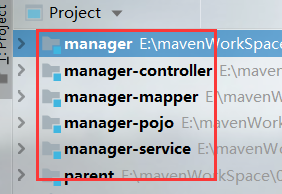

(修改 POM 文件 )parent
<?xml version="1.0" encoding="UTF-8"?>

<project xmlns="http://maven.apache.org/POM/4.0.0"

         xmlns:xsi="http://www.w3.org/2001/XMLSchema-instance"

         xsi:schemaLocation="http://maven.apache.org/POM/4.0.0 http://maven.apache.org/xsd/maven-4.0.0.xsd">

    <modelVersion>4.0.0</modelVersion>

    <groupId>com.bjsxt</groupId>

    <artifactId>parent</artifactId>

    <version>1.0-SNAPSHOT</version>

    <packaging>pom</packaging>

        <properties>

            <junit.version>4.12</junit.version>

            <spring.version>4.1.3.RELEASE</spring.version>

            <mybatis.version>3.2.8</mybatis.version>

            <mybatis.spring.version>1.2.2</mybatis.spring.version>

            <mysql.version>5.1.32</mysql.version>

            <slf4j.version>1.6.4</slf4j.version>

            <druid.version>1.0.9</druid.version>

            <jstl.version>1.2</jstl.version>

            <servlet-api.version>2.5</servlet-api.version>

            <jsp-api.version>2.0</jsp-api.version>

            <tomcat.version>2.2</tomcat.version>

            <project.build.sourceEncoding>UTF-8</project.build.sourceEncoding>

        </properties>

        <!-- jar 包的依赖注入 ,由于该工程是一个父工程,

        所以 jar 包在该 pom 文件中只是声明-->

        <dependencyManagement>

            <dependencies>

                <!-- 单元测试 -->

                <dependency>

                    <groupId>junit</groupId>

                    <artifactId>junit</artifactId>

                    <version>${junit.version}</version>

                    <scope>test</scope>

                </dependency>

                <!-- 日志处理 -->

                <dependency>

                    <groupId>org.slf4j</groupId>

                    <artifactId>slf4j-log4j12</artifactId>

                    <version>${slf4j.version}</version>

                </dependency>

                <!-- Mybatis -->

                <dependency>

                    <groupId>org.mybatis</groupId>

                    <artifactId>mybatis</artifactId>

                    <version>${mybatis.version}</version>

                </dependency>

                <dependency>

                    <groupId>org.mybatis</groupId>

                    <artifactId>mybatis-spring</artifactId>

                    <version>${mybatis.spring.version}</version>

                </dependency>

                <!-- MySql -->

                <dependency>

                    <groupId>mysql</groupId>

                    <artifactId>mysql-connector-java</artifactId>

                    <version>${mysql.version}</version>

                </dependency>

                <!-- 连接池 -->

                <dependency>

                    <groupId>com.alibaba</groupId>

                    <artifactId>druid</artifactId>

                    <version>${druid.version}</version>

                </dependency>

                <!-- Spring -->

                <dependency>

                    <groupId>org.springframework</groupId>

                    <artifactId>spring-context</artifactId>

                    <version>${spring.version}</version>

                </dependency>

                <dependency>

                    <groupId>org.springframework</groupId>

                    <artifactId>spring-beans</artifactId>

                    <version>${spring.version}</version>

                </dependency>

                <dependency>

                    <groupId>org.springframework</groupId>

                    <artifactId>spring-webmvc</artifactId>

                    <version>${spring.version}</version>

                </dependency>

                <dependency>

                    <groupId>org.springframework</groupId>

                    <artifactId>spring-jdbc</artifactId>

                    <version>${spring.version}</version>

                </dependency>

                <dependency>

                    <groupId>org.springframework</groupId>

                    <artifactId>spring-aspects</artifactId>

                    <version>${spring.version}</version>

                </dependency>

                <!-- JSP 相关 -->

                <dependency>

                    <groupId>jstl</groupId>

                    <artifactId>jstl</artifactId>

                    <version>${jstl.version}</version>

                </dependency>

                <dependency>

                    <groupId>javax.servlet</groupId>

                    <artifactId>servlet-api</artifactId>

                    <version>${servlet-api.version}</version>

                    <scope>provided</scope>

                </dependency>

                <dependency>

                    <groupId>javax.servlet</groupId>

                    <artifactId>jsp-api</artifactId>

                    <version>${jsp-api.version}</version>

                    <scope>provided</scope>

                </dependency>

            </dependencies>

        </dependencyManagement>

        <!-- 插件的开启 -->

        <build>

            <!-- tomcat 插件,由于子项目不一定每个都是 web

            项目,所以该插件只是声明,并未开启 -->

            <pluginManagement>

                <plugins>

                    <!-- 配置 Tomcat 插件 -->

                    <plugin>

                        <groupId>org.apache.tomcat.maven</groupId>

                        <artifactId>tomcat7-maven-plugin</artifactId>

                        <version>${tomcat.version}</version>

                    </plugin>

                </plugins>

            </pluginManagement>

            <!-- maven 的编译器插件,该插件主要是决定了当前

            项目所使用 jre 版本 。由于无论是 jar,还是 war 项目都需要

            制定 jar 的版本,所以该插件不需要生命,应当是开启的。-->

            <plugins>

                <plugin>

                    <groupId>org.apache.maven.plugins</groupId>

                    <artifactId>maven-compiler-plugin</artifactId>

                    <version>3.2</version>

                    <configuration>

                        <source>1.7</source>

                        <target>1.7</target>

                        <encoding>UTF-8</encoding>

                    </configuration>

                </plugin>

            </plugins>

        </build>

</project>
修改 manager-mapper 的 pom 文件:
<?xml version="1.0" encoding="UTF-8"?>

<project xmlns="http://maven.apache.org/POM/4.0.0"

         xmlns:xsi="http://www.w3.org/2001/XMLSchema-instance"

         xsi:schemaLocation="http://maven.apache.org/POM/4.0.0 http://maven.apache.org/xsd/maven-4.0.0.xsd">

    <parent>

        <artifactId>manager</artifactId>

        <groupId>com.bjsxt</groupId>

        <version>1.0-SNAPSHOT</version>

        <relativePath>../manager/pom.xml</relativePath>

    </parent>

    <modelVersion>4.0.0</modelVersion>

    <artifactId>manager-mapper</artifactId>

    <packaging>jar</packaging>

    <dependencies>

        <dependency>

            <groupId>com.bjsxt</groupId>

            <artifactId>manager-pojo</artifactId>

            <version>1.0-SNAPSHOT</version>

        </dependency>

        <!-- Mybatis -->

        <dependency>

            <groupId>org.mybatis</groupId>

            <artifactId>mybatis</artifactId>

        </dependency>

        <dependency>

            <groupId>org.mybatis</groupId>

            <artifactId>mybatis-spring</artifactId>

        </dependency>

        <!-- MySql -->

        <dependency>

            <groupId>mysql</groupId>

            <artifactId>mysql-connector-java</artifactId>

        </dependency>

        <!-- 连接池 -->

        <dependency>

            <groupId>com.alibaba</groupId>

            <artifactId>druid</artifactId>

        </dependency>

    </dependencies>

    <build>

        <resources>

            <resource>

                <directory>src/main/java</directory>

                <includes>

                    <include>**/*.xml</include>

                </includes>

            </resource>

        </resources>

    </build>

</project>
修改 manager-service 的 pom 文件:
<?xml version="1.0" encoding="UTF-8"?>

<project xmlns="http://maven.apache.org/POM/4.0.0"

         xmlns:xsi="http://www.w3.org/2001/XMLSchema-instance"

         xsi:schemaLocation="http://maven.apache.org/POM/4.0.0 http://maven.apache.org/xsd/maven-4.0.0.xsd">

    <parent>

        <artifactId>manager</artifactId>

        <groupId>com.bjsxt</groupId>

        <version>1.0-SNAPSHOT</version>

        <relativePath>../manager/pom.xml</relativePath>

    </parent>

    <modelVersion>4.0.0</modelVersion>

    <packaging>jar</packaging>

    <artifactId>manager-service</artifactId>

    <dependencies>

        <dependency>

            <groupId>com.bjsxt</groupId>

            <artifactId>manager-mapper</artifactId>

            <version>1.0-SNAPSHOT</version>

        </dependency>

        <!-- Spring -->

        <dependency>

            <groupId>org.springframework</groupId>

            <artifactId>spring-context</artifactId>

        </dependency>

        <dependency>

            <groupId>org.springframework</groupId>

            <artifactId>spring-beans</artifactId>

        </dependency>

        <dependency>

            <groupId>org.springframework</groupId>

            <artifactId>spring-webmvc</artifactId>

        </dependency>

        <dependency>

            <groupId>org.springframework</groupId>

            <artifactId>spring-jdbc</artifactId>

        </dependency>

        <dependency>

            <groupId>org.springframework</groupId>

            <artifactId>spring-aspects</artifactId>

        </dependency>

    </dependencies>

</project>
修改 manager-controller 的 pom 文件 :
<?xml version="1.0" encoding="UTF-8"?>

<project xmlns="http://maven.apache.org/POM/4.0.0"

         xmlns:xsi="http://www.w3.org/2001/XMLSchema-instance"

         xsi:schemaLocation="http://maven.apache.org/POM/4.0.0 http://maven.apache.org/xsd/maven-4.0.0.xsd">

    <parent>

        <artifactId>manager</artifactId>

        <groupId>com.bjsxt</groupId>

        <version>1.0-SNAPSHOT</version>

        <relativePath>../manager/pom.xml</relativePath>

    </parent>

    <modelVersion>4.0.0</modelVersion>

    <artifactId>manager-controller</artifactId>

    <packaging>war</packaging>

    <dependencies>

        <dependency>

            <groupId>com.bjsxt</groupId>

            <artifactId>manager-service</artifactId>

            <version>1.0-SNAPSHOT</version>

        </dependency>

    <!--    <dependency>

            <groupId>javax.servlet</groupId>

            <artifactId>servlet-api</artifactId>

            <version>2.2</version>

            <scope>provided</scope>

        </dependency>-->

        <!-- JSP 相关 -->

        <dependency>

            <groupId>jstl</groupId>

            <artifactId>jstl</artifactId>

        </dependency>

        <dependency>

            <groupId>javax.servlet</groupId>

            <artifactId>servlet-api</artifactId>

            <scope>provided</scope>

        </dependency>

        <dependency>

            <groupId>javax.servlet</groupId>

            <artifactId>jsp-api</artifactId>

            <scope>provided</scope>

        </dependency>

    </dependencies>

    <build>

        <plugins>

            <!-- 配置 Tomcat 插件 -->

            <plugin>

                <groupId>org.apache.tomcat.maven</groupId>

                <artifactId>tomcat7-maven-plugin</artifactId>

                <configuration>

                    <port>8080</port>

                    <path>/</path>

                </configuration>

            </plugin>

        </plugins>

    </build>

</project>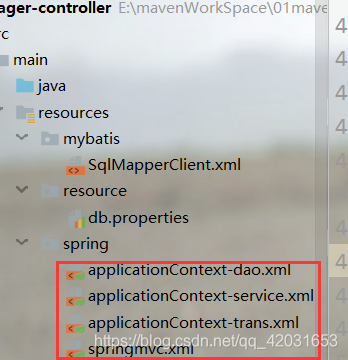
数据库配置文件:
jdbc.driver=com.mysql.jdbc.Driver

jdbc.url=jdbc:mysql://localhost:3306/ssm?characterEncoding=utf-8

jdbc.username=root

jdbc.password=root
spring/applicationContext-dao.xml:
<?xml version="1.0" encoding="UTF-8"?>

<beans xmlns="http://www.springframework.org/schema/beans"

	xmlns:xsi="http://www.w3.org/2001/XMLSchema-instance" xmlns:p="http://www.springframework.org/schema/p"

	xmlns:context="http://www.springframework.org/schema/context"

	xmlns:mvc="http://www.springframework.org/schema/mvc"

	xsi:schemaLocation="http://www.springframework.org/schema/beans http://www.springframework.org/schema/beans/spring-beans.xsd

        http://www.springframework.org/schema/mvc http://www.springframework.org/schema/mvc/spring-mvc-4.0.xsd

        http://www.springframework.org/schema/context http://www.springframework.org/schema/context/spring-context.xsd">

	<!-- 配置解析properties文件的工具类 -->

	<context:property-placeholder location="classpath:resource/*.properties"/>

	<!-- 配置数据源 dataSource -->

	<bean id="dataSource" class="com.alibaba.druid.pool.DruidDataSource" destroy-method="close">

	    <property name="url" value="${jdbc.url}" />

		<property name="username" value="${jdbc.username}" />

		<property name="password" value="${jdbc.password}" />

		<property name="driverClassName" value="${jdbc.driver}" />

		<property name="maxActive" value="10" />

		<property name="minIdle" value="5" />

	</bean>

	<!-- 创建mybatis的上下文对象  -->

	<bean class="org.mybatis.spring.SqlSessionFactoryBean">

		<property name="dataSource">

			<ref bean="dataSource"/>

		</property>

		<property name="configLocation">

			<value>classpath:mybatis/SqlMapperClient.xml</value>

		</property>

		<property name="typeAliasesPackage" value="com.bjsxt.pojo"/>

	</bean>

	<!-- 扫描mybatis的接口与映射配置文件 -->

	<bean class="org.mybatis.spring.mapper.MapperScannerConfigurer">

		<property name="basePackage" value="com.bjsxt.mapper"/>

	</bean>

</beans>
spring/applicationContext-service.xml:
<?xml version="1.0" encoding="UTF-8"?>

<beans xmlns="http://www.springframework.org/schema/beans"

	xmlns:xsi="http://www.w3.org/2001/XMLSchema-instance" xmlns:p="http://www.springframework.org/schema/p"

	xmlns:context="http://www.springframework.org/schema/context"

	xmlns:mvc="http://www.springframework.org/schema/mvc"

	xsi:schemaLocation="http://www.springframework.org/schema/beans http://www.springframework.org/schema/beans/spring-beans.xsd

        http://www.springframework.org/schema/mvc http://www.springframework.org/schema/mvc/spring-mvc-4.0.xsd

        http://www.springframework.org/schema/context http://www.springframework.org/schema/context/spring-context.xsd">

	<!-- 扫描bean对象 -->

	<context:component-scan base-package="com.bjsxt.service.impl"/>

</beans>
spring/applicationContext-trans.xml:
<?xml version="1.0" encoding="UTF-8"?>

<beans xmlns="http://www.springframework.org/schema/beans"

	xmlns:context="http://www.springframework.org/schema/context" xmlns:p="http://www.springframework.org/schema/p"

	xmlns:aop="http://www.springframework.org/schema/aop" xmlns:tx="http://www.springframework.org/schema/tx"

	xmlns:xsi="http://www.w3.org/2001/XMLSchema-instance"

	xsi:schemaLocation="http://www.springframework.org/schema/beans http://www.springframework.org/schema/beans/spring-beans-4.0.xsd

	http://www.springframework.org/schema/context http://www.springframework.org/schema/context/spring-context-4.0.xsd

	http://www.springframework.org/schema/aop http://www.springframework.org/schema/aop/spring-aop-4.0.xsd http://www.springframework.org/schema/tx http://www.springframework.org/schema/tx/spring-tx-4.0.xsd

	http://www.springframework.org/schema/util http://www.springframework.org/schema/util/spring-util-4.0.xsd">

   <!-- 配置事物管理器的切面 -->

   <bean id="transactionMananger" class="org.springframework.jdbc.datasource.DataSourceTransactionManager">

		<property name="dataSource" ref="dataSource"/>

   </bean>

   <!-- 配置事物传播行为 :其实就是那些方法应该受什么样的事物控制-->

    <tx:advice id="advice" transaction-manager="transactionMananger">

   	<tx:attributes>

   		<tx:method name="add*" propagation="REQUIRED"/>

   		<tx:method name="modify*" propagation="REQUIRED"/>

   		<tx:method name="update*" propagation="REQUIRED"/>

   		<tx:method name="dorp*" propagation="REQUIRED"/>

   		<tx:method name="del*" propagation="REQUIRED"/>

   		<tx:method name="find*" read-only="true"/>

   	</tx:attributes>

   </tx:advice>

   <!-- 那些类下的方法需要参与到当前的事物管理中 。配置切点 -->

   <aop:config>

   	<aop:advisor advice-ref="advice" pointcut="execution(* com.bjsxt.service.*.*(..))"/>

   </aop:config>

</beans>
spring/springmvc.xml:
<?xml version="1.0" encoding="UTF-8"?>

<beans xmlns="http://www.springframework.org/schema/beans"

	xmlns:xsi="http://www.w3.org/2001/XMLSchema-instance" xmlns:p="http://www.springframework.org/schema/p"

	xmlns:context="http://www.springframework.org/schema/context"

	xmlns:mvc="http://www.springframework.org/schema/mvc"

	xsi:schemaLocation="http://www.springframework.org/schema/beans http://www.springframework.org/schema/beans/spring-beans.xsd

        http://www.springframework.org/schema/mvc http://www.springframework.org/schema/mvc/spring-mvc-4.0.xsd

        http://www.springframework.org/schema/context http://www.springframework.org/schema/context/spring-context.xsd">

      <!-- 包的扫描器主要是扫描@controller -->

      <context:component-scan base-package="com.bjsxt.web.controller"/>

	   <!-- 注册两个新对象 主要是为了来处理springmvc中的其他anntation 如:@requestmapping -->

	   <mvc:annotation-driven></mvc:annotation-driven>

	   <!-- 视图解析器 -->

	   <bean class="org.springframework.web.servlet.view.InternalResourceViewResolver">

		<property name="prefix" value="/WEB-INF/jsp/" /><!-- jsp所在的前缀 -->

		<property name="suffix" value=".jsp" />

    </bean>

    <!-- 配置静态资源映射 -->

    <mvc:resources location="/WEB-INF/css/" mapping="/css/**"/>

	<mvc:resources location="/WEB-INF/js/" mapping="/js/**"/>

</beans>
idea结合maven小项目的更多相关文章
- maven小项目注册服务(三)--web模块
java的web应用打包方式一般为war它和jar的区别就是包含了更多的资源和文件,如JSP文件,静态资源文件,servlet等等.war包的核心就WEB-INF文件夹下必须有一个web.xml 的配 ...
- maven小项目注册服务(一)--email和persist模块
跟着书里的讲解,跟着做了一遍该项目: 首先明白注册账户的需求: 账号的lD和Email地址都可以用来唯一地标识某个用户,而显示名称则用来显示在页面下,方便浏览.注册的时候用户还需要输入两次密码,以确保 ...
- maven小项目注册服务(二)--captcha模块
验证码生成模块,配置信息基本和前面的模块一样.account-captcha需要提供的服务是生成随机的验证码主键,然后用户可以使用这个主键要求服务生成一个验证码图片,这个图片对应的值应该是随机的,最后 ...
- spring+springmvc+hibernate架构、maven分模块开发样例小项目案例
maven分模块开发样例小项目案例 spring+springmvc+hibernate架构 以用户管理做測试,分dao,sevices,web层,分模块开发測试!因时间关系.仅仅測查询成功.其它的准 ...
- 主要介绍JavaEE中Maven Web 项目的结构及其它几个小问题
先说下本篇随笔的目录. 1.介绍windows中环境变量Path与ClassPath的区别. 2.可能导致命令行运行javac编译成功,但 java命令 + 所要执行的类的类名 无效的原因. 3.介绍 ...
- Mybatis与Spring整合,使用了maven管理项目,作为初学者觉得不错,转载下来
转载自:http://www.cnblogs.com/xdp-gacl/p/4271627.html 一.搭建开发环境 1.1.使用Maven创建Web项目 执行如下命令: mvn archetype ...
- 【maven + hibernate(注解) +spring +springMVC】 使用maven搭建项目
研究,百度,查资料+好友帮助,使用MyEcplise2015工具,通过maven搭建hibernate+springMVC+spring的项目,数据库采用MySql5.5 不过使用的版本会在项目搭建过 ...
- Java Web 入门(一)使用 Intellij IDEA 14.1.5 创建 Maven Web项目
1.基础配置 1.1 安装 JDK1.7,配置系统变量:JAVA_HOME 和 Path 1.2 安装 Tomcat 7.0 1.3 安装 Intellij IDEA 14.1.5 1.4 Mave ...
- Maven构建项目比较慢的解决办法
[前言] Intellij IDEA下Maven构建项目时,构建项目速度比较慢.需要等好久才能构建好一个项目,有时候一下午也还在提示进度. [问题描述] 使用Maven构建项目时: 设置好各种参数,然 ...
随机推荐
- mysql用find_in_set代替like搜索提高性能
mysql用find_in_set代替like搜索提高性能 <pre>SELECT * from mobantestinfo1 where find_in_set('33',info2); ...
- matlab中的eval函数使用
matlab中的eval函数使用 在matlab的命令行窗口中输入help eval命令回车就可以看到eval函数的官方解释,大概的意思就是执行matlab中的表达式,计算expression表示的代 ...
- 两张图弄懂函数的递归(以golang为例)
函数递归时要遵守的原则: 执行一个函数时,就要创建一个新的受保护的独立空间(新函数栈) 函数的局部变量是独立的,不会相互影响: 递归必须向退出递归的条件逼近,否则就会无限递归: 当一个函数执行完毕,或 ...
- 使用火狐浏览器模仿手机浏览器,附浏览器HTTP_USER_AGENT汇总
HTTP_USER_AGENT用来获取浏览页面的访问者在用什么操作系统(包括版本号)浏览器(包括版本号)和用户个人偏好. 改变浏览器的这个参数就可以伪装成相应的浏览器. User Agent Swit ...
- VS2019打包WPF安装程序最新教程
VS2019打包WPF安装程序最新教程,使用Visual Studio 2019开发的WPF程序如果想要打包为安装程序,除了在VS2019找到WPF项目类库直接右键发布之外,更常用的还是将其打包为ex ...
- Xshell选中的同时把内容复制到剪贴板
1.设置对话框 工具 -> 选项 -> 键盘和鼠标 -> 将选定的文本自动复制到剪贴板 2.贴图如下 2.1.打开设置对话框 2.2.设置键盘鼠标,左键复制
- etcd-operator快速入门完全教程
Operator是指一类基于Kubernetes自定义资源对象(CRD)和控制器(Controller)的云原生拓展服务,其中CRD定义了每个operator所创建和管理的自定义资源对象,Contro ...
- C#:转义字符 \n 和 \r 的区别
1.\n,换行符,作用是换行符之后的字符换到下一行: 例如:1234/n567 得出的结果是1234 567 2.而\r,回车符,作用是回车符之后的字符会回到当前行的最前面,把回车符之前的字符覆 ...
- nyoj 283-对称排序 (sort)
283-对称排序 内存限制:64MB 时间限制:1000ms 特判: No 通过数:2 提交数:4 难度:1 题目描述: In your job at Albatross Circus Managem ...
- vim用户手册笔记常用操作整理
"x"命令可以删除一个字符 "d"命令可以后跟任何一个位移命令,它将删除从当前光标起到位移的终点处的文本内容dw "c",改变命令例如cw ...