
idea结合maven小项目
整体构造
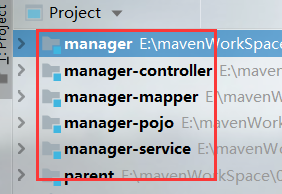

(修改 POM 文件 )parent
<?xml version="1.0" encoding="UTF-8"?>

<project xmlns="http://maven.apache.org/POM/4.0.0"

         xmlns:xsi="http://www.w3.org/2001/XMLSchema-instance"

         xsi:schemaLocation="http://maven.apache.org/POM/4.0.0 http://maven.apache.org/xsd/maven-4.0.0.xsd">

    <modelVersion>4.0.0</modelVersion>

    <groupId>com.bjsxt</groupId>

    <artifactId>parent</artifactId>

    <version>1.0-SNAPSHOT</version>

    <packaging>pom</packaging>

        <properties>

            <junit.version>4.12</junit.version>

            <spring.version>4.1.3.RELEASE</spring.version>

            <mybatis.version>3.2.8</mybatis.version>

            <mybatis.spring.version>1.2.2</mybatis.spring.version>

            <mysql.version>5.1.32</mysql.version>

            <slf4j.version>1.6.4</slf4j.version>

            <druid.version>1.0.9</druid.version>

            <jstl.version>1.2</jstl.version>

            <servlet-api.version>2.5</servlet-api.version>

            <jsp-api.version>2.0</jsp-api.version>

            <tomcat.version>2.2</tomcat.version>

            <project.build.sourceEncoding>UTF-8</project.build.sourceEncoding>

        </properties>

        <!-- jar 包的依赖注入 ,由于该工程是一个父工程,

        所以 jar 包在该 pom 文件中只是声明-->

        <dependencyManagement>

            <dependencies>

                <!-- 单元测试 -->

                <dependency>

                    <groupId>junit</groupId>

                    <artifactId>junit</artifactId>

                    <version>${junit.version}</version>

                    <scope>test</scope>

                </dependency>

                <!-- 日志处理 -->

                <dependency>

                    <groupId>org.slf4j</groupId>

                    <artifactId>slf4j-log4j12</artifactId>

                    <version>${slf4j.version}</version>

                </dependency>

                <!-- Mybatis -->

                <dependency>

                    <groupId>org.mybatis</groupId>

                    <artifactId>mybatis</artifactId>

                    <version>${mybatis.version}</version>

                </dependency>

                <dependency>

                    <groupId>org.mybatis</groupId>

                    <artifactId>mybatis-spring</artifactId>

                    <version>${mybatis.spring.version}</version>

                </dependency>

                <!-- MySql -->

                <dependency>

                    <groupId>mysql</groupId>

                    <artifactId>mysql-connector-java</artifactId>

                    <version>${mysql.version}</version>

                </dependency>

                <!-- 连接池 -->

                <dependency>

                    <groupId>com.alibaba</groupId>

                    <artifactId>druid</artifactId>

                    <version>${druid.version}</version>

                </dependency>

                <!-- Spring -->

                <dependency>

                    <groupId>org.springframework</groupId>

                    <artifactId>spring-context</artifactId>

                    <version>${spring.version}</version>

                </dependency>

                <dependency>

                    <groupId>org.springframework</groupId>

                    <artifactId>spring-beans</artifactId>

                    <version>${spring.version}</version>

                </dependency>

                <dependency>

                    <groupId>org.springframework</groupId>

                    <artifactId>spring-webmvc</artifactId>

                    <version>${spring.version}</version>

                </dependency>

                <dependency>

                    <groupId>org.springframework</groupId>

                    <artifactId>spring-jdbc</artifactId>

                    <version>${spring.version}</version>

                </dependency>

                <dependency>

                    <groupId>org.springframework</groupId>

                    <artifactId>spring-aspects</artifactId>

                    <version>${spring.version}</version>

                </dependency>

                <!-- JSP 相关 -->

                <dependency>

                    <groupId>jstl</groupId>

                    <artifactId>jstl</artifactId>

                    <version>${jstl.version}</version>

                </dependency>

                <dependency>

                    <groupId>javax.servlet</groupId>

                    <artifactId>servlet-api</artifactId>

                    <version>${servlet-api.version}</version>

                    <scope>provided</scope>

                </dependency>

                <dependency>

                    <groupId>javax.servlet</groupId>

                    <artifactId>jsp-api</artifactId>

                    <version>${jsp-api.version}</version>

                    <scope>provided</scope>

                </dependency>

            </dependencies>

        </dependencyManagement>

        <!-- 插件的开启 -->

        <build>

            <!-- tomcat 插件,由于子项目不一定每个都是 web

            项目,所以该插件只是声明,并未开启 -->

            <pluginManagement>

                <plugins>

                    <!-- 配置 Tomcat 插件 -->

                    <plugin>

                        <groupId>org.apache.tomcat.maven</groupId>

                        <artifactId>tomcat7-maven-plugin</artifactId>

                        <version>${tomcat.version}</version>

                    </plugin>

                </plugins>

            </pluginManagement>

            <!-- maven 的编译器插件,该插件主要是决定了当前

            项目所使用 jre 版本 。由于无论是 jar,还是 war 项目都需要

            制定 jar 的版本,所以该插件不需要生命,应当是开启的。-->

            <plugins>

                <plugin>

                    <groupId>org.apache.maven.plugins</groupId>

                    <artifactId>maven-compiler-plugin</artifactId>

                    <version>3.2</version>

                    <configuration>

                        <source>1.7</source>

                        <target>1.7</target>

                        <encoding>UTF-8</encoding>

                    </configuration>

                </plugin>

            </plugins>

        </build>

</project>
修改 manager-mapper 的 pom 文件:
<?xml version="1.0" encoding="UTF-8"?>

<project xmlns="http://maven.apache.org/POM/4.0.0"

         xmlns:xsi="http://www.w3.org/2001/XMLSchema-instance"

         xsi:schemaLocation="http://maven.apache.org/POM/4.0.0 http://maven.apache.org/xsd/maven-4.0.0.xsd">

    <parent>

        <artifactId>manager</artifactId>

        <groupId>com.bjsxt</groupId>

        <version>1.0-SNAPSHOT</version>

        <relativePath>../manager/pom.xml</relativePath>

    </parent>

    <modelVersion>4.0.0</modelVersion>

    <artifactId>manager-mapper</artifactId>

    <packaging>jar</packaging>

    <dependencies>

        <dependency>

            <groupId>com.bjsxt</groupId>

            <artifactId>manager-pojo</artifactId>

            <version>1.0-SNAPSHOT</version>

        </dependency>

        <!-- Mybatis -->

        <dependency>

            <groupId>org.mybatis</groupId>

            <artifactId>mybatis</artifactId>

        </dependency>

        <dependency>

            <groupId>org.mybatis</groupId>

            <artifactId>mybatis-spring</artifactId>

        </dependency>

        <!-- MySql -->

        <dependency>

            <groupId>mysql</groupId>

            <artifactId>mysql-connector-java</artifactId>

        </dependency>

        <!-- 连接池 -->

        <dependency>

            <groupId>com.alibaba</groupId>

            <artifactId>druid</artifactId>

        </dependency>

    </dependencies>

    <build>

        <resources>

            <resource>

                <directory>src/main/java</directory>

                <includes>

                    <include>**/*.xml</include>

                </includes>

            </resource>

        </resources>

    </build>

</project>
修改 manager-service 的 pom 文件:
<?xml version="1.0" encoding="UTF-8"?>

<project xmlns="http://maven.apache.org/POM/4.0.0"

         xmlns:xsi="http://www.w3.org/2001/XMLSchema-instance"

         xsi:schemaLocation="http://maven.apache.org/POM/4.0.0 http://maven.apache.org/xsd/maven-4.0.0.xsd">

    <parent>

        <artifactId>manager</artifactId>

        <groupId>com.bjsxt</groupId>

        <version>1.0-SNAPSHOT</version>

        <relativePath>../manager/pom.xml</relativePath>

    </parent>

    <modelVersion>4.0.0</modelVersion>

    <packaging>jar</packaging>

    <artifactId>manager-service</artifactId>

    <dependencies>

        <dependency>

            <groupId>com.bjsxt</groupId>

            <artifactId>manager-mapper</artifactId>

            <version>1.0-SNAPSHOT</version>

        </dependency>

        <!-- Spring -->

        <dependency>

            <groupId>org.springframework</groupId>

            <artifactId>spring-context</artifactId>

        </dependency>

        <dependency>

            <groupId>org.springframework</groupId>

            <artifactId>spring-beans</artifactId>

        </dependency>

        <dependency>

            <groupId>org.springframework</groupId>

            <artifactId>spring-webmvc</artifactId>

        </dependency>

        <dependency>

            <groupId>org.springframework</groupId>

            <artifactId>spring-jdbc</artifactId>

        </dependency>

        <dependency>

            <groupId>org.springframework</groupId>

            <artifactId>spring-aspects</artifactId>

        </dependency>

    </dependencies>

</project>
修改 manager-controller 的 pom 文件 :
<?xml version="1.0" encoding="UTF-8"?>

<project xmlns="http://maven.apache.org/POM/4.0.0"

         xmlns:xsi="http://www.w3.org/2001/XMLSchema-instance"

         xsi:schemaLocation="http://maven.apache.org/POM/4.0.0 http://maven.apache.org/xsd/maven-4.0.0.xsd">

    <parent>

        <artifactId>manager</artifactId>

        <groupId>com.bjsxt</groupId>

        <version>1.0-SNAPSHOT</version>

        <relativePath>../manager/pom.xml</relativePath>

    </parent>

    <modelVersion>4.0.0</modelVersion>

    <artifactId>manager-controller</artifactId>

    <packaging>war</packaging>

    <dependencies>

        <dependency>

            <groupId>com.bjsxt</groupId>

            <artifactId>manager-service</artifactId>

            <version>1.0-SNAPSHOT</version>

        </dependency>

    <!--    <dependency>

            <groupId>javax.servlet</groupId>

            <artifactId>servlet-api</artifactId>

            <version>2.2</version>

            <scope>provided</scope>

        </dependency>-->

        <!-- JSP 相关 -->

        <dependency>

            <groupId>jstl</groupId>

            <artifactId>jstl</artifactId>

        </dependency>

        <dependency>

            <groupId>javax.servlet</groupId>

            <artifactId>servlet-api</artifactId>

            <scope>provided</scope>

        </dependency>

        <dependency>

            <groupId>javax.servlet</groupId>

            <artifactId>jsp-api</artifactId>

            <scope>provided</scope>

        </dependency>

    </dependencies>

    <build>

        <plugins>

            <!-- 配置 Tomcat 插件 -->

            <plugin>

                <groupId>org.apache.tomcat.maven</groupId>

                <artifactId>tomcat7-maven-plugin</artifactId>

                <configuration>

                    <port>8080</port>

                    <path>/</path>

                </configuration>

            </plugin>

        </plugins>

    </build>

</project>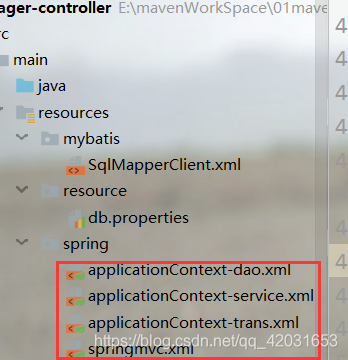
数据库配置文件:
jdbc.driver=com.mysql.jdbc.Driver

jdbc.url=jdbc:mysql://localhost:3306/ssm?characterEncoding=utf-8

jdbc.username=root

jdbc.password=root
spring/applicationContext-dao.xml:
<?xml version="1.0" encoding="UTF-8"?>

<beans xmlns="http://www.springframework.org/schema/beans"

	xmlns:xsi="http://www.w3.org/2001/XMLSchema-instance" xmlns:p="http://www.springframework.org/schema/p"

	xmlns:context="http://www.springframework.org/schema/context"

	xmlns:mvc="http://www.springframework.org/schema/mvc"

	xsi:schemaLocation="http://www.springframework.org/schema/beans http://www.springframework.org/schema/beans/spring-beans.xsd

        http://www.springframework.org/schema/mvc http://www.springframework.org/schema/mvc/spring-mvc-4.0.xsd

        http://www.springframework.org/schema/context http://www.springframework.org/schema/context/spring-context.xsd">

	<!-- 配置解析properties文件的工具类 -->

	<context:property-placeholder location="classpath:resource/*.properties"/>

	<!-- 配置数据源 dataSource -->

	<bean id="dataSource" class="com.alibaba.druid.pool.DruidDataSource" destroy-method="close">

	    <property name="url" value="${jdbc.url}" />

		<property name="username" value="${jdbc.username}" />

		<property name="password" value="${jdbc.password}" />

		<property name="driverClassName" value="${jdbc.driver}" />

		<property name="maxActive" value="10" />

		<property name="minIdle" value="5" />

	</bean>

	<!-- 创建mybatis的上下文对象  -->

	<bean class="org.mybatis.spring.SqlSessionFactoryBean">

		<property name="dataSource">

			<ref bean="dataSource"/>

		</property>

		<property name="configLocation">

			<value>classpath:mybatis/SqlMapperClient.xml</value>

		</property>

		<property name="typeAliasesPackage" value="com.bjsxt.pojo"/>

	</bean>

	<!-- 扫描mybatis的接口与映射配置文件 -->

	<bean class="org.mybatis.spring.mapper.MapperScannerConfigurer">

		<property name="basePackage" value="com.bjsxt.mapper"/>

	</bean>

</beans>
spring/applicationContext-service.xml:
<?xml version="1.0" encoding="UTF-8"?>

<beans xmlns="http://www.springframework.org/schema/beans"

	xmlns:xsi="http://www.w3.org/2001/XMLSchema-instance" xmlns:p="http://www.springframework.org/schema/p"

	xmlns:context="http://www.springframework.org/schema/context"

	xmlns:mvc="http://www.springframework.org/schema/mvc"

	xsi:schemaLocation="http://www.springframework.org/schema/beans http://www.springframework.org/schema/beans/spring-beans.xsd

        http://www.springframework.org/schema/mvc http://www.springframework.org/schema/mvc/spring-mvc-4.0.xsd

        http://www.springframework.org/schema/context http://www.springframework.org/schema/context/spring-context.xsd">

	<!-- 扫描bean对象 -->

	<context:component-scan base-package="com.bjsxt.service.impl"/>

</beans>
spring/applicationContext-trans.xml:
<?xml version="1.0" encoding="UTF-8"?>

<beans xmlns="http://www.springframework.org/schema/beans"

	xmlns:context="http://www.springframework.org/schema/context" xmlns:p="http://www.springframework.org/schema/p"

	xmlns:aop="http://www.springframework.org/schema/aop" xmlns:tx="http://www.springframework.org/schema/tx"

	xmlns:xsi="http://www.w3.org/2001/XMLSchema-instance"

	xsi:schemaLocation="http://www.springframework.org/schema/beans http://www.springframework.org/schema/beans/spring-beans-4.0.xsd

	http://www.springframework.org/schema/context http://www.springframework.org/schema/context/spring-context-4.0.xsd

	http://www.springframework.org/schema/aop http://www.springframework.org/schema/aop/spring-aop-4.0.xsd http://www.springframework.org/schema/tx http://www.springframework.org/schema/tx/spring-tx-4.0.xsd

	http://www.springframework.org/schema/util http://www.springframework.org/schema/util/spring-util-4.0.xsd">

   <!-- 配置事物管理器的切面 -->

   <bean id="transactionMananger" class="org.springframework.jdbc.datasource.DataSourceTransactionManager">

		<property name="dataSource" ref="dataSource"/>

   </bean>

   <!-- 配置事物传播行为 :其实就是那些方法应该受什么样的事物控制-->

    <tx:advice id="advice" transaction-manager="transactionMananger">

   	<tx:attributes>

   		<tx:method name="add*" propagation="REQUIRED"/>

   		<tx:method name="modify*" propagation="REQUIRED"/>

   		<tx:method name="update*" propagation="REQUIRED"/>

   		<tx:method name="dorp*" propagation="REQUIRED"/>

   		<tx:method name="del*" propagation="REQUIRED"/>

   		<tx:method name="find*" read-only="true"/>

   	</tx:attributes>

   </tx:advice>

   <!-- 那些类下的方法需要参与到当前的事物管理中 。配置切点 -->

   <aop:config>

   	<aop:advisor advice-ref="advice" pointcut="execution(* com.bjsxt.service.*.*(..))"/>

   </aop:config>

</beans>
spring/springmvc.xml:
<?xml version="1.0" encoding="UTF-8"?>

<beans xmlns="http://www.springframework.org/schema/beans"

	xmlns:xsi="http://www.w3.org/2001/XMLSchema-instance" xmlns:p="http://www.springframework.org/schema/p"

	xmlns:context="http://www.springframework.org/schema/context"

	xmlns:mvc="http://www.springframework.org/schema/mvc"

	xsi:schemaLocation="http://www.springframework.org/schema/beans http://www.springframework.org/schema/beans/spring-beans.xsd

        http://www.springframework.org/schema/mvc http://www.springframework.org/schema/mvc/spring-mvc-4.0.xsd

        http://www.springframework.org/schema/context http://www.springframework.org/schema/context/spring-context.xsd">

      <!-- 包的扫描器主要是扫描@controller -->

      <context:component-scan base-package="com.bjsxt.web.controller"/>

	   <!-- 注册两个新对象 主要是为了来处理springmvc中的其他anntation 如:@requestmapping -->

	   <mvc:annotation-driven></mvc:annotation-driven>

	   <!-- 视图解析器 -->

	   <bean class="org.springframework.web.servlet.view.InternalResourceViewResolver">

		<property name="prefix" value="/WEB-INF/jsp/" /><!-- jsp所在的前缀 -->

		<property name="suffix" value=".jsp" />

    </bean>

    <!-- 配置静态资源映射 -->

    <mvc:resources location="/WEB-INF/css/" mapping="/css/**"/>

	<mvc:resources location="/WEB-INF/js/" mapping="/js/**"/>

</beans>
idea结合maven小项目的更多相关文章
- maven小项目注册服务(三)--web模块
java的web应用打包方式一般为war它和jar的区别就是包含了更多的资源和文件,如JSP文件,静态资源文件,servlet等等.war包的核心就WEB-INF文件夹下必须有一个web.xml 的配 ...
- maven小项目注册服务(一)--email和persist模块
跟着书里的讲解,跟着做了一遍该项目: 首先明白注册账户的需求: 账号的lD和Email地址都可以用来唯一地标识某个用户,而显示名称则用来显示在页面下,方便浏览.注册的时候用户还需要输入两次密码,以确保 ...
- maven小项目注册服务(二)--captcha模块
验证码生成模块,配置信息基本和前面的模块一样.account-captcha需要提供的服务是生成随机的验证码主键,然后用户可以使用这个主键要求服务生成一个验证码图片,这个图片对应的值应该是随机的,最后 ...
- spring+springmvc+hibernate架构、maven分模块开发样例小项目案例
maven分模块开发样例小项目案例 spring+springmvc+hibernate架构 以用户管理做測试,分dao,sevices,web层,分模块开发測试!因时间关系.仅仅測查询成功.其它的准 ...
- 主要介绍JavaEE中Maven Web 项目的结构及其它几个小问题
先说下本篇随笔的目录. 1.介绍windows中环境变量Path与ClassPath的区别. 2.可能导致命令行运行javac编译成功,但 java命令 + 所要执行的类的类名 无效的原因. 3.介绍 ...
- Mybatis与Spring整合,使用了maven管理项目,作为初学者觉得不错,转载下来
转载自:http://www.cnblogs.com/xdp-gacl/p/4271627.html 一.搭建开发环境 1.1.使用Maven创建Web项目 执行如下命令: mvn archetype ...
- 【maven + hibernate(注解) +spring +springMVC】 使用maven搭建项目
研究,百度,查资料+好友帮助,使用MyEcplise2015工具,通过maven搭建hibernate+springMVC+spring的项目,数据库采用MySql5.5 不过使用的版本会在项目搭建过 ...
- Java Web 入门(一)使用 Intellij IDEA 14.1.5 创建 Maven Web项目
1.基础配置 1.1 安装 JDK1.7,配置系统变量:JAVA_HOME 和 Path 1.2 安装 Tomcat 7.0 1.3 安装 Intellij IDEA 14.1.5 1.4 Mave ...
- Maven构建项目比较慢的解决办法
[前言] Intellij IDEA下Maven构建项目时,构建项目速度比较慢.需要等好久才能构建好一个项目,有时候一下午也还在提示进度. [问题描述] 使用Maven构建项目时: 设置好各种参数,然 ...
随机推荐
- javascript获取上传图片的大小
javascript获取上传图片的大小 <pre><input id="file" type="file"> <input id= ...
- Geotools求shapefile路网中任意两点之间最短路径的距离
前言:之前在博问求助过这个问题.经过几天的思考,算是解决了(但仍有不足),另一方面对Geotools不是很熟,有些描述可能不正确,希望大家批评指正. 问题:作为一个新手,我并没有发现Geotools中 ...
- .NET Core 对龙芯的支持情况和对 .NET Core 开发嵌入式的思考
目录 .NET Core 对龙芯的支持情况和对 .NET Core 开发嵌入式的思考 一,遗憾的尝试 二,.NET Core在嵌入式下的几点不足 三,.NET Core 龙芯移植的进展和资料 .NET ...
- java多线程与线程并发五:多个线程访问共享对象和数据的方式
本节的内容主要是对前面几节提到的线程间共享数据的方式做一个总结. 线程之间共享数据有以下几种方式: 1.如果每个线程执行的代码相同,可以使用同一个Runnable对象. 2.如果每个线程执行的代码不同 ...
- 微擎框架商业版 V2.1.2 去后门一键安装版+去除云平台+无附带模块
下载地址:http://dd.ma/AdVvoDu5 关注微信公众号codervip,点击公众号菜单,获取提取码! 这个是一键安装版本,所以微擎安装比较简单,不用大家手动去改数据库了,而且修复上个2. ...
- C语言|博客作业05
这个作业属于哪个课程 C语言程序设计II 这个作业的要求在哪里 https://edu.cnblogs.com/campus/zswxy/CST2019-1/homework/9825 我在这个课程的 ...
- 让块元素在div中水平居中,并且垂直居中的五种方法
在写代码前,先做下准备工作,写两个div,设置下div的大小,把小的div放在大的div里面.可以给小的div设置下颜色,方便观看. 方法一:写一个伪元素,将它设置为行内块元素,高度与父元素相同,写一 ...
- 剑指Offer-25.复杂链表的复制(C++/Java)
题目: 输入一个复杂链表(每个节点中有节点值,以及两个指针,一个指向下一个节点,另一个特殊指针指向任意一个节点),返回结果为复制后复杂链表的head.(注意,输出结果中请不要返回参数中的节点引用,否则 ...
- Windows 10上源码编译glog和gflags 编写glog-config.cmake和gflags-config.cmake | compile glog and glags on windows from source
本文首发于个人博客https://kezunlin.me/post/bb64e398/,欢迎阅读! compile glog v0.3.5 and glags on windows from sour ...
- 从零开始入门 | Kubernetes 中的服务发现与负载均衡
作者 | 阿里巴巴技术专家 溪恒 一.需求来源 为什么需要服务发现 在 K8s 集群里面会通过 pod 去部署应用,与传统的应用部署不同,传统应用部署在给定的机器上面去部署,我们知道怎么去调用别的机 ...