
目不识丁的我使用Python编写汉字注音小工具
一万点暴击伤害
人懒起来太可怕了,放了个十一充分激发了我的惰性。然后公众号就这么停了半个月,好惭愧…
新学期儿子的幼儿园上线了APP,每天作业通过app布置后,家长需要陪着孩子学习,并上传视频才算完成作业。来看看今天的课后作业吧:

看到最后的千字文,我就瞬间崩溃了,别说教孩子,我自己都一堆字不认识。老婆就是因为很多字需要手机查嫌麻烦,才把辅导孩子的任务甩给了我。平时我们中英文翻译的时候,经常使用百度翻译,那么今天我们使用Python来做一个自动注音的GUI工具吧!
Python的拼音模块
Python的模块库API,每次进去习惯第一动作,就是右键翻译为中文。可Python的拼音模块不需要这么做,因为涉及拼音等模块肯定和中文有关系,文档自然是中文的喽。
那么Python的拼音模块是什么? pypinyin
- 特性
根据词组智能匹配最正确的拼音。
支持多音字。
简单的繁体支持, 注音支持。
支持多种不同拼音/注音风格。
- 安装
pip install pypinyin
- 使用示例
>>> from pypinyin import pinyin, lazy_pinyin, Style

>>> pinyin('中心')

[['zhōng'], ['xīn']]

>>> pinyin('中心', heteronym=True)  # 启用多音字模式

[['zhōng', 'zhòng'], ['xīn']]

>>> pinyin('中心', style=Style.FIRST_LETTER)  # 设置拼音风格

[['z'], ['x']]

>>> pinyin('中心', style=Style.TONE2, heteronym=True)

[['zho1ng', 'zho4ng'], ['xi1n']]

>>> pinyin('中心', style=Style.BOPOMOFO)  # 注音风格

[['ㄓㄨㄥ'], ['ㄒㄧㄣ']]

>>> pinyin('中心', style=Style.CYRILLIC)  # 俄语字母风格

[['чжун1'], ['синь1']]

>>> lazy_pinyin('中心')  # 不考虑多音字的情况

['zhong', 'xin']

# Python 3(Python 2 下把 '中心' 替换为 u'中心' 即可):
tkinter的宽与高
    from tkinter import *

    def center_window(width, height):

        screenwidth = root.winfo_screenwidth()

        screenheight = root.winfo_screenheight()

        size = '%dx%d+%d+%d' % (width, height, (screenwidth - width) / 2, (screenheight - height) / 2)

        root.geometry(size)

    root = Tk()

    center_window(700, 700)

    root.mainloop()
上面是一个tkinter设置程序居中的简单代码,其中700 700为宽高的px值,在这里没什么问题,但宽高一直都是px值么?
答案是否定的!
Text(frame, width=80, height=20, borderwidth=2, font=('黑体', '11'))
当我们使用Text文本标签时,width和height代表的是容纳字符的长度与高度。这里width代表设置80个字符的宽度,height为20个字符的高度。
程序实现
让我们先来看看实现效果吧: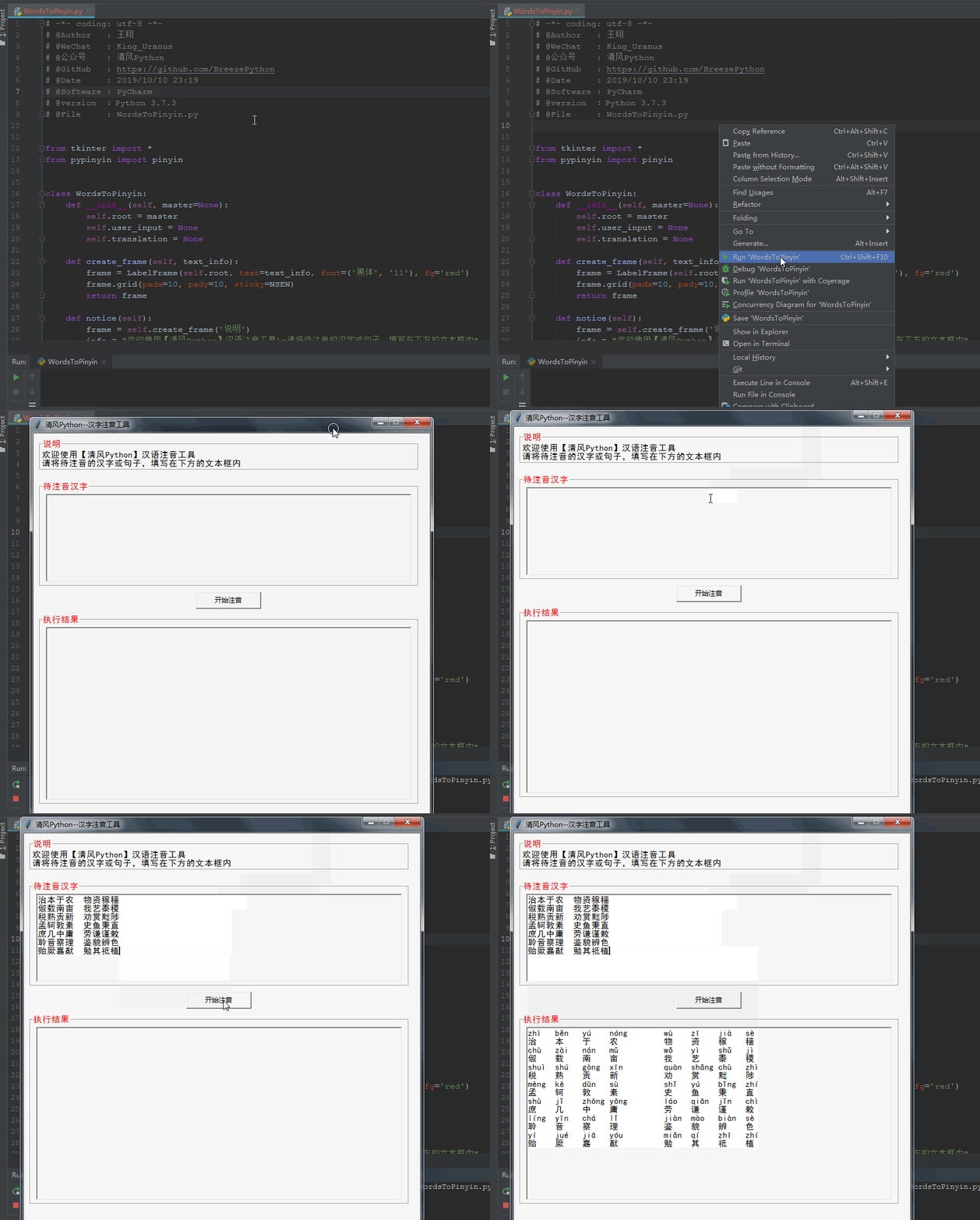
界面设计
GUI的界面比较简单,只需要有一个用户文本输入,翻译按钮,结果输出即可。
可以看到说明、待注音汉字、执行结果都通过**LabelFrame**进行包裹,主要是为了美观。
整体代码
# -*- coding: utf-8 -*-

# @Author   : 王翔

# @WeChat   : King_Uranus

# @公众号    : 清风Python

# @GitHub   : https://github.com/BreezePython

# @Date     : 2019/10/10 23:19

# @Software : PyCharm

# @version  :Python 3.7.3

# @File     : WordsToPinyin.py

from tkinter import *

from pypinyin import pinyin

class WordsToPinyin:

    def __init__(self, master=None):

        self.root = master

        self.user_input = None

        self.translation = None

    def create_frame(self, text_info):

        frame = LabelFrame(self.root, text=text_info, font=('黑体', '11'), fg='red')

        frame.grid(padx=10, pady=10, sticky=NSEW)

        return frame

    def notice(self):

        frame = self.create_frame('说明')

        info = "欢迎使用【清风Python】汉语注音工具\n请将待注音的汉字或句子,填写在下方的文本框内"

        note = Label(frame, text=info, justify=LEFT, font=('黑体', '11'))

        note.grid(sticky=EW)

    def user_words(self):

        frame = self.create_frame('待注音汉字')

        self.user_input = Text(frame, width=80, height=10, borderwidth=2, font=('黑体', '11'))

        self.user_input.grid(padx=10, pady=5)

    @staticmethod

    def split_words(words):

        word_list = ""

        tmp = ""

        for string in words:

            if len(bytes(string, 'utf-8')) == 3 and len(string) == 1:

                if tmp != '':

                    word_list += tmp.ljust(6)

                    tmp = ""

                word_list += string.ljust(5)

            else:

                tmp += string

        return word_list

    def translate(self):

        self.translation.delete(0.0, END)

        total_info = ''

        info = self.user_input.get(1.0, END).split('\n')

        for line in info:

            if not line:

                continue

            a = self.split_words(line)

            total_info += ''.join(map(lambda x: x[0].ljust(6), pinyin(line))) + '\n'

            total_info += a + '\n'

        self.translation.insert(1.0, total_info)

    def start_translate(self):

        b = Button(self.root, text='开始注音', width=15, command=self.translate)

        b.grid()

    def result_info(self):

        frame = self.create_frame('执行结果')

        self.translation = Text(frame, width=80, height=20, borderwidth=2, font=('黑体', '11'))

        self.translation.grid(padx=10, pady=5)

if __name__ == '__main__':

    def center_window(width, height):

        screenwidth = root.winfo_screenwidth()

        screenheight = root.winfo_screenheight()

        size = '%dx%d+%d+%d' % (width, height, (screenwidth - width) / 2, (screenheight - height) / 2)

        root.geometry(size)

    root = Tk()

    center_window(700, 700)

    root.resizable(width=False, height=False)

    root.title('清风Python--汉字注音工具')

    Main = WordsToPinyin(root)

    Main.notice()

    Main.user_words()

    Main.start_translate()

    Main.result_info()

    root.mainloop()
程序打包
为了之后使用方便,我们可以通过pyinstaller将小程序打包成exe工具,这样就可以在电脑上直接使用了!
The End
OK,今天的内容就到这里,如果觉得内容对你有所帮助,欢迎点击文章右下角的“在看”。
公众号回复拼音即可获取整体代码及打包好的exe工具。
当然如果你是Pythoner欢迎访问我的github下载:https://github.com/BreezePython
期待你关注我的公众号 清风Python,如果觉得不错,希望能动动手指转发给你身边的朋友们。
作者:清风Python
目不识丁的我使用Python编写汉字注音小工具的更多相关文章
- 用Python编写博客导出工具
用Python编写博客导出工具 罗朝辉 (http://kesalin.github.io/) CC 许可,转载请注明出处 写在前面的话 我在 github 上用 octopress 搭建了个人博 ...
- 使用Python编写打字训练小程序【华为云技术分享】
版权声明:本文为博主原创文章,遵循CC 4.0 BY-SA版权协议,转载请附上原文出处链接和本声明.本文链接:https://blog.csdn.net/devcloud/article/detail ...
- 使用Python编写打字训练小程序
你眼中的程序猿 别人眼中的程序猿,是什么样子?打字如飞,各种炫酷的页面切换,一个个好似黑客般的网站破解.可现实呢? 二指禅的敲键盘,写一行代码,查半天百度-那么如何能让我们从外表上变得更像一个程序猿呢 ...
- python开发目录合并小工具 PathMerge
前言 这个程序陆陆续续开发了几天,正好我在学Python,就一边做一边学,倒是学到不少东西. 不得不说python是快速开发的好工具. 程序做了一些改进,这两天又忙着毕设,现在才想起来发到博客上.想想 ...
- python 3.6 MJ小工具
2017.07.14 update 做了个界面,不需要使用cmd命令行+文件路径的方式来使用了: 链接如下: http://www.cnblogs.com/chenyuebai/p/7150382.h ...
- sharedb结合elementUi编写的实时小工具
我是使用sharedb 作为后端 ,然后前端使用的elementUI样式,编写的一个值班小工具.接下来,让我们先来了解一下sharedb是什么吧? sharedb工具 github地址:https:/ ...
- Python编写的记事本小程序
用Python中的Tkinter模块写的一个简单的记事本程序,Python2.x和Python3.x的许多内置函数有所改变,所以以下分为Python2.x和Python3.x版本. 一.效果展示: 二 ...
- Python编写的ARP扫描工具
源码如下: rom scapy.all import * import threading import argparse import logging import re logging.getLo ...
- python转exe的小工具
其实只是在cxfreeze的基础上加了个壳,做成窗口软件了 使用了pyqt做的界面,软件发布在了开源中国上,可以直接去下面的地址查看 http://git.oschina.net/robocky/py ...
随机推荐
- Charles破解安装及基本使用
一.Charles简介 1.Charles是一款代理服务器,通过成为电脑或者浏览器的代理,而后截取请求和请求结果达到抓包目的. 2.Charles是用Java写的,能够在Windows,Mac,Lin ...
- eclipse断点的使用---for循环举例
在很多时候,我们在学习过程中,不知道代码具体的实现过程,很好奇这个变量的值怎么就发生的变化,用好断点的使用,帮助我们更好的理解. 例子:10以内的奇数之和 package day03; public ...
- 在线WEB开发编辑器,edt.df5d.com
在线WEB开发编辑器,http://edt.df5d.com 本地服务端下载 : https://pan.baidu.com/s/11SlcoU_D-KbzGFbs-_9Dpg 即可加载本地磁盘,也可 ...
- linux 命令 | 常用命令导图(0)
- 编程工具 | VScode 使用快捷键
按 Press 功能 Function Ctrl + Shift + P,F1 显示命令面板 Show Command Palette Ctrl + P 快速打开 Quick Open Ctrl + ...
- hashMapp
原文链接:https://www.iteye.com/topic/539465 Hashmap是一种非常常用的.应用广泛的数据类型,最近研究到相关的内容,就正好复习一下.网上关于hashmap的文章很 ...
- 使用vue-cli搭建项目开发环境
一.前言 本篇文章主要是使用vue-cli搭建一个简单的vue项目,这个项目在其他文章中作为代码演示的环境会一直使用. 注意:默认大家的电脑已经安装nodejs,所以这里不总结nodejs的安装. 二 ...
- solr 本地搭建
1. 运行 D:\solr-4.7.2\example --> java -jar start.jar 2. 添加插件IK D:\solr-4.7.2\example\solr-weba ...
- SparkSQL--数据源Parquet的加载和保存
一.通用的load和save操作 对于Spark SQL的DataFrame来说,无论是从什么数据源创建出来的DataFrame,都有一些共同的load和save操作.load操作主要用于加载数据,创 ...
- nyoj 54-小明的存钱计划 (遍历 + 判断)
54-小明的存钱计划 内存限制:64MB 时间限制:3000ms Special Judge: No accepted:5 submit:11 题目描述: 小明的零花钱一直都是自己管理.每个月的月初妈 ...