
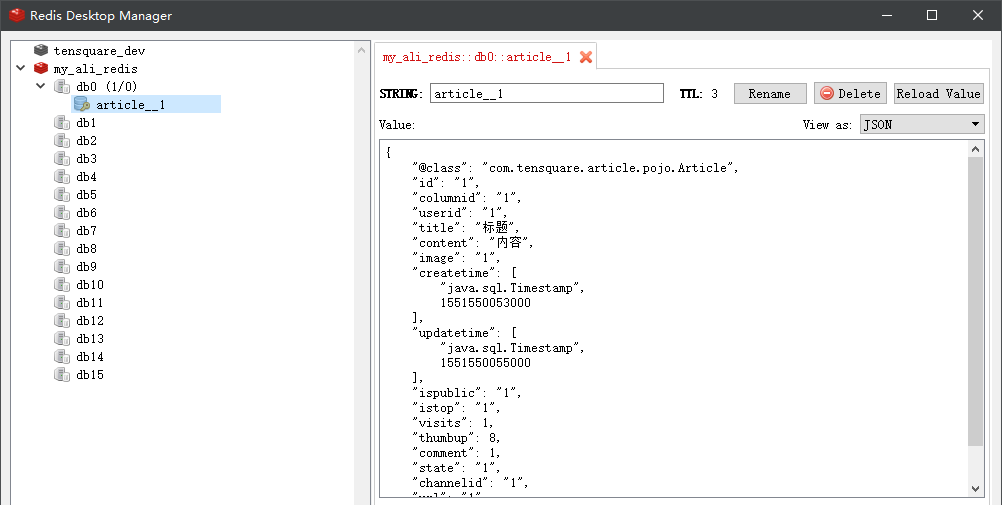
SpringBoot整合Redis在可视化工具乱码问题,以及常用的api
pom依赖:
 <parent>

    <groupId>org.springframework.boot</groupId>

    <artifactId>spring-boot-starter-parent</artifactId>

    <version>2.0.1.RELEASE</version>

    <relativePath/>

 </parent>

<dependencies>

      <dependency>

          <groupId>org.springframework.boot</groupId>

          <artifactId>spring-boot-starter-data-redis</artifactId>

      </dependency>

</dependencies>
yml配置:
 spring:

   redis:

     host: 127.0.0.1
配置类:
/**
 * @author GongXincheng
 * @since 2019-09-26 13:36
 */
@Configuration
public class RedisConfigBean {

    /**
     * redis 防止key value 前缀乱码.
     *
     * @param factory redis连接 factory
     * @return redisTemplate
     */
    @Bean(name = "redisTemplate")
    public RedisTemplate<String, Object> redisTemplate(RedisConnectionFactory factory) {
        RedisTemplate<String, Object> template = new RedisTemplate<>();
        template.setConnectionFactory(factory);
        template.setKeySerializer(new StringRedisSerializer());
        template.setValueSerializer(new GenericJackson2JsonRedisSerializer());
        template.setHashKeySerializer(new GenericJackson2JsonRedisSerializer());
        template.setHashValueSerializer(new GenericJackson2JsonRedisSerializer());
        template.afterPropertiesSet();
        return template;
    }

}
常用api:
stringRedisTemplate.opsForValue().set("test", "100",60*10,TimeUnit.SECONDS);//向redis里存入数据和设置缓存时间

stringRedisTemplate.opsForValue().get("test") //根据key获取缓存中的val

stringRedisTemplate.boundValueOps("test").increment(-1); //val做-1操作

stringRedisTemplate.boundValueOps("test").increment(1); //val +1

stringRedisTemplate.getExpire("test") //根据key获取过期时间

stringRedisTemplate.getExpire("test",TimeUnit.SECONDS) //根据key获取过期时间并换算成指定单位

stringRedisTemplate.delete("test"); //根据key删除缓存

stringRedisTemplate.hasKey("546545"); //检查key是否存在,返回boolean值

stringRedisTemplate.expire("red_123",1000 , TimeUnit.MILLISECONDS); //设置过期时间

stringRedisTemplate.opsForSet().add("red_123", "1","2","3");  //向指定key中存放set集合

stringRedisTemplate.opsForSet().isMember("red_123", "1")  //根据key查看集合中是否存在指定数据

stringRedisTemplate.opsForSet().members("red_123");  //根据key获取set集合
SpringBoot整合Redis在可视化工具乱码问题,以及常用的api的更多相关文章
- SpringBoot整合Redis并完成工具类
SpringBoot整合Redis的资料很多,但是我只需要整合完成后,可以操作Redis就可以了,所以不需要配合缓存相关的注解使用(如@Cacheable),而且我的系统框架用的日志是log4j,不是 ...
- springboot整合redis,并解决乱码问题。
热烈推荐:超多IT资源,尽在798资源网 springboot 版本为 1.5.9 //如果是2.x 修改 pom.xml 也可切换成 1.5.9 <parent> <groupId ...
- SpringBoot整合Redis及Redis工具类撰写
SpringBoot整合Redis的博客很多,但是很多都不是我想要的结果.因为我只需要整合完成后,可以操作Redis就可以了,并不需要配合缓存相关的注解使用(如@Cacheable). ...
- SpringBoot整合Redis、mybatis实战,封装RedisUtils工具类,redis缓存mybatis数据 附源码
创建SpringBoot项目 在线创建方式 网址:https://start.spring.io/ 然后创建Controller.Mapper.Service包 SpringBoot整合Redis 引 ...
- Redis-基本概念、java操作redis、springboot整合redis,分布式缓存,分布式session管理等
NoSQL的引言 Redis数据库相关指令 Redis持久化相关机制 SpringBoot操作Redis Redis分布式缓存实现 Resis中主从复制架构和哨兵机制 Redis集群搭建 Redis实 ...
- 九、springboot整合redis二之缓冲配置
1.创建Cache配置类 @Configuration @EnableCaching public class RedisCacheConfig extends CachingConfigurerSu ...
- SpringBoot整合Redis使用Restful风格实现CRUD功能
前言 本篇文章主要介绍的是SpringBoot整合Redis,使用Restful风格实现的CRUD功能. Redis 介绍 Redis 是完全开源免费的,遵守BSD协议,是一个高性能的key-valu ...
- 【SpringBoot | Redis】SpringBoot整合Redis
SpringBoot整合Redis 1. pom.xml中引入Redis相关包 请注意,这里我们排除了lettuce驱动,采用了jedis驱动 <!-- redis的依赖 --> < ...
- Springboot整合Redis入门完整篇,零基础入门教学教程
记录一次简易集成Redis缓存 自定义Redisconfig配置 自定义序列化操作 加深印像 整合前提工具环境准备: 1.redis官网 https://redis.io/download 下载安装r ...
随机推荐
- [Vjudge][POJ][Tony100K]搜索基础练习 - 全题解
目录 POJ 1426 POJ 1321 POJ 2718 POJ 3414 POJ 1416 POJ 2362 POJ 3126 POJ 3009 个人整了一些搜索的简单题目,大家可以clone来练 ...
- .Net Core 商城微服务项目系列(十):使用SkyWalking构建调用链监控(2019-02-13 13:25)
SkyWalking的安装和简单使用已经在前面一篇介绍过了,本篇我们将在商城中添加SkyWalking构建调用链监控. 顺带一下怎么把ES设置为Windows服务,cd到ES的bin文件夹,运行ela ...
- python process
原文:https://www.cnblogs.com/LY-C/p/9145729.html 使用process模块可以创建进程 from multiprocessing import Process ...
- ping本地局域网
#!/bin/bash for i in `seq 1 254` do ping -c 1 192.168.192.$i > /dev/null if [ $? -eq 0 ];then ech ...
- SpringBootSecurity学习(24)前后端分离版之OAuth2.0 应用登记
应用登记 一个应用要求 OAuth 授权,必须先到对方网站登记,让对方知道是谁在请求.举个例子,下面是github的登记页面: https://github.com/settings/applicat ...
- mvvm的初步思想
1.Object.defineProperty(obj,key,desc); 用法:1.给对象新增属性和特性 2.修改对象属性值和特性 desc(属性特性): 1.enumerable:boolean ...
- Asp.net内置对象用途说明
Asp.net 内置对象 1.Session当客户第一次请求网页,session创建.当客户最后一次请求页面,一段时间后,session销毁.默认30分钟. 一般存用户信息,即登陆成功后,在sessi ...
- CVE-2019-0708(非蓝屏poc)远程桌面代码执行漏洞复现
玩了几天 刚回成都 玩电脑复现一下~ 内核漏洞原理暂时 没看懂 别问 ,问就是不懂 0x01 复现环境和Exp准备 漏洞影响范围 Windows 7 Windows Server 2008 R2 W ...
- dnn文本分类
简介 文本分类任务根据给定一条文本的内容,判断该文本所属的类别,是自然语言处理领域的一项重要的基础任务.具体的,本任务是对文本quey进行分类,任务流程如下: 收集用户query数据. 清洗,标记. ...
- Cocos2d-x 学习笔记(3.3) Layer
1.简介 Layer直接继承了Node.Layer类似Ps里图层的概念,也可以理解成一块透明玻璃.Scene类似Ps里的一张图像,也可以理解成堆放玻璃的箱子. Layer能接收触摸事件.键盘事件.加速 ...